Pediatric & Child Health Professional Website Template
Cradle is a comparison table landing page built for a Level IV Neonatal Intensive Care Unit. It guides NICU parents and referring physicians through every stage of care using evidence-based comparison tables, a guided care assessment quiz, and a fixed transport call-to-action bar. The design balances clinical precision with moments of human warmth.
by Rocket studio
Quick summary
Cradle is a single-page template for a Level IV Neonatal Intensive Care Unit (NICU). It uses structured comparison tables and a step-by-step scroll journey to help NICU parents and referring physicians understand exactly what level of care their patient needs. A guided five-question assessment maps each visitor to a personalized care pathway.
Who this template is for
This template is built for two audiences working under pressure. One is a parent sitting in a hospital hallway at midnight, searching for reassurance. The other is a physician making a real-time transfer decision for a critically fragile newborn.
- NICU parents seeking clinical evidence to understand why their baby is receiving specific care
- Referring obstetricians (OBs), transport physicians, and community hospital staff evaluating transfer options
- Regional Level IV NICU centers that need to communicate complex capability differences clearly
What problem this template solves
Parents and physicians arrive at this page with completely different needs but the same urgency. A parent needs emotional clarity alongside clinical facts. A physician needs capability evidence fast. Most NICU pages fail both audiences by either over-explaining or under-informing.
- Parents cannot easily compare NICU care levels, leaving them anxious and uninformed during the most stressful moments of their lives
- Referring physicians need a fast, credible summary of transport readiness and surgical capability before committing to a transfer
- Standard healthcare pages rarely provide structured, side-by-side comparisons that make Level II, III, and IV differences immediately clear
What you get with this template
This template delivers a complete, scroll-driven landing page structured around five core sections. Each section builds on the previous one, layering clinical evidence until the case for Cradle is undeniable.
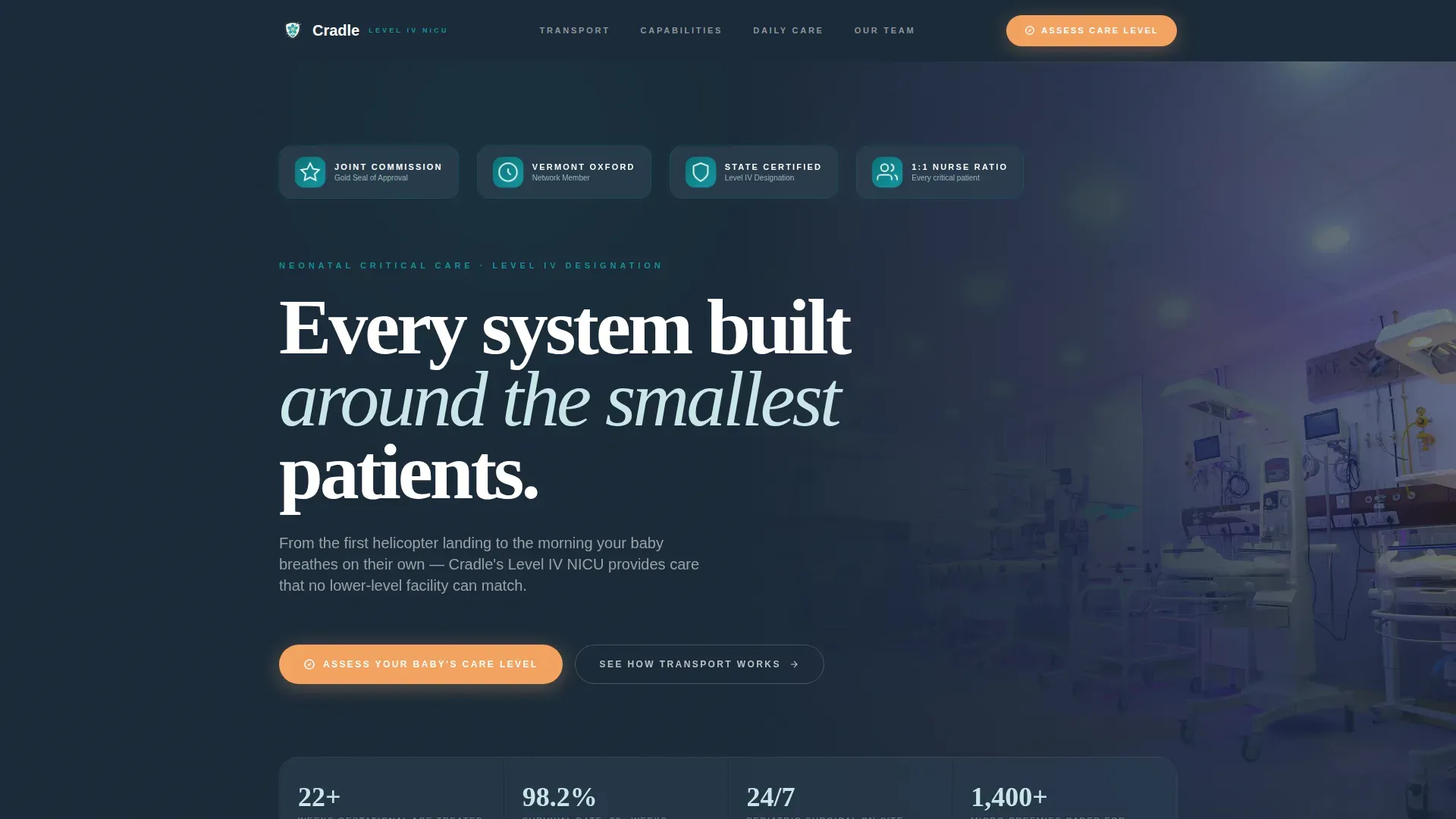
- A hero section with a pulsing award badge wall, floating stats, and a clear headline anchoring the NICU's authority
- Three comparison tables covering transport options, NICU level capabilities, and daily care protocol differences
- A five-question guided care assessment quiz with emailed pathway results and a family liaison callback trigger
Feature list
Award Badge Wall with Pulse Animation
The hero opens with a horizontal row of credentialing badges. These include the Joint Commission Gold Seal, Vermont Oxford Network (VON) membership, state-designated Level IV certification, and a 1:1 nurse-to-patient ratio badge. Each badge carries a subtle pulse micro-animation that mimics a steady heart monitor rhythm.
Multi-Level Comparison Tables
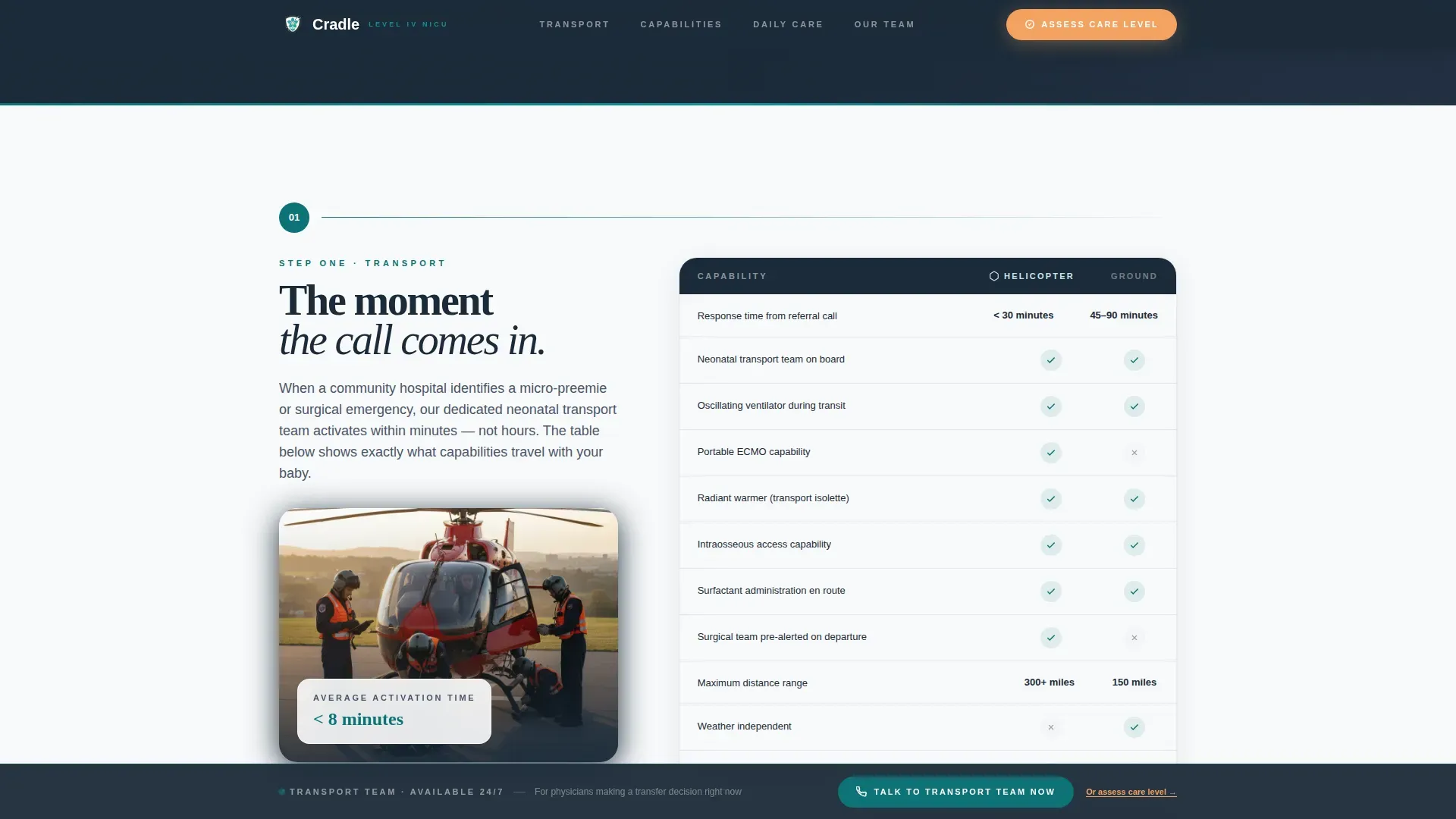
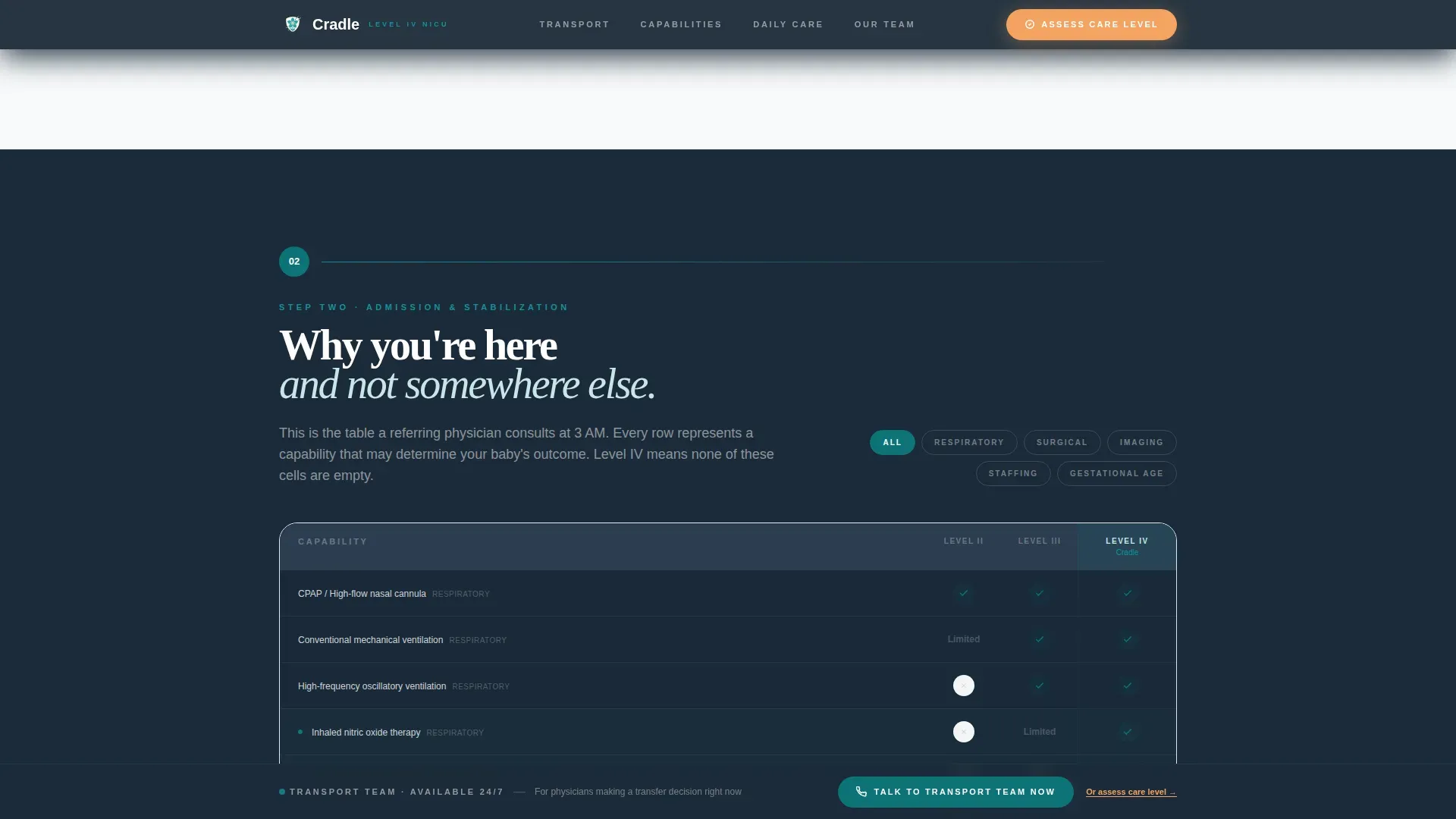
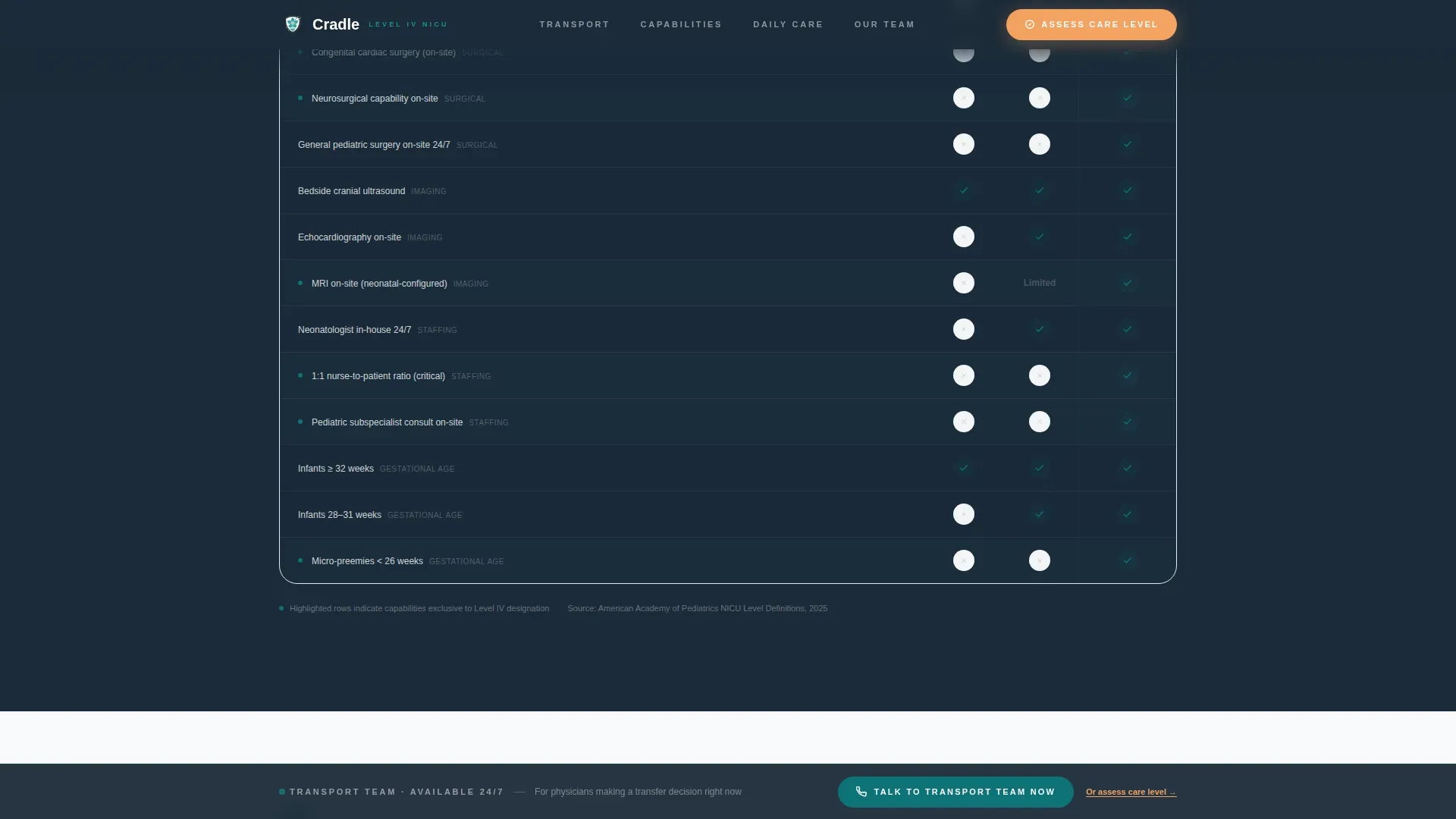
Three distinct comparison tables are embedded across the scroll journey. The first compares helicopter, ground ambulance, and no-transport scenarios. The second places Level II, III, and IV NICU capabilities side by side. The third toggles between a standard NICU and Cradle's daily care protocols row by row.
Guided Care Assessment Quiz
The primary call to action launches a five-question assessment. Parents or physicians enter gestational age, current complications, the referring hospital's NICU level, transport need, and a free-text field for their most urgent concern. Results are emailed immediately as a personalized care pathway summary.
Fixed Transport Call-to-Action Bar
A persistent bar is fixed at the bottom of the page. It displays a "Talk to Our Transport Team Now" button for emergency referrals. This ensures a physician transferring a 24-weeker can act immediately without scrolling back to the top.
Step-by-Step Scroll Journey
The page is structured as a guided parent walkthrough. Sections move sequentially from transport team activation through admission and stabilization to daily care protocols and family integration. GSAP ScrollTrigger animations reveal each section as the user scrolls, mimicking vitals trending upward.
Comparison Table Toggle Interaction
The daily care protocol section uses a client-side toggle. Visitors can switch each table row between "Standard NICU" and "Our NICU" to see capability differences directly. This interactive format delivers persuasive evidence without promotional language.
Page sections overview
| Section | Purpose |
|---|---|
| Hero Badge Wall | Establish clinical authority with credentialing badges and headline |
| Transport Step | Compare helicopter, ground, and no-transport referral capabilities |
| Level Comparison | Show Level II, III, and IV NICU differences side by side |
| Daily Care Toggle | Let visitors compare standard versus Cradle care protocols interactively |
| Care Assessment Quiz | Guide visitors to a personalized care pathway with emailed results |
| Footer Row | Provide single-row linear navigation and contact access |
Design & branding system
The visual identity follows a Corporate Precision theme. The palette moves from surgical-environment tones into moments of human warmth, using color as a signal rather than decoration.
- Clinical teal (#0D7377) anchors navigation and section dividers; deep charcoal (#1B2A38) grounds all comparison table headers and authority text; sterile white (#F7F9FA) fills backgrounds to evoke a controlled environment
- Soft apricot (#F4A261) appears only on calls to action and warmth moments, creating a clear emotional contrast against the clinical palette
- Typography pairs DM Sans for body and interface text with Fraunces for editorial headlines, balancing precision with human warmth
Mobile & speed optimization
This template is built for equal performance across devices. NICU parents access the page on mobile phones at 3 AM. Referring physicians open it on desktop workstations in hospital settings. The build accounts for both contexts.
- Static sections use Server Components for fast initial load; quiz and toggle interactions use Client Components to keep interactivity snappy
- The fixed transport call-to-action bar remains accessible at all viewport sizes, so a physician on any device can initiate a referral without extra navigation
- GSAP ScrollTrigger animations are scoped to reveal interactions, keeping visual motion meaningful without burdening the page layout
How this template helps you convert
The comparison table format does the persuading without a single sales claim. Evidence accumulates with each scroll, and every interactive element moves the visitor closer to one of two conversion actions.
- The guided care assessment quiz captures parent and physician intent, delivers personalized pathway results by email, and triggers a family liaison callback, creating a warm handoff from the page to the care team
- The fixed "Talk to Our Transport Team Now" bar ensures that a time-pressured physician can convert in seconds without losing their place in the page
Other information about this template
This template is designed for a regional Level IV NICU functioning as a referral center. It is built to serve both an emotionally overwhelmed parent researching care options and a physician making a transfer decision under time pressure.
- The Small Baby Unit focus for micro-preemies under 26 weeks gestation is reflected in the comparison table content and the assessment quiz's gestational age input field
- Page copy and table structures can be updated to reflect the specific outcomes, certifications, and care protocols of any Level IV NICU adopting this template
- The template is localized for English-language audiences using United States date formats and currency conventions
Theme
Corporate Precision
Creative direction
Step-by-Step Guide
Color system
Teal Catalyst
Style
Comparison Table
Direction
Quiz/Assessment
Page Sections
Award Badge Wall with Pulse Animation
Multi-level Comparison Tables
Guided Care Assessment Quiz
Fixed Transport Call-to-action Bar
Step-by-step Scroll Journey
Interactive Daily Care Toggle
Related questions
Who is this landing page template designed for?
What does the five-question care assessment quiz do?
Can the comparison tables be customized for a specific NICU?
How does the fixed transport bar work?
Is this template suitable for a community hospital NICU?



