Neonatology Medicine Education Website Template
Cradle is a hub-and-spoke landing page for a neonatology patient education platform. It translates clinical NICU language into calm, plain-English knowledge for overwhelmed parents. A self-drawing line art hero, five anchor-nav spoke modules, and a personalized five-question quiz work together to meet each parent exactly where they are.
by Rocket studio
Quick summary
Cradle is a single-page neonatology education platform built for NICU parents who need answers at 3 a.m. on a phone screen. Five anchor-nav spoke modules cover Breathing, Feeding, Monitors, Milestones, and Going Home. A guided quiz assessment personalizes the experience. The Soft Mist color system and warm typography keep every section calm and readable.
Who this template is for
This template is built for digital health teams and patient education publishers working in neonatology. It suits anyone creating a compassionate, parent-facing resource for families navigating the neonatal intensive care unit, also called the NICU.
- First-time mothers and fathers of premature or medically fragile newborns
- Extended family members such as grandparents who need plain-English context
- Neonatology practices, children's hospitals, or health education startups serving NICU families
What problem this template solves
NICU parents face a flood of medical terminology at the most frightening moment of their lives. Clinical words like bradycardia, apnea, and gestational corrected age create distance instead of understanding. Most hospital handouts are written for providers, not for a parent sitting in a corridor at midnight.
- Parents cannot easily find answers organized around their own questions and worries
- Medical content online is either too clinical or too shallow to build real confidence
- No single resource guides a parent progressively from admission through discharge planning
What you get with this template
You get a fully structured hub-and-spoke landing page designed around the NICU parent journey. Every section is purposeful. Every word earns its place by reducing anxiety, not adding to it.
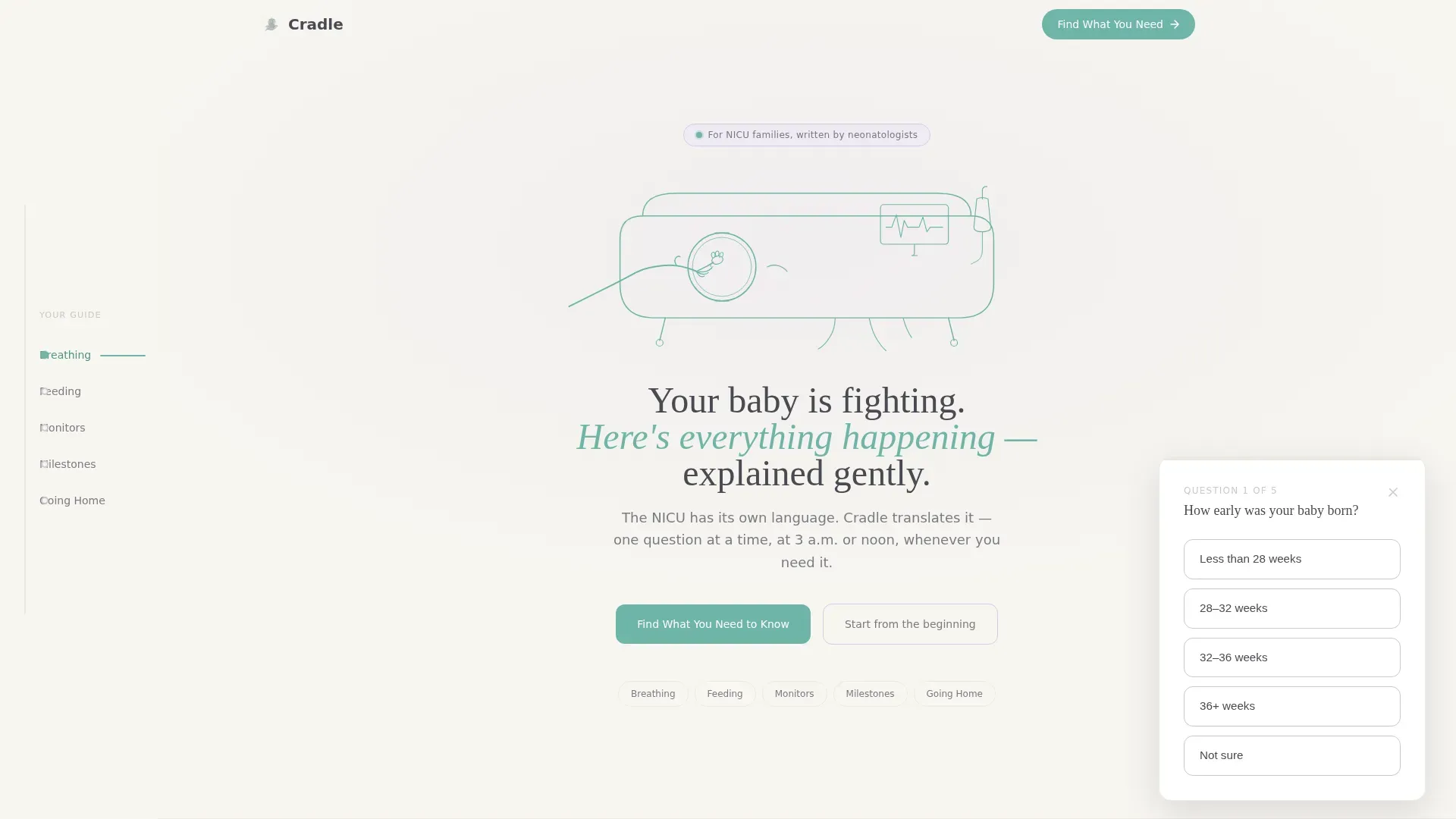
- A self-drawing SVG line art hero with an animated teal incubator illustration and a fade-in headline
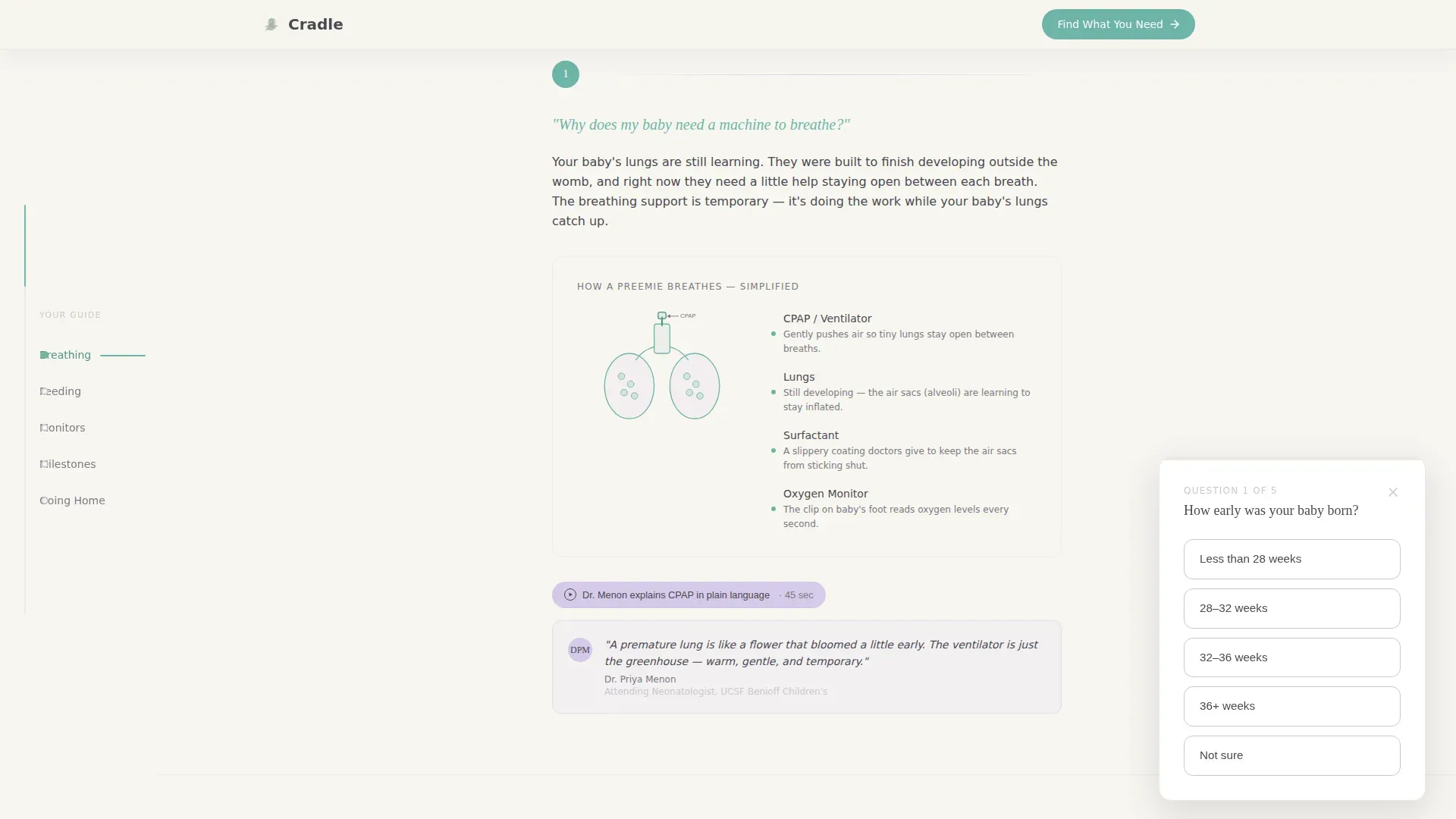
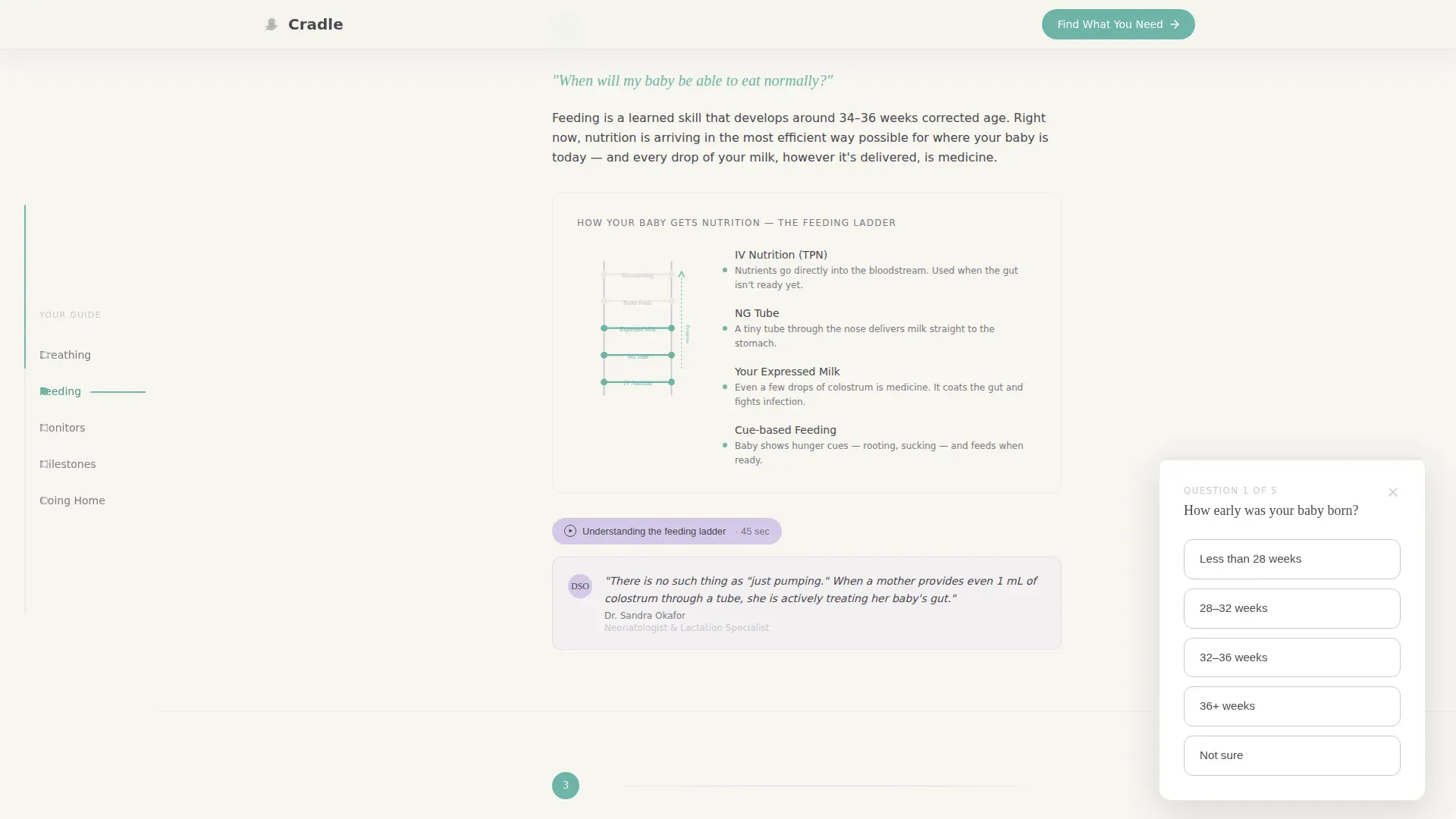
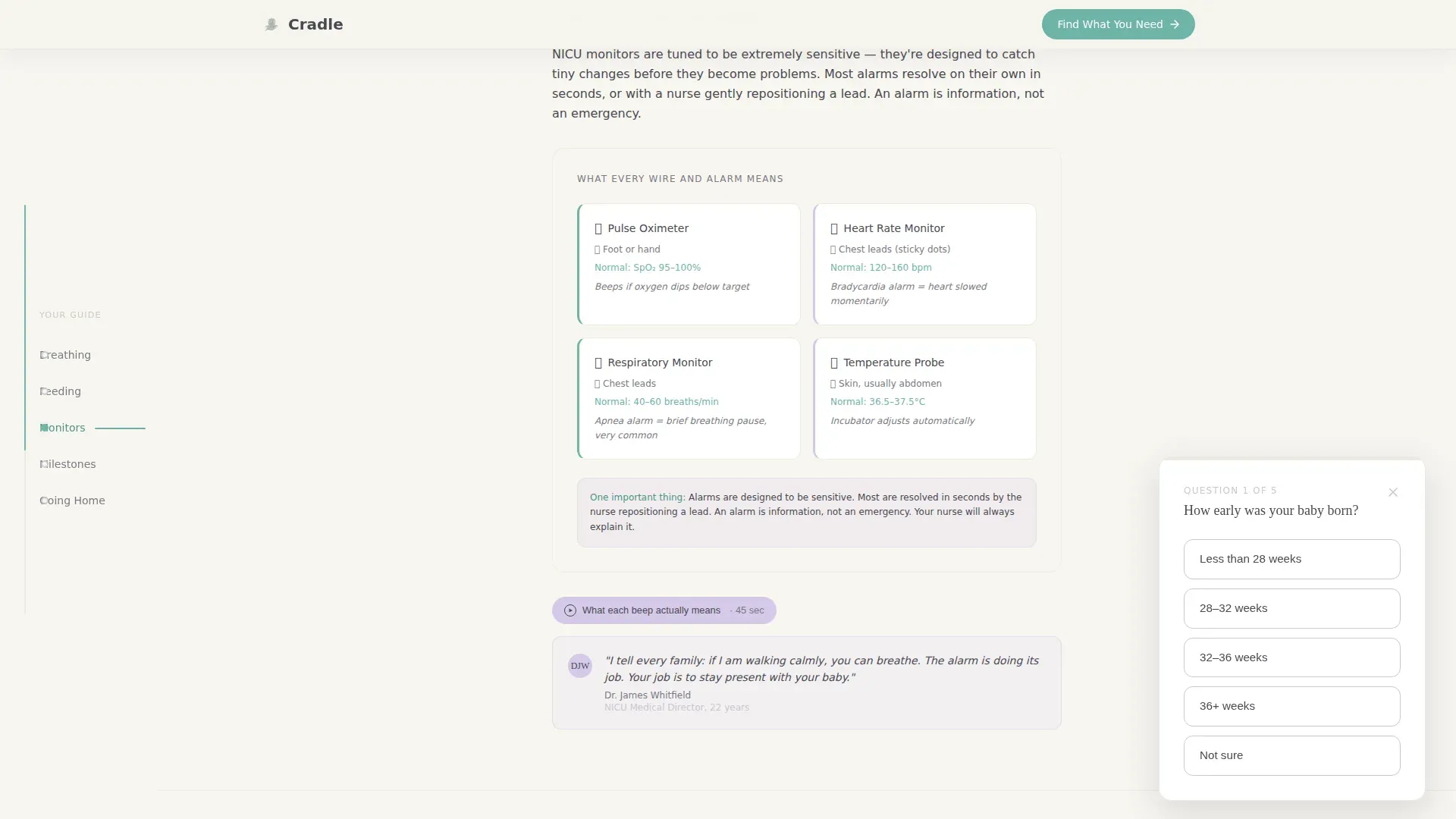
- Five self-contained spoke modules with anchor navigation, italicized parent questions, labeled diagrams, and short neonatologist audio clips
- A floating five-question quiz assessment that collects gestational age, NICU day, biggest worry, preferred learning format, and an optional email for a personalized weekly guide
Feature list
This template is built around meaningful interactivity and a carefully designed visual language. Each feature below serves the emotional and informational needs of NICU families.
Self-Drawing SVG Hero Illustration
A continuous single-weight teal stroke draws an incubator and a parent's hand reaching through the porthole over four seconds. The animation uses CSS-preferred stroke animation so it feels like a calm hand sketching the image in real time. No photography or stock imagery is used, keeping the visual personal and universal.
Fixed Anchor Navigation with Progress Bar
A vertical left-side anchor nav lists all five spoke labels: Breathing, Feeding, Monitors, Milestones, and Going Home. A soft teal progress bar fills along the nav as the parent scrolls, showing how much content has been covered and how much remains. Lavender highlights the active spoke so orientation is always clear.
Five Spoke Content Modules
Each spoke module opens with a single italicized parent question, answers it in two plain sentences, then expands into a labeled diagram and a short neonatologist audio clip. The layout feels like a notebook someone made just for you. Scroll reveal animations bring each section into view gently without rushing the reader.
Floating Quiz Assessment Card
A five-question guided assessment appears as a floating card after the second spoke is visited and again as the final page section. Questions appear one at a time with large tap targets and zero medical jargon. The quiz collects context and offers a personalized weekly guide delivered by email.
Credibility and Trust Signals Section
A dedicated credibility section weaves in neonatologist quotes, NICU statistics, and parent testimonials. Trust signals are embedded inside spoke modules as well, so authority builds progressively rather than appearing only at one point on the page.
Page sections overview
| Section | Purpose |
|---|---|
| Hero with animation | Introduces the platform and sets emotional tone with a self-drawing incubator illustration and fade-in headline |
| Breathing spoke | Explains respiratory support, alarms, and ventilator terms in plain parent language |
| Feeding spoke | Covers tube feeding, breast milk, and weight gain milestones accessibly |
| Monitors spoke | Demystifies monitor numbers, beeps, and what each alert actually means |
| Milestones spoke | Outlines the developmental steps from admission to readiness for discharge |
| Going Home spoke | Prepares parents for the discharge process and what comes next |
| Credibility section | Builds trust through neonatologist quotes, statistics, and parent testimonials |
| Quiz assessment | Delivers a personalized "Find What You Need to Know" guided five-question flow |
| Footer | Single-row linear footer with essential links |
Design & branding system
The Soft Mist color system is built to feel like morning light through a hospital curtain. Every color choice reduces visual stress and creates a sense of calm forward motion.
- Core palette: warm cloud white (#F7F5F0) background, monitor-line teal (#6EB5A8) for interactive elements and progress, whispered lavender (#D5CAE8) for navigation and anchor spokes, and gentle graphite (#4A4A52) for body text
- Typography pairing: Fraunces serif display for headlines and DM Sans for all body text, creating a notebook-and-sketchbook warmth that feels human rather than clinical
- Generous white space between every paragraph keeps the layout breathable and ensures nothing feels urgent or crowded
Mobile & speed optimization
This template is built mobile-first because NICU parents are most often reading on a phone in a hospital corridor or parking lot. Every interaction is designed for a small screen held in a tired hand.
- Large tap targets on all quiz questions ensure easy interaction without precision tapping
- CSS-preferred animations keep transitions smooth and lightweight on mobile connections
- The fixed anchor nav and progress bar adapt to the mobile viewport so parents always know where they are in the content
How this template helps you convert
The page earns trust section by section before it ever asks for anything. Conversion is not rushed; it is invited after the parent has already experienced the platform's clarity and warmth.
- Every spoke module proves the platform speaks plain parent language before the quiz card appears, so the call to action feels like a natural next step rather than a sales pitch
- The floating quiz card surfaces at the right scroll moment and again at the end, giving parents two low-pressure opportunities to personalize their experience and share an optional email
Other information about this template
This template is suited to the Health and Medical category with a specific focus on neonatology patient education. It uses a Step-by-Step Guide creative direction that mirrors how parents actually process information during a NICU stay: one question at a time, one day at a time.
- Template style is Hub and Spoke with anchor navigation, making it easy to jump to the most urgent topic without reading from top to bottom
- The page is structured for a US healthcare context and English-language audiences, with content framing suited to the emotional needs of families in American neonatal units
- The Line Art header concept and Medical Clarity theme work together to signal professionalism without clinical coldness
Theme
Medical Clarity
Creative direction
Step-by-Step Guide
Color system
Soft Mist
Style
Hub & Spoke (Anchor Nav)
Direction
Quiz/Assessment
Page Sections
Self-drawing SVG Hero Illustration
Fixed Anchor Nav with Progress Bar
Five Spoke Content Modules
Floating Quiz Assessment Card
Credibility and Trust Signals
Related questions
What is the primary purpose of this template?
How does the quiz assessment work for visitors?
Is this template designed for mobile use?
Can the five spoke topics be customized?
Who is the intended audience for this template?



