Advanced Manufacturing Processes Careers & Recruitment Website Template
Kerf is a dashboard-style laser cutting equipment landing page built for fiber laser manufacturers targeting production managers, aerospace subcontractors, and job-shop owners. It presents real customer throughput data, rejection-rate graphs, and cost-per-part grids inside an operator-console aesthetic, guiding every visitor from first impression to a machine configurator or spec sheet download.
by Rocket studio
Quick summary
Kerf is a single-page, dashboard-driven landing page template built for laser cutting equipment manufacturers. It uses a Case Study Narrative structure to let real customer data do the selling. Three escalating case studies walk visitors through speed, precision, and total cost of ownership, each presented as a live-looking data card styled like a machine control interface.
Who this template is for
This template is built for B2B capital equipment sellers in the metal fabrication and industrial manufacturing space. If your buyers make decisions based on specs, return on investment, and cut performance data, this layout speaks their language directly.
- Production managers at metal fabrication shops running multiple shifts, where every laser cut second counts against lease costs
- Aerospace subcontractors who need verified tolerance data and quality assurance proof before committing to new laser cutting equipment
- Job-shop owners who evaluate every machine purchase by cost per part and throughput per hour
What problem this template solves
Generic product pages fail industrial buyers. A production manager evaluating a fiber laser machine does not need lifestyle imagery. They need numbers, verified performance data, and a clear path to a configurator or spec file download. This template is designed to fill that gap.
- Visitors leave standard pages without converting because the data they need to justify a purchase is buried or missing entirely
- Engineers and quality leads require downloadable proof, such as specification sheets or CAD compatibility guides, before any sales conversation
- The disconnect between visual marketing and technical credibility costs laser cutting equipment sellers qualified leads every day
What you get with this template
You get a complete, production-ready landing page file built around an industrial dashboard aesthetic. Every section is pre-structured to account for the buying journey of technical decision-makers, from first scroll to final call to action.
- A full-bleed hero with a data overlay, three data-card case study sections, a persistent call to action bar, and a full-width conversion block
- An interactive cost-per-part data grid where visitors can toggle between machine models and compare cut speed against power consumption
- Two conversion paths: a primary "Configure Your Laser" route and a secondary "Download Full Spec Sheet" path for engineers who need a file before any conversation
Feature list
This template includes six purpose-built features grounded in the needs of industrial equipment buyers.
Full-Bleed Hero with Data Overlay
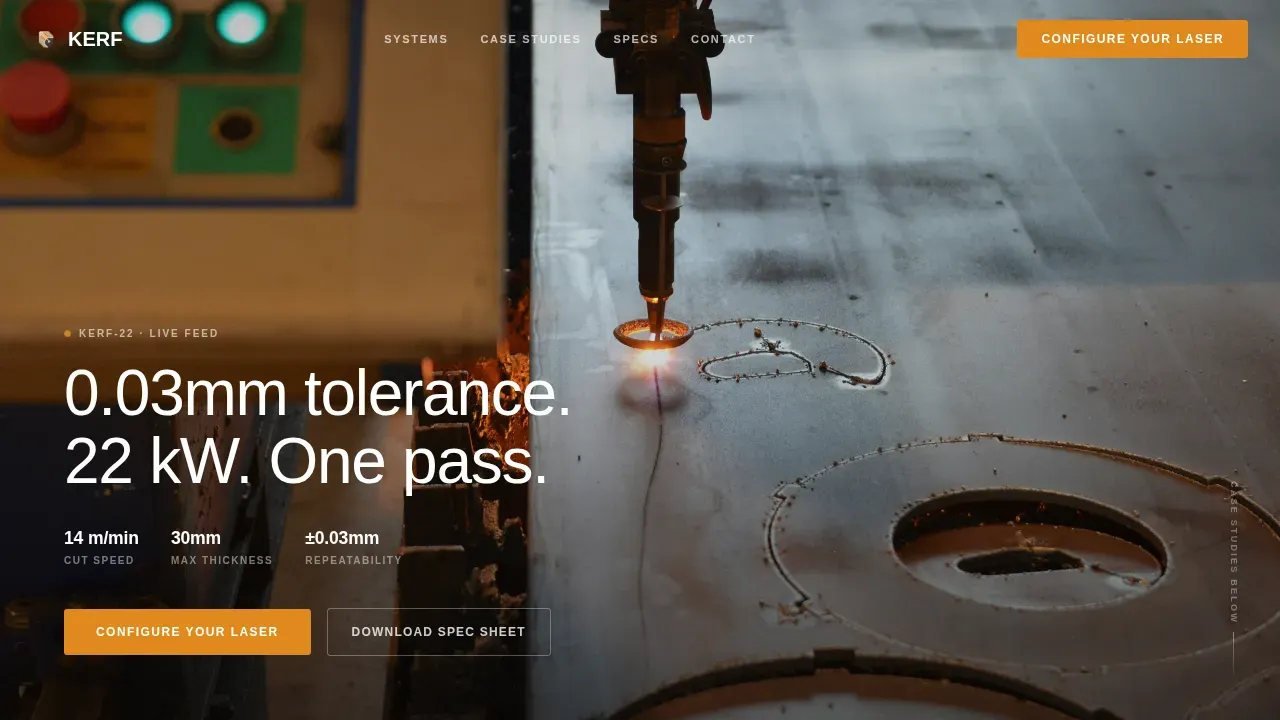
The header fills the viewport edge to edge with a long-exposure laser cut image. A data overlay fades in with key machine metrics in clean white text. No box, no gradient, just numbers. The image shows a focused laser beam mid-cut on brushed stainless, sparks frozen in a controlled fountain, shot at operator height with shallow depth of field.
Case Study Narrative Scroll
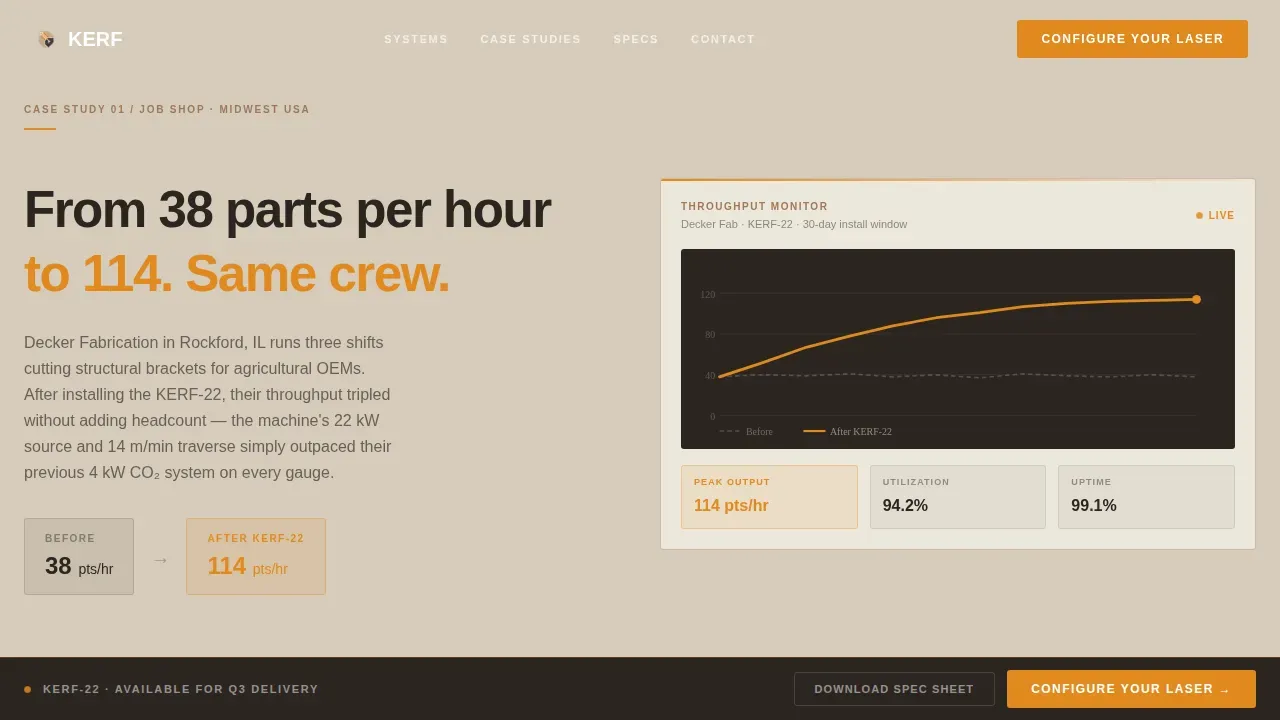
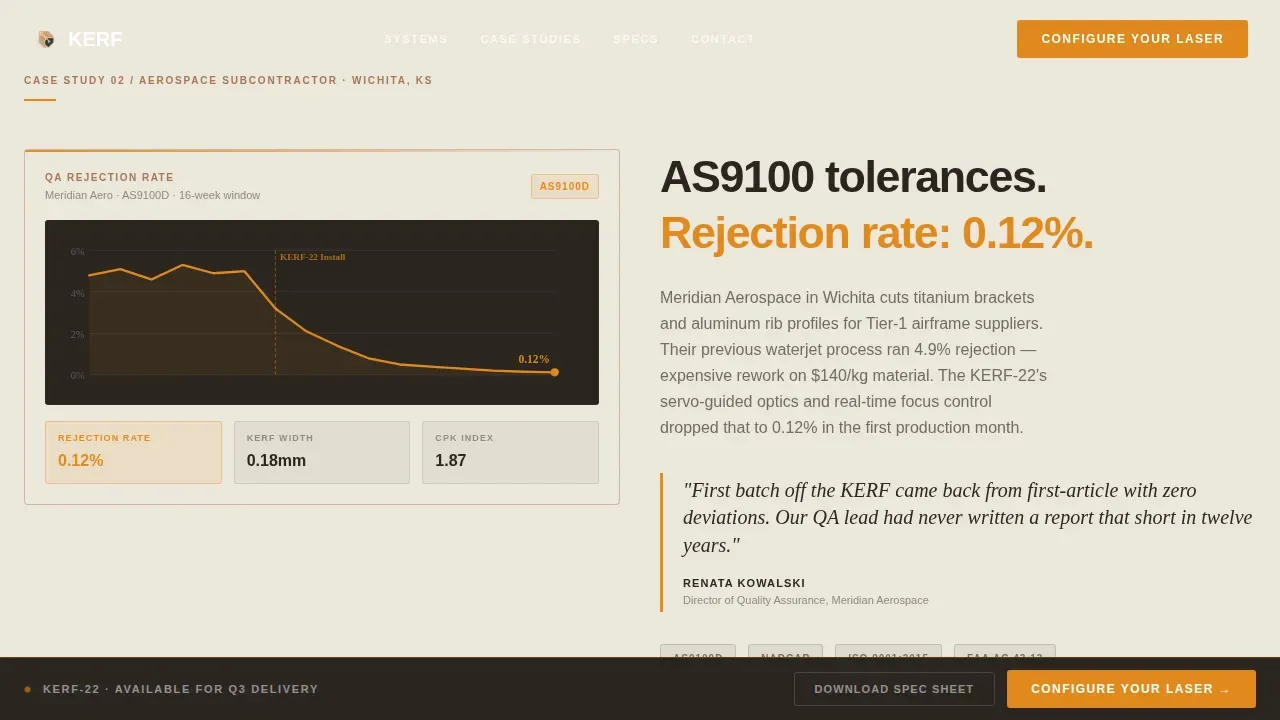
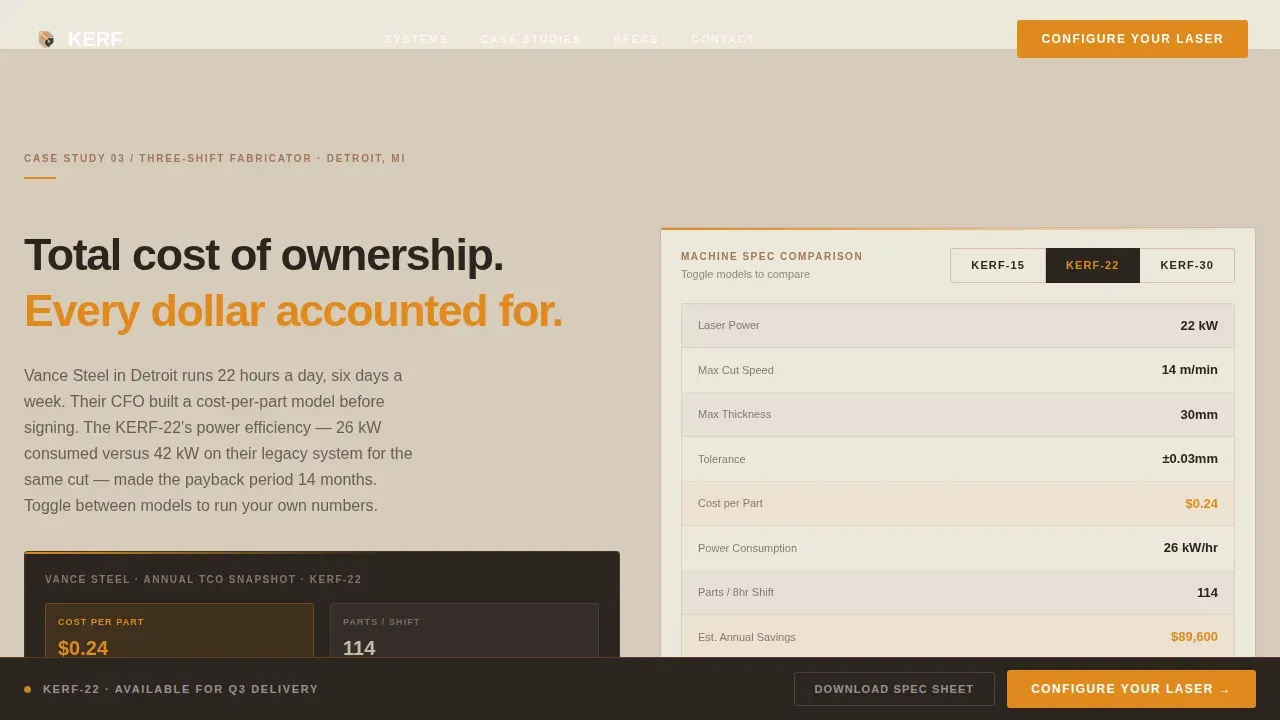
Each of the three page sections tells a customer story through the dashboard itself. Section one shows a job-shop throughput analytics card with parts-per-hour climbing from 38 to 114 after switching machines. Section two presents an aerospace contractor's rejection-rate graph dropping toward zero, paired with a quality assurance lead pull-quote. Section three displays a cost-per-part breakdown comparing power consumption against cut speed.
Interactive Machine Model Toggle Grid
The third case study section includes a data grid where visitors can toggle between laser cutter models. The grid compares material thickness performance, cut speed, and power draw in a format that mirrors the machine's own control interface, creating a hands-on feel before any purchase decision.
Persistent Call to Action Bar
After the hero scroll, a fixed bottom bar appears and stays visible throughout the page. It carries the primary "Configure Your Laser" call to action and a secondary "Download Full Spec Sheet" link. This keeps both conversion paths reachable at all times without interrupting the case study flow.
Warm Stone Dashboard Design System
The entire template uses a Warm Stone color palette. Quarry beige forms the primary background. Kiln-fired clay borders data cards and secondary panels. Deep foundry charcoal handles all text and graph lines. Molten amber is reserved exclusively for live data highlights, active toggles, and call to action buttons, creating a precision instrument feel that matches the industrial context.
Scroll-Triggered Animations
Count-up numbers, chart line draws, and scroll-fade reveals bring the data cards to life as visitors move down the page. These animations reinforce the operator-console concept, making the visitor feel like they are watching live machine data rather than reading a static page.
Page sections overview
| Section | Purpose |
|---|---|
| Full-Bleed Hero | Establish machine credibility with a laser beam image and data overlay |
| Persistent call to action Bar | Keep both conversion paths visible after hero scroll |
| Case Study One | Show job-shop throughput gains via animated analytics card |
| Case Study Two | Present aerospace rejection-rate drop with QA pull-quote |
| Case Study Three | Compare cost-per-part across machine models with toggle grid |
| Full-Width call to action Block | Drive final conversion to configurator or spec sheet download |
| Linear Footer | Single-row footer with navigation and secondary links |
Design & branding system
The visual identity follows a Dashboard Pro theme using a Warm Stone color system. Every color in the palette serves a load-bearing function, from background fill to interactive state. Typography pairs DM Sans for data and interface labels with Fraunces for pull-quotes, keeping the industrial tone precise and readable.
- Quarry beige (#D6CBBA) background, kiln-fired clay (#A0785A) card borders, deep foundry charcoal (#2B2520) for text and graph lines, and molten amber (#E08A1E) for all active and call to action elements
- DM Sans carries all data labels, settings readouts, and interface copy; Fraunces handles the pull-quote typography in the aerospace case study section
- Scroll-fade reveals, count-up number animations, and chart line draws create a high-interactivity experience that mirrors a real machine console
Mobile & speed optimization
The template is built desktop-first to match the operator-console concept, with a responsive mobile fallback that keeps the data cards readable and the conversion paths accessible on smaller screens. Static sections use server components while interactive elements, including the toggle grid and animations, are handled client-side.
- Desktop layout preserves the full dashboard grid with side-by-side data cards and a visible persistent bar
- Mobile fallback stacks cards vertically, maintains molten amber call to action buttons at thumb-reach positions, and keeps the spec sheet download link accessible at every breakpoint
How this template helps you convert
The page earns the click by letting the data do the selling. Every section is sequenced to move a skeptical industrial buyer from curiosity to confidence before they reach the final call to action.
- The hero data overlay establishes machine credibility in the first three seconds, using specific metrics that speak directly to production managers and aerospace buyers who focus on tolerance and cut performance
- The three case study sections escalate the proof: first speed, then quality, then total cost of ownership, so each visitor archetype finds their critical decision factor before the page ends
- The dual call to action structure captures both buyer types: decision-makers route to the configurator, while engineers download the full spec sheet file and complete their technical verification offline
Other information about this template
This template is designed with the full laser cutting buyer journey in mind. The facts and file standards referenced throughout reflect real industry practice for teams managing design files, material selection, and machine settings.
- Accepted vector file formats for laser cutting include.dxf,.dwg,.ai, and.step. DXF is the universal standard because virtually every CAD program and laser control software supports it. Common formats also include SVG, AI, EPS, and PDF.
- Laser cutting is a subtractive process that uses a focused laser beam to cut, engrave, or score materials. The kerf refers to the width of material removed when the beam vaporizes or melts away a small portion during the cut path.
- Kerf width varies depending on material being cut and the specific laser cutting equipment used. Higher laser power combined with greater material thickness tends to produce a wider kerf. To achieve a precise fit, you must offset your cut lines in the design file to account for the material removed.
- The best materials for laser cut boxes and structural parts include plywood, MDF, and acrylic. Baltic birch plywood is favored for its strength and attractive layered edges. MDF offers a smooth, paintable surface at a lower cost. Acrylic provides a modern look and is well suited to display cases or decorative boxes.
- Thinner materials require less laser power to produce a clean cut. Different materials require different parameter settings, and always verify material composition before cutting to protect your machine's optics.
- Layer organization in design files separates cut lines from raster engrave areas and score lines, ensuring repeatable results across production runs. Removing duplicate lines in a design file prevents the laser from tracing the same path twice.
- Running a small test piece before committing to a full template cut prevents wasting material on designs that still need adjustment. Batch processing groups similar jobs with identical machine settings to reduce setup time.
- Design software options such as Adobe Illustrator let you create and adjust vector images with full path control. Adobe Illustrator is widely used to prepare design files for laser cutting because it handles DXF export and allows designers to offset cut lines precisely. Inkscape is a free and open-source design software alternative that also supports template editing.
- The template concept supports artistic designs engraved across wood, acrylic, MDF, and paper. Engraved shapes, boxes, slots, and interlocking joints are all common project outputs. Interlocking parts assembled with wood glue or adhesive benefit most from accurate kerf compensation built into the design file.
- CuttingPaths is an online community-driven marketplace for free and premium laser cut files, including vector artwork and CNC files. Free laser cutting files help teams explore new techniques and save design time. Quality template libraries specify the intended material thickness and often include parametric versions you can adjust to your exact requirements. You can download a file directly from a design page using the Download button or the Files tab.
- This template can support educational template libraries, which position a laser cutting service as a resource for schools and training facilities. Prototypes cut from MDF or acrylic are a common use case for teams validating a new design created before moving to production materials.
Theme
Dashboard Pro
Creative direction
Case Study Narrative
Color system
Warm Stone
Style
Dashboard/Data Grid
Direction
Click-Through
Page Sections
Full-bleed Hero with Live Data Overlay
Three-section Case Study Narrative
Interactive Machine Model Toggle Grid
Persistent Dual-cta Bar
Scroll-triggered Dashboard Animations
Warm Stone Industrial Design System
Related questions
What file formats does this template work with?
How does the template handle kerf compensation in the content?
Which materials does the template reference or showcase?
Can I edit the data cards and toggle grid to match my own machine specs?
Who is the primary audience this template is designed for?



