Locksmith Marketing Specialist Professional Website Template
Deadbolt is a single-page landing page template built for locksmith referral programs. It uses a bold comparison table, expert endorsement panels, and a click-through layout to help property managers, realtors, and fleet operators find verified, bonded locksmiths fast. The design feels authoritative and trustworthy, built to convert skeptical visitors into confident clicks.
by Rocket studio
Quick summary
Deadbolt is a comparison table landing page designed for locksmith referral networks. It introduces vetted, bonded locksmiths through expert endorsements, then builds a side-by-side case for why a verified referral beats a random search result. The page drives visitors to a locksmith directory using two well-placed click-through calls to action.
Who this template is for
This template is built for locksmith referral programs and service networks that need to earn trust quickly. It works best when your audience is already under pressure and needs a reliable, fast solution.
- Property managers, realtors, and auto dealerships seeking dependable locksmith referrals
- Locksmith network operators who need to demonstrate vetting, bonding, and response time standards
- Marketing teams running lead-generation pages for professional locksmith services
What problem this template solves
When someone searches for a locksmith in a hurry, the first result on their phone rarely comes with proof of insurance, a background check, or a price guarantee. This template solves the trust gap between a desperate search and a confident hire.
- Visitors arrive uncertain whether any locksmith they call is licensed, insured, or reliable
- There is no clear comparison showing what a vetted referral network offers versus an unknown provider
- The page lacks a structured argument that moves skeptical visitors from doubt to a decisive click
What you get with this template
This template delivers a complete single-page layout built around visual proof and expert authority. Every section is designed to earn the click rather than demand it.
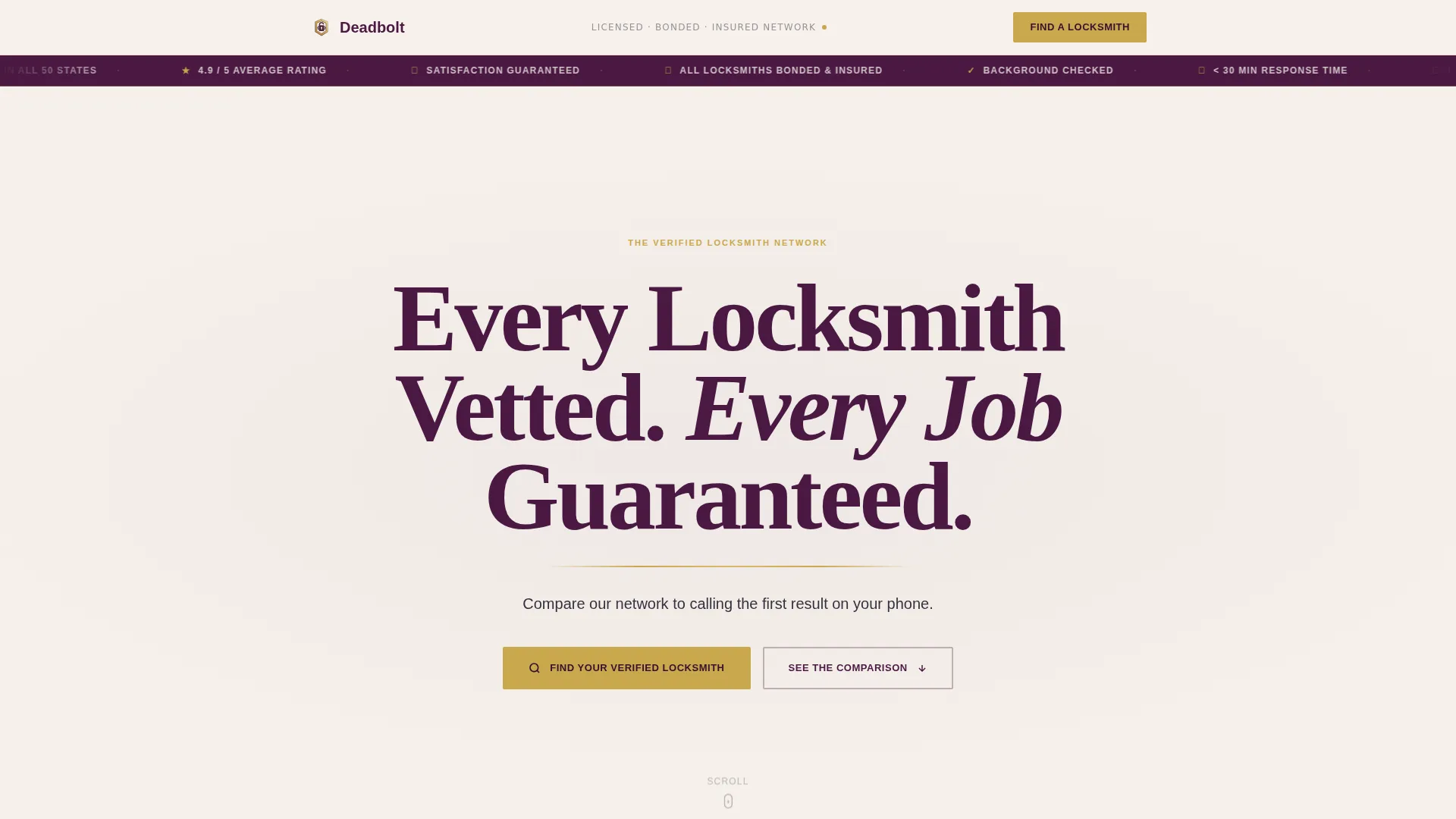
- A viewport-dominating headline section with gold rule and subline copy
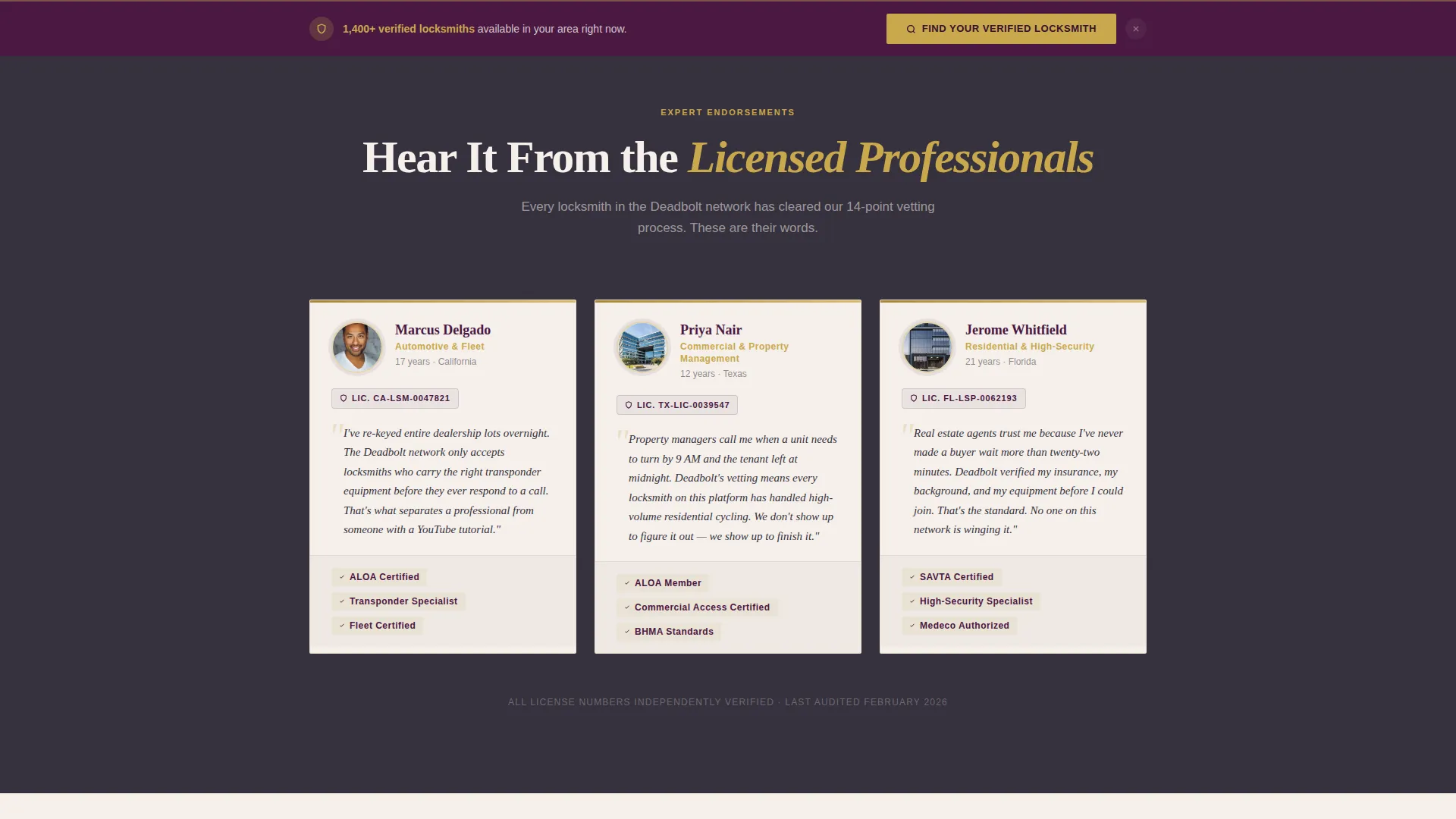
- Three named expert endorsement panels with headshots, license numbers, and specialty callouts
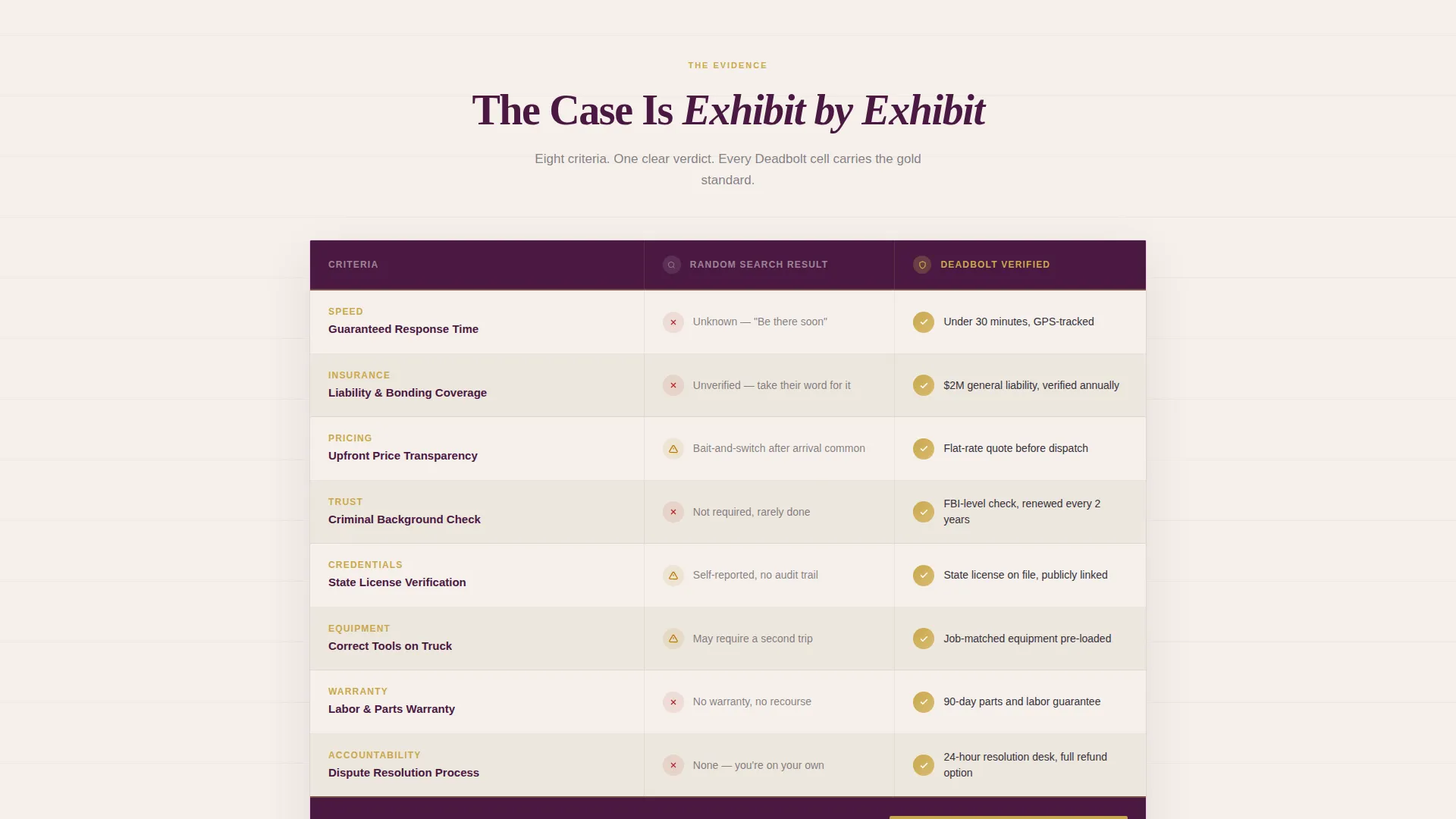
- A structured comparison table contrasting random search results against verified network standards
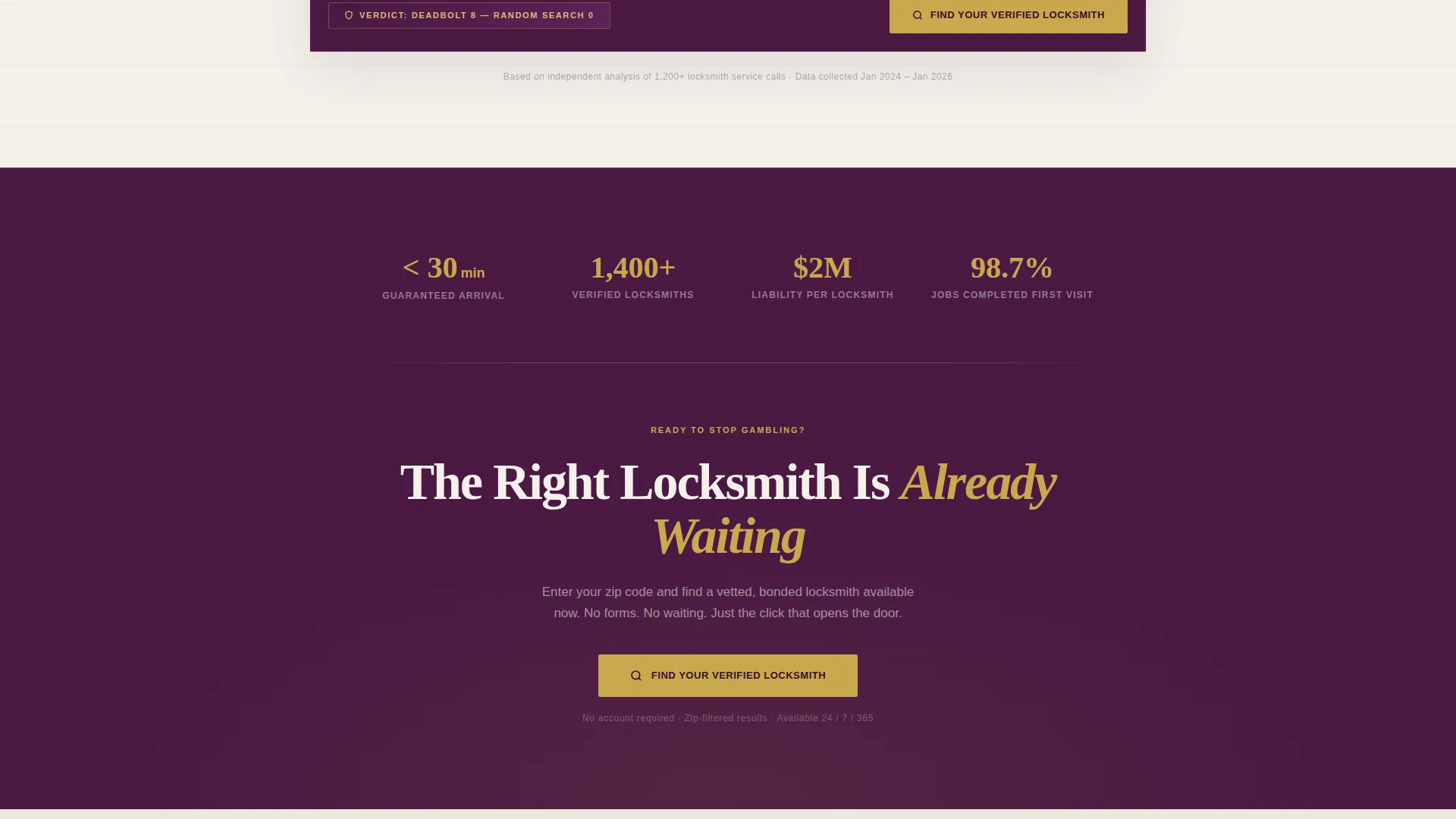
- Two calls to action: one beneath the comparison table and one as a sticky bottom bar
- A click-through flow that lands visitors on a zip-code-filtered locksmith directory
Feature list
This landing page template delivers purpose-built components tied directly to the locksmith referral use case.
Giant Headline Section
The header opens with a centered, viewport-scale serif headline set on a stark parchment cream background. A single gold rule runs beneath it. A charcoal subline reads "Compare our network to calling the first result on your phone." The typography alone functions as a credential.
Expert Endorsement Panels
Three licensed locksmiths appear as named experts, each with a headshot, license number, and stated specialty covering automotive, commercial, and residential services. Each expert endorses the referral program's vetting process in their own words, building authority before the comparison table appears.
Side-by-Side Comparison Table
The comparison table runs two columns: "Random Search Result" versus "Deadbolt Verified." Rows cover response time, insurance coverage, price transparency, background check status, and warranty terms. Every Deadbolt column cell carries a gold checkmark, building a cumulative legal-case rhythm down the page.
Dual Click-Through Calls to Action
The primary call to action, "Find Your Verified Locksmith," appears first directly beneath the comparison table. A second instance appears as a sticky bottom bar after the visitor scrolls past the expert endorsements. No form is used; both buttons push to the directory.
Sticky Bottom Bar
After scrolling past the expert panel section, a sticky bar anchors to the bottom of the viewport. It repeats the primary call to action, keeping the directory link always within reach without interrupting the comparison evidence above.
Plum Executive Color System
Deep plum anchors the headers and trust bars. Brushed charcoal fills body backgrounds. Parchment cream covers table cells and content panels. Notary gold marks badges, checkmarks, and call-to-action borders. The palette is designed to feel authoritative and bonded, like the embossed cover of a surety document.
Page sections overview
| Section | Purpose |
|---|---|
| Giant Headline Header | Opens with dominant serif type and gold rule to set authority immediately |
| Subline Copy Bar | Frames the comparison premise in a single charcoal line beneath the headline |
| Expert Panel Row | Three named locksmiths validate the network's vetting standards through personal endorsements |
| Comparison Table | Side-by-side rows prove the verified network outperforms a random search result |
| Primary call to action Block | Gold-on-plum button pushes visitors to the zip-code-filtered locksmith directory |
| Sticky Bottom Bar | Persistent call-to-action bar keeps the directory link visible after scrolling |
Design & branding system
The visual identity follows a Legal Shield theme built on the Plum Executive color system. Every color choice is deliberate, communicating authority, insurance, and professionalism before a word is read.
- Deep plum (#4A1942) on headers and trust bars; brushed charcoal (#36313D) on body backgrounds
- Parchment cream (#F5F0EB) for table cells and content panels; notary gold (#C9A84C) on badges, checkmarks, and call-to-action borders
- Heavy serif typography at viewport-dominating scale in the header; no competing imagery in the headline zone
Mobile & speed optimization
The layout is designed as a single-page flow with a lean component stack, keeping the experience fast and focused on smaller screens.
- Sticky bottom bar stays accessible on mobile without covering comparison table content
- Expert panels and comparison table are structured for vertical scroll readability on narrow viewports
How this template helps you convert
Every design and copy decision on this page is calibrated to move a pressured visitor from uncertainty to a confident click.
- The comparison table builds a cumulative argument row by row, so by the final checkmark the decision feels obvious rather than pushed.
- The expert endorsement panels establish human credibility before the call to action appears, reducing hesitation at the moment of click.
Other information about this template
This template is part of a broader set of professional services landing page designs. It fits naturally into locksmith marketing campaigns targeting high-intent, time-sensitive audiences.
- The page follows a click-through flow rather than a lead-capture form flow, keeping the visitor journey frictionless
- The comparison table structure can support any locksmith referral program positioning a vetted network against unverified competitors
- The creative direction follows the Expert Panel approach, meaning authority figures drive scroll depth rather than product features
- The Legal Shield theme and Plum Executive palette are cohesive enough to extend across related trust-heavy service pages
- This template is built for the locksmith referral program niche within the broader locksmith marketing and professional services category
Theme
Legal Shield
Creative direction
Expert Panel
Color system
Plum Executive
Style
Comparison Table
Direction
Click-Through
Page Sections
Viewport-scale Headline Header
Named Expert Endorsement Panels
Side-by-side Comparison Table
Dual Click-through Calls to Action
Plum Executive Color System
Related questions
Does this landing page include a contact form?
Can I update the expert panel content with my own locksmiths?
Who is this template built for?
Can I edit the comparison table rows?
Does the sticky bottom bar work on mobile?



