Military Service Member Insurance Pricing & Packages Website Template
The Shield Military Life Insurance Coverage Gap Landing Page Template is built for insurtech platforms serving active-duty service members, reservists, and veterans. It combines a data-driven stats wall, side-by-side coverage comparison tables, deployment risk tier breakdowns, and a seven-step interactive coverage gap assessment, all wrapped in a clinical Arctic White and gunmetal design system that communicates precision and trust.
by Rocket studio
Quick summary
This template gives military-focused insurance platforms a single-page conversion engine. It leads with three oversized metrics, walks visitors through a structured SGLI versus VGLI versus supplemental comparison, and ends with a personalized gap assessment. Life insurance is one of the cornerstones of financial security, and this template treats that fact with the seriousness military families deserve.
Who this template is for
This template is designed for digital insurance platforms and insurtech teams that serve the active-duty and veteran community. It fits B2C platforms and base-level financial advisors who need a clear, high-converting entry point for military life insurance products.
- Active-duty service members comparing SGLI maximums against real household obligations like mortgages and car payments
- Military spouses researching coverage options during a permanent change of station move, often on a phone late at night
- Retiring officers and senior enlisted personnel approaching the post-service coverage cliff, where group coverage evaporates within 180 days of separation
What problem this template solves
Most generic insurance landing pages ignore the specific pressures military families face. Servicemembers' Group Life Insurance, commonly called SGLI, has a maximum coverage amount of $500,000, and SGLI typically ends just 120 days after a service member separates from active duty. Many veterans assume they will easily replace their SGLI with a similar civilian life insurance policy, only to find that coverage is more expensive or harder to qualify for than expected. Veterans' Group Life Insurance, known as VGLI, can become significantly more costly over time as a person ages. Without proper coverage, families can face financial devastation. Standard templates do not address any of these realities.
- No side-by-side comparison of government-backed and private supplemental plans built for the military coverage area
- No deployment-aware premium tier data, which leaves service members unable to judge true cost against their actual risk profile
- No interactive assessment tool that converts a visitor's specific situation, rank, dependents, outstanding debts, into a concrete coverage gap number
What you get with this template
This template delivers a fully structured, section-led landing page tuned for military insurance platforms. Every section is built to educate, build trust, and drive a lead without a hard sell. Veterans can avoid life insurance coverage gaps by developing a strategy before retiring or separating, and this page supports that process from the first scroll to the final form submission.
- A hero stats wall with three oversized metrics, a side-by-side plan comparison table, a deployment risk tier table, testimonial profiles with rank and branch, and a seven-step coverage gap assessment
- A signal green call-to-action that pins to the bottom of the viewport on scroll, keeping the primary action visible throughout the entire page
- A personalized gap report delivered by email after assessment completion, converting the lead while providing genuine value before any sales contact
Feature list
This template is built from specific, prompt-grounded components. Each feature below reflects what the page structure actually delivers.
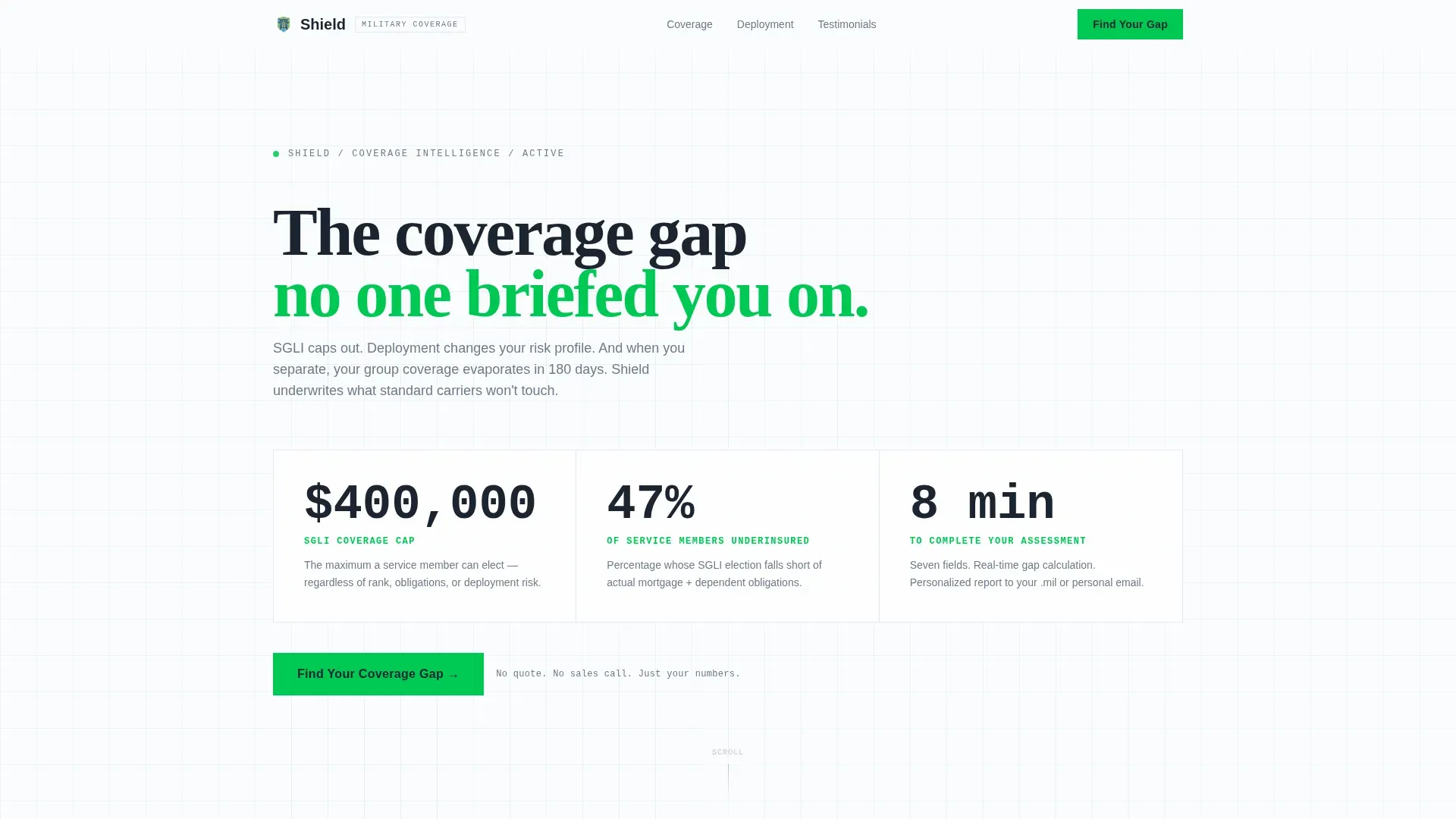
Stats Wall Hero with Three Key Metrics
The hero section displays three oversized figures in gunmetal type against arctic white: the SGLI coverage cap, the percentage of service members who are underinsured relative to their actual obligations, and the time required to complete the assessment. Each number carries a single-line explanation in ice blue. This opening section functions like a duty roster, all relevant data, no noise, no stock photography.
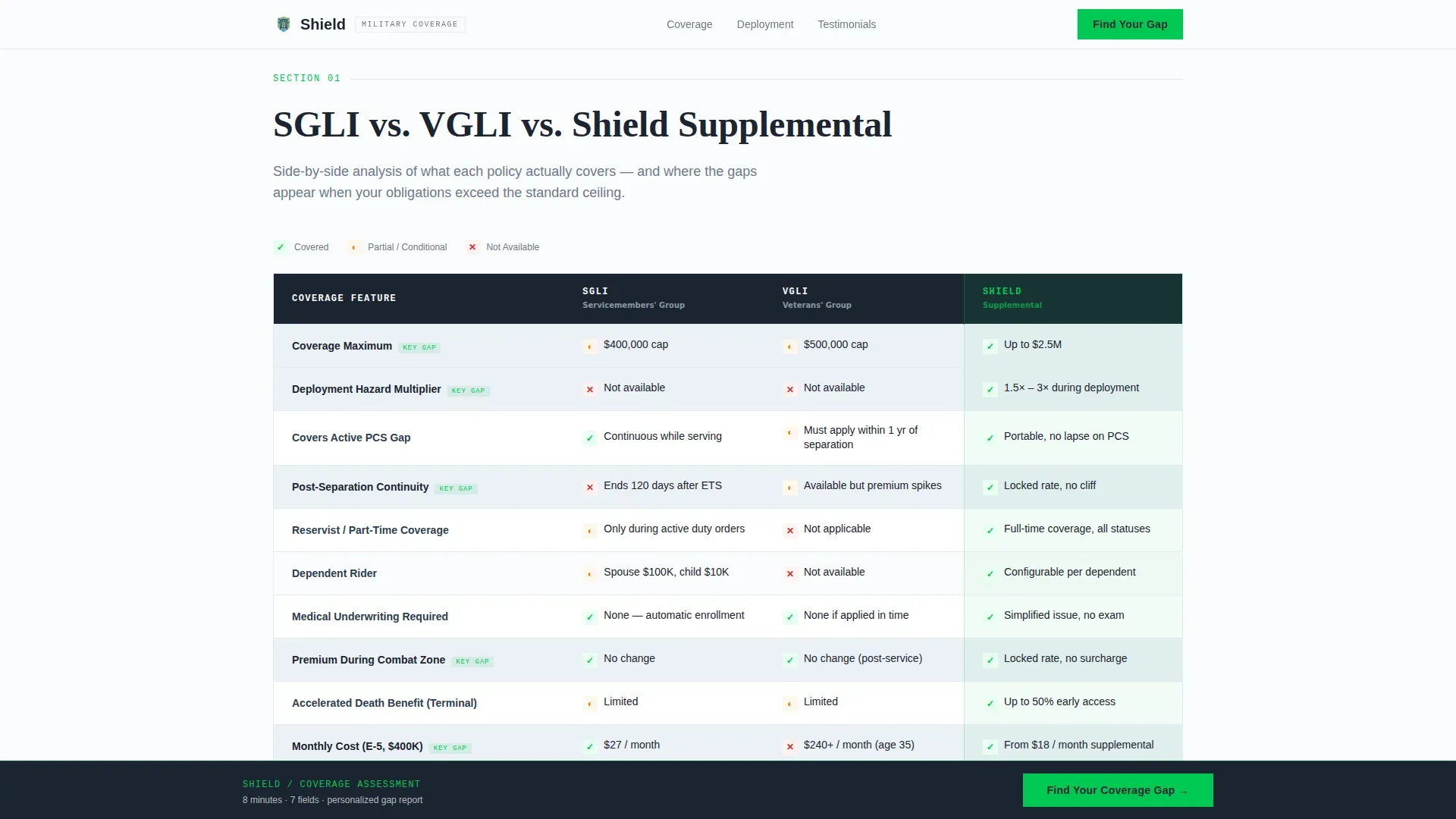
Side-by-Side Coverage Comparison Table
Section one of the page body presents a structured comparison of SGLI, VGLI, and private supplemental coverage in a clean table format. A visual comparison table highlights portability and higher coverage limits between SGLI and Shield supplemental benefits. Checkmarks and coverage limits are displayed side by side so eligible visitors can immediately see where their current plan falls short. The limitations of VGLI are clearly explained to illustrate why a new plan may be the better option for separating members.
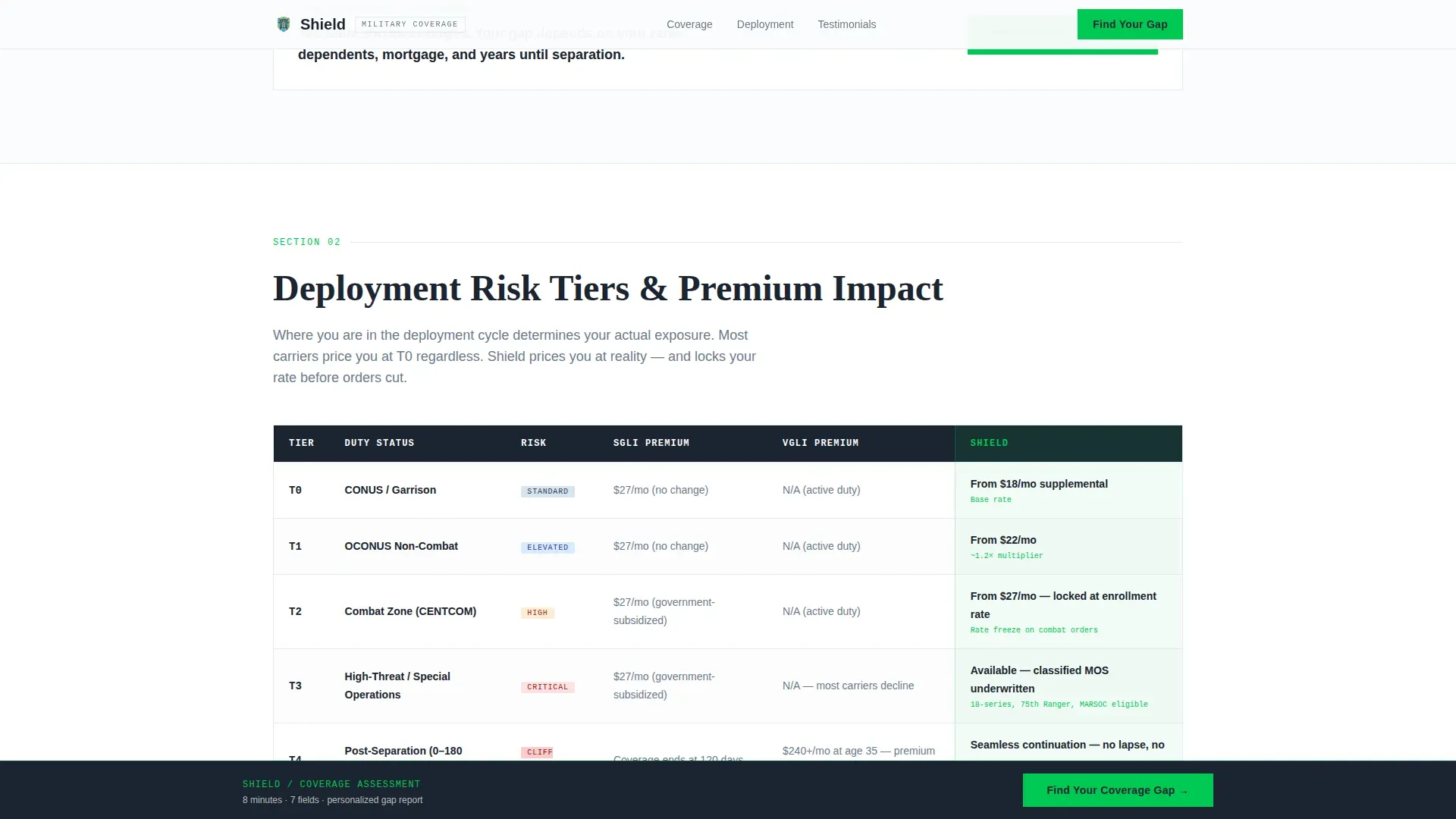
Deployment Risk Tier Table
Section two breaks down how deployment status affects premiums across carriers. Service members in foreign assignments or combat-designated zones face different risk classifications that generic carriers rarely account for. This table surfaces that data clearly, giving visitors the specific numbers they need to make an informed decision about their life insurance policy.
Seven-Step Coverage Gap Assessment
The primary conversion tool is a progressive seven-step assessment. Each step uses a dropdown or input field, rank and branch, years of service, number of dependents, current SGLI election amount, and outstanding debts including mortgage, auto, and education balances. As the visitor completes each step, a real-time coverage gap meter widens or narrows based on the data entered. There is no quote on the final screen. Instead, a personalized gap report is sent to the visitor's email, which converts the lead while delivering real value before any sales contact is made.
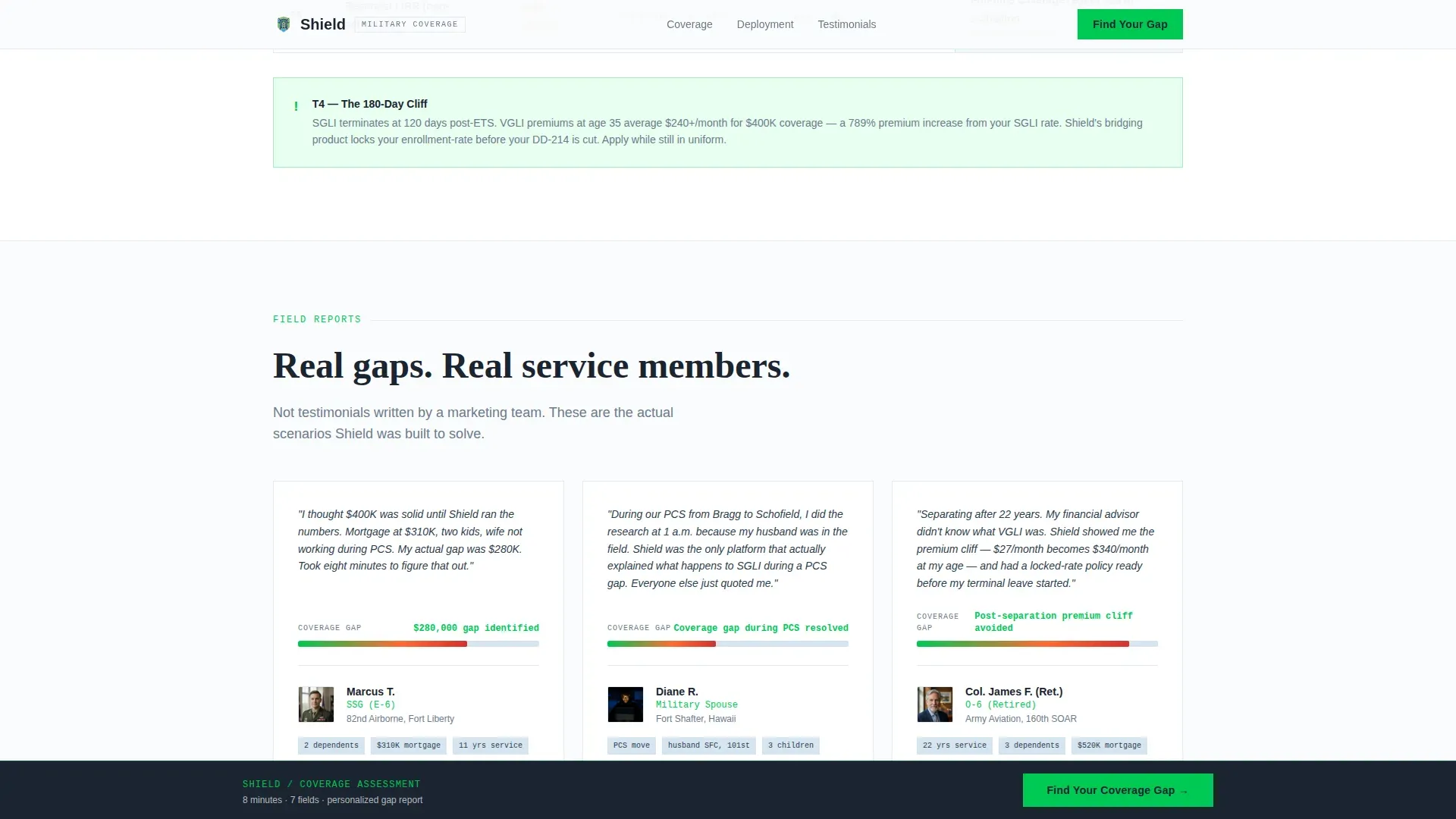
Testimonial Profiles with Rank and Branch
Three testimonial profiles give the page social proof grounded in military reality. Each profile is tied to a specific rank and branch, references concrete dollar amounts, and describes a recognizable coverage situation, an E-5 sergeant with a young family, a military spouse navigating a PCS move, and a retiring officer facing a post-service coverage cliff. Testimonials from fellow veterans and trust-oriented signals are effective in building the kind of trust that moves a military audience toward action.
Sticky Signal Green Call-to-Action
The primary call-to-action reads "Find Your Coverage Gap" and appears first after the comparison table. It then pins to the bottom of the viewport as the visitor scrolls. This keeps the conversion point accessible without interrupting the educational content flow. The signal green color stands out against the arctic white background and ice blue row accents, making the action easy to spot on any screen size.
Page sections overview
| Section | Purpose |
|---|---|
| Hero Stats Wall | Display three key metrics that immediately frame the coverage gap problem |
| SGLI versus. VGLI Table | Compare government-backed and supplemental plan options side by side |
| Deployment Risk Tiers | Show how deployment status and pay grade affect premiums across carriers |
| Testimonial Profiles | Build trust using rank-specific, dollar-grounded social proof |
| Gap Assessment Flow | Collect seven data points and return a personalized coverage gap report |
| Footer Row | Provide navigation, legal notice, and contact links in a single linear row |
Design & branding system
The visual identity follows a Startup Velocity theme. The palette reads like a freshly loaded fintech dashboard, sterile, trustworthy, and built for a reader who wants information fast, not emotion.
- Arctic White (#FAFBFC) for open backgrounds, Gunmetal Charcoal (#1B2430) for data-dense text and table headers, Ice Blue (#D6E4F0) for alternating table rows and section dividers, and Signal Green (#00C853) for calls-to-action and checkmarks
- Typography uses Fraunces for hero display figures, JetBrains Mono for all numerical data values, and DM Sans for body copy and interface elements
- Animation includes counter effects on the stats wall metrics, scroll-reveal transitions between sections, and a real-time gap meter animation inside the assessment flow
Mobile & speed optimization
The template is designed mobile-first. Military spouses and service members research coverage options at all hours, often on a phone during a PCS move or between duty appointments. The page is structured so that every key data point, table, and call-to-action is accessible on a small screen without excessive scrolling or pinching.
- Thumb-friendly button sizing and tap targets on the sticky call-to-action and each assessment step, so the process remains easy to complete on a phone screen
- Server-rendered static sections for the hero, comparison tables, and testimonial blocks keep the initial page load fast, while the interactive assessment component loads as a client component to protect performance
How this template helps you convert
The page is structured around a single conversion outcome: getting a qualified lead to complete the seven-step assessment and receive their personalized gap report. Every section contributes to that path.
- The hero stats wall creates immediate recognition, visitors who are underinsured see their own situation in the numbers before they read a single word of body copy, which builds urgency without manufactured pressure.
- The comparison tables and deployment risk tiers provide the educational depth that a military audience expects before trusting a new plan or provider, so by the time the visitor reaches the assessment call-to-action, they are already convinced a gap exists.
- The progressive assessment form collects just enough data to generate a meaningful report, rank, branch, years of service, dependents, SGLI election, and outstanding debts, and returns a personalized result by email, giving the platform a verified lead contact while giving the visitor something of genuine value.
Other information about this template
This section covers additional context that helps template buyers understand how this page fits into the broader military insurance landscape and what to keep in mind when deploying it.
- The shield military life insurance coverage gap landing page template is designed for platforms operating in the US market with a military-specific audience, using USD values and military terminology throughout including SGLI, VGLI, DD-214, PCS, and standard rank designations.
- Federal employees and reservists who are eligible for Federal Employees Health Benefits, commonly called FEHB, face a parallel set of coverage decisions. Three types of enrollment are available for federal employees: Self Only, Self Plus One, and Self and Family. A Self Only enrollment provides benefits only for the enrollee and does not cover any family members. A Self Plus One enrollment covers the enrollee and one eligible family member. A Self and Family enrollment covers the enrollee and all eligible family members automatically covered under that plan. If both spouses are eligible to enroll, one may enroll for Self and Family to cover the entire family.
- Health insurance enrollment timing is a related concern for military families transitioning out of service. You may enroll or change enrollment during Open Season or within a specific timeframe of experiencing a qualifying life event. A qualifying life event allows you to change your health insurance enrollment outside of Open Season. You can apply up to 60 days before your coverage ends, and up to 60 days after it ends. If you take the full 60 days to enroll after a qualifying life event, you will be without health coverage until the effective date of your new enrollment. You must have a qualifying life event to change from Self and Family to Self Only or to cancel your coverage outside of Open Season.
- If you lose coverage under FEHB or another group insurance plan, you may enroll or change your enrollment within 31 days before and 60 days after the date you lost coverage. Changes in enrollment become effective on the first day of the first pay period after the employing office receives the enrollment request. Enrollment codes identify the plan, option, and type of enrollment chosen by the federal employee.
- Open Season for federal health insurance occurs annually from the Monday of the second full workweek in November through the Monday of the second full workweek in December. Your employing office must receive your Open Season election by the last day of Open Season for it to be considered timely filed. If you do not want to make an Open Season change, you do not need to take any action to continue your current enrollment.
- Additional qualifying life events that allow enrollment changes include marriage, divorce, legal separation where a service member becomes legally separated from a spouse, the birth or adoption of a child, a change in employment status, and a transfer from one duty post to another either within or outside the United States. If you are separating from service and you or your spouse are pregnant, you may change your enrollment during your final pay period. If a plan is discontinued, you may change to a new plan during Open Season or a special enrollment period.
- Dual enrollment is generally prohibited unless authorized by your employing office when you or a family member would otherwise lose coverage. You may change your enrollment if you become eligible for Medicare, starting 30 days before your eligibility date. Medicaid eligibility is a separate consideration for low-income family members and does not automatically affect FEHB enrollment.
- Veterans should begin reviewing life insurance options at least 6 to 12 months before leaving the service. Working with someone experienced in veteran-specific scenarios can help secure tailored coverage that accounts for deployment history, hazard pay history, and post-service income changes.
- The assessment form inside this template is intentionally streamlined. A well-designed form limits fields to essential information: name, email, rank and status, and coverage goal. The seven-step flow in this template uses progressive disclosure so visitors are never confronted with the full form at once, which keeps completion rates higher on mobile devices.
- Documentation requirements for military life insurance applications often include a DD-214 discharge certificate, birth certificates for covered children, and documentation of outstanding debts. The page design accounts for these realities by framing the assessment around the same data points a service member would gather before any coverage-related appointment.
- A government agency administering military benefits such as the Department of Veterans Affairs operates within specific eligibility rules and coverage limits. This template is designed to help platforms explain where those government-set limits fall short and how supplemental coverage addresses those gaps. The employer-sponsored model used by the military government benefit system is not portable after separation, which is a core message the comparison tables communicate.
- The community of military families this template targets spans active-duty households, reservist households, and veteran households across all branches. Each group faces a distinct coverage timeline and different documentation needs, which is why the assessment collects branch and years of service as its first two data points.
Theme
Startup Velocity
Creative direction
Industry Report
Color system
Arctic White
Style
Comparison Table
Direction
Quiz/Assessment
Page Sections
Stats Wall Hero with Oversized Metrics
Side-by-side Plan Comparison Table
Deployment Risk Tier Breakdown
Seven-step Coverage Gap Assessment
Rank-specific Testimonial Profiles
Sticky Viewport Call-to-action
Related questions
What sections are included in this landing page template?
Can I customize the coverage comparison table with my own plan data?
How does the seven-step assessment work for the visitor?
Is this template suitable for platforms serving both active-duty and veteran audiences?
What does the visitor receive after completing the assessment?



