Defense — Expert Pest Management Landing Page Template
Shield is a single-page landing page template built for Sydney pest control businesses targeting strata managers, commercial facility coordinators, and real estate agencies. It uses a split-screen scroll layout, a testimonial mosaic proof system, and two conversion paths: a portfolio assessment form and a downloadable compliance checklist. The design is corporate, monochrome, and built entirely around evidence over emotion.
by Rocket studio
Quick summary
Shield is a precision-built landing page template for a Sydney commercial pest control company. It targets property management professionals who need documented, reliable results. The layout uses a 50/50 split screen, a scroll-driven testimonial mosaic, and two distinct lead capture paths. Every design choice reinforces credibility, not decoration.
Who this template is for
This template is designed for pest control businesses that serve commercial and property management clients. It fits operators who need to demonstrate compliance outcomes rather than simply advertise services.
- Strata managers overseeing large residential unit blocks across Sydney
- Commercial facility coordinators managing food safety audit obligations
- Real estate agencies protecting landlord portfolios from pest-related insurance clauses
What problem this template solves
Property management clients do not respond to generic pest control marketing. They need documented proof, clear service scope, and a fast path to a professional conversation. This template addresses the gap between a service provider's expertise and a client's need for verifiable evidence.
- Generic pest pages fail to speak to compliance-focused buyers
- Strata and facility managers need case-study-level proof before committing
- Most landing pages offer one conversion path, missing leads at different decision stages
What you get with this template
The template delivers a fully structured, single-page layout with clearly defined sections and two independent conversion paths. Every section is built around the buyer's need for confidence, not visual novelty.
- A 50/50 split-screen layout that separates service promises from client proof
- A scroll-driven testimonial mosaic with expandable case study tiles
- Two lead capture forms: a portfolio assessment request and a gated compliance checklist download
Feature list
This template includes purpose-built components that move a property management buyer from awareness to action. Each feature reflects a deliberate structural decision grounded in the brief.
Split-Screen Scroll Layout
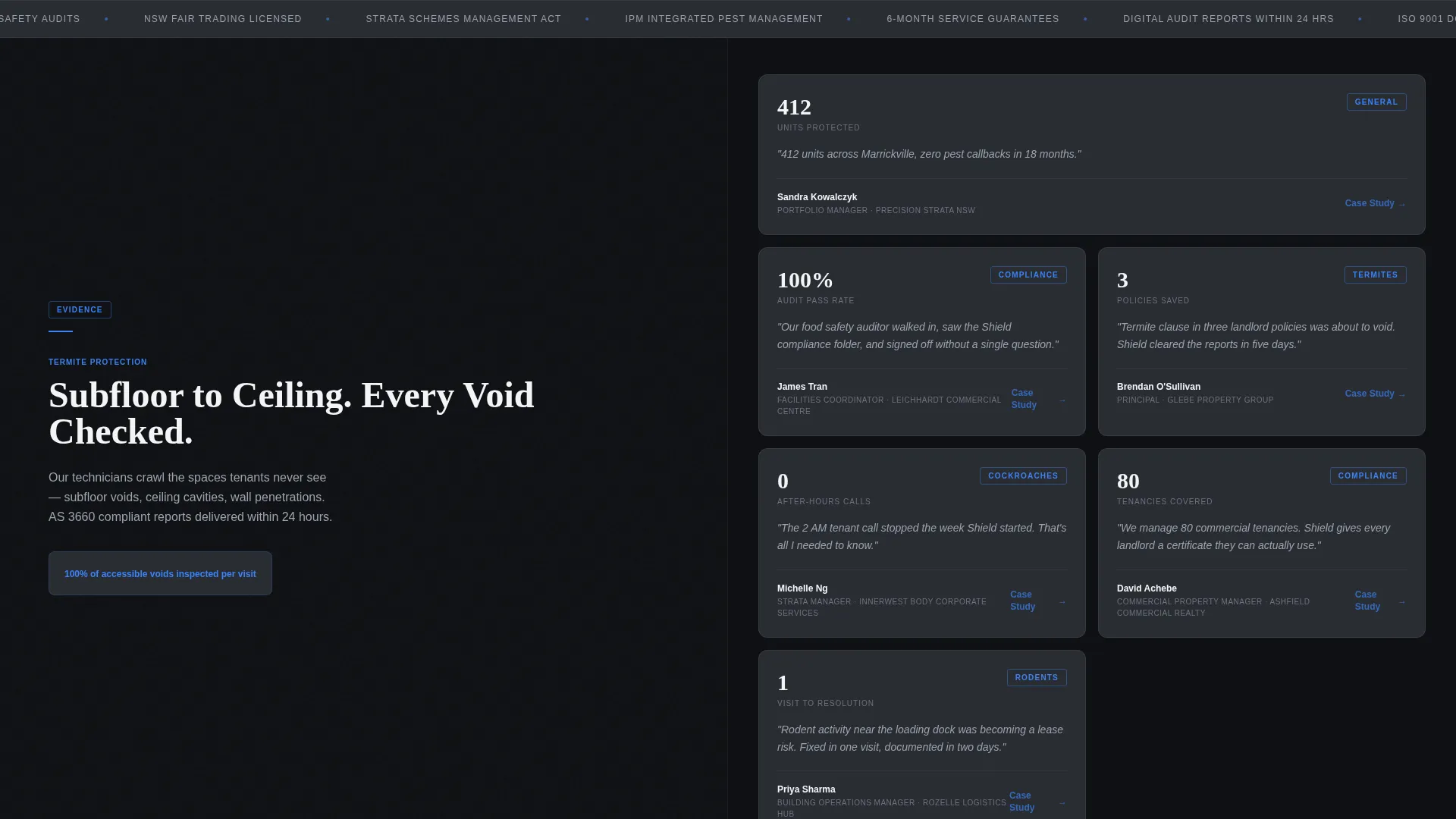
The page divides into two equal panels on scroll. The left panel locks on a rotating service promise, such as termite protection or compliance reporting. The right panel cycles through a mosaic of real client results and statistics. This structure keeps proof in constant view without interrupting the reading flow.
Testimonial Mosaic with Expandable Tiles
Each mosaic tile displays a real outcome, such as unit counts, callback rates, or audit pass figures. Clicking any tile expands it into a short case study. This turns social proof into a layered evidence system that builds trust incrementally.
Dual Conversion Path System
The primary call to action, "Request a Portfolio Assessment," appears twice: once in the header and once after the third testimonial mosaic row. A secondary path offers a downloadable PDF checklist gated behind a minimal two-field form, capturing leads who are not yet ready to call.
Portfolio Assessment Request Form
The form collects company name, number of properties managed, primary pest concern via dropdown, and preferred contact method. The fields are designed for a commercial buyer, not a residential one, making the intake process feel relevant and professional from the first interaction.
Fade-In Hero with Diagnostic Visual Style
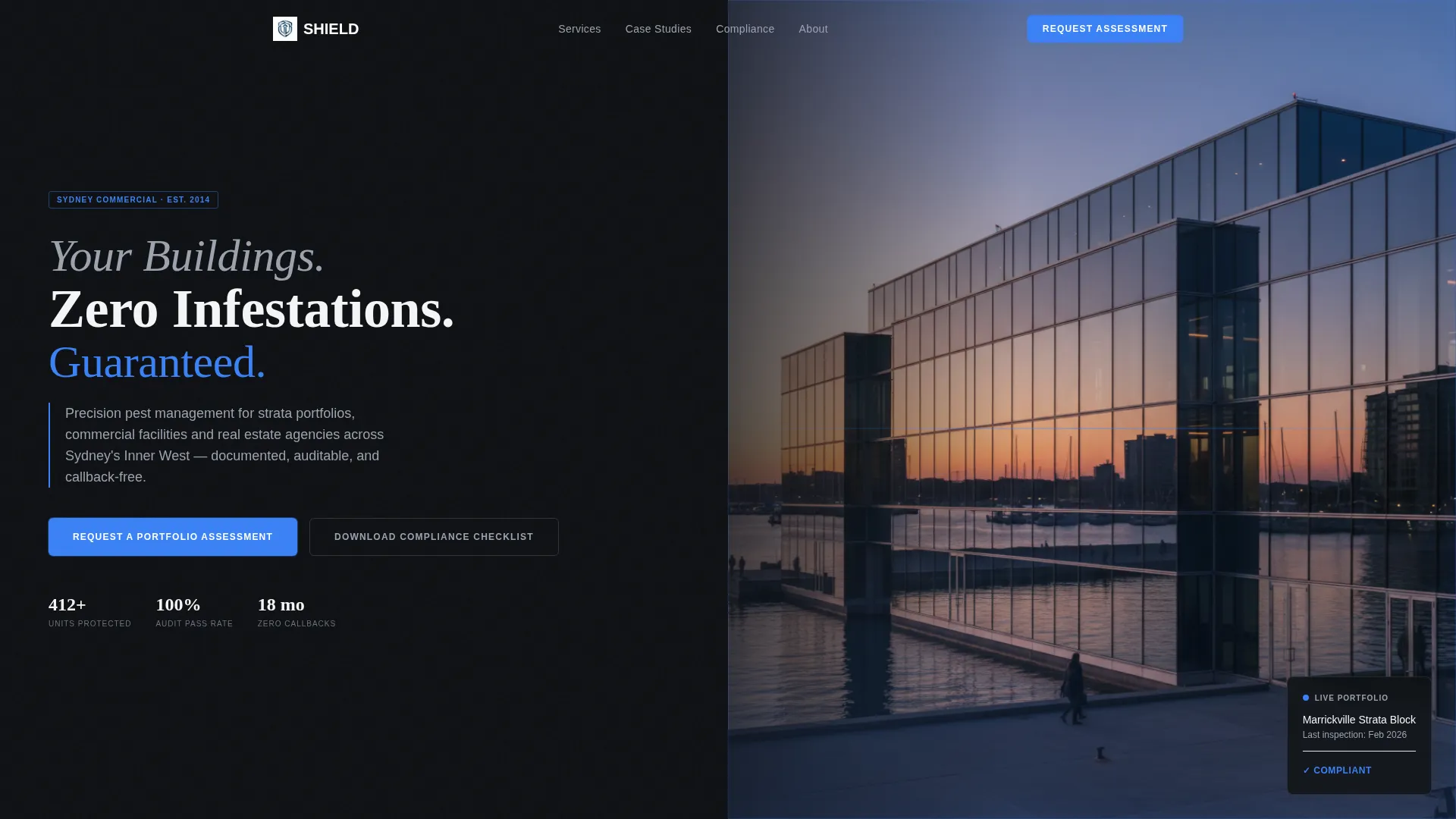
The header uses a full-bleed image of a Sydney commercial building at dusk. A subtle electric-blue glow traces the building outline. The headline fades in over three seconds. There is no pest imagery. The visual language communicates precision and professionalism before any copy is read.
Gated Compliance Checklist Download
The secondary conversion path offers a "Sydney Strata Pest Compliance Checklist" as a downloadable PDF. It is gated behind email address and company name only. This captures early-stage leads who need more information before committing to a direct conversation.
Page sections overview
| Section | Purpose |
|---|---|
| Full-Bleed Header | Establishes brand authority with a fade-in headline and primary call to action |
| Split-Screen Scroll | Locks service promises on the left while cycling proof on the right |
| Testimonial Mosaic Row 1 | Displays first layer of client results and expandable case study tiles |
| Testimonial Mosaic Row 2 | Continues layered proof with additional strata and facility outcomes |
| Testimonial Mosaic Row 3 | Completes the mosaic sequence before the second call to action placement |
| Portfolio Assessment Form | Captures high-intent commercial leads with a targeted intake form |
| Compliance Checklist Gate | Offers a secondary download for leads at an earlier decision stage |
Design & branding system
The visual identity follows a Corporate Precision theme built on a Monochrome Steel color system. Every color choice has a specific role, and no decorative elements are used outside those roles.
- Deep graphite (#1C1E22) and clinical white (#F4F5F7) form the primary surface palette
- Brushed steel mid-tone (#6B7280) handles supporting text and secondary user interface elements
- Electric blue (#3B82F6) is reserved exclusively for calls to action and data highlights
Mobile & speed optimization
The layout is designed with a clear structural hierarchy that translates cleanly to smaller screens. The split-screen behavior and mosaic grid are built to reflow without losing the evidence-first reading order.
- The 50/50 split stacks vertically on mobile, keeping service promises above proof tiles
- Form fields are touch-friendly and structured for minimal friction on any device
How this template helps you convert
The page is engineered around a commercial buyer's decision process, not a general consumer's. Every structural choice reduces hesitation and accelerates trust-building.
- The testimonial mosaic accumulates evidence row by row, so by the time the second call to action appears, the reader has already absorbed multiple layers of documented proof.
- The dual conversion paths mean the page captures both high-intent leads ready for a direct assessment and early-stage leads who want to research first before making contact.
Other information about this template
This template sits within the Professional Services and Sydney Local Services categories. It is designed for a niche where purchase decisions are driven by compliance obligations and risk management rather than price comparison. The scroll-driven layout and evidence-first structure make it well suited to competitive local service markets where differentiation depends on demonstrated results rather than claims.
- The page type is a single landing page, not a multi-page website
- The template style draws on comparison-based evidence display, aligning with buyers who evaluate vendors side by side
- The header concept uses a visual metrics and diagnostic aesthetic rather than traditional service imagery
- The template is suitable for operators building authority in strata, commercial facilities, and property portfolio management across Sydney


Theme
Educational Guide
Creative direction
FAQ-Driven
Color system
Slate & Sky
Style
Comparison Table
Direction
Booking/Scheduling
Page Sections
Split-screen Scroll Layout
Testimonial Mosaic with Expandable Tiles
Dual Conversion Path System
Portfolio Assessment Request Form
Gated Compliance Checklist Download
Fade-in Hero with Diagnostic Visual Style
Related questions
Can I edit the testimonial mosaic tiles with my own client results?
Does the page include both a contact form and a lead magnet download?
Is this template suitable for a pest control business outside Sydney?
Can I remove the split-screen layout and use a standard single-column format?



