Patient Portal Landing Page Template
A dermatologist patient portal landing page built around comparison tables and patient-question framing. It walks hesitant visitors through visit types, treatment options, and insurance coverage before asking for contact details. The result is a warm, trust-first experience that turns skin concerns into booked consultations, without rushing anyone to a form before they feel ready.
by Rocket studio
Quick summary
This is a single-page dermatologist patient portal landing page designed around FAQ-driven scroll flow and side-by-side comparison tables. It answers real patient questions first, then presents a progressive booking form once trust is established. The Healing Space visual theme keeps the experience warm, human, and far from clinical.
Who this template is for
This template fits dermatology practices that treat a wide range of patients and want a page that meets each one where they are. It works especially well when the goal is to convert hesitant, first-time visitors into booked appointments.
- Dermatology clinics serving new mothers, teenagers, and adults seeking specialist care
- Practices offering both in-person and telehealth visit formats
- Providers who want to reduce phone-call volume by answering coverage and treatment questions upfront
What problem this template solves
Most patients arrive at a dermatology page with a list of worries, not a credit card. They want to know what kind of visit they need, whether their insurance applies, and what treatment options exist before they commit to anything. Standard contact-form pages skip all of that and lose those visitors.
- Patients abandon booking flows when coverage and cost questions go unanswered
- Generic layouts treat everyone the same, ignoring the emotional weight of skin concerns
- Visitors referred by a general practitioner often need more reassurance than a simple "Book Now" button provides
What you get with this template
The template delivers a fully structured, single-page layout with five distinct content sections and a lead generation form. Every section is built to reduce a specific patient hesitation before the next one appears.
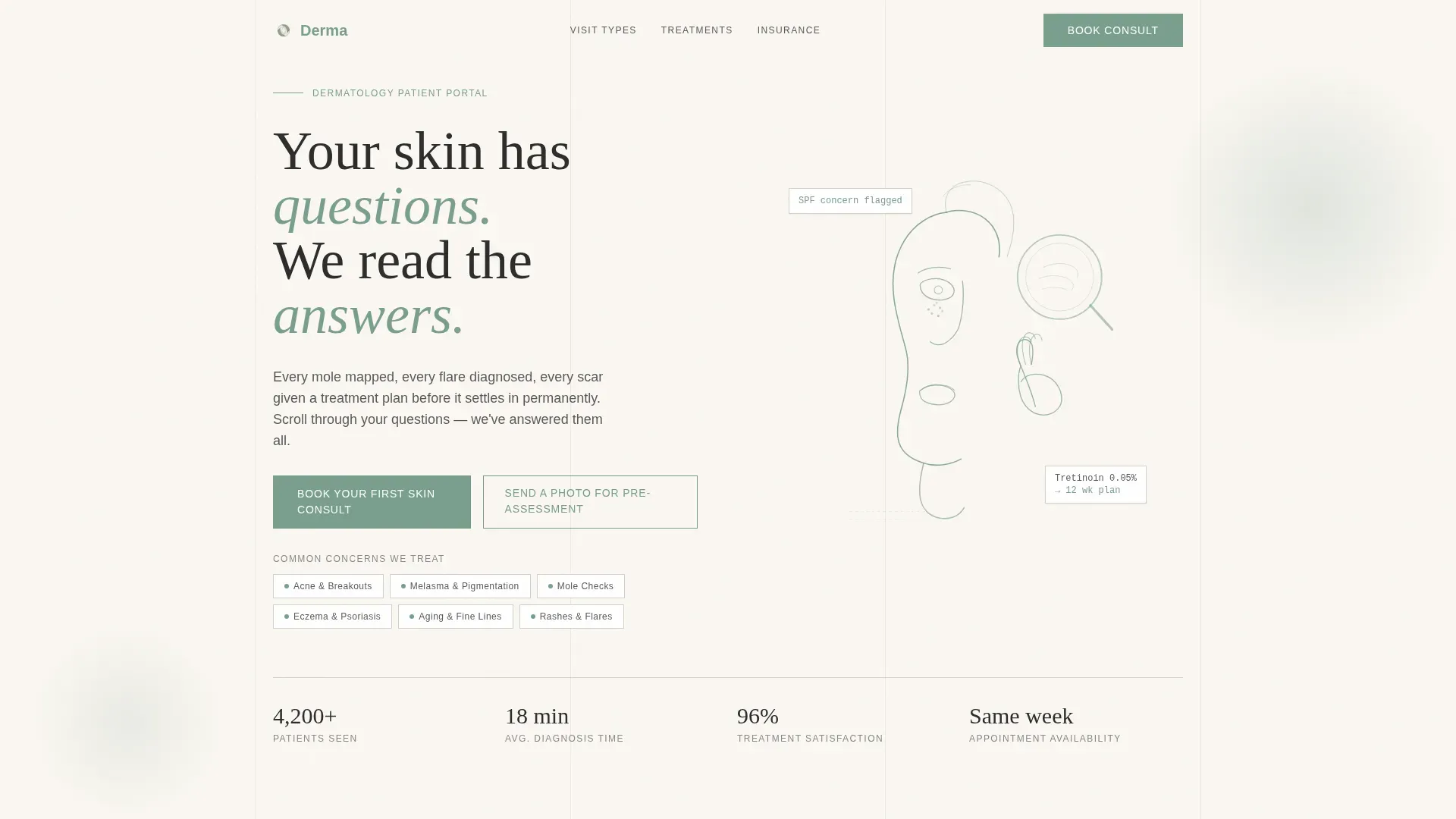
- A line-art hero section with a concern-type badge row and a scroll-reveal headline
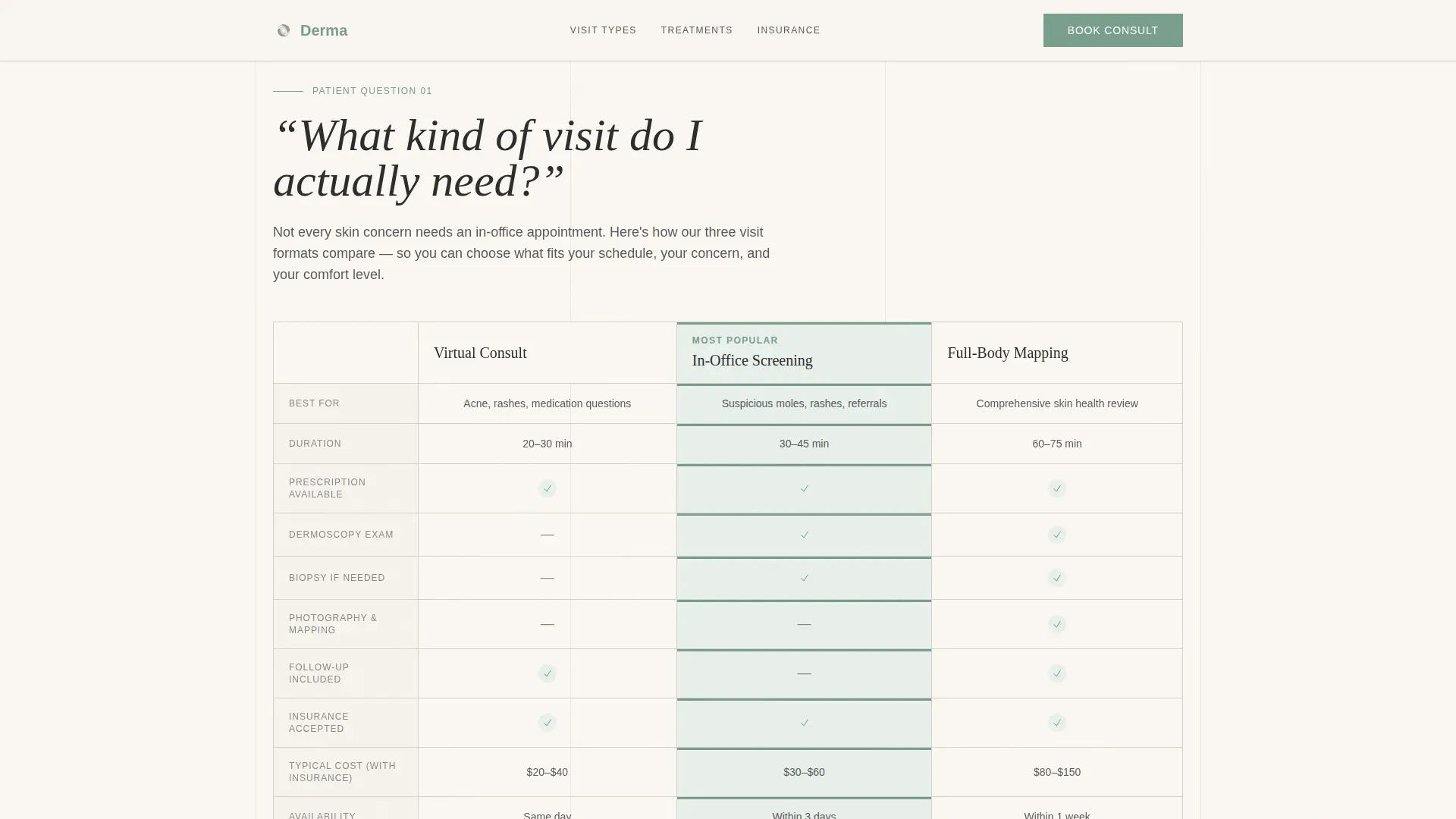
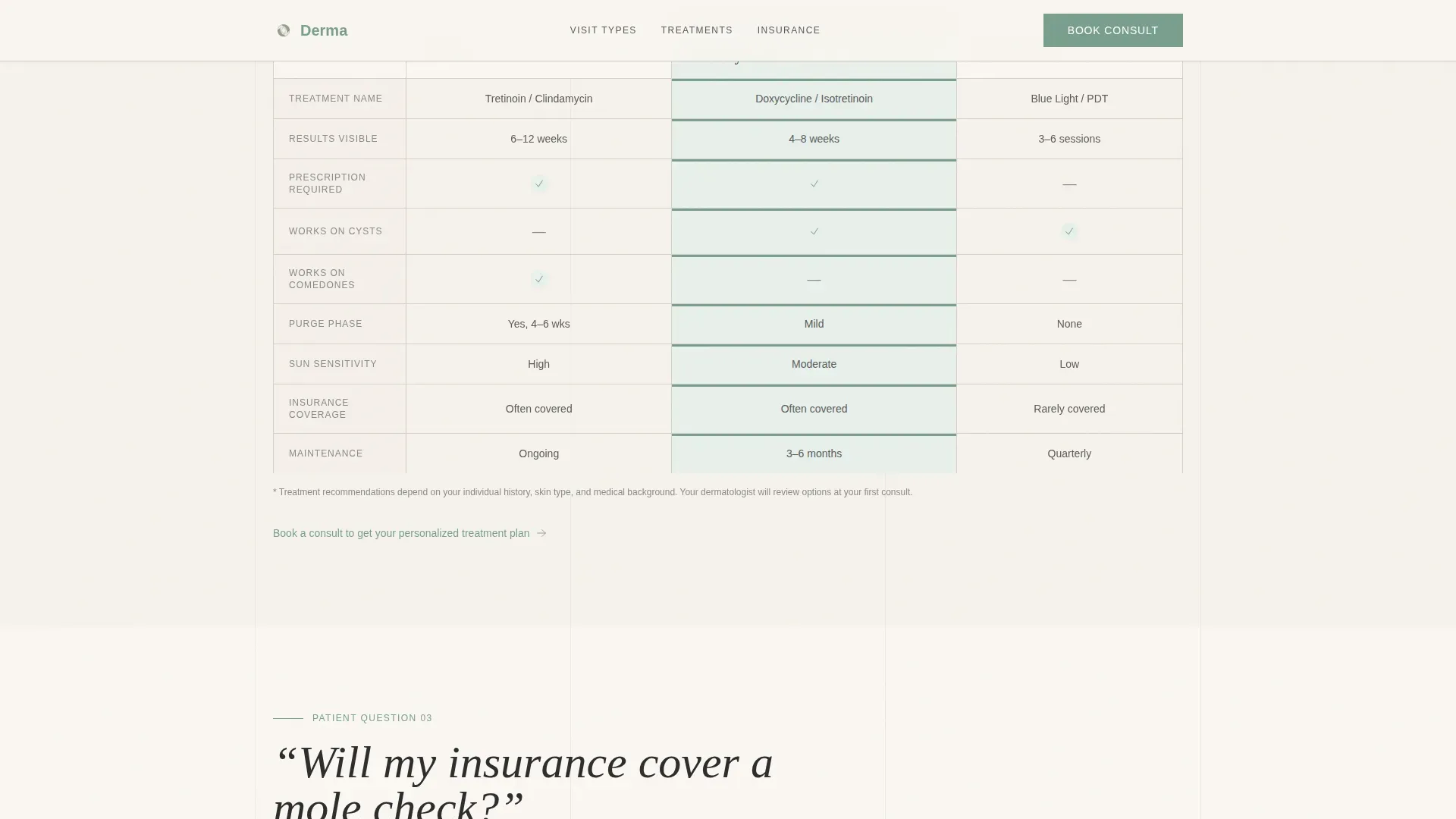
- Three comparison tables covering visit types, treatment options, and insurance tiers
- A five-field progressive disclosure form with a secondary photo upload path
Feature list
This template includes the following built-in capabilities, all grounded in the source brief.
FAQ-Driven Scroll Architecture
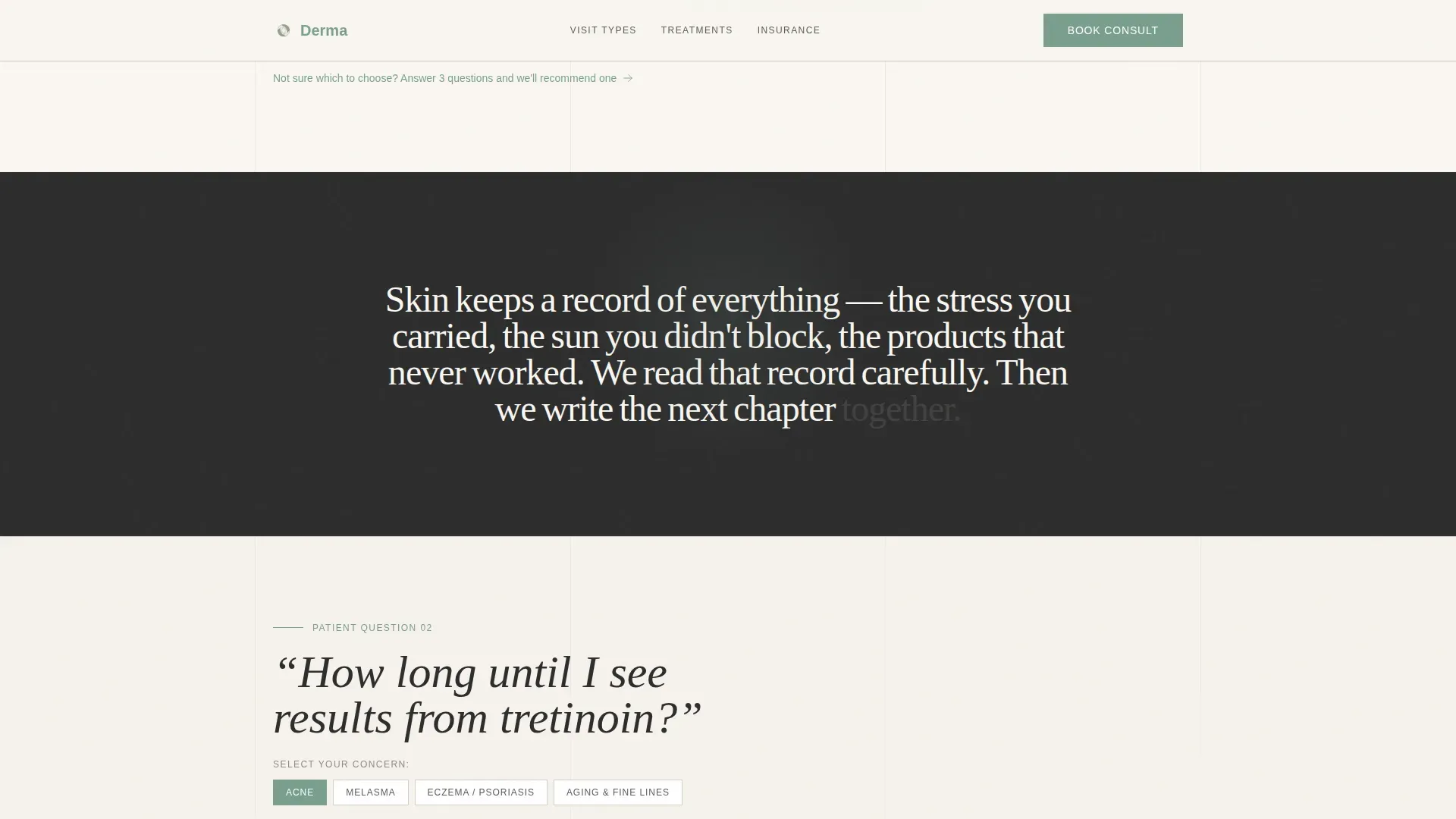
Each major scroll section opens with a large, handwritten-style patient question. The question anchors the content that follows, so visitors feel like their specific concern is being addressed rather than skipped. This structure lowers anxiety before each comparison table appears.
Side-by-Side Comparison Tables
Three distinct tables present information in a scannable, column-based format. The visit types table compares virtual consult, in-office screening, and full-body mapping. The treatment table sets topical, oral, and light therapy options side by side. The insurance table uses plain-language footnotes and checkmarks to make coverage readable at a glance.
Progressive Disclosure Booking Form
The lead generation form uses a staged reveal. It begins with the patient's skin concern via dropdown, then asks for insurance carrier, preferred visit format, and finally name and phone number. Starting with the skin concern rather than personal details reduces friction significantly.
Secondary Photo Pre-Assessment Path
Visitors who are not ready to book can use a secondary call to action to upload a skin photo for pre-assessment. This path keeps hesitant users engaged and on-site rather than letting them leave without any interaction.
Line Art Hero Composition
The header features continuous-stroke SVG illustrations of a face in profile, a hand touching a cheek, and a magnifying lens over skin texture. All lines are drawn in eucalyptus on linen white. There are no stock photos or models, which keeps the experience respectful of sensitive skin concerns.
Concern-Type Badge Row
The hero section includes a row of concern-type badges that act as visual trust signals. Each badge represents a common patient category, such as acne, rash, mole check, and aging, helping visitors self-identify quickly before scrolling further.
Page sections overview
| Section | Purpose |
|---|---|
| Hero with badges | Introduce the clinic and surface common concern types |
| Visit Types Table | Help patients choose between virtual, in-office, and full-body visits |
| Treatment Comparison Table | Compare topical, oral, and light therapy options clearly |
| Insurance Coverage Table | Explain insurance tiers in plain language with checkmark indicators |
| Lead Generation Form | Collect concern, insurance, visit format, and contact details progressively |
| Footer | Display logo, tagline, and navigation links in a split layout |
Design & branding system
The visual identity follows a Healing Space theme with a Cloud Canvas color palette. The goal is warmth and calm without sterility, like unbleached cotton and aloe on a bathroom shelf.
- Linen white (#FAF7F2) backgrounds, whisper gray (#D6D1CA) borders, calm eucalyptus (#7A9E8E) buttons, and deep charcoal (#2C2C2C) body text
- Typography uses DM Sans for body text, Fraunces for handwritten-style headings, and JetBrains Mono for table data
- Scroll-reveal word animations, fade-in sections, and staggered table row entries create a medium-motion reading experience
Mobile & speed optimization
The template is designed with mobile-first layout priorities, reflecting how most patients research skin concerns on their phones in bathrooms or waiting rooms.
- Column-stacking and touch-friendly form inputs are built for smaller screens
- Static content is prioritized throughout, and the booking form runs entirely on the client side
- Table layouts are structured to remain readable at narrow viewports without horizontal scrolling
How this template helps you convert
The page is engineered to build trust incrementally before asking for anything. Every section removes one more hesitation until booking feels like the obvious next step.
- The FAQ-style scroll answers the three most common patient concerns, visit type, treatment options, and insurance coverage, before the primary call to action ever appears
- The primary call to action, "Book Your First Skin Consult," appears after the third comparison table when credibility is at its highest point
- The secondary photo upload path captures visitors who are curious but not yet ready to commit, keeping them in the funnel without pressure
Other information about this template
This template is designed for the United States market, using English copy, USD references, and US insurance terminology throughout. It is categorized under Health and Medical, specifically the Dermatologist Website subcategory and Dermatologist Patient Portal niche.
- The intersection match score for this template's niche alignment is 13, reflecting a strong fit between the FAQ-Driven creative direction and patient portal lead generation goals
- The footer follows a split layout with the logo and tagline on the left and navigation links on the right
- Animation intensity is set to medium, keeping the experience engaging without overwhelming visitors on slower connections
Theme
Healing Space
Creative direction
FAQ-Driven
Color system
Cloud Canvas
Style
Comparison Table
Direction
Lead Generation
Page Sections
Faq-driven Scroll Architecture
Three Side-by-side Comparison Tables
Progressive Disclosure Booking Form
Secondary Photo Pre-assessment Path
Line Art Hero with Concern Badges
Related questions
Can I change the concern-type dropdown options in the booking form?
Does this template support telehealth visit bookings?
How does the photo pre-assessment path work?
Is this template suitable for a solo dermatologist practice?
Can I remove or replace the comparison tables if I only offer one treatment type?



