Diagnose - Rapid Appliancerepair Landing Page Template
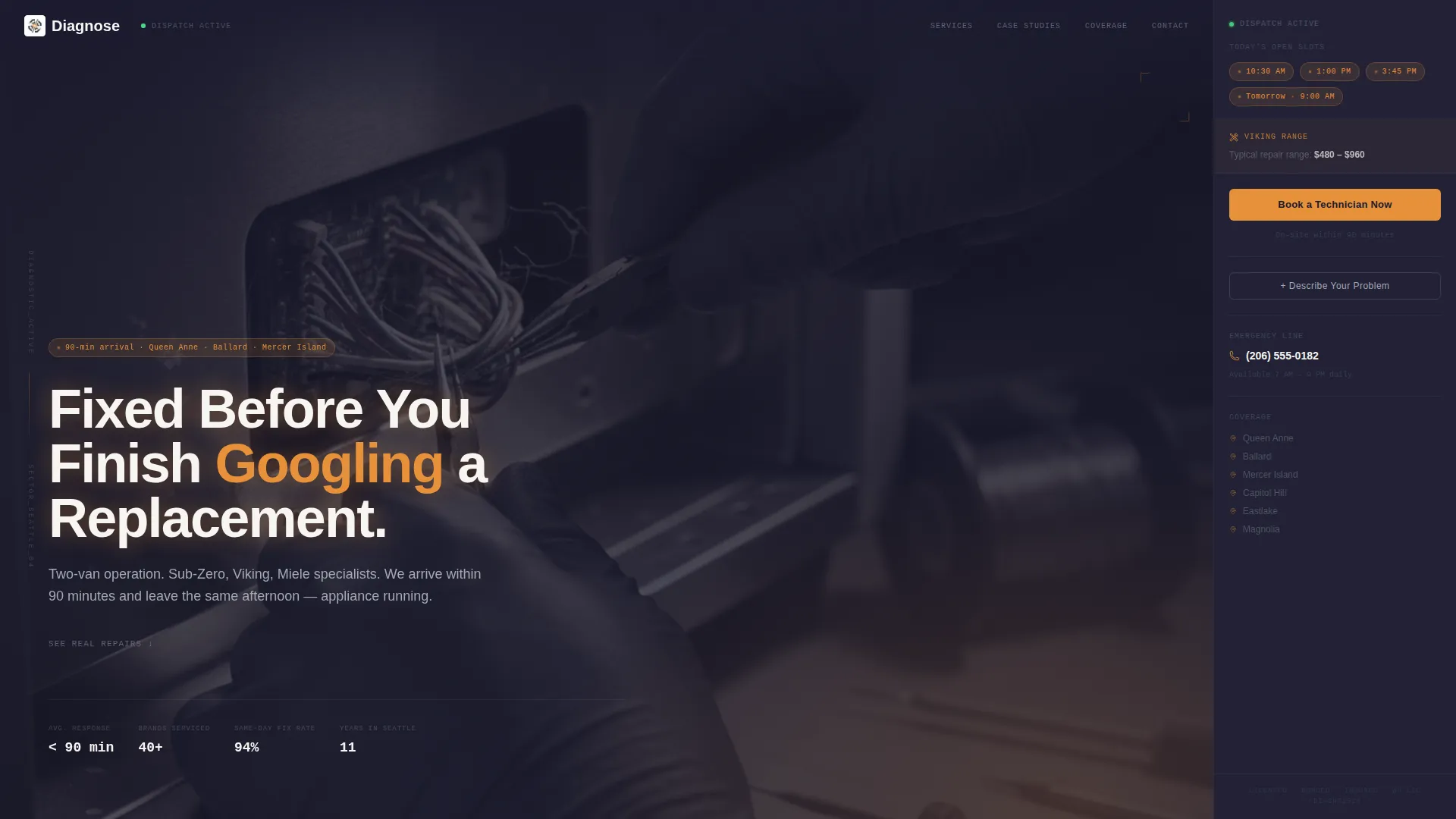
Diagnose is a sidebar companion landing page built for a fast-response appliance repair service. It pairs a cinematic dark header with a persistent booking sidebar, guiding stressed homeowners from a frantic search to a confirmed appointment in minutes. Case study sections build trust, while an appliance-first booking form makes the process feel personal and immediate.
by Rocket studio
Quick summary
Diagnose is a single-page, sidebar companion layout designed for a premium appliance repair service. The dark, glow-lit aesthetic signals calm expertise, while scrolling case studies walk visitors through real repair stories. A persistent sidebar holds live availability badges and a booking form that stays on screen from the first second to the final click.
Who this template is for
This template is built for appliance repair professionals who handle high-end equipment and need to convert anxious visitors into booked appointments fast. It works especially well for small, specialized operations with strong local reputations.
- Owner-operators running one or two-van repair businesses serving urban and near-urban neighborhoods
- Property managers who need a reliable repair contact for tenant appliance emergencies
- Remodelers and contractors looking for a pre-demo appliance disconnect service
What problem this template solves
When a premium appliance fails, the homeowner's first instinct is to search frantically and call whoever looks most credible. A generic repair website with a contact form buried at the bottom loses that visitor. This template solves the trust and urgency problem at once.
- Visitors land on a page that immediately communicates speed, expertise, and local presence
- Real repair stories replace vague "we're the best" claims with evidence
- The persistent sidebar keeps booking accessible so nothing breaks the decision flow
What you get with this template
You get a fully structured landing page layout with every section pre-built and purposeful. The design, copy structure, and booking flow are all ready to be adapted to your own service details.
- A cinematic dark full-bleed header with a glow-lit repair scene and a fade-in headline
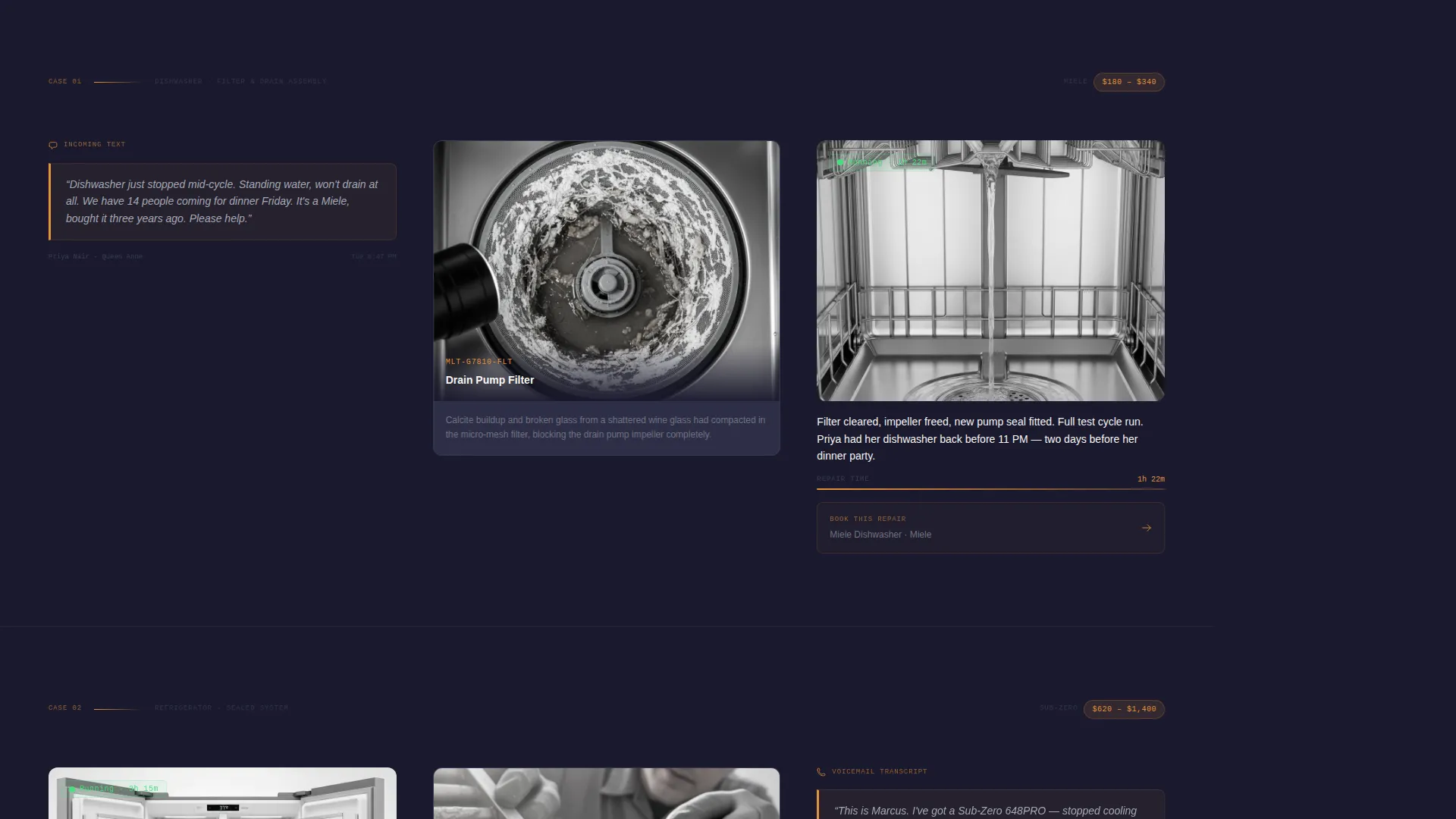
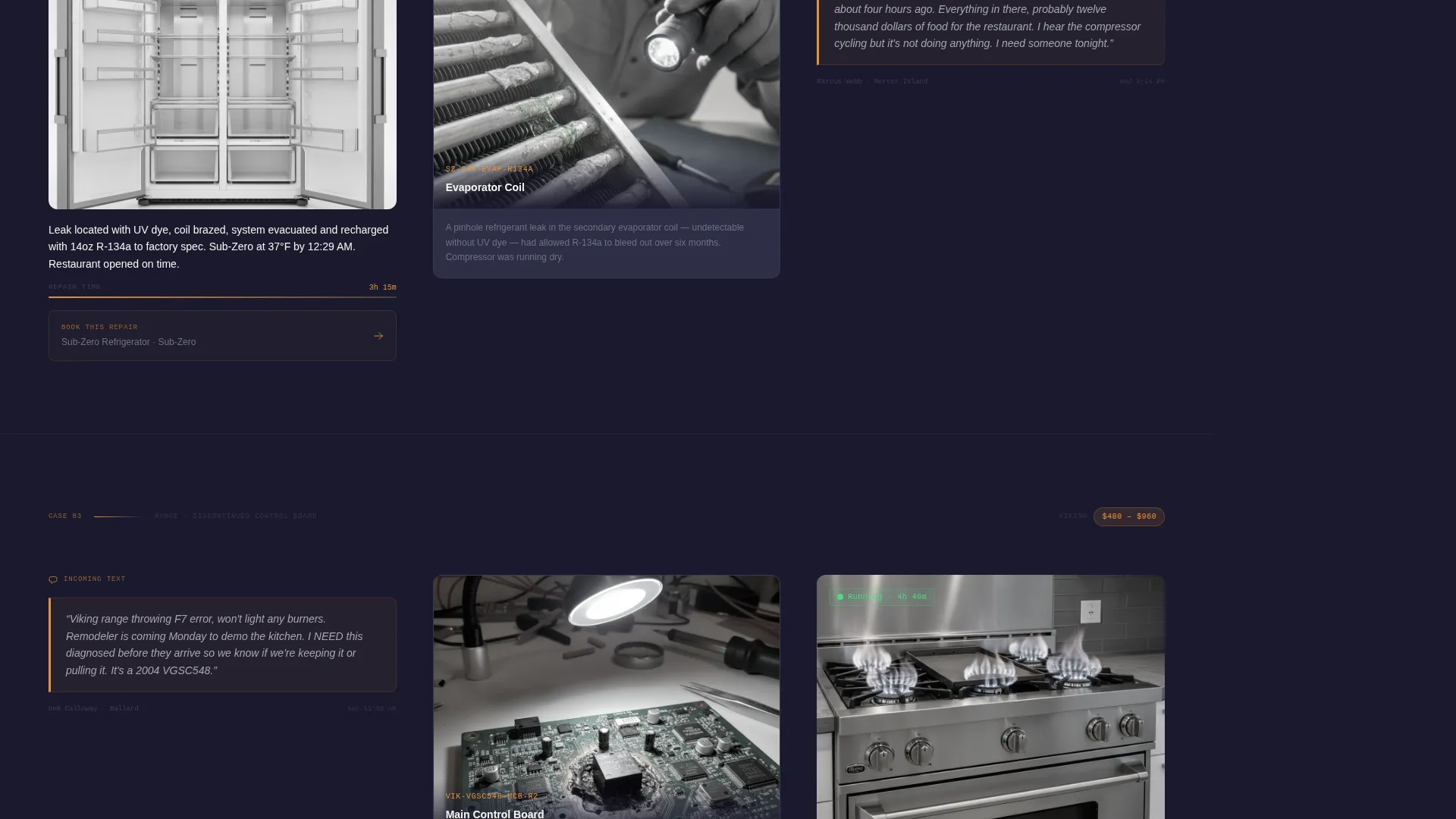
- Three scrollable case study sections, each built around a call, diagnosis, and resolution format
- A persistent sidebar companion with availability badges, contextual repair details, and an inline booking form
Feature list
Persistent Sidebar Booking Panel
The sidebar stays fixed on screen as the visitor scrolls. It displays same-day availability slots as amber pill badges and holds the primary "Book a Technician Now" call to action at all times. Clicking expands an inline booking form without leaving the page.
Appliance-First Booking Form
The inline form asks for appliance brand first, then symptom, then preferred time window, then contact details. This order makes the visitor feel understood before they share personal information, reducing form abandonment significantly.
Case Study Narrative Sections
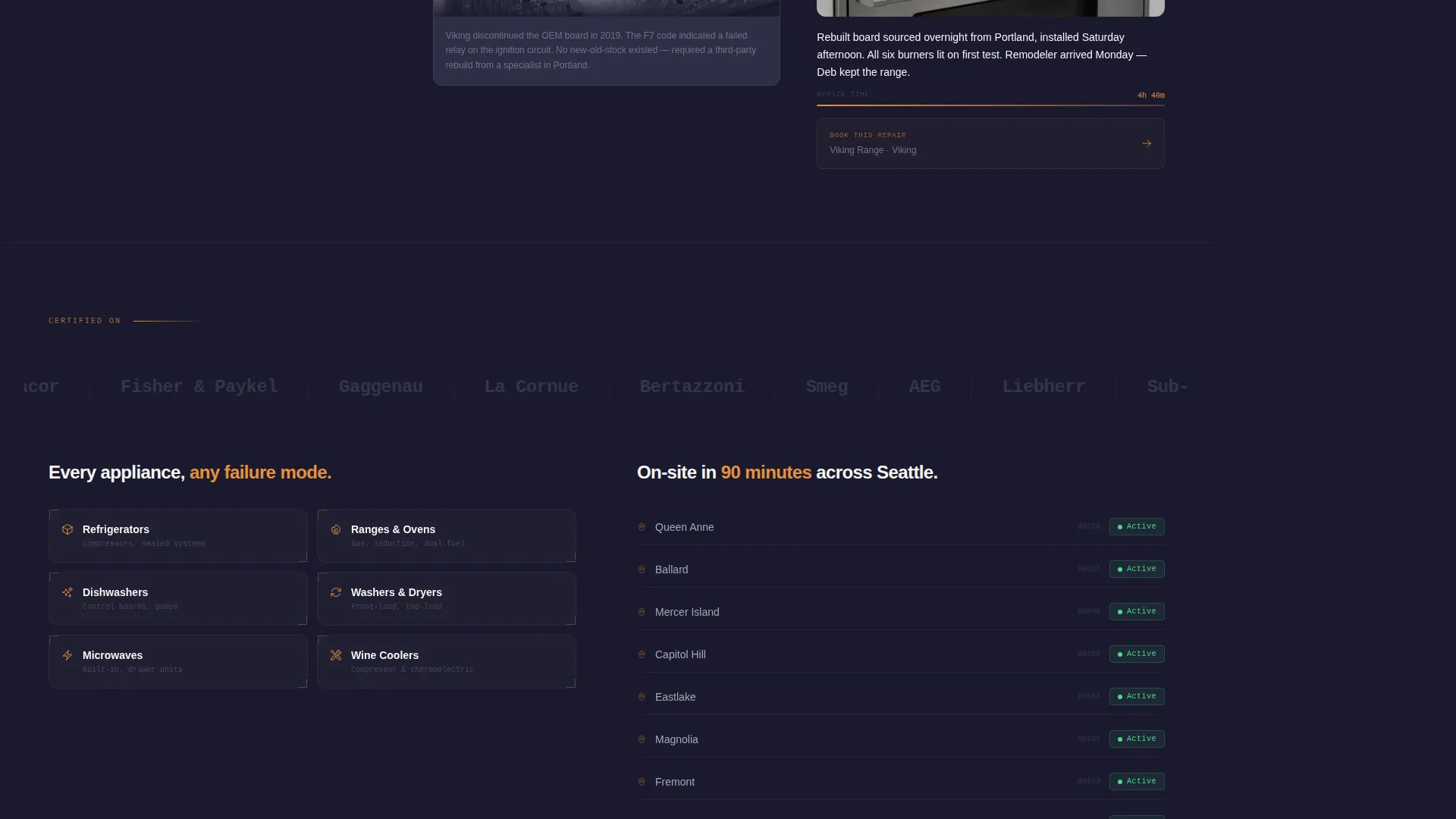
Each scroll section tells a real repair story in three beats: the frantic call shown as a quoted message, the diagnosis with a close-up of the failed part, and the resolution with an elapsed repair timestamp. Stories escalate in complexity from a clogged filter to a full control board replacement.
Contextual Sidebar Updates
As the visitor scrolls through each case study, the sidebar updates to show the relevant appliance brand, average repair cost range, and a persistent booking button. This keeps the sidebar feeling live and relevant rather than static.
Secondary "Describe Your Problem" Path
Below each case study, a secondary call to action opens a free-text field for edge cases and unusual symptoms. This gives visitors who do not match the checkbox options a clear path forward.
Dark Full-Bleed Glow Header
The header fills the full viewport with a near-black frame. An amber diagnostic glow lights a technician's gloved hands mid-repair inside a stainless steel refrigerator cavity. The headline fades in from the dark, setting tone and authority from the first frame.
Page sections overview
| Section | Purpose |
|---|---|
| Dark glow header | Sets authority with cinematic repair scene and fade-in headline |
| Persistent sidebar | Anchors booking panel and live availability from page load |
| Case study one | Builds trust with a relatable, simple repair story |
| Case study two | Escalates complexity with a compressor swap narrative |
| Case study three | Peaks with a discontinued-model control board replacement |
| Inline booking form | Converts intent into a confirmed appointment via appliance-first flow |
| Secondary contact path | Captures edge-case visitors through a free-text problem description |
Design & branding system
The visual identity follows an Executive Suite theme built around a Charcoal and Amber color system. Every color choice reflects the feel of peering inside a high-end appliance with a flashlight: dark recesses, warm electrical glow, and precise mechanical surfaces.
- Deep appliance-interior black (#1A1A2E) dominates backgrounds and the sidebar; brushed stainless gray (#A3A9B5) carries body text
- Warm amber (#E8913A) marks every interactive element, availability badge, and call-to-action button
- Porcelain white (#F7F5F2) opens up the main content column, keeping long-form case study text easy to read
Mobile & speed optimization
The sidebar companion layout is designed with a clear hierarchy so it adapts gracefully to narrower screens. The booking panel remains accessible without overwhelming the primary content column.
- On smaller screens, the sidebar collapses into a sticky bottom bar so the booking button stays reachable at all times
- Case study sections use close-up imagery and short text blocks that load and scan well on mobile connections
- Amber interactive elements maintain strong contrast against dark backgrounds across all screen sizes
How this template helps you convert
The entire layout is engineered around a single outcome: turning a stressed visitor into a booked appointment before they click away. Every design and structural decision supports that goal.
- The sidebar booking panel is visible from the first second, so there is never a moment when the visitor has to search for how to book
- The appliance-first form order builds rapport before asking for contact details, lowering the psychological barrier to completing the form
- Live availability badges create genuine urgency by showing real same-day slots, removing the need for countdown timers or artificial pressure
Other information about this template
This template is part of the Diagnose series, designed specifically for the appliance repair niche where trust and speed are the two dominant buying signals. It is built as a sidebar companion layout within the Executive Suite theme family.
- The Case Study Narrative creative direction makes this layout well-suited for repair services that work on recognizable premium appliance brands, helping visitors self-identify with the stories on screen
- The Charcoal and Amber color system is distinctive in the home services category, where most competitors default to blue and white palettes
- The booking flow is structured to handle common repair request types including refrigerator cooling failures, dishwasher leaks, range ignition faults, and washer malfunctions
Theme
Executive Suite
Creative direction
Case Study Narrative
Color system
Charcoal & Amber
Style
Sidebar Companion
Direction
Booking/Scheduling
Page Sections
Persistent Sidebar Booking Panel
Appliance-first Booking Form
Case Study Narrative Sections
Contextual Sidebar Updates
Dark Full-bleed Glow Header
Secondary Free-text Contact Path
Related questions
Can I adapt the case study sections to my own repair stories?
How does the sidebar availability panel work?
Can I customize the appliance brand dropdown and symptom checkboxes?
Does this template work for a solo technician, not just a multi-van team?
What is the purpose of the 'Describe Your Problem' secondary path?



