Appliance Repair Landing Page Template
Diagnose is a single-page landing page template built for appliance repair businesses. It combines a bold stats-first layout with a zigzag alternating structure, a clinical Arctic White color system, and a dual-call to action setup that guides visitors from error-code lookup straight to same-day booking. The result feels less like a brochure and more like a service record laid open on the counter.
by Rocket studio
Quick summary
Diagnose is a high-conviction landing page template for appliance technician businesses. It opens with a manifesto-style header, moves through escalating performance stats in a zigzag layout, and closes every section with a path to action. The design feels clinical, fast, and trustworthy, exactly what a homeowner in a repair emergency needs to see.
Who this template is for
This template is built for service professionals who fix appliances for a living and need a page that earns trust in under ten seconds. It fits small operations and established shops alike.
- Independent appliance technicians and two-person repair crews
- Appliance repair businesses serving homeowners, landlords, and property managers
- Service providers who want to lead with results rather than generic marketing copy
What problem this template solves
Most appliance repair pages look like every other local service site, stock photos, vague promises, and a phone number buried in the footer. Visitors in a repair emergency need immediate confidence, not a wall of text.
- No clear proof of skill or speed visible above the fold
- No self-service diagnostic tool to give visitors value before they call
- No urgent booking path that matches the stress of a broken appliance at 7 a.m.
What you get with this template
The template delivers a complete single-page layout structured around four escalating stat panels, a resource-driven primary call to action, and a sticky emergency booking form. Every section is built and ready to customize.
- A manifesto-style header with bold condensed typography and zero photography
- Four zigzag stat sections covering response time, first-visit fix rate, brands serviced, and parts stocked
- A primary "Find Your Fix" call to action linking to a searchable error-code database
- A sticky "Book Same-Day Service" form with appliance type, symptom selector, and zip code fields
Feature list
This section covers the core built-in capabilities of the Diagnose template.
Manifesto Header with Typographic Hero
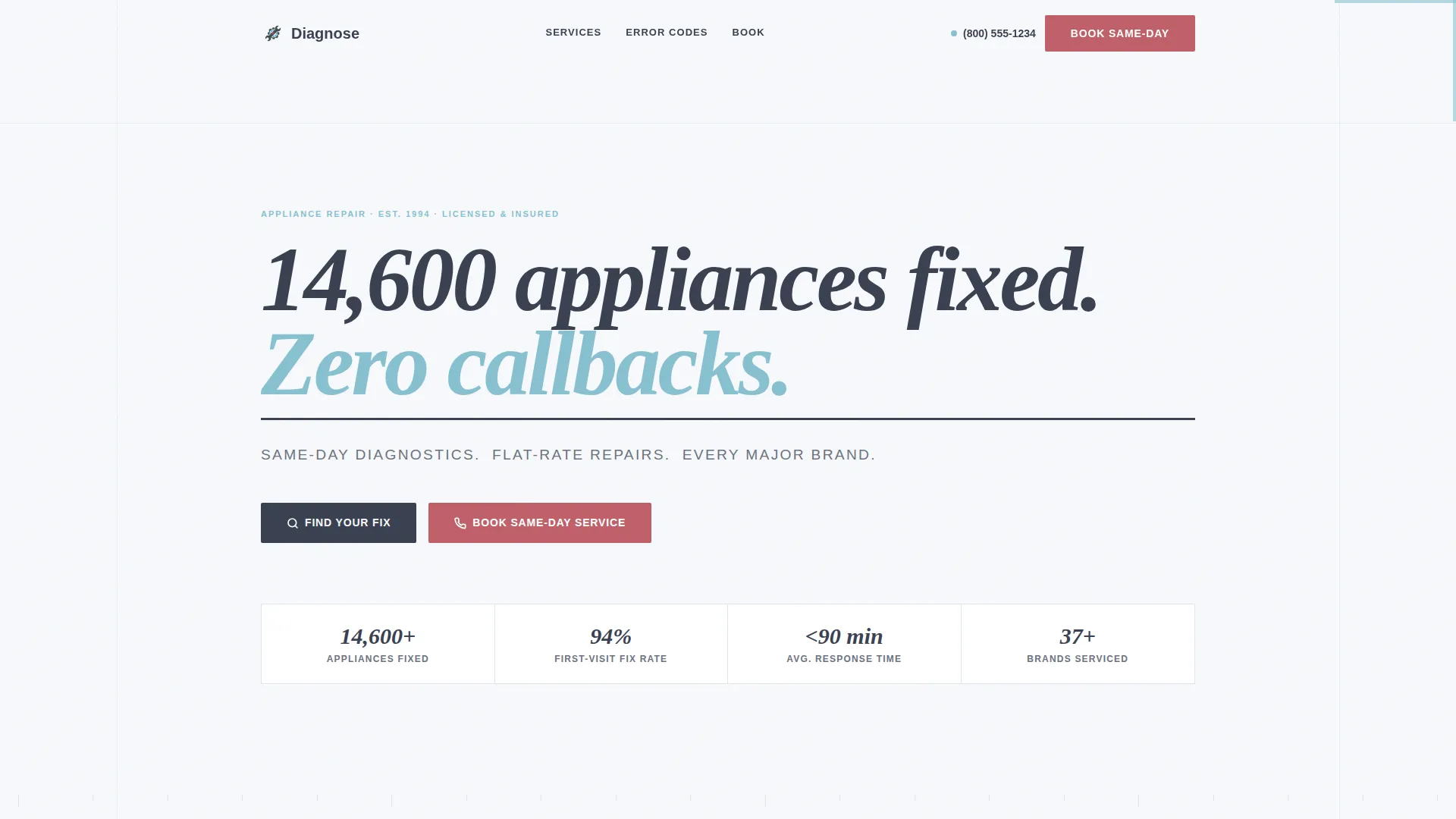
The header opens on a stark white field with no photography. A single heavy condensed headline reads "14,600 appliances fixed. Zero callbacks." A subline in tool-steel gray anchors the service promise below it. The negative space around the type is the design, nothing competes with the claim.
Zigzag Alternating Stat Sections
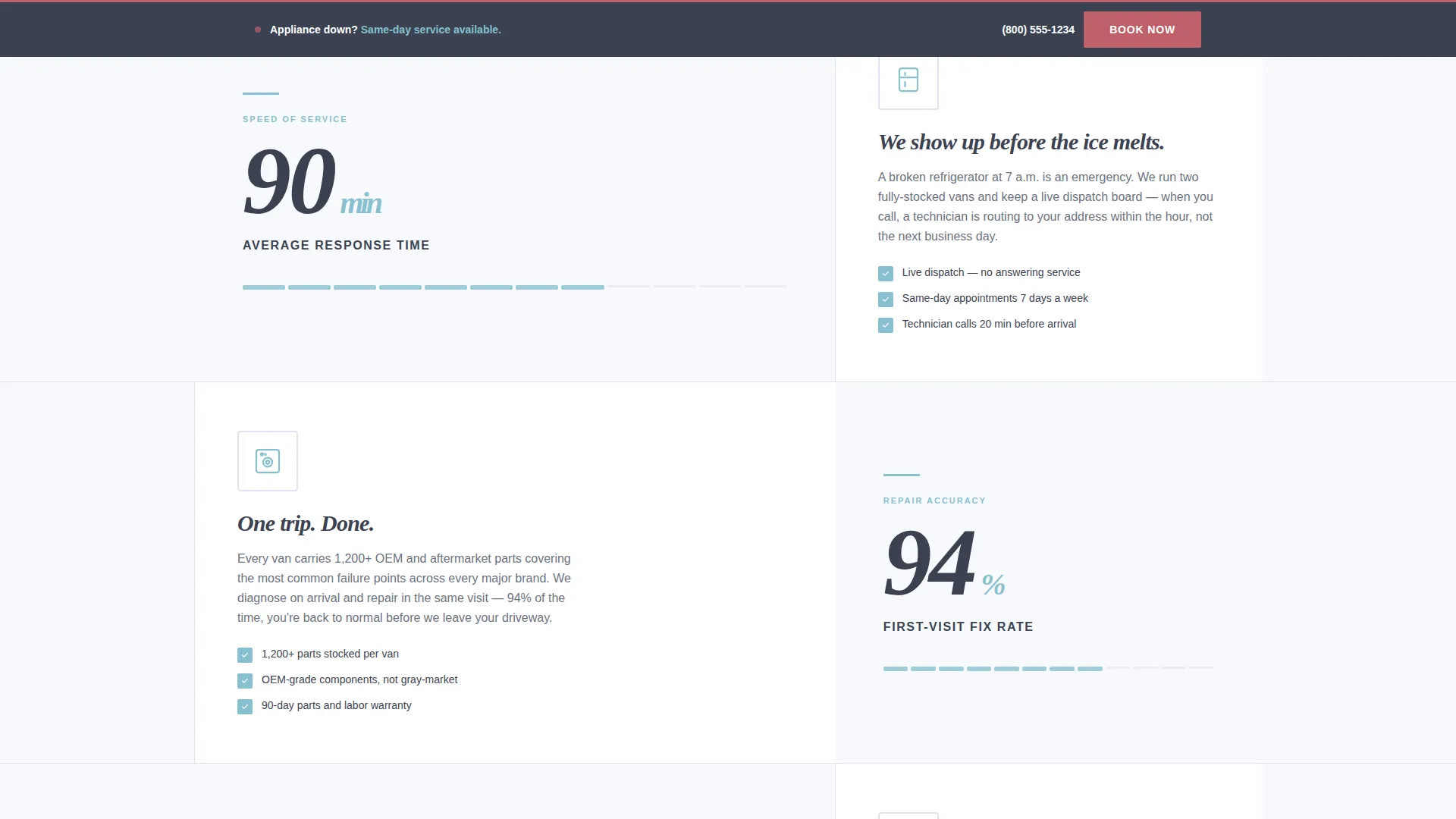
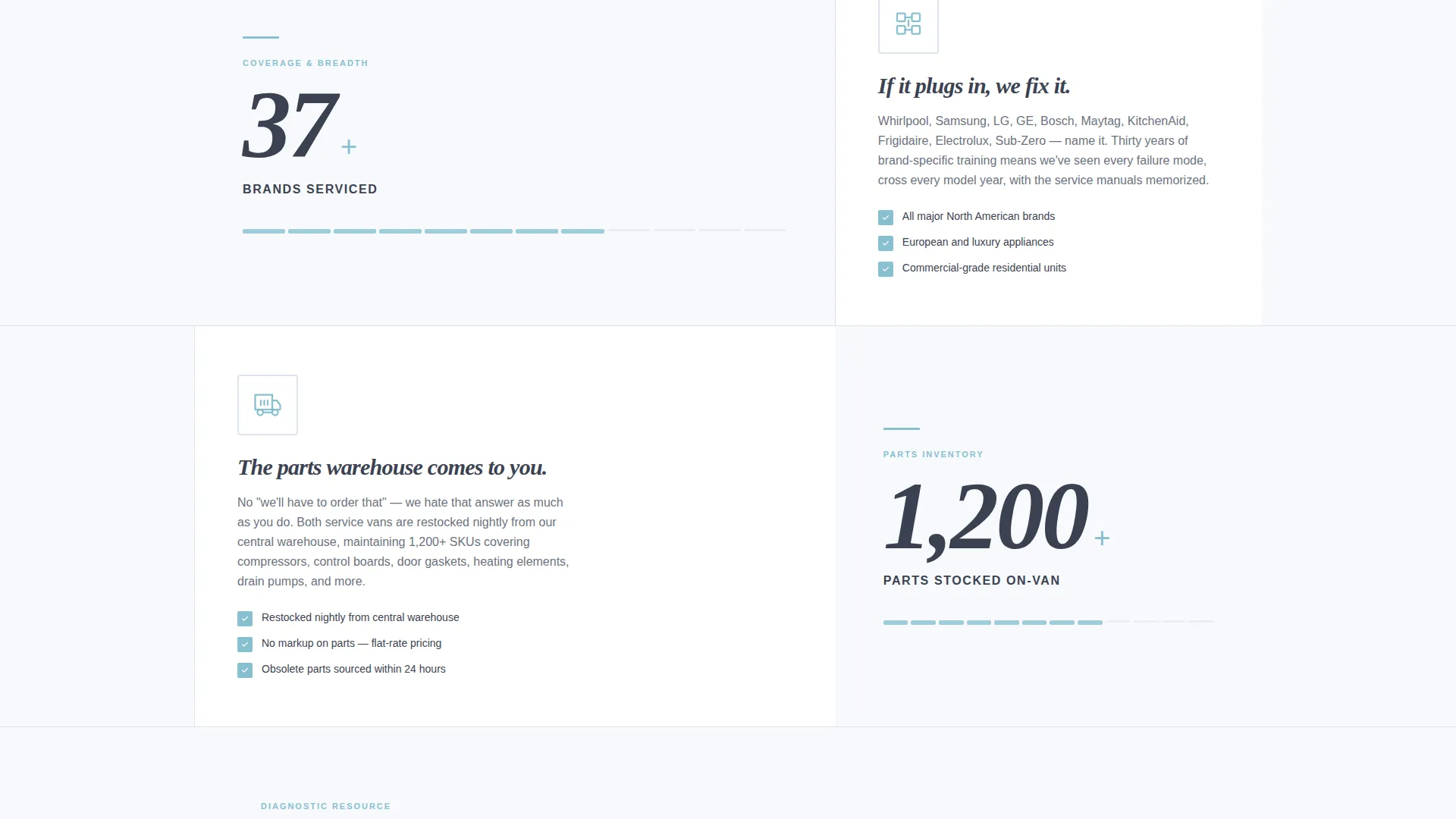
Four alternating two-panel sections each lead with a massive performance stat on the wider panel. The narrower panel pairs the stat with a short contextual paragraph and a single icon or line illustration. The sequence escalates from speed to skill to breadth, building a cumulative case as the visitor scrolls.
Primary Resource Call to Action
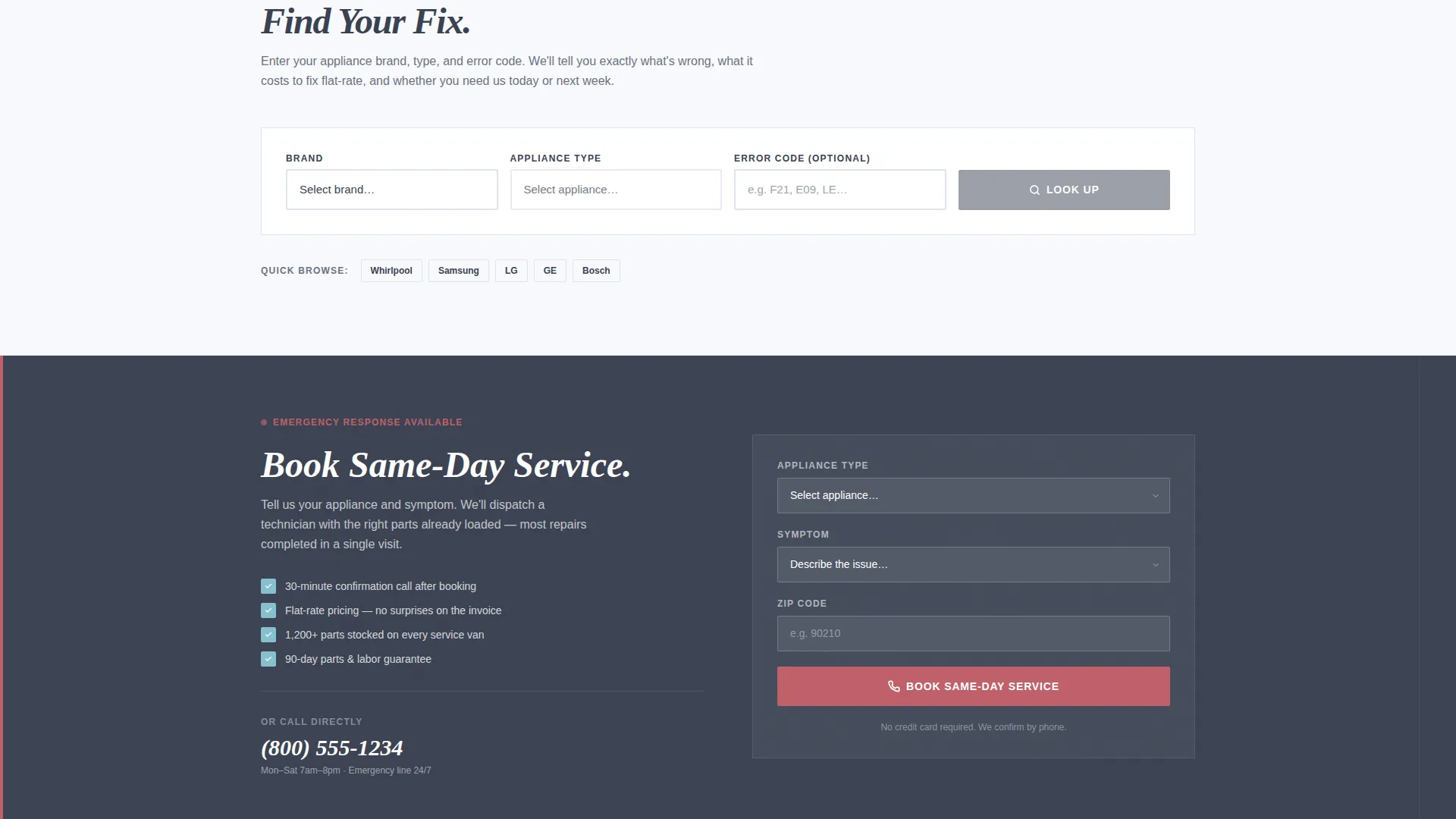
The "Find Your Fix" call to action links visitors to a searchable error-code database organized by brand and appliance type. Visitors see the exact diagnosis and flat-rate repair cost before they ever pick up the phone. This turns a passive browser into an informed, ready-to-book customer.
Sticky Emergency Booking Form
A sticky secondary call to action in emergency signal red stays visible as visitors scroll. The form contains three fields: appliance type dropdown, symptom selector, and zip code. The form is always one scroll away, reducing the friction between panic and booking.
Arctic White Color System
The layout keeps white at roughly seventy percent of every viewport. Diagnostic ice blue handles stats, icons, and hover states. Emergency signal red is used exclusively for the urgent-service call to action. The palette feels clinical and immediately trustworthy.
Service Utility Theme Layout
The overall layout follows a Service Utility theme. Sections are divided by gunmetal tool-steel gray rules. Typography is mechanical and spaced like a serial plate. The visual language signals competence without relying on lifestyle imagery.
Page sections overview
| Section | Purpose |
|---|---|
| Manifesto Header | Opens with bold performance claim and service subline |
| Response Time Stat | Leads with "Under 90 Minutes" and context paragraph |
| Fix Rate Stat | Highlights 94% first-visit fix rate with supporting copy |
| Brands Serviced Stat | Shows breadth with "37+ brands" and appliance illustration |
| Parts Stocked Stat | Reinforces readiness with "1,200+ parts on-van" detail |
| Find Your Fix call to action | Directs visitors to searchable error-code database |
| Sticky Booking Form | Persistent three-field form for same-day service requests |
Design & branding system
The design language is built around a clinical Arctic White palette that communicates hygiene, precision, and reliability. Every color choice has a specific functional role rather than a decorative one.
- Background frost white (#F7F9FC) keeps layouts open and readable at any scroll depth
- Gunmetal tool-steel gray (#3B4252) handles body text and section dividers for clear visual structure
- Diagnostic ice blue (#88C0D0) appears on stats, icons, and hover states to draw attention to key numbers
- Emergency signal red (#BF616A) is reserved exclusively for the sticky same-day service call to action
Mobile & speed optimization
The template is structured so the most important content, the headline claim and the booking form, stays accessible on small screens without horizontal scrolling or hidden elements.
- The sticky booking form remains visible and functional at mobile viewport widths
- Zigzag panels reflow into a single-column stacked layout on smaller screens
- Large stat figures and icons remain legible at reduced sizes due to the high-contrast color system
How this template helps you convert
The Diagnose template converts visitors by removing the two biggest friction points in appliance repair bookings: lack of proof and lack of a clear next step.
- The error-code database gives visitors immediate diagnostic value, making the decision to book feel logical rather than risky.
- The escalating stat sequence builds trust progressively, so by the time a visitor reaches the booking form they have already seen the evidence they need.
- The sticky emergency booking form keeps the conversion path visible at every scroll position, reducing the chance a visitor leaves before acting.
Other information about this template
The Diagnose template is a strong fit for appliance repair businesses that want a page reflecting real operational credibility. It is practical, data-forward, and built around the specific psychology of a repair emergency.
- The template is designed for a single-page layout and does not include multi-page navigation or blog infrastructure
- Flat-rate pricing transparency is built into the resource section concept, reducing pre-call hesitation
- The stat figures in the template (response time, fix rate, brands serviced, parts stocked) are placeholder values meant to be replaced with the actual business's own service record data
- The layout supports businesses serving residential clients including homeowners, rental landlords, and property management companies
- The Service Utility theme and Arctic White color system make this template visually distinct from generic local-service page designs
Theme
Service Utility
Creative direction
Stats-First Impact
Color system
Arctic White
Style
Zigzag/Alternating
Direction
Content/Resource
Page Sections
Manifesto-style Typographic Header
Zigzag Alternating Stat Layout
Error-code Resource Call to Action
Sticky Three-field Booking Form
Arctic White Clinical Color System
Service Utility Theme Structure
Related questions
Can I replace the placeholder stat figures with my own numbers?
Does the template include the error-code database itself?
Is the sticky booking form already connected to a backend?
What business size is this template designed for?
Can I adjust the color palette to match my brand?



