Baseball Youth League Landing Page Template
Diamond is a full-width baseball youth league landing page template built around a scoreboard-style stats header, a draggable Before/After Reveal scroll, and a three-step event registration flow. It captures the electric atmosphere of a ballpark at dusk through a Futuristic Neon color system and serves leagues running multiple divisions and seasons.
by Rocket studio
Quick summary
Diamond is a single-page template designed for competitive youth baseball leagues. It opens with a live-data scoreboard header, guides families through a Before/After player journey, and closes the gap between a curious parent and a completed registration. The layout handles three seasons, fourteen divisions, and thousands of registered players without losing the feeling that every kid matters.
Who this template is for
This template is built for youth baseball organizations that need more than a basic sign-up form. It speaks directly to the people who show up every weekend, haul equipment, and keep scorebooks in the bleachers.
- League directors and administrators managing multiple divisions and seasonal rosters
- Volunteer coaches and program coordinators looking to recruit new staff each season
- Parents of players aged seven to fifteen who need clear registration steps and division guidance
What problem this template solves
Most youth sports pages feel like a flyer stapled to a telephone pole. They list dates, drop a form link, and leave families to figure out the rest. Diamond fixes that disconnect.
- Families arrive with no context and leave before registering because the page builds no trust
- Coaches and volunteers have no clear secondary path to join the program
- Leagues with many divisions struggle to present the full scope of what they offer without overwhelming visitors
What you get with this template
You get a structured, immersive landing page that moves visitors from curiosity to commitment in a logical sequence. Every section earns the next click before asking for anything.
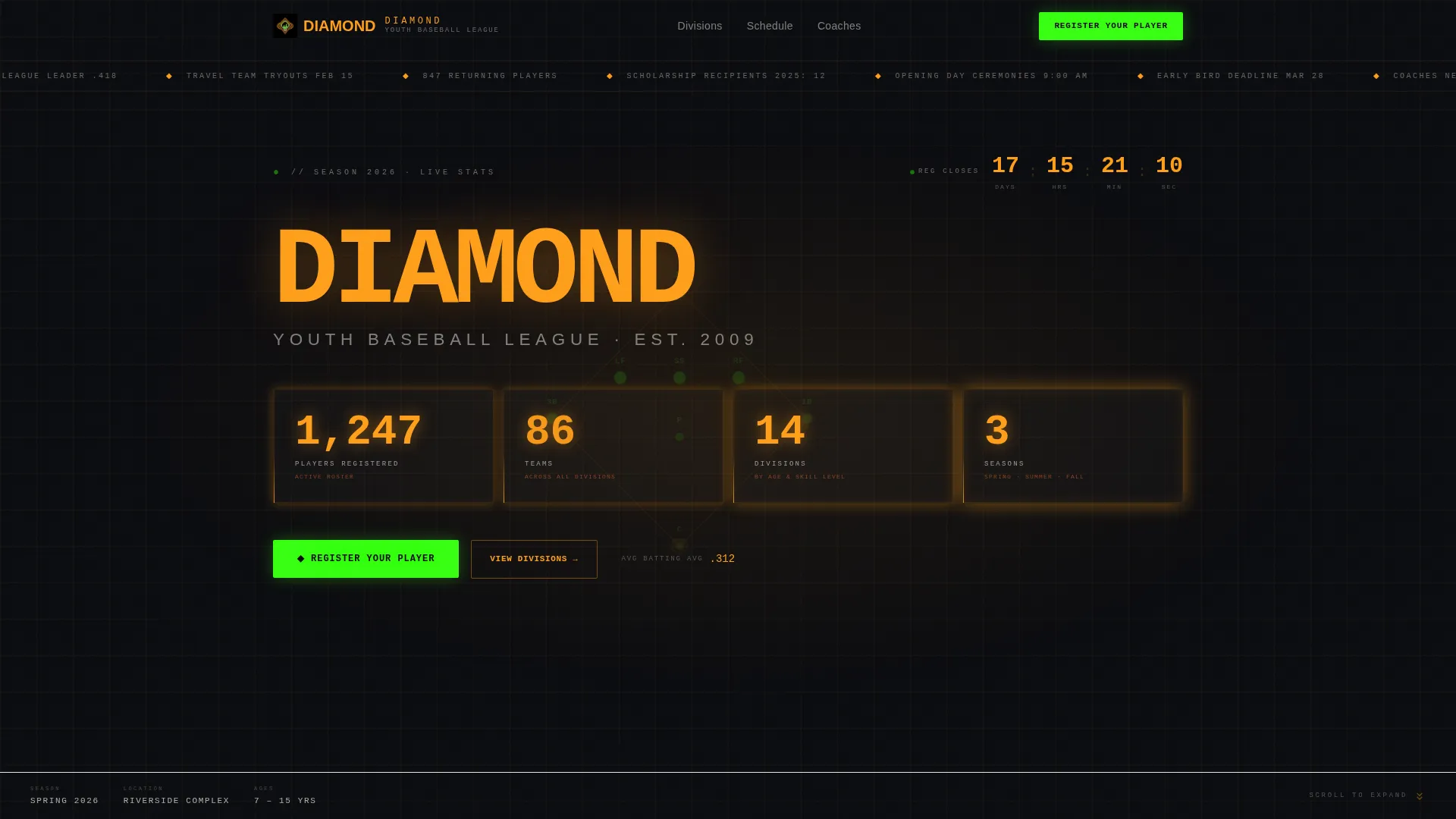
- A scoreboard-style stats header displaying real league numbers such as registered players, teams, divisions, and seasons
- A draggable Before/After Reveal section that shows a player's journey from first season to confident competitor
- A three-step progressive registration form with a pinned "Register Your Player" call to action and a secondary "Coach This Season" path
Feature list
This section covers the core built-in capabilities that make Diamond distinct from a generic sports page.
Scoreboard Stats Header
The header renders live league figures in a monospaced jumbotron typeface on a night-sky black canvas. Numbers like 1,247 registered players, 86 teams, 14 divisions, and 3 seasons glow in scoreboard amber. A faint diamond diagram pulses underneath, showing positional heat dots from last season's play. A countdown timer to the registration deadline pulses inside the header as well.
Draggable Before/After Reveal
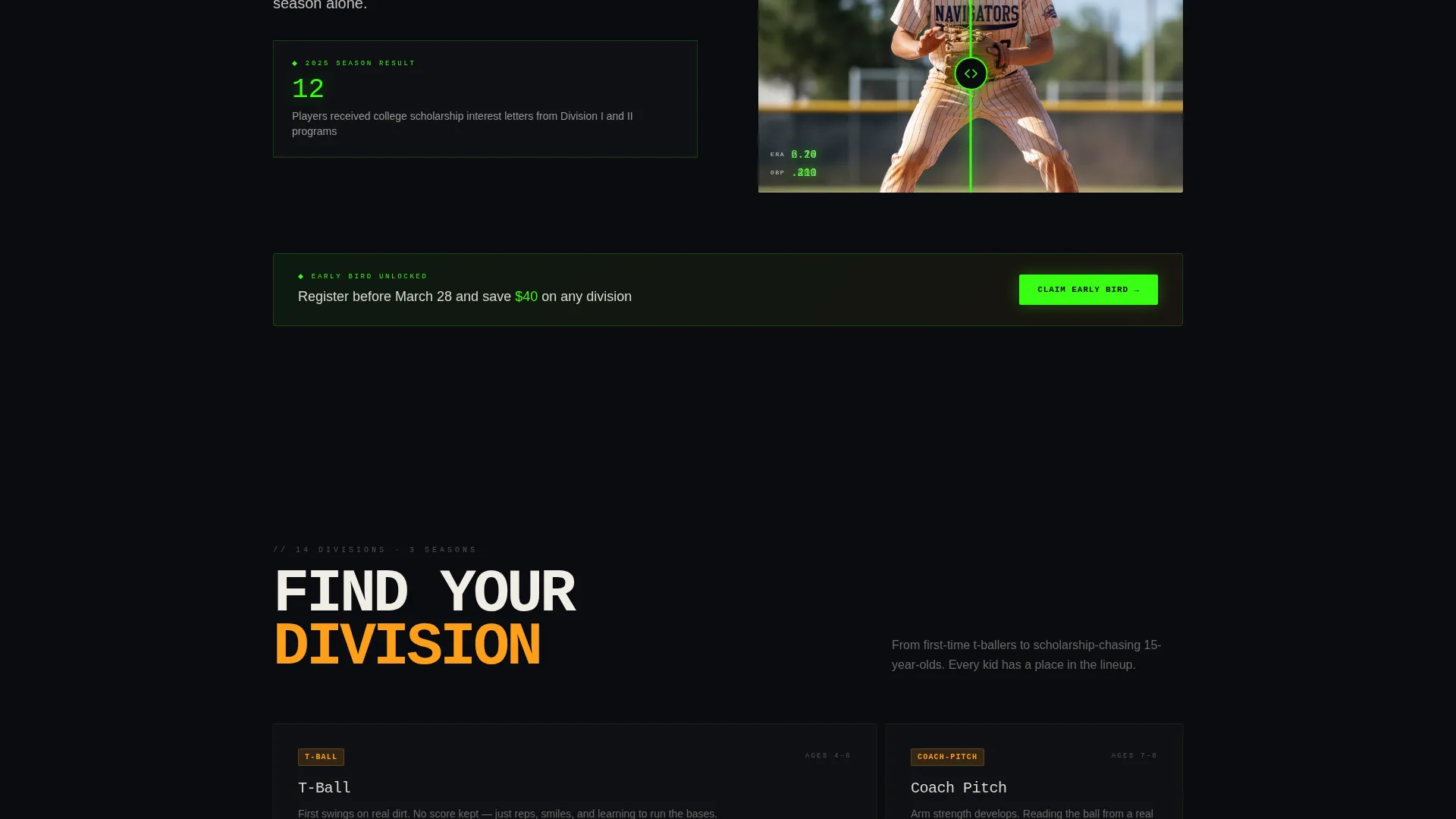
A draggable slider splits each paired moment in a player's development. A first-season stance sits beside a travel-team swing in the same frame. As visitors scroll, the stakes grow: an empty form becomes a full roster, a bare infield becomes opening day. Each reveal carries a stat line that grew alongside the player.
Three-Step Progressive Registration Form
The registration flow breaks into three clear stages. Step one collects player name and age. Step two gathers division preference and prior experience. Step three captures parent contact and emergency information. This structure reduces friction and keeps families moving forward instead of bouncing off a wall of fields.
Pinned Call-to-Action Bar
After the first scroll, a "Register Your Player" button in neon diamond green anchors to the bottom of the viewport. It stays visible throughout the entire page experience. Families never have to scroll back up to act.
Early-Bird Pricing Reveal
Discounted pricing does not appear at the top. It surfaces only after the second Before/After section lands, rewarding engaged visitors with proof before presenting an offer. This sequencing respects the visitor's attention and makes the pricing feel earned.
Division Breakdown with Coach Recruitment
Each division section includes a secondary call to action: "Coach This Season." Volunteer coaches who scan the page for their own entry point find it naturally placed, without disrupting the primary registration flow.
Page sections overview
| Section | Purpose |
|---|---|
| Stats Scoreboard Header | Displays live league metrics and registration countdown |
| Before/After Reveal One | Contrasts a player's first stance with a developed swing |
| Before/After Reveal Two | Shows registration journey from empty form to full roster |
| Before/After Reveal Three | Captures the transformation from nervous beginner to leadoff hitter |
| Division Breakdown | Lists all fourteen divisions with coach recruitment prompts |
| Early-Bird Pricing | Reveals discounted registration after scroll-based proof |
| Three-Step Registration | Collects player, preference, and parent data progressively |
| Pinned call to action Bar | Keeps "Register Your Player" visible after the first scroll |
Design & branding system
The visual identity is built on a Fire and Earth palette that feels like a ballpark when the sodium lights snap on at dusk. The type system uses a monospaced jumbotron face for numbers and a clean secondary face for body copy.
- Core palette: scoreboard amber (#FF9F1C), warning-track clay (#A4502B), night-sky black (#0B0C10), and electric chalk-line white (#F0EDE5)
- Neon diamond green (#39FF14) appears only on hover states and live data pulses, keeping it rare and visually urgent
- The overall aesthetic avoids stock photography entirely, relying on data displays, positional heat diagrams, and high-contrast typography to carry the emotional weight
Mobile & speed optimization
The template is designed to hold its visual impact on smaller screens without sacrificing the scoreboard feel or the draggable reveal mechanics.
- The pinned call-to-action bar reflows cleanly on mobile viewports so the registration path stays reachable with a thumb
- The three-step form collapses into a single-column layout on narrow screens, keeping each step readable and tappable
How this template helps you convert
Diamond is sequenced to build trust before it asks for anything. Every design decision points toward a completed registration.
- The scoreboard header leads with proof: real numbers about real players, teams, and divisions, so families know immediately that this league is active and credible.
- The Before/After Reveal sections build emotional investment section by section, showing what a player becomes inside the program before pricing or forms ever appear.
- Early-bird pricing surfaces only after the second reveal lands, so the offer feels like a reward for attention rather than an interruption.
Other information about this template
Diamond sits at the intersection of sports recreation design and youth baseball league marketing. A few additional details worth knowing before you build with it.
- The template is designed for a single full-width landing page flow, not a multi-page site
- The Bento Grid layout style and Competition Edge theme are baked into the section rhythm, giving the page structure without rigid boxes
- The Futuristic Neon visual direction is calibrated for a youth baseball audience that includes both digital-native teenagers and grandparents who prefer clear, readable type
- The color system uses high-contrast pairings throughout so that amber numbers on black backgrounds remain legible at a glance


Theme
Competition Edge
Creative direction
Before/After Reveal
Color system
Dopamine Pop
Style
Bento Grid
Direction
Event Registration
Page Sections
Scoreboard Stats Header with Countdown
Draggable Before/after Reveal Scroll
Three-step Progressive Registration Form
Pinned Neon Call-to-action Bar
Early-bird Pricing Reveal Sequence
Division Breakdown with Coach Recruitment
Related questions
Can I update the league stats shown in the scoreboard header?
Does the three-step registration form connect to a payment system?
Is the Before/After slider usable on a phone?
Can I add or remove divisions from the division breakdown section?
Who handles the Coach This Season sign-up path?