Digs - Verified Studenthousing Landing Page Template
Digs is a split-screen student housing landing page template built for platforms that match university students with verified rooms, flatshares, and studio lets. It leads with bold stats, a cinematic header, and a three-step booking form pinned to the right panel. The Navy Authority colour system and academic gold accents create a tone that feels trustworthy and aspirational for students, postgrads, and parents alike.
by Rocket studio
Quick summary
Digs is a single-page landing page template for verified student accommodation platforms. It uses a 50/50 split-screen layout, a stats-first scroll structure, and a pinned booking form to move visitors from curiosity to confirmed viewing. The design feels clean, confident, and built specifically for the pressures of student housing search.
Who this template is for
This template is designed for student housing platforms that want to convert anxious visitors quickly. It suits operators who curate and inspect their listings rather than aggregating unvetted landlord posts.
- Second-year students losing their halls guarantee and searching for their first private let
- International postgraduates arriving in an unfamiliar city with a tight move-in window
- Parents researching safe, verified accommodation on behalf of their children
What problem this template solves
Finding verified student accommodation is stressful. Students face low-quality listings, unresponsive landlords, and no clear way to book a viewing fast. This template removes that friction by leading with proof before asking for any commitment.
- Visitors land on credibility-first content, with large stats answering trust objections immediately
- The pinned booking form reduces drop-off by keeping the call to action visible throughout the scroll
- A secondary browse path accommodates visitors who are not yet ready to book
What you get with this template
The template delivers a complete, conversion-focused landing page layout ready for a student accommodation platform. Every section is purposefully ordered to guide the visitor from awareness to action.
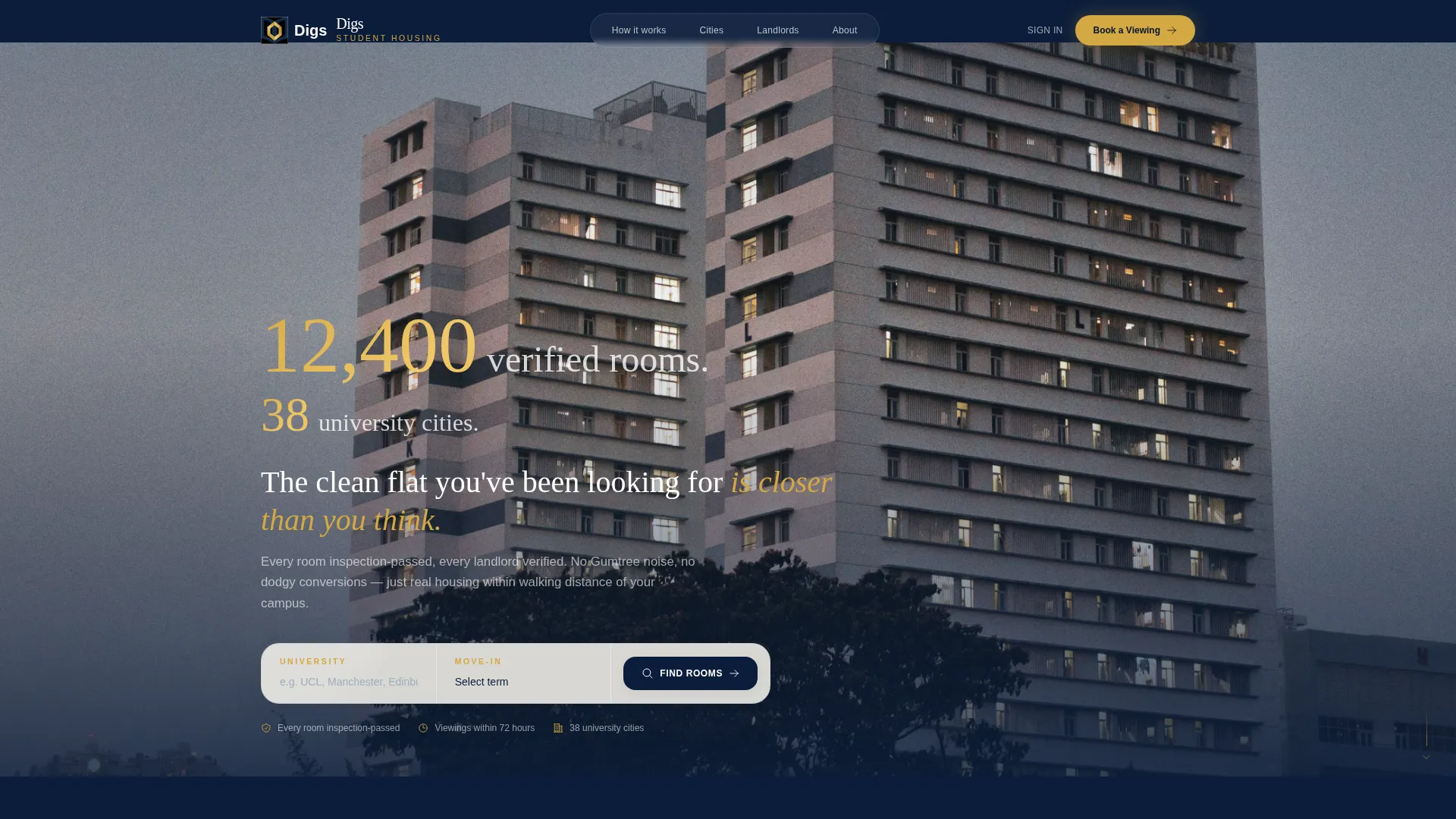
- A panoramic cinematic header with an overlaid stat block and navy letterbox bars
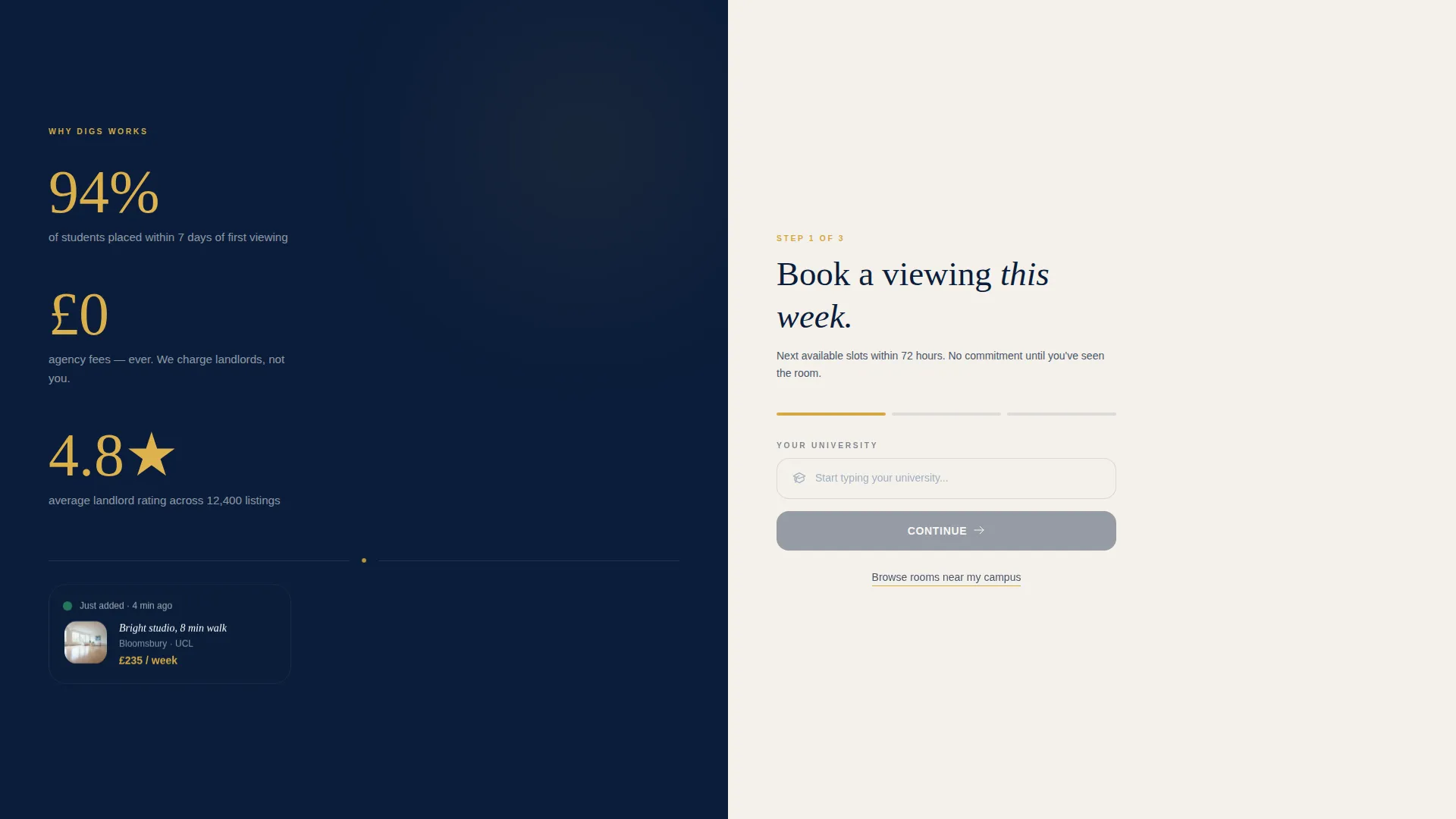
- A 50/50 split-screen body layout with a locked left panel for stats and a right panel for content and forms
- A three-step inline booking form with university autocomplete, term-aligned move-in dropdown, and a 72-hour viewing slot picker
Feature list
This template includes purpose-built components that reflect the specific needs of a student accommodation booking flow.
Panoramic Cinematic Header
The header uses a wide, letterboxed golden-hour cityscape image with thin navy bars top and bottom. A large-scale stat block fades in over the image, displaying verified room count and city reach in gold serif numerals before any supporting copy appears.
Stats-First Scroll Structure
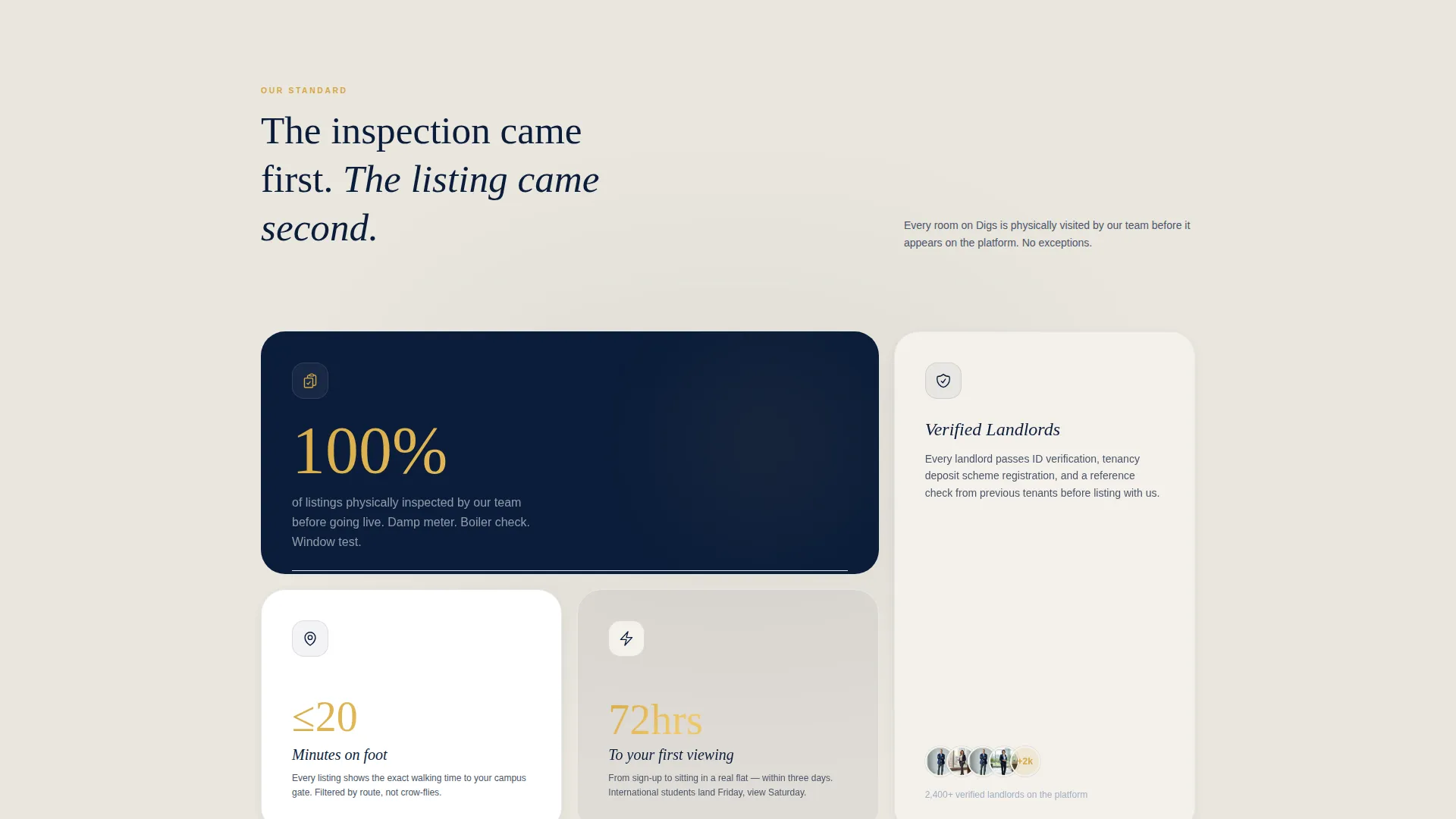
Every scroll transition opens with a bold number before an explanation. The left panel locks a prominent figure in view as the visitor scrolls, reinforcing credibility at each stage of the page without requiring the visitor to read long paragraphs.
Pinned Booking Call to Action
From the second scroll section onward, the primary call to action button stays fixed to the right panel. The button reads clearly in academic gold on navy, maintaining visibility as visitors move through the page content.
Three-Step Inline Booking Form
Clicking the primary button opens a compact inline form with three fields: university name with autocomplete, a move-in month dropdown aligned to academic terms (September, January, June), and a time-slot picker showing available viewings within the next 72 hours.
Secondary Browse Path
Below the primary call to action, an underlined text link labelled "Browse Rooms Near My Campus" gives hesitant visitors a lower-commitment route into the platform without disrupting the main booking flow.
Academic Gold Accent System
Buttons, stat figures, and interactive highlights all use a single confident accent colour. This restraint keeps the visual hierarchy clear and ensures the most important elements draw the eye without visual noise.
Page sections overview
| Section | Purpose |
|---|---|
| Cinematic Header Panel | Establishes scale and credibility with a panoramic image and stat overlay |
| Stats Impact Block | Delivers trust-building figures at the first scroll position |
| Split-Screen Body | Separates proof content on the left from booking actions on the right |
| Booking Form Panel | Captures lead intent through a three-step inline viewing request |
| Secondary Browse Path | Retains visitors not ready to book with a lower-commitment action |
Design & branding system
The visual identity follows a Navy Authority colour system inspired by an architecture student's organised desk. The palette balances institutional authority with approachable warmth, making the page feel curated rather than corporate.
- Deep institutional navy (#0B1D3A) anchors the header, left panel background, and primary button
- Chalk white (#F4F1EB) fills the right panel content space, creating a clean reading surface
- Academic gold (#D4A843) is reserved exclusively for buttons, stat numerals, and interactive highlights, keeping the accent meaningful
Mobile & speed optimization
The split-screen layout is designed with responsive reflow in mind. On smaller screens, the two panels stack vertically so content and the booking form remain fully accessible without horizontal scrolling.
- The pinned call to action adapts to a persistent bottom bar on mobile viewports
- The cinematic header image uses letterbox framing that scales proportionally across screen sizes
- The inline booking form fields are spaced for comfortable thumb interaction on touch devices
How this template helps you convert
The page is structured so that by the time a visitor reaches the booking form, the stats have already addressed every common trust concern. The layout does not ask for commitment before delivering proof.
- The header stat block establishes scale immediately, reducing the instinct to bounce before reading further
- The left-panel figure lock keeps credibility visible throughout the scroll, reinforcing the platform's authority at every stage
- The three-step form reduces perceived effort, making a viewing request feel quick and low-risk rather than like a lengthy sign-up
Other information about this template
This template is built as a single landing page, not a multi-page site. It is well suited to platforms operating in the verified student accommodation and co-living space for young professionals and postgraduates. The design language draws from an Atelier Studio aesthetic, which has become associated with premium property and architecture brands seeking a refined but approachable tone.
- The Pastoral Calm theme softens the institutional navy palette with warm chalk and brass-tone gold, avoiding the cold feel of typical property portals
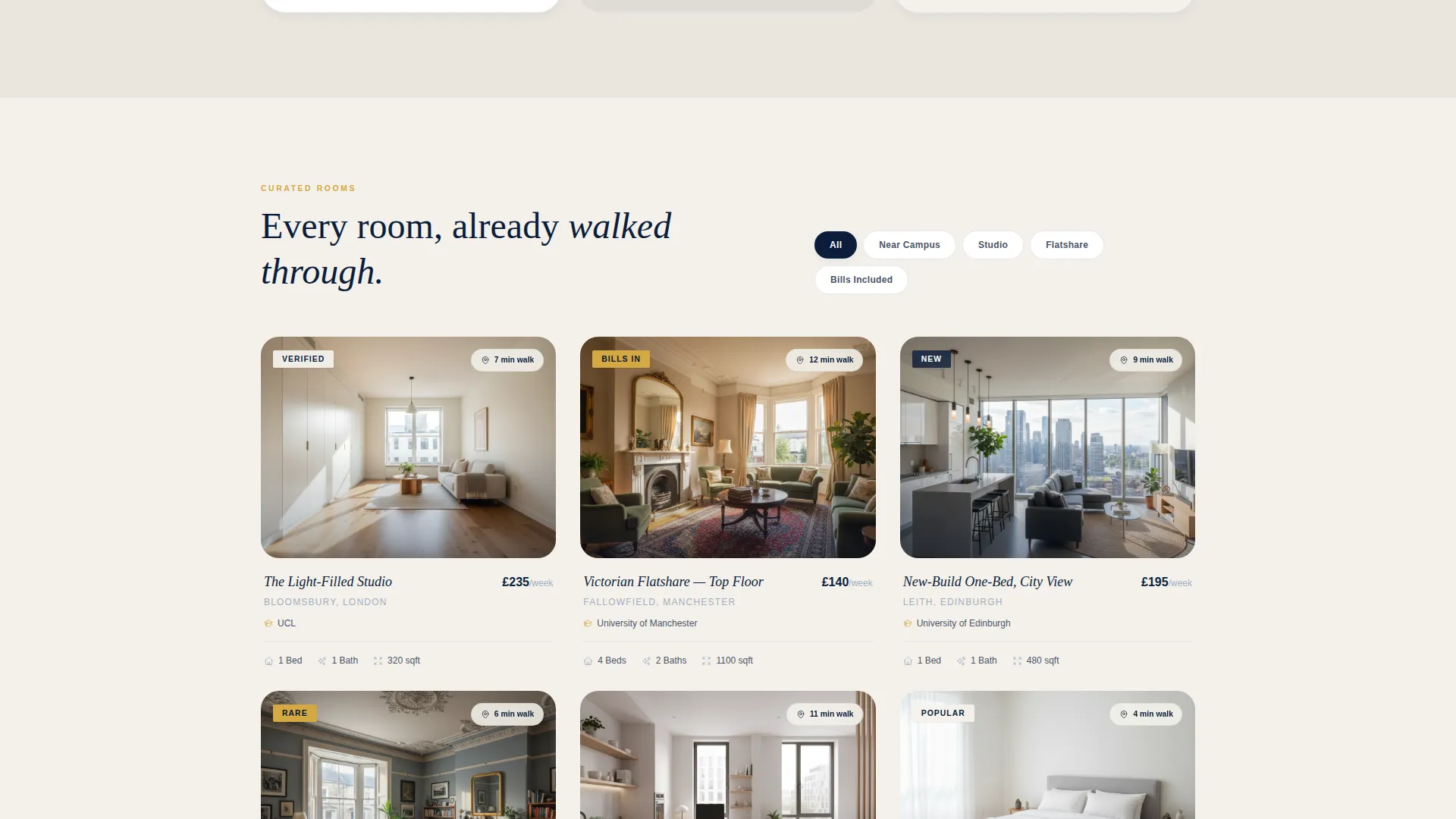
- The Card Grid modular template style means individual stat blocks and listing cards within the body can be updated or reordered without rebuilding the layout
- The Click-Through landing page direction keeps the visitor moving toward a single conversion goal rather than distributing attention across multiple destinations
Theme
Pastoral Calm
Creative direction
Case Study Narrative
Color system
Navy Authority
Style
Card Grid (Modular)
Direction
Click-Through
Page Sections
Panoramic Cinematic Header
Stats-first Scroll Structure
Pinned Booking Call to Action
Three-step Inline Booking Form
Secondary Browse Path
Academic Gold Accent System
Related questions
Can I change the stat figures shown in the header?
Does the booking form connect to a scheduling tool?
Is this template suitable for a single-city student housing platform?
Can the colour palette be updated to match an existing brand?
What are the two calls to action on this landing page?



