Celiac Disease Care Comparison Website Template
A celiac disease telehealth landing page built for gastroenterology practices. It leads with a portrait-centered physician header, guides visitors through a self-assessment checklist, and converts them via a three-step intake form. The comparison table is the core conversion section, showing exactly how specialist-led celiac care closes the gaps left by general practice.
by Rocket studio
Quick summary
This is a single-page, comparison-table landing page designed for a celiac disease telehealth practice. It connects newly diagnosed patients and struggling self-managers with board-certified gastroenterologists through a structured audit-and-convert flow: checklist, comparison table, patient proof, and a progressive intake form that turns uncertainty into a booked consultation.
Who this template is for
This template is built for gastroenterology-focused telehealth practices that specialize in celiac disease and related gastrointestinal (GI) conditions. It suits practices ready to communicate clinical authority through design and convert informed visitors into consultation requests.
- Board-certified gastroenterologists offering remote serology and biopsy review
- Celiac-focused telehealth practices targeting newly diagnosed adults and pediatric referrals
- GI specialists providing gluten-free transition protocols and differential diagnosis support
What problem this template solves
Most patients with a celiac diagnosis leave their initial appointment with a pamphlet and a six-month wait for a specialist. This template addresses that gap directly. It frames the practice as the structured next step, not a generic second opinion.
- Newly diagnosed adults do not know what comprehensive follow-up care looks like
- Parents of children with elevated tissue transglutaminase immunoglobulin A (tTG-IgA) need a clear path to specialist review
- Long-suffering self-diagnosed patients need a credible differential to rule out Crohn's disease, small intestinal bacterial overgrowth (SIBO), or wheat allergy
What you get with this template
The template delivers a complete, single-page lead generation experience. Every section has a defined role in moving a hesitant, medically anxious visitor toward form completion.
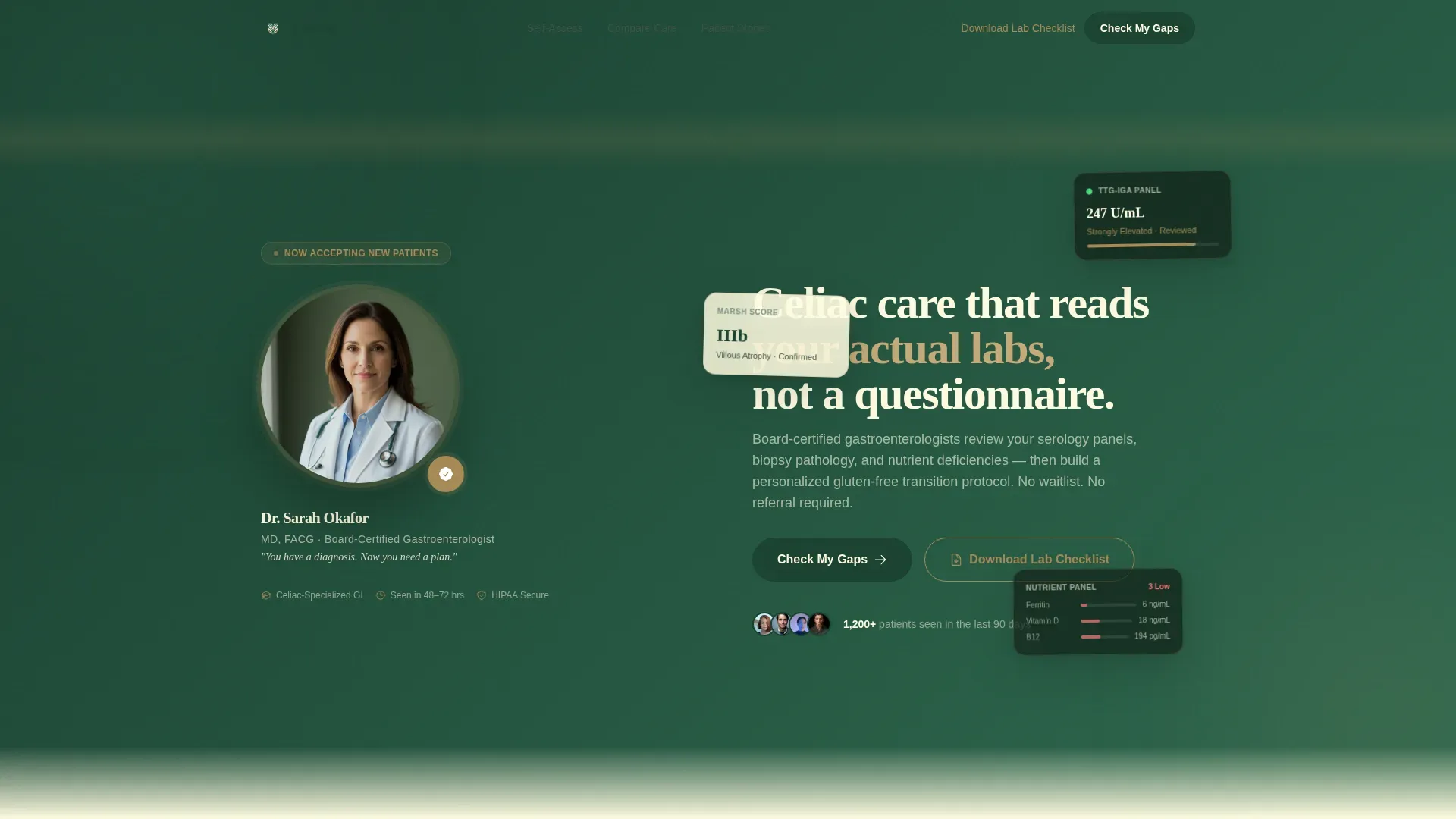
- A portrait-centered hero with physician credentials and a direct clinical headline
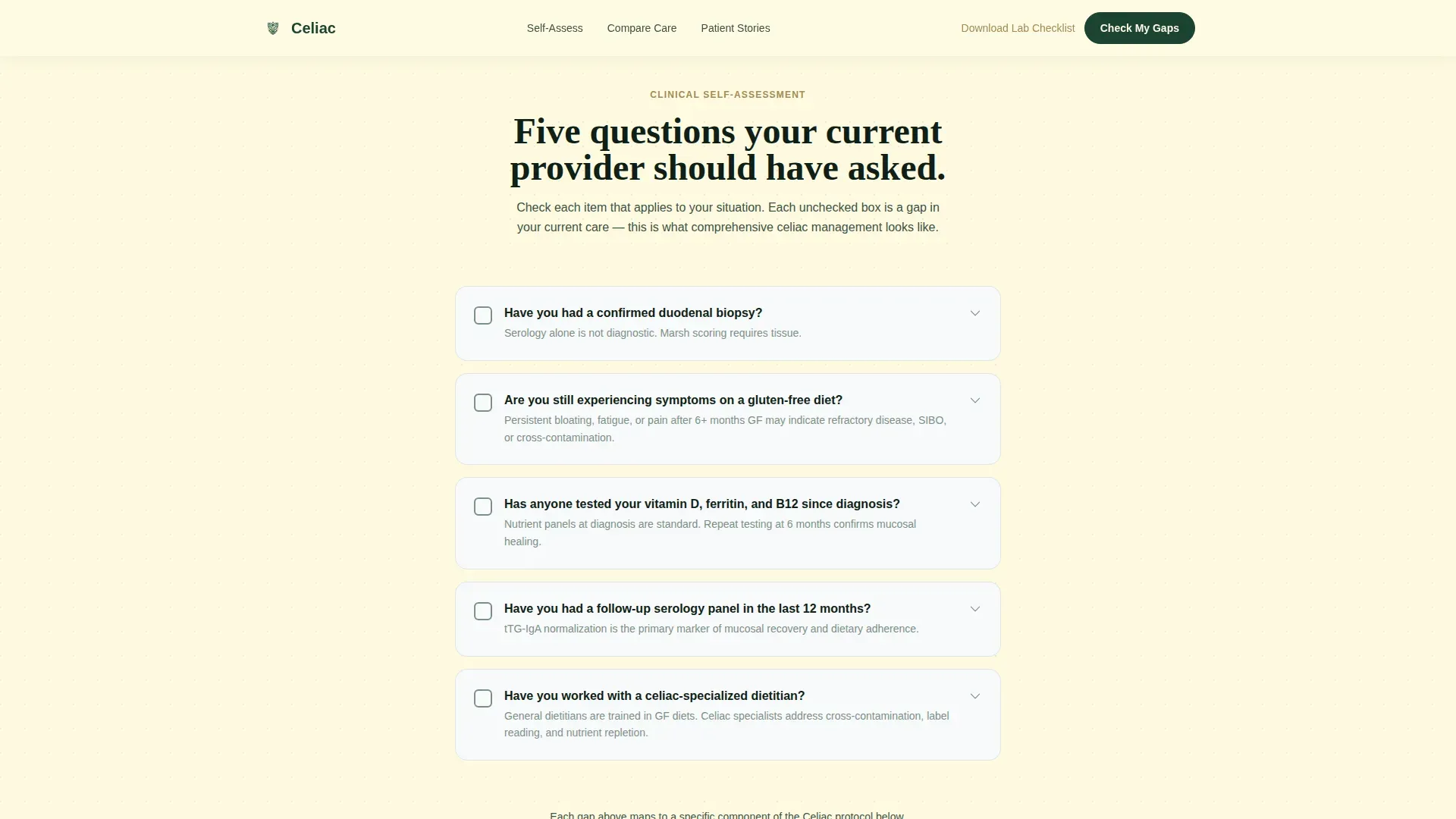
- An interactive self-assessment checklist that surfaces the visitor's own care gaps
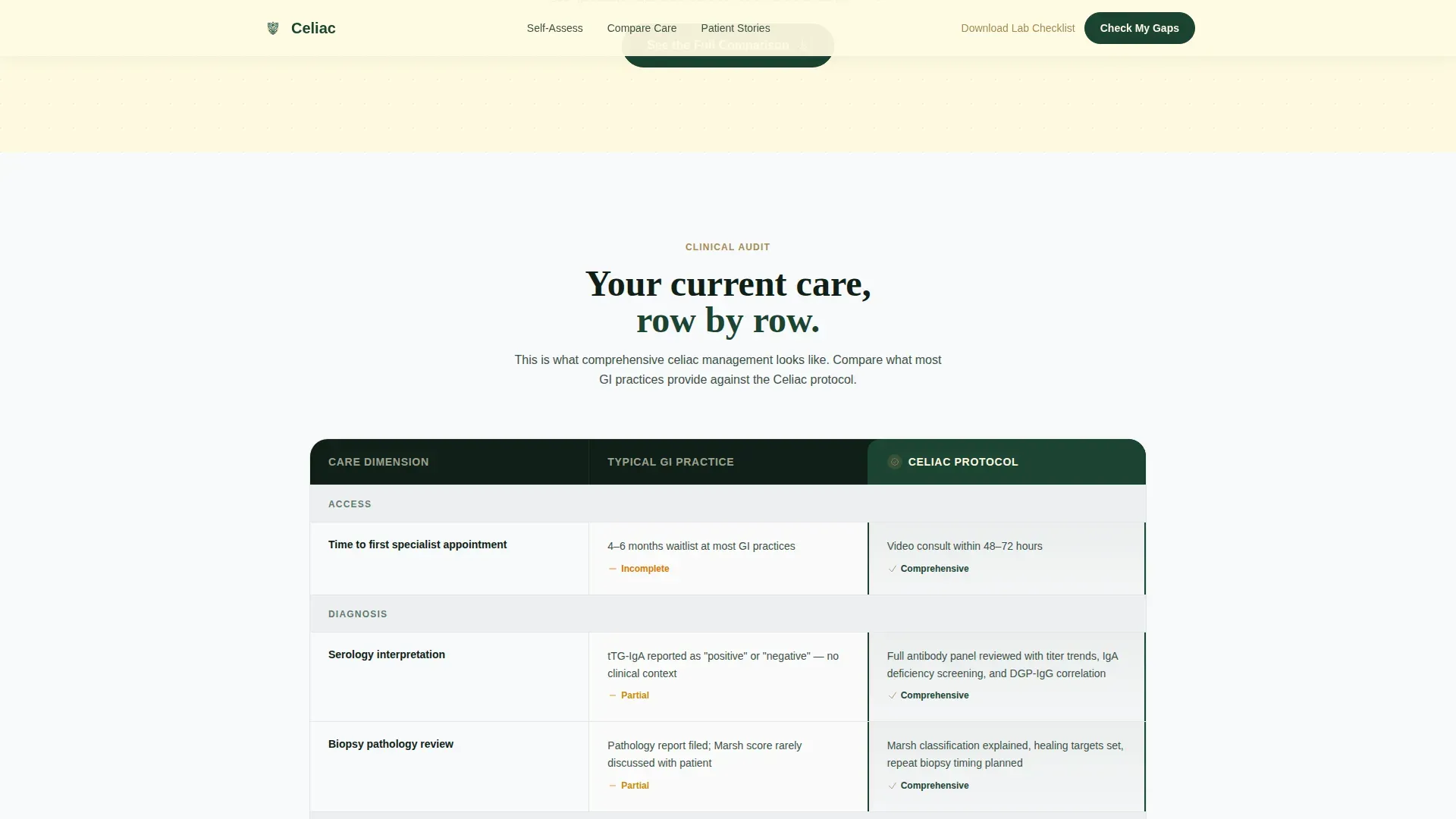
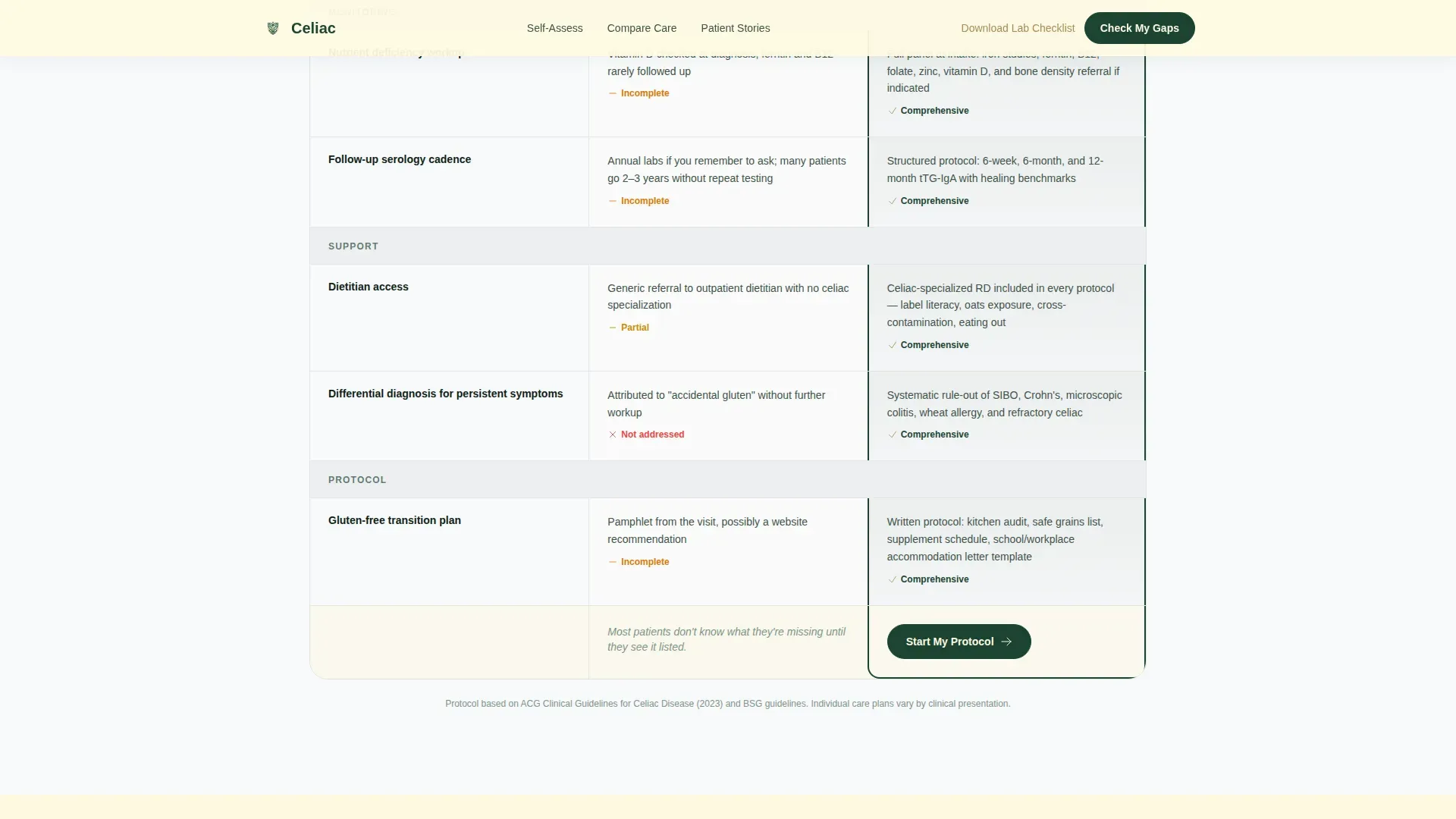
- A side-by-side comparison table, a three-step progressive intake form, and a secondary email capture path
Feature list
This template covers all the structural and interactive components a celiac telehealth practice needs to convert informed visitors at a high rate.
Portrait-Centered Physician Hero
The hero section displays a shoulders-up photograph of a gastroenterologist against a muted forest-green background. A name, credentials, and a single-line headline anchor the section with quiet clinical authority before the visitor scrolls.
Interactive Self-Assessment Checklist
A scroll-triggered checklist asks visitors targeted clinical questions: whether they have had a confirmed biopsy, whether symptoms persist on a gluten-free diet, and whether key nutrient panels have been checked. Each checked item reveals a gap and transitions directly into the comparison table below.
Side-by-Side Comparison Table
The core conversion section places current general care against the practice's celiac-specific protocol, row by row. Rows cover response time, panel comprehensiveness, dietitian access, and follow-up cadence. Hover states and scroll-triggered row stagger keep the table engaging without sacrificing clinical clarity.
Three-Step Progressive Intake Form
The primary call to action, "Check My Gaps," anchors to a multi-step form. The first screen asks about diagnosis status, the second asks about the last relevant lab date, and the third collects name, state, and preferred appointment window. The phased structure reduces friction and feels like a clinical intake, not a sales funnel.
Secondary Email Capture Path
Visitors not ready to book can download the Celiac Lab Checklist. This secondary path collects an email address and delivers a printable checklist the patient can bring to any current provider, keeping the practice top of mind without pressuring an immediate booking.
Testimonial Mosaic with Outcome Metrics
A bento-grid layout presents patient stories alongside specific lab metrics and recovery timelines. Each testimonial includes condition context, grounding the social proof in clinical reality rather than generic satisfaction statements.
Page sections overview
| Section | Purpose |
|---|---|
| Hero portrait header | Establish physician trust and surface the primary call to action |
| Self-assessment checklist | Help visitors identify their own care gaps through an interactive audit |
| Comparison table | Show current care versus specialist protocol, row by row |
| Testimonial mosaic | Reinforce credibility with patient outcomes and specific lab context |
| Progressive intake form | Capture leads through a low-friction, three-step clinical intake |
| Footer single-row | Provide navigation, legal links, and secondary contact options |
Design & branding system
The visual identity follows a Corporate Precision theme built on the Forest Trust color system. The palette balances sterile clinical confidence with organic warmth, referencing the calm of a physician's office inside a national park lodge.
- Deep diagnostic green (#1B4332) leads section headers and navigation; calm hemlock (#2D6A4F) supports depth in hover states and dividers
- Soft oat cream (#FEFAE0) warms the background between comparison rows; clinical white (#F8F9FA) keeps card surfaces clean and readable
- Muted gold (#A68A56) appears sparingly on checkmarks, badges, and call-to-action borders, directing the eye only where conversion matters
Mobile & speed optimization
The template is built desktop-first to serve the comparison table experience at full width, and it scales down to a fully responsive mobile layout. Scroll-triggered animations and interactive components use a client-side rendering approach, while static content uses server components for efficient loading.
- Comparison table reflows into a stacked card format on smaller screens
- Checklist animations and multi-step form interactions are handled client-side for smooth, responsive feedback
- Static hero and testimonial sections use server components to reduce initial load weight
How this template helps you convert
Every design and copy decision in this template is aimed at reducing the anxiety of a medically uncertain visitor and replacing it with a clear, logical next step.
- The self-assessment checklist turns vague worry into named, solvable gaps, making the comparison table feel like a direct answer rather than a sales pitch.
- The comparison table builds row-by-row proof that specialist-led celiac care is materially different from general practice follow-up, so the intake form feels like the obvious continuation of a process already underway.
- The dual conversion paths, "Check My Gaps" for ready visitors and the lab checklist download for cautious ones, ensure the practice captures leads at every readiness level without losing anyone to a hard sell.
Other information about this template
This template is part of a broader library of telehealth and specialty medical landing page templates designed for high-trust, lead-generation contexts in the Health and Medical category.
- Typography uses Fraunces for serif headlines and DM Sans for body text and user interface elements, pairing medical authority with clean digital readability
- Animation is set to medium intensity: scroll-triggered reveals, checklist check animations, and comparison table row stagger keep the page lively without distracting from clinical content
- The template is localized for English-language audiences in the United States, using USD pricing references and US date format conventions throughout
Theme
Corporate Precision
Creative direction
Checklist & Audit
Color system
Forest Trust
Style
Comparison Table
Direction
Lead Generation
Page Sections
Portrait-centered Physician Hero
Interactive Self-assessment Checklist
Side-by-side Comparison Table
Three-step Progressive Intake Form
Secondary Email Capture Path
Testimonial Mosaic with Outcome Metrics
Related questions
Can I replace the physician photograph with my own headshot?
Is the comparison table content editable?
How does the three-step intake form work?
What is the secondary conversion path for visitors not ready to book?
Do I need external tools to run the interactive checklist and multi-step form?



