Tow Truck Operator Advanced Booking Website Template
Dispatch is a split-screen landing page template built for 24-hour tow truck operators. It pairs live-counter stats with crew portraits, introduces each operator through personal FAQ panels, and drives bookings through a pinned "Request a Tow Now" button. The charcoal-and-amber design communicates urgency and professionalism from the first scroll.
by Rocket studio
Quick summary
Dispatch is a single-page towing landing page template designed for round-the-clock tow operators. A stats-forward header builds instant credibility, crew-driven split screens turn FAQs into human conversations, and a pinned booking form keeps the next call one tap away. The charcoal-and-amber palette feels like a lit highway at night: dark everywhere except where it counts.
Who this template is for
This template is built for towing businesses that need a page working as hard as their drivers do. It works equally well for solo operators and multi-truck fleets who want to convert late-night searches into booked jobs.
- Independent tow truck operators running 24-hour roadside coverage
- Fleet and body shop account managers who book recurring, non-emergency hauls
- Towing company owners who want a credible online presence without a complex build
What problem this template solves
Most towing websites feel generic and fail to answer the questions that stop someone from calling. A stranded driver at midnight has real concerns about cost, timing, and whether their car will arrive undamaged. This template addresses those fears head-on before the visitor ever reaches the booking form.
- Visitors leave before calling because they can't find clear pricing or timing information
- The page feels impersonal, making it hard to trust an operator with a luxury or fleet vehicle
- There is no obvious next step, so warm leads scroll away without requesting a tow
What you get with this template
You get a complete, single-page layout structured around three conversion goals: build credibility fast, dissolve common objections through human-centered FAQs, and close with a friction-reduced booking form. Every section has a defined job, and nothing on the page is decorative without purpose.
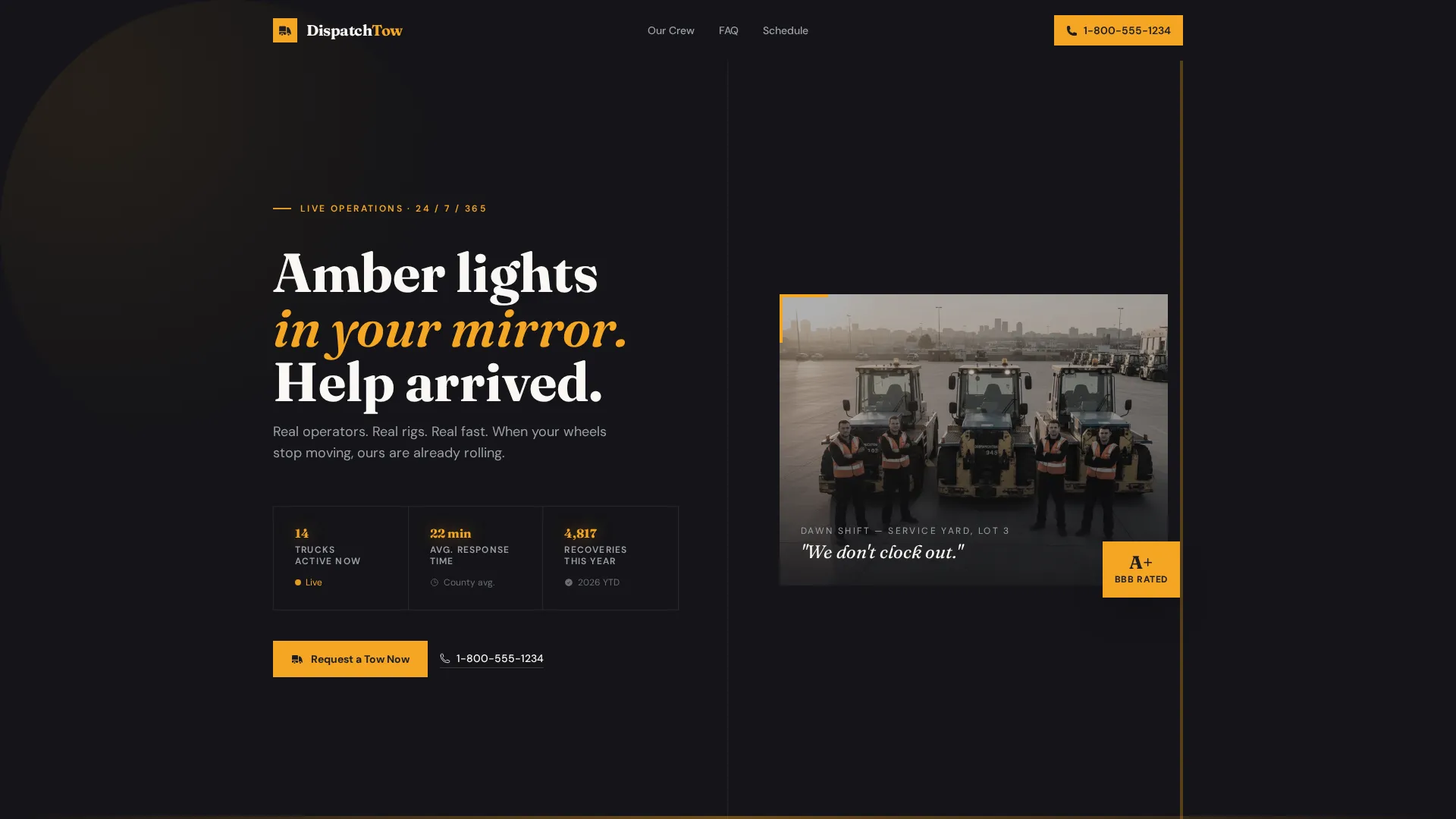
- A stats header with three animated counters plus a crew portrait block
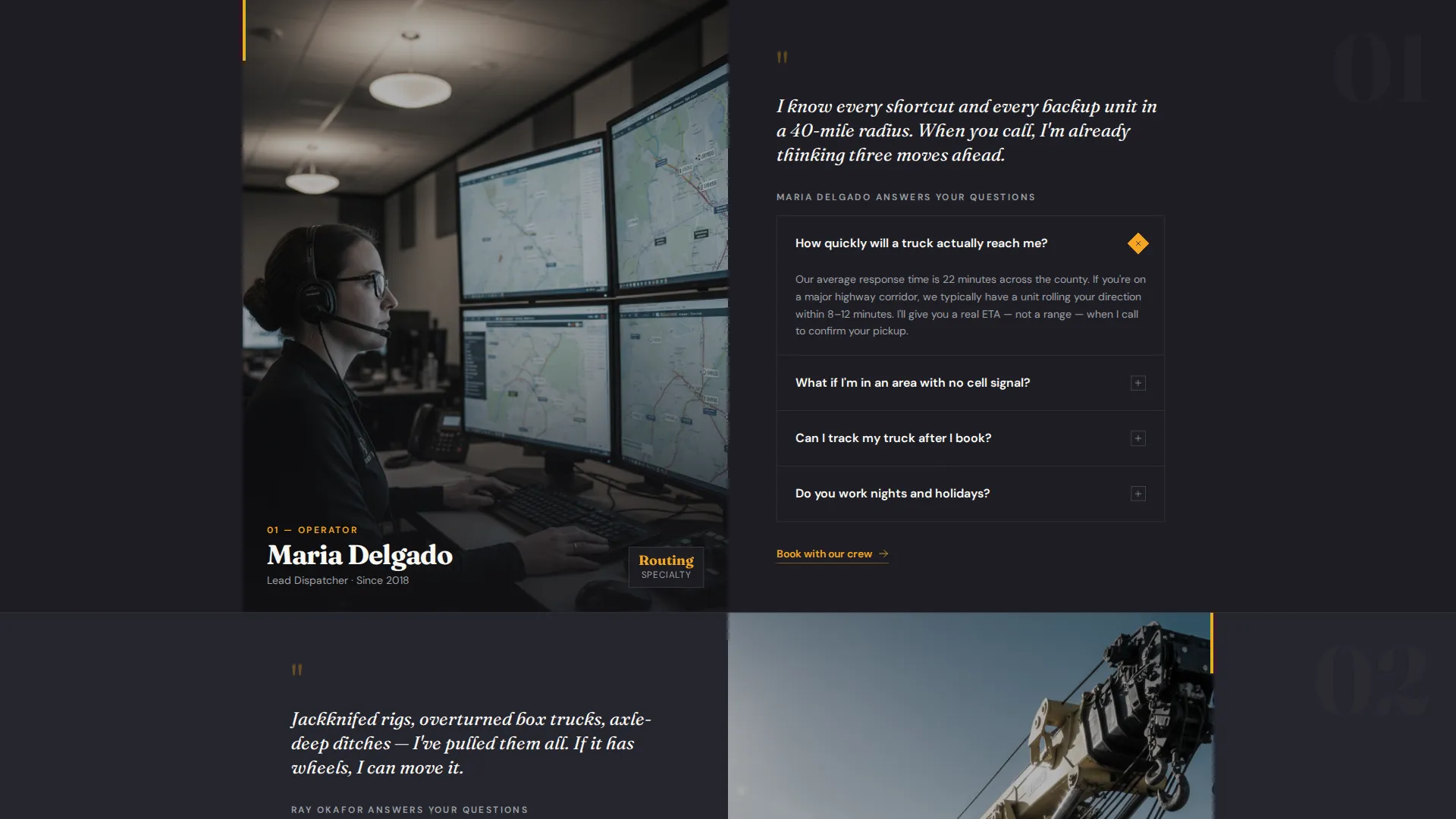
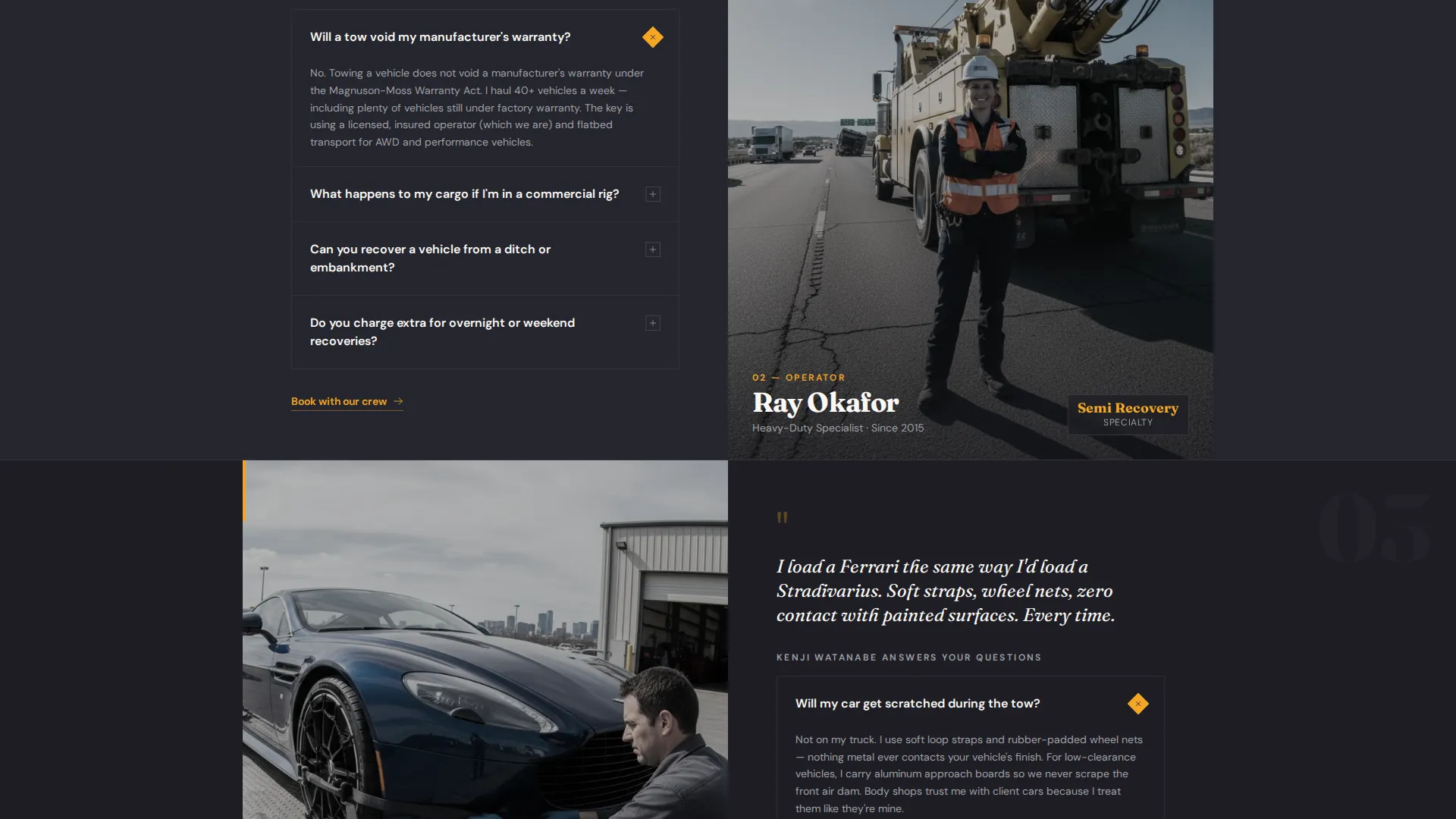
- Per-operator split-screen FAQ sections introducing Maria, Ray, and Kenji with their personal answers
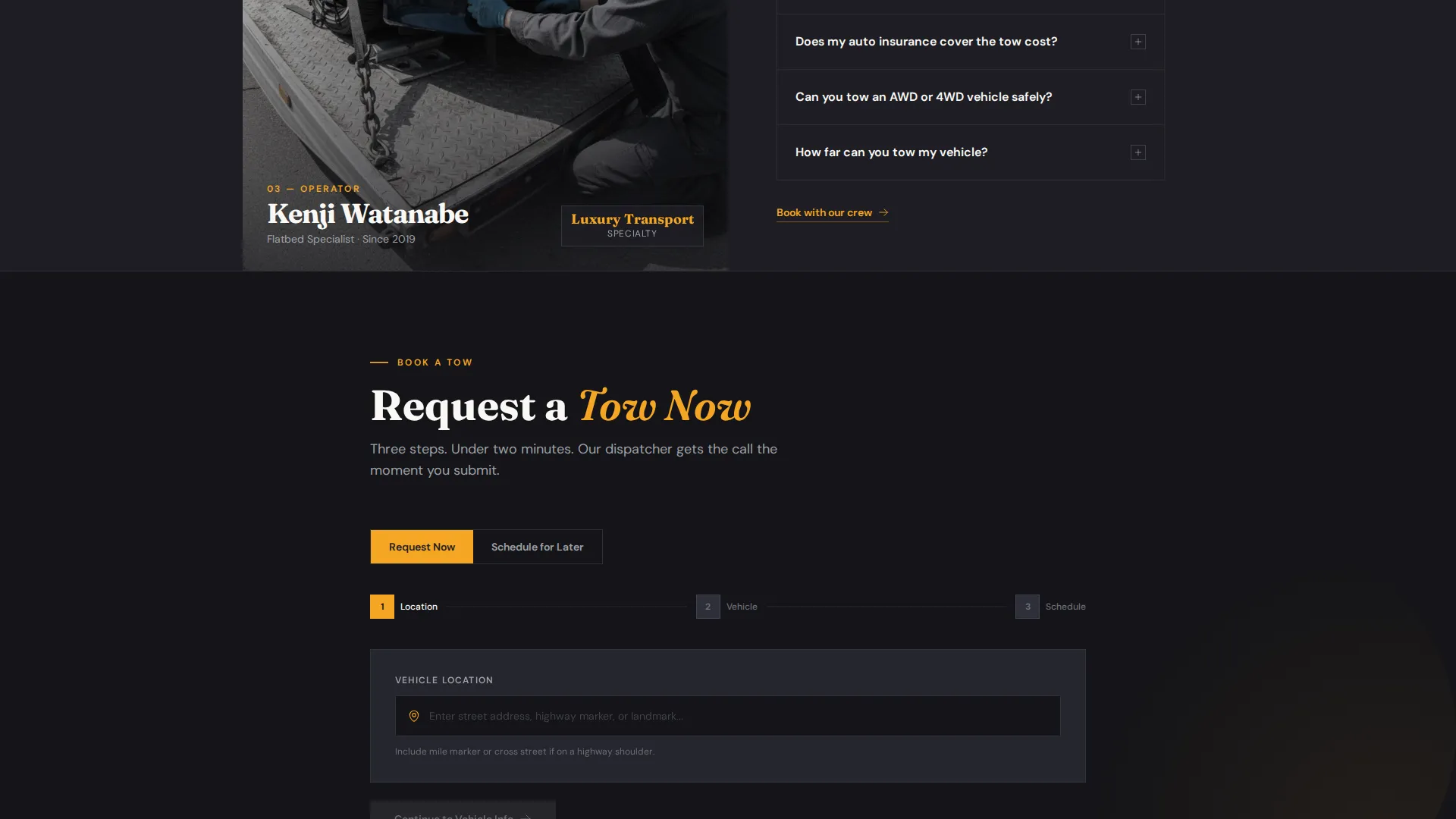
- A pinned "Request a Tow Now" call-to-action bar and a three-step booking form with a secondary scheduling path
Feature list
This template delivers a focused set of components, each matched to a real moment in the visitor's decision journey.
Animated Stats Header
Three large counters display trucks currently on the road, average response time in minutes, and total recoveries completed this year. The numbers tick upward on load, signaling an active, high-volume operation before a word is read.
Crew Portrait Block
A right-side portrait of four operators standing in front of their rigs at dawn anchors the header. High-visibility vests and crossed arms communicate competence without marketing language.
Operator-Led FAQ Split Screens
Each scroll section introduces one team member on one side and a personally answered FAQ on the other. Dispatcher Maria, heavy-duty specialist Ray, and flatbed driver Kenji each dissolve a specific visitor fear with direct, credible answers.
Pinned Booking Call-to-Action
An amber "Request a Tow Now" bar stays fixed at the bottom of the viewport throughout the entire page. It opens a three-step form: map-pin or address entry, vehicle type and condition selection, and a preferred pickup window.
Dual Booking Paths
A secondary "Schedule for Later" option sits alongside the primary call-to-action. It opens a calendar picker designed for body shops and fleet managers who need to book non-emergency hauls in advance.
Pre-Objection FAQ Coverage
FAQ panels are positioned before the final booking form, addressing cost, insurance implications, and response timing. Objections are answered by the operators most qualified to address them, making the answers feel trustworthy rather than scripted.
Page sections overview
| Section | Purpose |
|---|---|
| Stats & Metrics Header | Establishes credibility with live counters and a crew portrait |
| Dispatcher Maria Panel | Answers routing and arrival-time questions personally |
| Specialist Ray Panel | Addresses heavy-duty and semi-truck recovery concerns |
| Flatbed Driver Kenji Panel | Covers luxury and high-value vehicle handling questions |
| Primary Booking Form | Captures emergency tow requests in three steps |
| Schedule for Later | Provides a calendar path for non-emergency bookings |
Design & branding system
The visual system is built around the feeling of a lit highway at night. Every color decision serves a functional role: dark surfaces keep the eye moving, amber commands attention at decision points, and white content panels ensure legibility without softening the industrial tone.
- Deep asphalt charcoal (#1E1E24) forms the primary background across all sections
- Road-stripe amber (#F5A623) marks every button, counter highlight, and actionable element
- Weathered steel gray (#6B6E73) is used for secondary text and dividers, and headlight white (#FAF8F5) powers content panels
Mobile & speed optimization
The split-screen layout is designed to stack cleanly on smaller viewports without losing its structural rhythm. The pinned booking bar remains accessible on mobile, keeping the primary call-to-action visible at every scroll depth.
- Split-screen panels reflow to full-width stacked sections on narrow screens
- The pinned amber booking bar persists across all viewport sizes
- Three-step form inputs are sized for thumb-friendly interaction on touch devices
How this template helps you convert
The page is structured as a trust-then-convert funnel. Credibility is established before any ask is made, objections are removed before the form appears, and the booking path is always visible regardless of where the visitor is on the page.
- The stats header and crew portrait establish operational credibility in the first viewport, reducing the impulse to bounce
- Operator-answered FAQ panels address cost, warranty, insurance, and timing concerns before the visitor reaches the booking form, so the decision to call is already made
- The dual booking paths serve two distinct audiences simultaneously: emergency callers who need a tow right now and account-based clients who plan ahead
Other information about this template
This template is categorized under Professional Services and is specifically aligned with the tow truck operator online presence and booking page niche. It follows an FAQ-driven creative direction, meaning the page earns trust through knowledge before pushing for a conversion. The layout style is built on a comparison-oriented structure that lets visitors self-identify their situation and find the right answer quickly.
- Template theme: Executive Suite with a Charcoal & Amber color system
- Primary landing page direction: Lead Generation with dual booking paths
- Header concept: Stats and metrics with a crew portrait, suited to high-trust service businesses
- The FAQ-driven structure makes this layout adaptable to other 24-hour service businesses beyond towing
Theme
Executive Suite
Creative direction
FAQ-Driven
Color system
Charcoal & Amber
Style
Comparison Table
Direction
Lead Generation
Page Sections
Animated Stats Counter Header
Crew Portrait & Identity Block
Operator-led FAQ Split Screens
Pinned Booking Call-to-action Bar
Dual Booking Paths
Pre-objection FAQ Layout
Related questions
What type of towing business is this landing page best suited for?
Can I customize the team members and their FAQ answers?
How does the three-step booking form work?
Does the template support both emergency and non-emergency bookings?
How many sections does this landing page include?



