Tow Truck Operator Booking Website Template
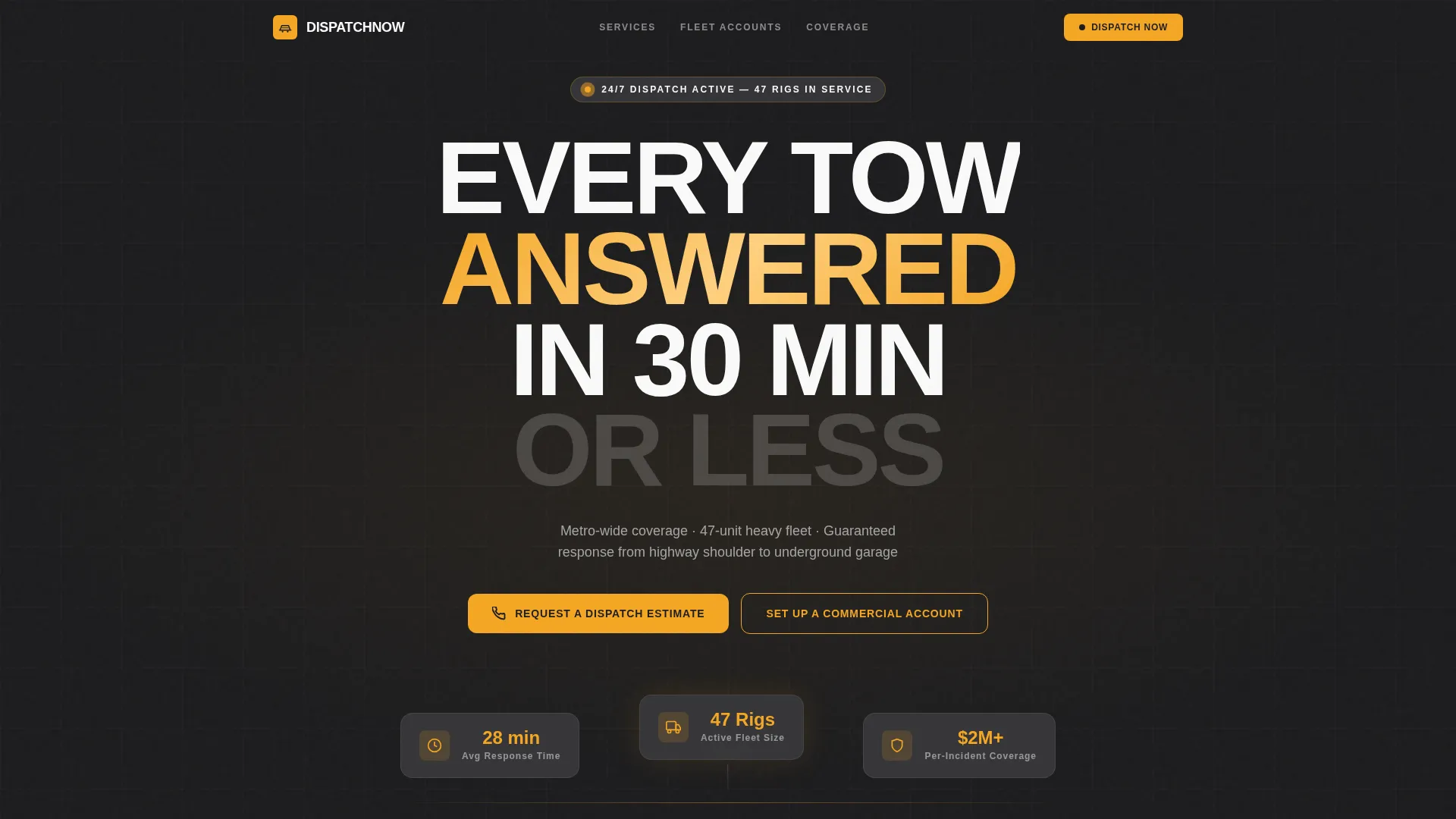
Dispatch is a single-page towing service landing page built around a comparison table layout and FAQ-driven scroll structure. It targets tow truck operators who serve fleet managers, insurance adjusters, and property managers. The charcoal and amber design system, giant centered headline, and tiered service tables guide every visitor from their specific problem straight to a booking or estimate request.
by Rocket studio
Quick summary
Dispatch is a lead generation landing page for tow truck operators running heavy-duty recovery and flatbed fleets. It uses a comparison table structure to show three service tiers side by side. Visitors find their exact situation in a FAQ-anchored section, review the relevant tier, and submit a dispatch estimate request or commercial account inquiry before leaving the page.
Who this template is for
This template is built for tow truck operators and roadside recovery businesses that handle a high volume of service requests across multiple client types. If you juggle fleet contracts, one-off roadside calls, and property management accounts, this page speaks directly to every one of those buyers.
- Fleet managers coordinating vehicle breakdowns across metro routes
- Insurance adjusters authorizing roadside recovery and transport
- Property managers needing unauthorized vehicles removed quickly
What problem this template solves
Most towing service pages list phone numbers and a generic "we tow anything" headline. Visitors who arrive with specific, urgent questions, about vehicle weight, underground garage access, electric vehicle handling, or fleet invoicing, find no clear answer and leave. Dispatch solves that by structuring the entire page around the real objections a dispatcher hears daily.
- Visitors cannot quickly match their situation to the right service tier
- No comparison of response time, capacity, or pricing across service levels
- Commercial clients lack a clear path to set up a fleet or account relationship
What you get with this template
You get a fully structured single-page layout that moves visitors through a logical, objection-clearing sequence. Every section exists to reduce hesitation and accelerate the decision to request a tow or open a commercial account.
- A viewport-filling centered headline with subtext covering service radius, fleet size, and availability
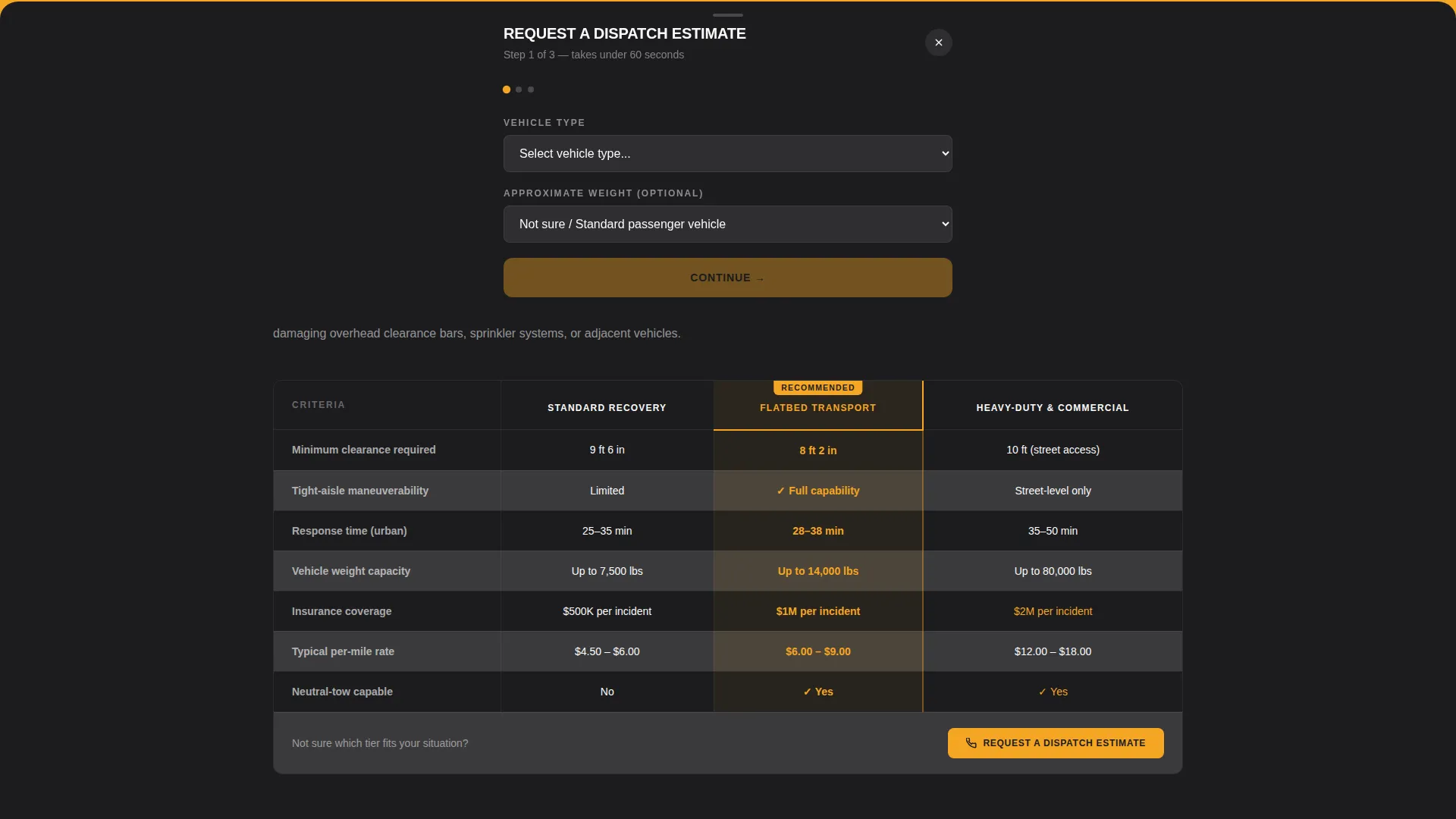
- Three comparison tables covering Standard Recovery, Flatbed Transport, and Heavy-Duty and Commercial tiers
- A slide-up estimate request form and a separate commercial account qualification form
Feature list
This template delivers a focused set of purpose-built components. Each one is drawn directly from the needs of a towing and roadside recovery operation.
Giant Centered Headline Header
The header opens with a single bold statement filling the viewport in a condensed heavy sans-serif. A one-line subtext row below it confirms service radius, fleet size, and around-the-clock availability. The amber call-to-action button sits directly beneath and pulses once on load to signal immediate response.
FAQ-Anchored Scroll Structure
The page scroll is organized around real dispatcher questions. Each question anchors a content section that opens directly into the relevant comparison table. Visitors navigate by recognizing their own situation, not by browsing abstract feature lists.
Three-Tier Comparison Tables
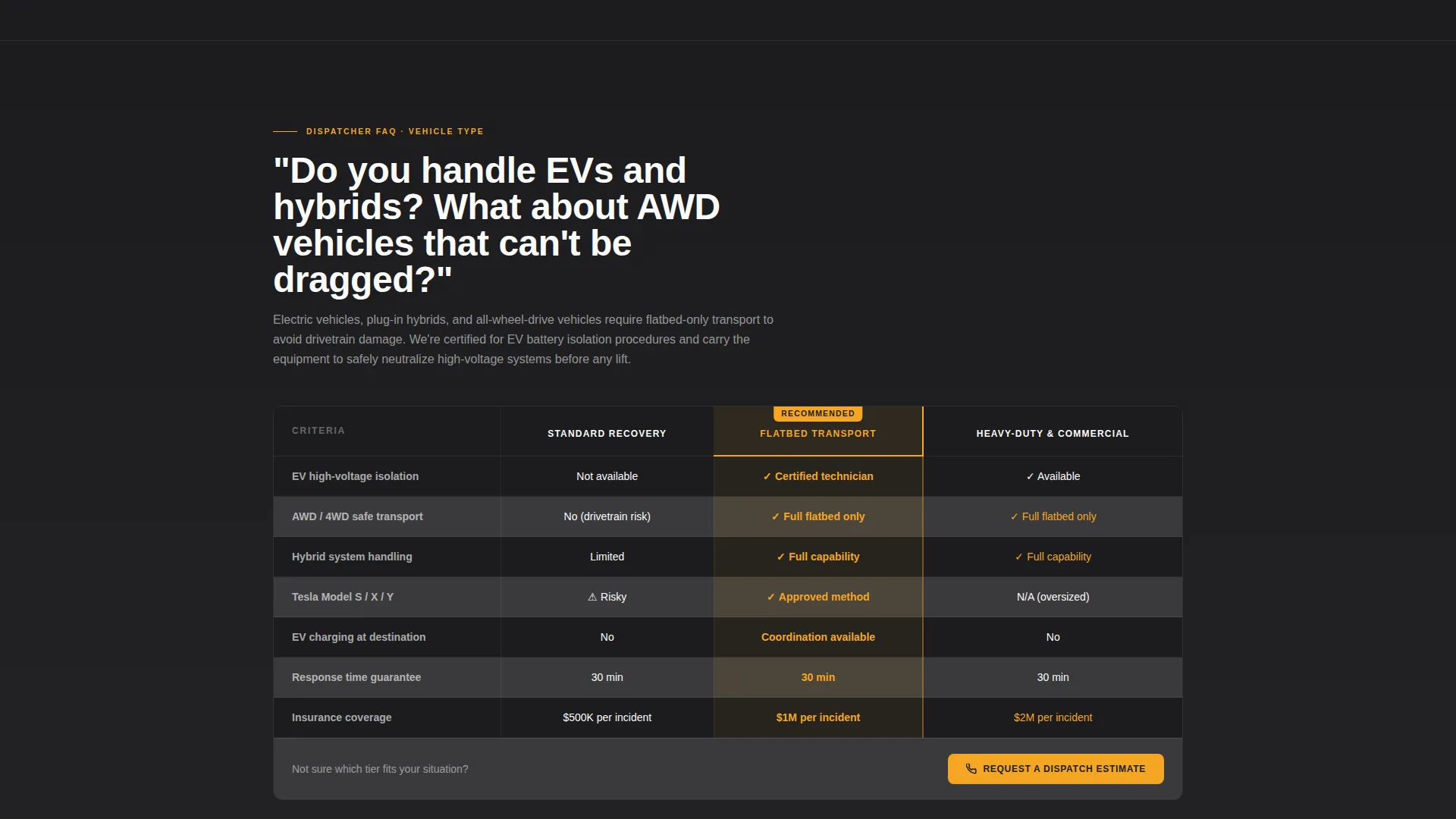
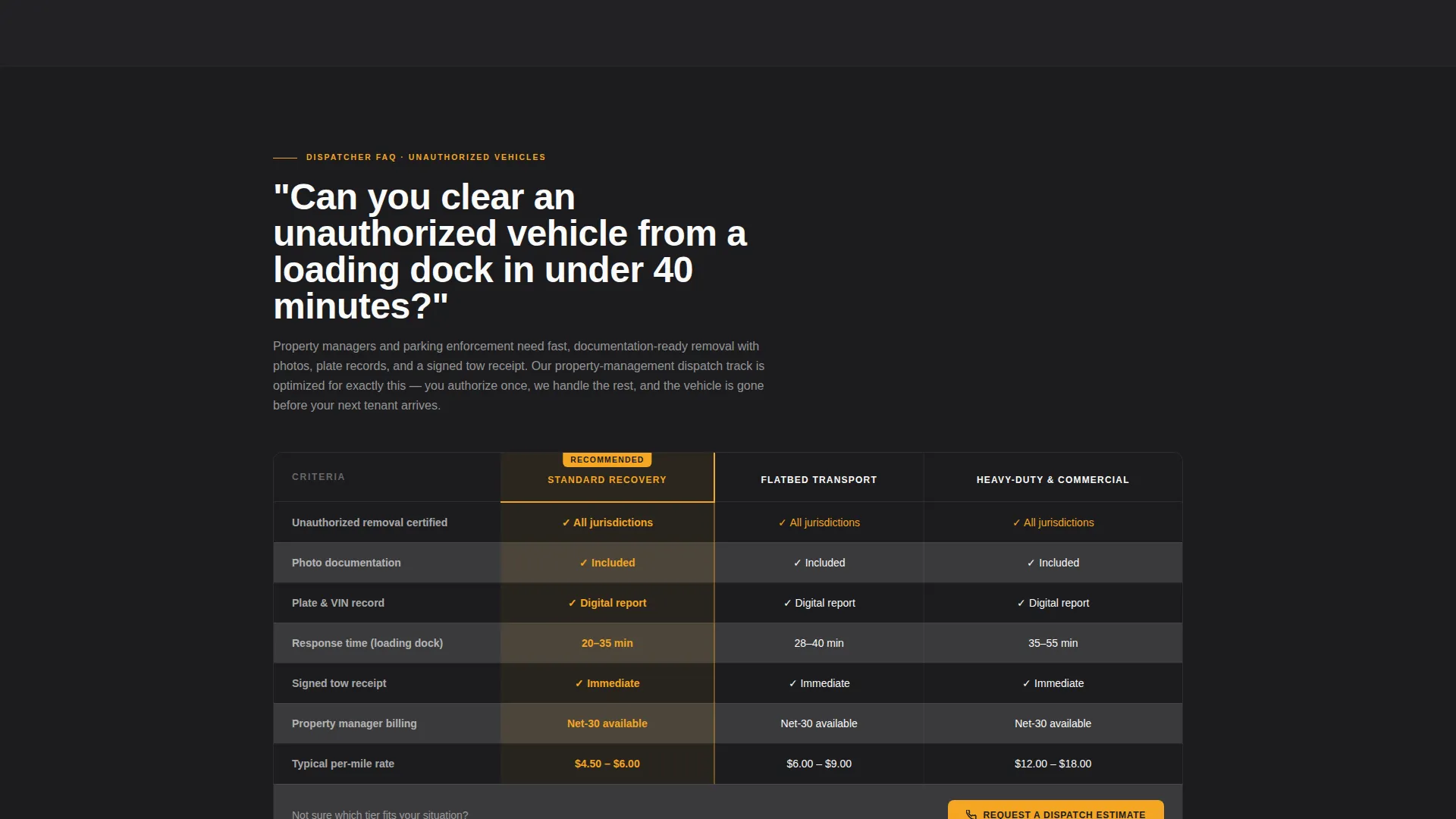
Each comparison table shows Standard Recovery, Flatbed Transport, and Heavy-Duty and Commercial service options side by side. Columns cover response time, vehicle weight capacity, insurance coverage, and per-mile rate ranges. Alternating charcoal and gunmetal row colors keep large data tables scannable, and the recommended tier is outlined in amber.
Slide-Up Dispatch Estimate Form
The primary lead form opens as a slide-up panel triggered by the main call-to-action. It collects information in three sequential steps: vehicle type and approximate weight, location or zip code, then urgency level. Urgency options cover stranded now, scheduled tow, and ongoing fleet contract.
Commercial Account Qualification Path
A secondary conversion path lets fleet operators bypass the standard estimate form. Clicking "Set Up a Commercial Account" routes to a longer form collecting company name, average monthly tow volume, and preferred invoicing terms. This keeps high-value B2B leads on a separate, appropriate track.
Fixed Mobile Bottom Bar
On mobile, the primary call-to-action is fixed in a persistent bottom bar so it remains reachable at every scroll position. The same estimate request button also repeats after every comparison table on desktop and mobile, ensuring no visitor has to scroll back up to convert.
Page sections overview
| Section | Purpose |
|---|---|
| Hero Headline Header | Establishes the 30-minute response promise and primary call to action |
| FAQ Question One | Anchors underground garage service context and table |
| Standard Recovery Table | Compares entry-tier tow options with full spec columns |
| FAQ Question Two | Anchors electric and hybrid vehicle handling context |
| Flatbed Transport Table | Compares flatbed service specs across response and rate columns |
| FAQ Question Three | Anchors fleet invoicing and commercial account context |
| Heavy-Duty Commercial Table | Compares heavy-duty tier specs for commercial clients |
| Estimate Request Form | Slide-up panel capturing vehicle, location, and urgency details |
| Commercial Account Form | Qualification form for fleet and property management clients |
| Fixed Mobile call to action Bar | Persistent bottom-bar booking button for mobile visitors |
Design & branding system
The visual identity follows an Executive Suite theme built entirely around a charcoal and amber color system. The palette is inspired by a dispatch office at night: dark surfaces, glowing data, and the amber pulse that signals a truck is moving. Every color decision serves a functional role.
- Deep asphalt charcoal (#1C1C1E) covers primary backgrounds; brushed gunmetal (#3A3A3C) surfaces card areas and alternating table rows
- High-visibility amber (#F5A623) appears exclusively on calls-to-action, active-state highlights, and the recommended-tier table outline
- Clean headlight white (#FAFAFA) is used for all body text, keeping contrast high against dark backgrounds
Mobile & speed optimization
The template is designed to keep the conversion path intact at every screen size. Mobile visitors face no layout breakdowns between the headline and the estimate form.
- The primary call-to-action button is fixed in a persistent bottom bar on mobile so it is always one tap away
- Comparison tables are structured for horizontal scroll or column-collapse on smaller screens, keeping data readable without zooming
- The slide-up form panel uses a sequential three-step layout that works cleanly on narrow viewports without overwhelming the screen
How this template helps you convert
The page is engineered so visitors arrive at the call-to-action already convinced. Every structural decision serves that goal.
- FAQ-anchored sections match the visitor's exact situation before showing them a table, removing the need to self-navigate and reducing drop-off
- Comparison tables answer price, capacity, and response-time questions inline, clearing the most common objections before the form appears
- Two distinct conversion paths, the dispatch estimate form and the commercial account form, ensure both one-off callers and high-volume fleet clients reach the right next step
Other information about this template
Dispatch is categorized under Professional Services with a specific focus on tow truck operator online presence and booking page use cases. It is a strong fit for operators who want a polished, credible page that matches the seriousness of the clients they serve.
- The template style is Comparison Table, making it useful beyond towing for any service business that needs to differentiate tiers clearly
- The FAQ-Driven creative direction means the page structure can be adapted by updating the dispatcher questions to match a different service area or specialty
- The Executive Suite theme and charcoal and amber palette are pre-configured and require only brand name, contact details, and service specifics to go live
Theme
Executive Suite
Creative direction
FAQ-Driven
Color system
Charcoal & Amber
Style
Comparison Table
Direction
Lead Generation
Page Sections
Giant Centered Headline with Amber Call to Action
Faq-anchored Section Scroll
Three-tier Service Comparison Tables
Slide-up Dispatch Estimate Form
Commercial Account Qualification Path
Fixed Mobile Bottom Bar Call to Action
Related questions
What type of towing business is this template designed for?
Can I update the comparison table columns to match my actual pricing?
How does the commercial account form differ from the estimate request form?
Does the template include a mobile-friendly call-to-action layout?
Can I change the FAQ questions to reflect my own service area?



