Judiciary & Legal Professional Website Template
Docket is a single-page district court landing page template built for public courthouse portals. It leads with an interactive SVG campus map, a sticky case-search bar, and zigzag content sections that guide attorneys, litigants, jurors, and court reporters from confusion to clarity. The monochrome steel palette and clean typographic system give every section the quiet authority of a well-run courthouse.
by Rocket studio
Quick summary
Docket is a content-forward district court landing page template. It opens with a vector courthouse campus map and a floating search bar, then moves visitors through a zigzag scroll covering jurisdiction, forms, the weekly court calendar, and judicial profiles. Every section answers one specific question a courthouse visitor has before they ever reach the phone.
Who this template is for
This template is built for public-facing district court websites that need to serve a wide and varied audience without confusion. If your court receives daily calls about case numbers, parking, or form downloads, this layout is designed to reduce that friction directly.
- Defense attorneys and self-represented litigants checking deadlines or downloading forms
- First-time jurors looking for parking directions and reporting instructions
- Court reporters, probation officers, and legal researchers confirming department assignments
What problem this template solves
Most court websites bury critical information inside dense navigation menus. Visitors land without orientation and leave to call the clerk's office instead. Docket solves the orientation problem at the page level.
- No clear campus wayfinding means attorneys and litigants arrive late or at the wrong building
- Forms scattered across unorganized pages cause deadline errors for self-represented parties
- Lack of a live calendar view forces phone calls that tie up court staff
What you get with this template
You get a fully structured single-page layout with seven distinct sections, each mapped to a specific courthouse information need. The design, typography, and interaction patterns are all included and ready to customize.
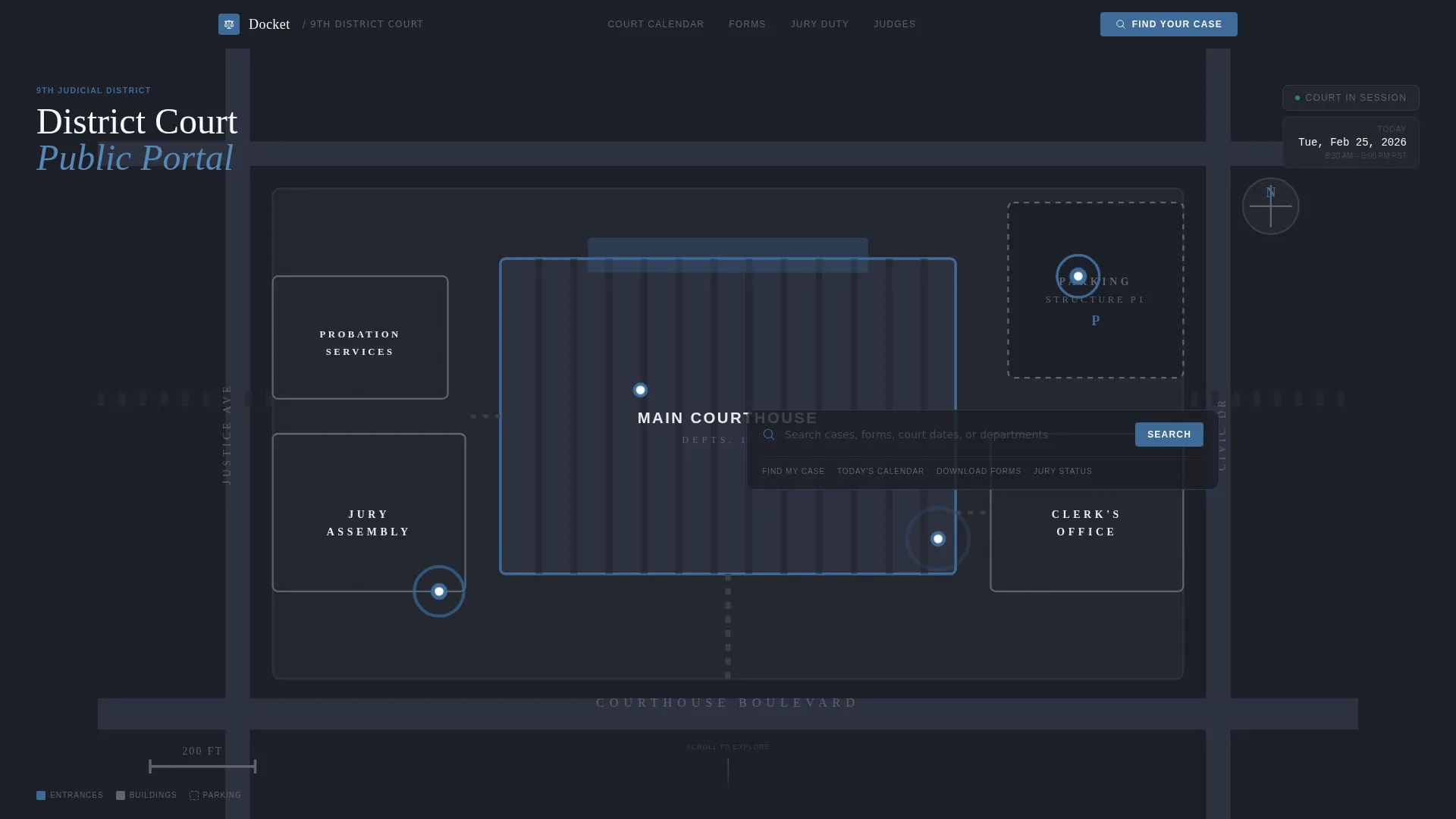
- An SVG courthouse campus map in the hero section with labeled buildings and pulsing entrance pins
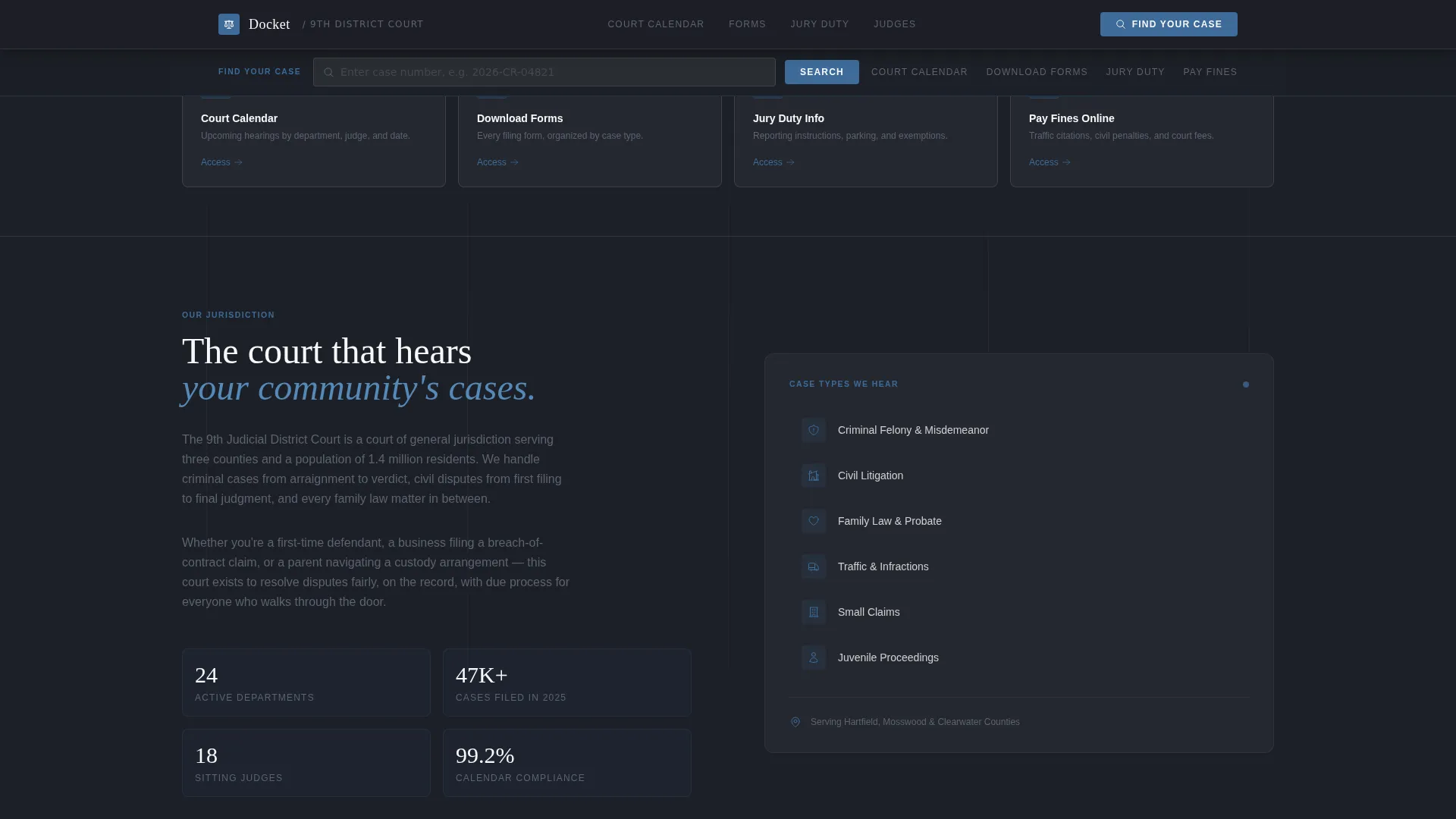
- A sticky utility bar with a case number search field and four quick-access tiles for calendar, forms, jury duty, and fine payment
- Zigzag content sections for jurisdiction overview, a forms library, a weekly court calendar, and a judicial profiles bento grid
Feature list
A paragraph-driven description of each core capability is below.
Interactive Campus Map Hero
The hero section renders a vector overhead map of the courthouse campus. Buildings are outlined in steel gray and labeled in small caps. Judicial blue pins pulse softly at each entrance, giving visitors immediate spatial orientation before they read a single word of body copy.
Sticky Case Search Bar
After the visitor scrolls past the map, a utility bar locks to the top of the viewport. It holds a case number input field and a single search button styled in judicial blue. The bar stays accessible throughout the entire scroll without interrupting the reading flow.
Zigzag Alternating Layout
Content sections alternate between left-aligned text blocks and right-aligned illustrative panels, then reverse. The rhythm mirrors the back-and-forth of courtroom procedure and keeps long informational pages from feeling monotonous or overwhelming.
Forms Library by Case Type
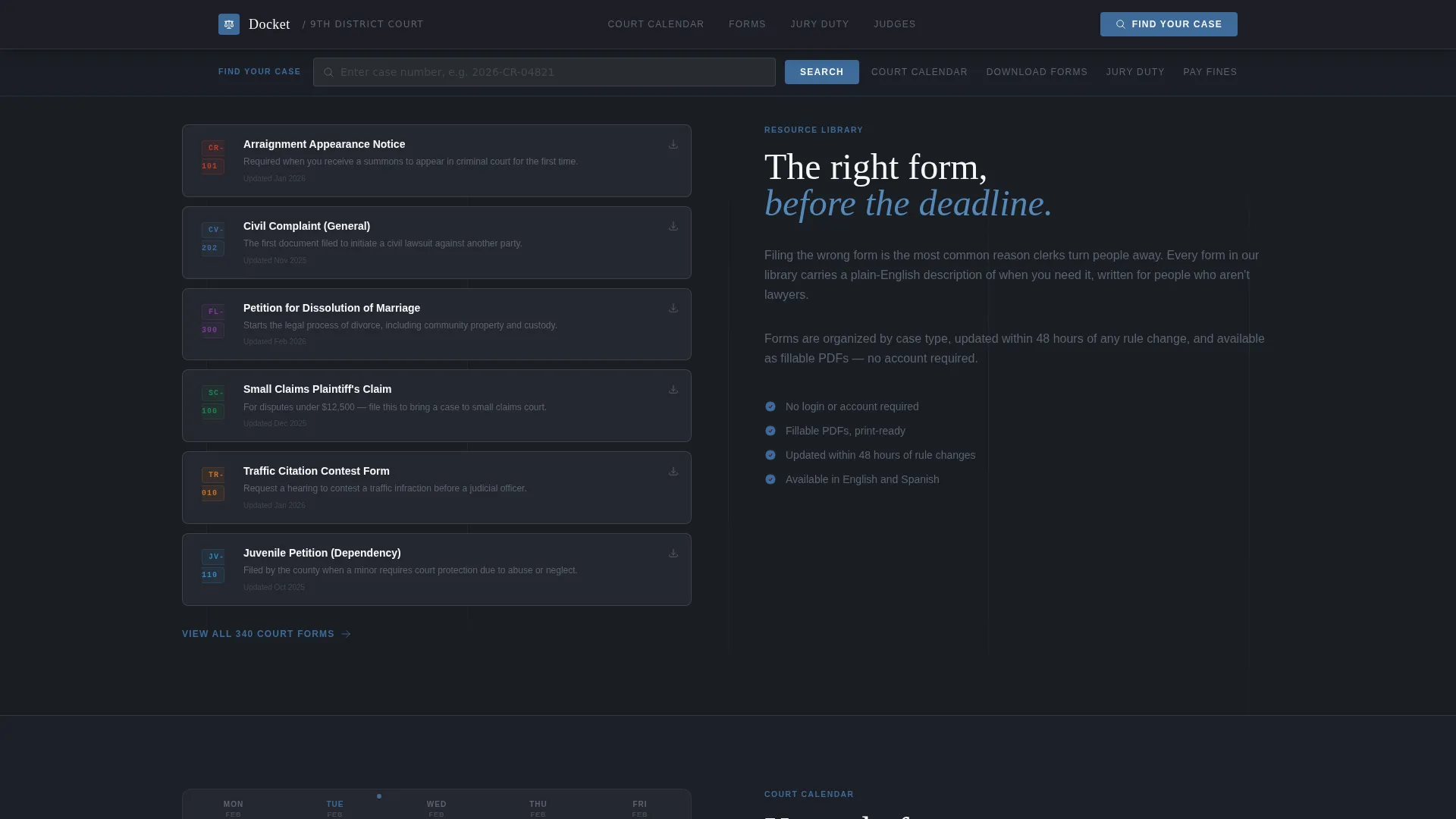
One dedicated section organizes downloadable court forms by case type. Each form entry includes a plain-English one-line description explaining when it is needed, reducing confusion for self-represented litigants who may not know legal terminology.
Weekly Court Calendar View
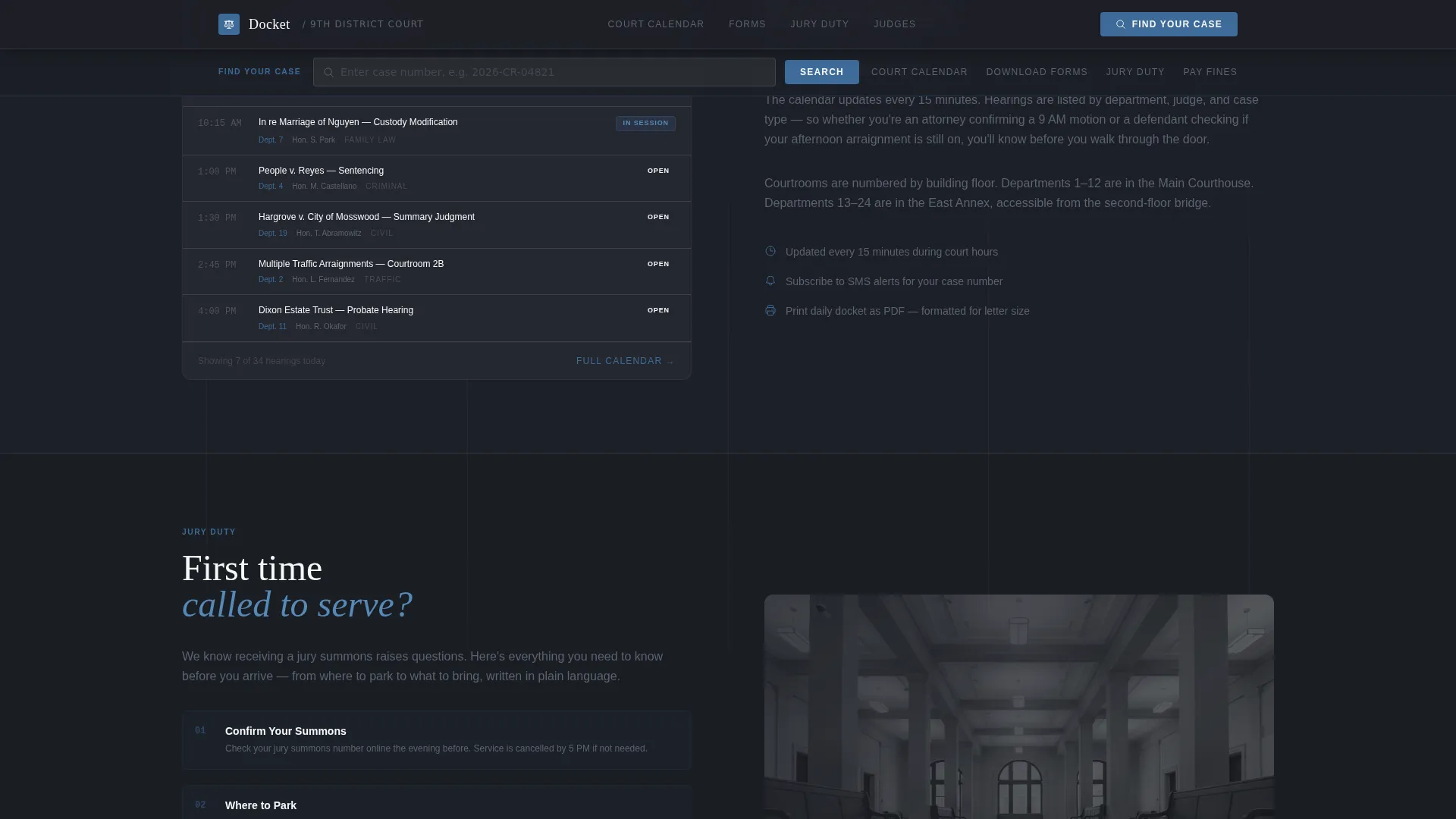
A section displays a weekly hearing schedule with departments, judge names, and hearing types. The layout uses an accordion-style interaction so visitors can expand only the day or department they need without scrolling through irrelevant entries.
Judicial Profiles Bento Grid
The final content section presents judge profiles in a bento-style grid. Each card includes a photo placeholder, courtroom number, and department focus area, giving attorneys and court reporters a quick reference before entering the building.
Page sections overview
| Section | Purpose |
|---|---|
| Campus Map Hero | Orients visitors with a labeled SVG courthouse map and floating search bar |
| Quick-Access Tiles | Provides four utility cards linking to calendar, forms, jury duty, and fine payment |
| Jurisdiction Mission Block | States the court's mission and case types in plain, human language |
| Forms Library | Lists downloadable forms organized by case type with plain-English descriptions |
| Weekly Calendar View | Displays hearings by department with accordion-style day and judge filtering |
| Judicial Profiles Grid | Shows judge cards with photos, courtroom numbers, and department assignments |
| Footer | Splits logo and tagline left with navigation links right |
Design & branding system
The visual identity follows a Directory and Discovery theme using a monochrome steel color system. Every color choice reinforces institutional authority without feeling cold or unwelcoming.
- Deep charcoal (#1C1F26) for primary backgrounds, courthouse steel (#5C6370) for secondary panels, and pale docket gray (#E8EAED) for content surfaces
- Judicial blue (#3D6B99) used exclusively for links, active states, the sticky search button, and wayfinding icons
- Fraunces handles display headings for typographic weight and character; DM Sans handles body copy and interface labels for clarity at small sizes
Mobile & speed optimization
The template is designed desktop-first but ships with full mobile responsiveness. Attorneys checking case calendars at midnight on a phone receive the same structured information as a desktop visitor.
- Zigzag sections reflow to a single column on smaller screens without losing section hierarchy
- The sticky utility bar remains accessible on mobile, with the case search field scaling to full width
- Server Components handle all static sections to minimize client-side JavaScript load
How this template helps you convert
This template earns engagement through immediate utility rather than persuasion. Every design and layout decision is aimed at moving a visitor from confusion to a concrete answer in as few clicks as possible.
- The pulsing campus map in the hero answers the wayfinding question before any text is read, reducing bounce from first-time visitors who simply needed to know where to go.
- The sticky case search bar and four quick-access tiles surface the four most common courthouse tasks in one persistent, always-visible location, turning a multi-click hunt into a single-step action.
Other information about this template
This template is categorized under Government and Public, within the Judiciary and Legal subcategory, for the District Court niche. It is built as a single-page layout using a zigzag alternating template style and a content and resource landing-page direction. The intersection match score for this niche and design configuration is 13, indicating a strong alignment between the layout approach and real courthouse audience needs. Animation is set at medium intensity, with scroll-reveal effects on zigzag sections and pulsing pin animations on the map. Interactivity is set at high, covering the case search input, accordion calendar, and hover states on all cards and tiles.
- The footer uses a split layout pattern with the court logo and tagline on the left and navigation links on the right
- Jurisdictional statistics such as cases filed, departments, and judges serving are included as social proof elements
- Date formatting follows the United States standard (MM/DD/YYYY) and fine payment references are denominated in USD
Theme
Directory & Discovery
Creative direction
Vision & Mission
Color system
Monochrome Steel
Style
Zigzag/Alternating
Direction
Content/Resource
Page Sections
Interactive SVG Campus Map
Sticky Case Search Utility Bar
Zigzag Alternating Content Sections
Organized Court Forms Library
Accordion Weekly Court Calendar
Judicial Profiles Bento Grid
Related questions
Who is the primary audience for this template?
Can I customize the court forms listed in the forms library section?
Does the campus map section work with a real courthouse layout?
Is this template suitable for courts that handle both civil and criminal cases?
What typography does this template use?



