Intellectual Property Booking Website Template
Docket is a sidebar companion landing page template built for a solo domain dispute attorney. It uses an FAQ-driven layout to answer procedural questions on UDRP proceedings, WIPO arbitration, and federal Anticybersquatting law with legal precision. A persistent sidebar, collapsible deep-dives, and two conversion paths turn informed readers into checklist downloads and booked case reviews.
by Rocket studio
Quick summary
Docket is a single-page resource template designed for a solo practitioner specializing in domain name disputes. It answers the exact questions startup founders, trademark counsel, and e-commerce operators search for, then earns the conversion through compounding credibility. The layout pairs a fixed sidebar table of contents with expanding FAQ clusters and two clear calls to action.
Who this template is for
This template suits legal professionals who recover stolen or parked domain names and need a resource-first web presence that builds trust before asking for anything. It speaks directly to the people most likely to need that help.
- Startup founders who discover their company name is parked by a cybersquatter on a third-party registrar page
- Trademark counsel at mid-size brands who need an outside specialist for a single UDRP or WIPO proceeding
- E-commerce operators losing traffic to typosquatters siphoning their audience
What problem this template solves
Most domain dispute attorneys present a generic firm biography and a contact form. That approach fails the visitor who arrives with a specific procedural question and no patience for a sales pitch. Docket solves three connected problems.
- Visitors leave before converting because the page never answers their actual question
- The attorney has no scalable way to demonstrate deep subject-matter expertise at a glance
- There is no natural bridge between free information and a paid case review booking
What you get with this template
Docket gives you a fully structured, desktop-first landing page with a persistent sidebar, two FAQ clusters, a checklist download form, and a Calendly booking embed. Every section is written around real procedural intent, not filler copy.
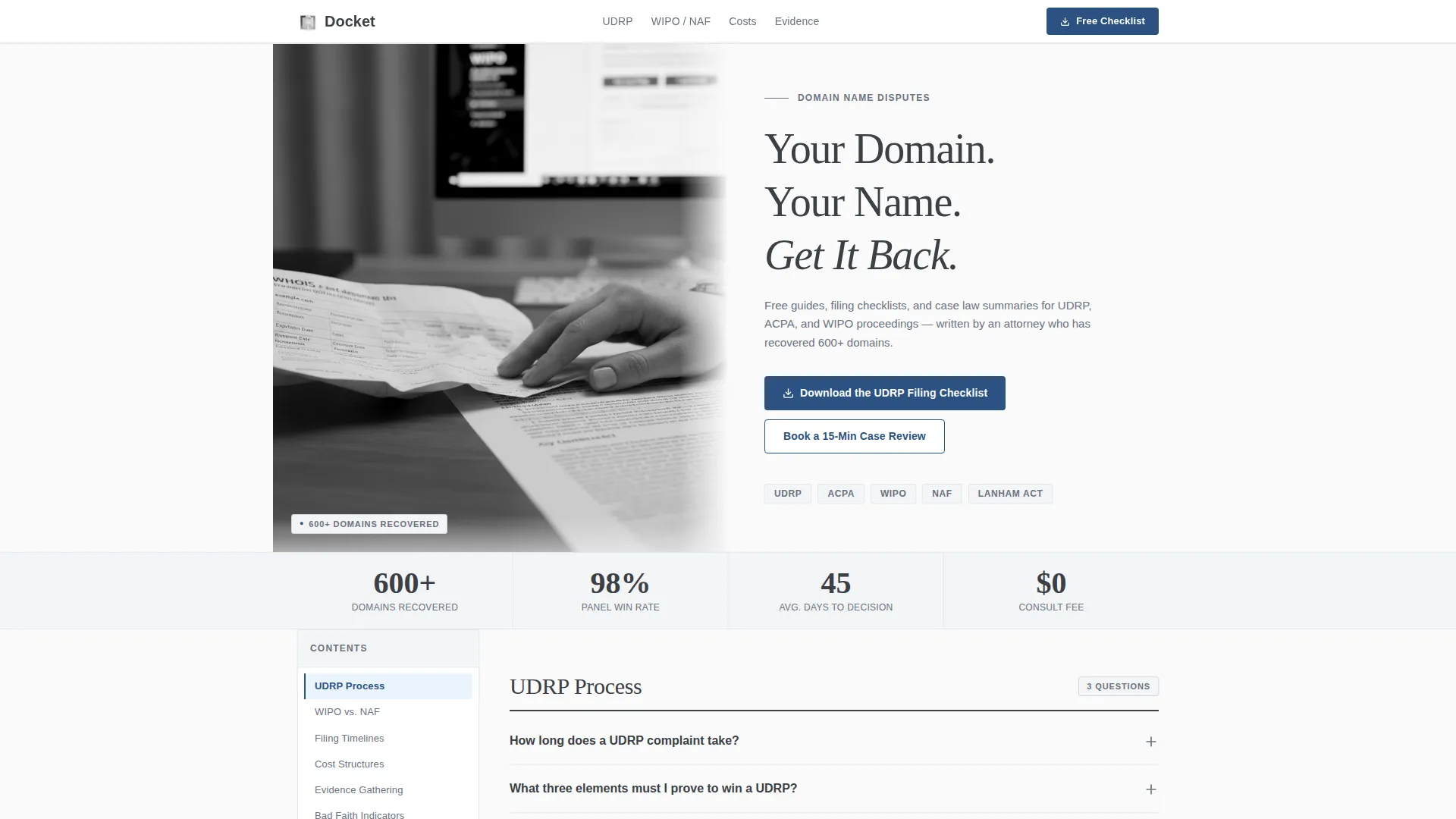
- A half-page hero with a split photo-and-headline layout, a serif headline, and a credibility subhead citing 600+ domains recovered
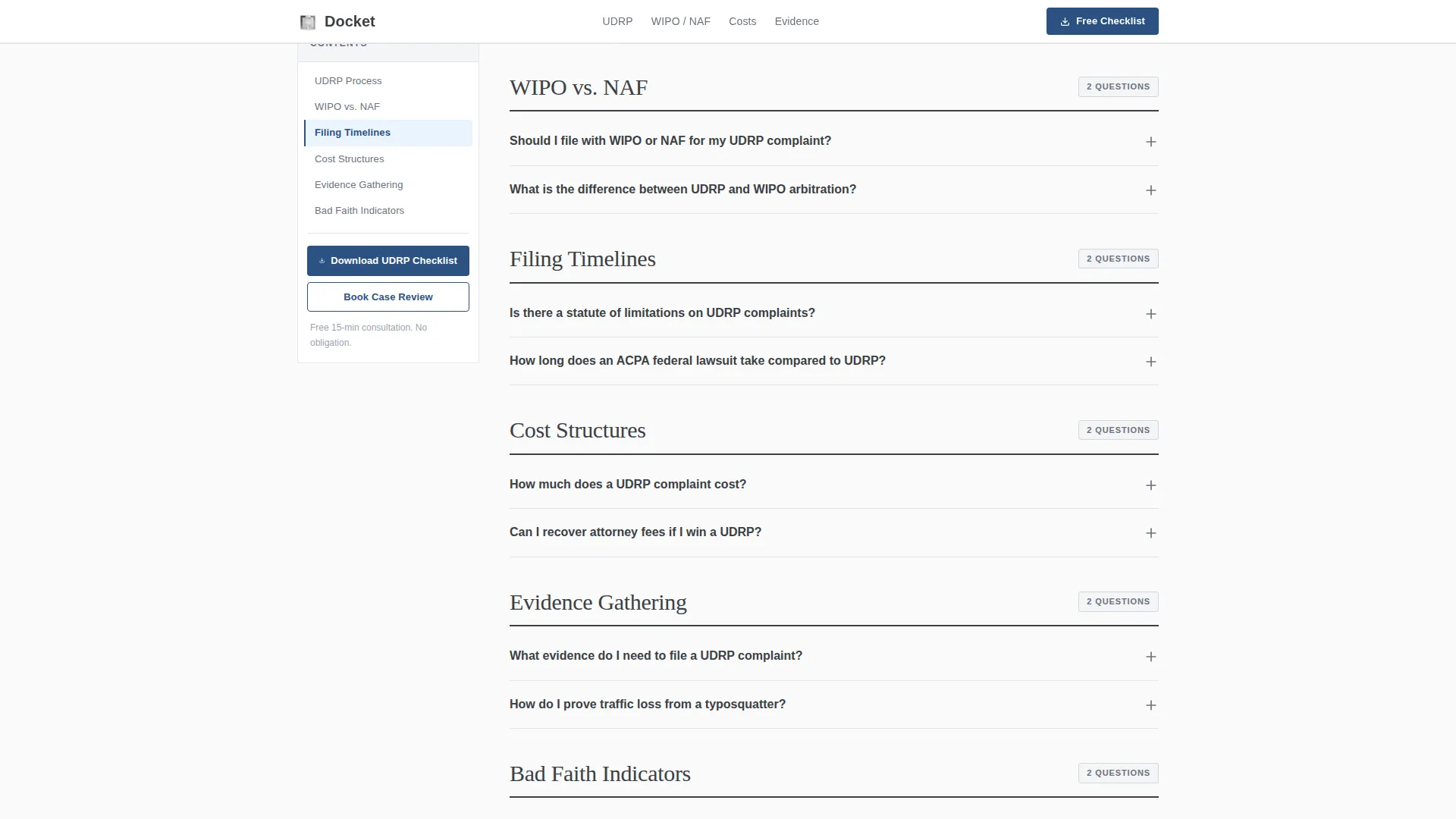
- Six sidebar FAQ clusters covering the Uniform Domain-Name Dispute-Resolution Policy process, filing timelines, cost structures, evidence gathering, bad faith indicators, and forum comparisons
- Two conversion paths: a downloadable UDRP filing checklist with an email capture form, and inline case review booking links throughout every deep-dive section
Feature list
This template is built around a specific set of functional components described in the source brief.
Persistent Sidebar with Scroll Spy
The sidebar stays fixed as the visitor scrolls. It lists every FAQ cluster as a navigation link and highlights the active section automatically. On screens narrower than 1024 pixels, it collapses into a sticky top navigation bar.
Collapsible FAQ Accordions
Each FAQ cluster opens with a plain two-sentence answer to a real search query. A collapsible deep-dive below it contains statute references, panel decision citations, and links to downloadable checklists. Smooth accordion expansion keeps the page feeling organized.
UDRP Checklist Download Form
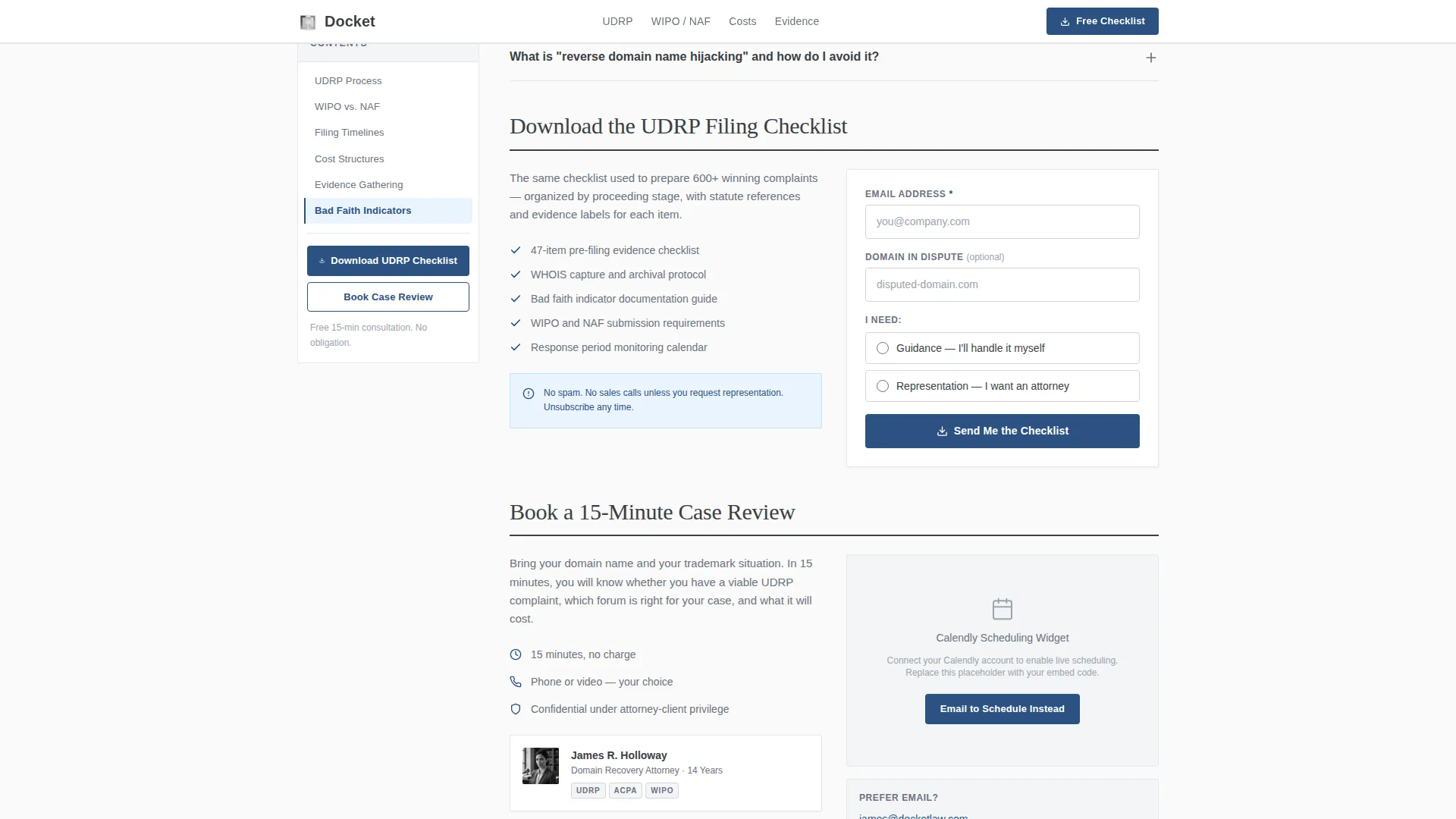
The primary call to action is a downloadable UDRP filing checklist. The capture form collects an email address first, then an optional domain name in dispute, then a single radio selector asking whether the visitor needs guidance or representation.
Calendly Case Review Embed
A secondary conversion path runs through every FAQ deep-dive as an inline text link. The link leads to a Calendly embed for booking a 15-minute case review. This keeps the offer present without interrupting the reading flow.
Half-Page Split Hero
The header uses a black-and-white photograph on the left showing an attorney's hand beside a printed WHOIS record and a highlighted Lanham Act excerpt. The right side carries a large charcoal serif headline and a single credibility sentence.
Inline Statute and Citation References
Each deep-dive section supports references to specific statutes and panel decisions. This gives the page the feel of a properly filed legal brief rather than a generic blog post.
Page sections overview
| Section | Purpose |
|---|---|
| Hero split layout | Establishes authority and introduces the 600+ domain recovery credential |
| Persistent sidebar nav | Keeps all FAQ clusters reachable and highlights the active section |
| FAQ Cluster A | Covers the UDRP process, forum comparisons, and filing timelines |
| FAQ Cluster B | Covers cost structures, evidence gathering, and bad faith indicators |
| Checklist download form | Captures email and intent for the UDRP filing checklist |
| Case review call to action | Presents the Calendly embed and inline booking links |
| Minimal footer | Single-row footer with essential links |
Design & branding system
The visual identity follows a Civic Service theme. The aesthetic deliberately avoids warmth and decoration, communicating authority through restraint. Every color choice reinforces the feeling of a well-organized government clerk's office.
- Four-color palette: civil-service charcoal (#3B3F45) for body text, filing-cabinet gray (#6B7280) for secondary text, bond-paper white (#FAFAFA) for primary backgrounds, and stamped-ink blue (#2C5282) exclusively for links, active sidebar indicators, and call-to-action buttons
- Typography pairs Fraunces serif for headings with DM Sans for body copy, reinforcing the legal-document aesthetic
- Section backgrounds alternate between bond-paper white and a barely-there gray (#F3F4F6) to separate FAQ clusters without visual noise
Mobile & speed optimization
The template is built desktop-first because the sidebar layout requires a viewport of at least 1024 pixels to function as intended. Below that breakpoint, the layout adapts cleanly.
- The sidebar collapses into a sticky top navigation bar on smaller screens, keeping cluster navigation accessible without the fixed column
- Static FAQ content uses server-rendered components for fast initial load, while the scroll spy sidebar runs as a lightweight client component
- Animations are deliberately minimal: scroll-linked sidebar state changes, smooth accordion expansion, and subtle hover states only
How this template helps you convert
Docket earns the conversion by answering questions first and asking for something second. The structure is designed so that each answered question increases the visitor's trust before the next step appears.
- The FAQ clusters answer real search queries with legal precision, proving expertise before any call to action appears, so the checklist download feels like a natural next step rather than a gate
- The persistent sidebar and inline booking links keep both conversion paths visible throughout the entire reading experience without interrupting the flow of information
Other information about this template
This template covers domain dispute law in a US legal context, using English copy and USD pricing references throughout. It is built around the authority of a single practitioner with a documented track record.
- The hero subhead references 600+ domains recovered across UDRP, federal Anticybersquatting Consumer Protection Act lawsuits, and WIPO arbitration panels, giving first-time visitors an immediate credibility signal
- The footer uses a minimal single-row pattern suited to a solo practice that does not need a large footer navigation structure
- The template supports a Calendly embed placeholder, meaning the booking calendar can be dropped in without custom development work
- The radio selector on the checklist form ("I need guidance / I need representation") helps the practitioner triage incoming leads before any conversation begins
Theme
Civic Service
Creative direction
FAQ-Driven
Color system
Monochrome Steel
Style
Sidebar Companion
Direction
Content/Resource
Page Sections
Persistent Sidebar with Scroll Spy
Collapsible FAQ Accordions
UDRP Checklist Download Form
Calendly Case Review Embed
Half-page Split Hero
Inline Statute and Citation References
Related questions
What type of attorney is this template designed for?
Can I replace the 600+ domains recovered figure in the hero section?
How does the sidebar navigation behave on smaller screens?
What are the two conversion paths built into this template?
Does this template include the actual legal content or only the layout?