Kids Martial Arts Online Class Landing Page Template
Dojo is a masonry-style kids martial arts landing page template built to turn late-night parent browsing into booked free trial classes. A personalized three-question quiz reshuffles the Pinterest-style grid in real time, matching each child to the right style, instructor, and class level. The result is a page that feels personal, energetic, and ready to convert.
by Rocket studio
Quick summary
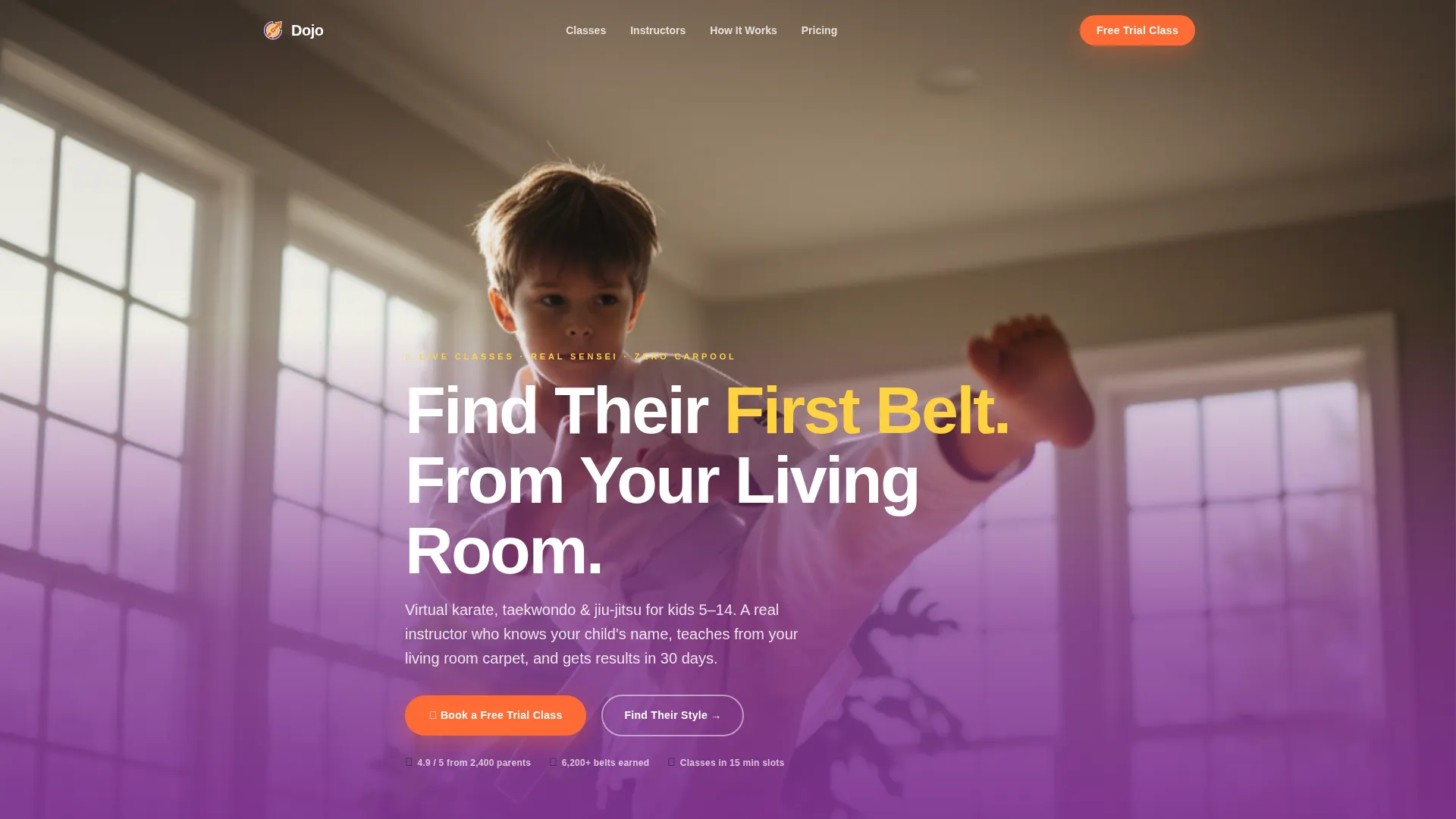
Dojo is a single-page kids martial arts landing page template designed for online class providers. It opens with a full-bleed living room photo and a warm, confident headline. A three-question quiz then reshuffles the masonry grid to show class cards, instructor bios, and parent testimonials matched to each child's age and experience level.
Who this template is for
This template is built for instructors and online martial arts programs that teach kids remotely. It speaks directly to parents who want structure, focus, and confidence for their child without a complicated commute.
- Kids martial arts instructors offering virtual classes or subscriptions
- Online children's fitness platforms adding a dedicated enrollment landing page
- Independent senseis launching a digital dojo for students aged five to twelve
What problem this template solves
Most kids activity pages throw every class at every visitor. Parents leave confused, not converted. Dojo solves that by personalizing the experience the moment a parent answers three quick questions.
- Parents arrive unsure whether karate, taekwondo, or jiu-jitsu is right for their child
- Generic class listings give no sense of fit, instructor personality, or appropriate level
- Booking friction stops interested parents before they ever pick a time slot
What you get with this template
You get a complete, ready-to-customize landing page built around a quiz-driven, masonry-layout experience. Every major conversion moment is already placed and styled.
- A full-bleed hero section with a fade-in headline and floating call-to-action button
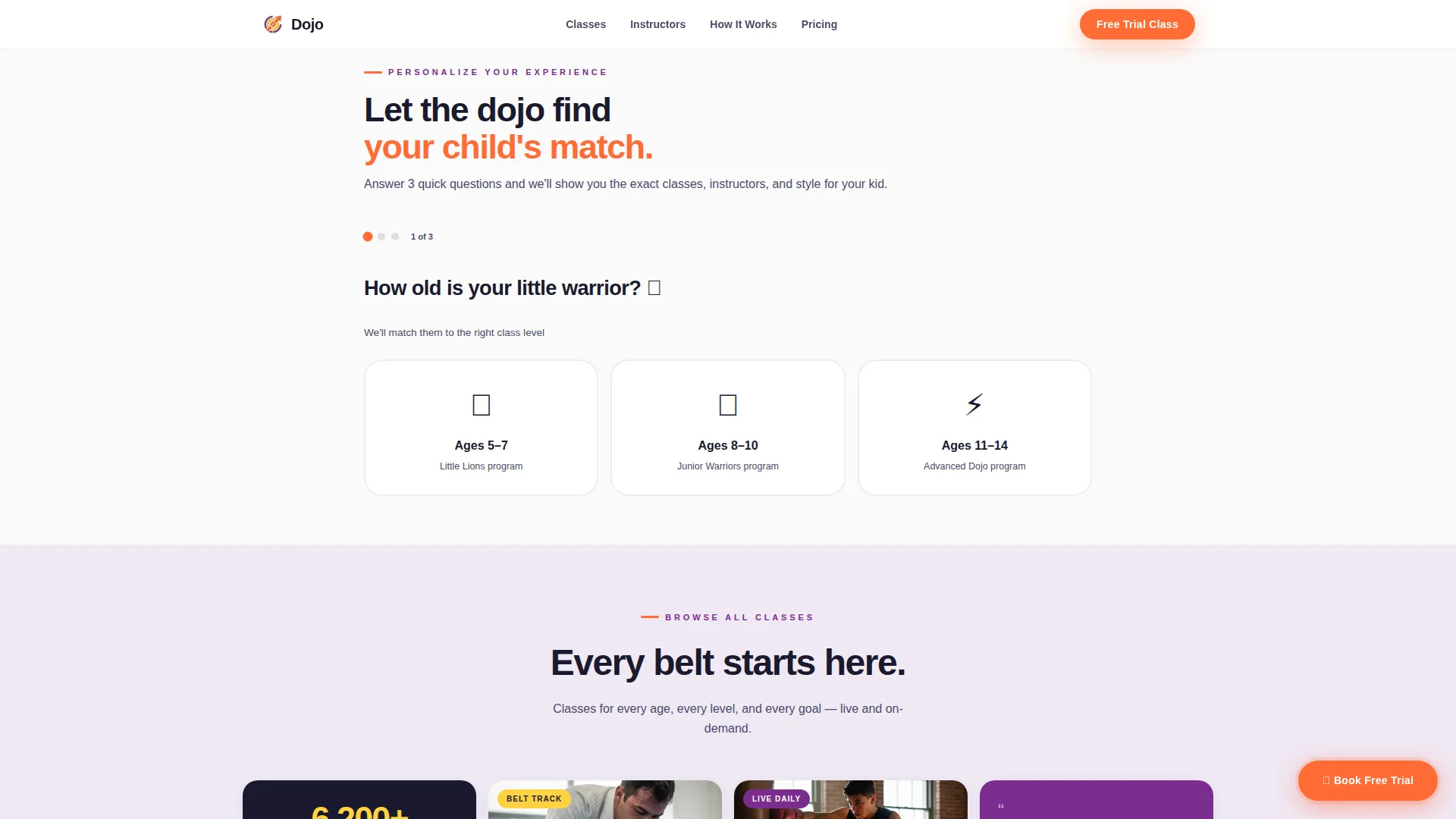
- A three-question illustrated quiz engine that reshuffles class cards, testimonials, and instructor bios based on answers
- A two-step booking modal pre-filled with the child's recommended style and a live color-coded calendar
Feature list
This template packs five purposefully designed features into one cohesive landing page. Each one serves the moment a parent is actually in when they land on the page.
Personalized Quiz Engine
A three-question illustrated card diagnostic asks age, experience level, and what matters most. Each answer reshuffles the masonry grid below, surfacing class cards, video clips, and instructor bios that match the child's profile.
Masonry Results Grid
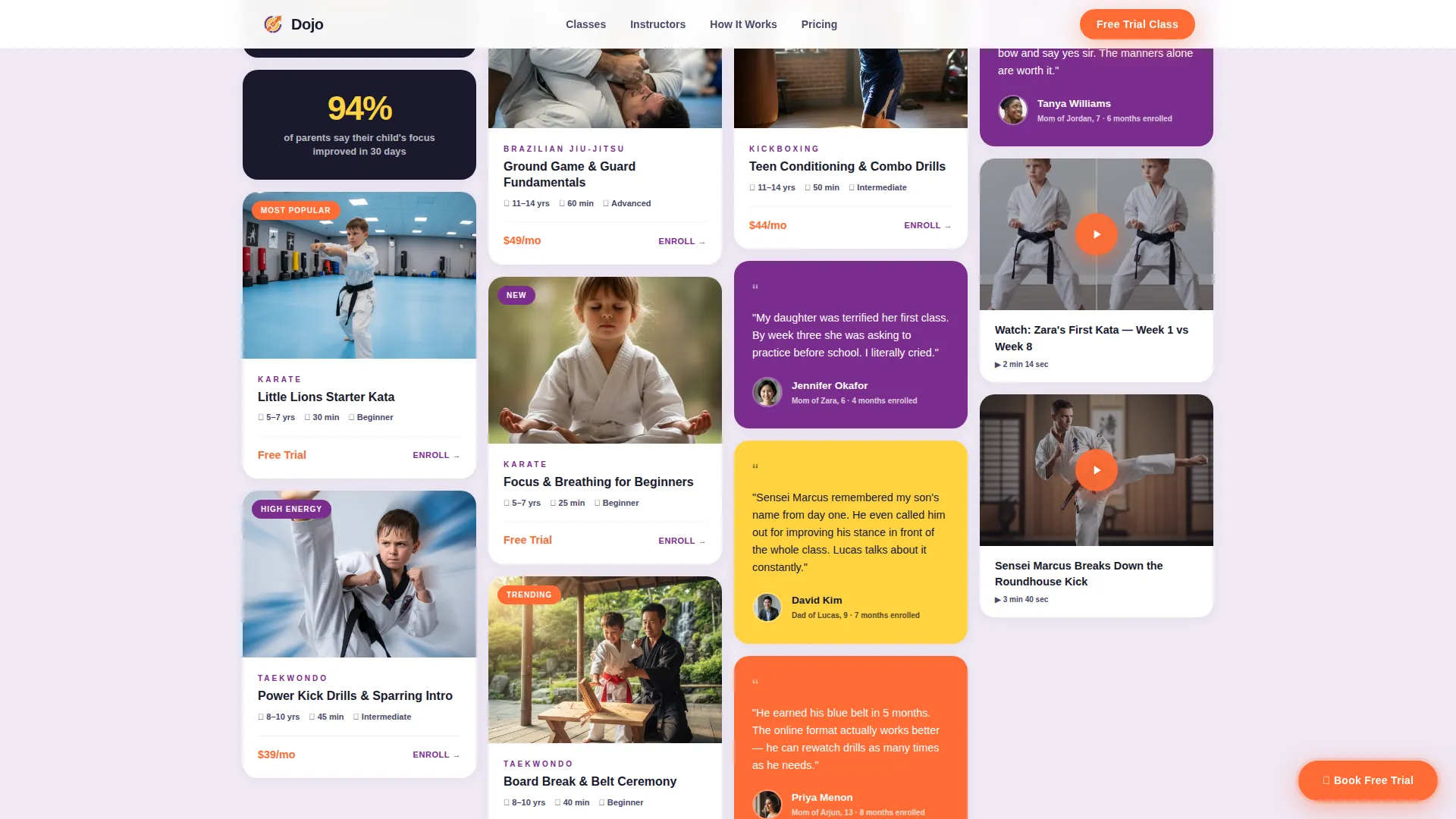
A Pinterest-style mixed grid displays class cards, short video clips, instructor bios, and parent testimonials in a flowing, staggered layout. GSAP ScrollTrigger animations reveal each tile as the parent scrolls, keeping the page feeling alive and dynamic.
Two-Step Booking Modal
The primary call-to-action opens a focused two-step scheduler. Step one shows the child's recommended style and class level, pre-filled from quiz answers. Step two shows a live calendar with available trial slots color-coded by instructor and time zone.
Floating Trial Class Button
An electric tangerine "Book a Free Trial Class" button stays pinned on mobile as the parent scrolls. It reappears at the quiz result reveal and at the bottom of the page, keeping the booking action always within reach.
Lead Capture Secondary Path
A secondary call-to-action offers a downloadable illustrated parent guide comparing martial arts disciplines, gear expectations, and what to expect in the first month. It captures email addresses from parents who are interested but not yet ready to book.
Social Proof Mosaic
Parent testimonials tagged with the child's age and months enrolled are shuffled between class tiles in the masonry grid. The placement feels organic rather than forced, building trust without interrupting the browsing flow.
Page sections overview
| Section | Purpose |
|---|---|
| Full-Bleed Hero | Opens with a living room photo, fade-in headline, and a floating booking call-to-action |
| Quiz Engine | Three illustrated questions personalize the entire page experience for each child |
| Masonry Results Grid | Pinterest-style mixed grid of class cards, video clips, instructor bios, and testimonials |
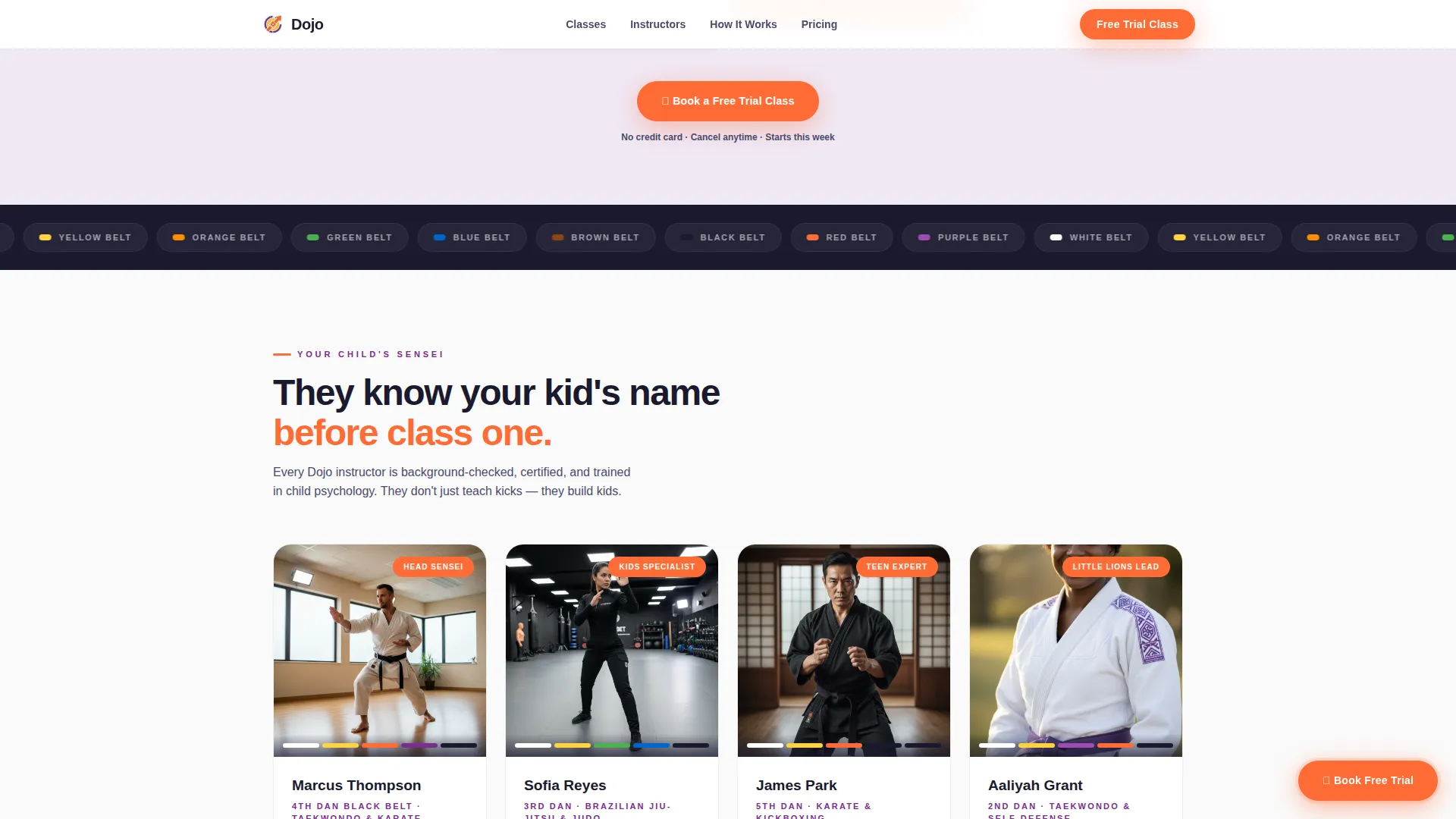
| Instructor Showcase | Asymmetric photo and bio cards introduce senseis with personality and credibility |
| Booking Call to Action | Two-step scheduler reveal with pre-filled recommendations and color-coded calendar |
| Minimal Footer | Horizontal layout with dot-separated links for clean, low-distraction page exit |
Design & branding system
The visual identity follows an Educational Guide theme with a Dopamine Pop color system. The palette is joyful and energetic but organized enough to communicate trust to a parent choosing an activity for their child.
- Electric tangerine (#FF6B35) drives primary buttons and belt-rank callouts; vivid grape (#7B2D8E) backgrounds section panels and badges; sunburst yellow (#FFD23F) highlights achievement icons and hover states
- Clean gi white (#FAFAFA) provides breathing space between masonry cards, and deep charcoal (#1A1A2E) anchors all body text for clear readability
- Typography uses Plus Jakarta Sans throughout, a rounded and confident typeface that reads well at every size on both mobile and desktop
Mobile & speed optimization
This template is designed mobile-first, because the primary audience is parents scrolling on their phones at night. Every layout decision prioritizes the small-screen experience before scaling up.
- The floating tangerine button stays pinned to the bottom of the screen on mobile, so the booking action never disappears mid-scroll
- Images across the masonry grid are lazy-loaded, meaning tiles appear progressively as the parent scrolls rather than all at once
- Interactive components such as the quiz engine and booking modal are isolated as client-side islands, keeping the rest of the page lightweight
How this template helps you convert
Dojo is built around a deliberate conversion path. The quiz does the persuasion work so that by the time a parent sees the booking calendar, the hardest decisions are already made.
- The three-question quiz creates a personalized experience that reduces the "which style is right?" hesitation most parents arrive with, moving them from browsing to believing faster.
- The two-step booking modal pre-fills the child's recommended style and class level from quiz answers, so the only remaining decision is choosing a Tuesday or Thursday slot.
- The lead-capture secondary path catches parents who are not ready to book yet, offering a practical illustrated guide in exchange for an email address and keeping them in the funnel.
Other information about this template
Dojo is part of a focused Kids and Family category, specifically built for the kids martial arts online class niche. A few additional details are worth noting for anyone evaluating this template.
- The template is built for English-language audiences with pricing in USD and scheduling across US time zones
- Animation is high-intensity by design: GSAP ScrollTrigger powers staggered masonry reveals, quiz card transitions, and hover micro-interactions
- The footer follows a horizontal minimal layout with dot-separated links, keeping the page exit clean and distraction-free
- The hero image concept shows a child in a white gi mid-kick toward a laptop screen, with toys on the shelf behind and afternoon light through a window, communicating that this experience happens at home
- The template style is Masonry and Pinterest-inspired, a deliberate choice for a mobile-first audience accustomed to scrollable, visual content feeds
Theme
Educational Guide
Creative direction
Quiz & Personalize
Color system
Dopamine Pop
Style
Masonry/Pinterest
Direction
Booking/Scheduling
Page Sections
Personalized Quiz Engine
Masonry Results Grid
Two-step Booking Modal
Floating Trial Class Button
Lead Capture Secondary Path
Social Proof Mosaic
Related questions
Who is this landing page template designed for?
Can I customize the quiz questions and class cards?
What happens when a parent clicks the booking button?
Does the template include a way to capture leads who are not ready to book?
Is this template suitable for a single instructor or a larger program?



