Architecture & Interiors Portfolio Professional Website Template
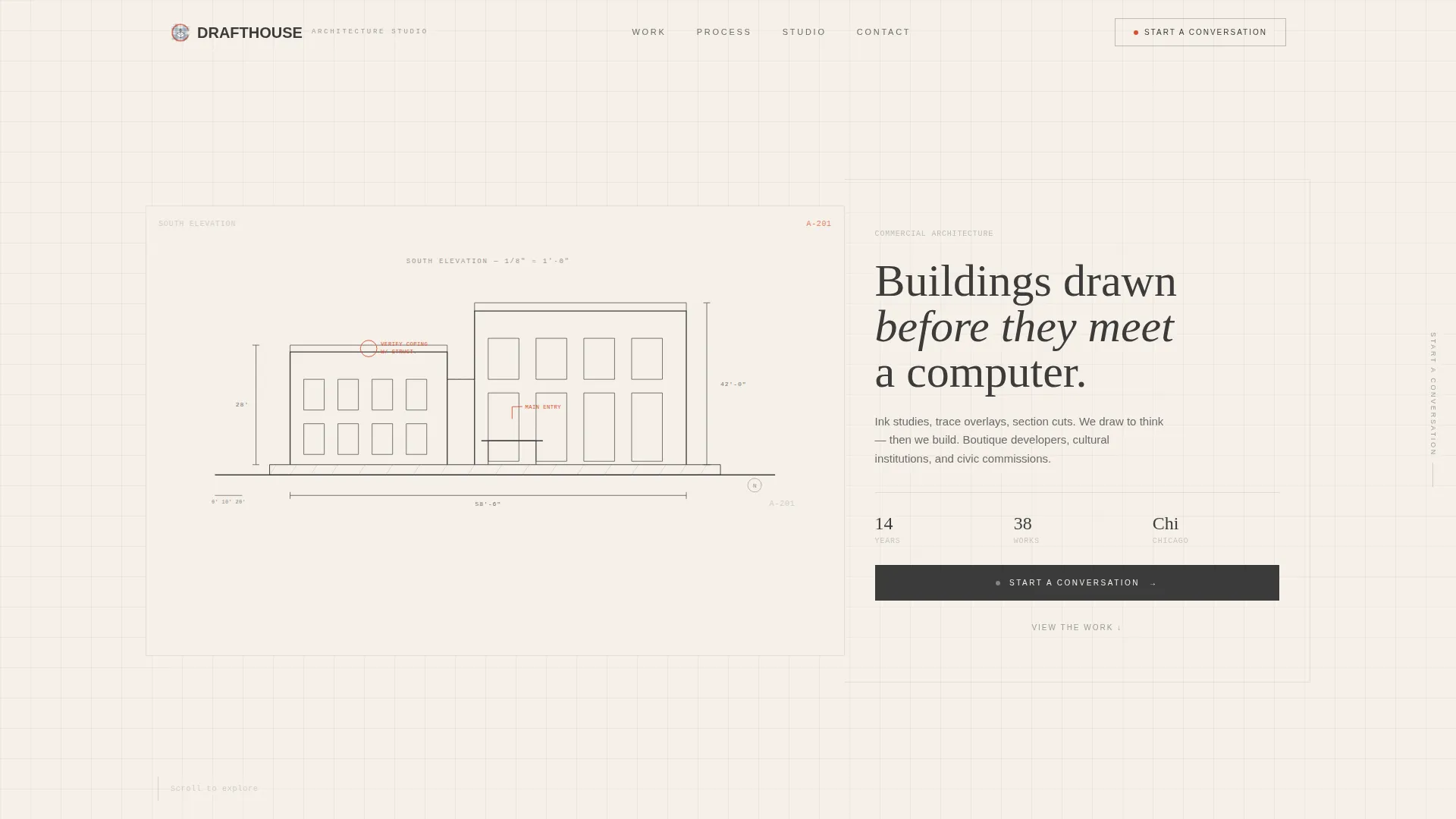
Drafthouse is a handcrafted architect landing page template built for commercial architecture practices that lead with craft. An asymmetric 60/40 grid holds large-format drawings alongside project narratives. The animated header draws an architectural elevation in real time. Every detail, from the ink-and-paper color palette to the parallax scroll explorer, signals a studio that thinks before it builds.
by Rocket studio
Quick summary
Drafthouse is a single-page architect portfolio template designed for practices where hand-drawing is still the first act of design. The asymmetric grid, animated line-work header, and interactive project explorer give commercial architecture studios a digital presence that looks and feels as deliberate as a well-drafted set of construction documents.
Who this template is for
This template is built for architecture studios and independent practitioners who win work through the quality of their ideas, not the volume of their projects. It speaks directly to the kind of office where trace paper and Micron pens are still part of the process.
- Commercial architecture practices pitching boutique developers and cultural institutions
- Principal architects seeking a portfolio landing page that reflects a craft-first identity
- Studios preparing proposals for municipal or civic commissions where presentation signals conviction
What problem this template solves
Most portfolio templates are built for photographers or generalist creatives. They default to image grids and carousels that flatten the depth of architectural work into a parade of renders. Drafthouse solves the problem of presenting architecture as a process, not just a product.
- Shallow portfolio layouts that show only final images without conveying design intelligence
- Generic agency templates that undercut the authority a serious architecture practice needs
- Friction-heavy contact pages that interrupt the momentum built during portfolio browsing
What you get with this template
Drafthouse is a complete, single-page landing layout ready to represent a commercial architecture studio. Every section has a defined role in moving a visitor from curiosity to conversation.
- An animated header that draws a full architectural elevation stroke by stroke over four seconds
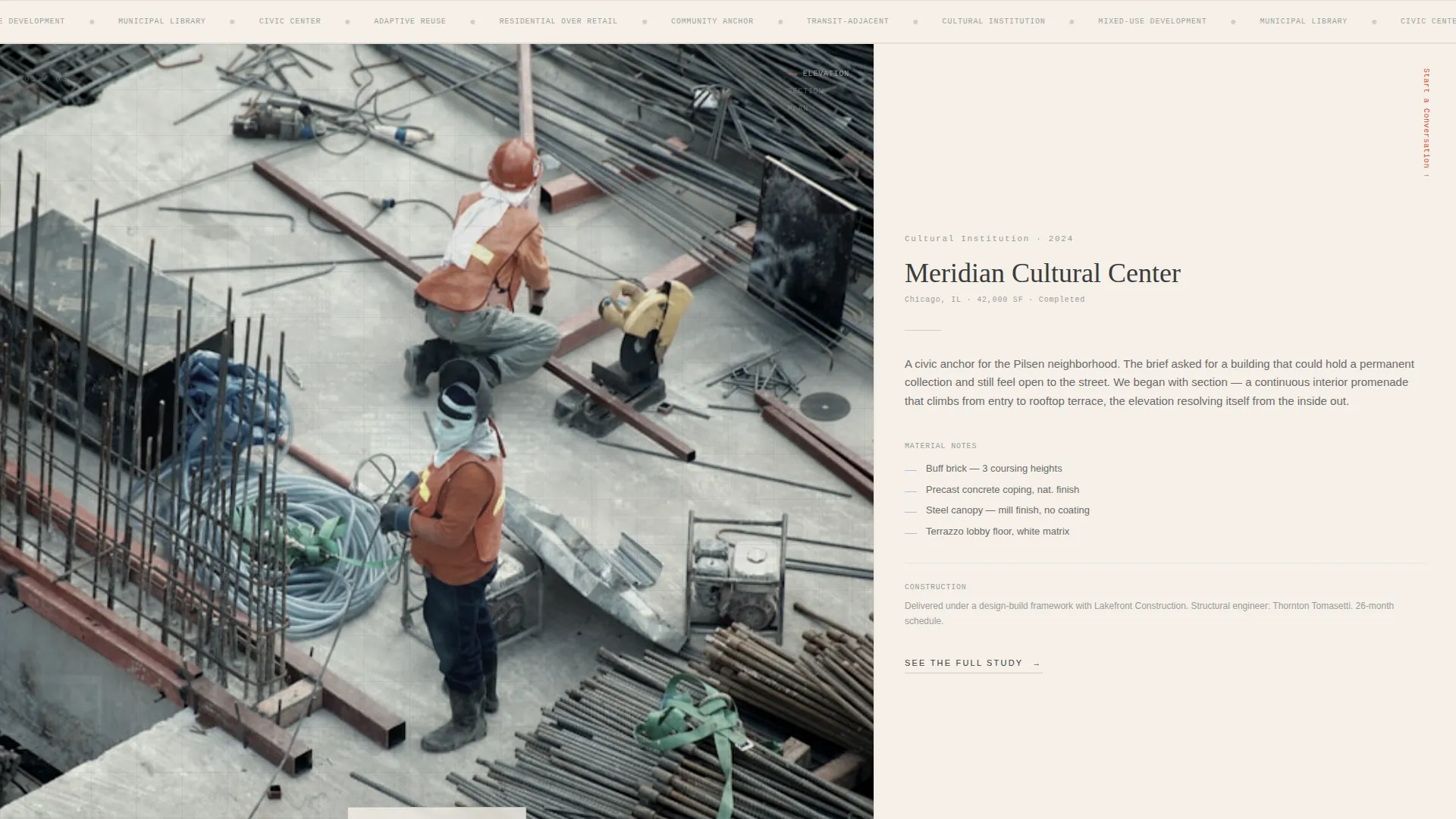
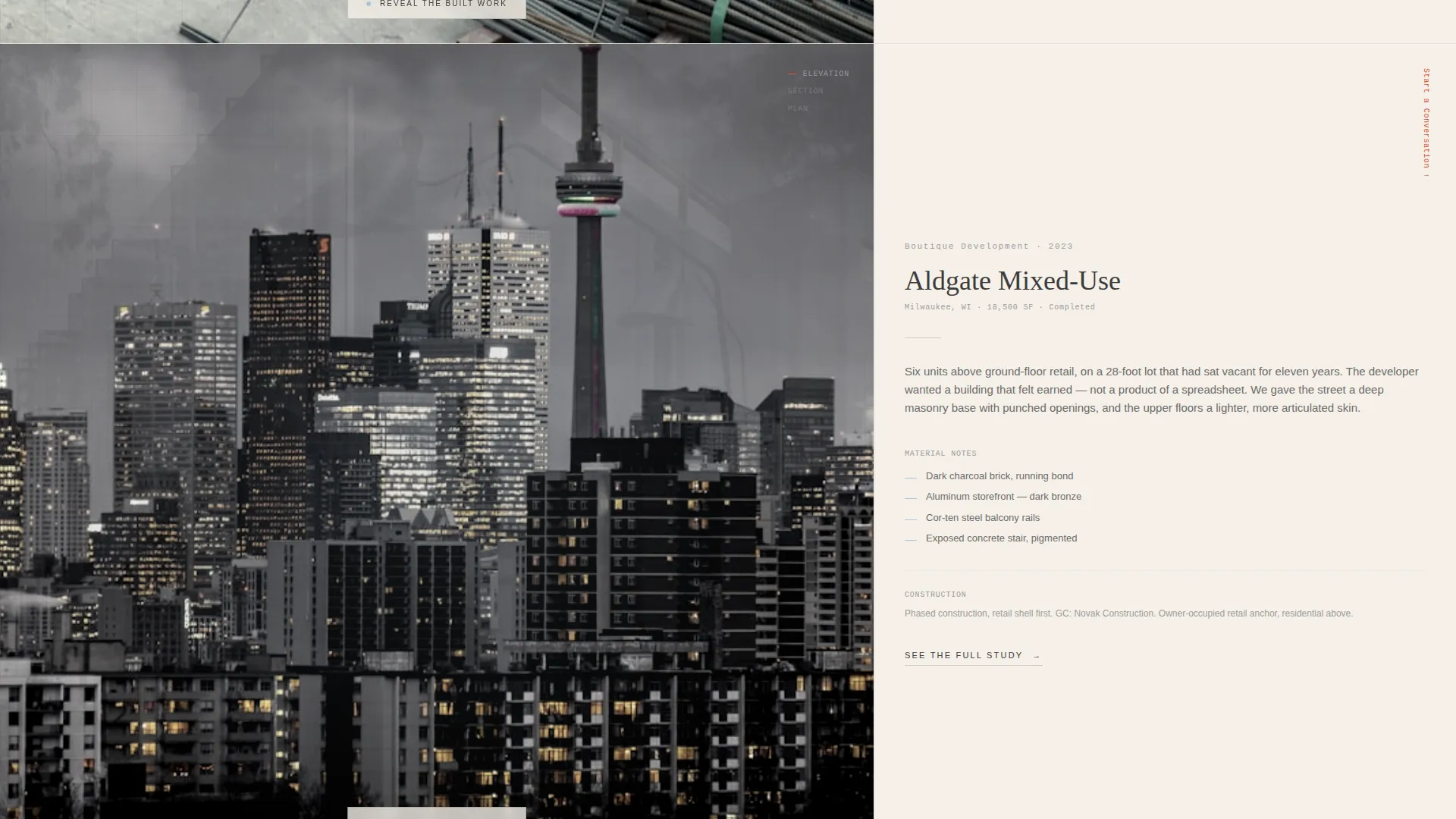
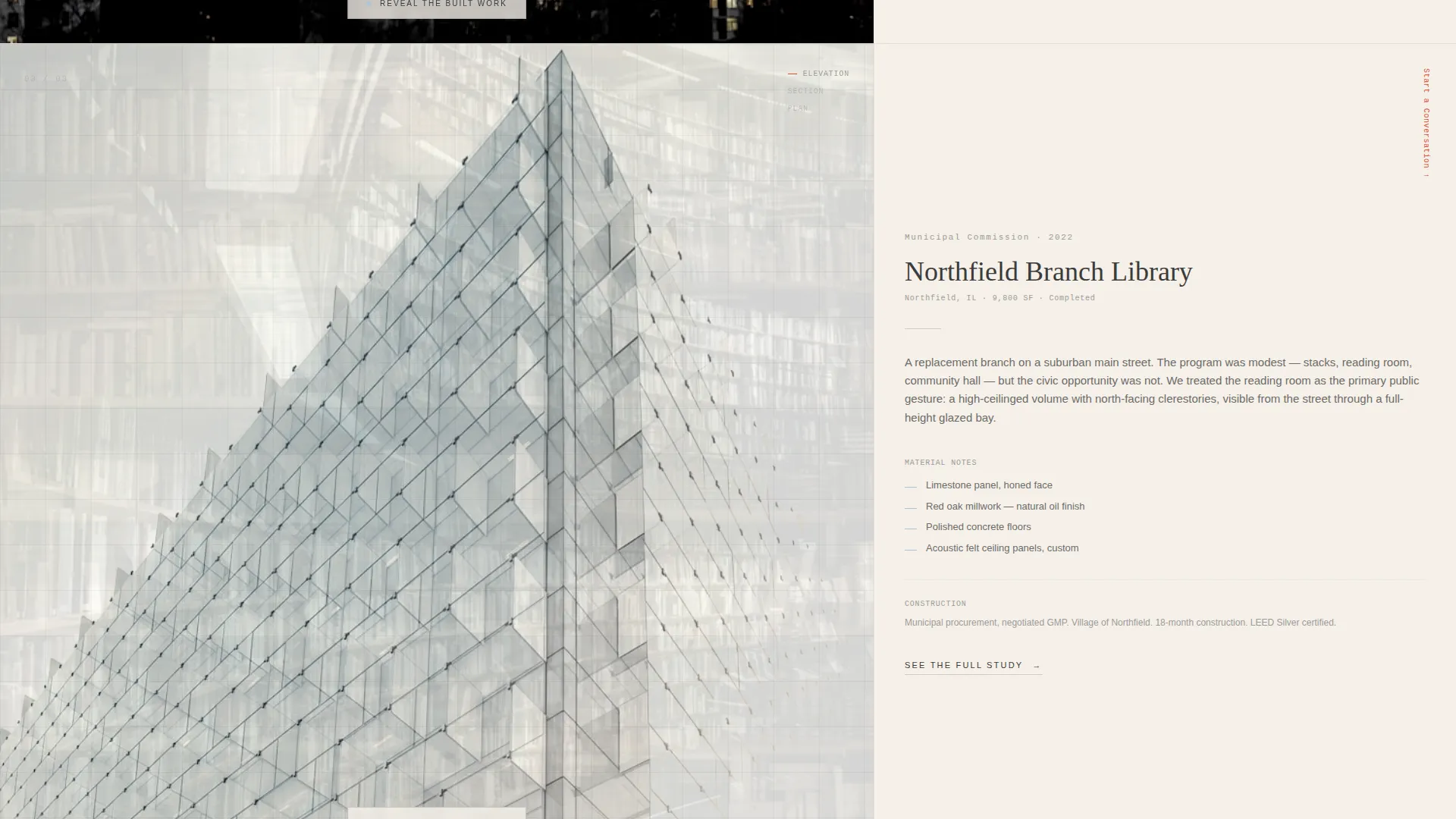
- An asymmetric 60/40 grid with parallax-responsive project drawings and fluid narrative columns
- A click-through conversion structure that routes visitors to a dedicated brief submission page with zero form friction on this page
Feature list
Drafthouse delivers six core features that work together to build trust, demonstrate craft, and drive project inquiries.
Real-Time Animated Header Drawing
The header animates a single architectural elevation as if an invisible hand is drafting on screen. Ink lines build from foundation to roofline over four seconds. Dimension lines snap into place last, and vermillion redline annotations appear with a deliberate delay, mimicking a principal's corrections on a live drawing.
Asymmetric 60/40 Grid Layout
The template uses a confident 60/40 column split throughout the project sections. The wider column carries large-format drawings. The narrower column holds project narratives, material notes, and construction context. The ratio creates visual tension that keeps the eye moving without losing hierarchy.
Parallax Interactive Project Explorer
As visitors scroll and move their cursor, the 60-column drawings respond with parallax-shifting layers of plan, section, and elevation. The effect mimics shuffling trace overlays on a light table, giving each project a sense of physical depth and rewarding genuine exploration.
Progressive Project Reveal Structure
Each project section deepens in deliberate stages: a single sketch first, then layered drawings, then the final built photograph revealed only at the end. This structure rewards visitors who engage fully and builds anticipation before the completed work is shown.
Fixed and Full-Width Conversion calls to action
The primary call to action, "Start a Conversation," begins as a subtle fixed element in the 40-column margin. After the final project reveal, it scales into a full-width invitation paired with the line: "Every building begins with a sketch. Tell us about yours." Secondary calls to action labeled "See the Full Study" appear beneath each project.
Ink and Paper Visual Identity
The Cloud Canvas color system uses warm vellum (#F5F0E8), graphite stroke (#3B3B3B), faded blue trace (#A8C4D8), and vermillion redline (#D94F30). The palette is deliberately matte and uncoated in character, so every color reads as an intentional mark rather than a decorative choice.
Page sections overview
| Section | Purpose |
|---|---|
| Animated Header Drawing | Opens with a real-time elevation sketch to establish craft authority immediately |
| Fixed call to action Margin | Keeps "Start a Conversation" visible in the 40-column as visitors scroll project work |
| Project Explorer One | Introduces the first project with a single sketch in the parallax 60/40 grid |
| Project Explorer Two | Adds layered drawings and narrative context as scroll depth increases |
| Project Explorer Three | Reveals the final built photograph as the payoff of full engagement |
| Full-Width call to action Block | Closes the page with a scaled invitation and the "Every building begins with a sketch" line |
| Secondary Project calls to action | "See the Full Study" links beneath each project let visitors self-select resonant work |
Design & branding system
The template's visual identity is rooted in the Ink and Paper theme paired with the Cloud Canvas color system. The goal is a digital surface that feels physical: soft, matte, and quiet enough that every mark of line or color reads as considered annotation.
- Warm vellum (#F5F0E8) as the base surface, graphite stroke (#3B3B3B) for all primary line work and text, and faded blue trace (#A8C4D8) as a secondary tonal layer
- Vermillion redline (#D94F30) reserved exclusively for hover states and interactive cues, preserving its visual weight as a signal of action
- An asymmetric grid structure that reflects the proportional thinking of architectural drafting rather than the symmetry of standard web layouts
Mobile & speed optimization
The template is designed with responsive behavior in mind so the core experience translates clearly across screen sizes. The parallax and animation features are laid out to adapt gracefully when cursor-based interaction is unavailable on touch devices.
- The 60/40 grid collapses to a single-column stack on smaller screens, keeping project drawings and narratives in a readable sequence
- Animation and parallax layers are structured to degrade cleanly on mobile, preserving the visual story without relying on mouse movement
- The click-through call to action structure removes any on-page form weight, keeping the page light and focused regardless of device
How this template helps you convert
Drafthouse is built as a click-through landing page, meaning its entire structure is designed to build desire and then deliver a single, low-friction action: starting a project conversation.
- The progressive project reveal holds visitors in the page longer by rewarding scroll depth with increasing visual payoff, building genuine interest before the call to action appears at full scale.
- The fixed "Start a Conversation" element stays present throughout the browsing experience without interrupting it, so motivated visitors can act the moment they feel ready.
- The full-width closing block with its single paired line creates a moment of intentional pause, framing the inquiry as a creative act rather than a sales transaction.
Other information about this template
Drafthouse fits naturally within the broader category of architecture and interiors portfolio templates. It is specifically shaped for the commercial architect portfolio niche, where clients range from boutique property developers to civic institutions.
- The template style is Asymmetric Grid (60/40), the header concept is Animated Illustration, and the creative direction is Interactive Explorer
- The landing page direction is Click-Through, meaning no contact form appears on this page; the call to action routes to a separate brief submission page
- The theme is Ink and Paper and the color system is Cloud Canvas, giving the template a coherent visual language distinct from photography-first portfolio formats
- This template is well suited to studios building their first dedicated portfolio landing page or replacing a generic agency-style site with something that reflects a more defined design identity
Theme
Ink & Paper
Creative direction
Interactive Explorer
Color system
Cloud Canvas
Style
Asymmetric Grid (60/40)
Direction
Click-Through
Page Sections
Real-time Animated Header Drawing
Asymmetric 60/40 Grid Layout
Parallax Interactive Project Explorer
Progressive Project Reveal Structure
Fixed and Full-width Call to Action Flow
Ink and Paper Color System
Related questions
Is this template suitable for a solo architect or only for larger studios?
Does this template include a contact form?
How many projects can I include in the template?
Who are the intended clients for a practice using this template?
Can the animated header be replaced with a photograph?



