Kids Basketball Specialist Booking Website Template
Dribble is a playful, masonry-style landing page template built for neighborhood kids basketball instructor directories. It pairs a cursor-reactive isometric hero illustration with a Pinterest-style coach gallery, sticky filters, and a streamlined three-field booking modal. Parents can browse local coaches by zip code, age group, and schedule, then book a free trial class in under twenty seconds.
by Rocket studio
Quick summary
Dribble is a single-page directory template designed for youth basketball coach listings. It opens with an isometric court illustration that shifts with cursor movement, then flows into a masonry coach gallery where parents browse profiles, read star ratings, and book a free trial class without leaving the page. The whole experience is built for busy parents on a phone.
Who this template is for
This template is built for anyone connecting parents with local youth basketball instruction. It works equally well as a starting point for a new directory or a redesign of an existing listing page.
- Parents running community coach-finder projects or local sports directories
- Recreation directors and after-school program coordinators managing coach rosters
- Coaches or training groups who want a polished booking page for their own program
What problem this template solves
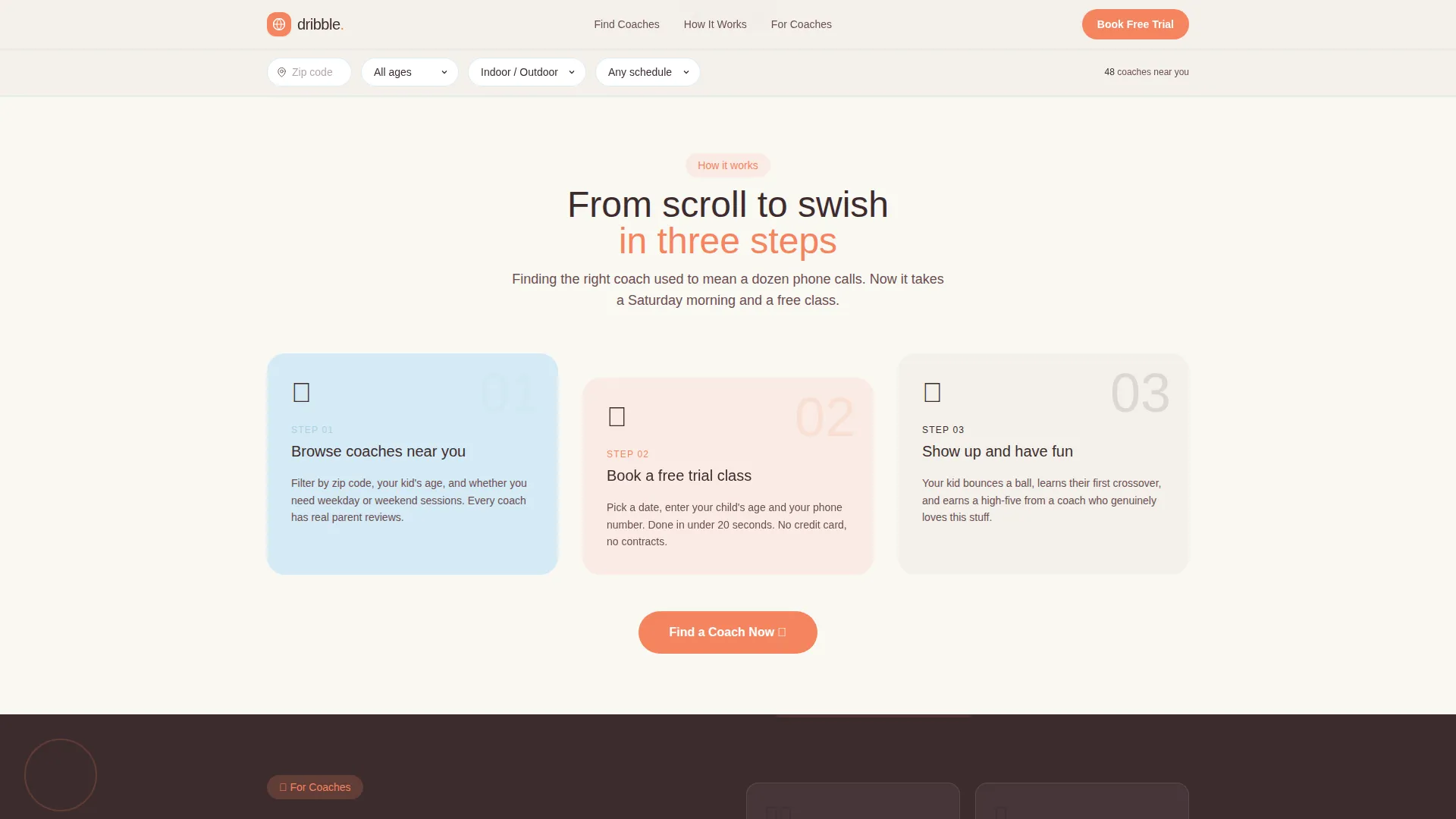
Finding a trustworthy kids basketball coach online usually means digging through generic search results, outdated flyers, or Facebook groups. Parents waste time and still feel uncertain. This template gives them one focused place to compare coaches, read real parent reviews, and book without any back-and-forth.
- No clear way to compare multiple local coaches side by side
- Booking a trial class typically requires multiple phone calls or emails
- Generic sports pages feel cold and do not build the trust parents need for their child
What you get with this template
Dribble delivers a fully styled, single-page layout with every section a youth sports directory needs. From the animated hero down to the footer, the template is ready to populate with real coach data and launch.
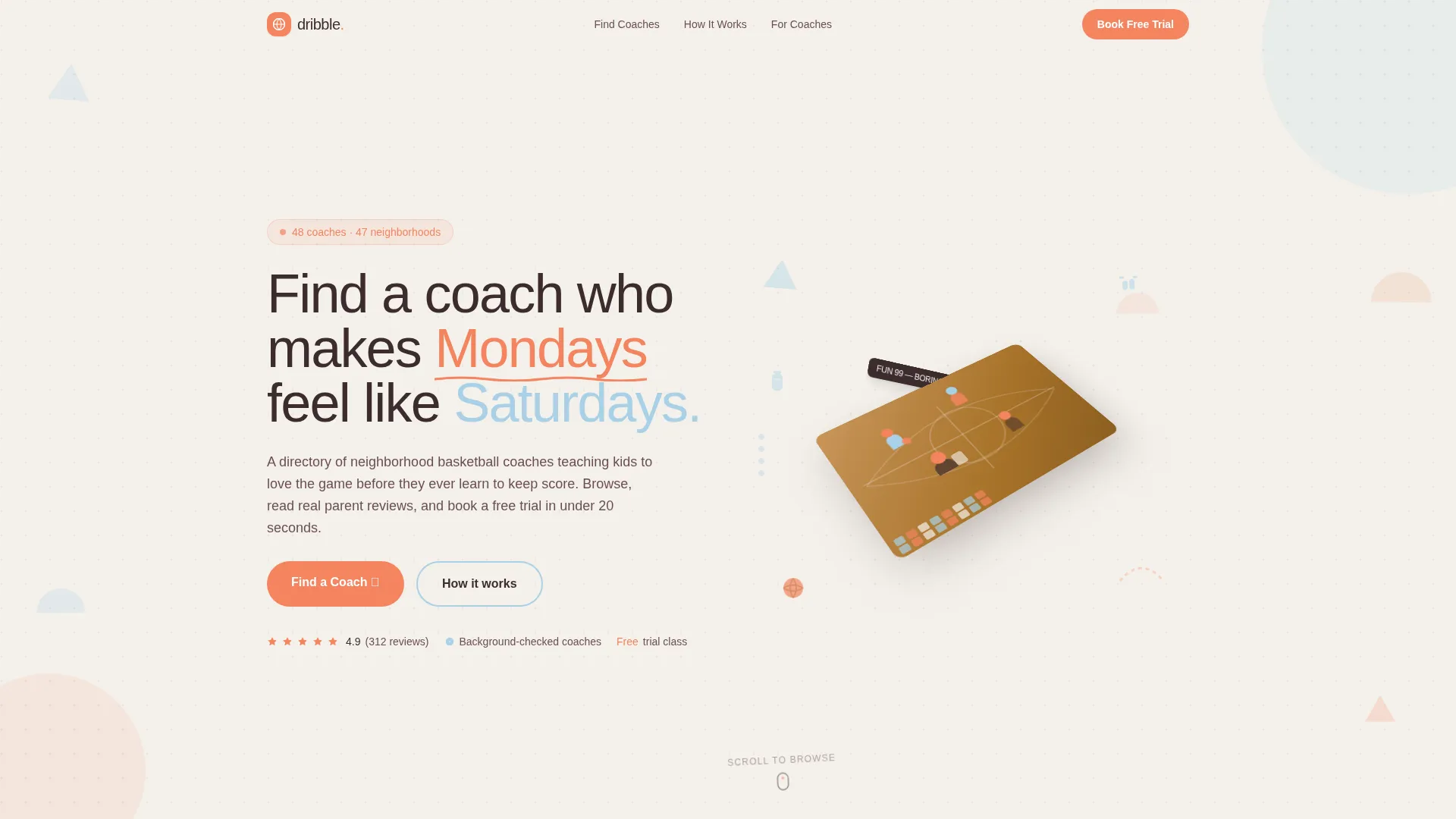
- An isometric hero section with parallax cursor movement and an integrated search bar
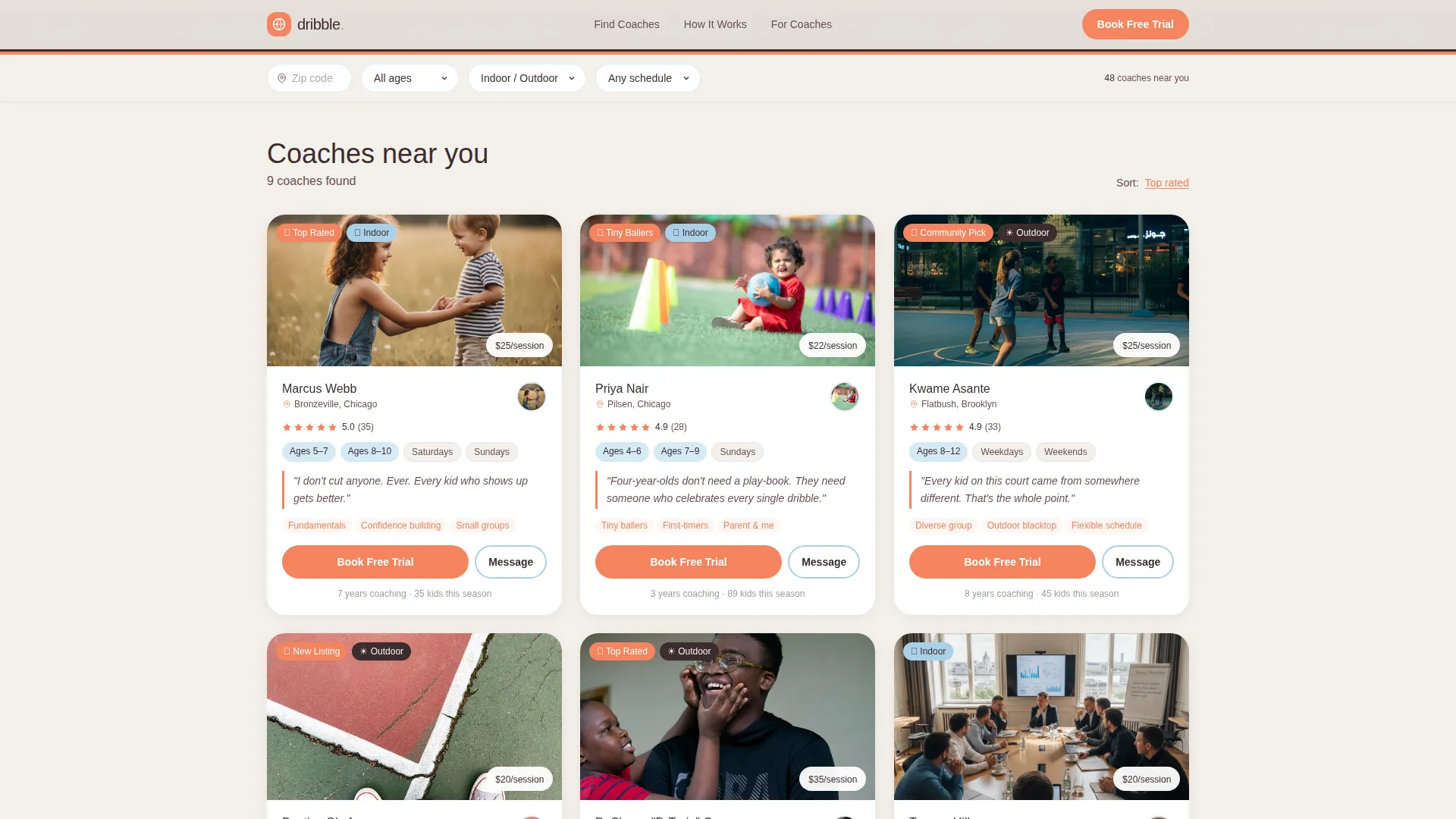
- A masonry coach gallery with sticky filters, scroll-reveal card animations, and sprinkled geometric illustrations between cards
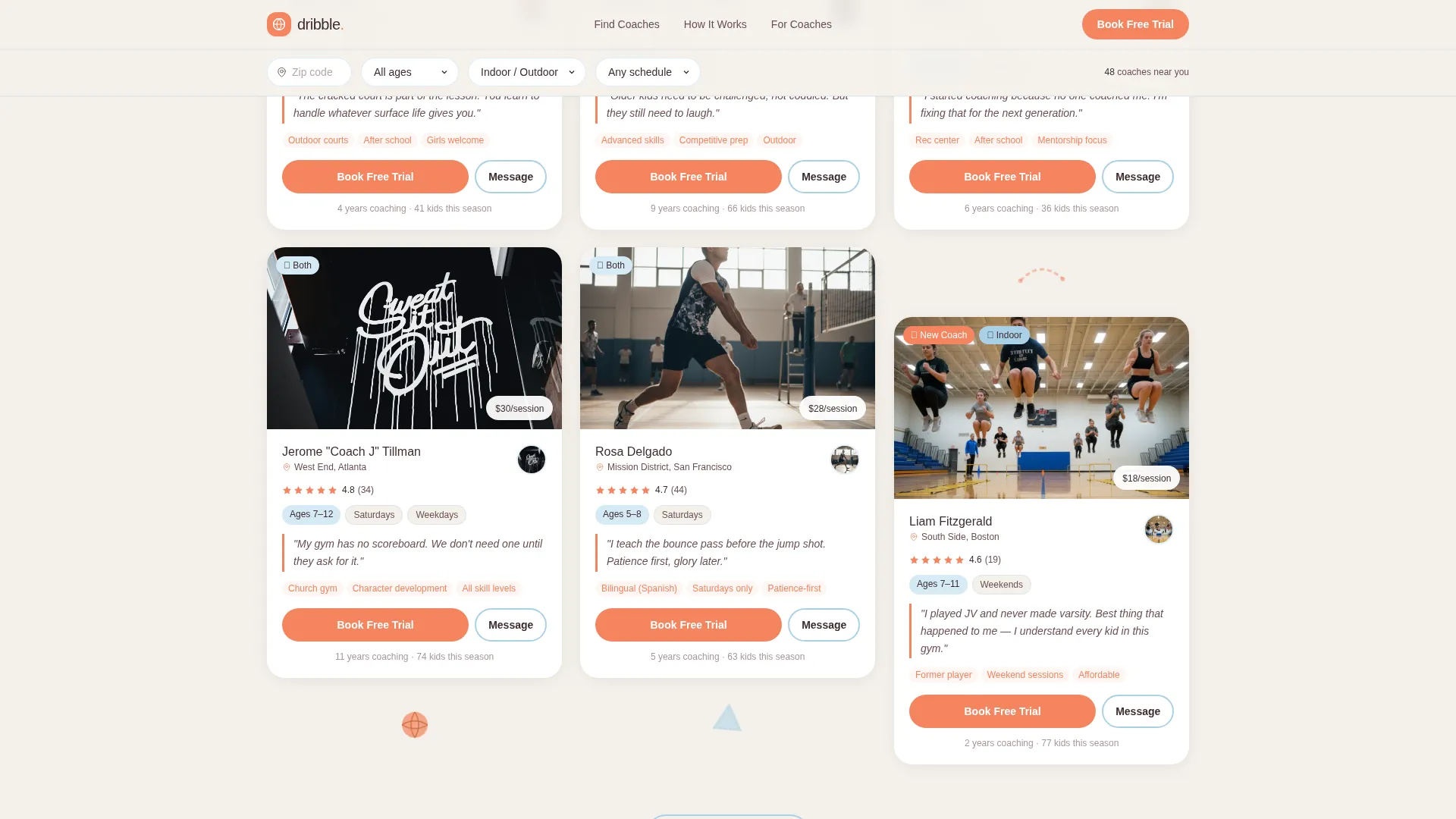
- A compact booking modal and a secondary message-coach path, both built into each instructor card
Feature list
The template bundles a focused set of interactive and visual features. Each one comes from the design brief and serves a specific purpose for parents or coaches using the directory.
Isometric Hero with Parallax Effect
The hero section displays a miniature basketball court viewed from a thirty-degree isometric angle. Tiny geometric figures mid-dribble, a kneeling coach, pixel-style bleacher parents, and a scoreboard reading "FUN 99 BORING 0" fill the scene. The illustration slowly shifts as the cursor moves, adding toybox depth without any heavy animation libraries.
Masonry Coach Gallery
Instructor profile cards arrange themselves in a Pinterest-style masonry grid. Each card height varies naturally based on content, including an action photo, star rating, neighborhood name, age groups taught, and a direct quote from the coach. New cards stagger into view as the parent scrolls, creating an infinite-browse feel.
Sticky Filter Bar
A filter strip floats at the top of the screen throughout the gallery. Parents can narrow results by zip code, child age range, indoor or outdoor setting, and weekday or weekend availability. The filters stay accessible without interrupting the browsing flow.
Three-Field Booking Modal
Each coach card carries a rubber-orange "Book a Free Trial Class" button. Tapping it opens a compact modal where a parent selects their child's age, picks an available date from the coach's calendar view, and enters a phone number. The entire interaction is designed to complete in under twenty seconds.
Message Coach Path
A secondary call to action labeled "Message Coach First" sits below the booking button on every card. It gives hesitant parents a lower-commitment way to ask a question before booking, reducing drop-off from parents who are not yet ready to commit.
Social Proof Banner
An animated marquee between the gallery and the bottom call to action section cycles through parent testimonial snippets and directory-wide stats. It reinforces trust at the moment parents are deciding which coach to choose.
Page sections overview
| Section | Purpose |
|---|---|
| Hero illustration | Draws attention, sets playful tone, introduces search |
| Sticky filter bar | Lets parents narrow coach results instantly |
| Masonry coach gallery | Main browsing and comparison experience |
| Social proof banner | Builds trust with testimonials and stats |
| Coach listing call to action | Invites coaches to add their own program |
| Page footer | Navigation and trust signals |
Design & branding system
The visual language is Playful Geometric, built around a Cloud Canvas color palette that feels bright without being aggressive. Every color choice has a functional role, not just a decorative one.
- Cloud white (#F4F1EB) as the dominant background, chalky sky blue (#A8D0E6) for section dividers and hover states, rubber orange (#F4845F) for buttons and badges, and deep gym-floor maple (#3D2C2E) for headlines and body text
- Floating geometric shapes such as triangles, half-circles, and dotted arcs appear behind cards as background accents, referencing a coach's playbook doodled in crayon
- Plus Jakarta Sans handles headings for a rounded, friendly feel, while DM Sans keeps body text clean and easy to read at small sizes
Mobile & speed optimization
The template is designed mobile-first, reflecting the reality that most parents browse in short windows on a phone. Layouts stack cleanly, touch targets are sized for thumbs, and the booking modal is thumb-friendly from the first tap.
- CSS animations are preferred over JavaScript-heavy alternatives to keep scroll-reveal and parallax effects lightweight
- Masonry card images are optimized for fast loading as the gallery grows with more coach profiles
- The sticky filter bar and booking modal are both designed specifically for small-screen interaction without horizontal scrolling
How this template helps you convert
The page is structured so that persuasion happens during browsing, not during checkout. By the time a parent reaches the booking button, the gallery has already done the convincing.
- The masonry gallery exposes parents to multiple smiling-kid photos, five-star ratings, and coach voice quotes before they ever see a call to action, building confidence through repeated positive signals.
- The three-field booking modal removes every unnecessary step. Selecting an age, picking a date, and entering a phone number is all that stands between a browsing parent and a confirmed free trial class.
Other information about this template
Dribble is categorized under Kids and Family, specifically the Kids Basketball niche. It is designed as a business-to-consumer booking platform for local sports education services.
- The template targets a United States audience, with date formatting in MM/DD/YYYY and pricing in USD
- Animation intensity is set to high across the template, covering the hero parallax, card scroll-reveal, masonry stagger load, and booking modal transitions
- The footer follows a horizontal flow layout pattern, keeping navigation and trust signals organized without visual clutter
- Sprinkled geometric illustrations of a bouncing ball, a high-five, and a water bottle appear between gallery cards to maintain energy throughout the scroll
- The "List Your Program" call to action section at the bottom of the page creates a dual-audience entry point, serving both parents looking for coaches and coaches looking for visibility
Theme
Playful Geometric
Creative direction
Community Gallery
Color system
Cloud Canvas
Style
Masonry/Pinterest
Direction
Booking/Scheduling
Page Sections
Isometric Hero with Parallax Effect
Masonry Coach Gallery
Sticky Filter Bar
Three-field Booking Modal
Message Coach Path
Social Proof Banner
Related questions
What kind of directory is this template designed for?
Can parents book a session directly from the coach cards?
Is there an option for parents who are not ready to book right away?
How does the masonry gallery layout work?
Who else can benefit from this template beyond parents?



