Marina & Boat Repair Landing Page Template
Drydock is a single-column flow landing page built for full-service marinas and boat repair yards. It uses a dark, instrument-panel color system, an infographic boat cross-section header with animated stats, and a case study narrative structure that walks visitors through real repair jobs before presenting a lead-generation form.
by Rocket studio
Quick summary
Drydock is a lead-generation landing page for a full-service marina and repair yard. It opens with an animated boat cross-section infographic, then guides visitors through escalating case study stories before asking them to request an estimate or schedule a haul-out. Every design decision earns trust through evidence before making an ask.
Who this template is for
This template is built for marine businesses that need to convert hesitant boat owners into booked repair clients. It speaks directly to the yard's real customers and matches the tone of a working waterfront operation.
- Marina operators and independent repair yards offering hull, engine, electrical, and rigging services
- Charter operators and liveaboards who need a page that communicates speed, competence, and documented results
- Boat service businesses replacing generic brochure pages with a results-first narrative that drives inquiries
What problem this template solves
Boat owners delay expensive repairs because they do not trust that a yard will finish on time or within budget. A standard service page with a phone number and a short list of services does not address that hesitation. Drydock is structured to close that trust gap before the form ever appears.
- Visitors see repair stats and real job case studies before any sales language
- The lead form only surfaces after the page has demonstrated capability through documented outcomes
- The dual call-to-action path separates cold prospects from ready-to-book clients, reducing friction for both
What you get with this template
You get a fully structured single-column landing page with every section pre-built and logically sequenced. The layout moves from credibility to conversion in a deliberate order, and the visual system is consistent from header to footer.
- An animated infographic header, three escalating case study sections, single-stat interstitials, and a full-width lead form
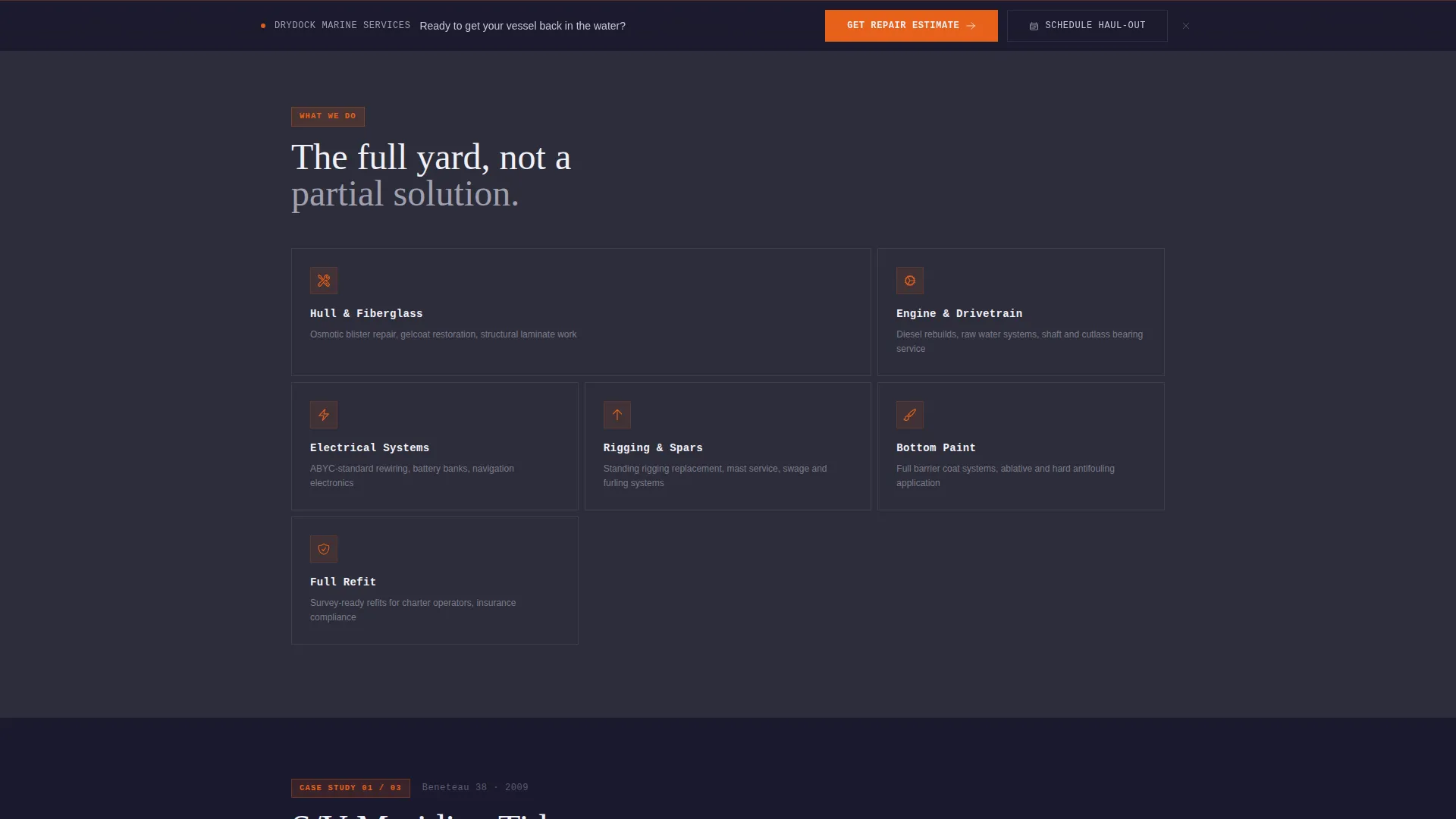
- A sticky bottom call-to-action bar that activates after the second scroll section, keeping the conversion path visible throughout
- A dark Carbon Fiber color system with signal-flare orange highlights, pre-applied across every component
Feature list
This section details the core built-in features that make Drydock a focused lead-generation tool for the marine repair market.
Animated Infographic Header
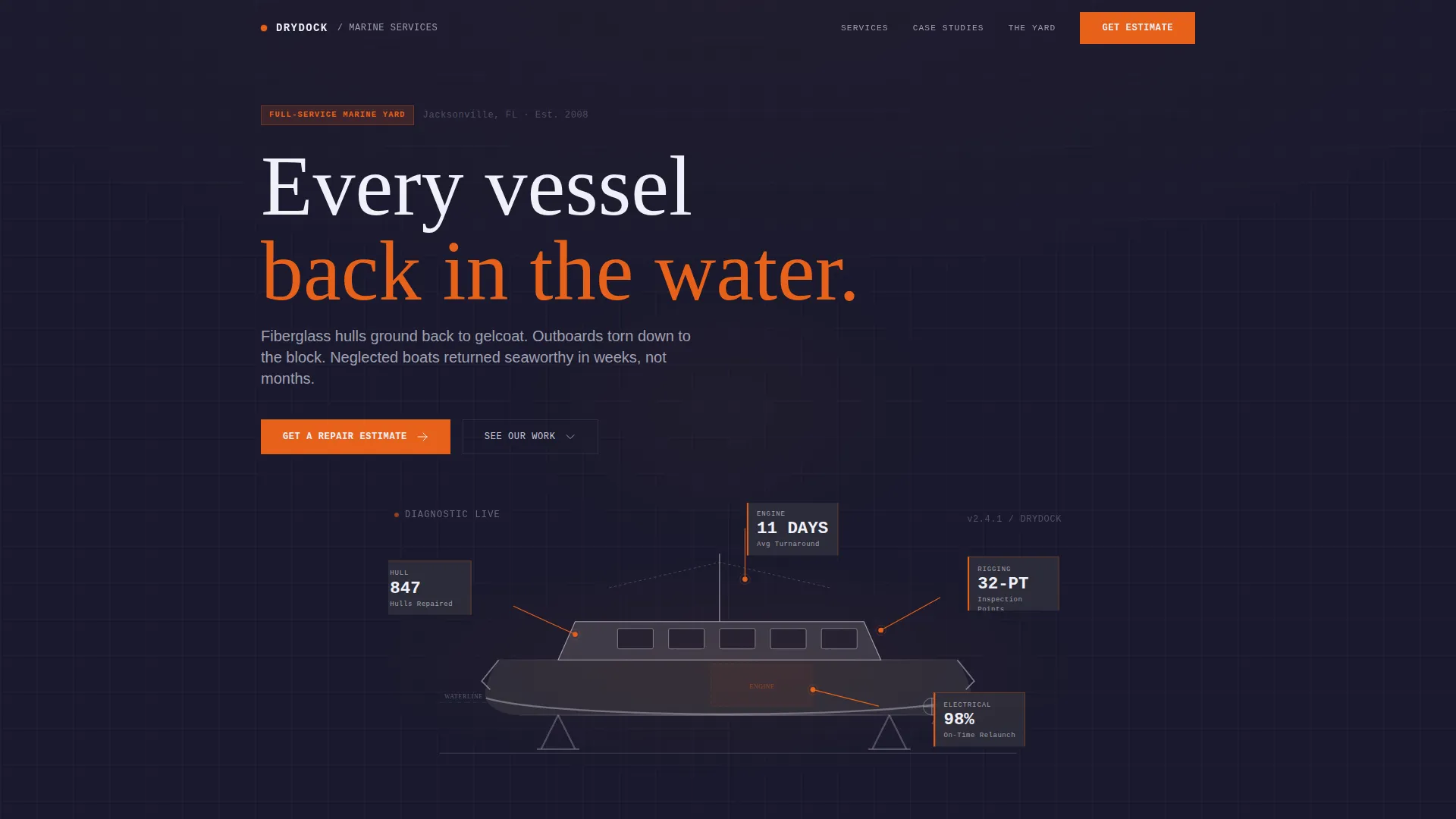
The header renders a single boat silhouette in cross-section. Animated data callouts branch from hull, engine, electrical, and rigging zones, each displaying a live-style stat: 847 hulls repaired, an average 11-day turnaround, a 32-point inspection standard, and a 98 percent on-time relaunch rate. Numbers tick upward on page load like a diagnostic readout, replacing conventional hero photography with data-driven visual impact.
Case Study Narrative Sections
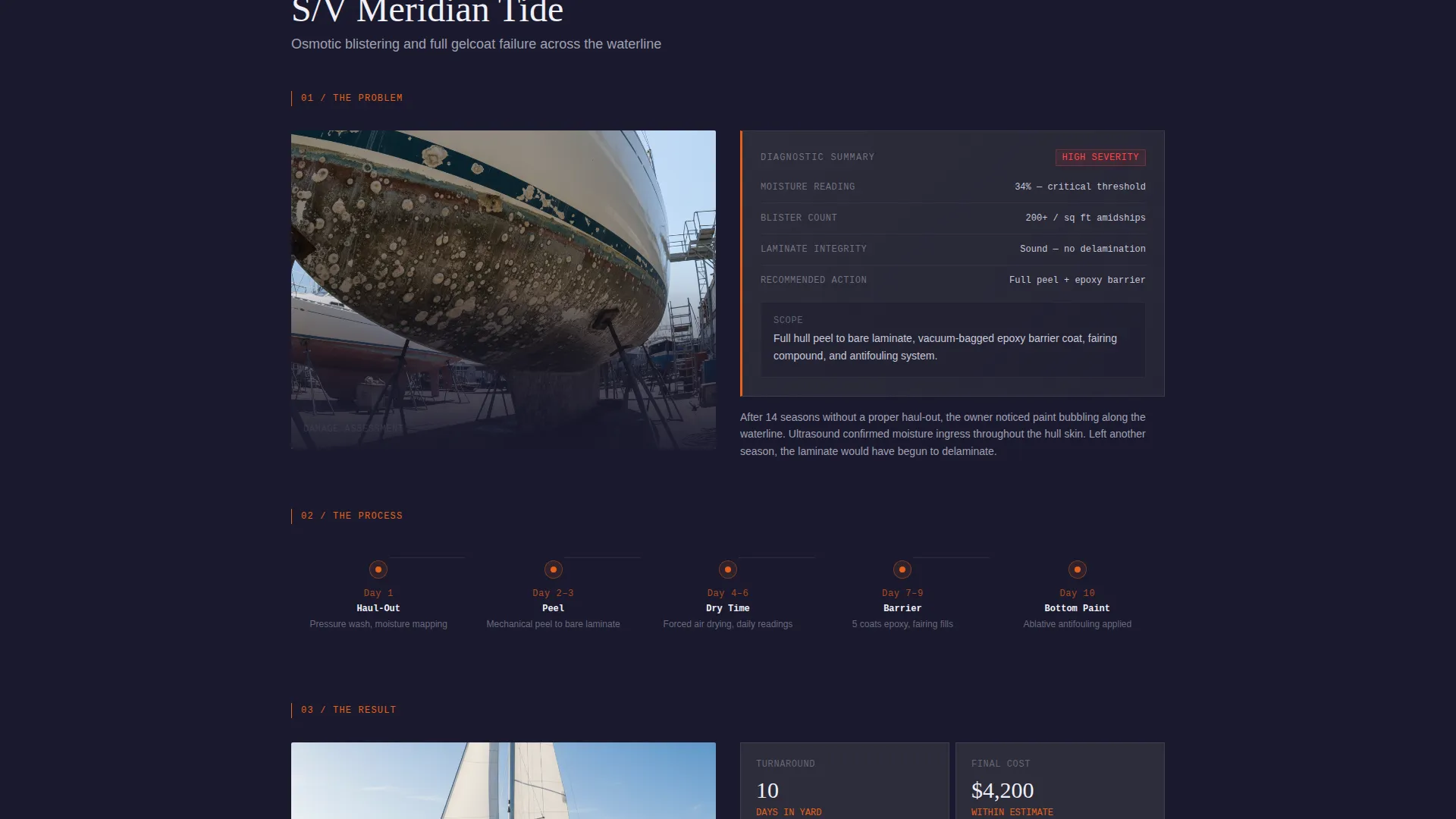
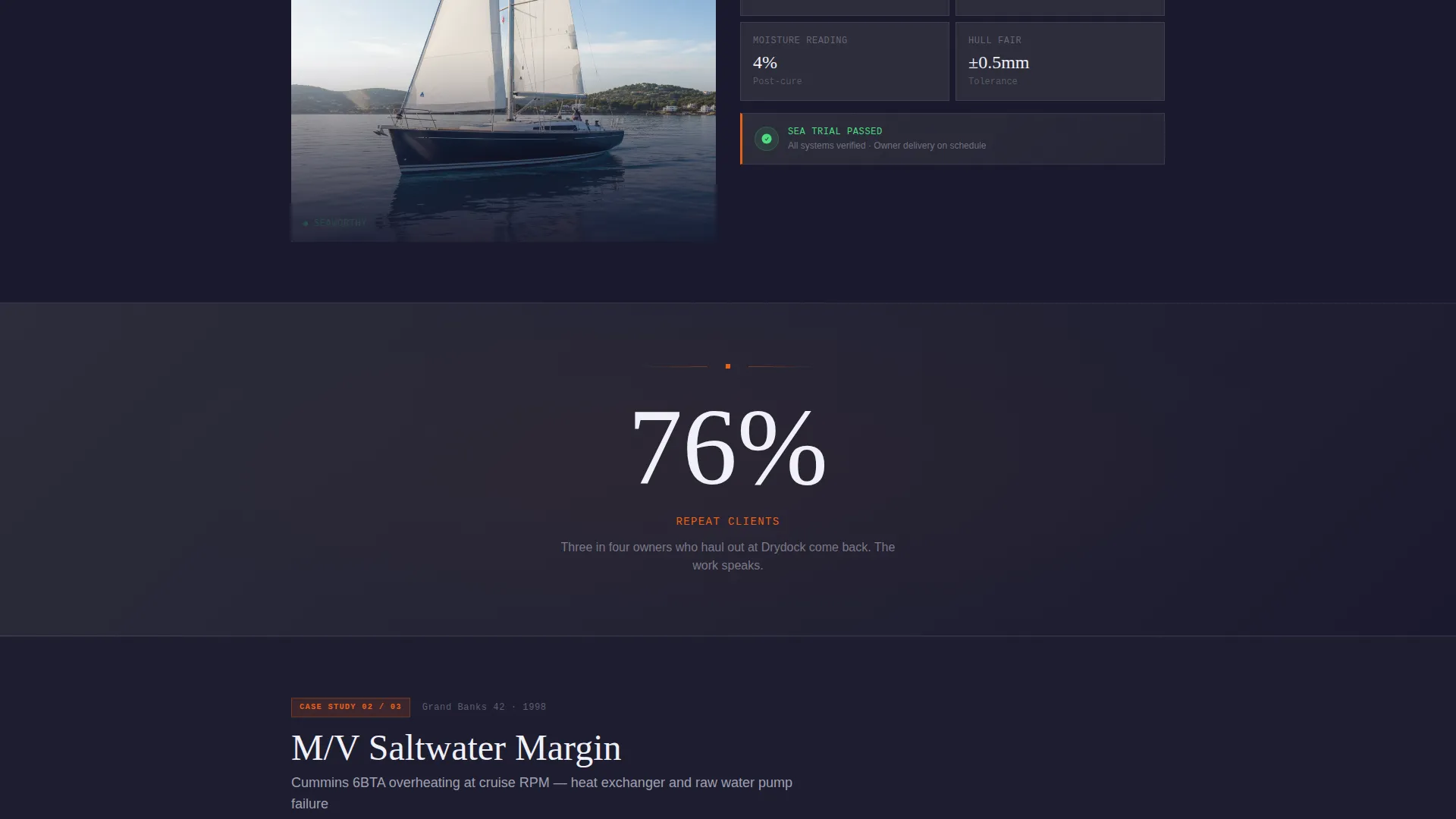
Three scroll sections each profile a single repair job as a three-act story. Each case opens with a damage photo and a diagnostic summary card showing scope and severity. A timeline strip tracks milestones from haul-out to sea trial. The finished vessel appears alongside metric cards displaying final cost and turnaround time. The three cases escalate in complexity: gel coat repair, engine rebuild, and complete refit.
Single-Stat Interstitials
Between each case study, a full-width interstitial panel displays one bold performance number. These brief breaks reinforce credibility without breaking the narrative flow. They give skimmers a fast read on yard performance even if they do not read the full case stories.
Dual Lead-Generation Path
The page offers two distinct conversion routes. The primary path is a "Get a Repair Estimate" form that collects boat length and type, primary issue via checkboxes, current location status, and a photo upload. The secondary path is a "Schedule a Haul-Out" option for visitors who already know what they need. Both paths are present in the full-width form section at the page base.
Sticky Bottom Call-to-Action Bar
After the visitor passes the second scroll section, a sticky bar locks to the bottom of the viewport. It keeps the primary call to action visible without interrupting the case study reading experience. The bar uses signal-flare orange to stay prominent against the dark background.
Carbon Fiber Dark Color System
The entire template uses a four-color palette: deep hull black for primary backgrounds, anti-fouling charcoal for card and panel surfaces, zinc anode silver for body text and secondary labels, and signal-flare orange reserved for calls to action, status indicators, and key metric highlights. The result is a visual system that reads like a center console instrument panel at night.
Page sections overview
| Section | Purpose |
|---|---|
| Infographic Header | Display animated boat cross-section with live-style repair stats |
| Case Study One | Profile a gel coat repair job as a three-act narrative |
| Stat Interstitial One | Reinforce credibility with a single bold performance number |
| Case Study Two | Profile a full engine rebuild with timeline and metric cards |
| Stat Interstitial Two | Break narrative with one key yard performance figure |
| Case Study Three | Profile a complete refit as the highest-complexity proof point |
| Stat Interstitial Three | Close the evidence section with a final performance stat |
| Sticky call to action Bar | Keep primary call to action visible after second scroll section |
| Full-Width Lead Form | Capture repair estimate requests and haul-out scheduling |
Design & branding system
The visual identity follows a Dashboard Pro theme applied through the Carbon Fiber color system. Every color serves a specific communication role, and no decorative fills dilute the signal clarity.
- Backgrounds layer deep hull black (#1A1A2E) and anti-fouling charcoal (#2D2D3A) to create depth without distraction
- Zinc anode silver (#A0A0B0) carries body text and secondary labels, keeping content readable on dark surfaces
- Signal-flare orange (#E8611A) appears exclusively on calls to action, status indicators, and key metric highlights to create immediate visual urgency
Mobile & speed optimization
The single-column flow layout is inherently well-suited for smaller screens because there are no multi-column grids to restack. Every section follows a vertical reading order that translates naturally to mobile viewports.
- The animated header, timeline strips, and metric cards are designed within a column-constrained layout that scales without horizontal overflow
- The sticky bottom bar remains usable at small screen widths, keeping the call to action reachable without requiring a scroll back to the top
- Form fields for the estimate request are vertically stacked by default, making touch input straightforward on any device
How this template helps you convert
The page is structured so that every section before the form builds the case for contacting the yard. Conversion is earned, not assumed.
- The infographic header opens with four verifiable performance stats, establishing credibility in the first viewport before the visitor reads a single sentence of body copy
- Three escalating case studies show progressively complex repair jobs with documented timelines and costs, so by the time the form appears, visitors have already seen evidence that their specific problem can be solved
- The dual call-to-action system separates first-time inquirers from repeat or returning clients, reducing decision fatigue and routing each visitor to the most relevant next step
Other information about this template
Drydock is built on the Dashboard Pro theme, which provides the underlying component structure for the dark interface, metric cards, timeline strips, and diagnostic-style callout elements used throughout the page.
- The template style is Single Column Flow, meaning all sections stack vertically in a single continuous reading path with no sidebar or multi-column grid
- The creative direction is Case Study Narrative, a format that works particularly well for service businesses where proof of past work is the strongest sales argument
- The lead-generation direction means the primary goal of every design and copy decision is to move the visitor toward submitting the estimate form or booking a haul-out date
- The header concept is Infographic, replacing conventional photography with a data-annotated boat cross-section that communicates yard capability at a glance
- The template sits within the Marine and Maritime category under the Shipbuilding and Repair subcategory, making it a focused fit for boat repair yards, full-service marinas, and related waterfront service businesses
Theme
Dashboard Pro
Creative direction
Case Study Narrative
Color system
Carbon Fiber
Style
Single Column Flow
Direction
Lead Generation
Page Sections
Animated Infographic Boat Header
Three-act Case Study Sections
Single-stat Interstitial Panels
Dual Conversion Path Form
Sticky Bottom Call to Action Bar
Carbon Fiber Dark Interface System
Related questions
Can I edit the repair stats shown in the infographic header?
Does the lead form support photo uploads out of the box?
Can I add more case study sections or remove one?
Is the sticky call-to-action bar always visible?
Do I need to use all four colors in the palette?