Advanced Vehicle Inspection & Testing Appointment Booking Website Template
Emissionspass is a scroll-reveal landing page template built for emissions testing centers. It serves fleet managers, owner-operators, and dealership service departments with a spec-sheet design aesthetic, a split-video hero, a 12-metric comparison engine, and a sticky three-field booking form. The Industrial Raw visual identity signals technical credibility from the first scroll.
by Rocket studio
Quick summary
Emissionspass is a single-page, scroll-reveal landing page template designed for emissions testing centers. It combines a split-video hero, a progressive spec-sheet layout, and a side-by-side comparison engine to convert fleet managers, owner-operators, and dealership service departments into booked tests before they reach the call to action.
Who this template is for
This template is built for emissions testing facilities that serve professional and commercial clients. The design language, section order, and conversion flow are all calibrated for high-stakes compliance decisions, not casual browsing.
- Fleet managers running 40-plus-truck operations with active DOT compliance deadlines
- Owner-operators who received a roadside inspection flag and need an urgent retest
- Dealership service departments pre-certifying trade-in vehicles before lot placement
What problem this template solves
Emissions testing centers compete against quick-lube chains and mobile testers whose low-effort websites make every facility look the same. Potential clients arrive with real urgency and no easy way to compare technical competence at a glance.
- Visitors cannot quickly evaluate equipment calibration standards, technician certifications, or retest policies from a generic service page
- Fleet managers need fleet-specific pricing and volume capacity data before they commit a multi-vehicle account
- Owner-operators under a deadline need instant clarity on test types, turnaround times, and booking availability
What you get with this template
The template delivers a fully structured landing page with five purpose-built sections, high interactivity, and a clinical design system that communicates authority through detail. Every section reveals progressively as the visitor scrolls, maintaining engagement from the hero to the booking form.
- A split-video hero, a standards spec sheet, a 12-metric comparison engine, a fleet services section, and a sticky booking form with footer
- Scroll-reveal animations powered by CSS and Intersection Observer for progressive row disclosure
- A fleet slide-out panel, sticky call-to-action bar, and a three-field scheduling form built into the layout
Feature list
This template includes the following built-in capabilities drawn directly from the design and interaction brief.
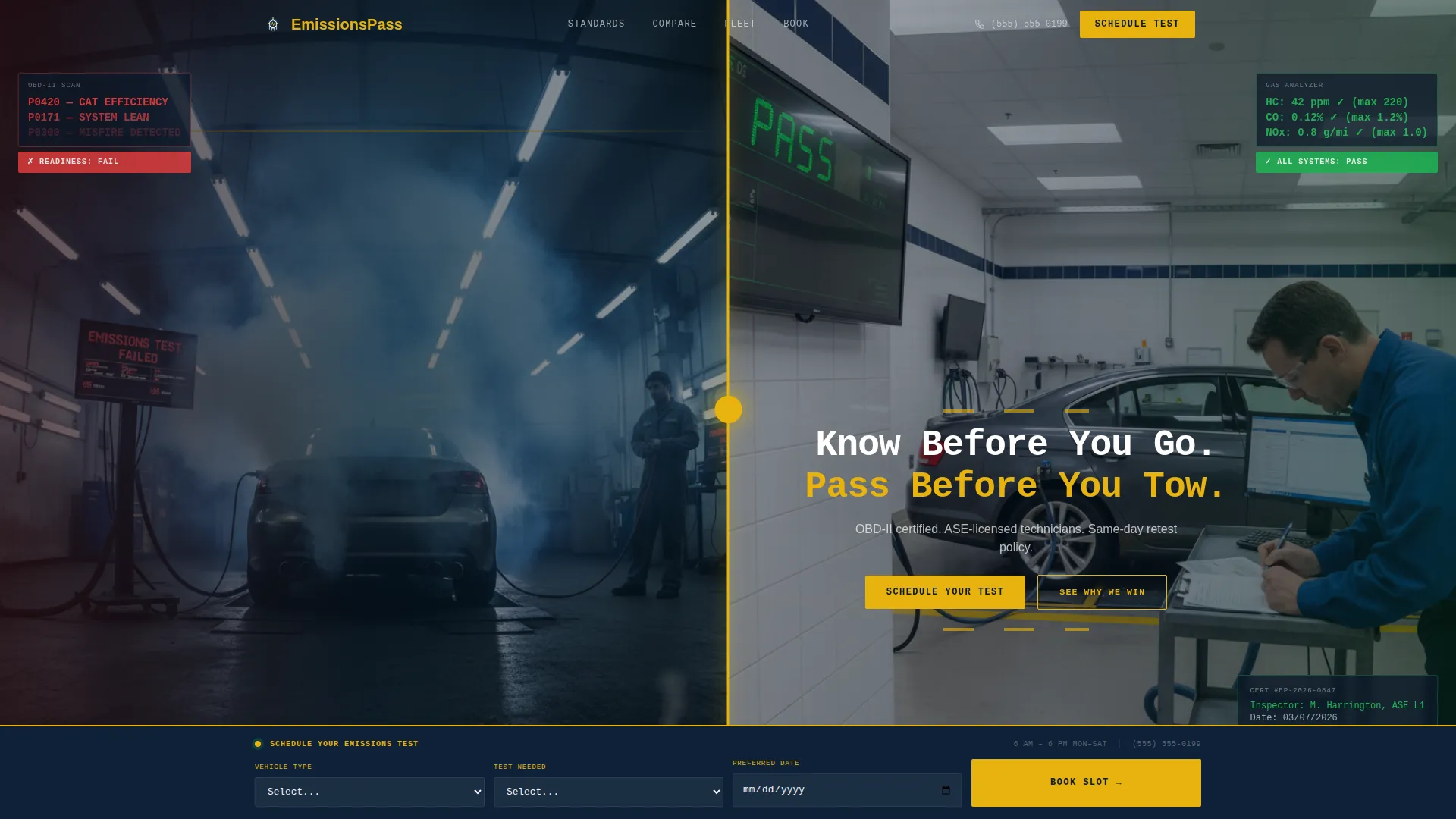
Split-Video Compare Hero
The header displays two looping silent video panels side by side. The left panel shows a vehicle failing inspection with visible exhaust and a red scanner readout. The right panel shows the same vehicle class leaving clean with a green digital readout. A single headline fades in across the split on load.
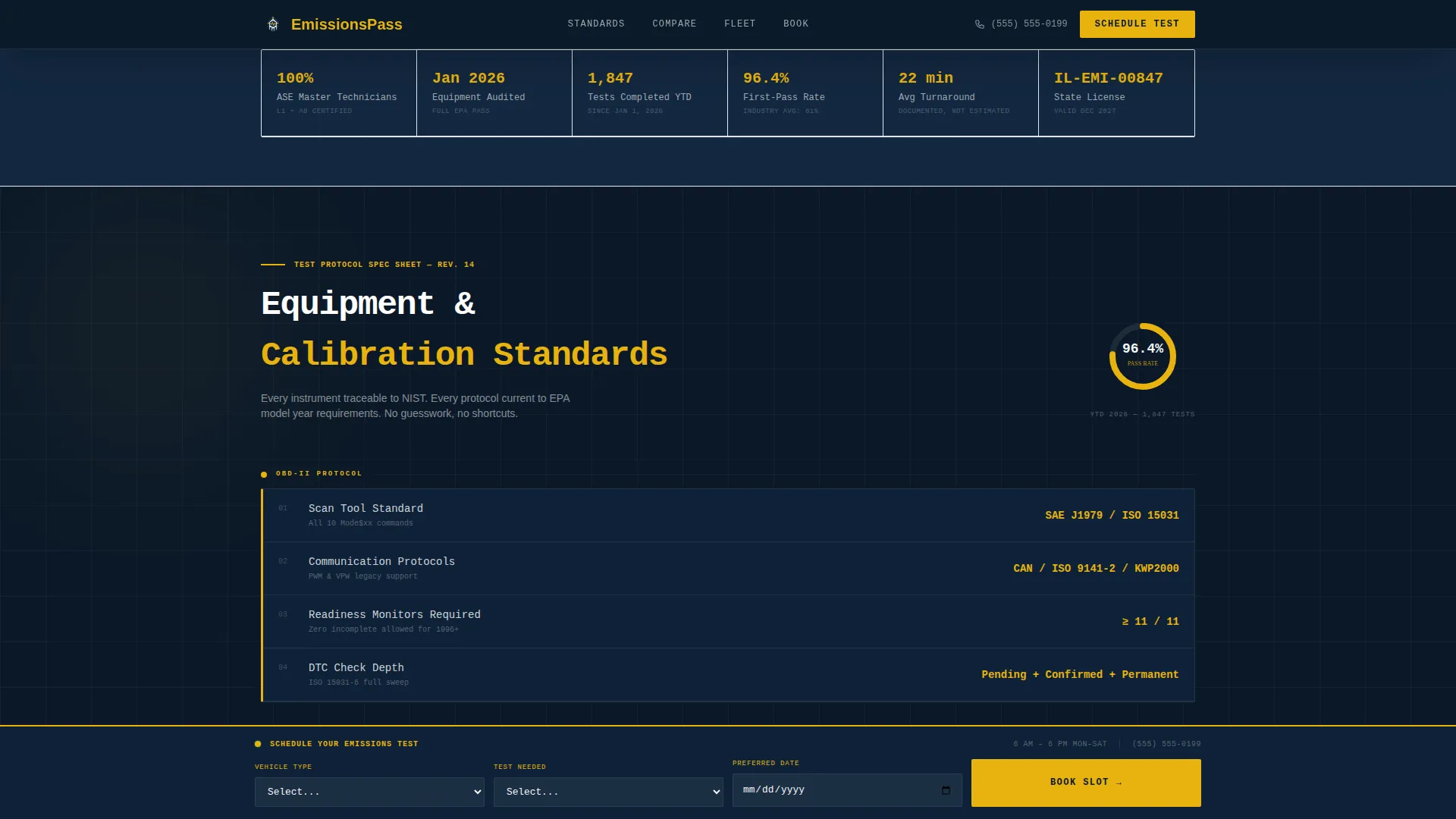
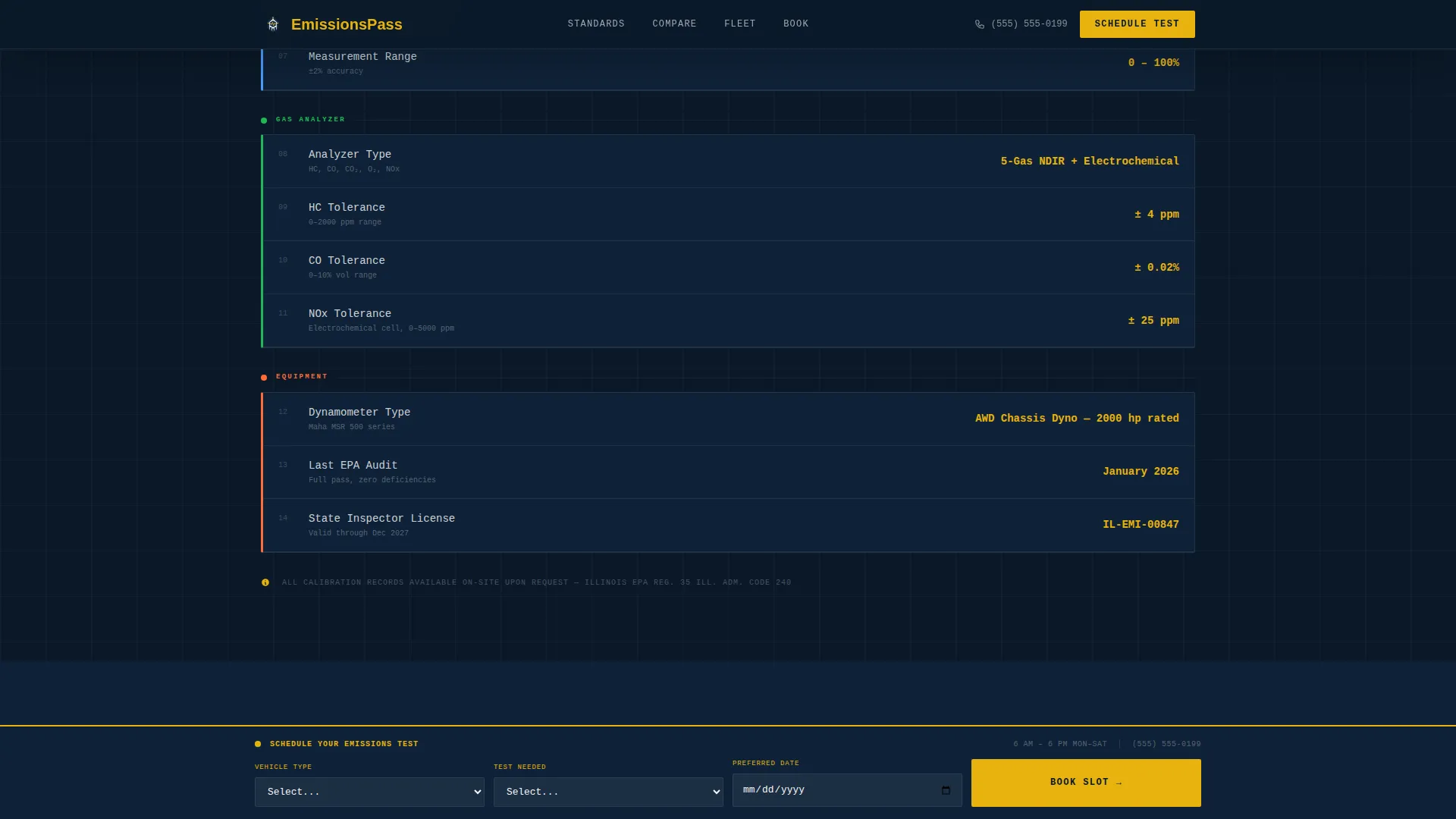
Progressive Spec Sheet Panels
Testing standards reveal as scrollable line items inside navy-colored monospaced panels. Each row slides up on scroll and presents data such as On-Board Diagnostics II (OBD-II) protocols, opacity meter specifications, and gas analyzer tolerances in JetBrains Mono type.
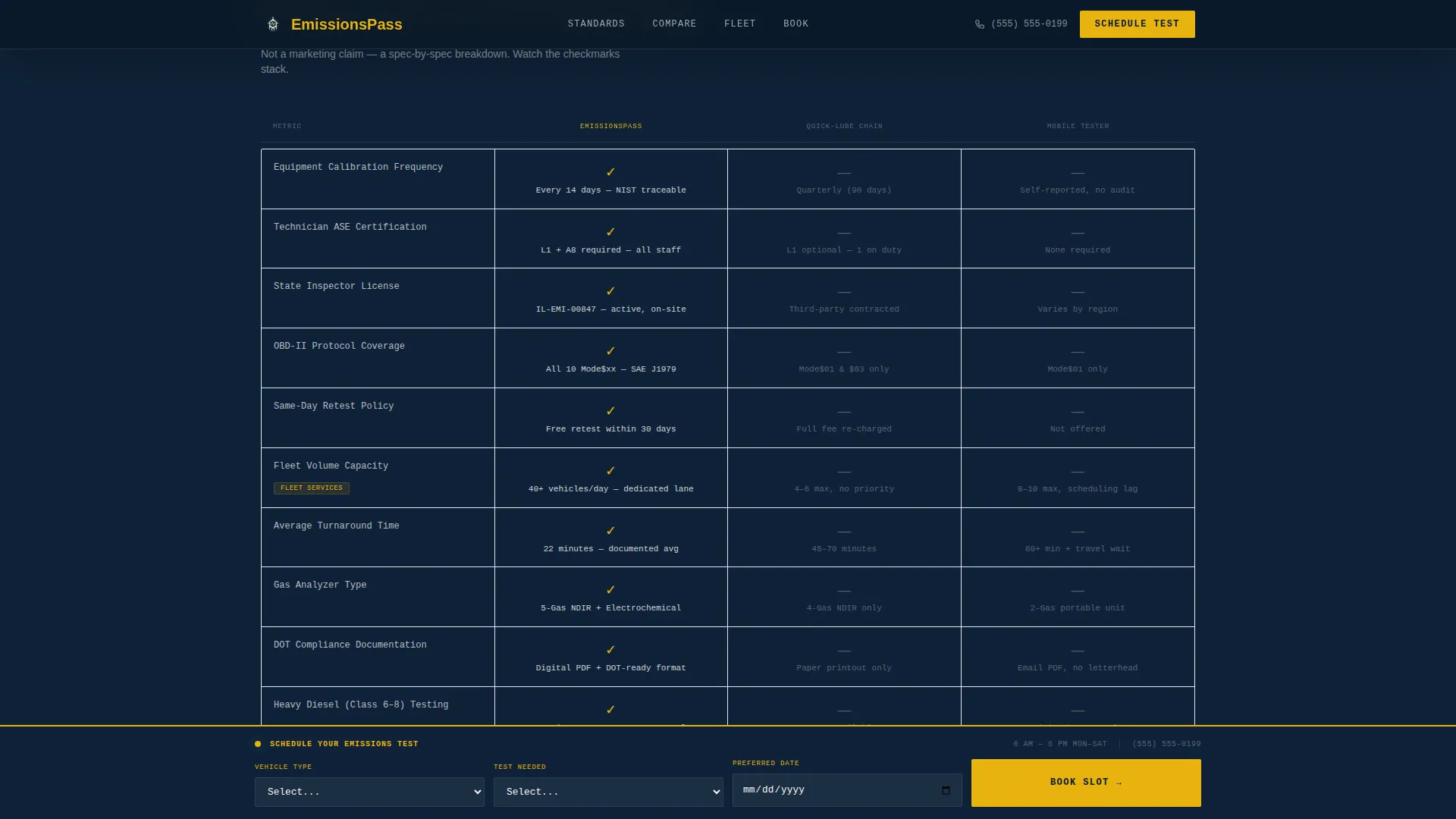
12-Metric Comparison Engine
A side-by-side comparison section stacks this facility against quick-lube chains and mobile testers across twelve real metrics. Each row reveals progressively as the visitor scrolls, with yellow checkmarks building on one side and gray dashes accumulating on the other.
Fleet Services Slide-Out Panel
A dedicated fleet section targets fleet managers directly. A secondary call-to-action labeled "Get Fleet Pricing" opens a slide-out panel requesting company name, fleet size, and CDL vehicle count. This path appears only within the fleet comparison row.
Sticky Booking Bar
A bottom sticky bar activates after the first comparison row reveals. It anchors the primary call-to-action "Schedule Your Test" throughout the remainder of the scroll. The bar stays visible without interrupting the reading experience.
Three-Field Scheduling Form
The booking form keeps friction minimal with exactly three fields: vehicle type as a dropdown (personal, fleet, or dealer lot), test needed (emissions only, emissions plus safety, or retest), and preferred date. No unnecessary inputs stand between the visitor and a confirmed appointment.
Page sections overview
| Section | Purpose |
|---|---|
| Split-Video Hero | Show fail-versus-pass contrast and introduce the headline |
| Standards Spec Sheet | Display OBD-II, opacity meter, and analyzer tolerances |
| Comparison Engine | Compare facility against chains across 12 metrics |
| Fleet Services Section | Target fleet accounts with slide-out pricing panel |
| Sticky Booking Bar | Anchor primary call to action and three-field scheduling form |
| Footer | Provide single-row linear contact and navigation |
Design & branding system
The Industrial Raw theme translates the atmosphere of a professional testing bay into a structured visual language. Navy dominates section backgrounds and headers, charcoal carries body text, high-vis yellow activates calls to action and pass indicators, and white opens up spec tables and comparison cards.
- Color palette: deep command navy (#0B1929), exhaust-stack charcoal (#3A3F47), high-vis compliance yellow (#E8B30E), and clean-pass white (#F4F5F7)
- Typography: JetBrains Mono for all spec data and digital readouts; Manrope for interface labels and body copy
- Visual references: polished concrete floors, overhead fluorescents, yellow lane markings, clipboard-on-steel-post aesthetics
Mobile & speed optimization
The template is designed desktop-first to serve fleet managers working on workstations, with strong mobile support for owner-operators checking requirements from a roadside location. All animations use CSS only and are triggered via Intersection Observer, keeping the page responsive on any device.
- Scroll-reveal animations rely entirely on CSS transitions and Intersection Observer, with no heavy JavaScript dependencies
- The sticky booking bar and slide-out fleet panel adapt to smaller viewports so mobile users can book without friction
How this template helps you convert
The conversion logic is built around earned trust. The visitor does not see a booking form until the comparison data has already done the persuasion work.
- The spec sheet and comparison engine build technical credibility row by row, so the visitor arrives at the call to action already convinced rather than skeptical.
- The sticky booking bar activates mid-scroll after the first comparison row reveals, reinforcing a decision the visitor is already making rather than interrupting the experience.
- The fleet slide-out panel captures high-value fleet accounts through a secondary conversion path that surfaces only for the right audience at the right moment.
Other information about this template
This template is part of the Automotive and Transport category under the Vehicle Inspection and Testing subcategory. It is localized for United States compliance contexts, using US Environmental Protection Agency (EPA) and Department of Transportation (DOT) standards, OBD-II protocols, and imperial references throughout.
- Template style: Scroll Reveal (Progressive) with high animation and interactivity settings
- Header concept: Split-Video Compare with simultaneous dual-loop silent video panels
- Creative direction: Spec Sheet, where every scroll mimics a new line item appearing on a test report
- Conversion direction: Comparison/Versus, where yellow checkmarks building against gray dashes drive the booking decision
- Social proof placeholders include ASE certification numbers, equipment calibration dates, pass rate percentages, and fleet volume capacity figures
- Footer pattern: Linear Single-Row layout for a clean, uncluttered close
Theme
Industrial Raw
Creative direction
Spec Sheet
Color system
Navy Authority
Style
Scroll Reveal (Progressive)
Direction
Comparison/Versus
Page Sections
Split-video Compare Hero
Progressive Spec Sheet Panels
Metric Comparison Engine
Fleet Services Slide-out Panel
Sticky Booking Bar with Scheduling Form
Related questions
Who is this landing page template designed for?
Can I customize the comparison section with my own facility metrics?
How does the fleet pricing slide-out panel work?
Does this template support mobile devices?
What fields are included in the scheduling form?



