Cinematic Education Agency Landing Page Template
Enroll is a dark, cinematic landing page template built for education video marketing agencies. It opens with a Before/After Slider that instantly shows the gap between flat campus footage and polished enrollment films. Interactive layered panels let visitors explore your reel by school type, and a feather-light audit form keeps the lead path friction-free.
by Rocket studio
Quick summary
Enroll is a single-page, overlap-layered landing page template designed for education video production agencies. It opens with a dramatic Before/After Slider, guides visitors through stacked interactive panels, and routes every click toward a filtered portfolio reel. The dark, gold-accented design communicates cinematic authority before a single word is read.
Who this template is for
This template is built for production agencies and studios that sell video marketing services to schools, colleges, and online programs. If your work transforms dull campus tours into compelling enrollment stories, this page matches your craft.
- Education video production agencies pitching admissions directors and enrollment teams
- Freelance cinematographers or small studios serving private schools and higher education clients
- Online program marketers who need a polished agency presence to win institutional contracts
What problem this template solves
Most video agencies serving education clients show up with generic portfolio sites that look identical to every other creative studio. Admissions directors and private school heads need to see the contrast immediately. They need to feel the difference between their current video assets and what a specialist agency can deliver.
- Generic portfolio layouts fail to communicate the cinematic gap between before and after
- Long contact forms and vague service pages create friction before a prospect is convinced
- Passive scrolling experiences lose visitors who would engage if given a more interactive path
What you get with this template
You get a complete, single-page layout built around three core mechanics: the Before/After Slider header, the Interactive Explorer panel system, and a click-through call to action structure that routes visitors by school type. Every section is designed to move a skeptical admissions buyer from curiosity to action.
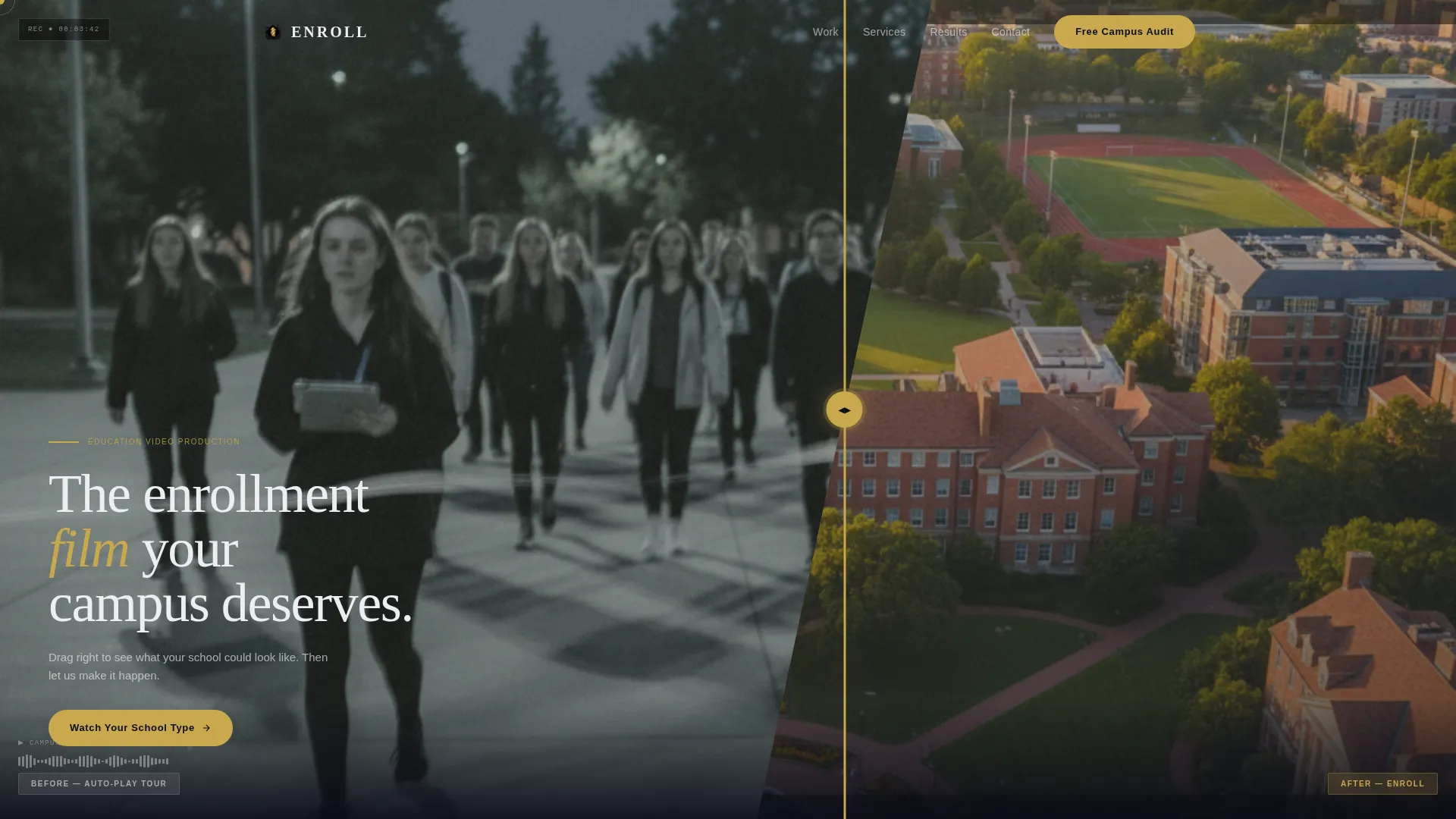
- A diagonal viewport-splitting Before/After Slider that opens the page with visceral contrast
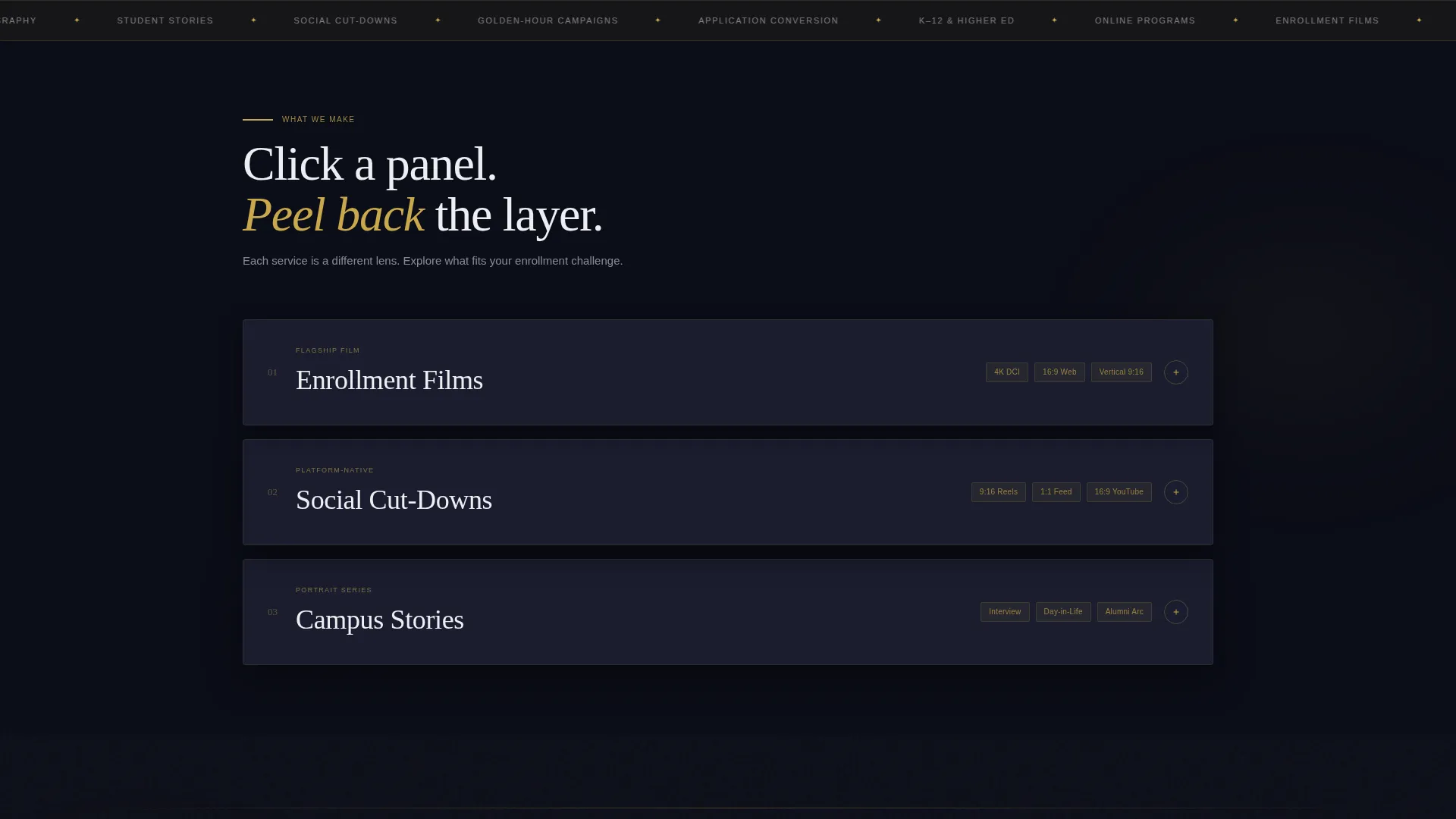
- Stacked, overlapping interactive panels for Enrollment Films, Social Cut-Downs, and testimonial collages
- Two conversion paths: a primary filtered reel call to action and a secondary low-friction campus audit form
Feature list
This template is built around deliberate design decisions. Each feature serves the specific conversion goal of turning an agency visit into a portfolio screening.
Before/After Slider Header
The header splits the viewport diagonally. The left side shows a flat, poorly lit campus tour still with a visible stock-music waveform. Dragging the gold-accented handle right reveals a cinematically reshot version of the same campus, complete with aerial golden-hour composition and color-graded warmth. The contrast lands in under three seconds.
Interactive Explorer Panel System
Visitors click to choose their own path through stacked, overlapping panels that rise as they engage. Selecting "Enrollment Films" peels back one layer to reveal a reel preview and conversion stats. Tapping "Social Cut-Downs" slides another card forward showing platform-specific aspect ratios and view counts. Each layer feels physically closer, building depth through curiosity.
Filtered Reel Click-Through call to action
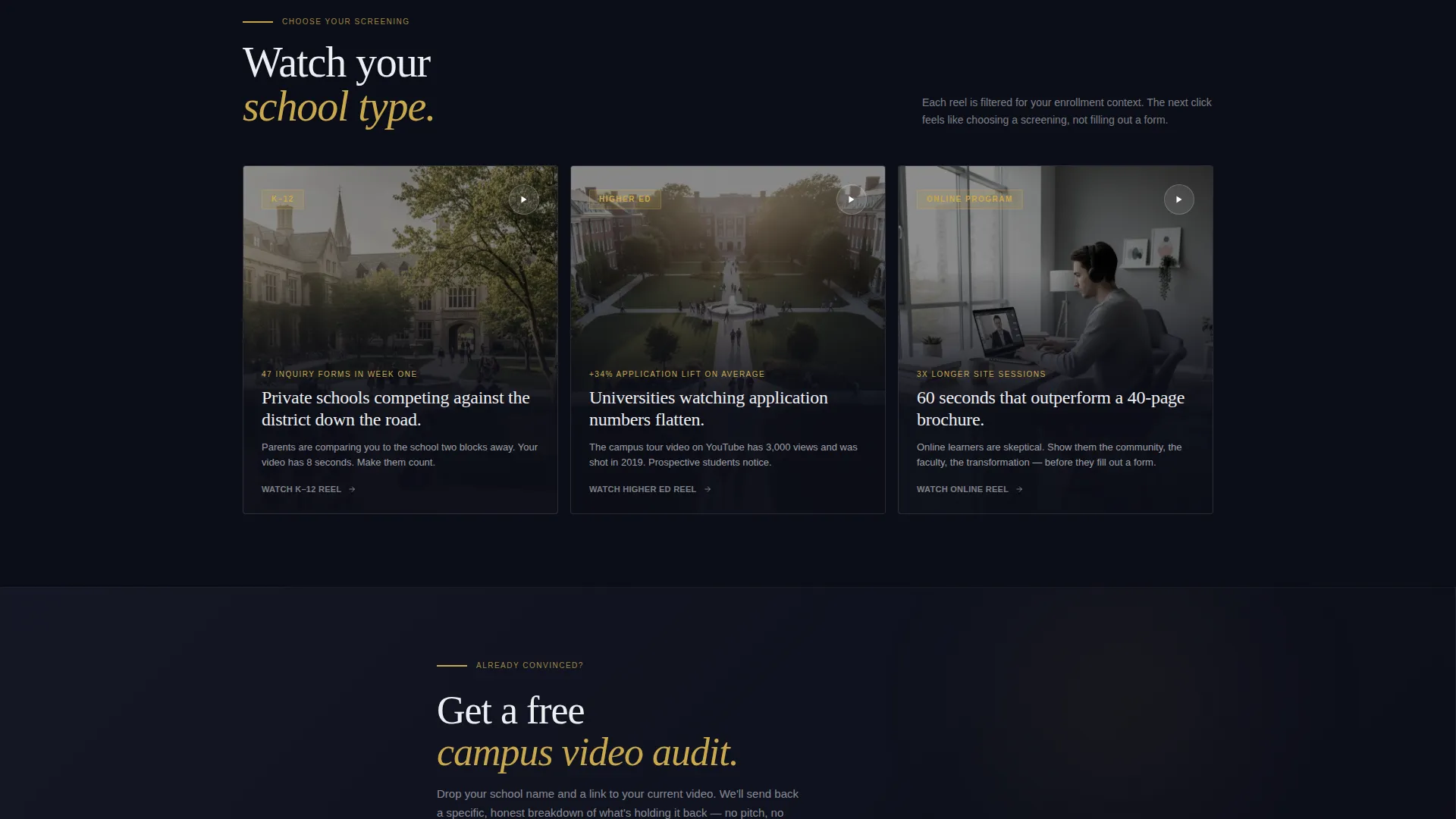
The primary call to action, "Watch Your School Type," appears immediately after the header and again as a sticky gold pill at the bottom of the page. It routes visitors to a filtered reel experience by school category: K-12, Higher Education, or Online Program. The next click feels like choosing a screening, not filling out a form.
Low-Friction Campus Audit Form
A secondary conversion path surfaces midway down the page for visitors already leaning toward a conversation. It asks only for a school name and a link to their current video. The minimal ask keeps friction feather-light and lets the portfolio page do the closing work.
Testimonial Collage Overlay
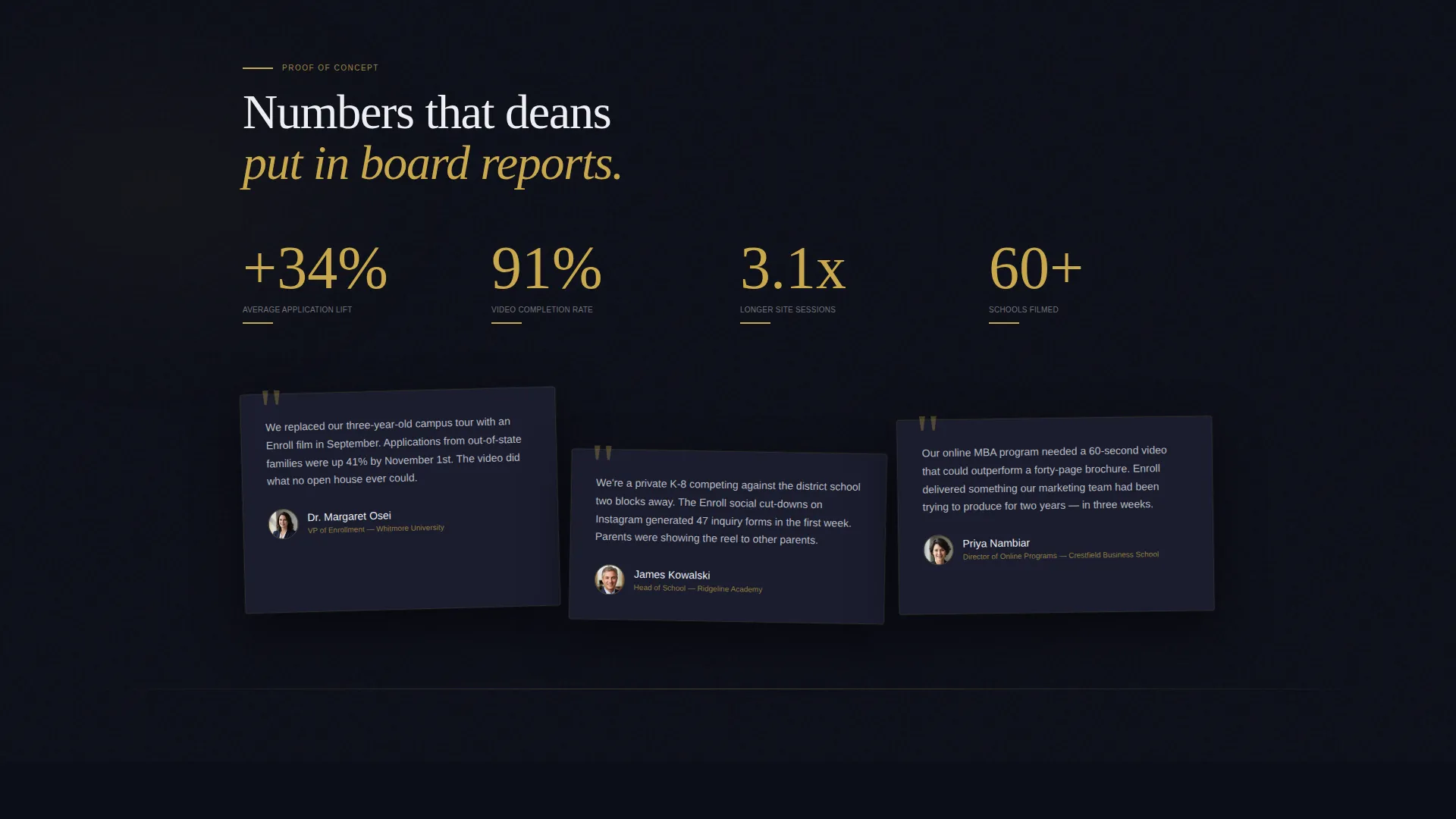
Testimonial cards from deans and enrollment vice presidents overlap the project panels at slight angles. The collage layout rewards exploration rather than passive reading. Social proof is embedded directly into the interactive layer system, so it appears as visitors dig deeper.
Dark Immersive Visual System
The Obsidian and Gold color system creates an immediate sense of cinematic authority. Deep volcanic black forms the primary canvas, charcoal slate surfaces the layered cards, and antique lecture-hall gold highlights every interactive element and accent line. Chalk white body text floats above the darkness like subtitles on a cinema screen.
Page sections overview
| Section | Purpose |
|---|---|
| Before/After Slider | Opens with visceral visual contrast between flat and cinematic campus footage |
| Primary Reel call to action | Routes visitors to a filtered portfolio experience by school type |
| Interactive Explorer Panels | Lets visitors self-select into Enrollment Films or Social Cut-Downs content |
| Testimonial Collage | Overlaps project panels with angled cards from deans and enrollment leaders |
| Campus Audit Form | Captures low-friction leads with only a school name and video link |
| Sticky Gold Pill | Keeps the primary call to action visible as a persistent bottom-screen prompt |
Design & branding system
The template follows a Dark Immersive theme built around an Obsidian and Gold color system. The palette references the brass fittings and dark wood of a university library after hours, lit by a single banker's lamp.
- Deep volcanic black (#0B0D17) as the primary canvas, charcoal slate (#1A1D2E) for layered card surfaces
- Antique lecture-hall gold (#C9A84C) on every interactive element, accent line, and call to action pill
- Chalk white (#EDEEF2) for body text, creating a subtitle-on-cinema-screen reading effect
Mobile & speed optimization
The overlap and layered panel structure is designed to translate across screen sizes. Interactive elements are sized and spaced to work with touch input, so the explorer experience remains functional on smaller devices.
- The Before/After Slider handle is touch-friendly and responds to swipe gestures on mobile screens
- Stacked panel interactions are built for tap-to-reveal behavior, not hover-only desktop triggers
- The sticky gold pill call to action remains anchored at the bottom of the screen on all device sizes
How this template helps you convert
This template is engineered around a single goal: turning a visiting admissions buyer into someone who watches your reel and then reaches out. Every layout decision supports that funnel.
- The Before/After Slider creates an immediate emotional gap that makes the visitor aware of their current video problem before any copy is read.
- The "Watch Your School Type" call to action removes generic friction by letting the visitor self-select a reel that matches their institution, making the next step feel personal rather than promotional.
- The Campus Audit form surfaces only after the portfolio has done its work, collecting just enough information to start a real conversation without demanding commitment too early.
Other information about this template
This template is categorized under Portfolio and Agency, with a specific focus on the Education Marketing and Agency subcategory. It is built for the Education Video Marketing Agency niche, where the sales cycle depends heavily on showing rather than telling.
- The template style is Overlap/Layered, meaning panels physically stack and peel back to create a sense of depth and dimension
- The creative direction is Interactive Explorer, driven by visitor curiosity rather than passive scroll momentum
- The landing page direction is Click-Through, optimized to push visitors into a deeper portfolio experience rather than a contact form
- The header concept is a Before/After Slider, the single most effective visual argument an education video agency can make on the first screen
Theme
Dark Immersive
Creative direction
Interactive Explorer
Color system
Obsidian & Gold
Style
Overlap/Layered
Direction
Click-Through
Page Sections
Before/after Slider Header
Interactive Explorer Panel System
Filtered Reel Click-through Call to Action
Low-friction Campus Audit Form
Testimonial Collage Overlay
Dark Immersive Visual System
Related questions
Who is this landing page template designed for?
Can I use this template to show different types of school projects?
How does the Before/After Slider work on the page?
What is the Interactive Explorer panel system?
Do I need a long contact form on this landing page?



