Clinical Trial Recruitment Landing Page Template
Enroll is a clinical trial recruitment landing page built for healthcare organizations that need to connect real patients to active trials fast. It features a live metrics dashboard, a transparent four-stage enrollment journey, a filterable trial browser, and a three-step eligibility form with embedded calendar scheduling. The design is warm, clinical, and built for trust.
by Rocket studio
Quick summary
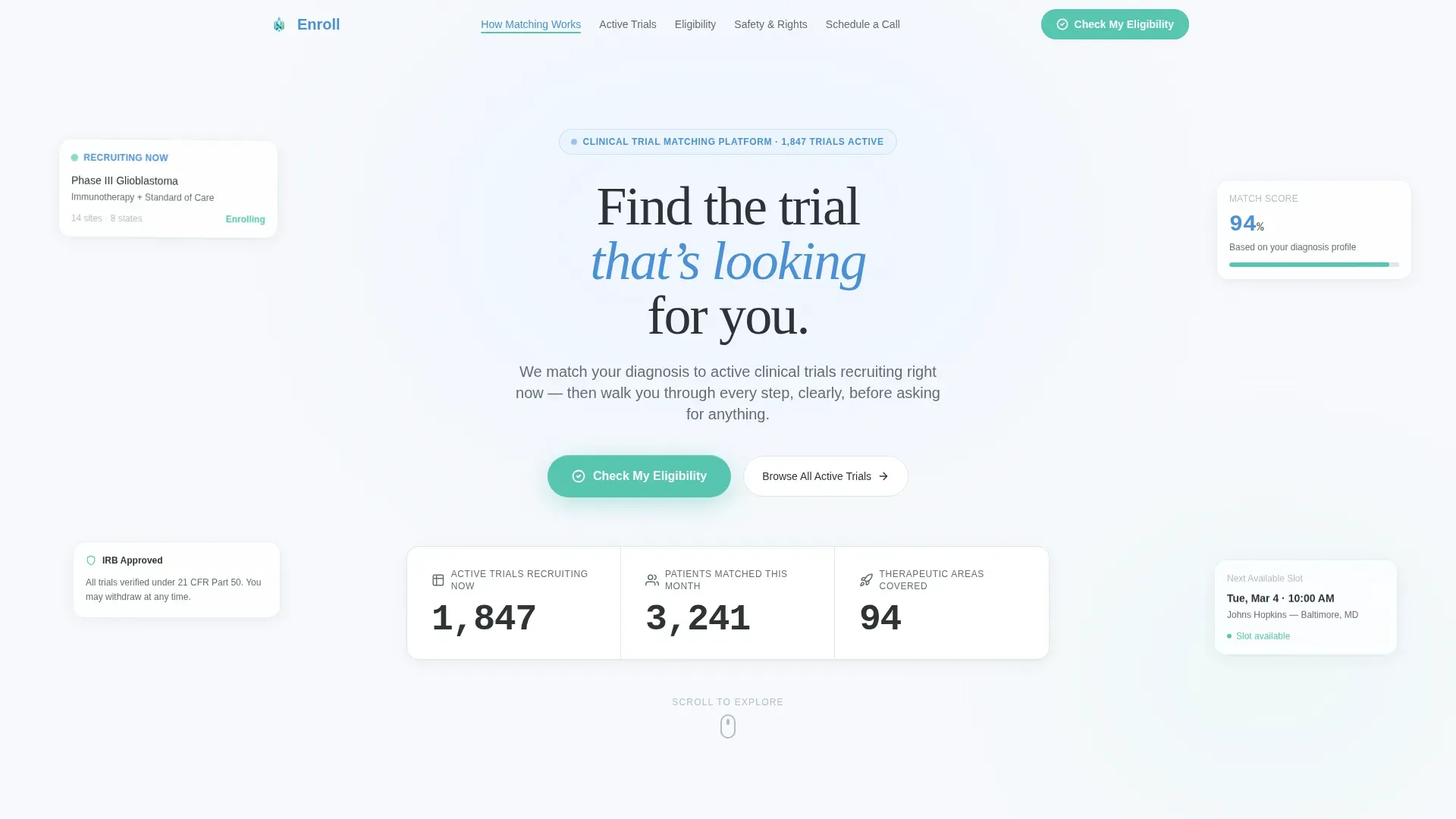
Enroll is a hub-and-spoke landing page for clinical trial recruitment. It opens with animated live counters showing active trials, patient matches, and therapeutic areas. A fixed anchor navigation guides visitors through five clearly labeled sections. The entire page is built around one principle: show the process first, ask for participation second.
Who this template is for
This template is designed for healthcare and medical research organizations that need to recruit patients efficiently and build trust before asking for any commitment. It serves both patient-facing outreach and research site coordination needs.
- Oncology research programs and rare disease trial coordinators looking to reach patients directly
- Healthcare marketing teams building a transparent, conversion-focused recruitment page
- Clinical research organizations that need a single, structured page to handle multiple audience types
What problem this template solves
Finding a clinical trial is confusing and slow for most patients. Existing recruitment pages often hide eligibility criteria, bury contact forms, and offer no sense of what happens after someone clicks. Patients searching at late hours need clarity, not friction.
- Patients cannot easily tell whether they qualify before committing to a call
- The enrollment process feels opaque, which erodes trust before it forms
- Research sites lose eligible candidates who drop off before reaching the scheduling step
What you get with this template
You get a fully structured, single-page recruitment engine organized around five anchor-linked sections. Every section is built to reduce confusion and move a visitor one step closer to booking a screening call.
- A hero section with three animated live counters, a headline, and a persistent floating call-to-action button
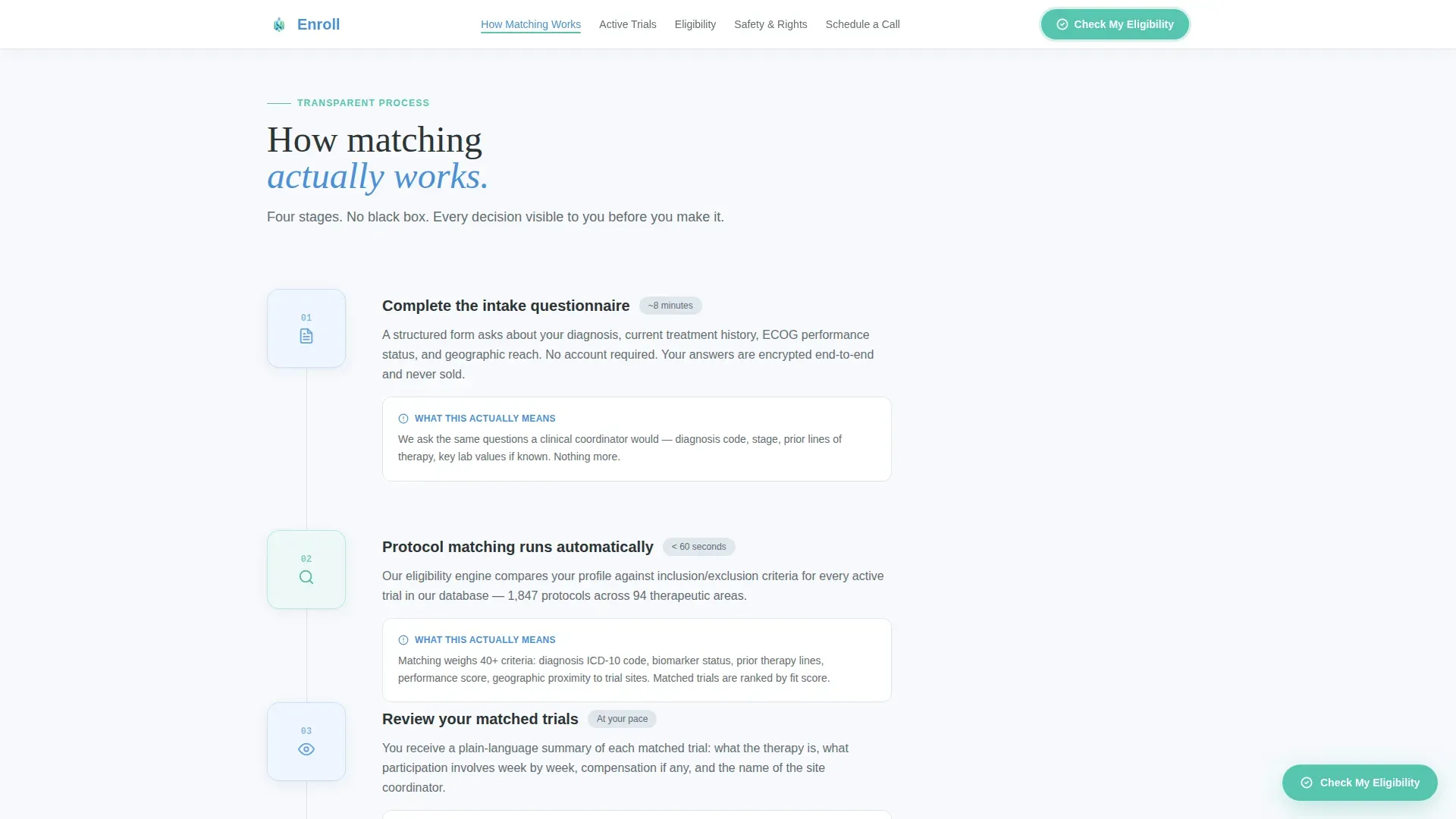
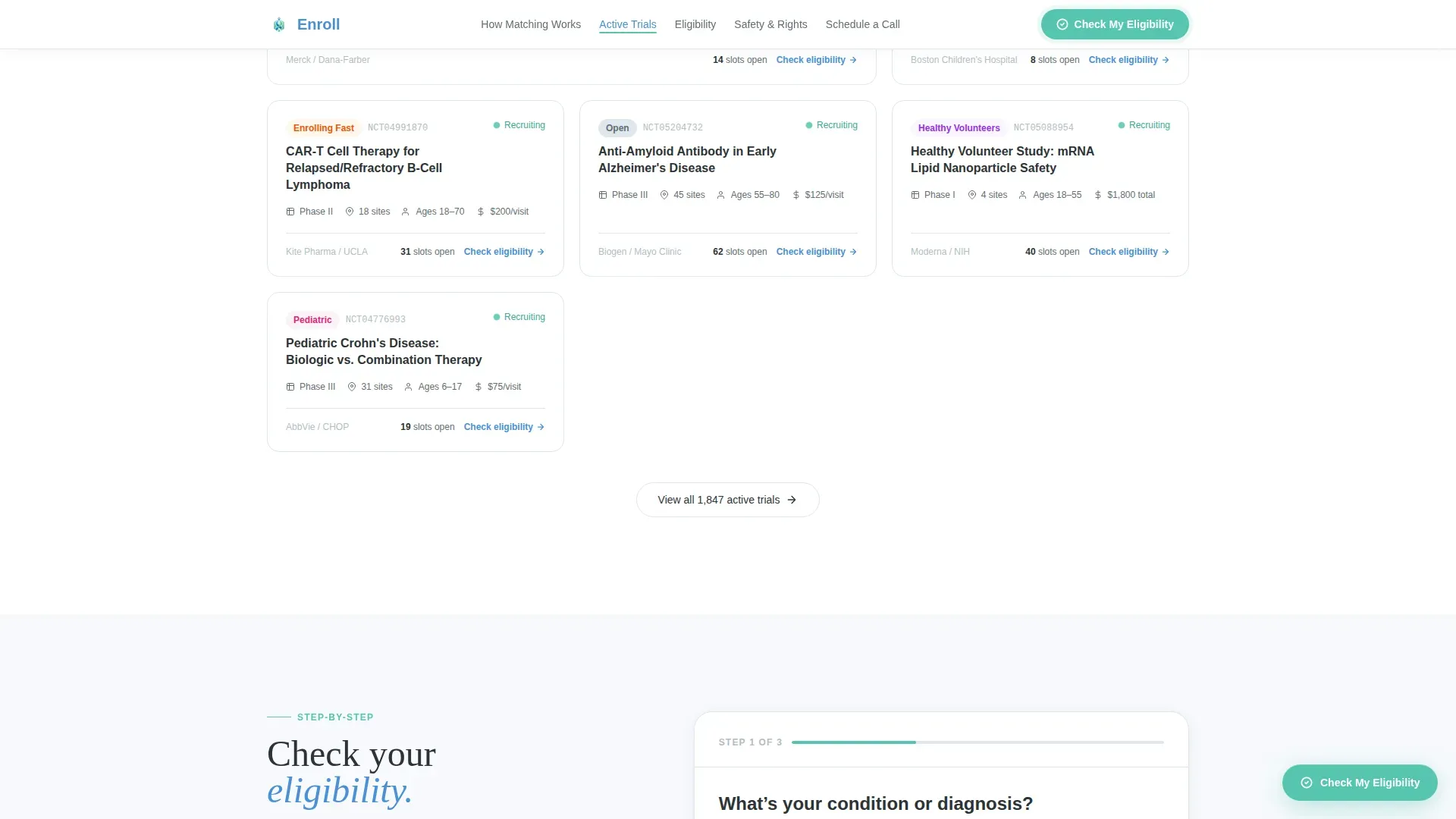
- A linear four-stage enrollment journey, a filterable active trials grid, a three-step eligibility form with calendar integration, and a safety and rights section
- A footer using a clean linear single-row pattern and anchor navigation that stays fixed as the visitor scrolls
Feature list
This template packages several tightly integrated components that work together to guide a visitor from curiosity to a scheduled call.
Live Metrics Dashboard Header
Three oversized animated counters display active recruiting trials, patients matched this month, and therapeutic areas covered. Numbers render in tabular monospace figures against a cloud white background. Each counter has a single-line charcoal descriptor beneath it. The headline "Find the trial that's looking for you" fades in below.
Fixed Anchor Navigation
A five-spoke anchor nav sits fixed below the header and stays visible throughout the full scroll. Labels use plain language: How Matching Works, Active Trials, Eligibility, Safety and Rights, and Schedule a Call. The active state updates as the visitor scrolls into each section.
Four-Stage Enrollment Journey
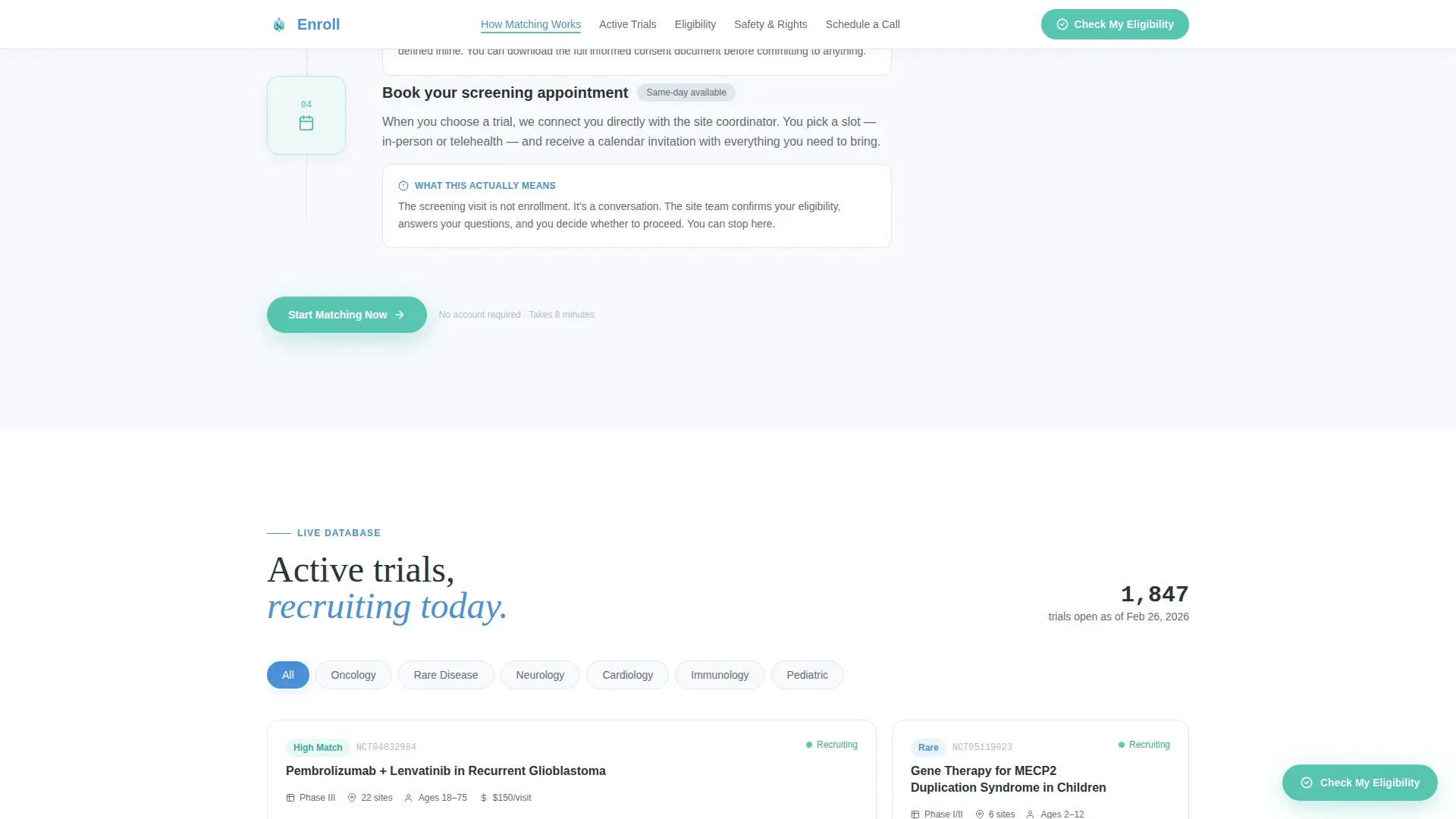
The How Matching Works section presents a numbered, linear flow from initial questionnaire through protocol matching, site assignment, and first appointment. Each stage shows actual timelines and explains exactly what happens. Complexity decreases as the visitor scrolls further down the page.
Filterable Active Trials Grid
The Active Trials section displays trial cards in a bento-style grid layout. Visitors can filter by therapeutic area using tab controls. Each card surfaces the information a patient needs to assess relevance before clicking through to the eligibility form.
Three-Step Progressive Eligibility Form
The eligibility flow captures condition or diagnosis via a searchable dropdown in step one, zip code and travel radius in step two, and available screening call slots via an embedded calendar in step three. A persistent floating button labeled "Check My Eligibility" opens this form from anywhere on the page.
Safety and Rights Section
This section covers patient protections, including references to Institutional Review Board oversight and relevant regulatory compliance standards. Reassurance-focused copy addresses informed consent directly, framing it as a natural next step rather than a barrier.
Page sections overview
| Section | Purpose |
|---|---|
| Hero metrics dashboard | Establish credibility with live counters and primary headline |
| How Matching Works | Walk visitors through the four-stage enrollment journey |
| Active Trials grid | Let visitors browse and filter trials by therapeutic area |
| Eligibility form | Capture diagnosis, location, and schedule a screening call |
| Safety and Rights | Reassure visitors about patient protections and consent |
| Footer single-row | Provide navigation closure and secondary contact paths |
Design & branding system
The visual identity follows a Medical Clarity theme built on the Cloud Canvas color system. The palette reads like a freshly printed lab report under diffused light: clean enough to trust, warm enough to read without flinching.
- Background uses soft clinical white (#F7F9FC), body text uses grounding charcoal (#2D3436), section headers and navigation use calm blue (#4A90D9), and all progress indicators and forward-action elements use seafoam green (#56C5B0)
- Typography pairs DM Sans for interface and body text with Fraunces serif for display headlines, and JetBrains Mono for the animated counter figures
- No stock photography of smiling doctors; the design uses data, structured layout, and a patient testimonial video shot in a real clinic waiting room with natural audio
Mobile & speed optimization
This template is designed mobile-first, reflecting the reality that many patients search for trial options late at night on a phone. Desktop layout is equally considered for trial coordinators working during the day.
- Static sections use server-rendered components for fast initial load; live counters and the eligibility form use client-side rendering where interactivity is required
- Scroll-reveal stagger animations, floating card effects, and anchor nav active states are built in without sacrificing readability on smaller screens
How this template helps you convert
The page earns the click by making the process visible before asking anything of the visitor. Trust is built progressively as the visitor scrolls, so the scheduling step feels like a logical conclusion rather than an unexpected ask.
- The live counters and plain-language anchor nav reduce uncertainty immediately, giving first-time visitors a clear map of what the page contains before they commit to reading further
- The three-step eligibility form breaks a potentially intimidating process into small, low-effort steps, and the embedded calendar removes the friction of back-and-forth scheduling
- The Safety and Rights section addresses patient concerns head-on before the final call-to-action, making informed consent feel like the natural next step
Other information about this template
This template is built for the clinical trial recruitment niche within the broader health and medical category. It suits clinical research organizations, academic medical centers, and sponsor teams running phase two or phase three studies.
- The secondary conversion path "Browse All Active Trials" lets self-directed visitors explore by therapeutic area before committing to the eligibility form, supporting both high-intent and exploratory visitors
- The patient testimonial video in the final spoke section uses real clinic footage with natural audio and no background score, reinforcing authenticity for skeptical audiences
- The template style is hub-and-spoke with anchor navigation, making it straightforward to expand or reorganize spokes as trial portfolios grow or shrink
Theme
Medical Clarity
Creative direction
Transparent Process
Color system
Cloud Canvas
Style
Hub & Spoke (Anchor Nav)
Direction
Booking/Scheduling
Page Sections
Animated Live Metrics Dashboard
Fixed Anchor Navigation Bar
Linear Four-stage Enrollment Journey
Filterable Trial Cards Grid
Three-step Progressive Eligibility Form
Safety and Rights Spoke Section
Related questions
Who is the primary audience for this landing page template?
Can I add or remove trial cards from the Active Trials section?
How does the three-step eligibility form work for visitors?
Does the page explain patient rights before asking for a commitment?
Is this template suitable for multiple therapeutic areas at once?



