Social Security Benefits Navigation Landing Page
Entitle is a sidebar companion landing page built for Social Security offices and government benefits navigation. It guides visitors through retirement, disability, survivor benefits, Medicare enrollment, and replacement card services using a structured icon grid, a scroll-linked sidebar checklist, and plain-language eligibility callouts. The page turns a stressful government errand into a clear, step-by-step experience.
by Rocket studio
Quick summary
Entitle is a government services landing page designed for Social Security offices. It organizes five major benefit categories into a clean icon grid, then walks each visitor through a numbered checklist with required forms, document lists, and processing times. The goal is simple: replace scattered government subdomains with one calm, authoritative page that earns trust before asking for anything.
Who this template is for
This template is built for civic organizations, government agencies, and public service teams that help Americans navigate SSA benefits. It suits teams who want a self-service resource that functions like a field office on the web, enabling visitors to find data and complete tasks without staff assistance.
- Adults approaching retirement age who need clear filing instructions
- Recently widowed spouses navigating survivor benefits for the first time
- New parents registering a child for a Social Security number, caregivers managing enrollment for family members, and disability applicants reviewing their options
What problem this template solves
Most people searching for SSA benefit information face a fragmented experience. They click through multiple government subdomains, encounter conflicting data, and still leave unsure which form applies to their situation. That uncertainty delays enrollment and erodes trust in government services.
- Visitors cannot easily find which documents to bring or which form numbers to select for their specific benefit type
- Eligibility conditions are buried in dense policy language rather than plain-language callouts that any adult can review at a glance
- There is no single page that connects a retirement filer, a spouse claiming survivor benefits, or a parent registering a child to their next concrete step
What you get with this template
You get a fully structured, single-page layout that covers five SSA service categories under one roof. Every section is designed to move a visitor from "Do I qualify?" to "What do I bring?" to "What happens after I file?" without requiring them to leave the page or search elsewhere.
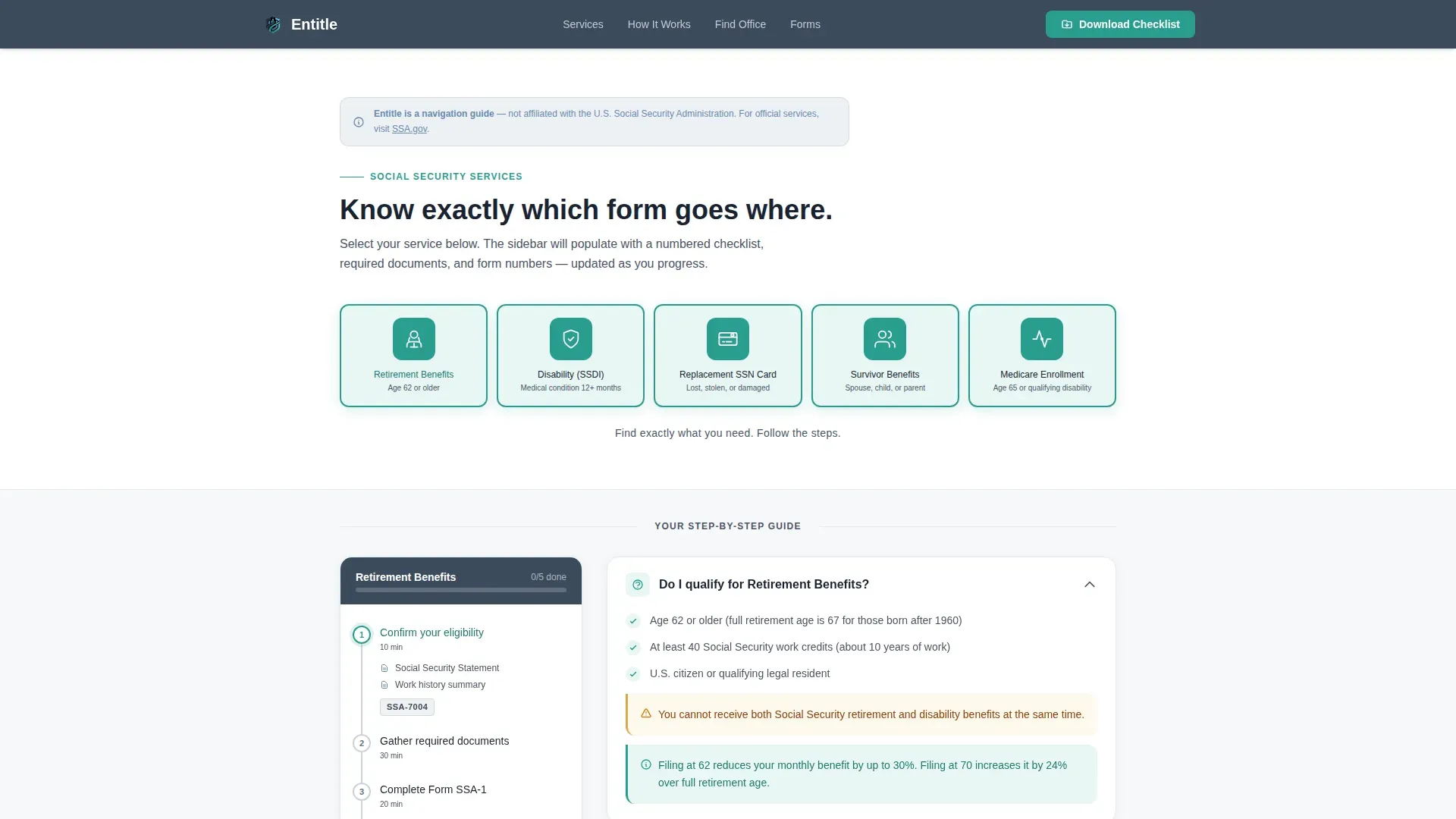
- An icon grid header with five labeled service categories that each populate a dedicated sidebar checklist on selection
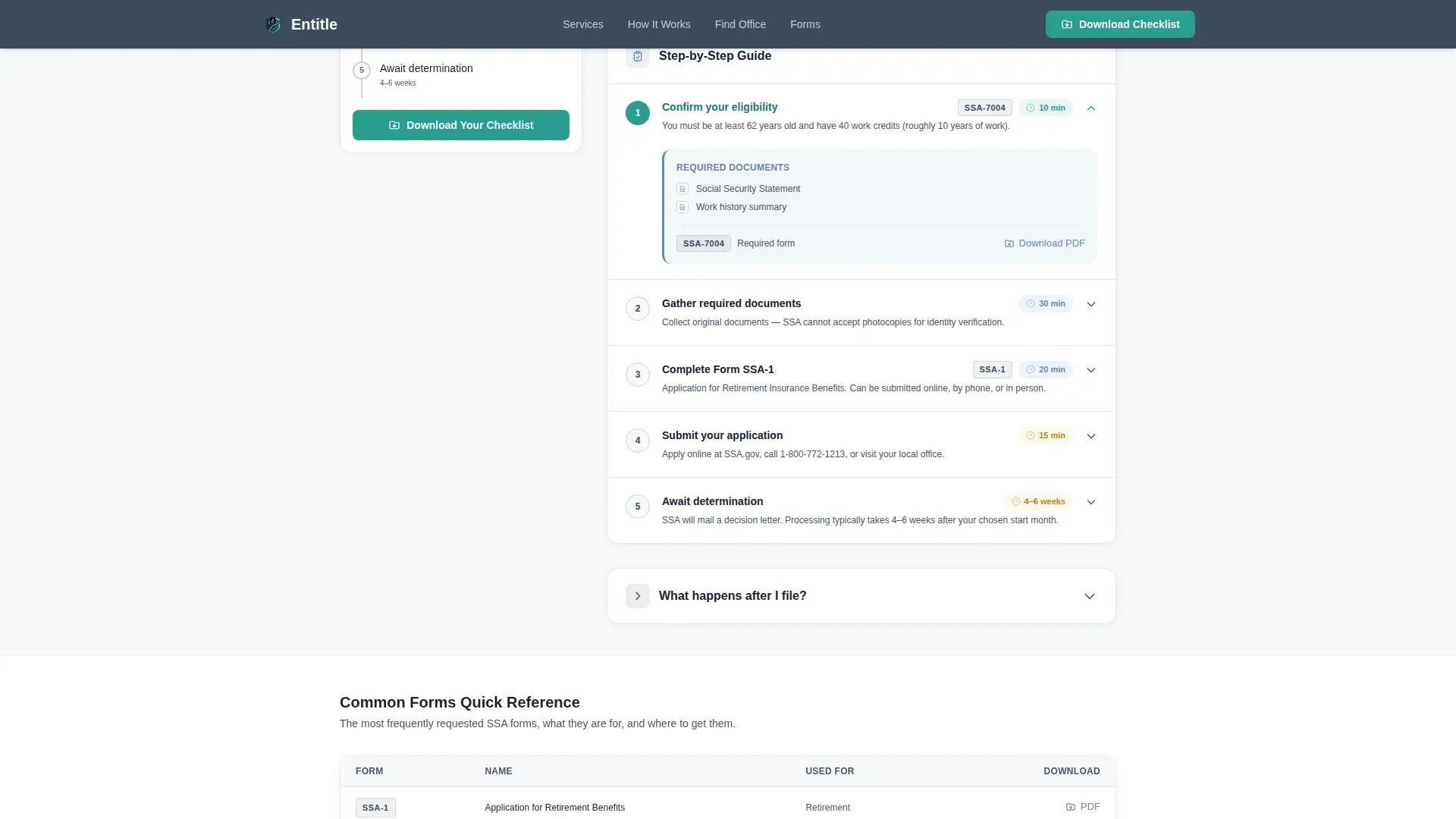
- A scroll-linked sidebar with progress indicators, expandable step panels showing form numbers such as SSA-1, SSA-16, and SSA-561, and estimated processing times
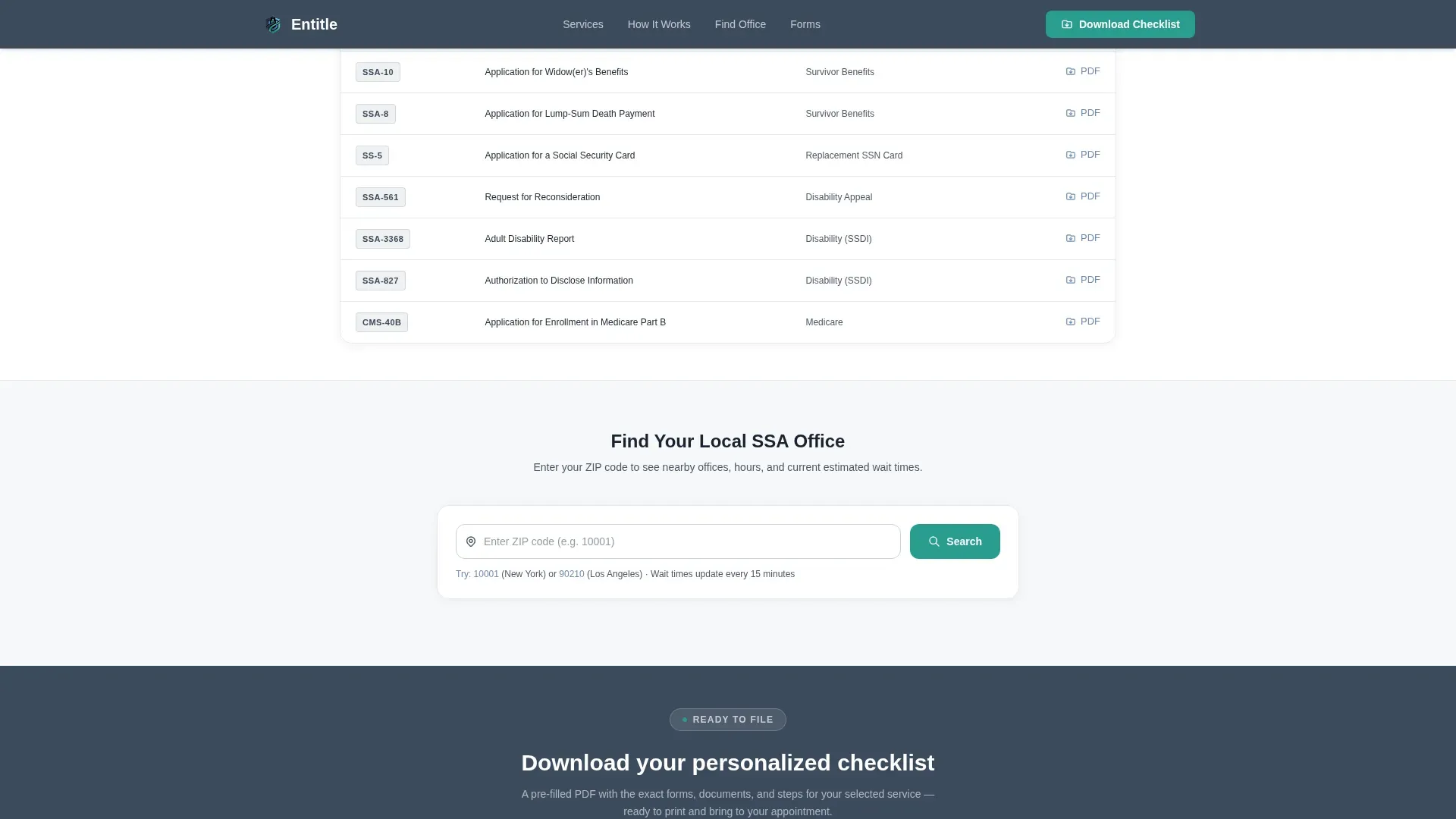
- Eligibility callout boxes, a downloadable checklist button, and a ZIP code field that returns local office address, hours, and current estimated wait times
Feature list
This template includes six core features grounded in the project brief. Each one serves a specific purpose in the enrollment and navigation experience.
Icon Grid Service Selector
Five line-weight icons represent the core benefit categories: retirement, disability, survivor benefits, replacement SSA card, and Medicare enrollment. Selecting an icon populates the sidebar with the relevant checklist for that service type. This keeps the page focused and limits each interaction to one primary action, reducing confusion for first-time visitors.
Scroll-Linked Sidebar Checklist
The sidebar tracks visitor progress using a vertical line and filled circles. As a visitor scrolls through the main content column, the sidebar persists and updates its active step indicator. Each step can expand to show required documents, specific form numbers, and estimated processing times, so visitors always know where they are in the process.
Eligibility Callout Boxes
Plain-language bordered boxes appear throughout the main content column. Each box states eligibility conditions clearly, without jargon. For example, a retirement callout will note the earliest filing date and any age-based benefit reduction rules. A disability callout will list the medical conditions and physician documentation required before an application can be considered complete.
Downloadable Checklist Generator
The primary call-to-action button lets visitors download a personalized checklist in PDF format. The checklist is pre-populated based on the service category the visitor selected, listing the exact documents and form numbers relevant to their situation. This gives every visitor a tangible, printable resource they can bring to their local office.
Local Office Finder
A ZIP code input field returns the nearest SSA office address, current hours, and estimated wait times. This feature removes one of the most common friction points in government benefits navigation: finding accurate, up-to-date location data without calling a phone line. Visitors can view this data directly on the page without leaving or searching elsewhere.
Plain-Language Step Explanations
Each numbered step in the main content column includes a short paragraph written for a general adult reading level. Steps cover what to bring, what to expect during processing, and what happens after submission. Instructions are written to avoid acronyms and government shorthand, so a spouse filing for the first time or a parent registering a child feels prepared rather than overwhelmed.
Page sections overview
| Section | Purpose |
|---|---|
| Icon Grid Header | Select a benefit category |
| Step-by-Step Guide | Follow numbered checklist steps |
| Eligibility Callout Boxes | Review plain-language conditions |
| Document Checklist Panel | View required forms and documents |
| Downloadable PDF Button | Generate a personalized checklist |
| Local Office Finder | Enter ZIP to find office data |
| Footer Row | Access secondary links and resources |
Design & branding system
The visual identity follows a Corporate Precision theme using the Cloud Canvas color system. The palette carries the quiet authority of a freshly printed government pamphlet. Typography uses DM Sans throughout for clean institutional readability across all text sizes.
- Soft institutional white (#F7F8FA) for page backgrounds, sidebar slate (#3B4A5C) for the persistent checklist panel, and muted policy blue (#6A89AF) for supporting text and bordered callout boxes
- Action teal (#2A9D8F) reserved exclusively for clickable steps, progress indicators, and the primary download button, so visitors always know what is interactive at a glance
Mobile & speed optimization
The template is built desktop-first to support the sidebar layout, and stacks responsively for tablet and mobile viewports. Interactive components such as the sidebar checklist and ZIP lookup use client-side rendering only, keeping the static base fast to load.
- The sidebar collapses into an inline accordion on smaller screens, so the step-by-step enrollment flow continues to work on any device
- Scroll-linked animations and icon hover states are medium-weight and scoped to interactive elements only, avoiding layout shifts on slower connections
How this template helps you convert
This template is designed around one primary conversion: the checklist download. Every scroll interaction and content block builds toward that moment, earning the click by delivering genuine value first.
- Visitors select a service category from the icon grid, which immediately populates the sidebar with relevant steps and form data, giving them a reason to continue scrolling rather than leaving
- Eligibility callouts and plain-language step explanations reduce anxiety at each stage, so by the time a visitor reaches the download button, they already trust the page and are prepared to act
Other information about this template
The Entitle trusted benefits navigation social security office landing page template is grounded in best practices for government digital services. Several open data and enrollment design principles informed how this template was structured.
- The SSA has actively identified and released priority public data of interest to the public since 2009, and the OPEN Government Data Act established requirements for data governance, management, and public engagement across federal agencies; this template reflects those transparency goals in its plain-language, open-access design
- The Office of Management and Budget memorandum M-25-05 provides updated guidance on data management under the Evidence Act, emphasizing that government data should be open by default; the page structure supports that principle by providing all benefit data, form numbers, and eligibility conditions without requiring login or account creation
- Self-service benefits landing pages improve the enrollment experience by providing new functionality that lets an employee or caregiver perform quick actions such as changing beneficiaries, reporting life events, and reviewing pending enrollment steps without staff assistance
- Benefits management tools can include calculators to forecast costs for various plans; while this template focuses on SSA navigation rather than employer benefit plans, the same self-service design principle applies to how visitors can review their options and assess their situation before visiting an office
- Official government branding guidelines recommend displaying agency logos clearly to establish legitimacy; the template uses institutional color and icon design for exactly this purpose, giving each page element the quiet authority expected of federal agencies
- The U.S. Web Design System provides accessible, pre-built components for government pages, and this template's structured table-like layout, scannable bullets, and descriptive subheadings follow those same readability and findability standards
- January through December date ranges appear in retirement benefit tables as an example of how filing date data is presented inside the step panels; note that all dates and processing times shown are placeholder data intended for customization
- Visitors who choose the survivor benefits path will note that the sidebar checklist lists a spouse's required documents separately from a child's required documents, keeping each enrollment path distinct and easy to follow
Theme
Corporate Precision
Creative direction
Step-by-Step Guide
Color system
Cloud Canvas
Style
Sidebar Companion
Direction
Content/Resource
Page Sections
Icon Grid Service Selector
Scroll-linked Sidebar Checklist
Eligibility Callout Boxes
Downloadable Checklist Generator
Local Office Finder
Plain-language Step Explanations
Related questions
What service categories does this template cover?
Can I customize the form numbers and processing times shown in the sidebar?
Does the template require visitors to create an account or log in?
How does the downloadable checklist work?
Is this template suitable for organizations that help clients navigate government benefits?



