Virtual Interior Design Studio Landing Page Template
Envision is a single-page landing page template built for virtual interior design studios. It opens with an interactive cost estimator above the fold, letting visitors select their room type, square footage, and style preference before scrolling a single pixel. Below, before-and-after transformations, client testimonials, designer profiles, and a four-step process guide visitors toward booking a designer inline.
by Rocket studio
Quick summary
Envision is a sophisticated landing page template for virtual interior design practices. It leads with a three-question cost estimator that produces a live price range and timeline before the visitor scrolls. The asymmetric 60/40 grid, dark emerald palette, and inline booking module work together to move a curious visitor toward a confirmed design consultation.
Who this template is for
This template is built for design professionals who sell remote interior design services and need a single page that both attracts and converts. It works best for practitioners who want their page to do the selling before a prospect ever reaches a contact form.
- Virtual interior designers offering mood boards, three-dimensional walkthroughs, and shoppable furniture plans
- Independent studio owners targeting dual-income homeowners, first-time office furnishers, or short-term rental hosts
- Design practitioners who want a polished, portfolio-grade presence without building a multi-page site
What problem this template solves
Most interior design pages ask visitors to browse a gallery and then fill out a vague inquiry form. That passive structure loses people who want instant clarity on cost and timeline. Envision flips the sequence so the visitor gets a useful answer first.
- Removes the price ambiguity that causes hesitation before a booking decision
- Replaces passive gallery browsing with an active, tool-led experience that builds commitment with each input
- Captures leads at two levels: ready-to-book visitors and those who only want their estimate emailed
What you get with this template
Envision delivers a fully structured, single-page layout with every section pre-built and logically sequenced. The design is ready to customize with your own room photos, designer headshots, and real project stats.
- An above-the-fold calculator panel with dropdown, draggable slider, and style mood image selector
- A scrolling evidence section with alternating before-and-after transformations, testimonials carrying project stats, designer profile cards, and a four-step process timeline
- An inline scheduling module with date and time selection, a long-text space description field, optional photo upload, and an email capture path for estimate-only leads
Feature list
This section walks through the core functional and visual components included in the template.
Interactive Room Cost Estimator
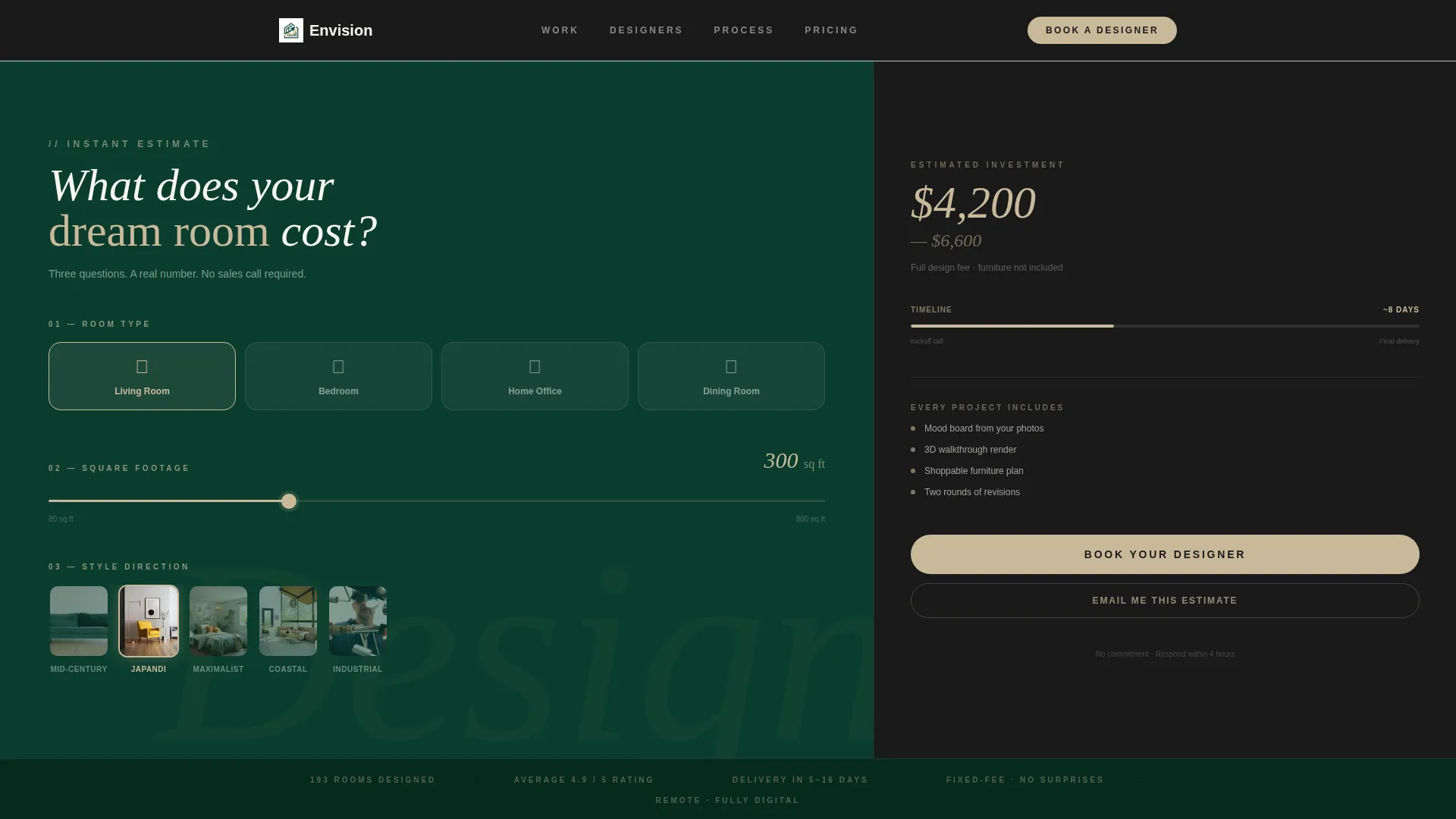
The estimator sits above the fold in the 60-column panel and asks three questions: room type via icon-labeled dropdown, approximate square footage via a draggable slider ranging from 80 to 800 square feet, and style preference via a horizontally scrolling row of five mood-image thumbnails. Every input change recalculates the live cost range displayed in the 40-column result panel.
Live Estimate Result Panel
The 40-column result panel shows the calculated price range in large champagne-colored numerals against a walnut background. It also displays a miniature timeline bar indicating estimated delivery days. A prominent "Book Your Designer" button anchors the bottom of this panel, acting as the page's primary call to action from the very first scroll position.
Inline Booking and Scheduling Module
Clicking "Book Your Designer" opens a scheduling module directly on the page without redirecting to an external link. The module includes date and time selection, a long-text field for describing the space, and an optional photo upload. A secondary path, labeled "Just Get My Estimate Emailed," captures leads who prefer to receive their calculator results as a branded portable document format file.
Before-and-After Transformation Gallery
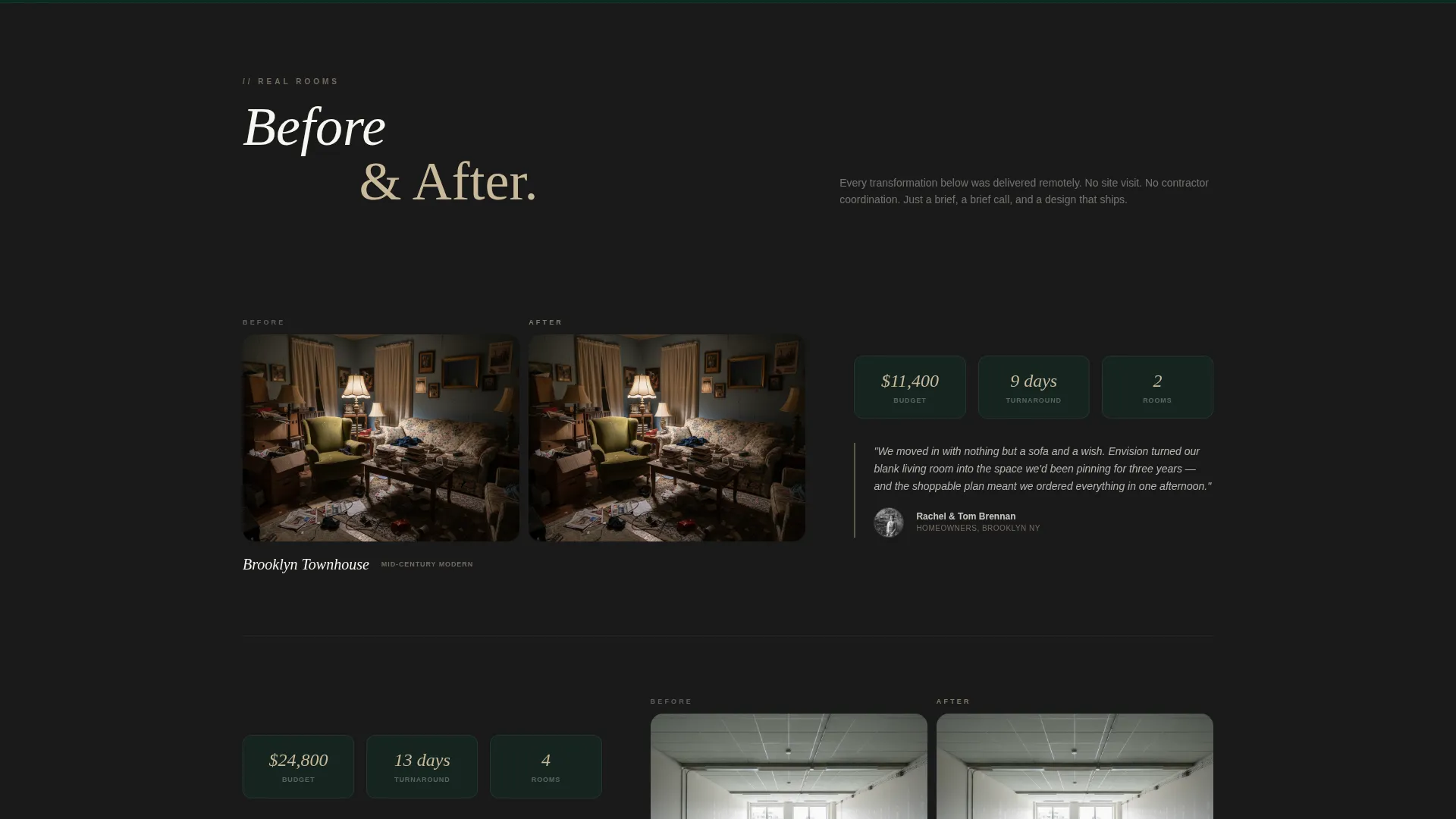
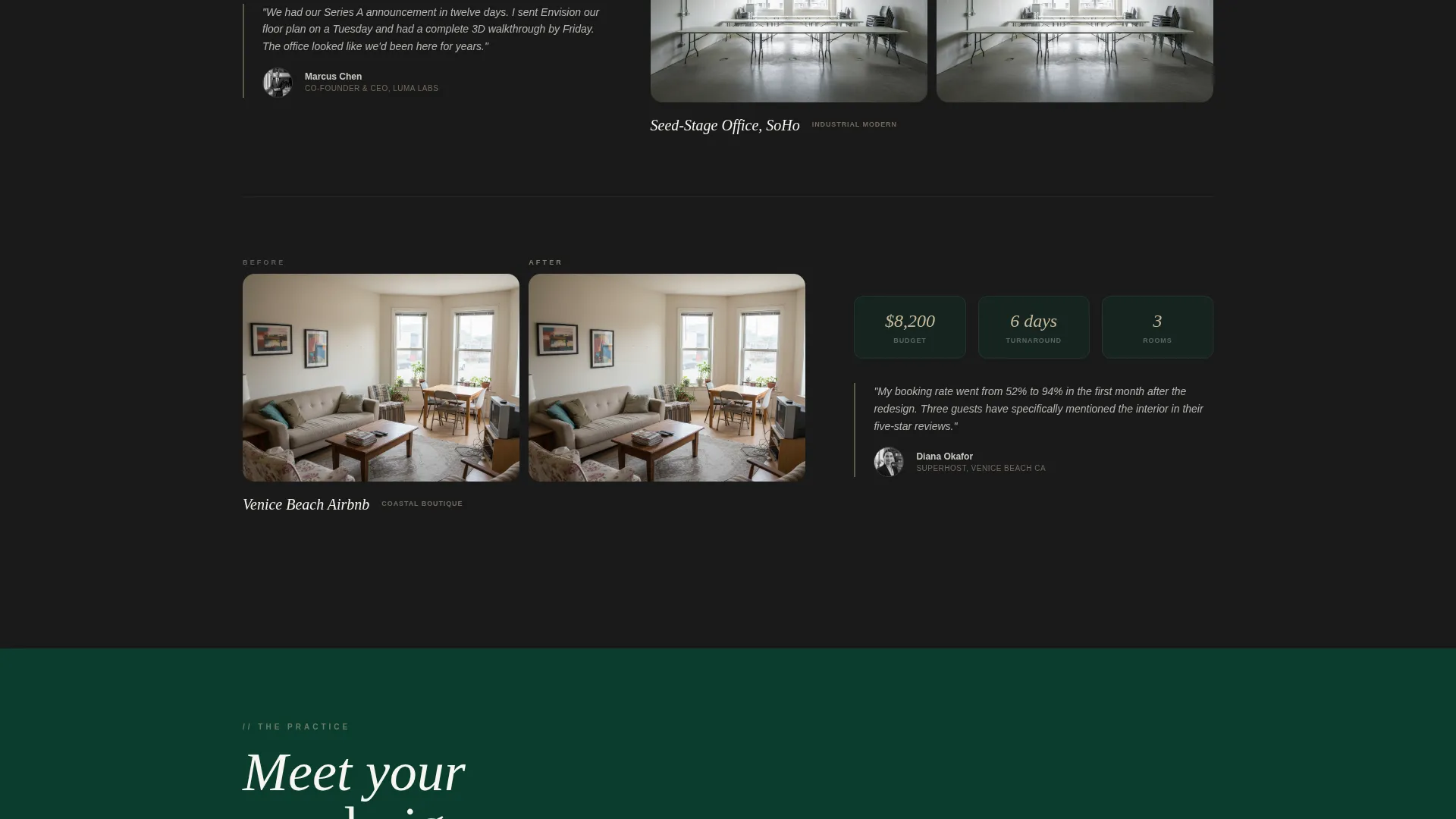
Below the fold, the wide column hosts a series of before-and-after room transformation images. The narrow column pairs each transformation with a client testimonial that includes specific project stats: budget, turnaround time, and number of rooms. This alternating structure builds trust through evidence rather than claims.
Designer Profile Section
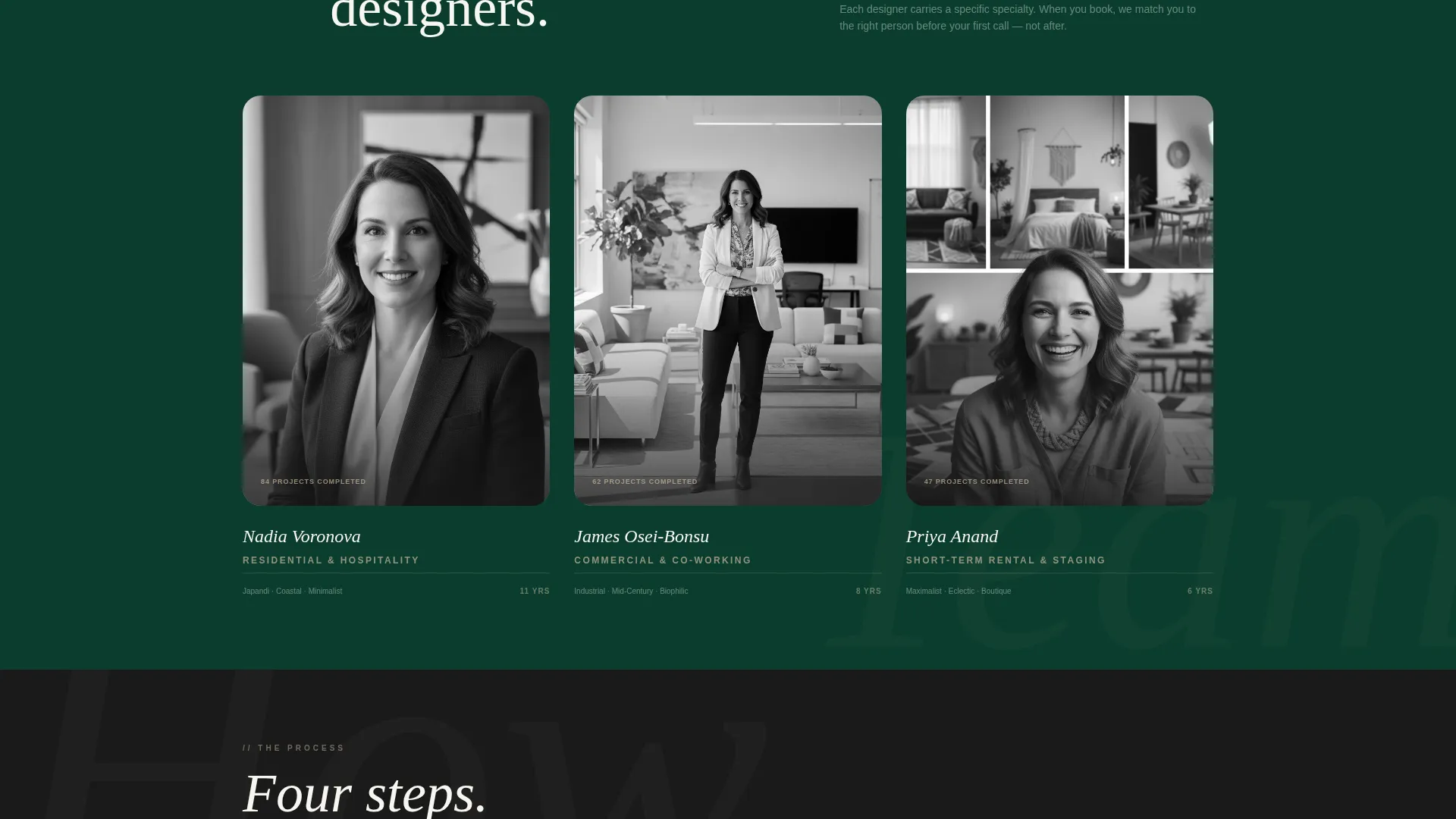
A dedicated section introduces the studio's designers with headshots, listed specialties, and years of practice. This section humanizes the service and gives prospects a reason to trust the team before committing to a booking.
Four-Step Process Timeline
A numbered, four-step process section lays out the design journey in a clear, sequential flow. The steps are presented to feel straightforward rather than complex, reducing pre-booking hesitation by making the path forward obvious.
Page sections overview
| Section | Purpose |
|---|---|
| Calculator estimator panel | Delivers instant cost and timeline before scrolling |
| Live result panel | Displays price range, timeline bar, and primary booking button |
| Before-and-after gallery | Shows room transformations paired with project stats |
| Client testimonial strip | Builds trust with specific budgets, timelines, and room counts |
| Designer profile cards | Introduces team members with specialties and experience |
| Process timeline steps | Guides visitors through the four-stage design journey |
| Sticky booking bar | Re-surfaces the primary call to action after the gallery scroll |
| Inline scheduling module | Handles date selection, space description, and photo upload |
| Estimate email capture | Converts hesitant visitors into leads via PDF estimate delivery |
Design & branding system
Envision uses an Executive Suite visual identity built around a dark emerald color system. The palette creates the atmosphere of a private members' club: deep, quiet, and confident without being cold.
- Core colors: deep boardroom green (#0B3D2E) for backgrounds and section dividers, black walnut (#1A1A1A) for body text anchoring, brushed champagne (#C9B99A) for hover states, slider tracks, active inputs, and numerals, and portfolio white (#F7F5F0) for card surfaces and type
- Layout structure: asymmetric 60/40 grid where the wider column holds the interactive tool and visual evidence, and the narrower column holds results, testimonials, and supporting detail
- Visual atmosphere: no stock photography competes with the tool; the estimator itself is the primary visual, keeping the page focused and free of generic imagery
Mobile & speed optimization
The asymmetric grid and interactive estimator are designed to function cleanly on smaller screens. The layout adapts so the estimator questions and result panel stack vertically on mobile without losing their logical sequence.
- The draggable slider, mood image scroll row, and dropdown inputs are sized for touch interaction
- The sticky booking bar remains accessible after the visitor scrolls past the first gallery section on any screen size
- The inline scheduling module and estimate email capture path both function within the single-page flow without requiring page redirects
How this template helps you convert
Envision is structured so that conversion pressure builds gradually and naturally. The visitor receives value before being asked for anything, which makes each subsequent call to action feel earned rather than forced.
- The above-the-fold estimator delivers a personalized price range and timeline before the visitor scrolls, giving them an immediate reason to stay and engage further
- The alternating gallery and testimonial sections deepen commitment with real project evidence, making the service feel proven and specific rather than abstract
- The dual conversion paths, direct booking and estimate email capture, meet visitors at exactly the readiness level they have reached, reducing drop-off from visitors who are interested but not yet ready to schedule
Other information about this template
Envision is categorized under the Real Estate and Property category, specifically within the Interior Design Studio subcategory. The template style follows a Gallery and Detail approach, combining visual proof with structured information in a single scrollable flow. The creative direction is built on a Luxe Minimal theme, favoring restraint and precision over decoration.
- The template is suited for practitioners working across niches including virtual consultation studios, boutique redesign services, and property styling for short-term rental hosts
- The color system, layout grid, and component hierarchy are fully customizable to match an existing studio brand
- The intersection match score for this template against the Interior Design Studio subcategory is rated at 9 out of 10, reflecting strong alignment between the template's structure and the target market's booking behavior
Theme
Luxe Minimal
Creative direction
Stats-First Impact
Color system
Charcoal & Amber
Style
Gallery + Detail
Direction
Direct Sales
Page Sections
Interactive Room Cost Estimator
Live Estimate Result Panel
Inline Booking and Scheduling Module
Before-and-after Transformation Gallery
Designer Profile Cards
Four-step Process Timeline
Related questions
Can I use this template without a live calculator backend?
How does the inline booking module work?
What happens when someone clicks 'Just Get My Estimate Emailed'?
Is this template suitable for a solo designer or only for a studio with a team?
Can I replace the style mood images in the estimator?



