Pool & Spa Specialist Professional Website Template
Excavate is a split-screen landing page template built for pool installation and construction companies. It guides homeowners from raw backyard potential to a signed project brief using scroll-driven construction storytelling, a Before/After hero slider, a cross-section dig diagram, and a pool configurator form. The Engineering Blueprint visual theme makes technical expertise feel tangible and trustworthy.
by Rocket studio
Quick summary
Excavate is a single-page template designed for pool installation and construction businesses. It opens with a side-by-side Before/After slider, walks visitors through the actual phases of a pool build, and closes with a direct sales configurator. Every section is structured to build confidence before asking for commitment.
Who this template is for
This template is made for pool construction companies that want to convert curious homeowners into qualified leads. It works best when the business can show real project photography and wants to communicate construction depth, not just finished results.
- Pool installation contractors targeting residential homeowners
- Custom pool builders offering gunite, freeform, or geometric designs
- Pool and spa companies ready to showcase multi-phase project expertise
What problem this template solves
Most pool company pages show pretty water and a phone number. That approach loses buyers who are still in the research phase and need to understand what the build actually involves. This template bridges that gap.
- Homeowners hesitate because they do not understand what a pool project entails
- Generic portfolio pages fail to communicate technical credibility or construction process
- Visitors leave without converting because there is no structured path from curiosity to commitment
What you get with this template
You get a fully structured, scroll-driven landing page that takes visitors through each phase of a pool project in a logical, visual sequence. The layout is opinionated and deliberate, so the story tells itself once your content is in place.
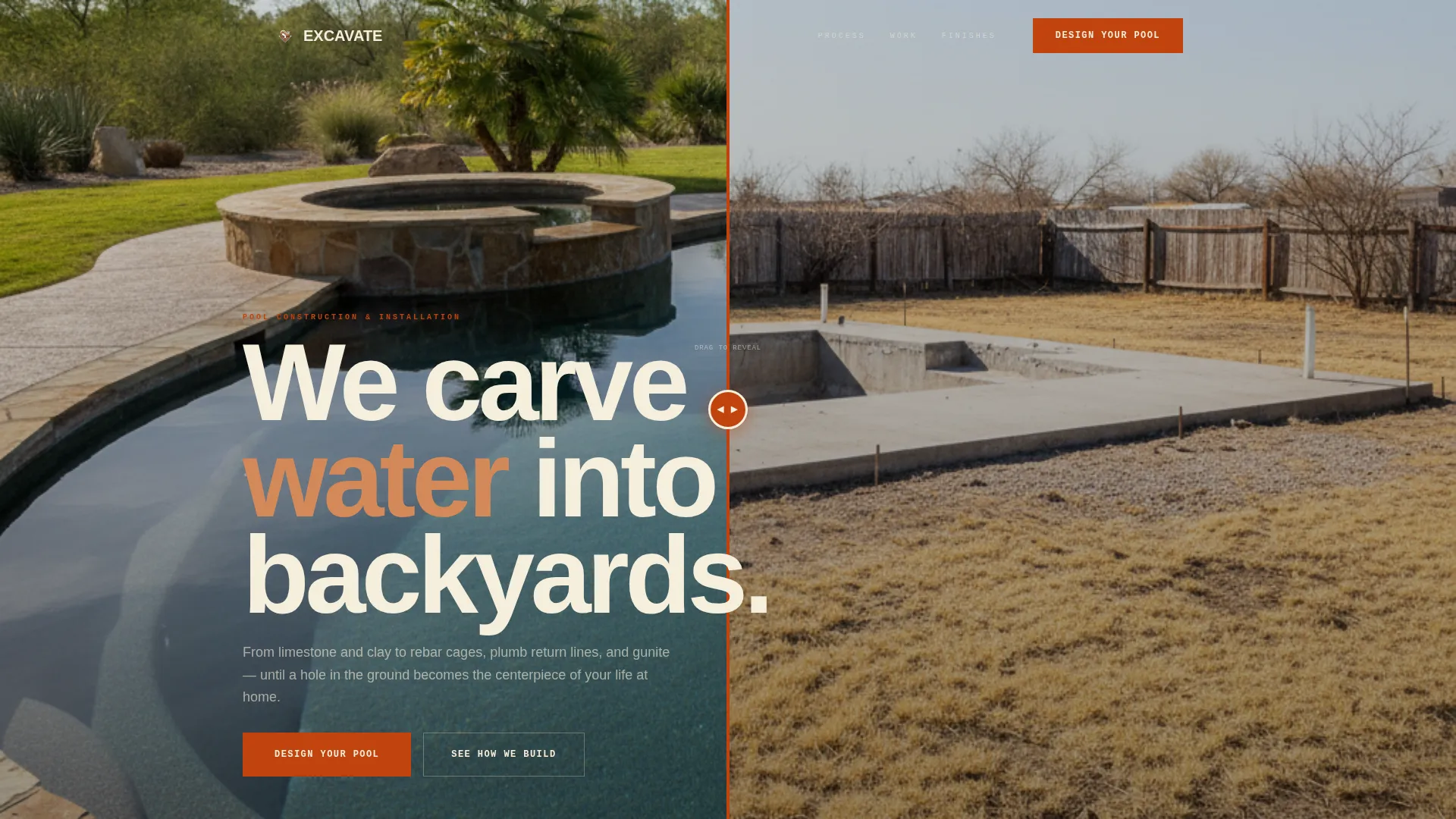
- A Before/After hero slider with a draggable surveyor-stake handle
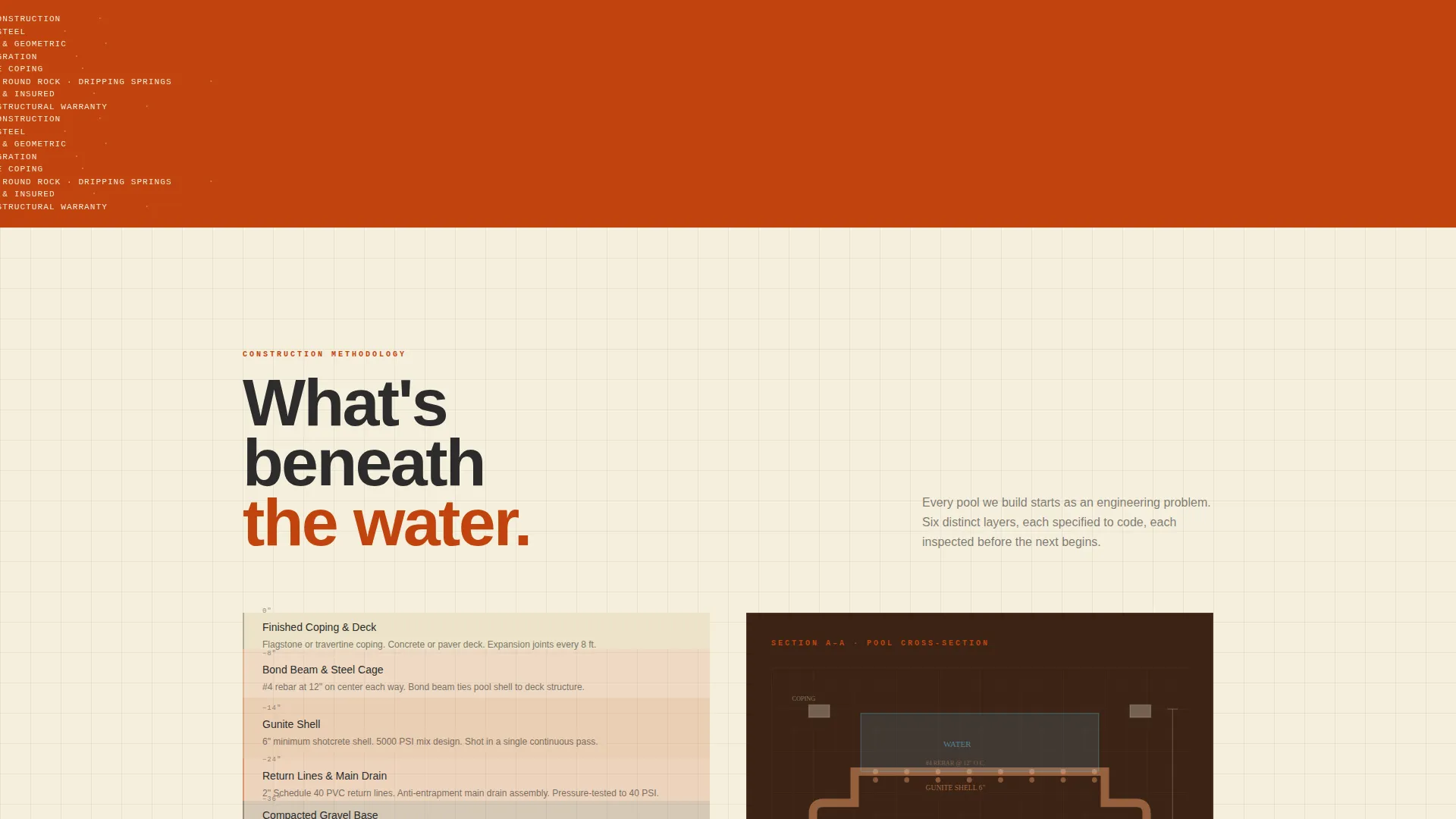
- A scroll-triggered cross-section diagram showing soil layers, rebar, plumbing, and shotcrete shell
- A pool configurator form with yard dimensions, pool shape, feature selections, and budget tiers
- A secondary lead capture path for visitors who want the Build Process Guide before committing
Feature list
This template is built around one central idea: show the engineering before asking for the sale. Each feature below serves that goal directly.
Before/After Hero Slider
The header splits the viewport into a 50/50 Before/After slider. The left side shows a flat, drought-stressed backyard. The right reveals a finished gunite pool with spa, flagstone coping, and calm water. The draggable handle is styled as a surveyor stake with the company mark, making the transformation feel like proof of work.
Scroll-Triggered Cross-Section Diagram
As the visitor scrolls past the hero, a layered cross-section diagram reveals soil composition, rebar cages, plumbing loops, and the shotcrete shell one layer at a time. Each layer appears as the page descends, reinforcing the sense that the build is being peeled back in real time.
Drone Photo and Schematic Split
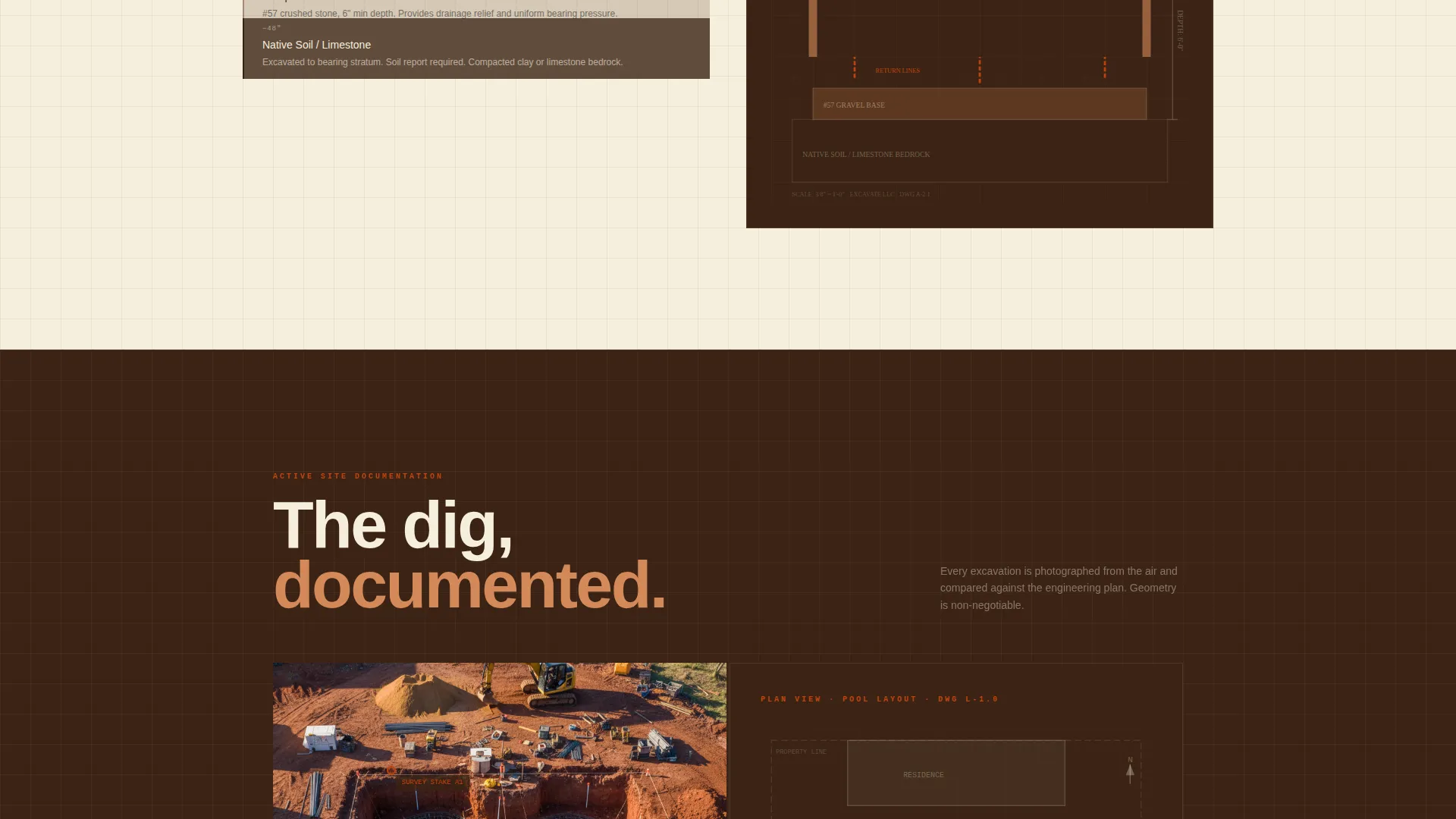
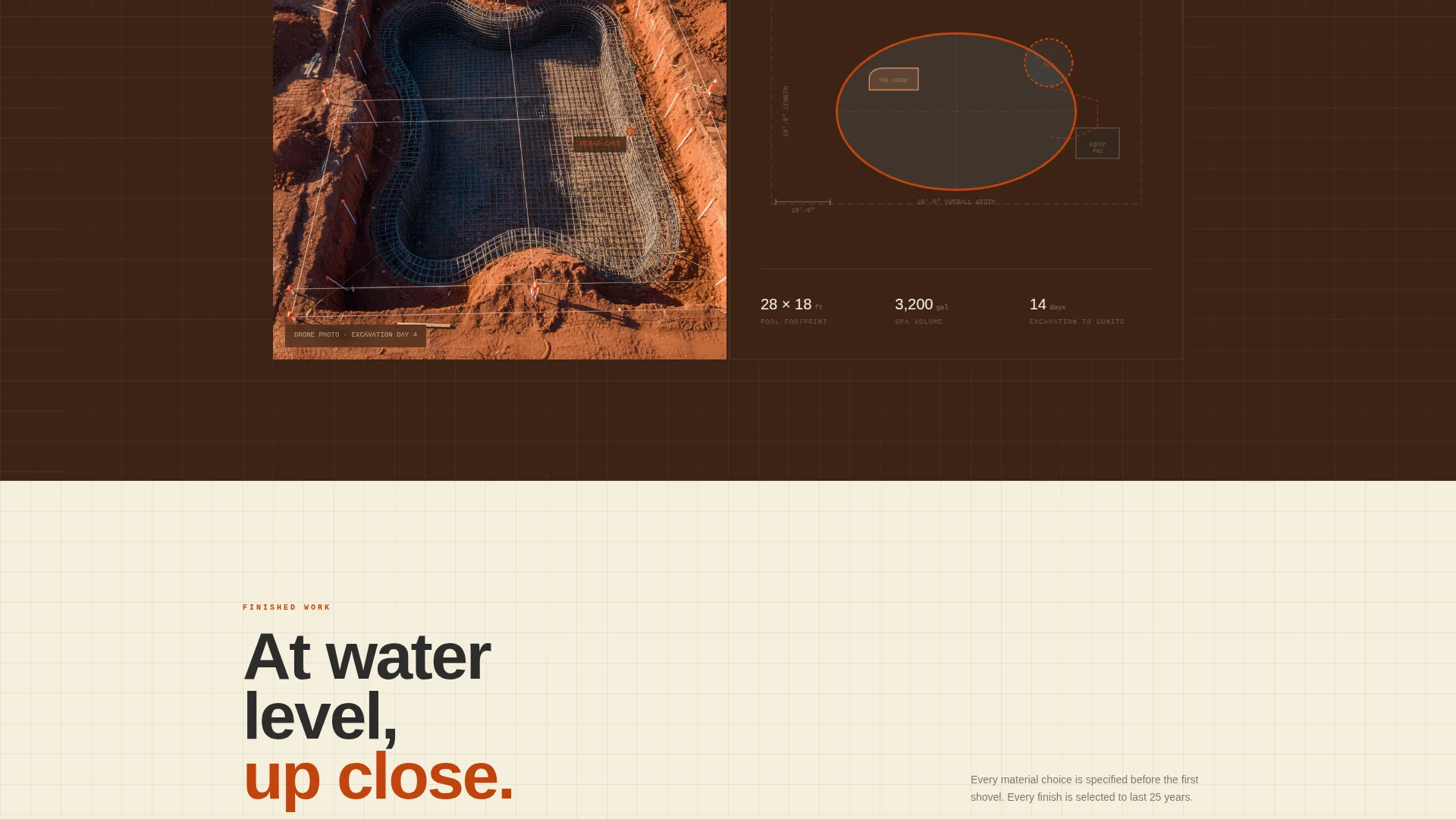
A dedicated split section pairs an overhead drone photograph of an active excavation on the left with its corresponding engineering schematic on the right. The side-by-side layout draws a direct line between field reality and planned precision.
Water-Level Photography with Material Callouts
Finished pool photography is shot at water level, barely above the surface, giving each image an architectural calm. Paired specification callouts identify aggregate finish type, tile band selections, and equipment packages, so the template communicates material quality without a separate product page.
Pool Configurator Form
The primary call-to-action section is a configurator-style form. Visitors select yard dimensions from a length-by-width dropdown, choose a pool shape from geometric, freeform, or lap options, check must-have features like spa or tanning ledge, and pick a budget tier from four illustrated ranges. This structured input replaces a generic contact form with a qualified lead capture.
Secondary Lead Capture Path
Visitors who are not ready to request a design can download the Build Process Guide. The form captures email address and zip code only, giving the business a lower-commitment entry point while still building a pipeline.
Page sections overview
| Section | Purpose |
|---|---|
| Before/After Slider | Opens the page with visual proof of transformation |
| Cross-Section Diagram | Reveals construction layers as the visitor scrolls |
| Drone and Schematic Split | Pairs field photography with engineering drawings |
| Water-Level Finished Pools | Showcases completed work with material specifications |
| Pool Configurator Form | Collects structured project details from ready buyers |
| Build Process Guide Capture | Converts research-phase visitors into email leads |
Design & branding system
The visual identity follows an Engineering Blueprint theme grounded in a Fire and Earth color palette. The overall effect feels like a construction site at golden hour, raw and deliberate rather than polished or corporate.
- Colors: scorched terracotta (#C1440E) for buttons and progress indicators, sun-dried clay (#D4895A) for accents, deep excavation brown (#3B2314) for dark backgrounds, blueprint vellum (#F5EEDC) as the primary background, and rebar charcoal (#2C2C2C) for typography and structural lines
- Backgrounds alternate between vellum cream and deep brown across sections, and thin charcoal grid lines run behind content areas like engineering graph paper
- Typography and structural lines are anchored in charcoal, keeping the layout readable against both light and dark background panels
Mobile & speed optimization
The split-screen layout and scroll-triggered diagram are designed to reflow cleanly on smaller screens. The 50/50 desktop split stacks vertically on mobile so both the Before/After slider and the schematic pair remain usable without horizontal scrolling.
- The configurator form uses dropdown and checkbox inputs that are touch-friendly on mobile devices
- Section backgrounds and grid-line textures are applied through CSS rather than heavy image assets, keeping visual complexity manageable across screen sizes
How this template helps you convert
The page is sequenced so that trust is built before any request is made. By the time a visitor reaches the configurator, they have already seen the engineering beneath the finished water.
- The Before/After slider creates immediate emotional impact and spatial proof, replacing skepticism with curiosity about the process
- The scroll-driven diagram and drone schematic sections establish technical authority, so the business feels like an engineering firm rather than a surface contractor
- The tiered configurator form with silhouette budget illustrations lowers the barrier to engagement by turning an open-ended quote request into a structured, low-pressure selection process
Other information about this template
This template is categorized under Construction and Home, specifically within the Pool and Spa Service subcategory for pool installation and construction businesses. It is a single landing page, not a multi-page website, so all content lives within one scroll flow.
- The template style is Split Screen at a 50/50 ratio, used consistently across the hero, the drone section, and the water-level photography section
- The header concept is the Before/After Slider, which anchors the Engineering Blueprint theme and sets the tone for the spatial and architectural creative direction
- The landing page direction is Direct Sales, with a primary call to action reading "Design Your Pool" and a secondary path for the Build Process Guide download
- The color system is Fire and Earth, and the theme is Engineering Blueprint, both of which are reflected in every section background, button color, and typographic treatment
Theme
Engineering Blueprint
Creative direction
Spatial & Architectural
Color system
Fire & Earth
Style
Split Screen (50/50)
Direction
Direct Sales
Page Sections
Before/after Hero Slider
Scroll-triggered Cross-section Diagram
Drone Photo and Schematic Split
Water-level Pool Photography with Spec Callouts
Pool Configurator Form
Secondary Build Process Guide Capture
Related questions
What type of business is this template built for?
What photography do I need to make this template work?
Is this a single page or a multi-page website?
Can I adjust the configurator form to match my actual service offerings?
What is the secondary lead capture path designed to do?



