Local Manufacturing Processes Professional Website Template
Extrude is a precision-focused landing page template built for aluminum extrusion service providers. It uses a modular card grid layout to present alloy options, tolerance classes, surface finishes, and secondary operations as self-contained technical data sheets. Designed for procurement engineers and OEM product designers, it front-loads every spec a buyer needs before they ever submit an inquiry.
by Rocket studio
Quick summary
Extrude is a single-page, card-grid landing page template for industrial extrusion businesses. It organizes capabilities into modular spec cards, each covering a distinct process or material parameter. The design follows an Industrial Raw aesthetic with a Monochrome Steel palette, making technical detail easy to scan and trust before a buyer commits to a conversation.
Who this template is for
This template is built for extrusion shops that sell to technical buyers, not end consumers. If your sales cycle starts with a drawing file and ends with a purchase order, this page fits your workflow.
- Procurement engineers sourcing tight-tolerance aluminum profiles at volume
- OEM product designers who need a co-extrusion partner capable of in-house custom die tooling
- Contract manufacturers comparing lead times and looking for a shop that qualifies itself on the page
What problem this template solves
Most extrusion service pages force a buyer to submit a request for quotation just to learn basic shop capabilities. That extra friction loses qualified leads before a conversation even starts. This template eliminates that barrier.
- Engineers leave when they cannot quickly verify that your shop holds their required tolerances
- Procurement teams need alloy options, finishing specs, and secondary operations confirmed before approving a new supplier
- Buyers comparing multiple shops will default to whoever presents the most complete technical picture up front
What you get with this template
You get a fully structured, single-page layout that doubles as a public-facing capability statement. Every section is purpose-built to answer the questions a technical buyer carries into a supplier search.
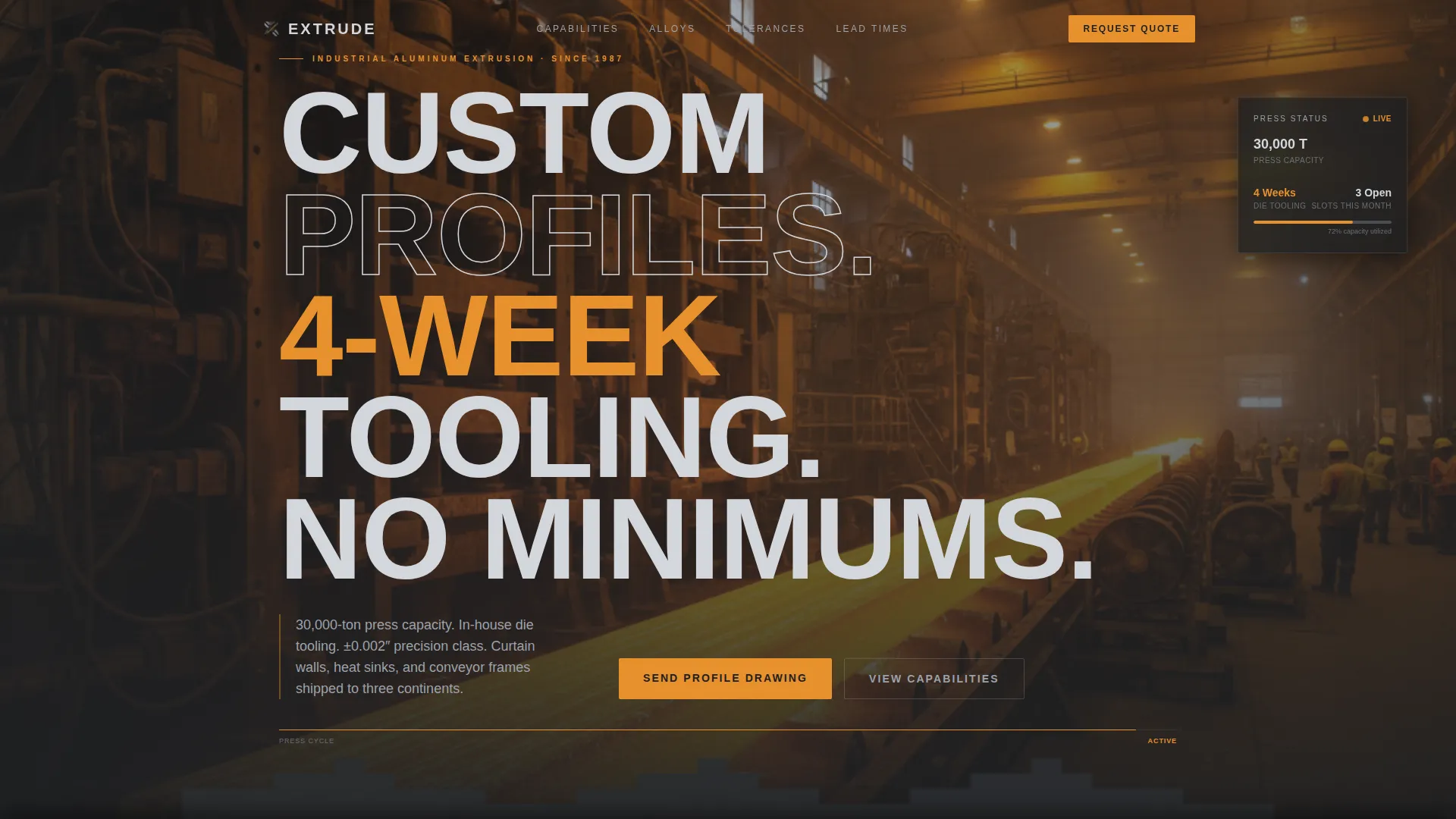
- A panoramic edge-to-edge header with an industrial press visual and a condensed headline announcing tooling timelines and order minimums
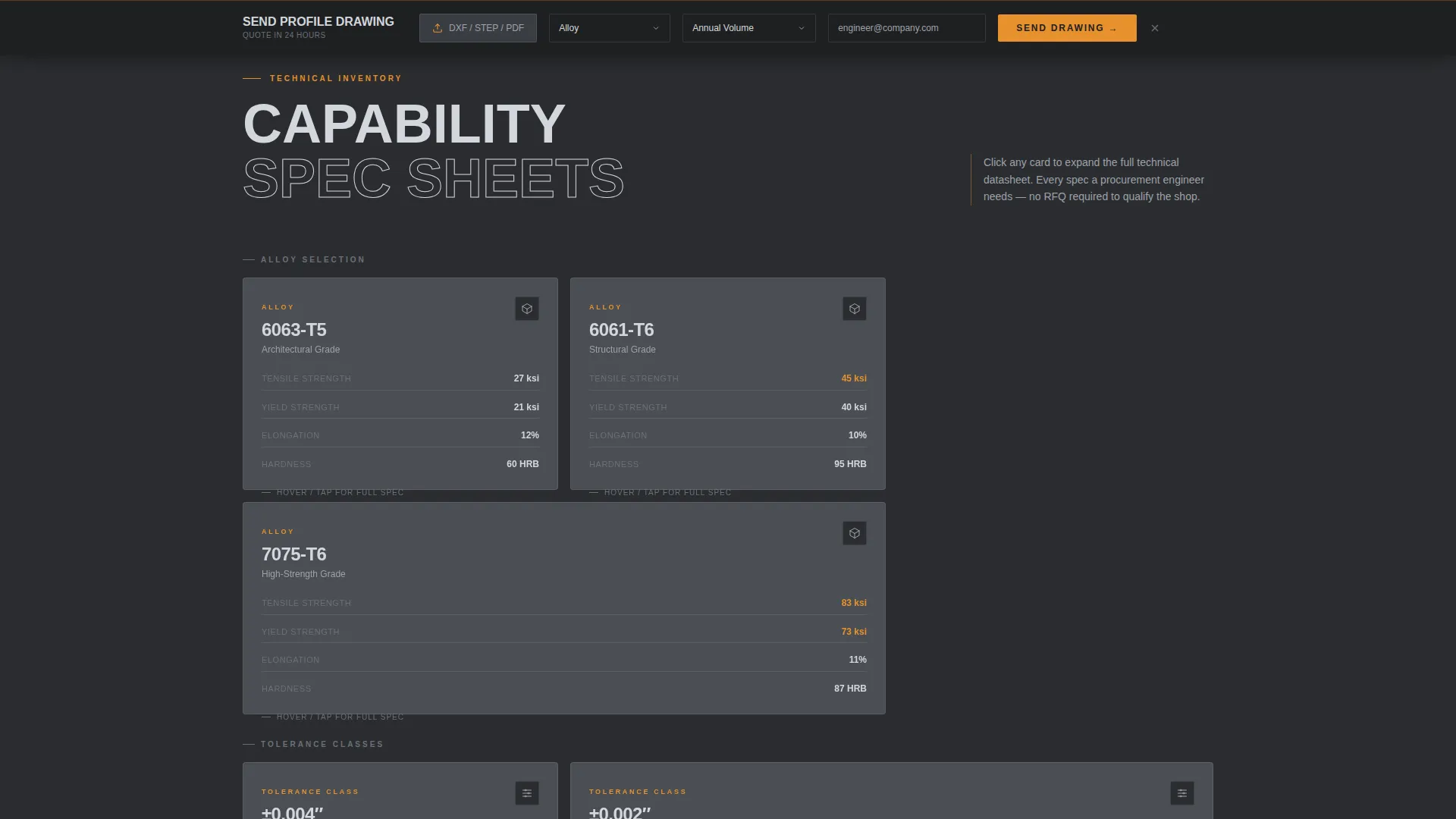
- A modular card grid organized by material, process, and logistics, each card functioning as a mini data sheet with expandable detail
- A sticky bottom conversion bar with file upload, alloy dropdown, volume selector, and a business email gate that qualifies leads at the point of contact
Feature list
A paragraph of context: each feature below is directly reflected in the template's layout and interaction design, drawn from the brief's specified components and creative direction.
Panoramic Press Header
The header runs edge to edge with no margin breaks. It frames the extrusion line at the moment of profile emergence, paired with a knockout headline in condensed industrial sans-serif. A thin amber progress bar beneath the headline pulses at a cadence that mirrors a press cycle, giving the page immediate visual authority.
Modular Capability Card Grid
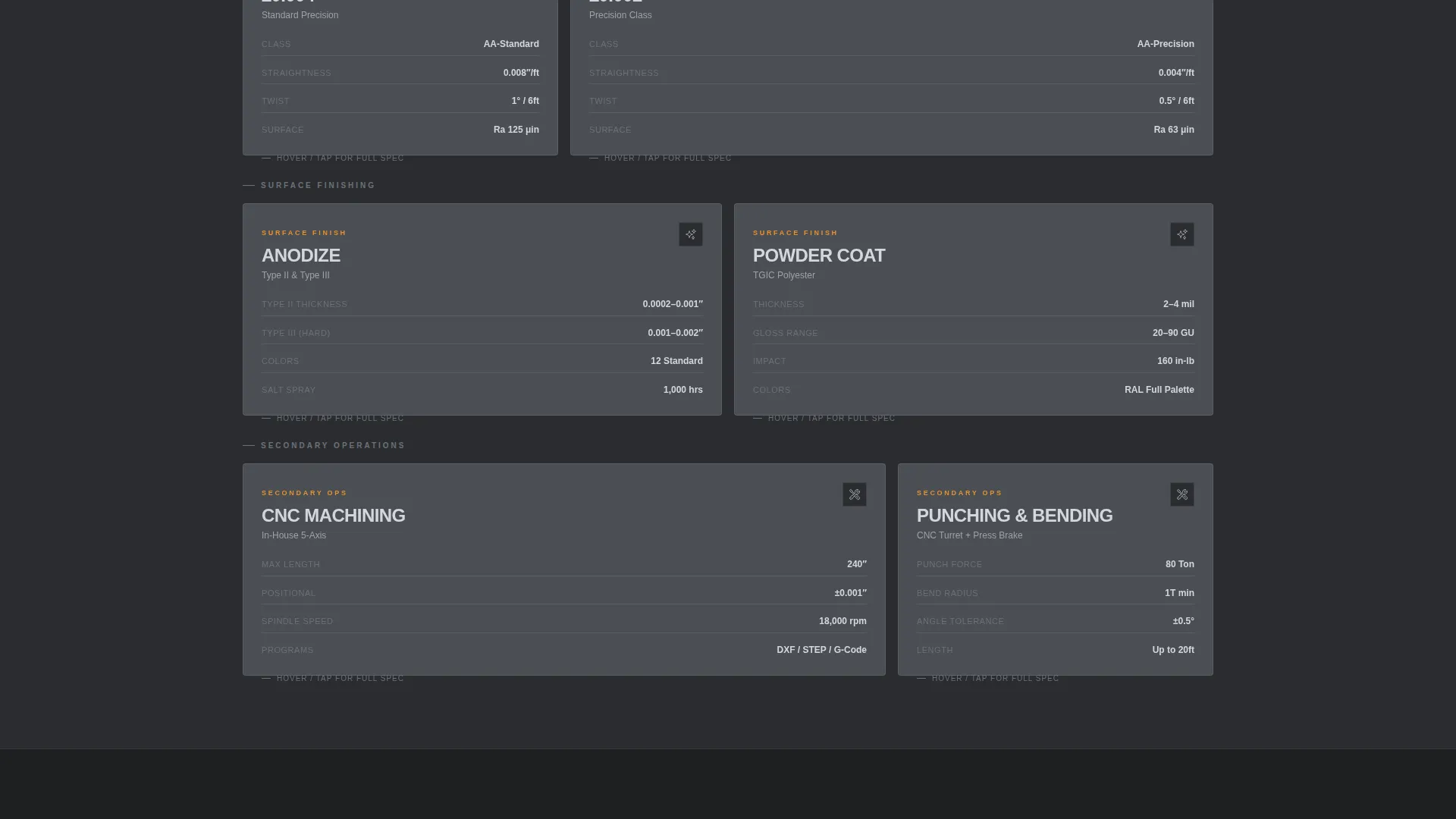
Each card in the grid is a self-contained technical data sheet. Cards cover alloy selection (6063, 6061, and 7075), surface finishing options (anodize, powder coat, and mill finish), tolerance classes (plus or minus 0.004 inches standard and plus or minus 0.002 inches precision), maximum circle size, wall thickness range, and secondary operations such as CNC machining, punching, and bending. Cards flip or expand on interaction to reveal deeper specs, downloadable PDF cut sheets, and sample profile libraries.
Escalating Card Row Logic
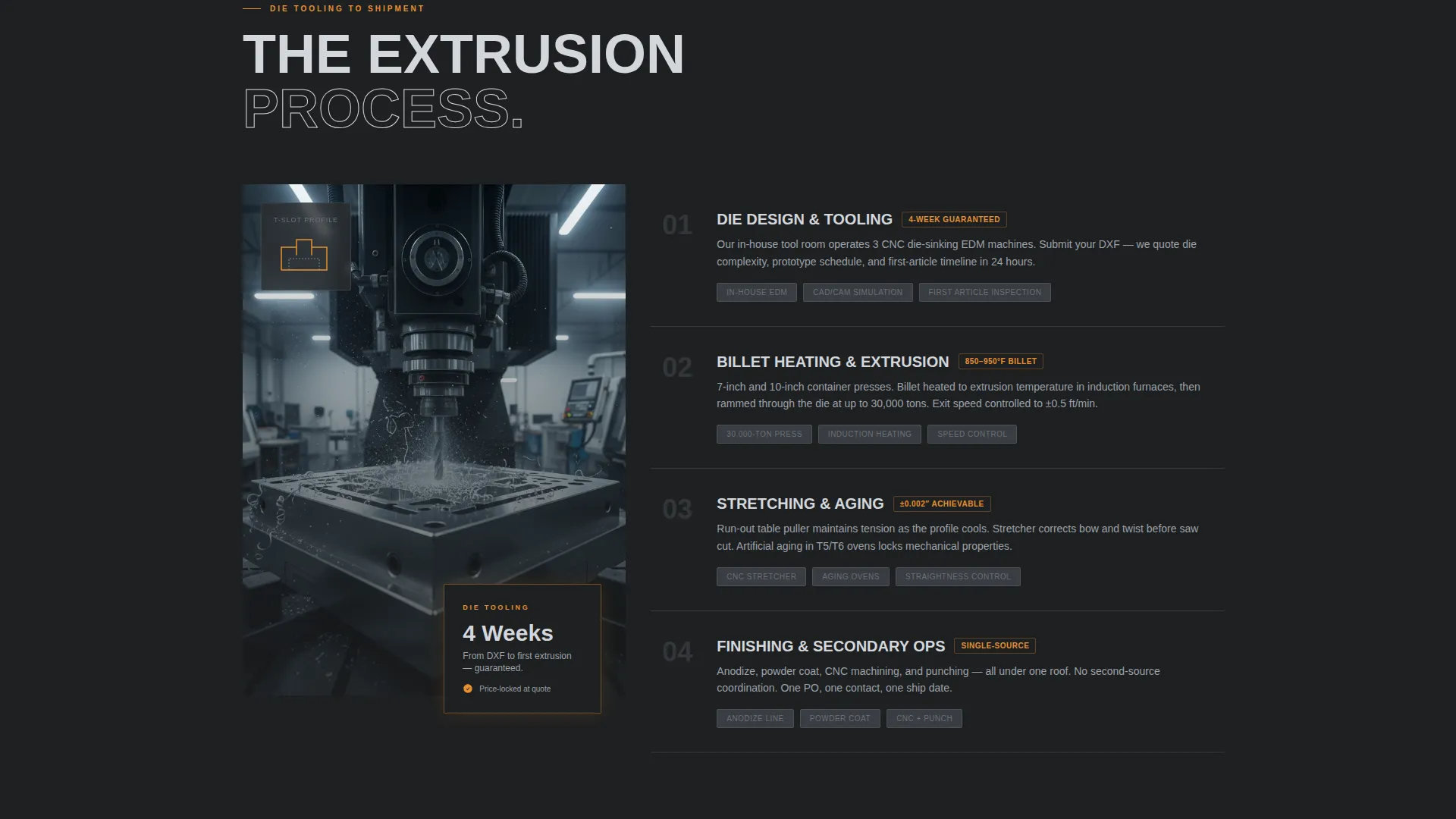
The grid is organized so each row moves the buyer deeper into qualification. Rows escalate from material selection to process capability to logistics and lead time. By the final row, a visitor has mentally confirmed the shop can handle their project without making a single phone call.
Sticky B2B Conversion Bar
A persistent bottom bar appears after the first scroll. It anchors the primary call to action with a DXF or STEP file upload field, an alloy dropdown, an estimated annual volume selector (1K, 10K, or 100K-plus pounds), and a company email input. Personal email domains are not accepted, reinforcing business-to-business qualification at the form level.
Secondary Lead Capture Path
Engineers still comparing suppliers can access a lighter gate: the "Download Our Alloy and Tolerance Guide" path requires only an email address and company name. This captures mid-funnel buyers who are not yet ready to submit a drawing but are still actively evaluating the shop.
Amber Accent System for Critical Data
A single machining-spark amber color is reserved exclusively for calls to action, tolerance figures, and live capacity indicators. Nothing else on the page uses this color, so technical buyers instinctively focus on the most decision-critical information without having to search for it.
Page sections overview
| Section | Purpose |
|---|---|
| Panoramic Press Header | Establishes shop scale and anchors the headline value proposition |
| Alloy Selection Cards | Presents available aluminum grades with expandable material specs |
| Surface Finishing Cards | Details anodize, powder coat, and mill finish options per profile |
| Tolerance Class Cards | Communicates standard and precision tolerance ranges with clear figures |
| Geometry Capability Cards | Covers maximum circle size and wall thickness range in spec format |
| Secondary Operations Cards | Outlines CNC machining, punching, and bending as add-on capabilities |
| Logistics and Lead Time Row | Addresses tooling timelines, order minimums, and volume tiers |
| Primary Conversion Bar | Sticky RFQ form with file upload, alloy select, volume tier, and email gate |
| Tolerance Guide Gate | Secondary download path for mid-funnel engineers comparing suppliers |
Design & branding system
The template uses an Industrial Raw theme built on a Monochrome Steel color system. Every color decision has a functional reason tied to readability and hierarchy on a technically dense page.
- Core palette: mill-finish aluminum (#D4D7DC), press-shop charcoal (#2B2D30), tooling-mark graphite (#4A4E54), and machining-spark amber (#E8912D) reserved exclusively for calls to action, tolerance callouts, and capacity indicators
- Card surfaces sit at graphite with hairline 1-pixel borders that visually reference extrusion profile cross-sections; backgrounds alternate between charcoal and a light aluminum wash
- Body text is rendered in mill-finish white against dark grounds, keeping reading fatigue low across long technical scanning sessions
Mobile & speed optimization
The card grid layout is designed to reflow cleanly across screen sizes. Technical buyers often review supplier pages on tablets during sourcing sessions or on mobile between meetings.
- Modular card columns collapse to a single-column stack on smaller screens without breaking the row-by-row escalation logic
- The sticky conversion bar remains visible and functional at mobile breakpoints, keeping the primary call to action accessible throughout the page
- The panoramic header image is set to bleed edge to edge at all viewport widths, preserving the visual impact of the press-floor scene on any device
How this template helps you convert
The page is engineered around a single insight: a procurement engineer who can verify your tolerances on the page is far more likely to send you a drawing than one who has to ask first.
- Front-loading every critical specification, from alloy grades to tolerance classes to secondary operations, removes the friction that causes qualified leads to bounce before they reach the form
- The dual conversion path captures both ready-to-quote buyers through the sticky RFQ bar and early-stage researchers through the lighter alloy guide download gate, so no qualified visitor leaves empty-handed
- The business email validation on the primary form filters out non-commercial inquiries at entry, so the leads the template delivers are pre-qualified by intent and company affiliation
Other information about this template
This template is well-suited for shops that serve multiple end markets simultaneously, such as architectural curtain wall fabricators, electronics thermal management customers, and industrial conveyor system builders. The modular grid structure makes it straightforward to adapt card content to highlight the alloy families or surface finishes most relevant to a specific target segment.
- The template style is Card Grid (Modular), designed for a single landing page experience with no multi-page navigation required
- The creative direction follows a Spec Sheet approach, meaning the page reads like a capability document rather than a marketing brochure
- The header concept is Panoramic or Wide, optimized for high-impact full-bleed industrial imagery that communicates press scale and operational credibility at first glance
Theme
Industrial Raw
Creative direction
Spec Sheet
Color system
Monochrome Steel
Style
Card Grid (Modular)
Direction
Partnership/B2B
Page Sections
Panoramic Edge-to-edge Press Header
Modular Spec Card Grid
Row-by-row Qualification Logic
Sticky B2B Request for Quotation Bar
Dual Conversion Path Design
Amber Accent Hierarchy
Related questions
Who is this landing page template designed for?
Can I update the alloy and tolerance data in the cards?
How does the template filter out non-business inquiries?
Is the secondary download gate separate from the main RFQ form?
What layout style does this template use?



