Certified Manufacturing Processes Professional Website Template
Extrude is a precision extrusion equipment landing page built for industrial manufacturers. It uses a zigzag case study layout, a dark Navy Authority color system, and a before/after header that leads with live performance metrics. Each section tells a real client story, making it easy for plant managers and procurement engineers to see measurable ROI before they ever fill out a form.
by Rocket studio
Quick summary
Extrude is a single-page template built for extrusion equipment manufacturers targeting plant managers, procurement engineers, and operations directors. It opens with a split before/after case study header, then walks visitors through three escalating client stories in a zigzag layout. The page ends with a qualification form that captures serious buyers while a gated PDF path catches engineers still in the research phase.
Who this template is for
This template is built for industrial B2B businesses that sell extrusion equipment or line upgrades. It speaks directly to the technical buyers who evaluate capital equipment, not general audiences.
- Extrusion equipment manufacturers targeting plant managers and procurement engineers
- Operations-focused suppliers whose buyers compare performance data before committing
- Industrial manufacturers serving window-profile, medical-tubing, or automotive-trim production sectors
What problem this template solves
Most industrial landing pages lead with product specs and ask for contact information too early. Buyers with capital expenditure authority need proof of return on investment first, and they rarely trust a page that skips straight to a form.
- Visitors leave before converting because the page never demonstrates measurable outcomes
- Engineers researching for a capital expenditure meeting have nowhere to take early-stage data
- A single generic call to action fails to capture buyers at different stages of the decision cycle
What you get with this template
You get a fully structured single-page layout that proves value three times before asking for anything in return. Every section is built around a specific conversion moment.
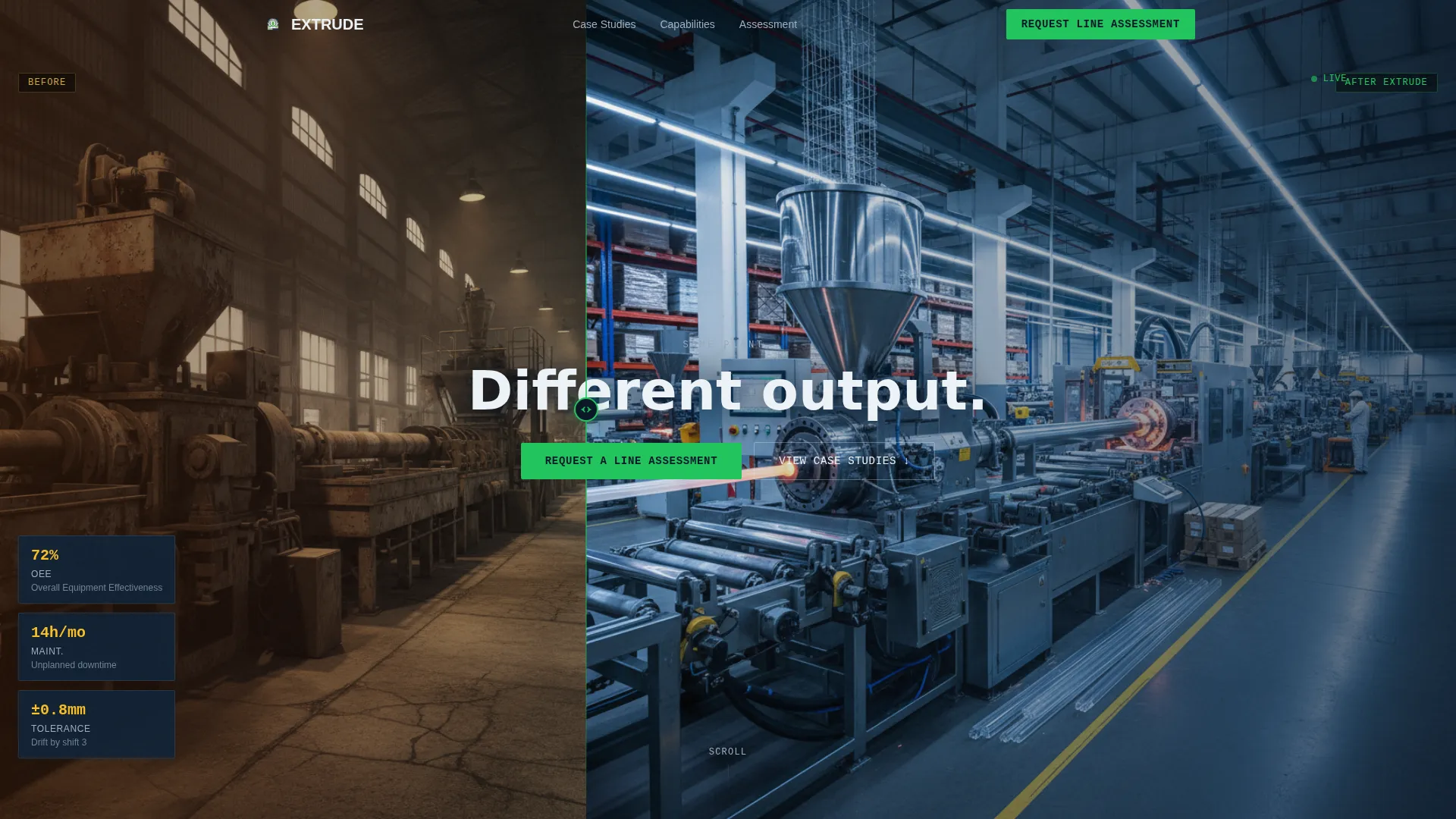
- A before/after header with animated divider and overlaid performance metrics in indicator green
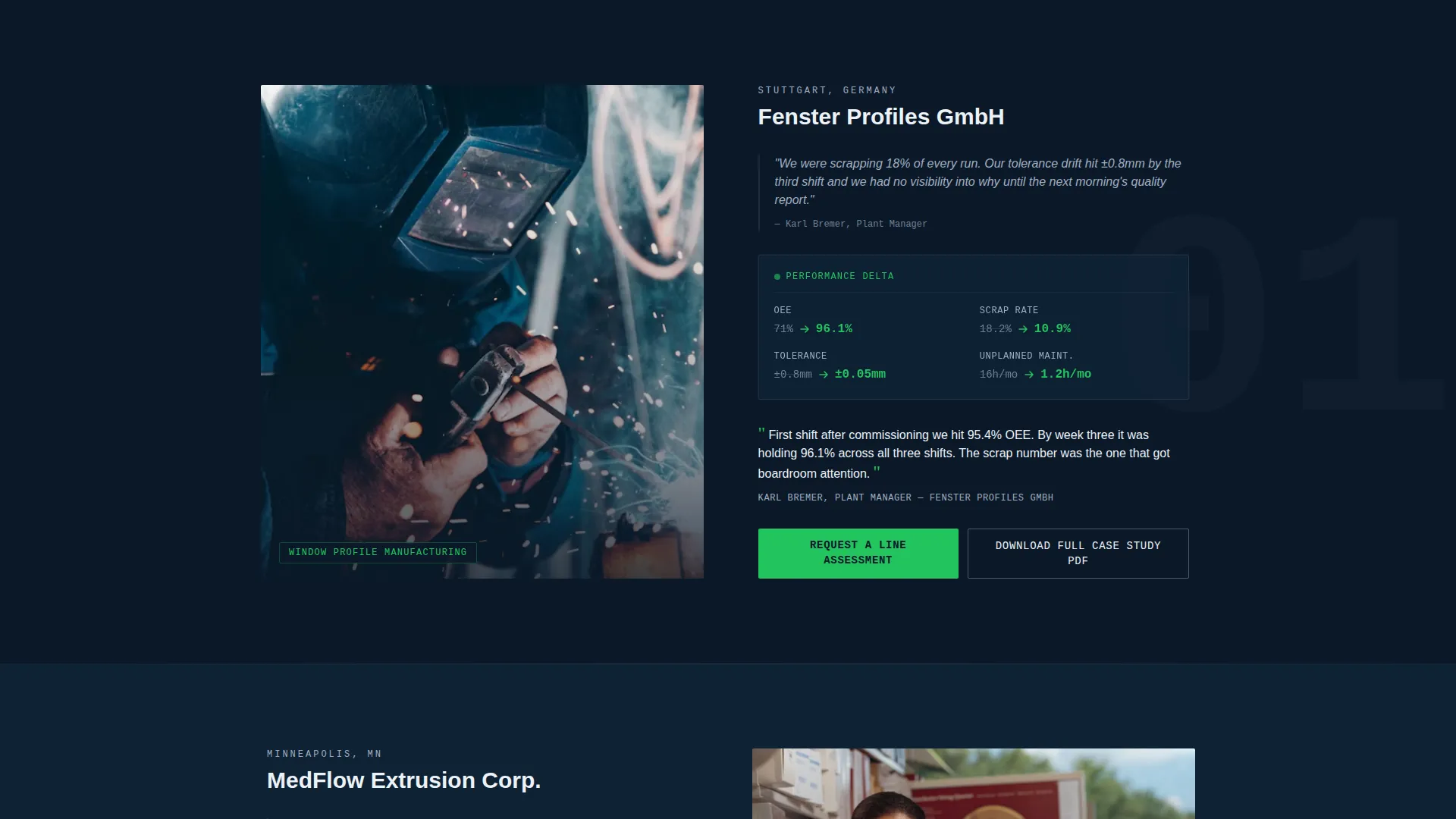
- Three zigzag case study sections, each with a metrics panel, equipment photograph, client quote, and call to action
- A dual conversion system: a primary qualification form and a secondary gated PDF download path
Feature list
This template includes purpose-built components drawn directly from the source brief. Each one serves a specific role in the buyer journey.
Animated Before/After Header
The header splits the screen between a legacy line and a retrofitted line. Downtime metrics glow on the left in warm tones; upgraded performance metrics glow in indicator green on the right. A sliding animated divider transitions between the two states, and a single headline fades in after two seconds: "Same plant. Different output."
Zigzag Case Study Sections
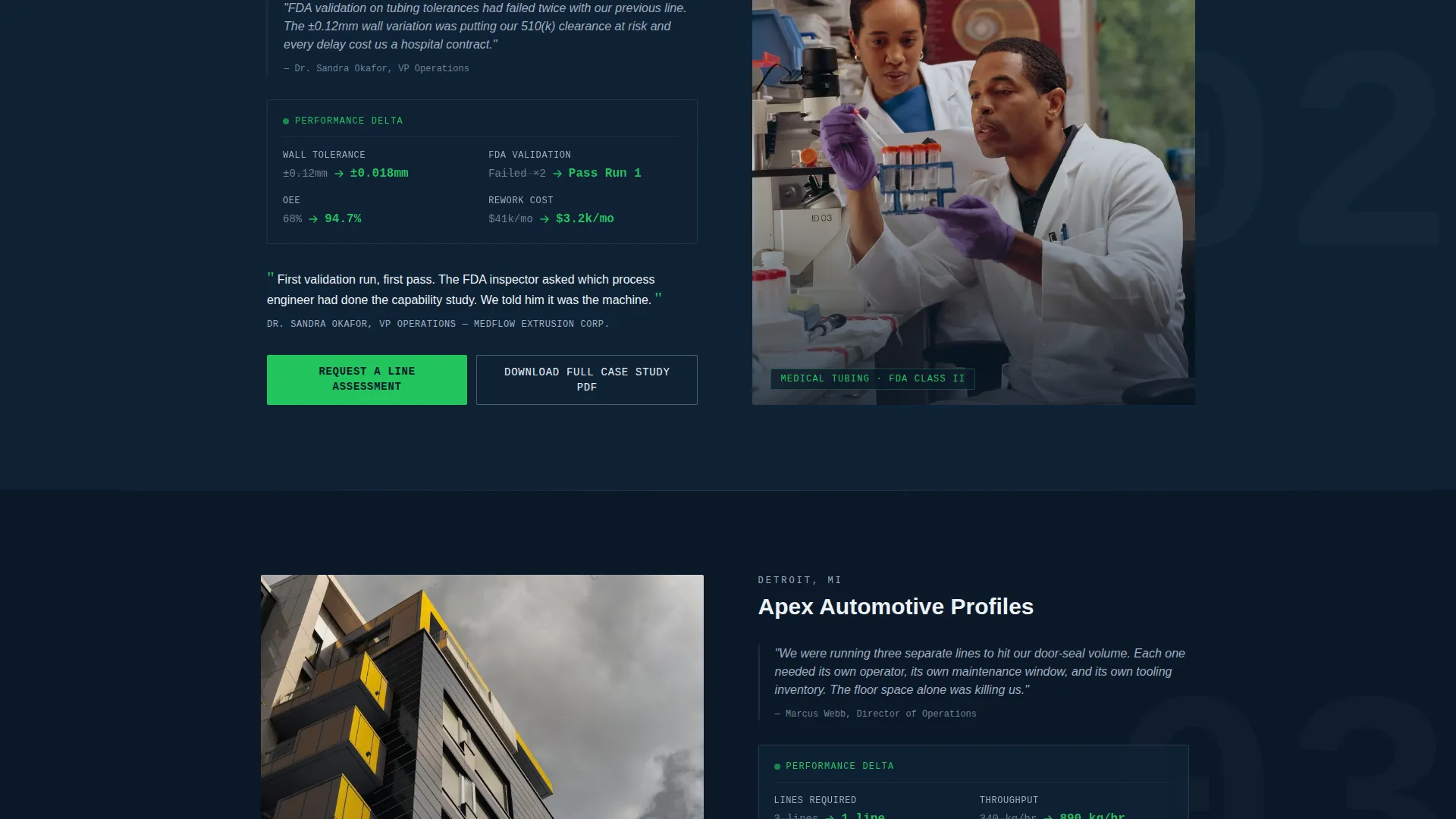
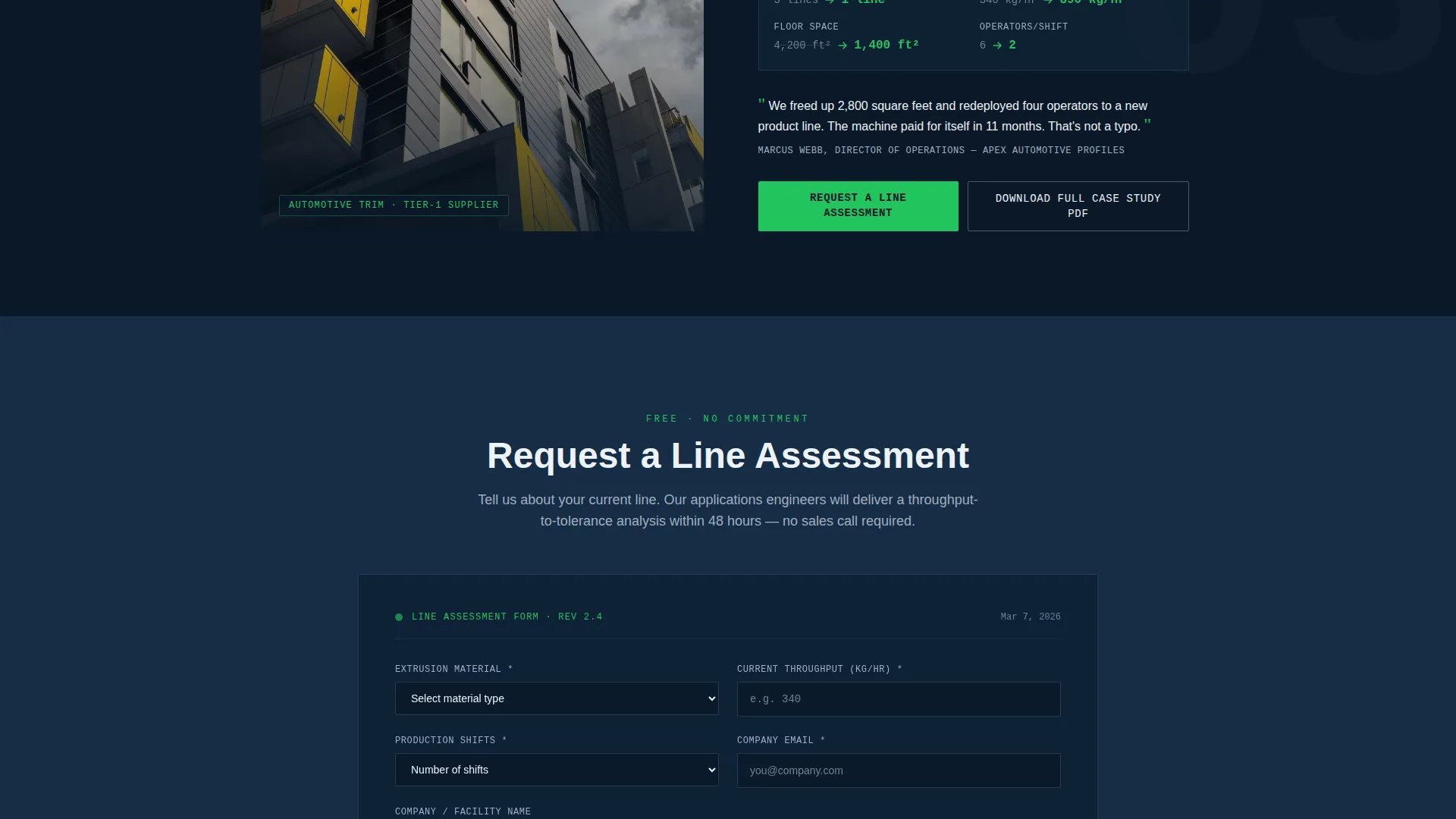
Three alternating sections each tell a distinct client story. Image-left/data-right and data-left/image-right layouts alternate to maintain visual rhythm. Each section escalates stakes, moving from a window-profile scrap reduction to FDA-validated medical tubing tolerances to a tier-one automotive line consolidation.
Dashboard-Style Metrics Panels
Each case study includes a before/after metrics panel styled like a human-machine interface (HMI) display. Key figures such as overall equipment effectiveness (OEE) percentage, maintenance hours per month, and tolerance drift are shown as live-style deltas with indicator green highlighting positive changes.
Dual Conversion Path System
The primary call to action, "Request a Line Assessment," appears at the header and repeats after every case study. It anchors to a qualification form asking for material type, current throughput in kilograms per hour, number of production shifts, and a free-text bottleneck field. A secondary path offers a gated case study PDF download for engineers not yet ready to speak directly.
Client Voice Integration
Each case study section includes a direct quote from the plant manager. These quotes are placed alongside the equipment photograph and metrics panel, giving the performance data a human source and adding credibility to every claim on the page.
Repeating Section Rhythm
Every case study follows the same four-part structure: client problem, metrics panel, equipment photograph, and plant manager quote. This predictable rhythm helps technical readers scan quickly and builds cumulative confidence as they move down the page.
Page sections overview
| Section | Purpose |
|---|---|
| Before/After Header | Opens with split performance metrics and animated divider |
| Case Study One | Window-profile extruder scrap rate story |
| call to action Block One | First "Request a Line Assessment" form anchor |
| Case Study Two | Medical-tubing FDA tolerance story |
| call to action Block Two | Second qualification form repetition |
| Case Study Three | Automotive tier-one line consolidation story |
| call to action Block Three | Third call to action and PDF download gate |
| Qualification Form | Captures material type, throughput, shifts, bottleneck |
Design & branding system
The visual identity follows a Dashboard Pro theme using the Navy Authority color system. It feels like the human-machine interface panel on a flagship extrusion line: dark, data-dense, and engineered to surface what matters instantly.
- Deep command-center navy (#0B1929) dominates headers and section backgrounds; machined-steel gray (#4A5568) carries body text and dividers
- High-visibility indicator green (#22C55E) fires only on performance numbers, live metrics, and call-to-action hover states
- Signal white (#EDF2F7) is used for data surface cards and panel backgrounds, making metric blocks float forward against the dark shell
Mobile & speed optimization
The zigzag layout and dark-panel design are structured to reflow cleanly on smaller screens. The data-heavy sections remain legible and scannable on mobile without losing the dashboard aesthetic.
- Metrics panels and case study blocks stack vertically on smaller viewports while preserving the before/after data hierarchy
- Indicator green highlights on performance numbers remain prominent at every screen size, keeping key figures instantly visible
- The qualification form and PDF download path are accessible at the bottom of the page without requiring horizontal scrolling
How this template helps you convert
The page is engineered to earn trust before it asks for anything. Every design and structural decision builds toward one of two conversion outcomes.
- Visitors reach the qualification form already convinced by three layers of proof, making form completion feel like a natural next step rather than a cold commitment.
- Engineers who are not yet ready to speak can grab the gated case study PDF with a company email, giving the sales team a warm lead to follow up before the next capital expenditure meeting.
Other information about this template
This template is categorized under Manufacturing and Industrial, within the Manufacturing Processes subcategory. It is specifically designed for the extrusion equipment manufacturer niche and carries an intersection match score of 13, reflecting strong alignment between the template style and the target buyer context.
- The template style is Zigzag/Alternating, the theme is Dashboard Pro, the creative direction is Case Study Narrative, and the header concept is Case Study Before/After
- The landing-page direction is Partnership and B2B engagement, making it suited for high-value capital equipment sales cycles
- The color system is Navy Authority, with a palette drawn from command-center and HMI design conventions used in industrial equipment interfaces
Theme
Dashboard Pro
Creative direction
Case Study Narrative
Color system
Navy Authority
Style
Zigzag/Alternating
Direction
Partnership/B2B
Page Sections
Animated Before/after Case Study Header
Three-part Zigzag Case Study Layout
Hmi-style Metrics Panels
Dual Conversion Path System
Client Quote Integration
Repeating Four-part Section Rhythm
Related questions
Who is this landing page template designed for?
Can I use this template to capture leads at different stages of the buying process?
How many case study sections are included?
Do I need to replace the metrics and quotes with my own data?
What information does the qualification form collect?



