Consumer Goods OEM Supplier Landing Page Template
Fabricore is a hub-and-spoke anchor-nav landing page built for consumer goods OEM suppliers. It uses a Data Command theme with a Carbon Fiber color system to present capabilities, materials, certifications, case studies, and an RFQ form in a dense, spec-sheet layout. Every section is engineered to turn procurement-minded visitors into qualified leads.
by Rocket studio
Quick summary
Fabricore is a single-page, anchor-nav landing page template designed for consumer goods OEM manufacturers. It opens with an animated infographic header that disassembles a product into its component layers, then guides visitors through a scrollable spec deck covering capabilities, materials, certifications, case studies, and a lead-capture RFQ form.
Who this template is for
This template is built for manufacturers and suppliers who need to communicate technical credibility fast. It speaks directly to the buyers who evaluate them.
- Product managers at mid-market consumer brands sourcing a new stock-keeping unit run
- Procurement directors comparing landed costs and supplier specs across multiple regions
- Startup founders holding a prototype who need to find a production partner for a high-volume Q3 deadline
What problem this template solves
Most OEM supplier pages look like corporate brochures. They bury the numbers buyers actually need and force procurement teams to send a dozen emails just to confirm basic capabilities. Fabricore fixes that by putting every critical spec front and center.
- Procurement visitors leave pages that lack tolerance data, material lists, and certification proof
- Generic hero images and vague copy fail to build the engineering trust that industrial buyers require
- Without a clear conversion path, RFQ requests stall and qualified leads go to better-organized competitors
What you get with this template
You get a fully structured, single-page layout that functions like a polished capabilities deck. Every scroll section is designed to answer the next question before the visitor thinks to ask it.
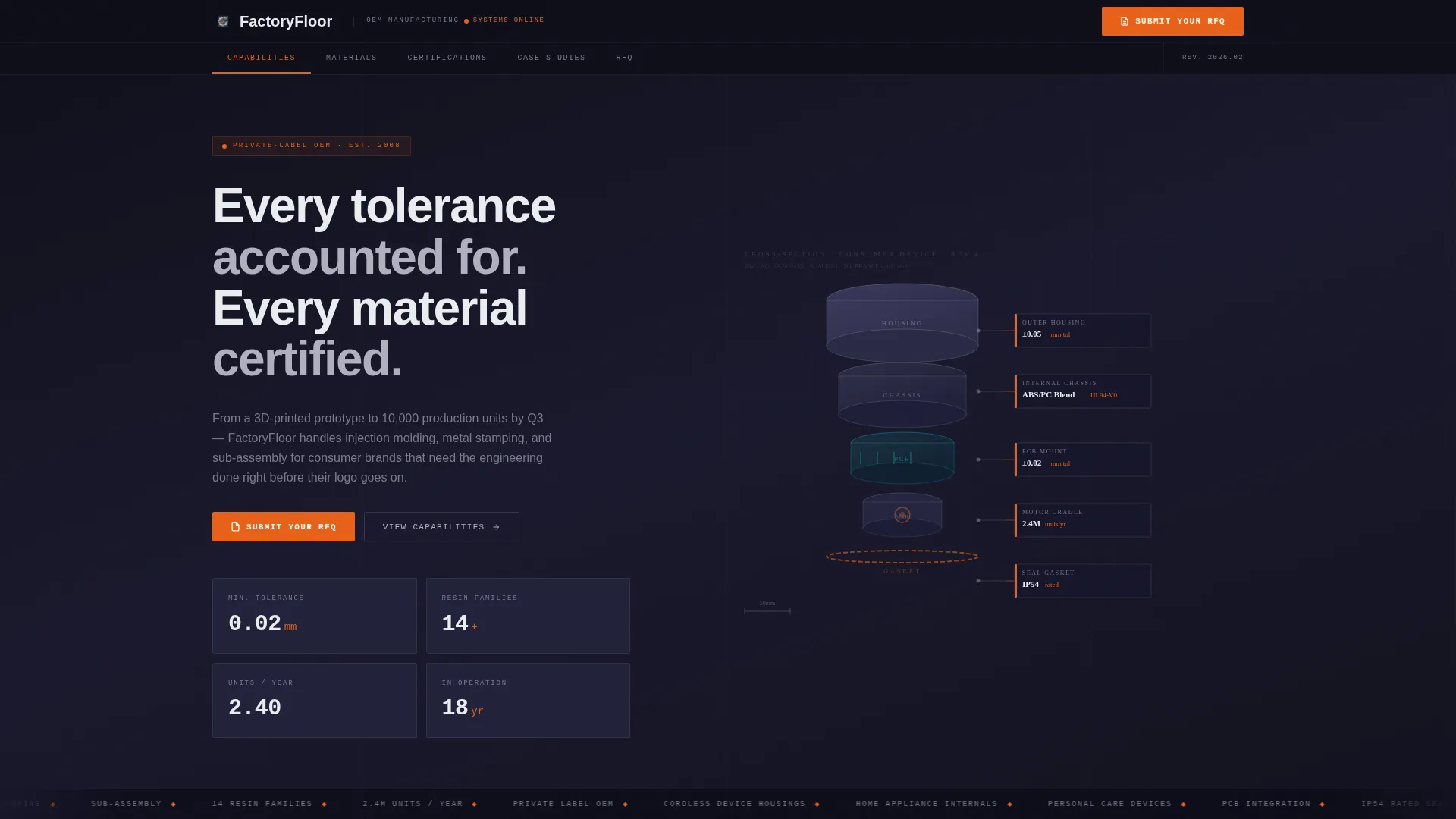
- A full-viewport animated infographic header showing an exploded product cross-section with labeled component layers
- Five anchor-nav spoke sections covering Capabilities, Materials, Certifications, Case Studies, and RFQ
- A dual conversion system with a primary "Submit Your RFQ" form and a secondary "Download Our Capabilities Deck" gate
Feature list
This template ships with purpose-built components that serve one goal: turning a skeptical procurement professional into a submitted lead.
Animated Exploded-Product Header
The header renders a stylized cross-section of a consumer product, such as an electric hand blender or a cordless trimmer, broken into labeled layers. Each layer displays a data tag showing material type, tolerance range, and annual unit capacity. The numbers animate into place as the page loads, replacing lifestyle imagery with engineering proof.
Sticky Anchor Navigation Bar
A persistent top navigation bar links directly to each spoke section: Capabilities, Materials, Certifications, Case Studies, and RFQ. The active nav state highlights in signal orange so visitors always know where they are. The "Submit Your RFQ" call-to-action button lives inside this bar and remains visible on every scroll.
Spec-Sheet Spoke Sections
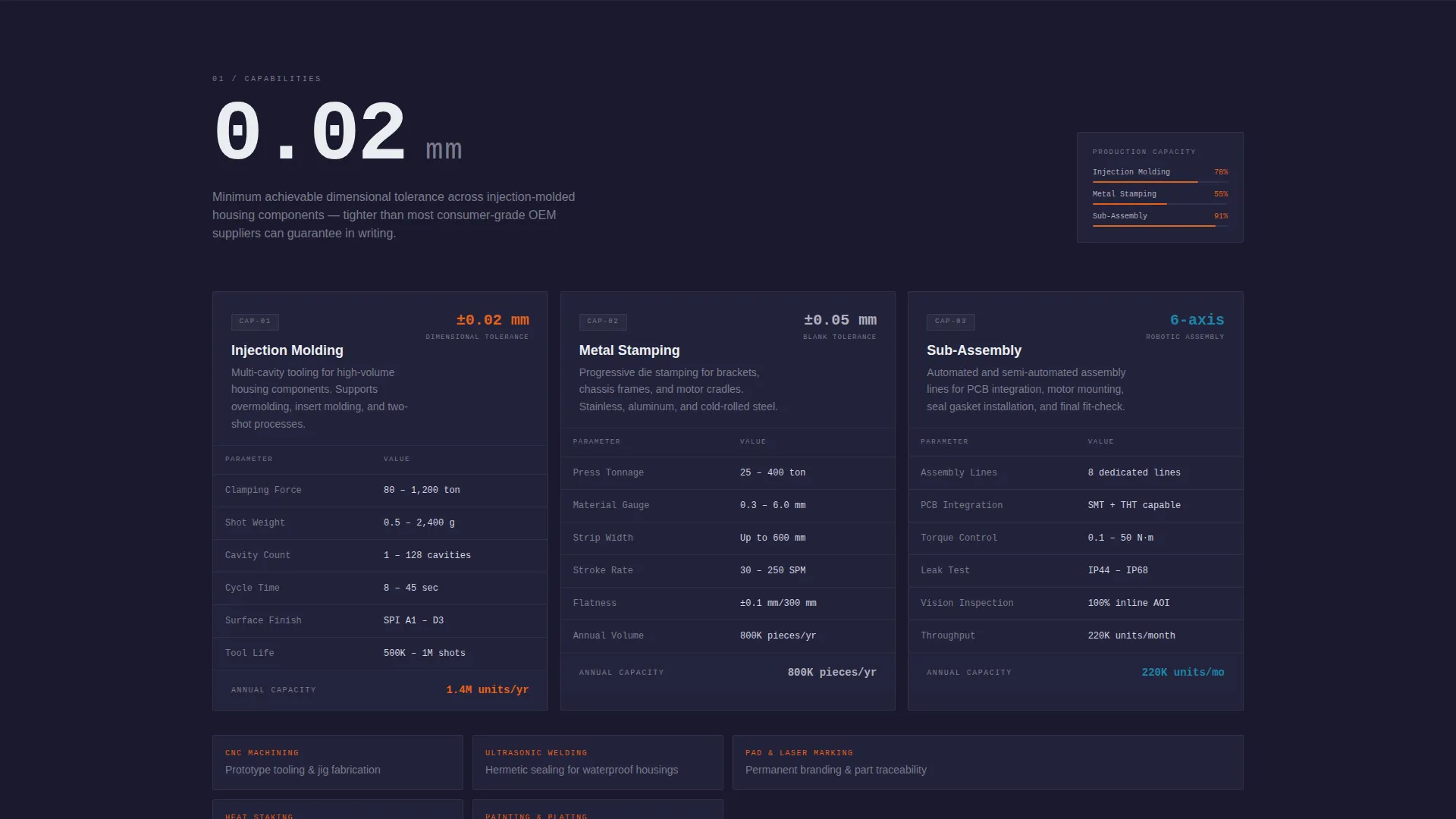
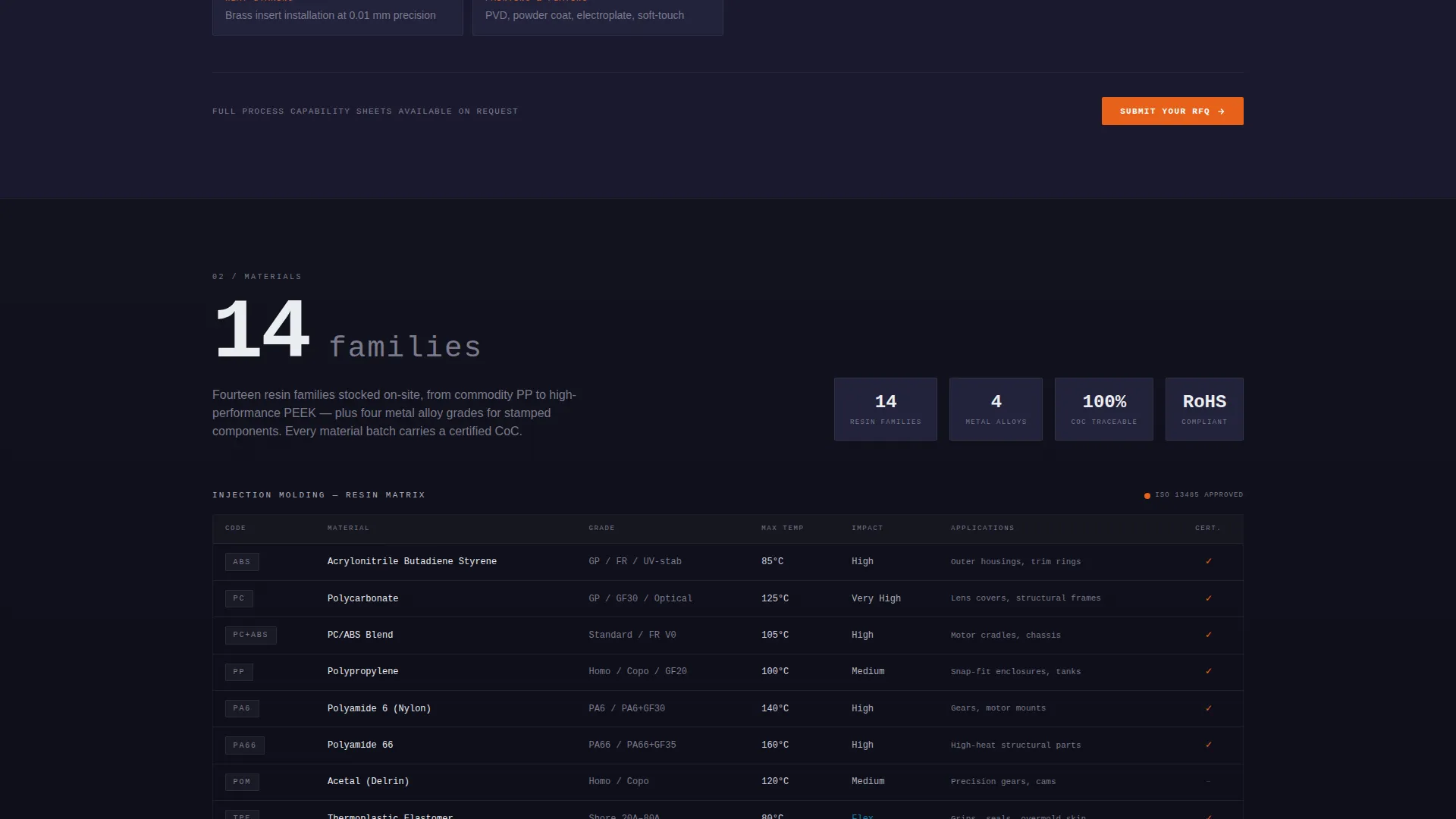
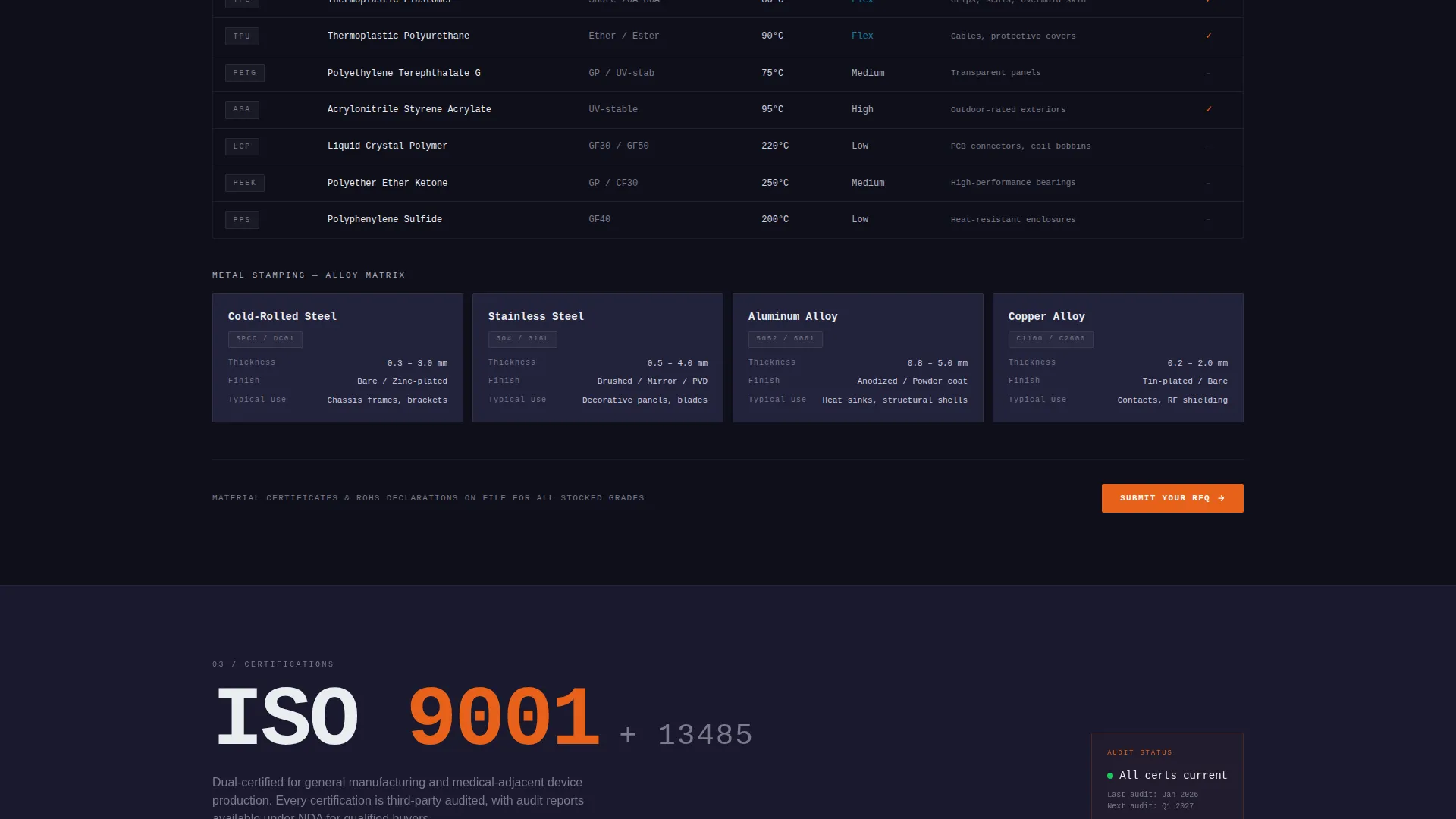
Each spoke section opens with a single oversized metric, for example "0.02 mm tolerance," "14 resin families," or "ISO 9001 + ISO 13485." The metric expands into spec tables, process diagrams, and comparison matrices. The layout mimics a tabbed technical document, making dense information feel organized rather than overwhelming.
Primary RFQ Lead Capture Form
The RFQ form collects company name, product category via a dropdown (home appliances, personal care, consumer electronics, or other), estimated annual volume via a tiered range selector, and a file upload field for CAD drawings or product briefs. This form appears at the close of each spoke section and as a final full-width block.
Secondary Capabilities Deck Gate
A lighter-commitment conversion path offers a downloadable capabilities deck. Visitors unlock it by entering only their email address and company name. This path is designed for procurement teams still benchmarking suppliers who are not yet ready to submit a full RFQ.
Data Command Visual System
Signal orange is reserved exclusively for calls-to-action, active nav states, and critical data callouts. Deep carbon black and machined aluminum cover backgrounds. Technical white handles body text. The result is a palette that feels like the instrument panel of a CNC machine, where every flash of color means something specific.
Page sections overview
| Section | Purpose |
|---|---|
| Animated Header | Introduces product cross-section with animated component data tags |
| Sticky Anchor Nav | Pins to top; links to all spokes plus primary RFQ call-to-action |
| Capabilities Spoke | Displays core manufacturing processes with spec tables and metrics |
| Materials Spoke | Lists resin families and material certifications with comparison data |
| Certifications Spoke | Presents quality certifications and compliance markers prominently |
| Case Studies Spoke | Shows production evidence through real-format project summaries |
| RFQ Form Section | Captures company, category, volume, and CAD file from qualified leads |
| Capabilities Deck Gate | Secondary email-gated download for early-stage procurement visitors |
| Final call to action Block | Full-width closing prompt reinforcing the primary RFQ submission path |
Design & branding system
The visual identity follows a Data Command theme built on a Carbon Fiber color system. Every color choice is functional, not decorative.
- Deep carbon black (#1A1A2E) and machined aluminum (#B0B0BF) handle all backgrounds, keeping the surface feel matte and industrial
- Technical white (#EAEDF0) is used for body text to maintain high contrast against dark backgrounds
- Signal orange (#E8611A) appears only on calls-to-action, active navigation states, and critical data callouts, so every orange element carries intent
Mobile & speed optimization
The template is structured to remain legible and navigable on smaller screens without sacrificing the density that technical buyers expect.
- The sticky anchor nav collapses cleanly on mobile so it does not obstruct the spec content below
- Spec tables and comparison matrices are formatted to scroll horizontally on narrow viewports rather than breaking the layout
- The exploded-product header animation is designed to render without blocking the primary page content
How this template helps you convert
Fabricore is engineered around a dual conversion architecture that moves visitors from initial curiosity to a submitted lead in a single scroll session.
- The primary path pushes visitors toward "Submit Your RFQ" by building an evidence wall across every spoke section, making the form feel like the natural conclusion rather than an interruption
- The secondary path captures early-stage procurement visitors with the gated capabilities deck download, requiring only an email and company name so the friction stays low for buyers still comparing suppliers
Other information about this template
This template is designed as a standalone single-page deliverable. It is well-suited for consumer goods OEM suppliers, contract manufacturers, and private-label production partners who need a professional web presence that speaks to industrial buyers.
- The hub-and-spoke anchor navigation structure makes it straightforward to adapt section content for different product verticals such as home appliances, personal care, or consumer electronics
- The spec-sheet creative direction means the layout naturally accommodates data-heavy content like tolerance figures, process certifications, and material indexes without feeling cluttered
- The Carbon Fiber color system and Data Command theme can be rebranded by updating the four core hex values, making it adaptable for different manufacturer identities
Theme
Data Command
Creative direction
Spec Sheet
Color system
Carbon Fiber
Style
Hub & Spoke (Anchor Nav)
Direction
Lead Generation
Page Sections
Animated Exploded-product Infographic Header
Sticky Anchor Navigation with RFQ Button
Spec-sheet Spoke Sections
Dual Conversion Architecture
Data Command Carbon Fiber Visual System
Related questions
What industries is this landing page template designed for?
Can I adapt the spoke sections to match my actual capabilities?
What information does the RFQ form collect from visitors?
What is the capabilities deck download and who is it for?
Do I need design or development experience to use this template?



