Youth Lacrosse League Registration Landing Page Template
The Faceoff landing page template is built for youth lacrosse leagues ready to fill every roster spot before the whistle blows. It combines a live countdown timer, glowing age-division cards, coach profiles, and a streamlined registration overlay into one high-energy, mobile-first page. If your league runs on urgency and community pride, this template delivers both.
by Rocket studio
Quick summary
Faceoff is a single-page event registration template designed for youth lacrosse leagues. It opens with a full-viewport countdown timer, moves through age-based divisions, game day visuals, coach profiles, and a season calendar, then closes every section with a pinned registration call to action. The entire page is built to move parents from curiosity to commitment in one scroll.
Who this template is for
This template fits any organizer running a structured lacrosse program for kids between six and fourteen. It speaks directly to the families and coaches who keep youth sports alive at the local level.
- League directors and club organizers launching a new spring or fall season
- Youth lacrosse coaches who need a fast, credible way to showcase their program and register players online
- Sports organizations serving both boys and girls across multiple age-group divisions, from first-timers to travel-level athletes
What problem this template solves
Most youth sports registration pages are generic, slow, and uninspiring. They ask parents to trust a program they cannot picture, fill out long forms they abandon halfway through, and dig for basic details like dates, location, and equipment requirements. Faceoff solves all of that.
- It puts the most critical real estate, the above-the-fold countdown and call to action, to work immediately so parents feel urgency before they read a single word of body copy
- It breaks registration into a short, sequential overlay form so parents can register from a phone in the carpool line without dropping out mid-process
- It answers the questions parents actually have, including division placement, equipment needs, coach credentials, and season dates, before they have to ask
What you get with this template
You get a complete, section-by-section storybook landing page that builds momentum from the first pixel to the final tap. Every section is purposeful and nothing is decorative filler.
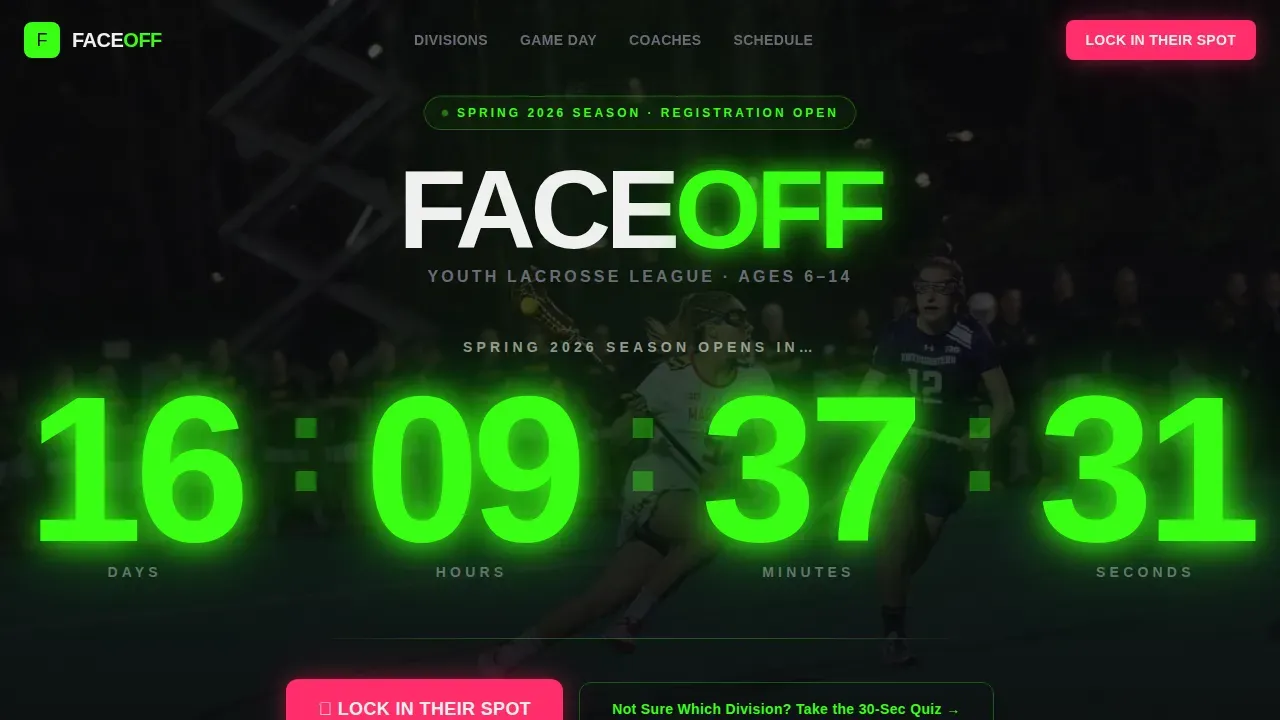
- A full-viewport hero with a live plasma-green countdown timer, slow-motion game footage in the background, and the primary registration button visible without scrolling
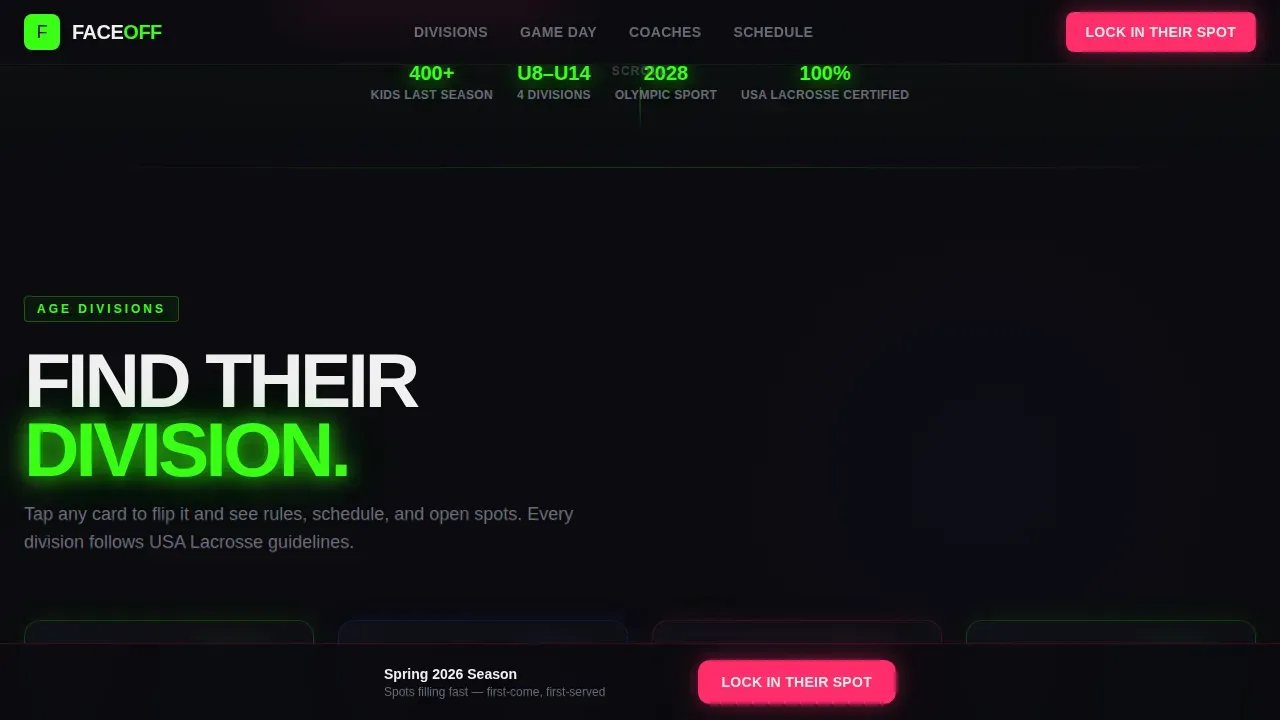
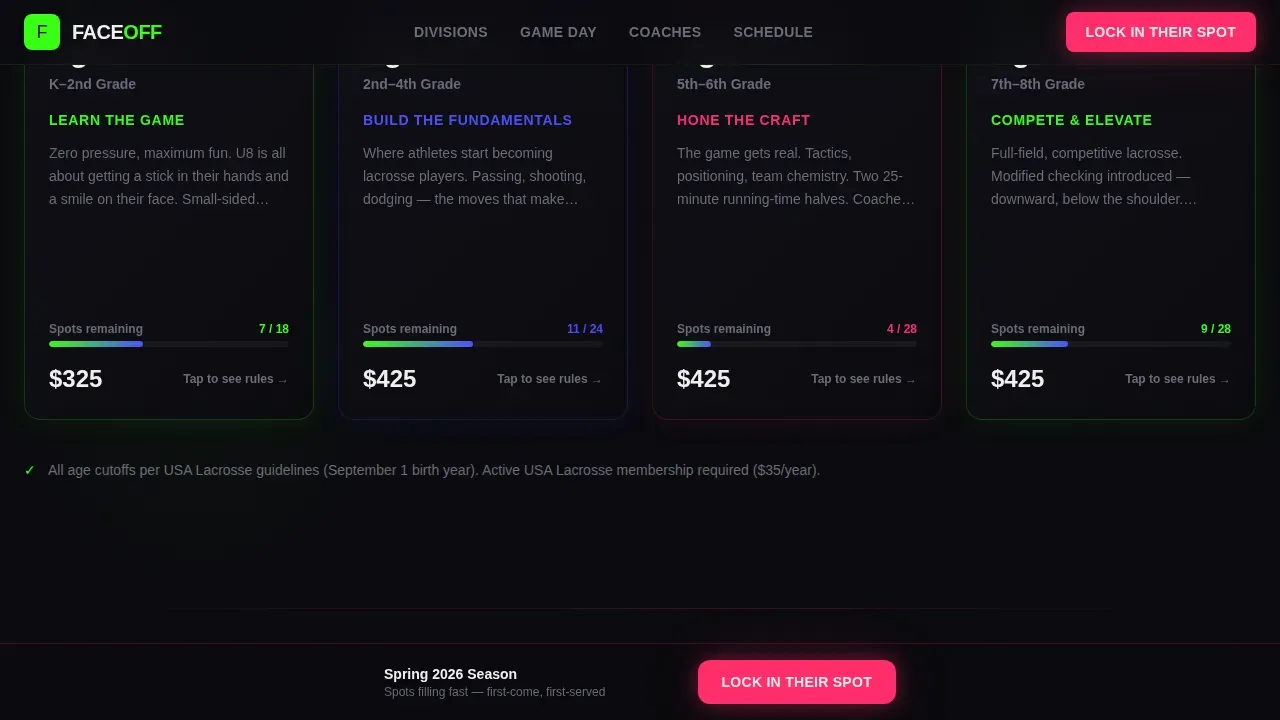
- Four age-based division cards (U8, U10, U12, U14) with flip-on-scroll animation revealing age rules, contact rules, and fees for each group
- A coach profile grid, a photo-heavy game day spread with parent testimonials, a neon-lit season calendar, and a pinned registration button that follows every page section
Feature list
This template packs every persuasive and functional element a youth lacrosse league needs to fill its roster fast.
Live Countdown Timer Hero
The hero section opens with massive plasma-green numerals counting down to registration day. The numbers occupy roughly seventy percent of the viewport. A single line beneath reads "Spring 2025 Season Opens In..." so parents know exactly what the clock means. Urgency is structural, not decorative.
Age-Division Flip Cards
Four glowing cards represent the U8, U10, U12, and U14 divisions. Each card flips on scroll to reveal age rules, contact rules, and fees. Parents can assess the right age group for their child instantly, without reading a wall of text. Boys divisions and girls divisions are both addressed clearly within each card.
Full-Screen Registration Overlay
The registration form opens as a full-screen overlay with a single-column layout proven to be faster for mobile users. It collects player first name, age, and experience level first, then parent email and phone. A progress indicator shows how close the parent is to finishing. Only essential fields appear, reducing the drop-off that long forms cause.
Division Placement Quiz
A secondary path labeled "Not Sure Which Division? Take the 30-Second Quiz" captures hesitant parents. The quiz matches a child to the right age group and skill tier, then funnels the family into the same registration flow. It is an exciting way to reduce friction and build confidence in first-time lacrosse families.
Coach Profile Card Grid
Coaches are presented as player cards complete with stats and certifications. Each card showcases the coach's background and credentials. Parents see who will be leading their child's training, which adds trust and helps families feel positive about the program before they commit.
Neon Season Calendar Timeline
The season calendar is displayed as a neon-lit horizontal timeline running from February through June. Key dates, session details, and event milestones are laid out clearly. Parents can see exactly when practice sessions begin, when games take place, and when the season ends, all in one visual sweep.
Page sections overview
| Section | Purpose |
|---|---|
| Hero Countdown Timer | Opens with urgency; drives immediate registration action |
| Age Division Cards | Shows U8 to U14 divisions with rules and fees per group |
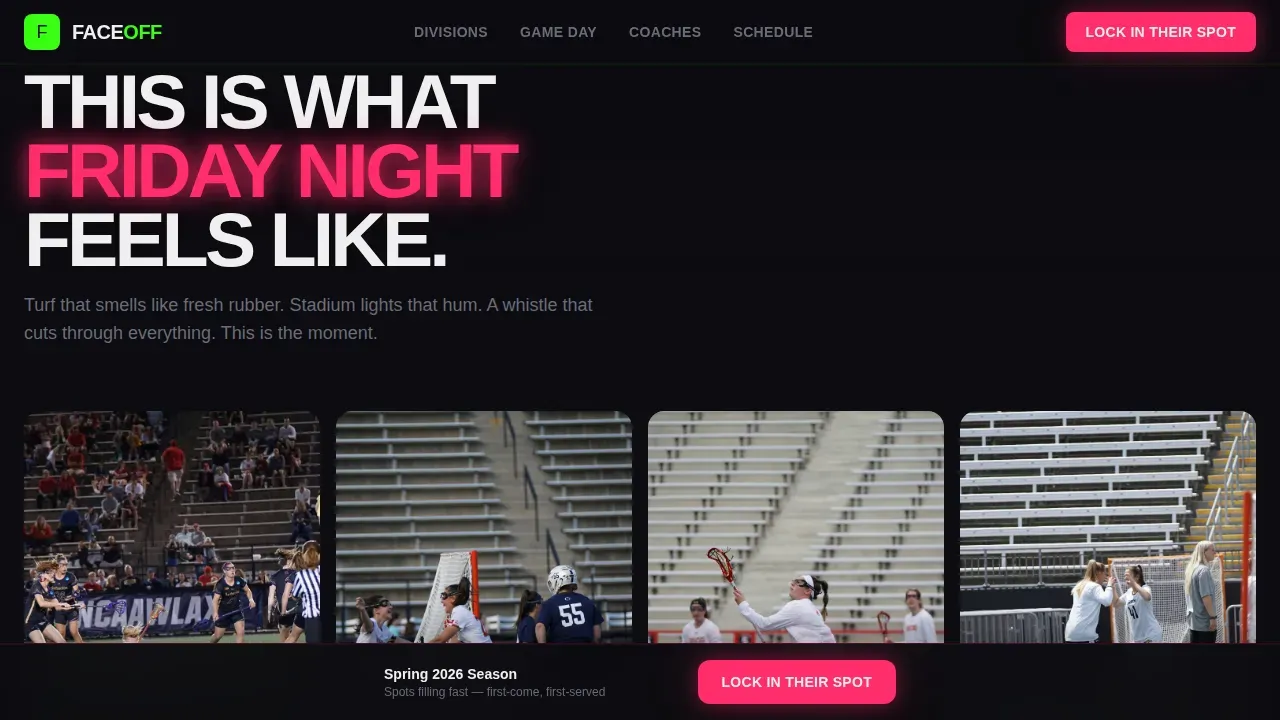
| Game Day Spread | Photo-heavy showcase of game atmosphere and parent testimonials |
| Coach Profile Grid | Builds trust through staff credentials and individual backgrounds |
| Season Calendar Timeline | Displays key dates, session windows, and event milestones |
| Registration Overlay Form | Captures player and parent details in a short, focused flow |
| Division Placement Quiz | Matches hesitant families to the right division tier |
| Footer | Single-row linear footer with essential league links |
Design & branding system
The visual language is Futuristic Neon, built around a Neon Shock color system. Void black (#0B0B0F) dominates every full-page background so neon elements float and pulse like scoreboard LEDs. The result is a page that feels like Friday night under stadium lights.
- Typography pairs Bricolage Grotesque for display headings with Manrope for body text; plasma green (#39FF14) is used for stats, age-group labels, and section dividers; ultraviolet blue (#4D4DFF) provides structural accents
- Hot magenta (#FF2D6B) appears only on the primary call-to-action button and urgent callouts, so every tap target is unmistakable; clean white (#F0F0F0) keeps body copy readable against the dark backgrounds
- Transitions between sections use a blackout-to-glow effect that mimics stadium lights powering on, reinforcing the Launch Energy creative direction and giving the scroll a sense of forward momentum
Mobile & speed optimization
The majority of parents register from a mobile device, with estimates suggesting up to 96% of youth lacrosse sign-ups happen on phones. This template is built mobile-first from the ground up, so the experience on a small screen is as strong as it is on a desktop.
- The single-column registration overlay and tap-sized call-to-action buttons are optimized for thumbs; the countdown timer scales down cleanly without losing its impact above the fold
- Animations rely on CSS transitions and IntersectionObserver scroll triggers, keeping the page responsive and smooth without heavy JavaScript payloads
- The staggered reveal approach means content loads visually in sequence, so parents on slower connections still experience the intended momentum rather than a broken layout
How this template helps you convert
Every design and content decision in this template is aimed at one outcome: getting a parent to tap "Lock In Their Spot" before they close the tab.
- The countdown timer and visible spot counters create genuine urgency at the top of the page, where attention is highest and parents are deciding whether to keep scrolling or leave
- The division quiz and flip-card details remove the most common hesitation points, so parents who were unsure about placement, fees, or equipment requirements can resolve those questions without leaving the page or sending a support email
- The pinned magenta registration button stays visible on every section, meaning no matter where a parent pauses to read testimonials, review coach profiles, or check the season calendar, the next step is always one tap away
Other information about this template
This template sits at the intersection of youth sports culture, high-energy visual design, and practical event registration. The details below add useful context for organizers evaluating whether Faceoff fits their program needs.
- The page design supports both boys and girls divisions within the same layout, making it flexible for co-ed leagues, single-gender programs, or club organizations that run separate rosters
- Equipment details can be incorporated into the division cards or a dedicated frequently asked question section; for reference, boys in youth lacrosse typically need a helmet, gloves, sticks, and a mouthguard, while girls need goggles, sticks, and a mouthguard
- Youth lacrosse games typically consist of two twenty-minute running time halves with a two-minute halftime; a shot clock format can also be referenced in section copy to communicate the pace and energy of the game to first-time families
- The season calendar section can accommodate fall league dates, summer camp sessions, and preseason showcase events, giving organizers flexibility across the full competitive calendar
- Programs that want to showcase participation in larger regional events, such as tournaments held at locations like Maryland State Fairgrounds or Chase Fieldhouse in Wilmington, Delaware, can reference those details inside the calendar or game day sections
- The Q4 Lacrosse Academy model of limiting academy sessions to focused groups is a strong example of the kind of skill development story this template can help you tell; coaches with a Best in Class background can highlight individual technique drills and live repetitions directly on their profile cards
- The NH Tomahawks Futures program approach of teaching fundamentals in a fun and engaging way for boys and girls in grades K-4 reflects exactly the audience and tone this template is calibrated for
- Registration fees, early-bird discounts, and payment installment options should be stated transparently within the division cards or registration overlay to reduce support inquiries and build trust with new families
- Players may be required to provide proof of age during registration; the overlay form process can be adapted to include that step without lengthening the overall flow significantly
- Some leagues allow players to register as free agents if they do not yet have a team; the division quiz can be adapted to surface that option for families who arrive without a group
- A waiver completion step can be added to the registration process; participants in youth lacrosse leagues are typically required to complete a waiver form before their spot is confirmed
Theme
Futuristic Neon
Creative direction
Launch Energy
Color system
Neon Shock
Direction
Event Registration
Page Sections
Live Countdown Timer Hero
Age-division Flip Cards
Full-screen Registration Overlay
Division Placement Quiz Modal
Coach Profile Card Grid
Neon Season Calendar Timeline
Related questions
Can this template handle both boys and girls divisions?
How does the registration form keep parents from dropping out?
Can I display real available spots per division?
What game format details should I include in the season calendar?
Does the template include a division placement quiz?