Premium Mobile Barbershop Landing Page Template
Fade is a scroll-reveal landing page template built for mobile barbershop businesses. It uses a warm Ink and Paper color system, stacked bundle cards, and progressive add-on reveals to guide visitors toward a premium booking. The layout is designed to feel personal and unhurried, matching the tone of a high-end, driveway-to-door grooming service.
by Rocket studio
Quick summary
Fade is a single-page landing page template designed for a mobile barbershop that visits clients at home. It opens with a three-tier bundle header, then walks visitors through scroll-triggered service reveals that build desire with every section. The warm parchment and charcoal palette gives the page an analog, handcrafted feel that fits a premium grooming brand.
Who this template is for
This template is built for mobile barbershop owners who serve clients that expect more than a walk-in experience. If your business runs from a converted van and your clients book in advance, this layout speaks their language.
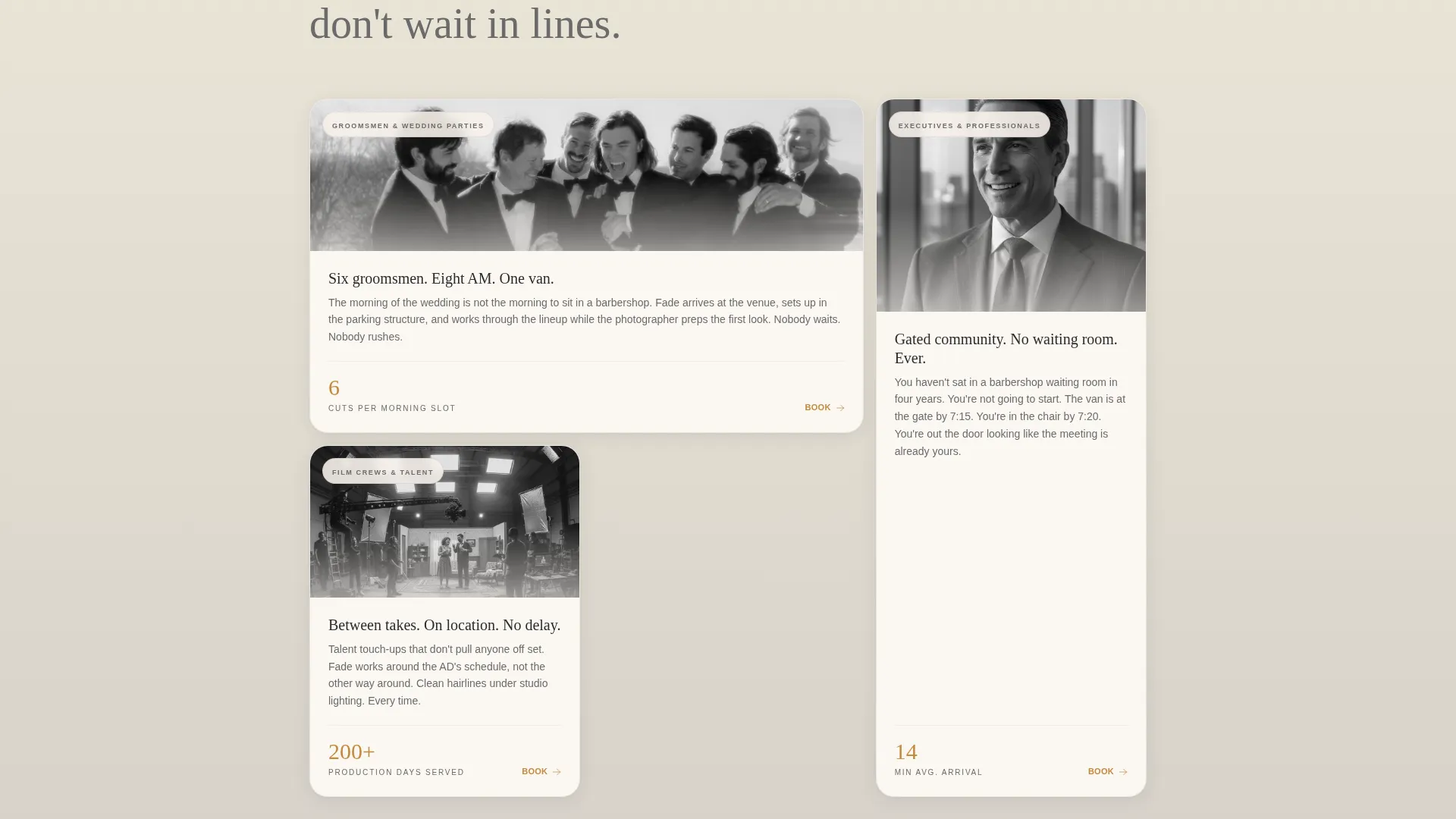
- Mobile barbers serving executives, wedding parties, or on-location film and production crews
- Solo grooming professionals who want a landing page that reflects a luxury, at-home service
- Mobile service providers ready to move visitors toward a premium bundle rather than a single-session booking
What problem this template solves
Most service landing pages list prices and stop there. They do not build desire. Fade solves this by teaching visitors what the full experience looks like before asking them to commit.
- Visitors arrive unsure of which package to choose, and the page guides them upward through progressive reveals
- Without a structured upsell flow, mobile barbers often undersell add-ons like hot towel service, beard sculpts, and scalp treatments
- A generic booking form fails to collect the key details a mobile service needs, such as address and preferred time window
What you get with this template
This template delivers a fully structured, scroll-driven landing page with a clear visual hierarchy and a built-in upsell path. Every section has a defined role, and the layout makes the premium tier feel like the natural choice.
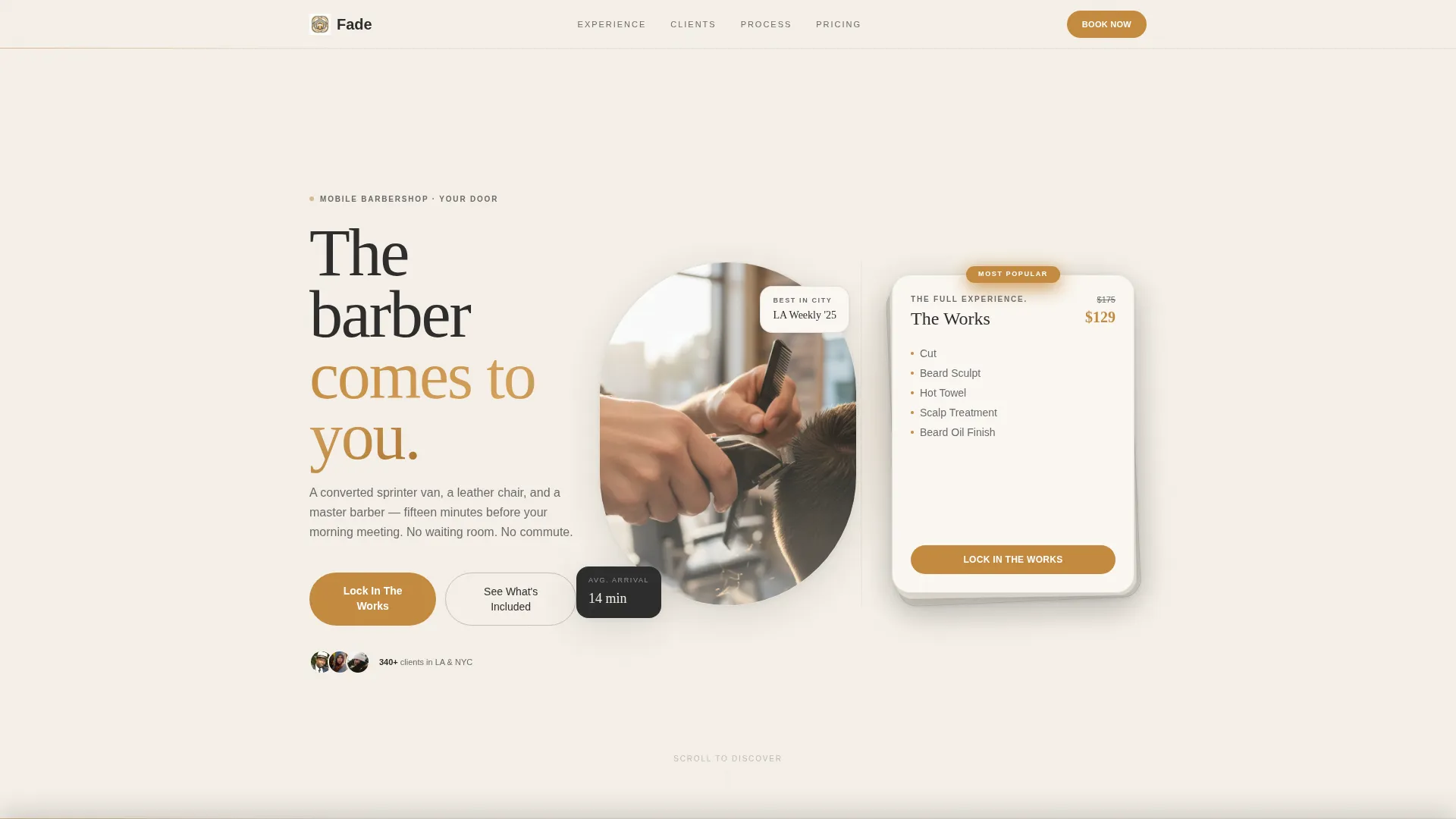
- A stacked bundle card header showing three grooming tiers with pricing highlights in amber
- Scroll-reveal sections that progressively introduce each add-on service as visitors move down the page
- A sticky bottom bar, an inline add-on toggle system, and a booking form that captures address, time preference, and package selection
Feature list
This template includes the following built-in layout features and interaction patterns, all grounded in the source brief.
Stacked Bundle Card Header
Three grooming package cards are presented as a single overlapping visual composition, like stacked playing cards. The top card shows the premium tier with a crossed-out single-service total and a bundle price highlighted in strop-leather amber.
Scroll-Reveal Add-On Sections
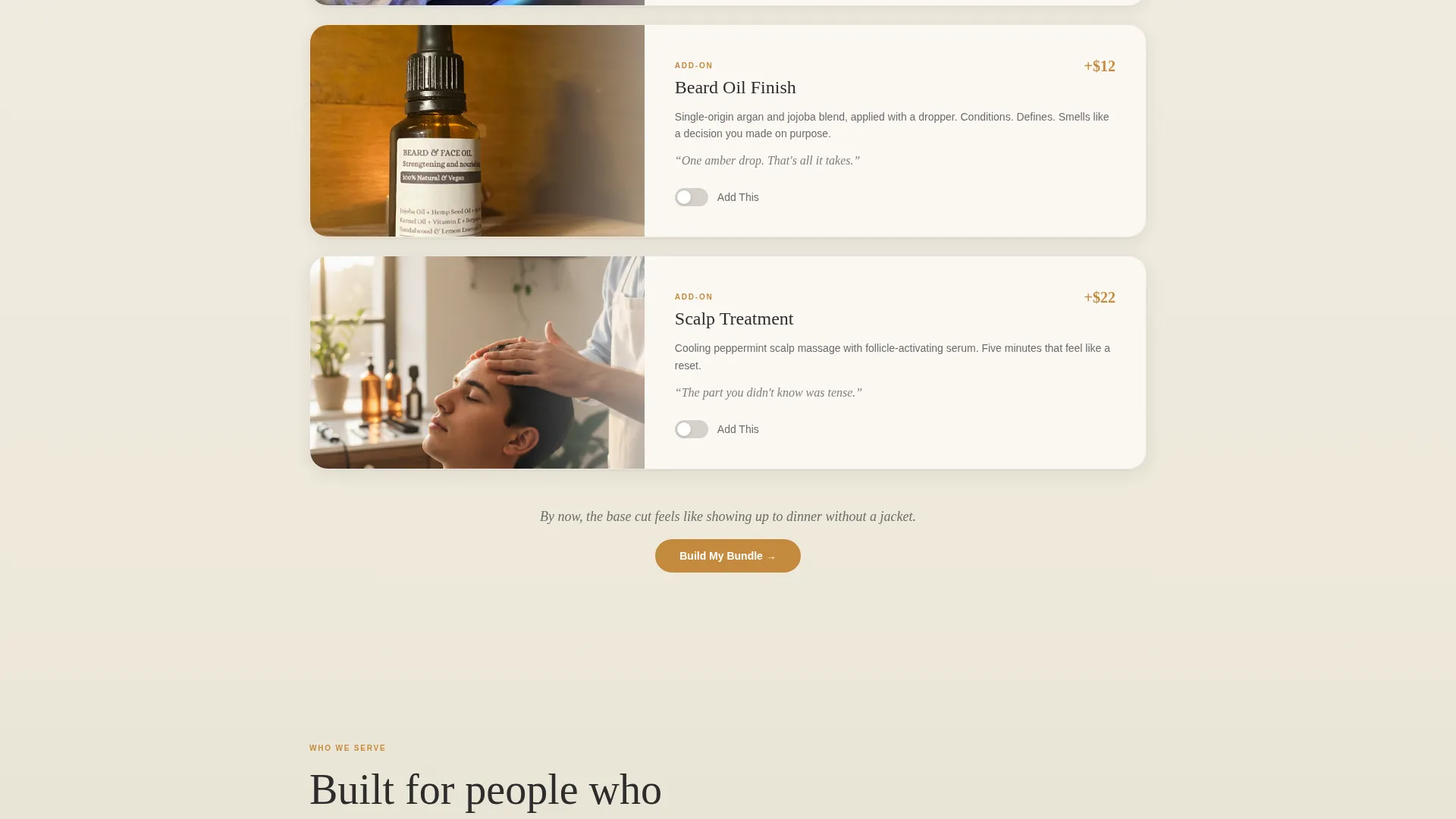
Each scroll step introduces a new service layer. A hot towel section unfurls from behind the card. A beard oil add-on appears with a micro-animation of a dropper releasing a single amber drop. The page builds the full experience reveal by reveal.
Inline Add-On Toggles
Every add-on section includes its own inline toggle so visitors can add items as they discover them. By the time they reach the final call to action, the bundle has been assembled through their own curiosity.
Sticky Upgrade Bottom Bar
A sticky bar sits at the bottom of the viewport and updates as visitors scroll past each add-on section. It reinforces the current bundle total and keeps the primary call to action visible throughout the session.
Comparison Drawer for Cautious Buyers
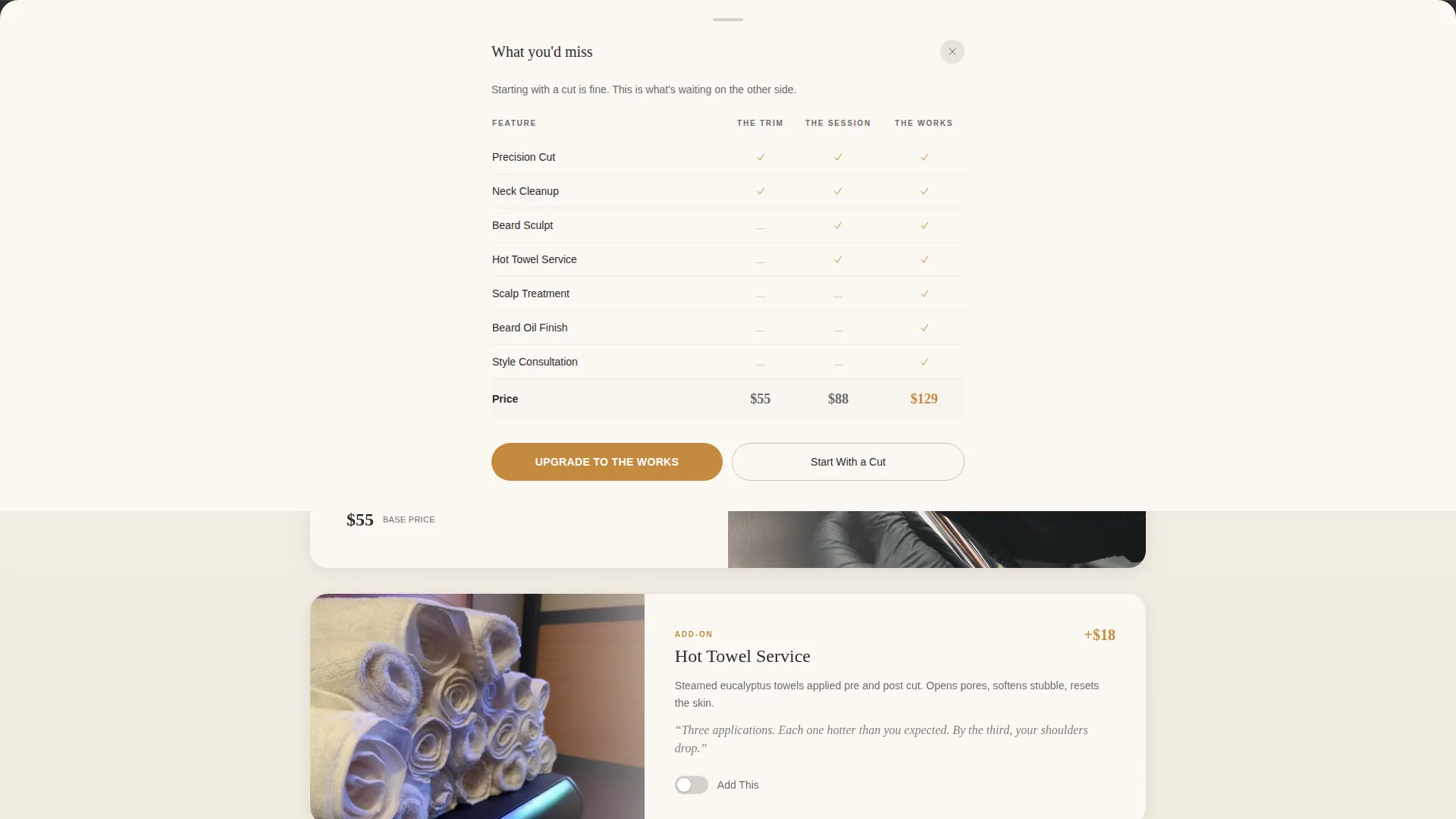
A secondary call to action labeled "Start With a Cut" opens a comparison drawer. The drawer shows visitors exactly what they would miss with a basic booking, making the upgrade feel informed rather than pressured.
Mobile-First Booking Form
The booking form captures the client's address, preferred morning or evening time window, and package choice. It defaults to the middle tier, reducing friction for first-time visitors while keeping the door open to an upgrade.
Page sections overview
| Section | Purpose |
|---|---|
| Bundle Card Header | Introduce three tiered packages as a stacked visual composition with amber pricing |
| Base Cut Reveal | Present the entry-level service as the scroll journey begins |
| Hot Towel Section | Reveal the hot towel add-on as a scroll-triggered unfurl animation |
| Beard Oil Add-On | Introduce beard oil with a micro-animation dropper reveal |
| Sticky Upgrade Bar | Keep the current bundle total and primary call to action visible at all times |
| Booking Form | Capture address, time window, and package with a middle-tier default |
| Comparison Drawer | Show the gap between a basic cut and a full bundle when the secondary path is tapped |
Design & branding system
The visual identity uses a Soft Gradient theme built on an Ink and Paper color system. The palette shifts from warm parchment at the top to soft dove gray as sections descend, giving the page the feeling of ink slowly bleeding through fine paper.
- Core palette: warm parchment (#F5F0E8), charcoal ink (#2C2C2C), smudged graphite (#6B6B6B), and soft dove gray (#D6D1C9) for section backgrounds
- Strop-leather amber (#C48A3F) is reserved for buttons, price highlights, and accent moments only
- Photography direction calls for tight, shallow depth-of-field shots with morning light and natural grain, evoking an iPhone-shot, driveway aesthetic rather than polished stock imagery
Mobile & speed optimization
The template is built with a mobile-first layout structure, reflecting that the target client is likely booking on a phone with one hand while getting ready in the morning.
- Scroll-reveal interactions and sticky bottom bar are designed to work smoothly on small-screen viewports
- The booking form is tap-friendly, with large input fields and a default package selection that reduces the number of steps to submit
- Section transitions use lightweight gradient shifts rather than heavy visual assets, keeping the layout responsive across device sizes
How this template helps you convert
The layout is not just a brochure. It is a structured persuasion sequence that guides visitors from curiosity to commitment.
- The stacked bundle header anchors the premium tier immediately, setting price expectations before a visitor reads a single line of copy.
- Each scroll reveal adds a new service layer, turning passive reading into active discovery and making the basic booking feel incomplete by the midpoint.
- The sticky bottom bar and inline toggles let visitors assemble their own bundle, so the final call to action feels like a confirmation rather than a decision.
Other information about this template
Fade is categorized under Retail and E-Commerce within the Mobile Business subcategory. The template follows a Click-Through landing page direction, meaning the primary goal is to move visitors toward a booking action rather than capture a lead for follow-up. The Masonry and Pinterest-style visual layering referenced in the design system applies to how the stacked bundle cards and overlapping section reveals are composed. The Surprise and Delight creative direction is expressed through the progressive scroll reveals, which reward exploration rather than demanding immediate commitment.
- This template is designed as a single landing page, not a multi-page website
- The Soft Gradient theme and Ink and Paper color system are consistent across all sections for visual coherence
- The header concept in the intersection context references a Countdown Timer layout, which this template adapts into a tiered bundle composition with price urgency built into the amber-highlighted totals
Theme
Soft Gradient
Creative direction
Surprise & Delight
Color system
Ink & Paper
Style
Masonry/Pinterest
Direction
Click-Through
Page Sections
Stacked Bundle Card Header
Progressive Scroll-reveal Sections
Inline Add-on Toggle System
Sticky Upgrade Bottom Bar
Comparison Drawer
Mobile-first Booking Form
Related questions
Can I use this template for a stationary barbershop?
Does the template include scroll animations out of the box?
What makes this template different from a basic booking page?
Can I use my own photography with this template?
What information does the booking form collect?



