Demolition & Site Work Careers & Recruitment Website Template
Felled is a gallery-and-detail landing page template built for tree removal and land clearing services. It pairs a dramatic full-bleed header photo with a before-and-after reveal gallery, field-note job logs, and a five-step visual quiz that guides visitors toward a personalised estimate. The Forest Trust colour system gives every section a grounded, trustworthy feel.
by Rocket studio
Quick summary
Felled is a single-page template designed for professional tree removal and land clearing businesses. It opens with a ground-level hero shot, flows through a scope-escalating before-and-after gallery, and closes with a five-step visual quiz that turns site visitors into qualified estimate requests. The design feels calm, competent, and ready to convert.
Who this template is for
This template speaks directly to tree service and land clearing businesses that need a page as credible as their crew. It suits operators who handle everything from a single suburban removal to multi-acre site preparation.
- Residential tree service companies handling dead, diseased, or storm-damaged trees for homeowners
- Land clearing contractors working with property developers and construction site-prep projects
- Tree care businesses managing HOA storm-damage contracts across multiple lots
What problem this template solves
Most tree service websites look rushed or generic. Potential clients facing a dangerous tree or a tight clearing deadline need to feel confident quickly. This template removes that friction.
- Visitors cannot easily judge scope or professionalism from a plain list of services
- Urgent clients (storm damage, leaning trees) abandon pages that bury the contact path
- Generic layouts fail to show the range from a single backyard job to a full land clearing project
What you get with this template
You get a complete, single-page layout built around visual proof and a guided estimate flow. Every section is designed to carry the visitor from first impression through to a submitted enquiry.
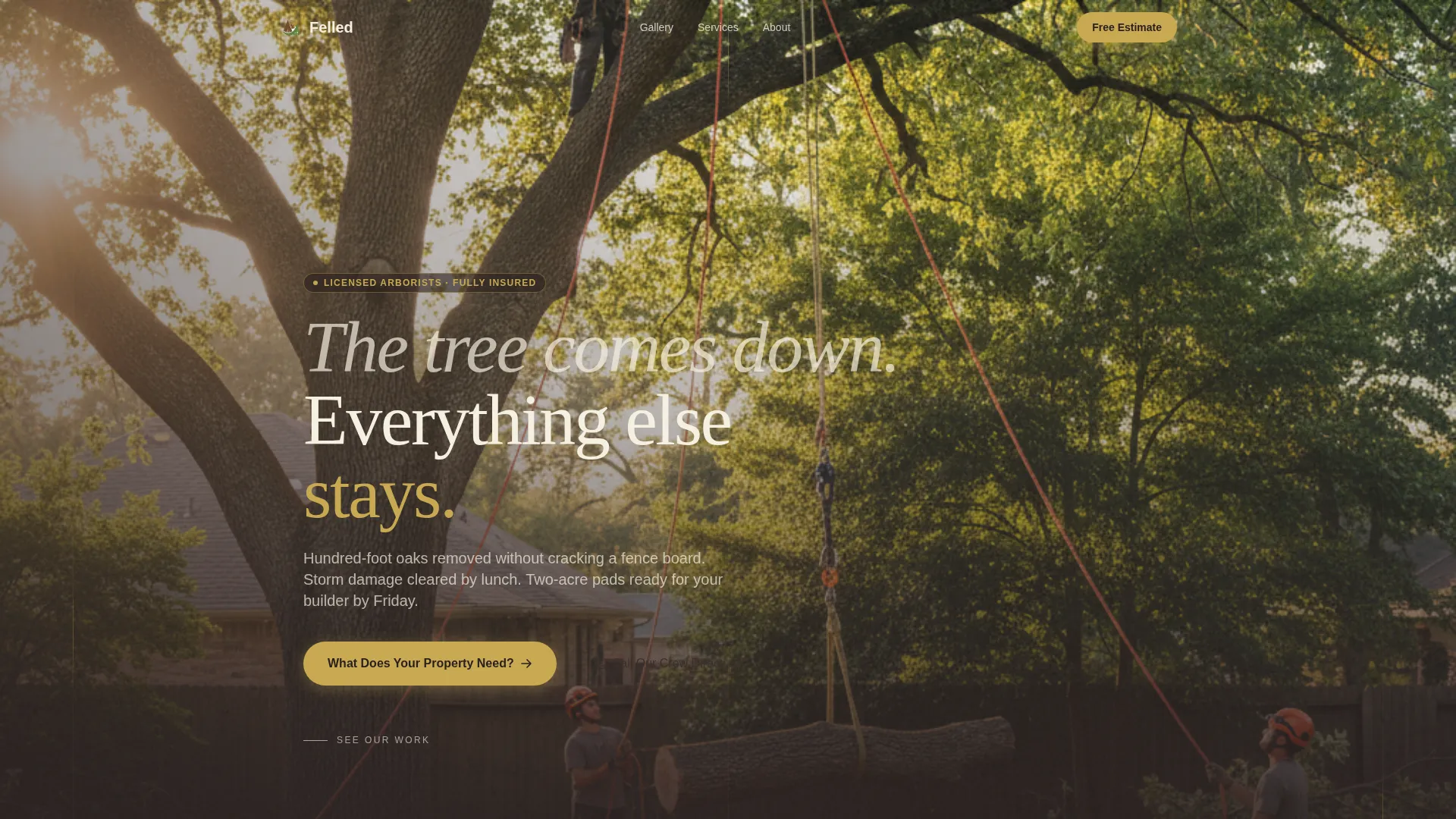
- A full-bleed hero section with a translucent headline overlay and early-morning job-site photography direction
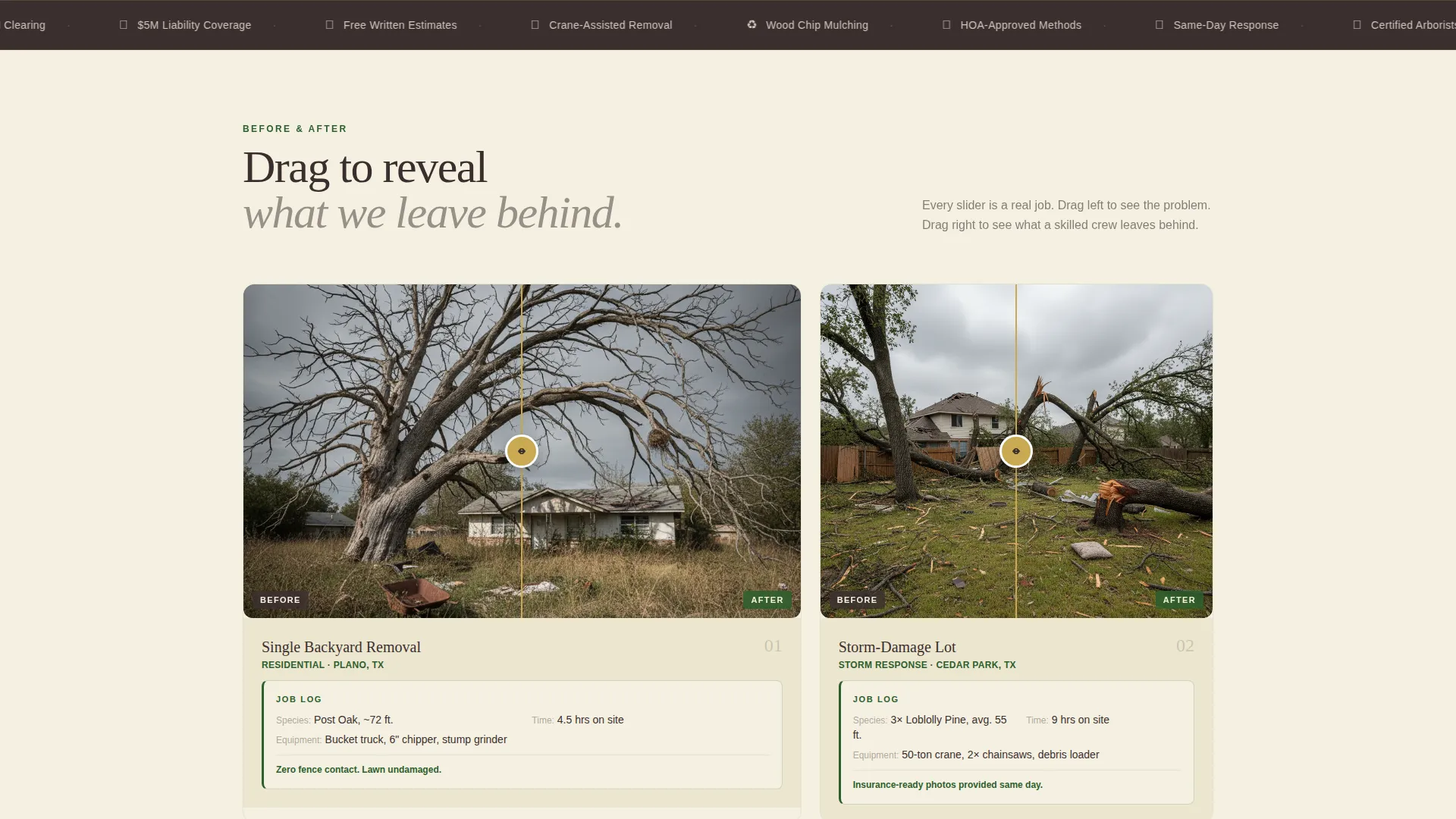
- A before-and-after drag-slider gallery with paired arborist-style field notes for each project shown
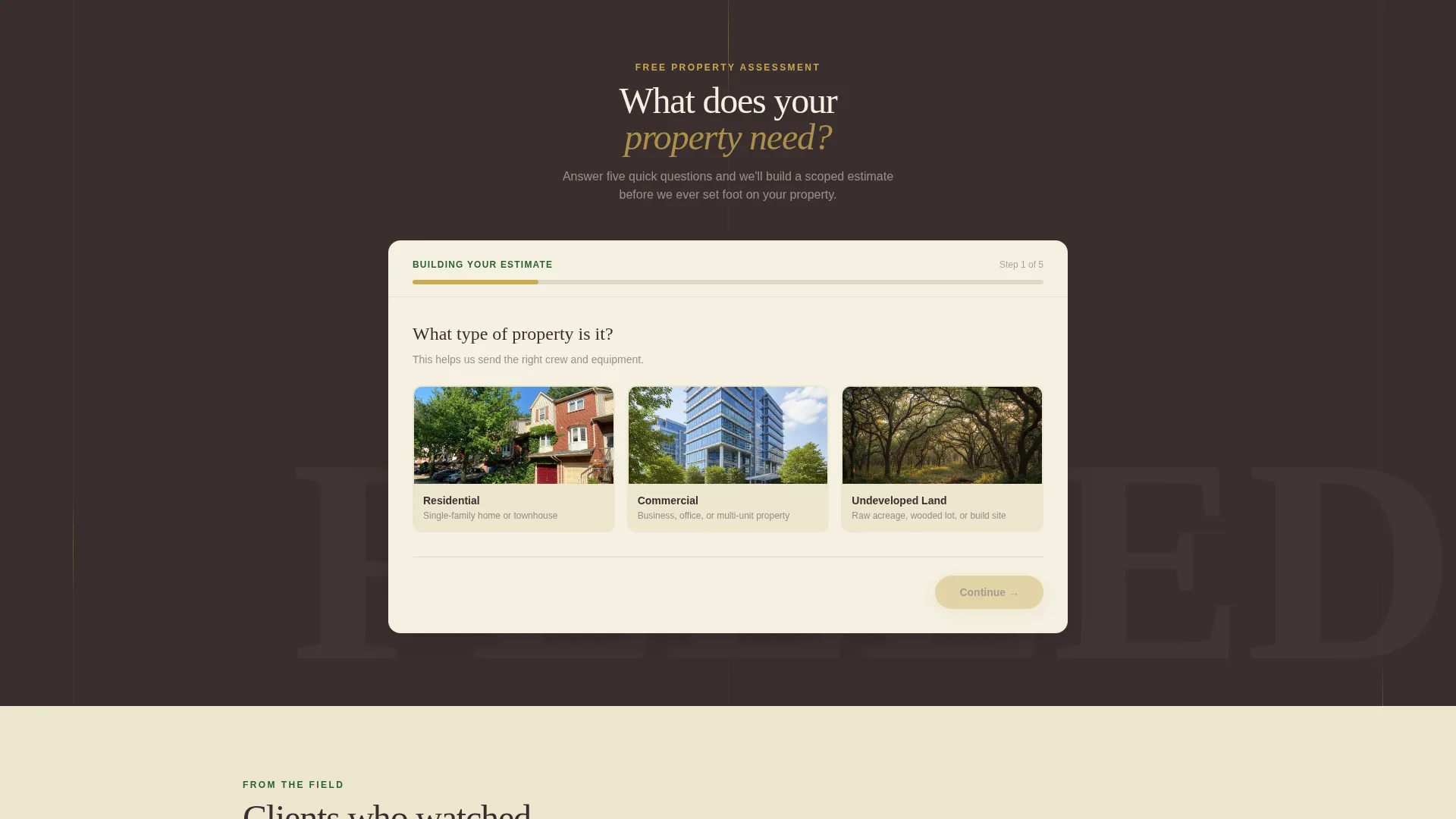
- A five-step visual quiz that collects property type, problem, tree count, access difficulty, and contact details
Feature list
This section covers the core functional and visual components built into the Felled template.
Full-Bleed Hero with Headline Overlay
The header fills the entire viewport with a ground-level photo of a controlled tree fall. A translucent headline fades in over the lower third of the image. The composition is deliberately calm, showing rigging lines, a helmeted climber, and an untouched lawn below.
Before/After Drag-Slider Gallery
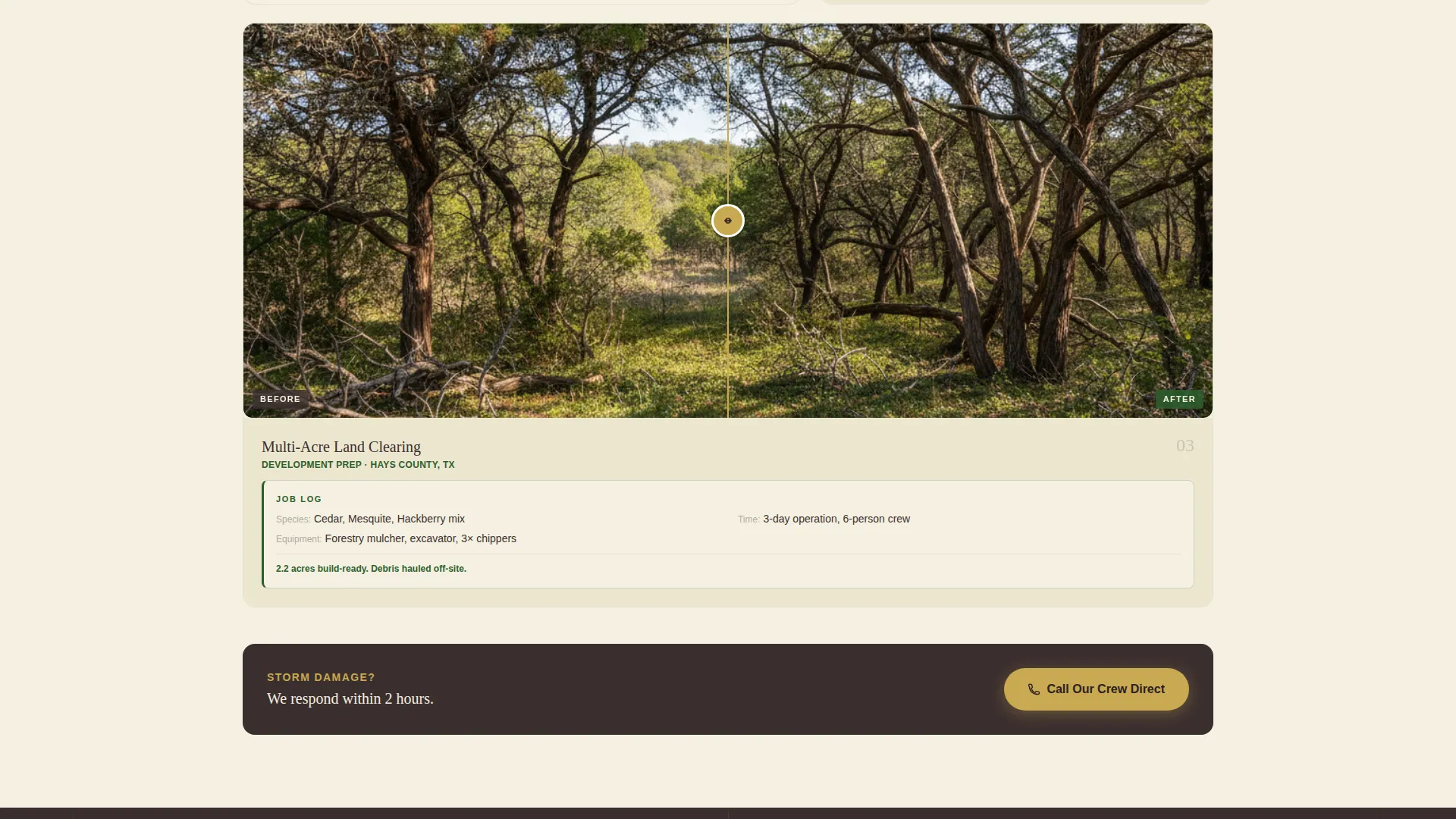
Each gallery thumbnail opens into a detail view with a horizontal drag slider. The left side shows an overgrown or damaged before state; the right shows the cleared, sunlit result. Scope escalates across three reveals: a single backyard removal, a storm-damage lot, and a full multi-acre land clearing.
Arborist Field Notes
Every gallery reveal is paired with a short, plainly written job log. It records species removed, hours on site, and equipment used. This detail builds trust by showing real operational specifics rather than vague marketing claims.
Five-Step Visual Quiz
The primary conversion path is a guided quiz labelled "What Does Your Property Need?" Step one collects property type via photo cards. Steps two through four narrow scope by problem type, tree count, height, and access difficulty. Step five collects name, address, and a photo upload. A progress bar labelled "Building Your Estimate" keeps the visitor moving forward.
Urgent Contact Path
A secondary call-to-action sits below the gallery for visitors who cannot wait. A "Call Our Crew Direct" button with click-to-call functionality serves homeowners dealing with immediate storm damage or hazardous tree situations.
Forest Trust Colour System
The palette uses deep bark brown for body text, canopy shadow green for borders and section dividers, open-meadow cream for backgrounds, and fresh-cut sapwood gold for all buttons and interactive highlights. The result is a visual identity that feels authoritative and warm at the same time.
Page sections overview
| Section | Purpose |
|---|---|
| Full-Bleed Hero | Opens with controlled-fall job photography and translucent headline |
| Gallery Thumbnails | Displays three project scopes as clickable entry points |
| Before/After Reveal | Drag slider shows transformation per project with field notes |
| Field Note Detail | Lists species, hours, and equipment for each revealed project |
| Quiz Introduction | Presents the "What Does Your Property Need?" prompt and entry |
| Quiz Step One | Photo-card selection for property type |
| Quiz Step Two | Problem category selection (dead tree, storm damage, clearing, stump) |
| Quiz Steps Three/Four | Illustrated sliders for tree count, height, and access difficulty |
| Quiz Step Five | Name, address, and photo upload collection form |
| Urgent Contact Bar | Click-to-call button for storm-damage and hazard situations |
Design & branding system
The Felled template uses a Pastoral Calm theme built on the Forest Trust colour palette. Every colour choice is intentional and tied to a specific role in the layout.
- Deep bark brown (#3B2F2F) anchors all body text; canopy shadow green (#2D5F2D) frames section dividers and photo borders
- Open-meadow cream (#F5F0E1) dominates backgrounds to simulate cleared, open sky; fresh-cut sapwood gold (#C8A951) highlights every button and interactive surface
- The overall feel references a wooded property at golden hour after the work is done: warm, unhurried, and unmistakably professional
Mobile & speed optimization
The layout is built to perform cleanly on smaller screens where many homeowners will land after searching during or after a storm event.
- The full-bleed hero, drag-slider gallery, and quiz steps are each designed to reflow clearly on mobile viewports
- The click-to-call button in the urgent contact section is a first-class element on mobile, reducing the steps to reach the crew
- Quiz photo cards and illustrated sliders are touch-friendly by design, keeping the estimate flow usable on any device
How this template helps you convert
Every layout decision in Felled is aimed at moving a hesitant visitor toward a concrete next step.
- The before-and-after gallery builds trust progressively, starting with a familiar suburban job and escalating to full land clearing, so visitors self-identify their own scope and feel confident the service can handle it.
- The five-step quiz replaces a passive contact form with an active consultation experience. The "Building Your Estimate" progress bar gives visitors a reason to complete all five steps rather than dropping off mid-page.
- The urgent click-to-call path below the gallery catches high-intent visitors who have an immediate hazard and will not wait for a quiz or callback, keeping them on the page instead of bouncing to a competitor.
Other information about this template
The Felled template sits within the Construction and Home category, specifically the Demolition and Site Work subcategory, with a niche focus on tree removal and land clearing services. It is a single-page gallery-and-detail layout, making it well suited as a standalone service landing page or a campaign-specific page alongside a broader business website.
- The template style is Gallery and Detail, meaning visual proof of work is the primary persuasion tool rather than copy-heavy service descriptions
- The creative direction follows a Before/After Reveal approach, which is particularly effective for tree removal and land clearing because transformation is the core value proposition
- The Quiz/Assessment conversion direction is chosen for this niche because tree removal pricing varies significantly by scope, and a guided estimate flow pre-qualifies leads more effectively than a generic enquiry form
Theme
Pastoral Calm
Creative direction
Before/After Reveal
Color system
Forest Trust
Style
Gallery + Detail
Direction
Quiz/Assessment
Page Sections
Full-bleed Hero with Headline Overlay
Before/after Drag-slider Gallery
Arborist-style Field Notes
Five-step Visual Quiz Flow
Urgent Click-to-call Section
Forest Trust Colour System
Related questions
Who is the Felled template designed for?
How does the five-step quiz work for collecting leads?
Is there a path for urgent storm-damage enquiries?
Can I use this template for a stump grinding-only service?
What makes this layout different from a generic contractor page?



