Immersive Carnival Landing Page Template
Bloco is a luxe minimal landing page template for carnival catering and food service businesses. Built around an obsidian and gold visual identity, it combines a scarcity-driven gallery layout with detailed vendor panels, a countdown bar, and dual booking paths. Bloco is designed for bloco organizers, camarote hosts, and brand activation managers who need to fill high-capacity carnival events fast.
by Rocket studio
Quick summary
Bloco is a gallery-plus-detail landing page template built for carnival catering and food service. It presents curated vendor kitchens in a scarcity-driven marketplace layout, complete with availability counters, a countdown bar, and a short reservation form. The obsidian and gold design system makes every scroll feel like a luxury drop with a deadline.
Who this template is for
This template is built for professionals who provision food and drink at scale during carnival season. It serves people who manage complex, high-volume catering events where timing and presentation both matter.
- Bloco organizers provisioning thousands of revelers across multiple cart stations
- Camarote hosts and sambódromo luxury-box operators curating bottle-service menus
- Brand activation managers building photogenic food walls for sponsorship lounges
What problem this template solves
Carnival catering has a fixed date and a finite kitchen capacity. Most generic booking pages do not communicate that pressure clearly, and hesitant visitors end up losing their slot. Bloco solves the conversion gap between browsing and committing.
- Visitors can see real remaining availability on every menu package card
- Scarcity is presented as arithmetic fact, not manufactured urgency
- The layout guides visitors from individual carts all the way up to full-venue takeovers
What you get with this template
Bloco delivers a complete single-page catering marketplace experience. Every visual and structural choice in the template is tuned to the carnival context and the luxury food service audience.
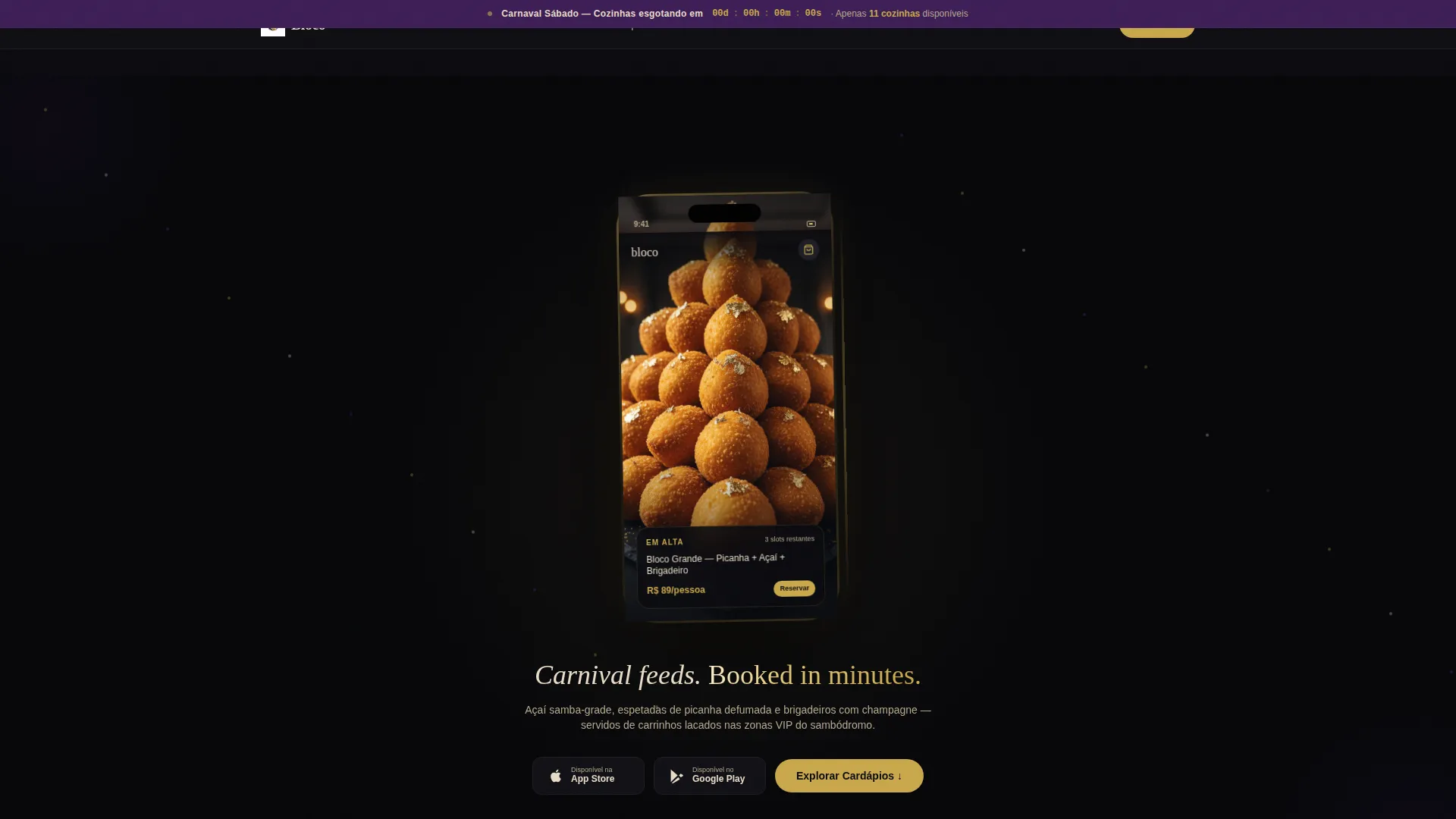
- A persistent countdown bar ticking toward Carnival Saturday across every scroll
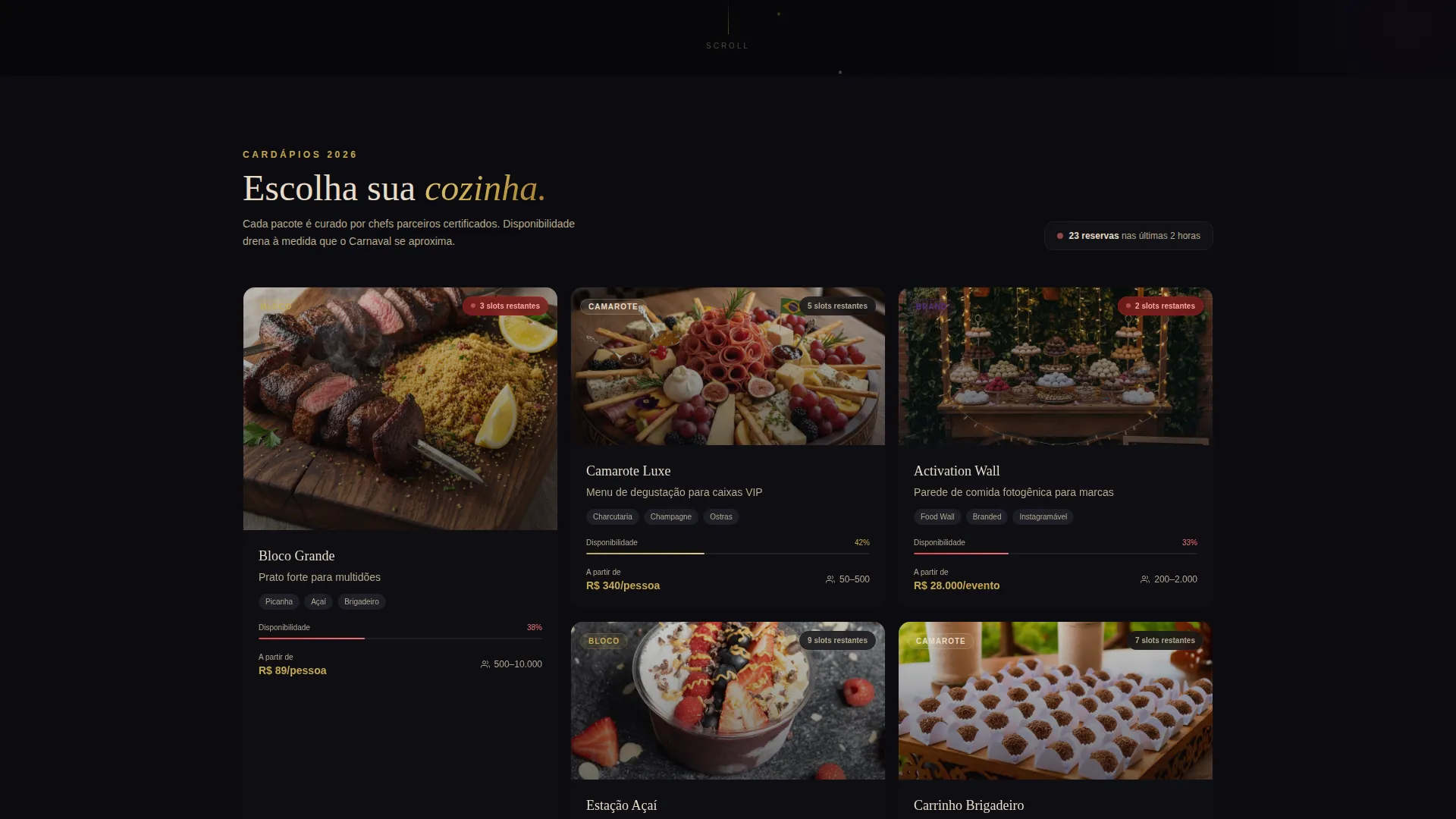
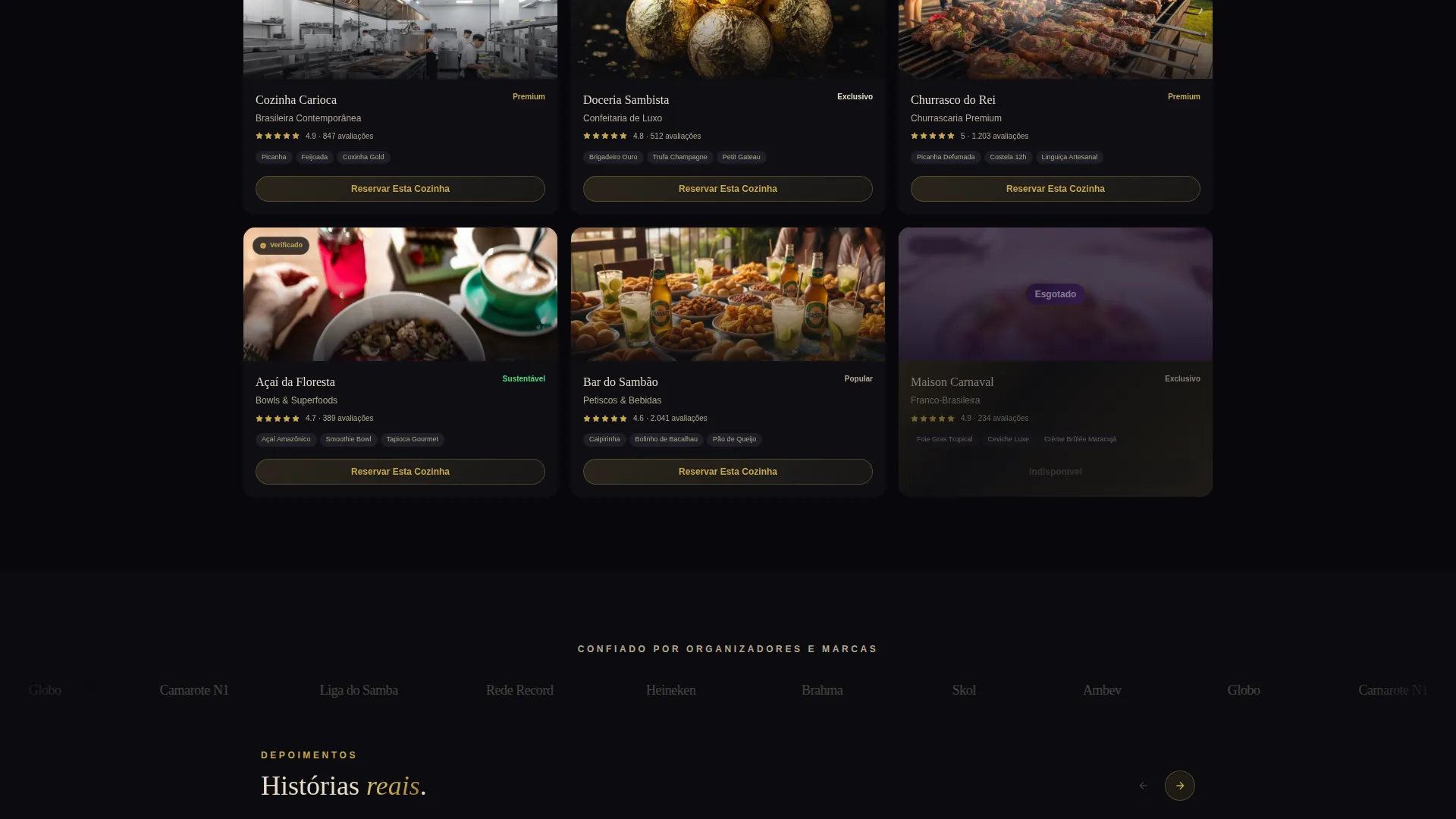
- A curated vendor gallery with cuisine style, price tier, and verified review count per tile
- Detail panels that open with a moody food photograph before revealing ingredients, serving counts, and past-client logos
Feature list
Bloco packs purpose-built components that serve the carnival catering booking flow from first impression to confirmed reservation.
App Store Preview Header
The header centers a matte-black phone mockup on a full-bleed obsidian background. The screen shows the Bloco ordering app mid-scroll through a carousel of platters, including a coxinha tower dusted in edible gold and a charcuterie spread shaped like a samba drum. A champagne-type tagline, dual download badges, and a pulsing gold call-to-action button sit beneath the device.
Countdown Availability Bar
A persistent countdown bar runs at the top of the page and ticks toward Carnival Saturday. Each gallery card pairs this macro urgency with micro scarcity, showing the exact remaining slots for a given menu package. The combination makes the deadline concrete for every visitor.
Vendor Gallery with Detail Panels
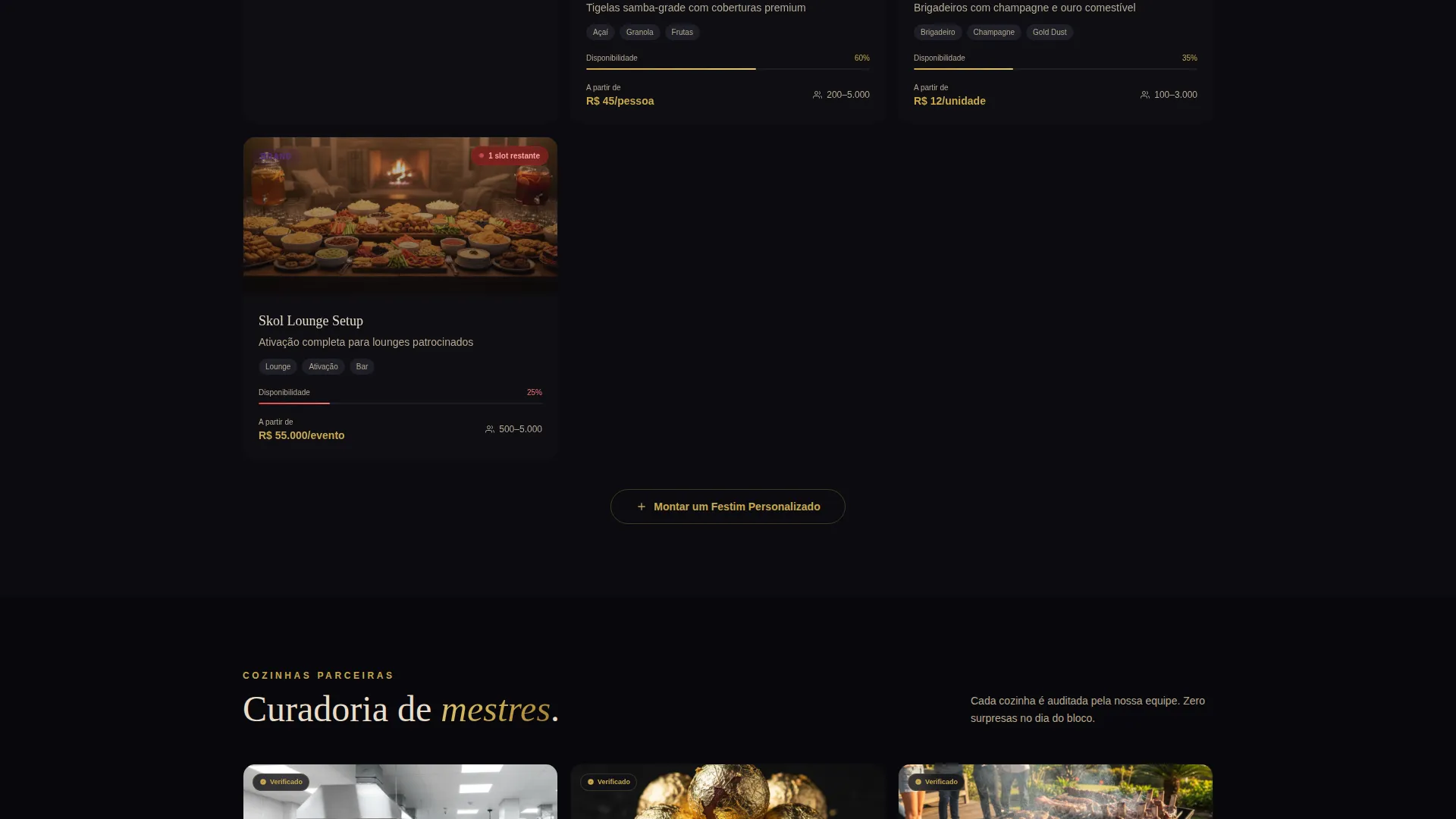
Curated partner kitchens each get a gallery tile showing cuisine style, price tier, and a verified review count. Tapping a tile opens a full detail panel that starts with a tight-crop food photograph, then expands into ingredient lists, serving counts, and past-client logos.
Dual Booking Paths
The primary path is a "Reserve This Kitchen" button inside every detail panel. It opens a short form with an event date pre-filled to next Carnival, a guest count slider, and a venue type dropdown. The secondary path, "Build a Custom Feast," lets organizers mix multiple vendors into a single order.
Escalating Section Architecture
Page sections are ordered deliberately, moving from individual carts to full-venue takeover packages. Prices appear only after a visitor taps into the detail panel. This progressive reveal keeps visitors scrolling and raises commitment naturally before the booking form appears.
Obsidian and Gold Visual System
The template uses deep obsidian black for full-bleed backgrounds, molten gold on hover states and pricing highlights, warm champagne for body text and card surfaces, and a deep amethyst accent reserved for countdown badges and sold-out tags. The palette is consistent and purposeful across every component.
Page sections overview
| Section | Purpose |
|---|---|
| Countdown Urgency Bar | Ticks toward Carnival Saturday across every scroll |
| App Store Header | Introduces the ordering app with phone mockup and tagline |
| Vendor Gallery Grid | Displays curated kitchens with price tier and review count |
| Menu Package Cards | Shows individual offerings with remaining availability slots |
| Detail Panel View | Expands each card into photo, ingredients, and client logos |
| Reserve This Kitchen | Short booking form with date, guest count, and venue type |
| Build a Custom Feast | Multi-vendor mix-and-order path for larger organizers |
| Full-Venue Takeovers | Escalated packages for camarote and brand activation clients |
Design & branding system
The Bloco design system follows a Luxe Minimal theme. Every color choice serves a specific role, and nothing is decorative without purpose.
- Deep obsidian black (#0B0B0F) covers full-bleed backgrounds for a velvet-dark base tone
- Molten gold (#C9A84C) activates on hover states and pricing highlights, giving metallic contrast exactly where it catches the eye
- Warm champagne (#E8DCC8) handles body text and card surfaces, while deep amethyst (#3D1F56) is reserved strictly for countdown badges and sold-out tags
Mobile & speed optimization
The App Store Preview header is designed around a mobile phone mockup, signaling that the template's visual hierarchy is built with smaller screens in mind. The layout scales cleanly from the phone display inward to the page structure around it.
- Gallery tiles and detail panels are structured to work at mobile widths without losing the scarcity indicators or review counts
- The countdown bar is designed to remain persistent and readable at every scroll position, including on narrow viewports
How this template helps you convert
Bloco turns a browsing visitor into a confirmed booking by layering urgency, trust, and a low-friction form in a deliberate sequence.
- The countdown bar and per-card availability numbers make the cost of hesitation immediate and visible from the first scroll
- Detail panels build trust progressively by leading with food photography, then reinforcing with ingredient detail and past-client logos before presenting the booking form
Other information about this template
Bloco sits in the Retail and E-Commerce category under the Carnival (Brazil) Business subcategory. It is purpose-built for the carnival catering and food service niche, with an intersection match score of 9 out of 10, reflecting a very tight alignment between the template design and the target audience.
- The template style is Gallery and Detail, meaning the gallery view and the expanded panel are both included as part of the single-page flow
- The creative direction is Limited Time, which informs the countdown bar, slot counters, and the overall sense that the page is a luxury drop with a hard deadline
- The Marketplace and Multi layout means the page is structured to present multiple vendors side by side, not a single operator
Theme
Luxe Minimal
Creative direction
Limited Time
Color system
Obsidian & Gold
Style
Gallery + Detail
Direction
Marketplace/Multi
Page Sections
App Store Preview Header
Countdown and Availability Bar
Vendor Gallery with Detail Panels
Dual Booking Paths
Escalating Section Architecture
Obsidian and Gold Visual System
Related questions
Who is this landing page template designed for?
Does the template include both a gallery view and a detail panel?
How does the scarcity mechanic work in this template?
Can one organizer book multiple vendors in a single order?
What venue types does the booking form support?



