Industrial Architecture Professional Website Template
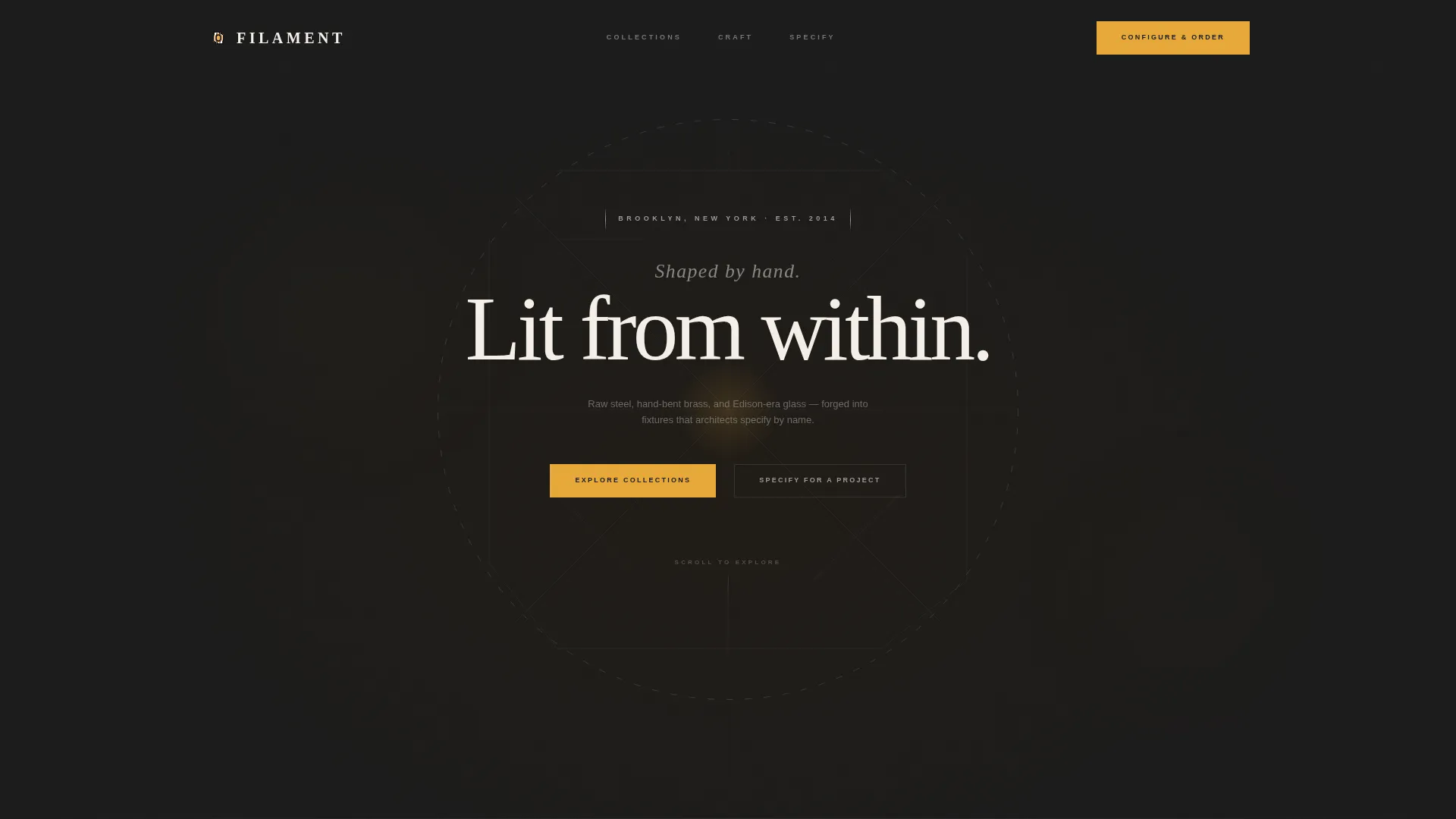
Filament is an asymmetric 60/40 grid landing page built for industrial lighting designers who sell hand-crafted fixtures to architects, interior designers, and discerning homeowners. It combines a parallax abstract header, a 360-degree interactive fixture explorer, a live product configurator, and a trade-professional inquiry path, all wrapped in a moody Monochrome Steel palette with amber accent glow.
by Rocket studio
Quick summary
Filament is a single-page atelier-style landing page for independent industrial lighting designers. It opens with a parallax geometric header, leads visitors through an interactive scroll-driven fixture explorer, and closes with a live product configurator that lets buyers choose finish, cord length, bulb warmth, and mount type before they order.
Who this template is for
This template is built for makers and studios whose work earns specification by name. If your fixtures are hand-formed, your clients are discerning, and a stock product page would do your craft a disservice, Filament was designed with you in mind.
- Independent industrial lighting designers selling direct to buyers
- Artisan studios supplying architects, interior designers, and boutique hospitality projects
- Loft and renovation-focused homeowners who want to see craft before committing
What problem this template solves
Most product pages flatten handmade work into a thumbnail grid that looks identical to mass-market catalogues. Buyers cannot feel material quality through a static image, and trade professionals cannot request project pricing without a phone call. Filament solves both problems at once.
- Static pages cannot convey the detail, texture, and intentionality of hand-built fixtures
- Trade buyers need a fast path to project pricing without a lengthy back-and-forth
- Generic layouts fail to build the emotional trust that justifies a premium price point
What you get with this template
You get a complete, ready-to-customise landing page structure that mirrors the rhythm of a studio visit. Every section is designed to deepen engagement as the visitor scrolls further down the page.
- A parallax abstract geometric header with cursor-driven motion and amber light-leak gradients
- A 360-degree interactive fixture explorer with material callout hotspots on each product
- A live product configurator covering finish, cord length, bulb warmth, and ceiling mount type
- A secondary "Specify for a Project" trade path with firm-name and quantity fields for designer pricing
Feature list
This section outlines the core interactive and structural capabilities built into the Filament template.
Parallax Abstract Geometric Header
The header renders intersecting angular steel lines in thin metallic strokes against forge black. The composition rotates slowly as the cursor moves, casting faint amber light-leak gradients at each joint. A single centred line of type, "Shaped by hand. Lit from within.", emerges from the geometry, creating deliberate visual tension that drives the first scroll.
360-Degree Interactive Fixture Explorer
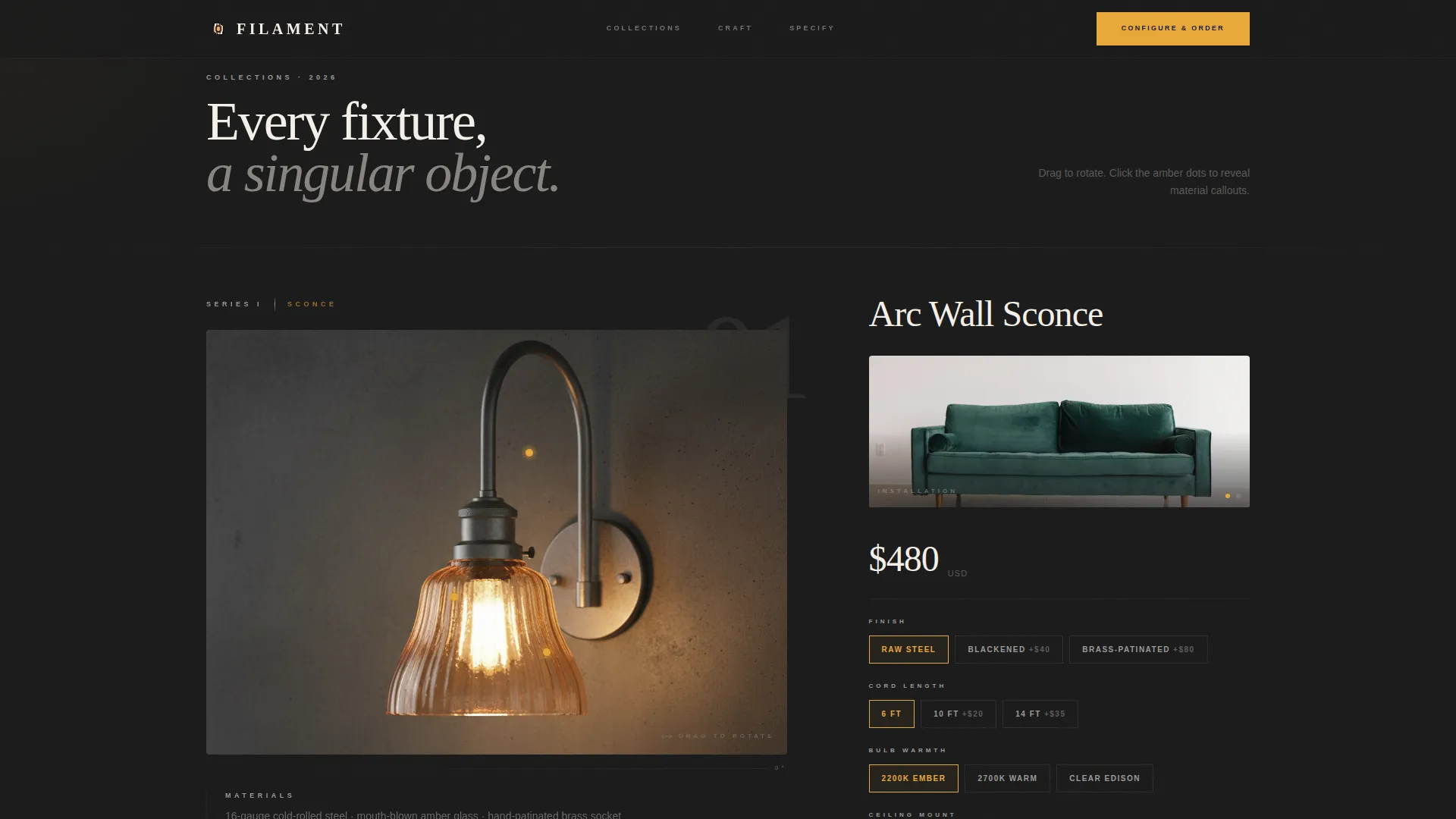
Each fixture collection on the 60-column side of the asymmetric grid is presented through a drag-to-rotate object viewer. Visitors can spin each piece to reveal weld seams, maker's marks, and hidden construction details. Clickable hotspots surface material callouts such as 16-gauge cold-rolled steel, mouth-blown amber glass, and hand-patinated brass socket information.
Contextual 40-Column Side Panel
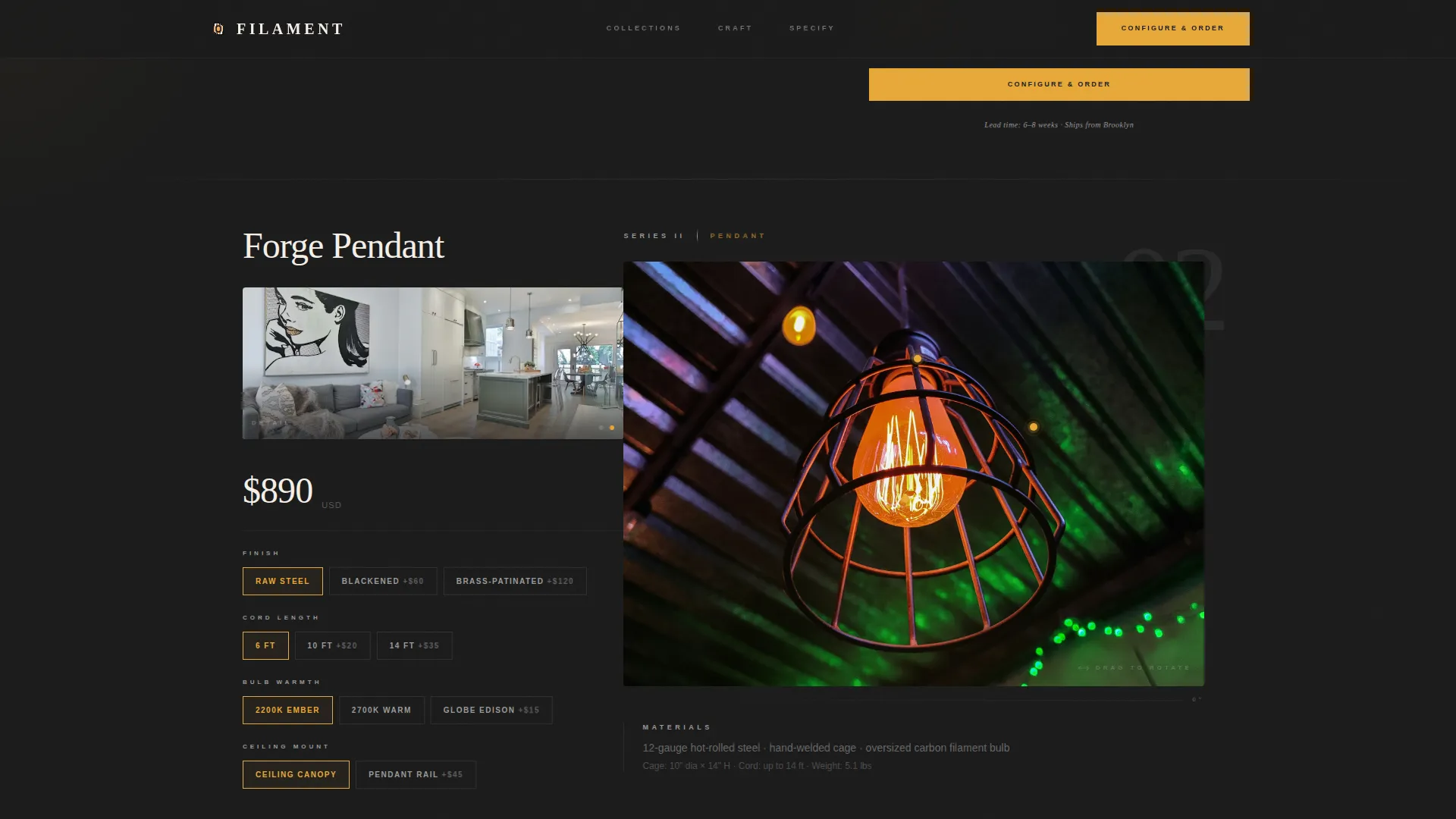
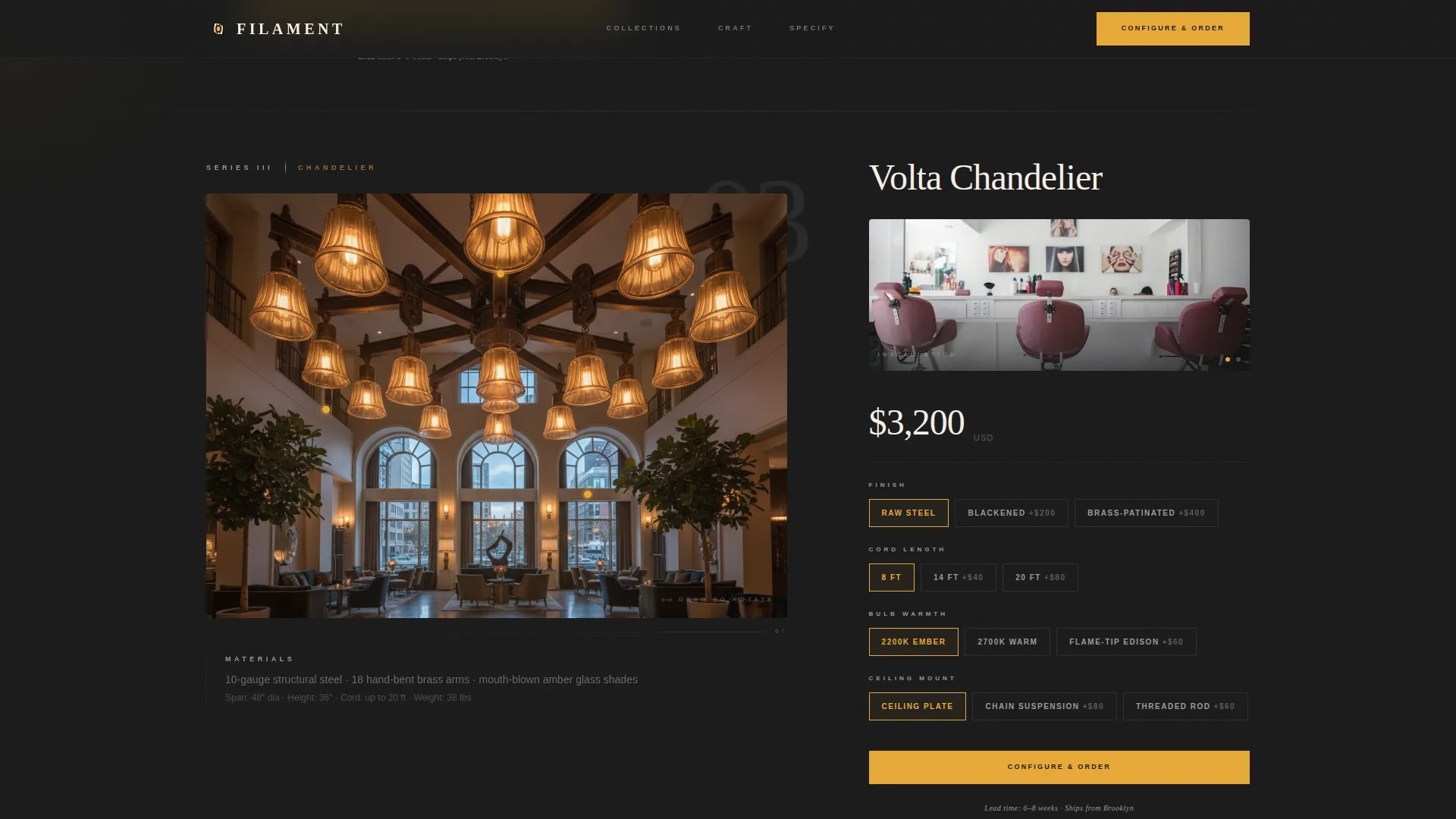
As visitors interact with a fixture on the wider column, the 40-column panel shifts contextually between installation photography, material close-up images, and specification sheets. The two columns respond to each other, keeping every interaction grounded in both aesthetic and technical detail.
Live Product Configurator
Each fixture section includes a "Configure and Order" component where buyers select finish (raw steel, blackened, or brass-patinated), cord length, bulb warmth, and ceiling mount type. The displayed price updates in real time with every selection, so buyers understand the cost of their exact configuration before proceeding to order.
Trade Professional Inquiry Path
A secondary call-to-action labelled "Specify for a Project" sits beside the primary order button. It presents a compact form capturing firm name and project quantity. Completing the form unlocks designer pricing, giving trade professionals a clear and fast route to project-scale quotes.
Scroll-Driven Scale Narrative
Sections are arranged to escalate in physical scale, beginning with the smallest sconce and progressing to the largest chandelier. This structure builds a sense of growing ambition with each scroll, guiding the visitor through the full range of the studio's capabilities in a single uninterrupted journey.
Page sections overview
| Section | Purpose |
|---|---|
| Abstract Geometric Header | Establish atmosphere and anchor the brand story before any fixture appears |
| Sconce Collection Explorer | Introduce the smallest fixture with 360-degree rotation and material hotspots |
| Wall Fixture Panel | Contextual side panel showing install photography and spec sheet for wall pieces |
| Pendant Collection Explorer | Present mid-scale hanging fixtures with drag-to-rotate interaction |
| Material Close-Up Panel | Shift side panel to brass and steel detail photography during pendant exploration |
| Chandelier Collection Explorer | Showcase the largest statement pieces at full 60-column width |
| Specification Side Panel | Display technical spec sheets alongside chandelier configurations |
| Configure and Order | Live product configurator with finish, cord, warmth, and mount options |
| Specify for a Project | Trade inquiry form unlocking designer pricing for studios and firms |
Design & branding system
The visual identity follows an Atelier Studio theme built entirely around the Monochrome Steel color system. Every tone references the physical reality of a metalworker's bench after the forge has cooled.
- Forge black (#1A1A1A) and brushed gunmetal (#4A4A4A) form the dominant background and structural tones
- Oxidized zinc (#9B9B9B) handles secondary text and supporting user interface elements
- Raw filament amber (#E8A838) is reserved exclusively for hover states, active links, and the glow surrounding each fixture photograph
Mobile & speed optimization
The asymmetric 60/40 grid is designed to reflow gracefully on smaller screens, preserving the hierarchy between the interactive explorer and the contextual side panel without losing content.
- The 60/40 column layout stacks vertically on mobile so fixture exploration remains the primary focus
- The 360-degree viewer and hotspot callouts are touch-friendly for use on phones and tablets
- Material close-up images and spec panels follow the same stacking order so context never disappears behind the product
How this template helps you convert
Filament earns purchase intent by letting visitors experience the craft before they reach the order button. Every interactive moment builds the emotional and rational case for a premium price.
- The 360-degree explorer turns passive browsing into active handling, so visitors feel the fixture's weight and detail long before checkout
- The live configurator removes pricing ambiguity, letting buyers commit to an exact specification with full cost visibility in real time
- The dedicated trade path reduces friction for professional buyers, giving interior designers and architects a direct route to project pricing without abandoning the page
Other information about this template
Filament is a purpose-built landing page for the industrial lighting design niche within the broader architecture and design category. It reflects the specific demands of the artisan-made, architect-specified fixture market.
- The template style is an asymmetric grid with a 60/40 column split throughout
- The creative direction is Interactive Explorer, meaning the scroll journey is the product experience
- The header concept is Abstract Geometric, deferring any fixture reveal until the visitor earns it through the first scroll
- The landing page direction is Direct Sales, with every section structured to reduce hesitation and move toward an order or a trade inquiry
- The Atelier Studio theme and Monochrome Steel color system work together to communicate workshop authenticity without relying on lifestyle photography clichés
- This template sits at the intersection of industrial architecture and artisan product commerce, making it well-suited to studios that sell both single pieces and project-scale quantities
Theme
Atelier Studio
Creative direction
Interactive Explorer
Color system
Monochrome Steel
Style
Asymmetric Grid (60/40)
Direction
Direct Sales
Page Sections
Parallax Abstract Geometric Header
Degree Interactive Fixture Explorer
Contextual 40-column Side Panel
Live Product Configurator
Trade Professional Inquiry Path
Scroll-driven Scale Narrative
Related questions
Can I add more fixture collections to the page?
How does the trade pricing path work?
Is the 360-degree viewer suitable for touch screens?
Can I change the color palette to match my studio's brand?
Who is the typical buyer this landing page targets?