Specialist Walk-In Closet Renovation Appointment Booking Website Template
Filament is a gallery-and-detail landing page built for walk-in closet lighting specialists. It pairs a moody, golden-hour visual identity with a neighborhood-led project gallery, a focused three-field lead form, and a sticky call-to-action bar. The result is a page that sells through atmosphere, builds trust through real project stories, and converts visitors into booked consultations.
by Rocket studio
Quick summary
Filament is a single-page gallery and detail template designed for walk-in closet lighting workshops. It opens with a split-screen header that sets a warm, editorial tone immediately. Each scroll section tells the story of a real neighborhood project. Two conversion paths work together: a quick three-field inquiry form and a downloadable lighting guide for visitors who need more time.
Who this template is for
This template is built for lighting specialists who work inside residential renovations. It speaks directly to the kind of business that understands the difference between a builder-grade ceiling fixture and a fully layered lighting scheme.
- Walk-in closet lighting designers and custom electrical contractors
- Interior designers looking to present a specialist lighting partner to their clients
- Renovation-focused service businesses serving specific cities and neighborhoods
What problem this template solves
Most service businesses in this niche rely on generic contractor pages that flatten the craft and say nothing about atmosphere. A homeowner mid-renovation cannot picture what layered closet lighting actually looks like from a bullet list of services.
- No gallery means no proof, and no proof means no inquiry
- Anonymous testimonials and vague project descriptions fail to build local trust
- A busy contact form scares off visitors who are standing in their half-built closet holding a phone
What you get with this template
You get a complete, gallery-forward landing page structured to do the selling before the form ever appears. The visual storytelling does the heavy lifting; the form just opens the door.
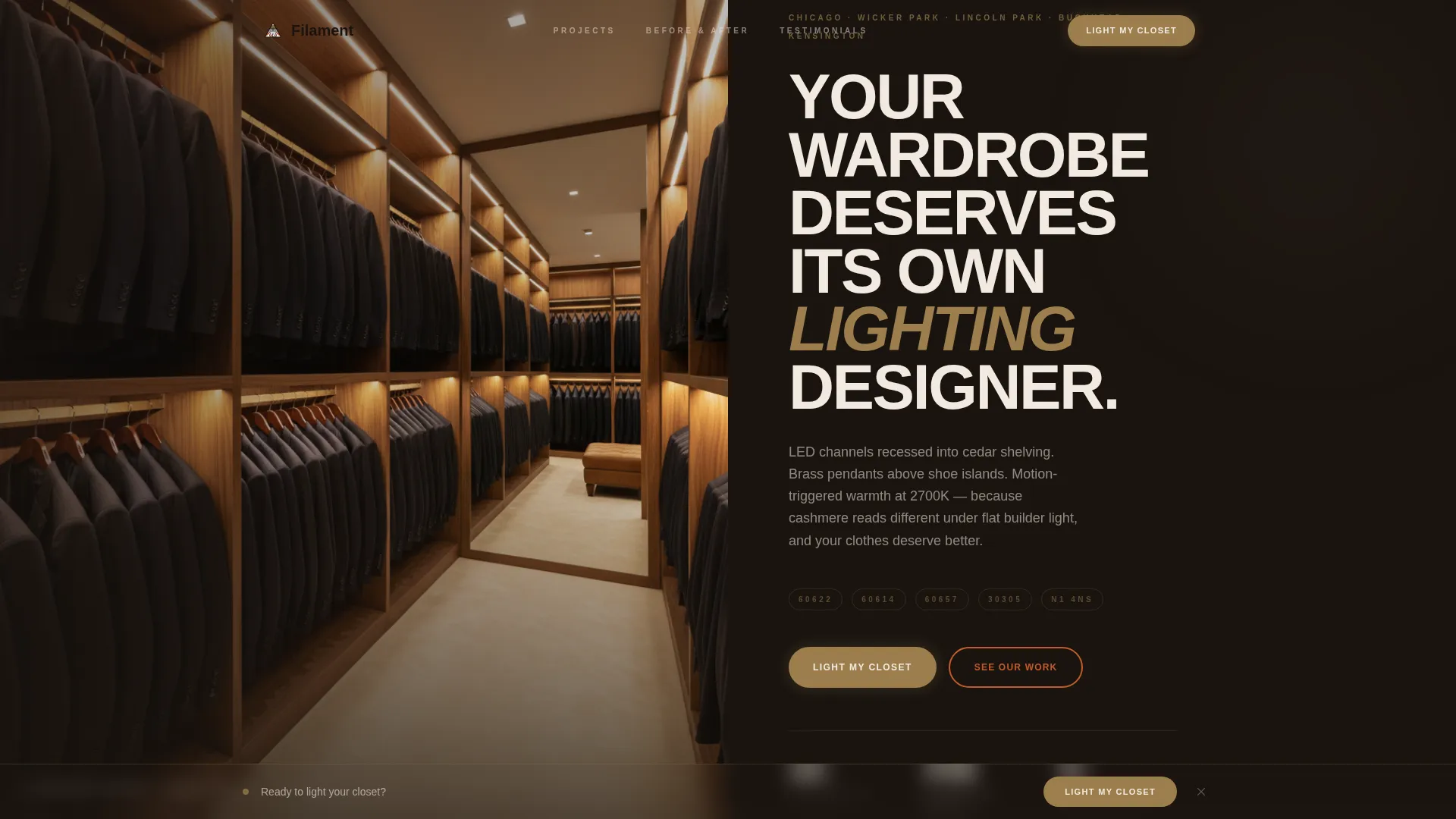
- A half-page split header with a moody interior photo and a bold headline set in raw plaster white
- A neighborhood-led project gallery where each card expands into a before-and-after detail view
- Two conversion paths: a three-field lead form and a secondary email capture for a downloadable closet lighting guide
Feature list
This template is built around a focused set of components that work together to earn trust and drive inquiries.
Split-Screen Header with Editorial Headline
The header divides the viewport into a tight-crop closet photograph on the left and a forge-black panel on the right. The headline reads "Your Wardrobe Deserves Its Own Lighting Designer" in raw plaster white. A subtext block names the real city streets and zip codes the business serves, making the location claim immediate and specific.
Neighborhood Project Gallery
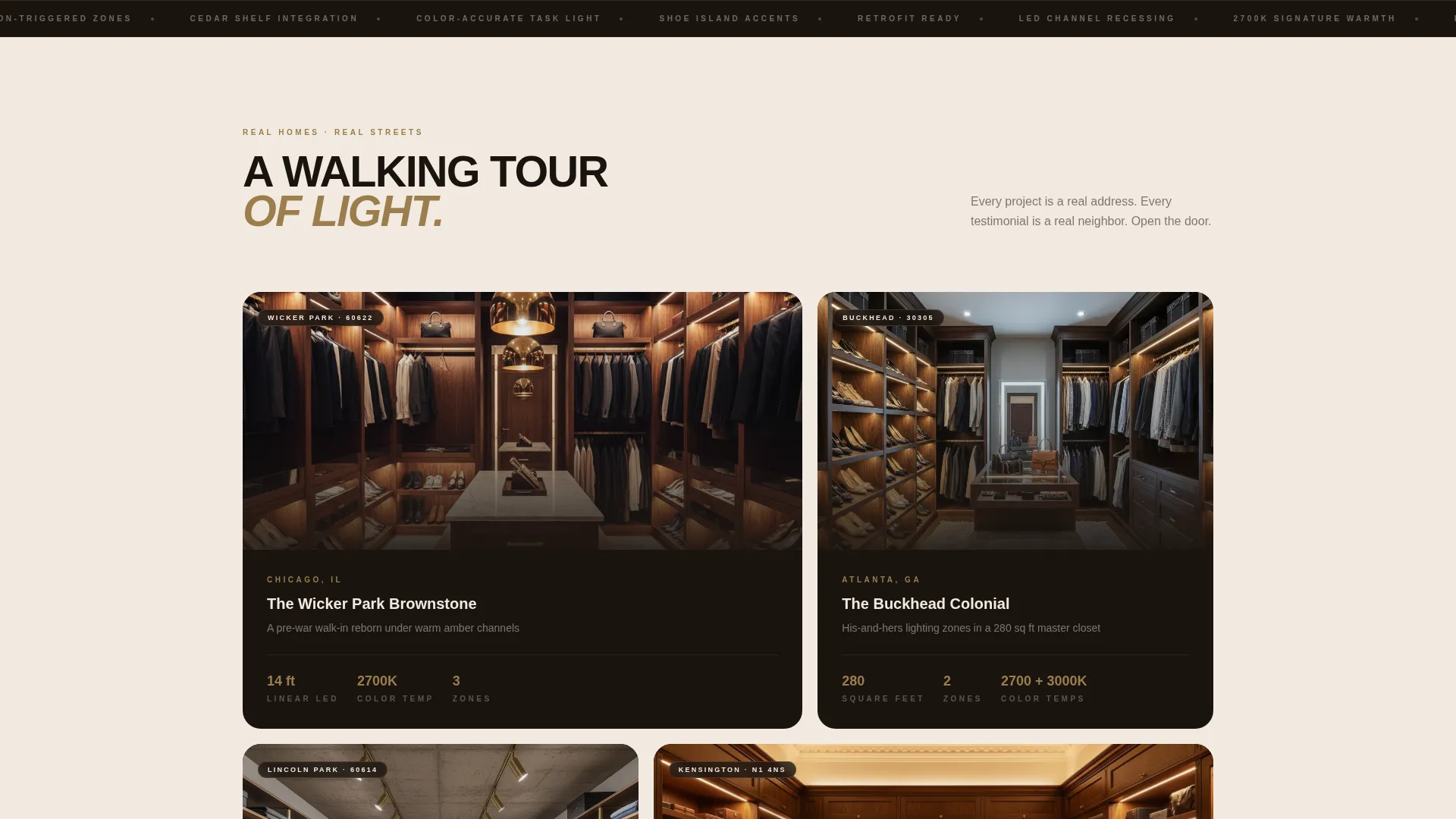
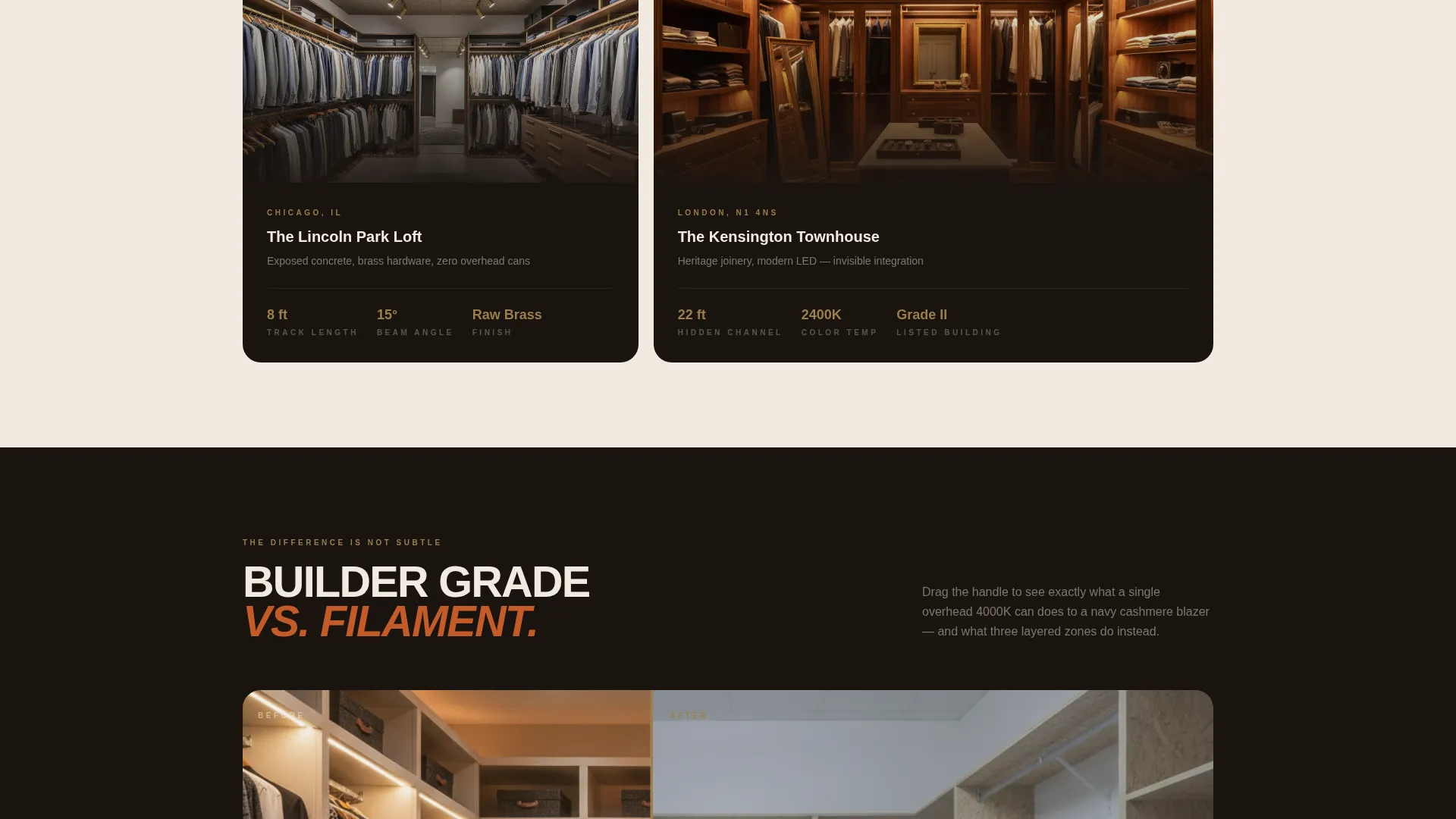
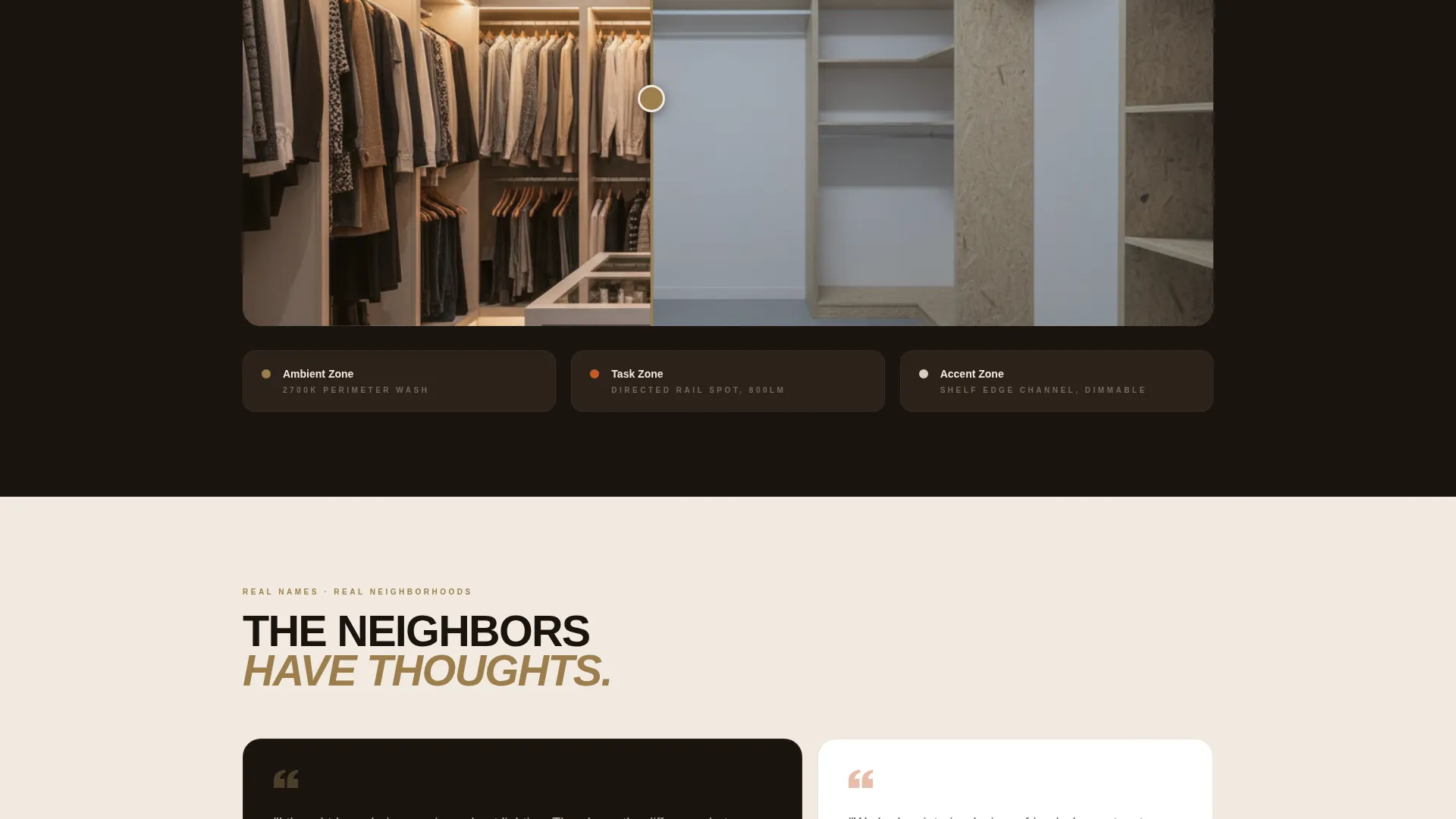
Each gallery section is named after a real project location, such as "The Kensington Brownstone" or "The Lincoln Park Loft." Cards link to a detail view that shows the before-and-after of the closet's lighting, with accent, task, and ambient zones clearly labeled. Scrolling the gallery feels like a neighborhood walking tour where every stop opens a private door.
Before-and-After Detail Views
Each project detail view contrasts the flat, shadowless builder-grade overhead fixture with the finished layered lighting scheme. Zone labels explain what each layer does. This component answers the most important buyer question without requiring a phone call.
Three-Field Lead Form
The inquiry form asks only for closet dimensions via a dropdown range, project stage (planning, mid-build, or retrofit), and zip code. Three fields only. It is fast enough to complete while standing inside the closet on a phone.
Sticky Bottom Call-to-Action Bar
After the third gallery project, a sticky bottom bar appears carrying the primary call to action: "Light My Closet" set in smoked brass against forge black. It stays visible as visitors scroll, removing any friction between decision and action.
Secondary Email Capture Path
A secondary conversion path offers a downloadable closet lighting guide in exchange for an email address. This nurture path catches visitors who are early in their planning stage and keeps the business in front of them while the renovation timeline develops.
Page sections overview
| Section | Purpose |
|---|---|
| Split-screen header | Establishes mood, headline, and location |
| Primary call to action block | First placement of "Light My Closet" form |
| Neighborhood gallery | Showcases real projects by location name |
| Project detail view | Before-and-after with labeled lighting zones |
| Attributed testimonials | Builds local trust with name and neighborhood |
| Guide download block | Secondary email capture for early-stage visitors |
| Sticky call to action bar | Persistent conversion prompt after gallery scroll |
Design & branding system
The visual identity follows an Industrial Raw theme anchored in a Fire and Earth color system. Every color choice is drawn from physical materials: forge black, kiln-fired terracotta, smoked brass, and raw plaster warm white. The palette behaves like a blacksmith's bench catching firelight, with warmth radiating from the materials rather than applied on top.
- Forge black (#1A1410) forms the dominant surface; raw plaster warm white (#F2EAE0) carries all headline text
- Kiln-fired terracotta (#C45B28) and smoked brass (#9B7E4C) provide accent warmth on buttons and detail elements
- Photography direction favors tight, moody interior crops shot at golden-hour light temperatures
Mobile & speed optimization
The three-field form was designed specifically for mobile completion. A visitor can fill it out while standing inside their closet, which is exactly where most renovation decisions happen.
- Dropdown inputs and short text fields reduce typing friction on small screens
- The sticky call-to-action bar remains accessible at the bottom of the viewport throughout the gallery scroll
- Gallery cards and detail views are laid out to reflow cleanly for single-column mobile reading
How this template helps you convert
The page is structured so the gallery does the convincing and the form simply captures the interest already built.
- The split-screen header sets an immediate emotional tone and names the real neighborhoods served, qualifying visitors before they scroll a single section.
- The neighborhood project gallery builds evidence project by project, with before-and-after detail views and attributed testimonials reinforcing credibility at every stop.
- The sticky call-to-action bar and the three-field form reduce every possible barrier between a convinced visitor and a submitted inquiry.
Other information about this template
This template fits naturally into the walk-in closet renovation category and the broader construction and home services market. It is particularly well matched to lighting specialists who serve named neighborhoods and want their local reputation to do the selling.
- The template style is Gallery and Detail, designed to let finished work speak before any sales language appears
- The creative direction is Local and Neighborhood, meaning project names, street references, and attributed testimonials are structural elements, not decorative ones
- The header concept is Half-Page Photo and Text, giving equal weight to atmospheric photography and clear written positioning
- The lead generation direction means every section is sequenced to reduce friction and move qualified visitors toward the form or the guide download
Theme
Industrial Raw
Creative direction
Local & Neighborhood
Color system
Fire & Earth
Style
Gallery + Detail
Direction
Lead Generation
Page Sections
Split-screen Editorial Header
Neighborhood Project Gallery
Before-and-after Detail Views
Three-field Mobile-first Form
Sticky Call-to-action Bar
Secondary Guide Download Block
Related questions
Can I replace the neighborhood project names with my own locations?
What does the three-field inquiry form collect?
How is the secondary download path different from the main form?
When does the sticky call-to-action bar appear?
Is this template suitable for interior designers who refer clients to a lighting specialist?



