Vehicle Inspection & Testing Booking Website Template
Fleet is a scroll-reveal landing page template built for commercial vehicle inspection services. It guides logistics directors, leasing companies, and owner-operators through a 142-point inspection process with an inspector-POV demo video, a category-by-category checklist reveal, a redacted report preview, a comparison table, and a three-step booking form, all styled in a clinical midnight navy and caution amber palette.
by Rocket studio
Quick summary
Fleet is a single-page, scroll-reveal landing page template designed for commercial vehicle inspection services targeting the B2B fleet acquisition market. It opens with an inspector-perspective demo video, then progressively reveals a 142-point checklist, a redacted report preview, a comparison table, and a three-step inspection booking form, converting skeptical buyers into scheduled appointments.
Who this template is for
This template is built for businesses that offer professional inspections on used Class 6 through 8 commercial trucks, trailers, and heavy equipment. It speaks directly to buyers who need documented evidence before they commit money to a vehicle.
- Logistics directors and fleet managers acquiring used trucks at auction
- Leasing companies turning over trailer fleets at quarter-end who need fast, reliable documentation
- Owner-operators spending their savings on a single unit and needing the full truth before signing
What problem this template solves
Buying used commercial vehicles is a high-stakes decision. A single missed fault on a frame rail or brake assembly can cost tens of thousands of dollars in repairs, or worse, a Department of Transportation (DOT) out-of-service order. Most pre-purchase checks are shallow, undocumented, and built for speed rather than accuracy.
- Buyers cannot verify inspection depth from a generic checklist or a dealer's word alone
- Fleet managers need a professional report they can defend to ownership and insurers
- Owner-operators have no visual proof of condition before auction day
What you get with this template
You get a fully structured, scroll-reveal landing page designed for one purpose: turning a skeptical commercial vehicle buyer into a confirmed inspection booking. Every section is sequenced to build trust before asking for commitment.
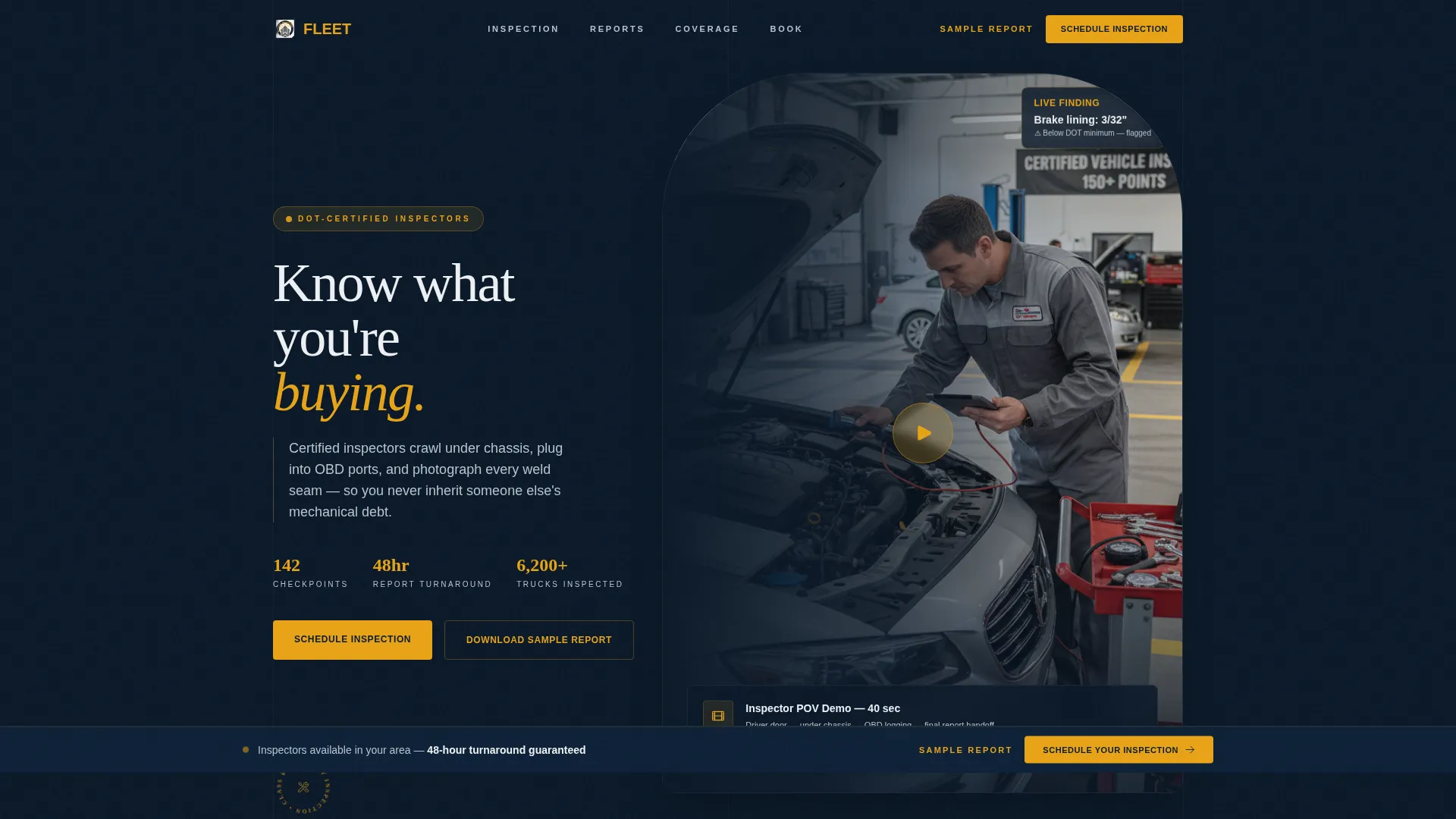
- A hero section with an embedded 40-second inspector-POV demo video and a glassmorphic call-to-action card
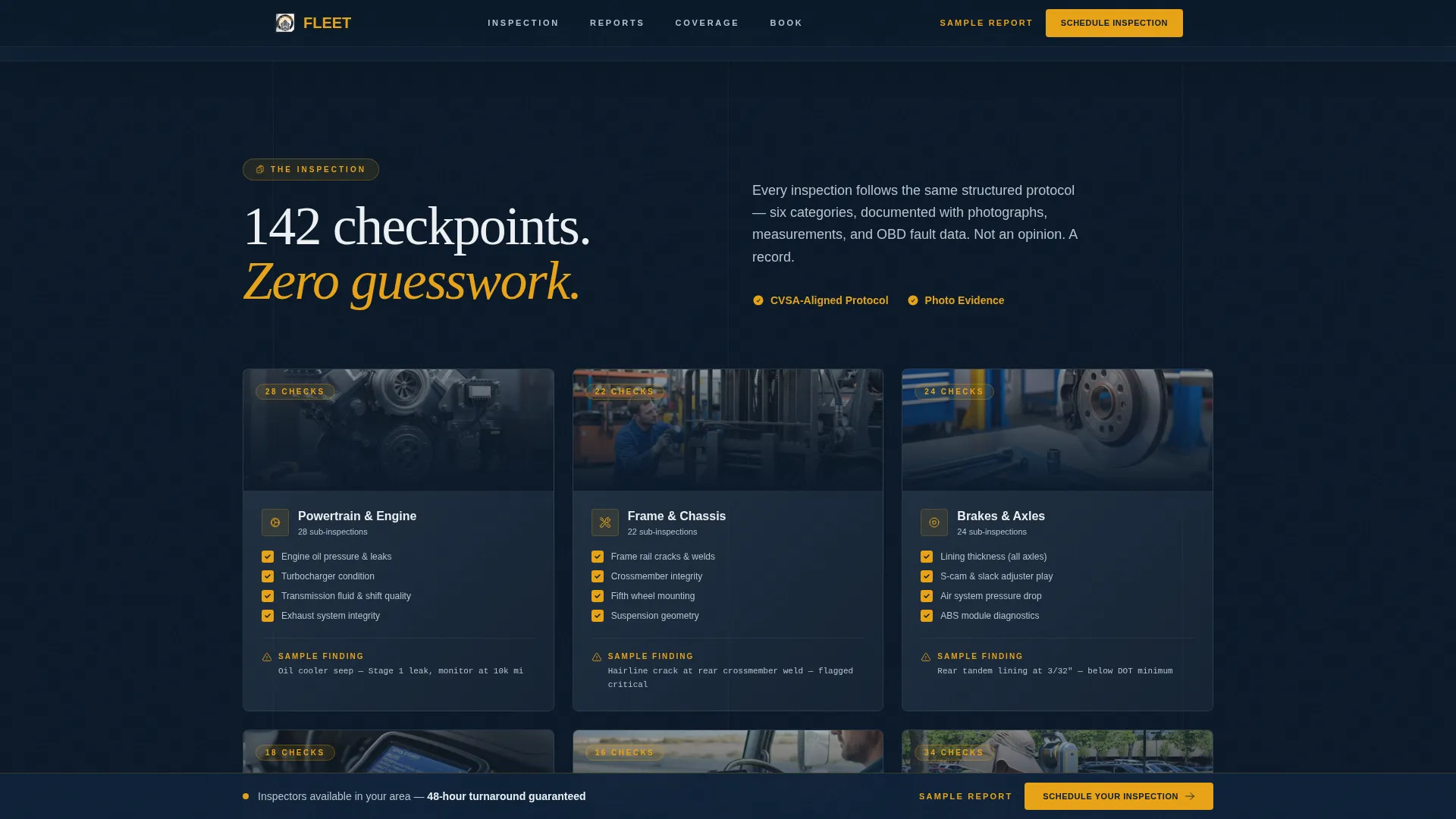
- A progressive checklist reveal across six inspection categories, each with sub-counts and sample findings
- A three-step booking form covering vehicle type, inspection location, and calendar scheduling, plus a secondary email-capture path for sample report downloads
Feature list
This template ships with a focused set of interactive and visual components. Each one is grounded in the specific workflow of a commercial vehicle inspection service.
Inspector-POV Demo Video Player
The hero opens with a 40-second video sequence shot from the inspector's perspective. It moves from the driver door to the undercarriage, to a tablet logging brake measurements, and closes on the inspector handing a bound report to a fleet manager. No narration is needed, ambient shop audio and the closing title card ("142 checkpoints. Zero guesswork.") do the work.
Staggered 142-Point Checklist Reveal
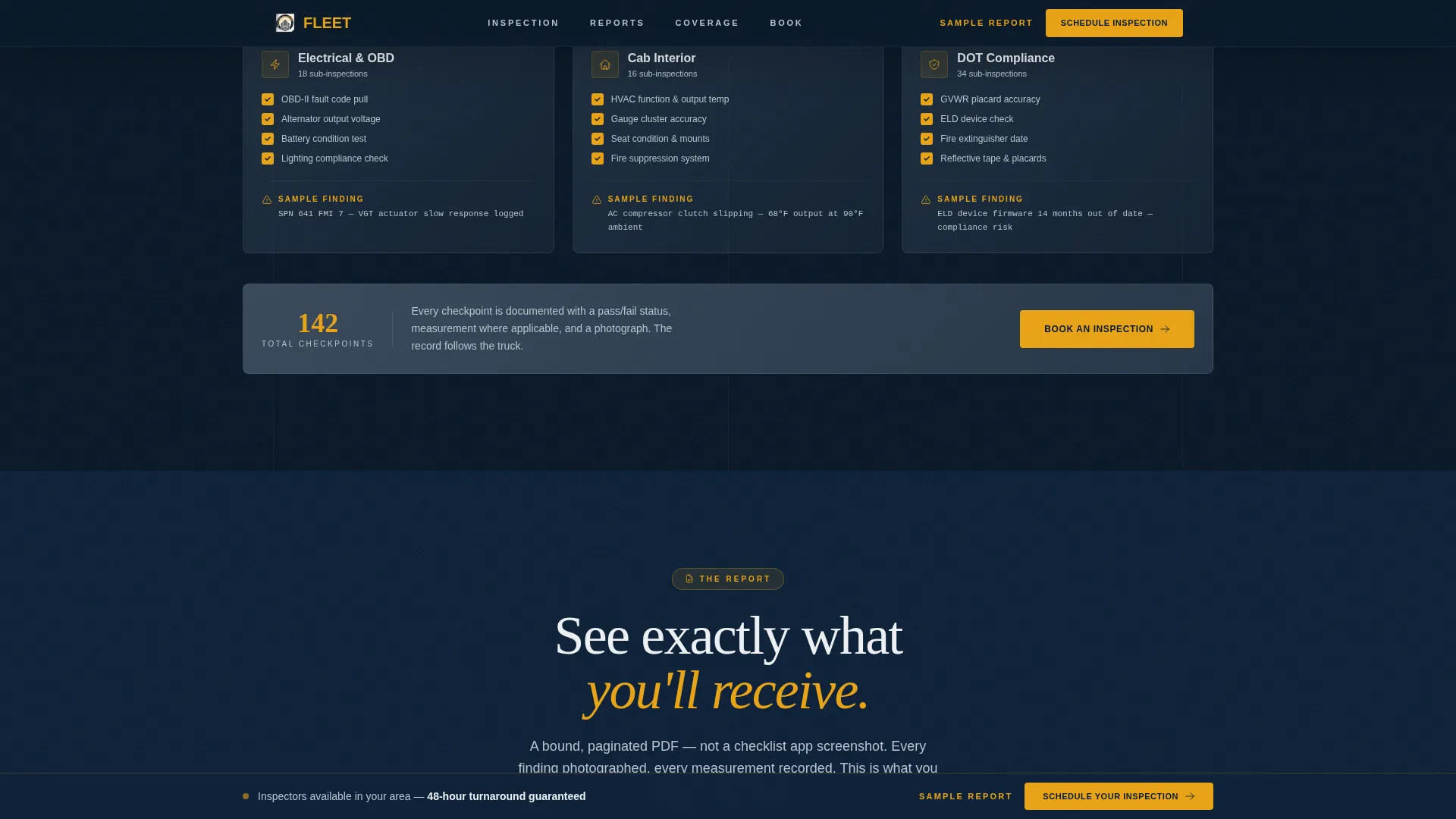
Six inspection categories fade in one at a time as the visitor scrolls: powertrain, frame and chassis, electrical, brakes, cab interior, and DOT compliance. Each category shows a sub-inspection count and a sample finding photograph, so the depth of the process is visible before a booking is made.
Scroll-Linked Report Preview
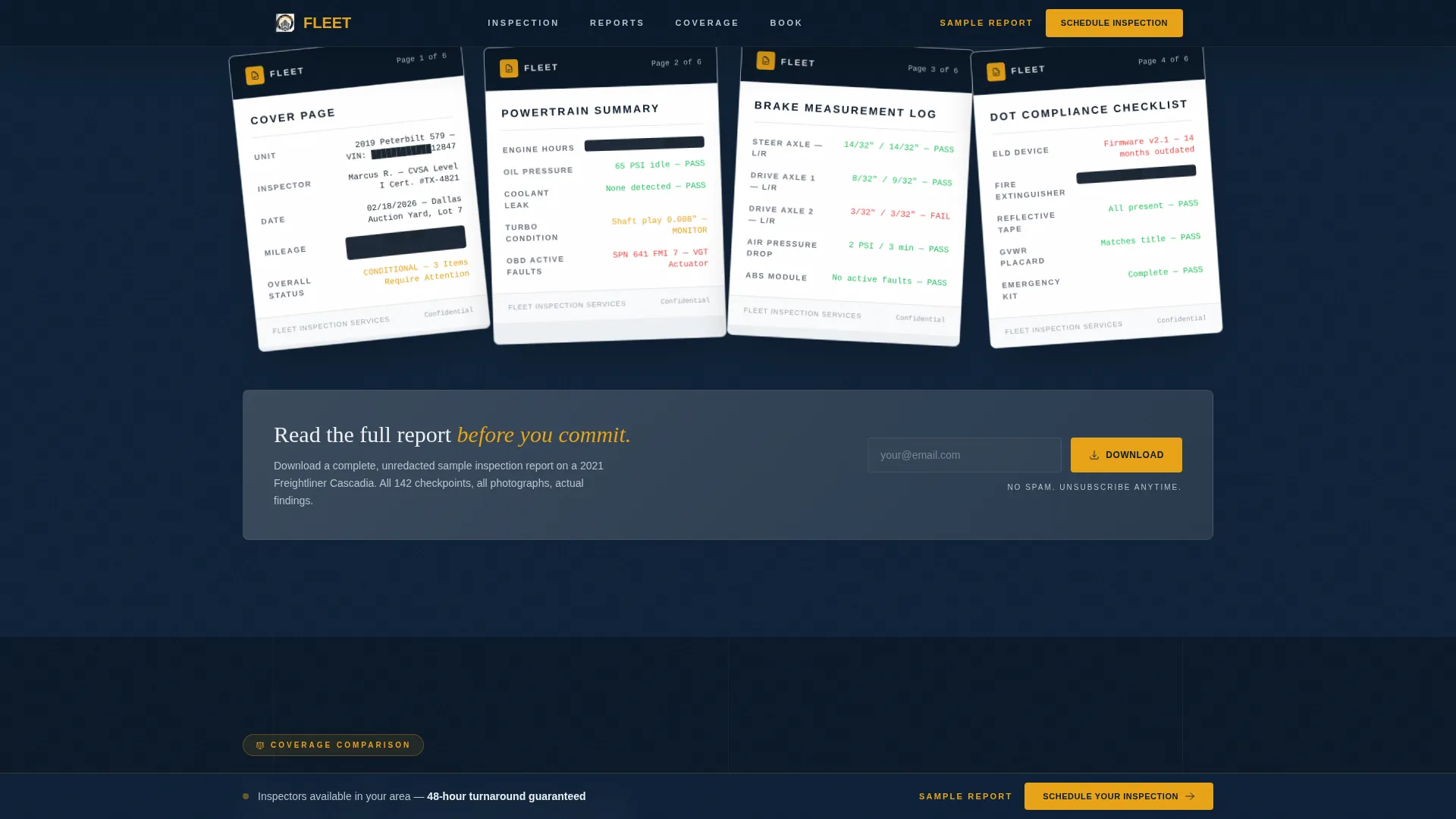
Redacted real inspection report pages fan open as the visitor scrolls down the page. The animation is driven by GSAP ScrollTrigger, making the report feel like it is being flipped open in real time. Visitors see exactly what they will receive before spending a dollar.
Scroll-Activated Comparison Table
A side-by-side table materializes on scroll, comparing Fleet's 142-point inspection against a standard pre-purchase check. It makes the value gap concrete and specific without requiring the visitor to take the claim on faith.
Three-Step Booking Form
The scheduling form is broken into three clear steps. Step one collects vehicle type from a dropdown (day cab, sleeper, box truck, trailer, bus) and unit count. Step two asks for inspection location (yard, auction house, or dealer lot) with a zip code field. Step three presents a calendar date picker and a preferred time window selector.
Sticky Call-to-Action Bar and Lead Capture Path
A sticky "Schedule Your Inspection" bar appears in caution amber on navy after the video section completes. A secondary path, "Download a Sample Report", captures email addresses from visitors not yet ready to book, using the same bound PDF teased during the scroll reveal.
Page sections overview
| Section | Purpose |
|---|---|
| Hero Video | Opens with inspector-POV demo and glassmorphic booking card |
| 142-Point Checklist | Reveals six inspection categories with sub-counts and photos |
| Report Preview | Fans open redacted report pages on scroll |
| Comparison Table | Contrasts Fleet's process against standard pre-purchase checks |
| Booking Form | Three-step scheduler for vehicle type, location, and date |
| Footer | Linear single-row footer with supporting links |
Design & branding system
The visual identity follows a Corporate Precision theme built around a Midnight Blue color system. The palette is deliberately clinical, it evokes a DOT inspection bay under overhead fluorescents, not a marketing brochure.
- Deep terminal navy (#0B1929) as the primary background, steel-panel gray (#3A4A5C) for section dividers and secondary surfaces, and inspection-white (#EDF0F3) for text and data fields
- Caution amber (#E8A317) is reserved exclusively for calls to action, status indicators, and critical findings highlights, never used decoratively
- Typography pairs DM Sans for body text with Fraunces display serifs for headings, giving the page a technical document feel that still reads clearly at speed
Mobile & speed optimization
The template is built desktop-first, reflecting how fleet managers review vehicles before auction day, seated at a workstation, not scrolling on a phone. Interactive sections use a client-side rendering approach while static content sections use server components to keep load lightweight.
- GSAP ScrollTrigger drives all scroll-linked animations, including the checklist stagger, report fan, and table materialization
- The booking form and video player are rendered client-side for full interactivity, while surrounding static sections are kept server-rendered
- The scroll-reveal structure naturally staggers content load, preventing all heavy assets from competing at page open
How this template helps you convert
The page is engineered around a single funnel: show proof first, ask for commitment second. Every scroll position adds evidence before the visitor reaches a form field.
- The video, checklist, and report preview collectively demonstrate inspection depth before any pricing or booking pressure appears, so visitors arrive at the form already convinced of the value.
- The three-step booking form breaks the scheduling decision into small, low-friction steps, vehicle type, location, then date, reducing drop-off at the moment of commitment.
- The secondary "Download a Sample Report" path captures email from leads who are not ready to book, keeping them in the funnel with a high-value asset that continues selling after the visit.
Other information about this template
This template is designed as a standalone, single-page booking experience with no multi-page navigation required. All interactive components are self-contained within the page structure.
- The footer follows a linear single-row layout (Pattern 1), keeping the page exit clean and uncluttered
- Localization defaults are set for the United States market: USD pricing, MM/DD/YYYY date format, and imperial measurements throughout
- The scroll-reveal animation sequence is built with GSAP ScrollTrigger and is configured for high animation fidelity on desktop, matching the desktop-first device priority of the target audience
- Social proof is integrated structurally through specific metrics (142 checkpoints, turnaround time indicators, and real findings examples) rather than generic testimonial placeholders
Theme
Corporate Precision
Creative direction
Spec Sheet
Color system
Midnight Blue
Style
Scroll Reveal (Progressive)
Direction
Booking/Scheduling
Page Sections
Inspector-pov Demo Video Hero
Staggered 142-point Checklist
Scroll-linked Report Fan Preview
Scroll-activated Comparison Table
Three-step Inspection Booking Form
Sticky Call to Action Bar and Email Lead Capture
Related questions
What type of business is this landing page template designed for?
Can I update the checklist categories to match my own inspection process?
What does the three-step booking form collect from prospective clients?
Is the sample report download a separate page?
Does this template require a video asset to work?



