Pump & Valve Manufacturer Landing Page Template
Flowpath is a dashboard-style landing page template built for pump and valve manufacturers. It combines an isometric cutaway header, an expandable product-family data grid, and a gated spec-sheet download flow into one engineering-grade experience. The Navy Authority color system and spatial scroll architecture make technical content feel authoritative, organized, and immediately actionable for procurement engineers and plant managers.
by Rocket studio
Quick summary
Flowpath is a precision-engineered landing page template designed for industrial pump and valve manufacturers. It presents product families inside an interactive data grid, supports gated spec-sheet downloads, and guides engineers from first browse to full quote request. The dark navy color system and isometric header illustration establish technical authority from the first scroll.
Who this template is for
This template speaks directly to manufacturers and suppliers who sell complex fluid-control equipment to technical buyers. If your audience compares specifications before they compare prices, Flowpath was built with them in mind.
- Centrifugal pump and gate valve manufacturers targeting procurement engineers and plant managers
- Industrial equipment suppliers serving water treatment, chemical refinery, and municipal pipeline sectors
- Engineering, procurement, and construction contractors who need a structured product catalog with downloadable documentation
What problem this template solves
Industrial buyers rarely trust a page that looks like a marketing brochure. They want spec sheets, pressure ratings, material grades, and dimensional tables before they pick up the phone. Most standard templates cannot hold that volume of technical content without becoming cluttered or confusing.
- Generic templates bury product data inside long prose paragraphs instead of structured, scannable cards
- Buyers who need downloadable documentation abandon pages that hide PDFs behind complex multi-step forms
- Procurement teams building a quote list have no way to collect multiple product selections in one action without navigating away
What you get with this template
Flowpath delivers a complete, content-rich landing page layout that doubles as an engineering resource hub. Every major section is designed to carry technical weight without sacrificing clarity.
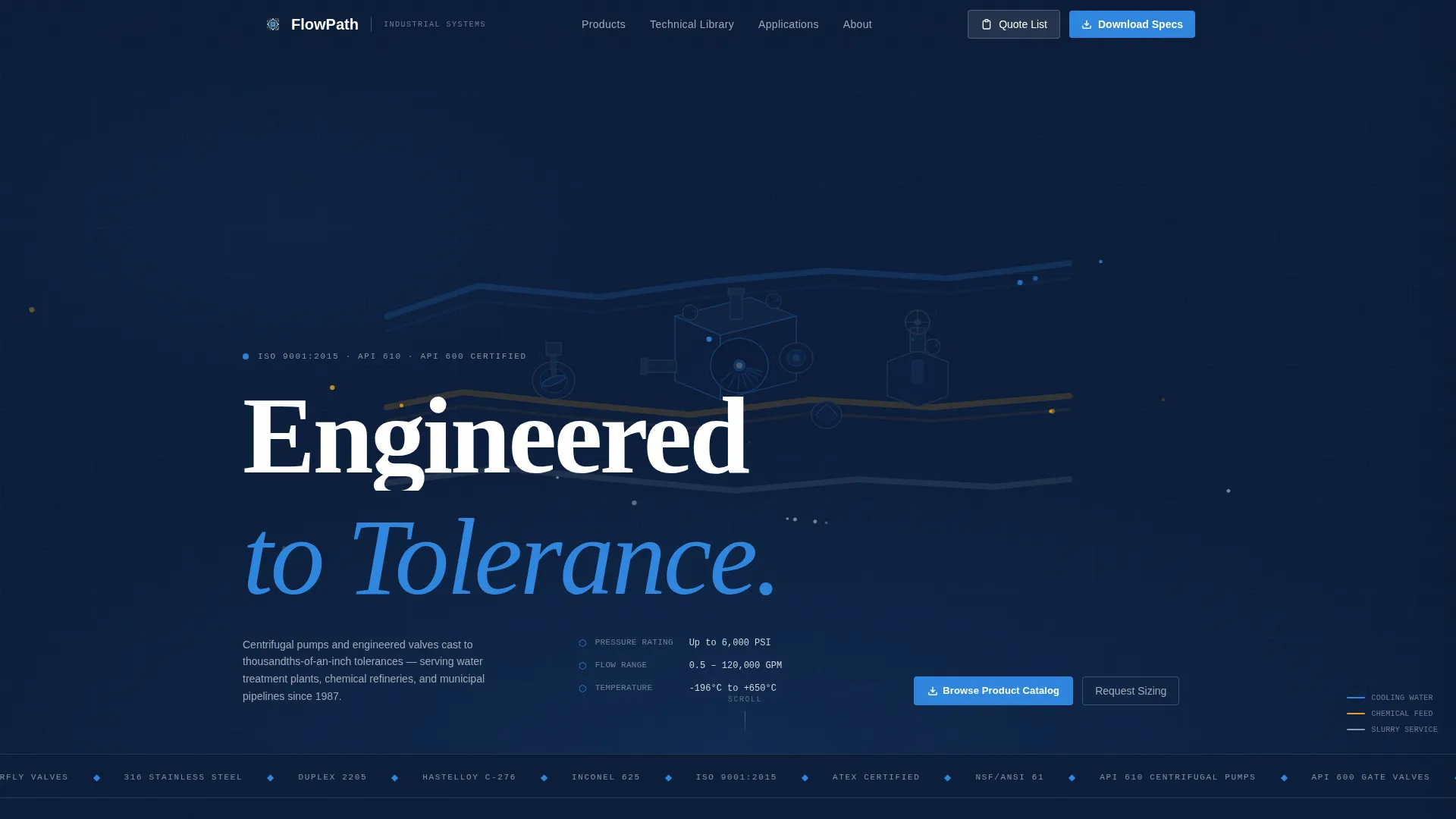
- An isometric cutaway hero header with animated flow particles and color-coded pipe runs
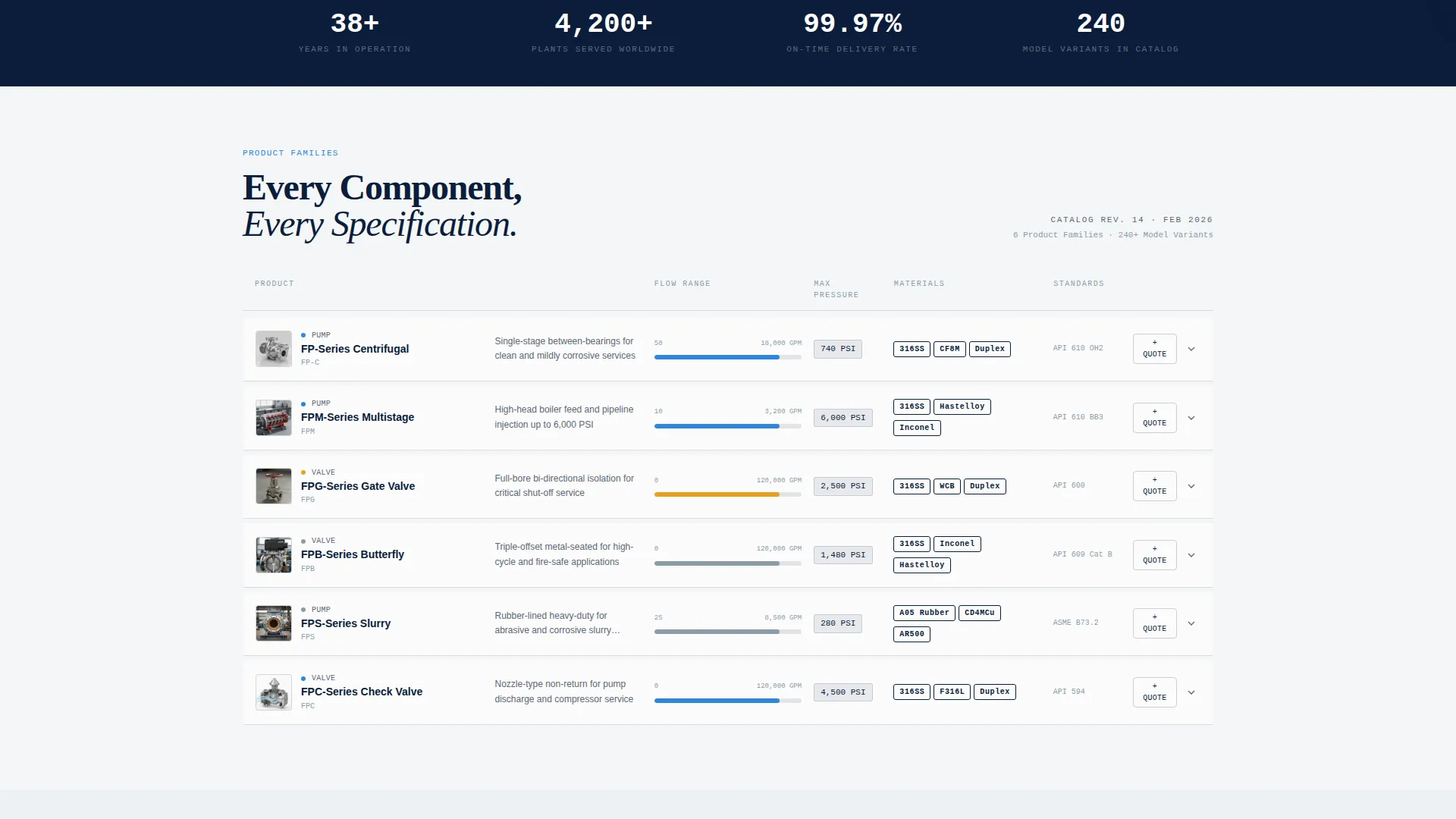
- An expandable product-family data grid with spec drawers, curve charts, and dimensional tables
- A floating quote-list sidebar tray that accumulates product selections and converts them into a single RFQ submission
Feature list
This section covers the core interactive and structural capabilities built into the Flowpath template.
Isometric Cutaway Hero Header
The header renders a full-width isometric illustration of a complete pumping system in precise vector lines against deep navy. Internal components including impellers, seat rings, and packing glands are exploded just enough to reveal engineering detail. Pipe runs extend to viewport edges and are color-coded by service: cooling water in blue, chemical feed in amber, and slurry in gray. Subtle animated flow particles pulse through transparent pipe walls.
Expandable Product-Family Data Grid
Below the header, product families appear as individual cards inside a structured data grid. Each card displays a thumbnail cutaway, a flow-range bar, a pressure rating badge, and a material tag such as 316 stainless steel, Duplex, or Hastelloy. Clicking a card expands it into a full-width spec drawer without navigating away from the page. The drawer includes curve charts, dimensional tables, and downloadable PDF links.
Gated Spec-Sheet Download Flow
The primary conversion path is a "Download Full Spec Sheet" action gated behind a single-field company email input. The field auto-detects the email domain and pre-fills the company name, reducing friction for the buyer. This keeps the gate lightweight while capturing qualified lead data.
Sizing Calculation Request Form
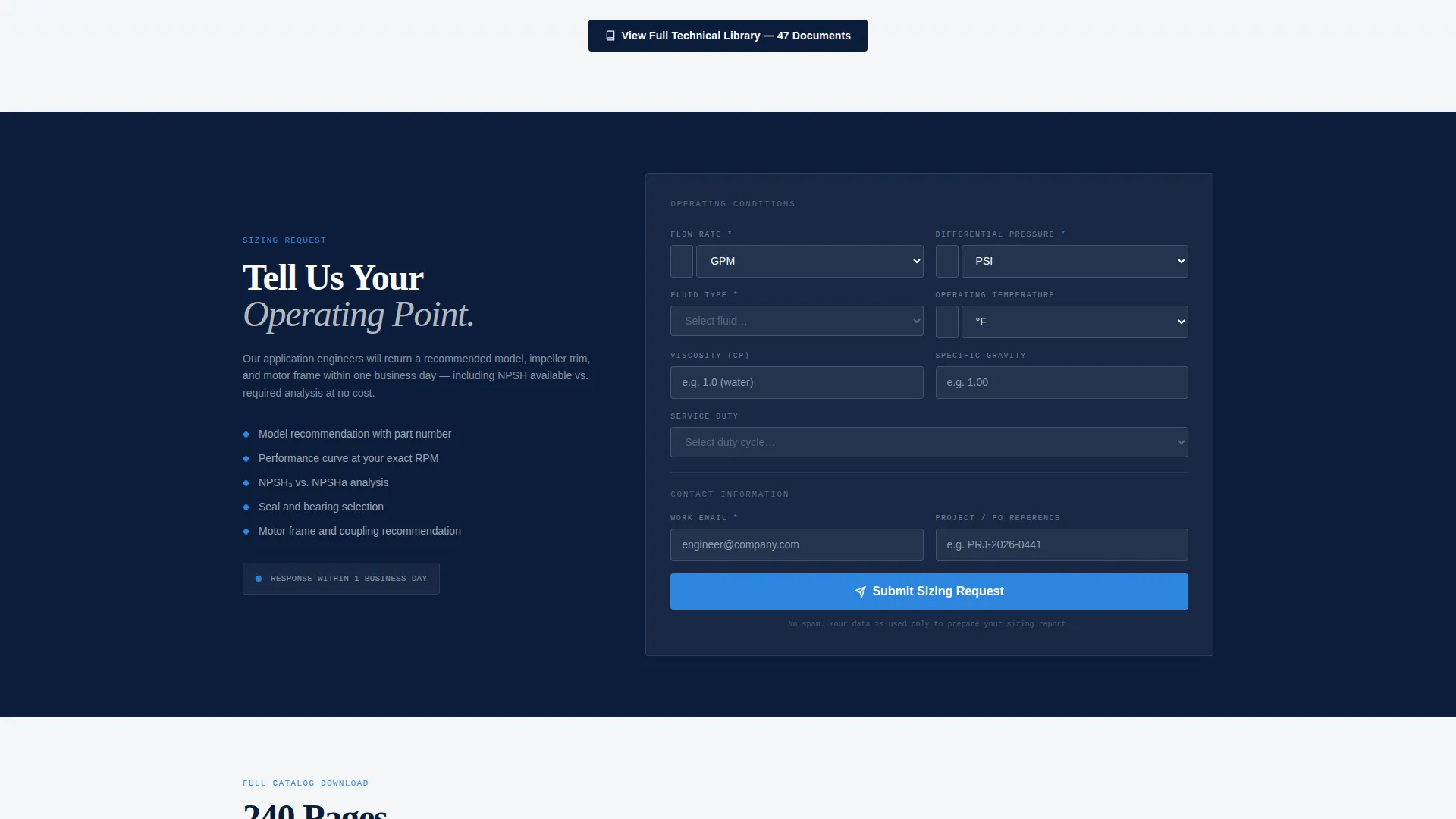
A secondary conversion path lets engineers submit a sizing request directly on the page. Input fields cover flow rate, differential pressure, fluid type, and operating temperature. This positions the manufacturer as a technical partner rather than just a product supplier.
Ungated Technical Bulletin Library
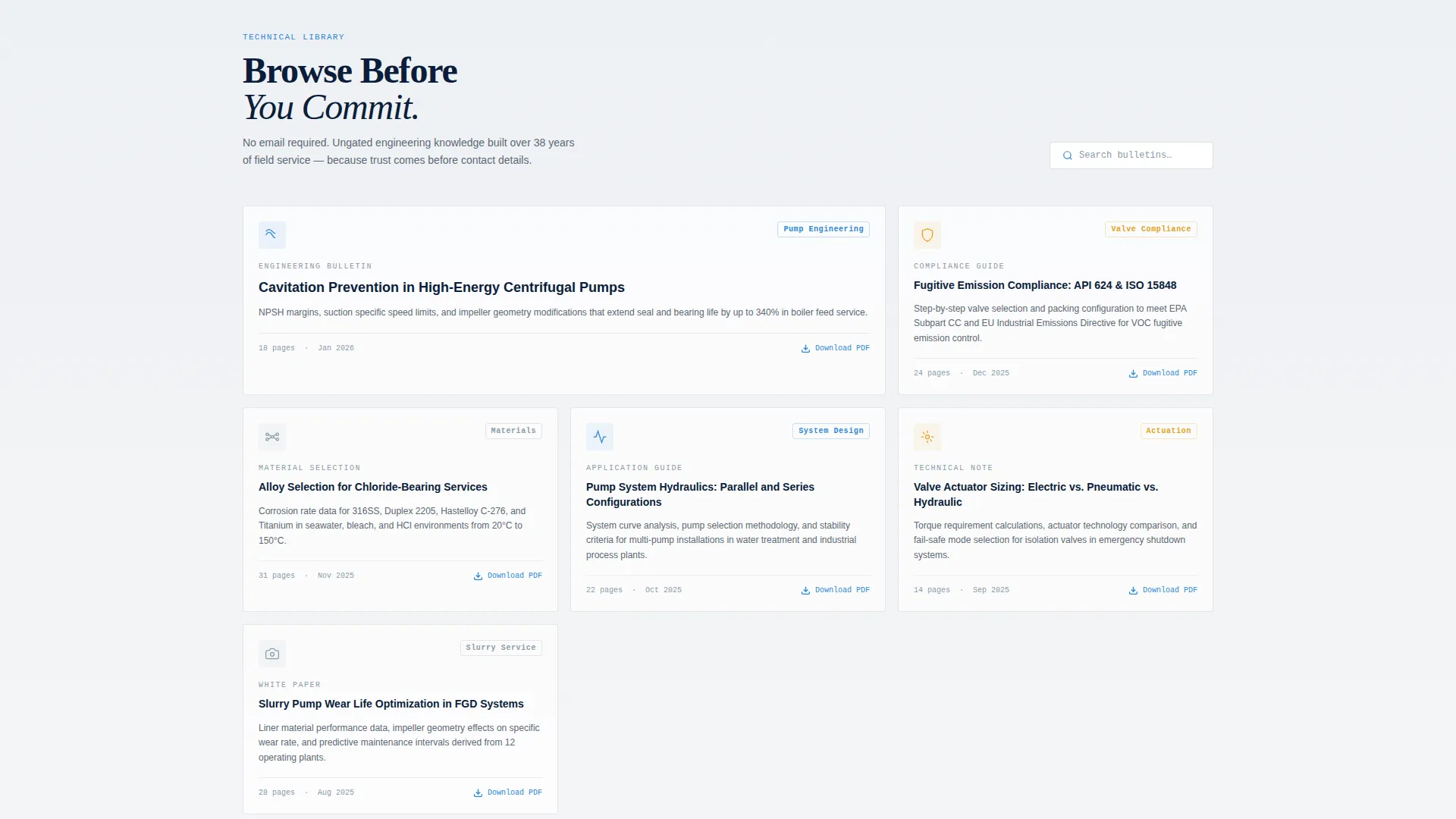
A browse-first resource section surfaces technical bulletins, application guides, and white papers without requiring any login or form submission. Topics such as cavitation prevention and fugitive-emission compliance are surfaced here. This section builds credibility before asking for contact details.
Floating Quote-List Sidebar Tray
Every product card carries a persistent "Add to Quote List" chip. Selections accumulate inside a floating sidebar tray that remains visible as the engineer scrolls. When ready, a single "Submit Quote Request" button sends the entire list as a formal request for quotation.
Page sections overview
| Section | Purpose |
|---|---|
| Isometric Hero Header | Establish visual authority with animated system illustration |
| Product Family Grid | Display catalog cards with ratings, materials, and flow data |
| Spec Drawer Panel | Expand card into full-width charts and dimensional tables |
| Spec Sheet Download | Gate primary document behind single-field email capture |
| Sizing Calculation Form | Collect flow, pressure, fluid, and temperature inputs |
| Technical Bulletin Library | Offer ungated white papers and application guides |
| Floating Quote Tray | Accumulate multi-product selections for one RFQ submission |
Design & branding system
The visual identity follows a Corporate Precision theme built on the Navy Authority color system. The palette is intentional and restrained, drawing from the aesthetics of an industrial control room at night.
- Command-deck navy (#0B1D3A) dominates headers and the persistent sidebar; machined-steel gray (#5C6874) separates data rows; technical-white (#F4F6F8) fills card backgrounds for readability
- Signal-blue (#2E86DE) appears only on active states, toggles, and download icons, reserving high-visibility color for moments that require action
- The spatial and architectural creative direction turns the scroll into a progressive walk through the product catalog, revealing deeper technical layers with each section
Mobile & speed optimization
The Flowpath layout is structured to remain functional and readable across device sizes. The data grid and spec drawers adapt to narrower viewports without losing the hierarchy that technical buyers depend on.
- Product cards reflow into a single-column layout on smaller screens, keeping flow-range bars and pressure badges visible without horizontal scrolling
- The floating quote-list tray collapses into a bottom-anchored button on mobile, maintaining access to accumulated selections without obscuring content
- The isometric header scales proportionally on tablet and mobile viewports so the engineering illustration retains its instructional value at any size
How this template helps you convert
Flowpath earns the conversion by proving technical competence before asking for anything in return. The page is structured so that each scroll deepens trust and each action reduces friction.
- The ungated technical bulletin library and expandable spec drawers give engineers real value immediately, establishing credibility before the gated download prompt appears.
- The single-field email gate with auto-detected company name removes the most common form-abandonment trigger while still capturing a qualified lead.
- The floating quote-list tray turns passive browsing into active selection, so the engineer arrives at the "Submit Quote Request" button with intent already formed.
Other information about this template
Flowpath is part of a broader family of industrial and manufacturing templates designed for technically demanding audiences. A few additional points are worth noting before you build with it.
- The template style is Dashboard and Data Grid, which makes it well suited for catalogs with ten or more product families
- The landing page direction is Content and Resource hub, meaning the page earns trust through documentation depth before pushing for a direct sale
- The intersection match between the Navy Authority color system, the Spatial and Architectural creative direction, and the Isometric header concept is a deliberate combination scored for industrial equipment and machinery contexts
- The Corporate Precision theme was selected to align with the expectations of procurement professionals who equate visual rigor with product reliability
- This template can support content-heavy industrial niches beyond pumps and valves, including flow meters, pressure vessels, and heat exchangers, wherever spec-sheet authority is the primary sales tool
Theme
Corporate Precision
Creative direction
Spatial & Architectural
Color system
Navy Authority
Style
Dashboard/Data Grid
Direction
Content/Resource
Page Sections
Isometric Cutaway Hero with Animated Flow
Expandable Product-family Data Grid
Single-field Gated Spec-sheet Download
Sizing Calculation Request Form
Ungated Technical Bulletin Library
Floating Multi-product Quote Tray
Related questions
Can I customize the product card data fields for my specific product range?
How does the spec-sheet download gate work?
Is the technical bulletin library section required, or can I remove it?
Does the floating quote tray work across the full page?
Who is the ideal audience for this template?



