Dark Immersive Executive Bio Landing Page Template
Folio is a single-page executive bio landing page built for senior technical professionals. It uses a dark immersive visual style, a Before/After Slider header, and deliberate pacing to translate technical depth into executive presence. A waitlist form with a role-select dropdown captures early interest, while a scarcity counter and live example link reduce friction before sign-up.
by Rocket studio
Quick summary
Folio is a full-width immersive landing page template designed for senior technical executives who need a human-facing online presence. The page opens with a dramatic Before/After Slider, moves through oversized metrics and a philosophy statement, and closes with a focused waitlist form. Every design decision signals restraint, authority, and craft.
Who this template is for
Folio is built for technical leaders who have earned credibility in code but need to express it in words. The template serves people who are entering board-level conversations, fundraise press cycles, or executive hiring pipelines.
- Chief Technology Officers (CTOs) refreshing their board profiles and public presence
- Founding engineers preparing for investor and press visibility during fundraising
- Senior architects and principal engineers who need a polished, human-readable bio page
What problem this template solves
Technical professionals often struggle to present their careers in a way that resonates outside engineering contexts. A GitHub profile, a list of patents, and a dense résumé carry real weight internally but can feel opaque to board members, investors, and press contacts. Folio bridges that gap.
- Translates technical depth into executive-grade narrative without losing substance
- Replaces generic profile pages with a focused, high-trust landing page that commands attention
- Captures waitlist interest before the full bio is ready, so outreach can begin immediately
What you get with this template
The template delivers a single, self-contained landing page with a clear visual arc from technical complexity to composed authority. Every section is intentional, and the layout moves at a confident, unhurried pace.
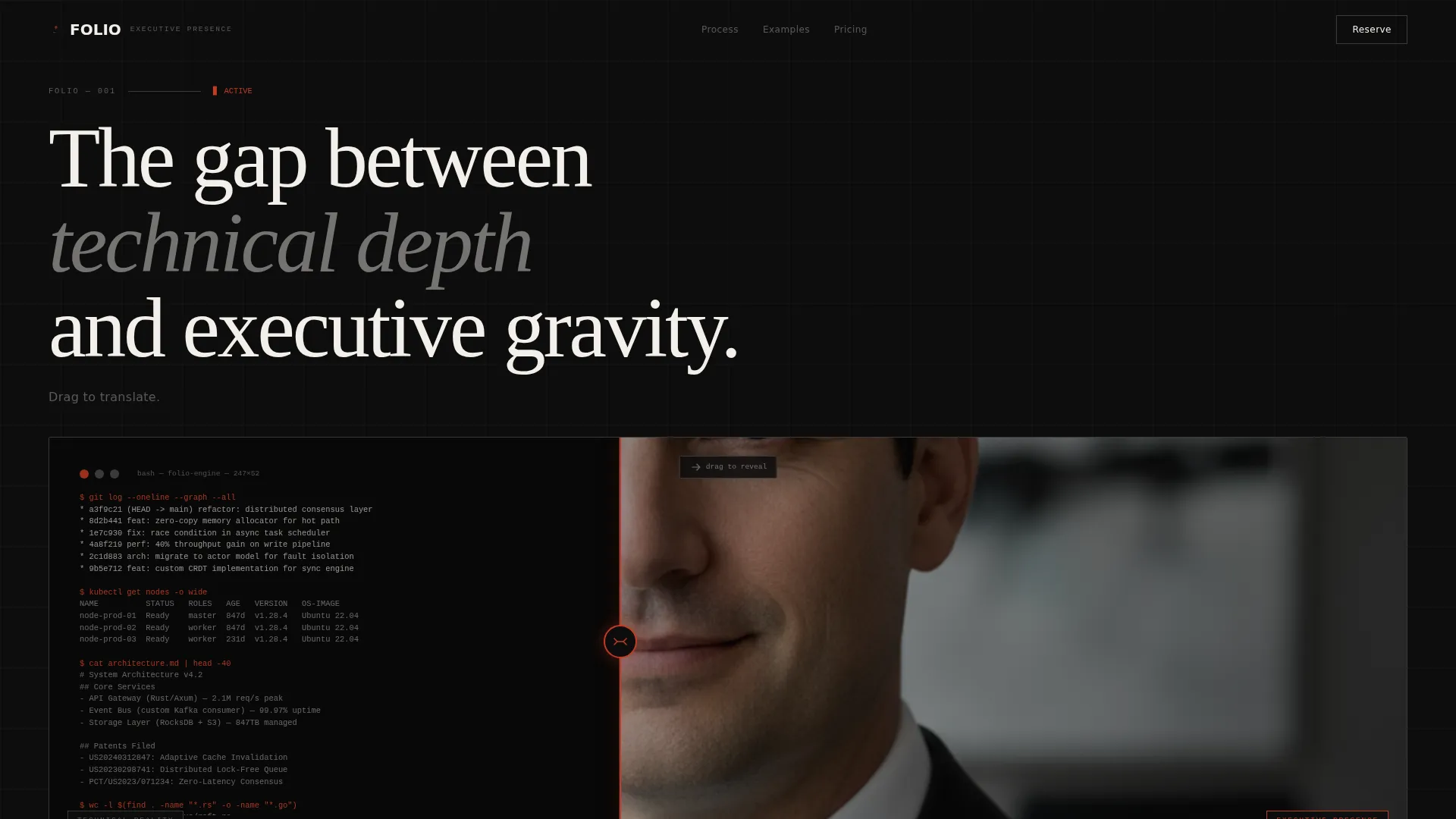
- A Before/After Slider header that dramatizes the transformation from raw technical output to executive portrait
- A metrics band, philosophy statement, and horizontal project timeline that build credibility section by section
- A waitlist form with email field, role-select dropdown, slot counter, and a secondary "See a Live Example" link
Feature list
This section describes the core built-in components included in the Folio template.
Before/After Slider Header
The header splits the viewport into two halves. The left side shows raw terminal output, commit logs, and system architecture diagrams. Dragging the slider right reveals a composed executive portrait with dramatic side lighting, clean typography, and a three-word title. The contrast communicates the core value proposition before a single word is read.
Oversized Metrics Band
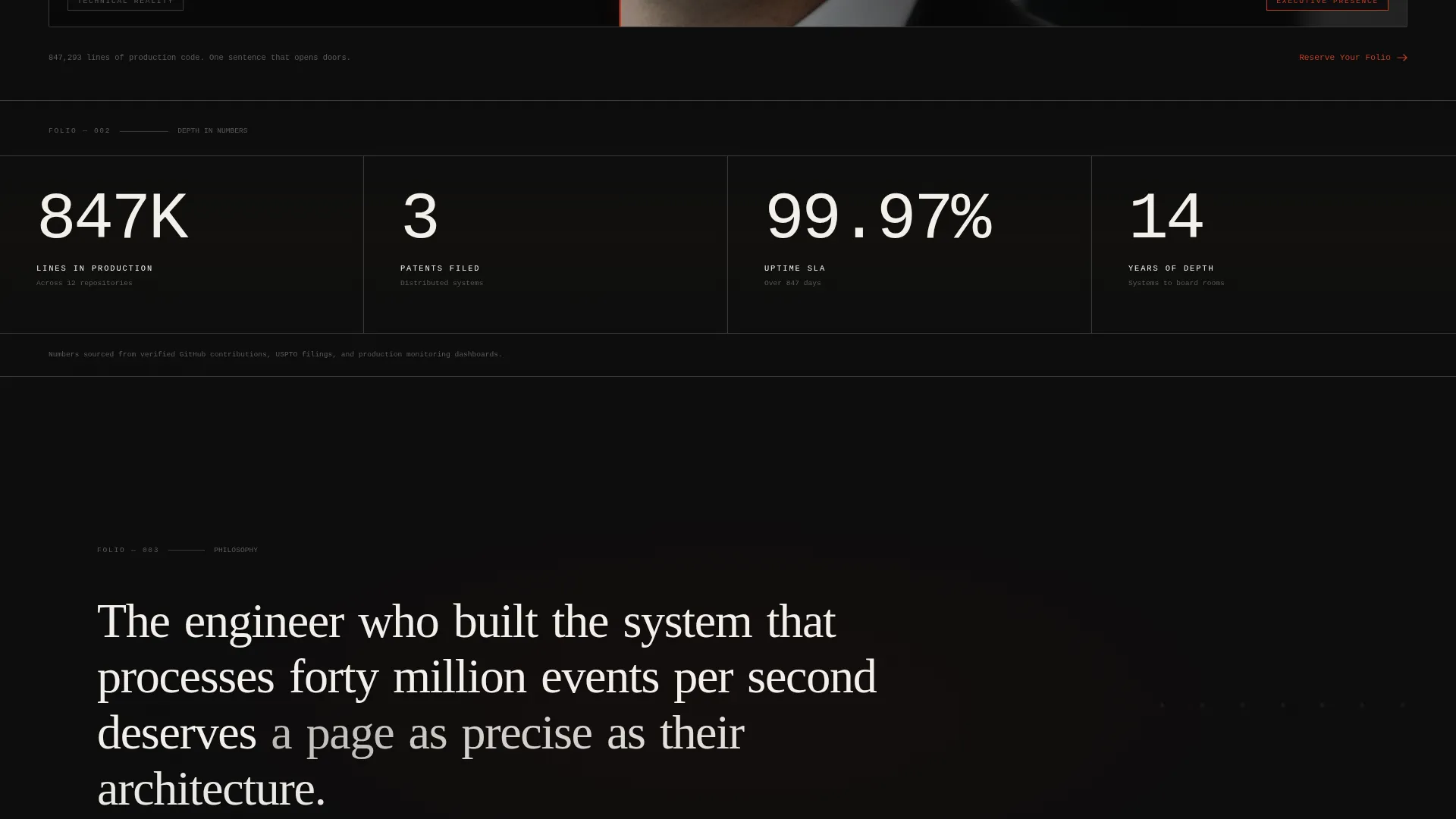
A dedicated band renders contribution counts, patent numbers, and similar career metrics in large tabular figures. The scale of the numbers does the persuading. No charts, no decorative elements, just the data given room to breathe.
Philosophy Statement Section
A single sentence spans a full viewport width, set in large serif type with generous letterspacing. The slow pacing of this section is intentional. It signals seniority and deliberate thought rather than rushing the visitor toward a call to action.
Horizontal Project Timeline
A curated project timeline unfolds horizontally across the page. Each node reveals detail on hover, letting the visitor explore depth at their own pace. The interaction reinforces the idea that this person's career has layers worth uncovering.
Waitlist Form with Role Selection
The conversion section includes a single email input field and a role-select dropdown. Options cover CTO, VP Engineering, Principal Engineer, and Founder. A subtle counter below the form shows the number of monthly slots remaining, framing limited availability as a mark of craft rather than urgency.
Secondary Social Proof Path
A "See a Live Example" link sits alongside the primary waitlist call to action. It routes visitors to a sample bio, reducing friction for those who want proof before committing. This two-path approach serves both ready-to-commit visitors and those who need one more reason.
Page sections overview
| Section | Purpose |
|---|---|
| Before/After Slider | Dramatizes the technical-to-executive transformation |
| Metrics Band | Displays career figures in oversized tabular type |
| Philosophy Statement | Sets a single-sentence thought across a full viewport |
| Project Timeline | Unfolds curated work history with hover-reveal nodes |
| Waitlist Form | Captures email and role with scarcity counter below |
| Live Example Link | Offers a friction-reducing secondary path to a sample bio |
Design & branding system
The visual identity follows a Dark Immersive theme built on an Ink and Paper color system. The palette is deliberately restricted: deep editorial black for backgrounds, warm parchment for body type, mid-tone graphite for secondary text and dividers, and a single accent of archival red reserved exclusively for interactive states and the call-to-action button. Red appears so rarely it carries the weight of a signature.
- Typography uses large serif type for the philosophy statement and monospaced type in the before-state of the slider, creating a clear visual contrast between the two worlds
- Sections fade in from darkness as the visitor scrolls, giving the experience a slow, page-turning quality that reinforces the editorial tone
- Color use is strict: parchment on black for primary content, graphite for supporting details, and archival red only where action is required
Mobile & speed optimization
The full-width immersive layout is structured to adapt across screen sizes without losing its editorial character. The before/after slider, oversized type, and horizontal timeline are designed to remain readable and usable on smaller viewports.
- Scroll-triggered fade-in animations are kept subtle so they do not interrupt the reading flow on mobile devices
- The waitlist form is compact by design, with a single field and a dropdown, making it easy to complete on any screen size
How this template helps you convert
Folio is structured to build trust before asking for commitment. The before/after demonstration does the selling, so by the time the visitor reaches the form, the value has already been made clear.
- The Before/After Slider shows the transformation immediately, anchoring the visitor's understanding of what the service delivers before any copy needs to explain it
- The scarcity counter below the waitlist form frames limited monthly slots as a quality signal, encouraging visitors who are already interested to act rather than return later
Other information about this template
Folio sits within the Personal and Resume category, specifically targeting the Tech Professional Executive Bio niche. It is designed for a Waitlist and Coming Soon use case rather than a live portfolio page, making it well-suited for professionals preparing a launch rather than those with a fully built presence. The template's deliberate pacing and immersive scroll experience make it distinct from conventional résumé or portfolio page layouts.
- The template is built as a single-page layout with a Full-Width Immersive structure, meaning all content lives within one scrollable experience
- The dark color system and editorial restraint are intentional positioning signals, communicating that the person behind the page values precision over decoration
- The role-select dropdown in the waitlist form (CTO, VP Engineering, Principal Engineer, Founder) also functions as a lightweight audience qualifier


Theme
Dark Immersive
Creative direction
Immersive Visual
Color system
Ink & Paper
Style
Full-Width Immersive
Direction
Waitlist/Coming Soon
Page Sections
Before/after Slider Header
Oversized Metrics Band
Philosophy Statement Viewport
Horizontal Project Timeline
Waitlist Form with Role Dropdown
Secondary Live Example Path
Related questions
Who is the Folio template built for?
Is this template designed for a live portfolio or a waitlist launch?
What does the Before/After Slider actually show?
What is the purpose of the scarcity counter below the form?
Can I customize the role options in the dropdown?



