Personal Website & Bio Pre-Launch Website Template
Folio is a horizontal scroll bio landing page built around a single creator's work, story, and presence. It moves visitors through a curated sequence of panels, name, portrait, philosophy, projects, and a waitlist close. Every design choice serves the work, not the interface. The template is ready for anyone building a professional bio page that needs to leave a lasting impression.
by Rocket studio
Quick summary
Folio is a single-panel horizontal scroll landing page for creative professionals. It presents one person's work, philosophy, and projects as a curated exhibition walk. The layout opens on a giant serif name, moves through a portrait and pull-quote, builds through project panels, and closes with a waitlist form designed to capture early interest with zero friction.
Who this template is for
Folio is built for independent creators and professionals who want their bio page to feel intentional, not templated. It suits people whose work speaks across multiple disciplines and whose reputation is still being built in public.
- Photographers, directors, writers, and designers who want a portfolio-adjacent bio
- Speakers and podcast guests who need a page a booker can scan in thirty seconds
- Freelancers and collaborators preparing for a launch or a public debut
What problem this template solves
Most bio pages either over-explain or under-deliver. They pile credentials into a sidebar, bury the work behind a navigation menu, or look like a resume printed to a screen. Folio removes those problems by structuring the page as an experience with a clear beginning, middle, and end.
- Visitors arrive and immediately understand who this person is and what they make
- The horizontal scroll creates a natural, guided pace so nothing feels skipped or rushed
- The waitlist close captures early interest before the full portfolio or booking system is live
What you get with this template
Folio delivers a fully structured horizontal scroll layout with a distinct visual identity and a conversion close built into the final panel. Every section is designed for a specific job, and nothing is decorative without purpose.
- A sequenced set of horizontal panels covering name, portrait, philosophy, projects, and waitlist
- A Cloud Canvas color system with a single amber accent reserved for interactive moments
- A waitlist panel with an email field, a call-to-action button, and a social proof counter
Feature list
Folio is built around a small set of deliberate, high-impact features. Each one earns its place in the layout.
Giant Serif Name Header
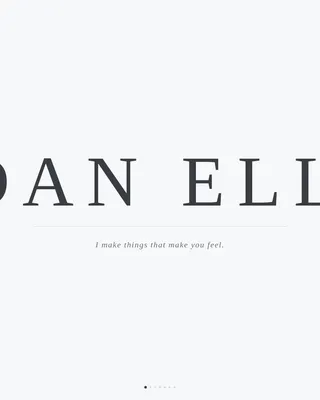
The opening panel sets a full-viewport headline using the creator's name in a thin-weight serif, wide-letterspaced and rendered in graphite on white. No image, no subtitle, no animation on load. A six-word italic descriptor fades in beneath the name after a single beat of stillness.
Horizontal Scroll Panel Sequence
The page moves right through seven distinct panels, following a Creator Spotlight arc. Each panel represents a chapter: name, portrait, philosophy, project cards, and the waitlist close. The sequence builds momentum and proves creative range without a single navigation click.
Full-Frame Portrait Panel
The second panel holds an uncropped portrait photograph that fills the entire frame. No overlay, no caption, no competing elements. The image does its job alone and hands the visitor directly to the philosophy statement that follows.
Oversized Pull-Quote Panel
The third panel renders a philosophy statement in large pull-quote type. The scale forces the visitor to slow down and read. It positions the creator's voice before the work is shown, so the projects that follow feel authored rather than assembled.
Project Cards with Slide-Up Captions
Each project panel is a full-bleed image with a caption that slides up as the panel arrives. The captions are concise and editorial. Moving through multiple project panels proves range across different mediums and collaborations without a separate case study section.
Waitlist Close with Social Proof
The final panel carries a single email input field, a call-to-action button labeled "Hold My Spot," and a small counter showing how many people have already joined. The amber button is the only warm color on the page. The counter seeds trust before the visitor decides to act.
Page sections overview
| Section | Purpose |
|---|---|
| Name headline panel | Opens with the creator's full name as a full-viewport serif headline |
| Portrait photo panel | Presents an uncropped portrait that fills the entire frame |
| Philosophy pull-quote | Delivers the creator's voice in oversized type before the work appears |
| Project card panels | Shows a run of full-bleed project images with slide-up editorial captions |
| Waitlist close panel | Captures email sign-ups with a counter, input field, and amber call to action button |
Design & branding system
The visual identity follows a Lens & Frame theme built on a Cloud Canvas color system. White dominates roughly eighty percent of the surface. Every other tone recedes so the work itself advances.
- Boundless white (#F7F8FA) as the dominant background, soft fog gray (#D4D7DD) for section dividers and card edges, and graphite (#3A3D42) for all body copy
- A single accent of developing-fluid amber (#E2A84B) appears only on hover states, active indicators, and the waitlist button
- Typography uses a thin-weight serif for the name headline, italic type for the six-word descriptor, and pull-quote scale for the philosophy panel
Mobile & speed optimization
The horizontal scroll experience is designed to translate cleanly across screen sizes. The layout is built to maintain its pacing and visual hierarchy on smaller viewports without collapsing the panel sequence into something unrecognizable.
- Panel transitions and slide-up captions are built to work with touch-based horizontal swipe gestures
- The restrained color system and minimal element count keep the visual load light across all panels
- The waitlist form is a single email field and one button, so it remains fully functional on mobile without reformatting
How this template helps you convert
Folio is structured as a waitlist landing page, so every design decision is pointed toward one action: getting the visitor to enter their email before the full archive opens.
- The horizontal scroll creates a guided, linear experience that ends at the waitlist panel, so visitors arrive at the form having already moved through the creator's name, face, philosophy, and work.
- The social proof counter above the email field shows how many people have already joined, giving late visitors a reason to act rather than wait.
- The amber button is the only warm color on the entire page, drawing the eye naturally to the single conversion point without competing visual noise.
Other information about this template
Folio sits in the Personal and Resume category, specifically within the Personal Website and Bio subcategory. It is purpose-built for the Professional Bio Page niche and carries an Intersection Match Score of 13, reflecting a tight alignment between the template style, theme, and landing page direction.
- The template style is Horizontal Scroll, the theme is Lens & Frame, and the creative direction follows a Creator Spotlight arc
- The landing page direction is Waitlist and Coming Soon, making it ideal for creators preparing a public debut before a full portfolio or booking system goes live
- The header concept is Giant Headline Centered, a deliberate choice that prioritizes the creator's name over any visual decoration on first load
Theme
Lens & Frame
Creative direction
Creator Spotlight
Color system
Cloud Canvas
Style
Horizontal Scroll
Direction
Waitlist/Coming Soon
Page Sections
Giant Serif Name Header
Horizontal Scroll Panel Sequence
Full-frame Portrait Panel
Oversized Pull-quote Panel
Project Cards with Slide-up Captions
Waitlist Close with Social Proof
Related questions
Who is Folio designed for?
What does the horizontal scroll layout look like in practice?
Can I use Folio before my full portfolio is ready?
How does the amber accent color work in the design?
How many project panels does the template include?



