Creative Director Portfolio Specialist Pre-Launch Website Template
Folio is a single-page bento grid landing page built for creative directors who want their work to speak before they do. It combines a full-bleed portrait header, an interactive project grid, and a waitlist modal into one cohesive experience. The Tech Glass visual theme and Cloud Canvas palette keep the design cool, minimal, and engineered to impress the right audience.
by Rocket studio
Quick summary
Folio is a single-page creative director portfolio landing page built on a bento grid layout. It pairs a full-bleed photo header with an interactive project archive, a category filter system, and a waitlist capture modal. The Tech Glass aesthetic and Cloud Canvas color system give the page a refined, engineered feel that lets the work take center stage.
Who this template is for
This template is designed for senior creative professionals who need a presence that communicates authority before a single case study loads. It works best for someone whose work is worth waiting for.
- Creative directors preparing for a freelance launch or studio debut
- Senior brand designers building a curated portfolio landing page for agency and startup clients
- Visual storytellers who want a coming-soon page that generates real demand before going live
What problem this template solves
Most portfolio pages show everything at once and end up feeling like a résumé dump. Folio flips that dynamic. It teases the work, earns curiosity, and converts that curiosity into a waitlist signup before the full case studies are even published.
- Unlaunched creative directors lose potential clients because they have no polished presence during the pre-launch window
- Static portfolio layouts fail to communicate the tactile, living quality of high-caliber creative work
- Generic contact forms do not signal exclusivity or create the urgency that drives early inquiries
What you get with this template
Folio delivers a complete single-page layout with every section needed to present a creative director's identity, hint at their body of work, and capture qualified leads before launch day.
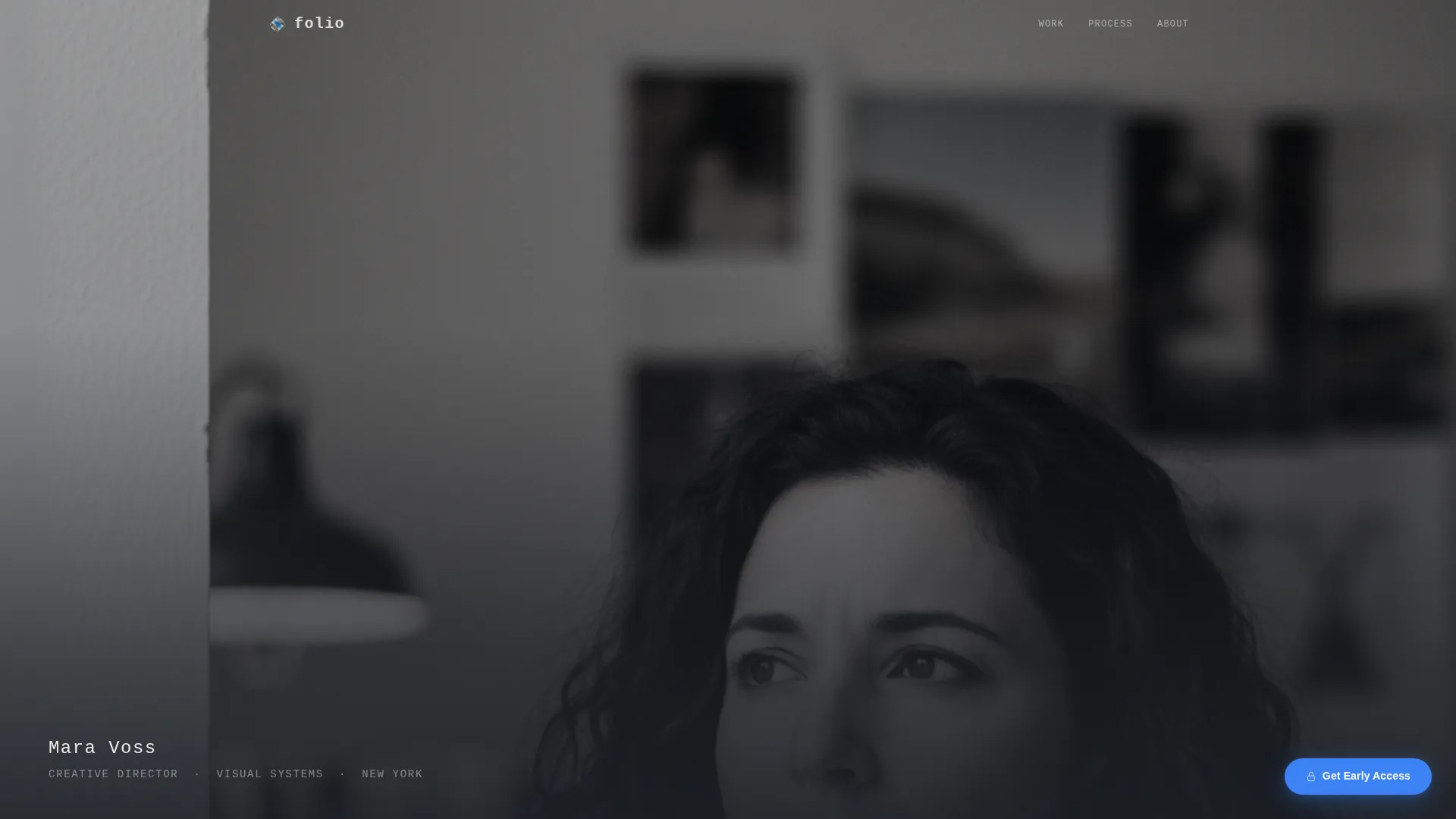
- A full-bleed photo header with a monospaced name and title fade-in animation
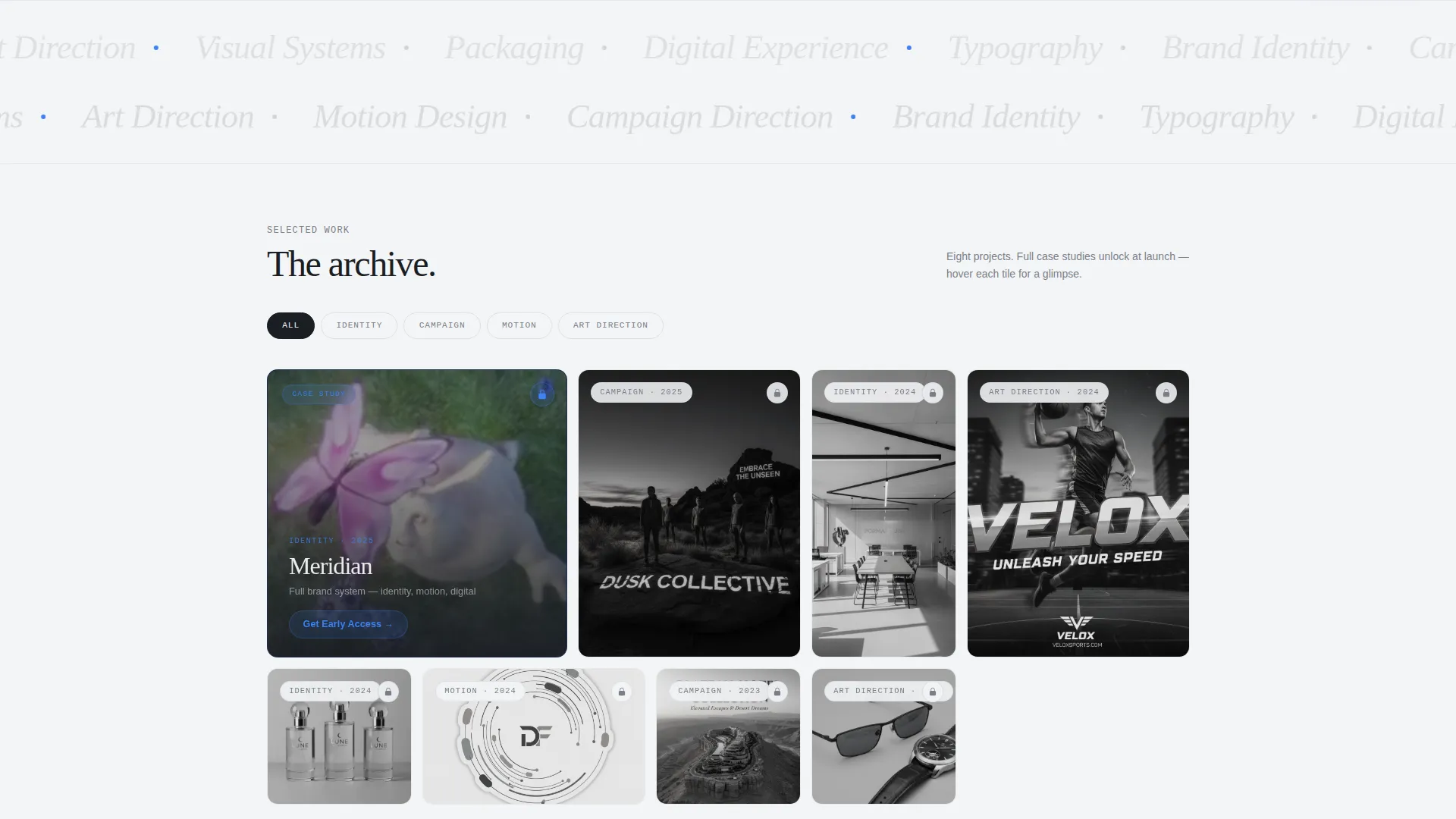
- A bento grid project archive with hover parallax, category filters, and one oversized case study tile with a looping video clip
- A floating "Get Early Access" pill button linked to a minimal waitlist modal with a scarcity counter
Feature list
This template packages interactive design details and conversion-focused layout choices into one cohesive creative director portfolio landing page.
Full-Bleed Photo Header
A high-contrast, desaturated portrait fills the entire viewport. The creative director's name and title appear in monospaced type at the bottom-left corner after a one-second fade-in delay, letting the image establish presence before any text competes for attention.
Interactive Bento Grid Archive
The project grid responds to hover with a slow parallax lift. Each card reveals a one-line role description and a muted thumbnail that shifts to full color on interaction. Scrolling subtly rearranges the grid, giving the page a sense of a living archive rather than a static layout.
Category Filter System
Four content categories, brand identity, campaign, motion, and art direction, filter the grid with a smooth shuffle animation. Visitors can narrow the view instantly without leaving the page or losing context.
Oversized Case Study Tile
One tile breaks the bento rhythm with a larger footprint and a looping three-second video clip. It functions as a teaser for the locked case studies, giving visitors a compelling reason to join the waitlist.
Floating Waitlist call to action
A signal-blue pill button labeled "Get Early Access" stays pinned to the bottom-right corner of the viewport as the user scrolls. It is always visible and always one click away from the conversion modal.
Waitlist Modal with Scarcity Counter
The modal collects a first name, email address, and one optional freeform field: "What are you looking for?" A counter below the form reads "47 people ahead of you," creating a sense of exclusivity without heavy-handed urgency.
Page sections overview
| Section | Purpose |
|---|---|
| Full-Bleed Header | Establish identity with a portrait and delayed name reveal |
| Monospaced Name Tag | Introduce the creative director's name and title after a pause |
| Bento Grid Archive | Display project tiles in an interactive, filterable layout |
| Category Filter Bar | Let visitors sort projects by brand, campaign, motion, or art direction |
| Oversized Feature Tile | Tease a flagship case study with a looping video clip |
| Floating call to action Button | Keep the waitlist action visible throughout the entire scroll |
| Waitlist Modal | Capture name, email, and intent with a scarcity counter |
Design & branding system
The visual identity follows a Tech Glass theme built on the Cloud Canvas color palette. Every design decision supports legibility, negative space, and the sense that the work on screen was made by someone with a precise eye.
- Color palette: frosted white (#F4F5F7), translucent panel gray (#D6DAE0), deep graphite (#1A1D23) for typography, and signal-blue (#3B82F6) reserved for interactive states and the waitlist call to action
- Glassmorphism layer: cards float with subtle background blur, 1px white borders at 12% opacity, and generous negative space between grid cells
- Typography: monospaced type for the name reveal; clean sans-serif body copy that reads as engineered rather than decorative
Mobile & speed optimization
The bento grid layout is structured to adapt gracefully across screen sizes. The floating pill button and modal remain functional on smaller viewports without cluttering the visual field.
- Grid cells restack vertically on mobile so project tiles remain tappable and readable without horizontal scrolling
- The full-bleed header scales to fill the viewport on any device, preserving the depth-of-field effect and the delayed name animation
- Hover states transition to tap interactions on touch devices, keeping the parallax and color-reveal behavior accessible on phones and tablets
How this template helps you convert
Every layout decision in Folio is pointed toward one outcome: turning a curious visitor into a waitlist signup before the full portfolio is even live.
- The locked-work model builds anticipation. Visitors browse real project tiles and see enough to want more, which makes clicking "Get Early Access" feel earned rather than forced.
- The scarcity counter inside the modal ("47 people ahead of you") signals that other qualified people have already committed, adding social proof at the exact moment of decision.
- The optional "What are you looking for?" field pre-qualifies leads by collecting intent data at signup, so the creative director knows what each person wants before any conversation begins.
Other information about this template
Folio is built specifically for the creative director minimalist portfolio niche, where restraint and precision carry more weight than feature volume. A few additional details worth knowing:
- The template is categorized under Portfolio and Agency, with a subcategory focus on creative director portfolio presentation
- The bento grid template style is well-suited for archiving diverse project types, campaigns, rebrands, and visual systems, without forcing a linear narrative
- The coming-soon and waitlist direction means the page generates professional credibility and lead capture simultaneously, even before any case study goes public
- The single optional form field ("What are you looking for?") is designed to feel like a concierge intake, not a mass-market signup form
- Signal-blue (#3B82F6) appears only on interactive states and the call-to-action button, keeping the rest of the palette neutral and work-forward
Theme
Tech Glass
Creative direction
Interactive Explorer
Color system
Cloud Canvas
Style
Bento Grid
Direction
Waitlist/Coming Soon
Page Sections
Full-bleed Portrait Header
Interactive Bento Grid
Category Filter with Shuffle Animation
Oversized Case Study Tile
Floating Waitlist Call to Action Button
Waitlist Modal with Scarcity Counter
Related questions
Can I use this template before my case studies are finished?
How does the category filter work?
What does the waitlist modal collect?
Is the Get Early Access button always visible while scrolling?
Who is this landing page designed to attract?



