Farrier FAQ Website Template
Forge is a single-page farrier FAQ and resource landing page built around real-world shoeing scenarios, editorial case studies, and side-by-side comparison tables. It serves apprentices, journeymen, and horse owners who need authoritative hoof-care reference material fast. The Monochrome Steel visual system and stats-driven header make complex corrective shoeing data easy to scan and trust.
by Rocket studio
Quick summary
Forge is a content and resource landing page designed for the farrier trade. It opens with a bold stats dashboard, then walks readers through narrative case studies covering corrective shoeing, hoof pathology, and therapeutic shoe options. Comparison tables, gated reference downloads, and ungated pathology guide links give every visitor a clear next step.
Who this template is for
This template is built for professionals and learners who work directly with hoof care and need reliable, structured reference material in one place.
- Apprentice farriers studying toward American Farriers Association (AFA) certification who need organized, scannable study material
- Journeyman farriers troubleshooting complex cases such as club foot, navicular syndrome, or laminitis
- Horse owners trying to understand corrective shoeing recommendations from their farrier or trimmer
What problem this template solves
Farrier knowledge is scattered across journals, forums, and word-of-mouth advice passed between appointments. There is no single, well-organized digital destination that covers corrective angles, forge temperatures, shoe materials, and hoof pathology in one readable place.
- Readers waste time hunting across multiple sources for information they could find in one reference page
- Comparison data for shoe types, correction angles, and material costs is rarely presented side by side in a clear format
- Horse owners lack a plain-language resource that bridges the gap between professional recommendations and their own understanding
What you get with this template
You get a fully structured single-page layout built to function as a professional farrier reference hub. Every section is designed to deliver value before asking anything from the reader.
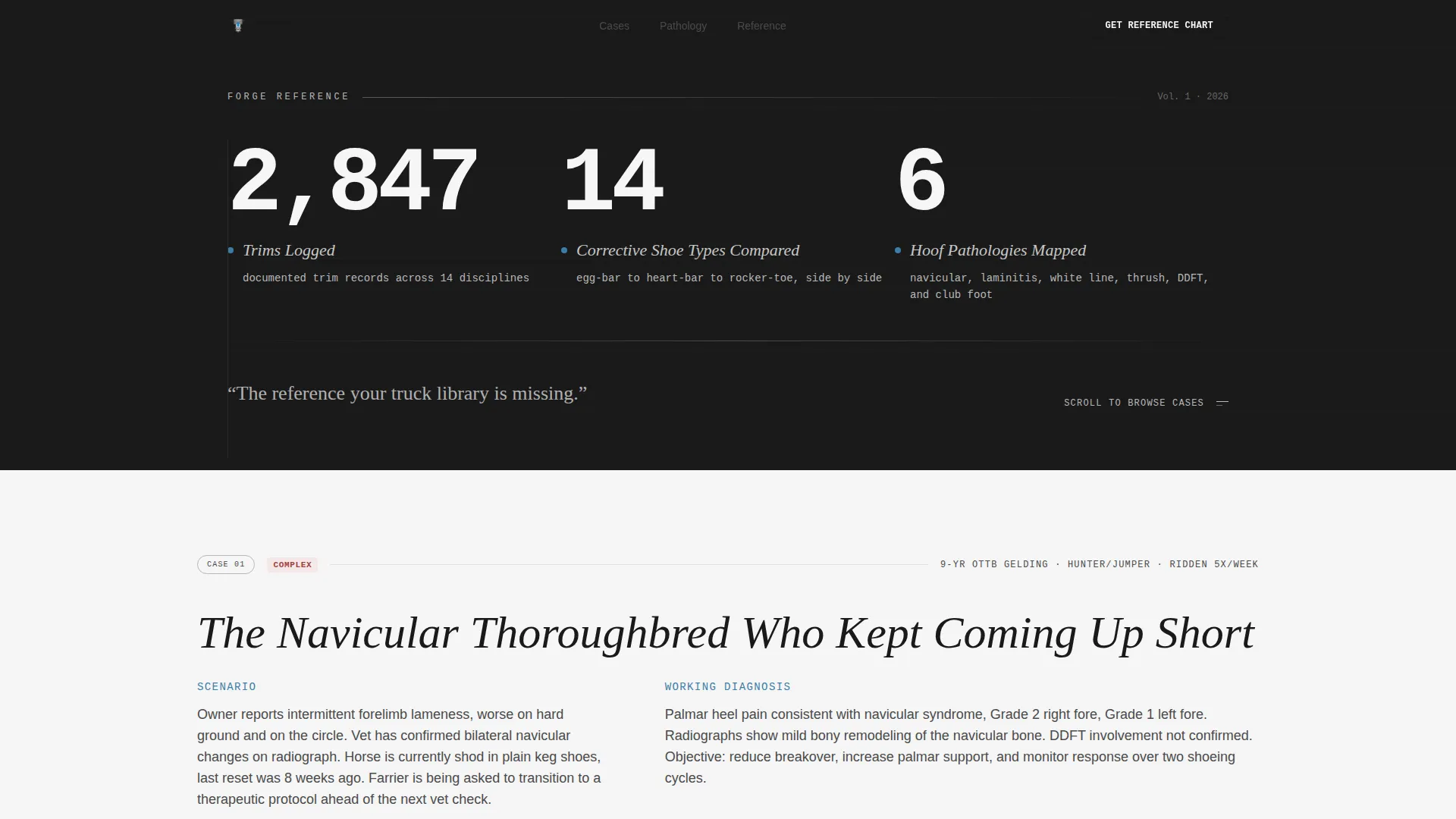
- A stats-led header dashboard displaying key figures such as trims logged, shoe types compared, and hoof pathologies mapped
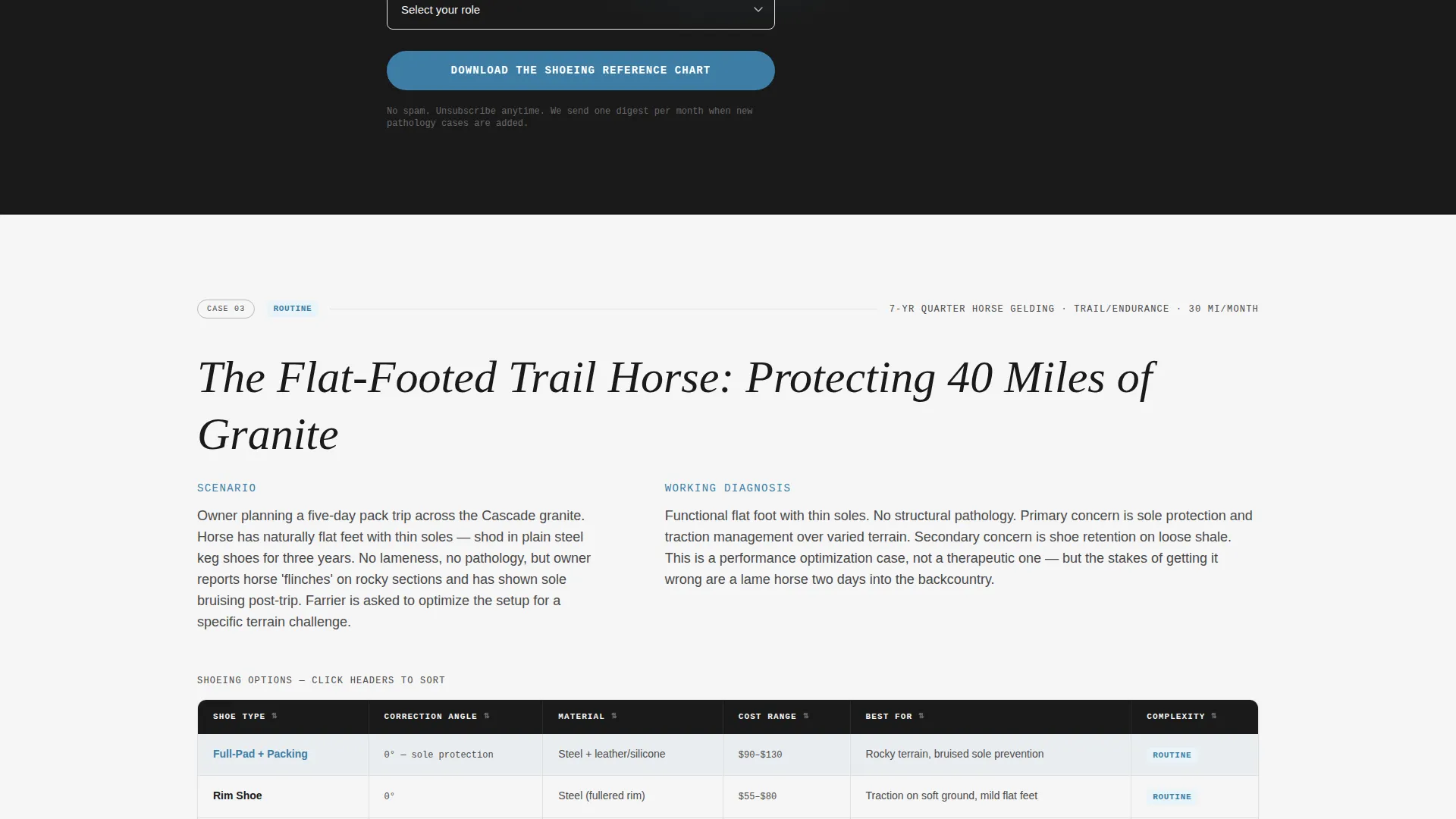
- Editorial case study sections covering real-world scenarios including a navicular Thoroughbred, a laminitic pony, and a flat-footed trail horse
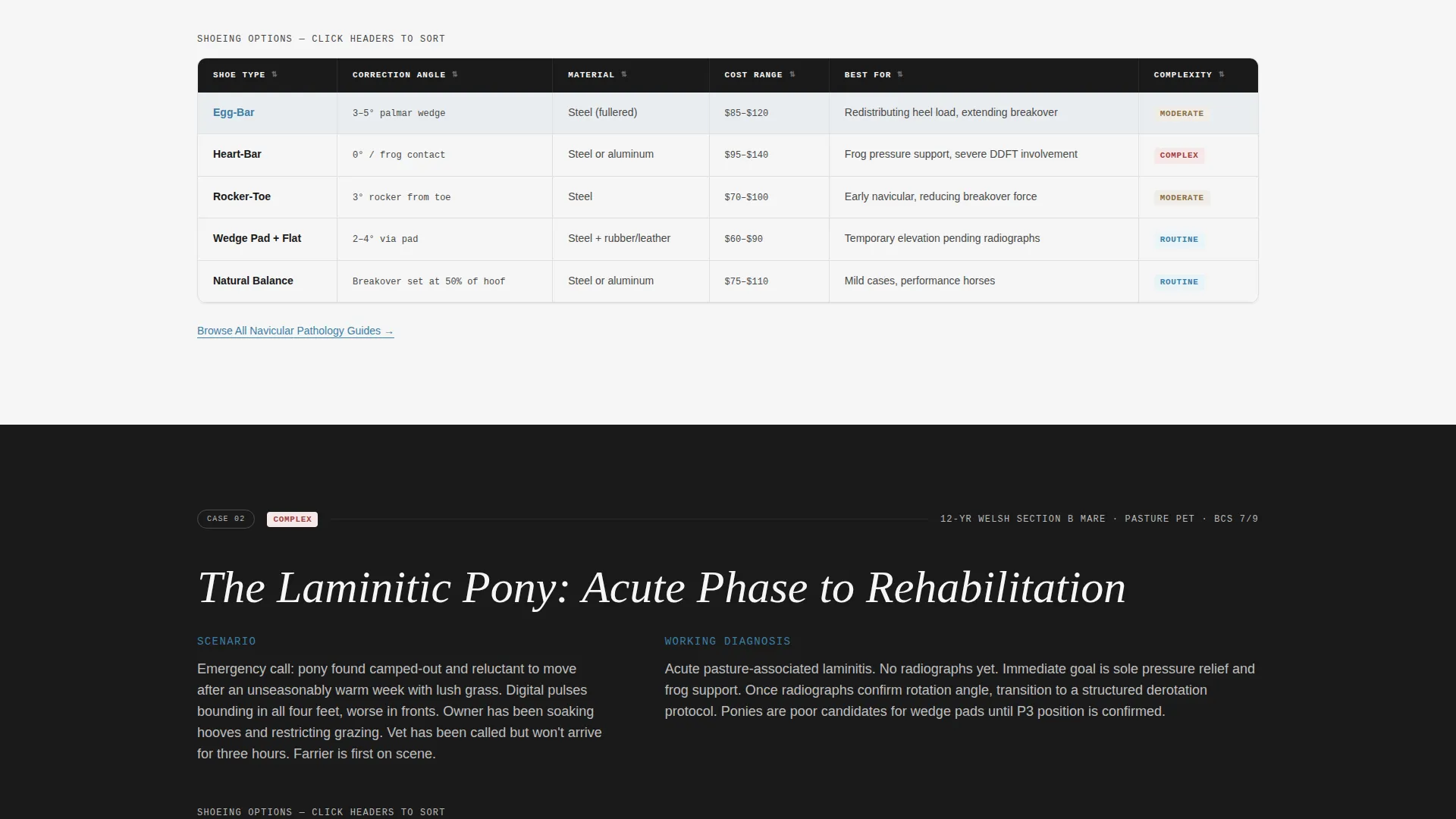
- Inline comparison tables breaking down shoe type, correction angle, material, and cost within each case study
Feature list
This template is built around a specific set of content and layout components drawn directly from the brief. Each feature serves a practical purpose for the farrier audience.
Stats and Metrics Dashboard Header
The header opens with bold editorial numerals at display scale against anvil black. Key figures such as trims logged, corrective shoe types compared, and hoof pathologies mapped dominate the viewport. A thin silver rule separates each metric, and a single line of body text anchors the visual: "The reference your truck library is missing."
Case Study Narrative Sections
Each scroll section presents a real-world shoeing scenario written in short editorial case format. The narrative escalates from routine maintenance trims to complex therapeutic shoeing. Readers gain more specialized knowledge the further they scroll, rewarding those who need rarer clinical detail.
Inline Comparison Tables
Within each case study, a structured comparison table lets readers scan shoe type, correction angle, material, and cost side by side. Active table headers use the quench-water blue accent to orient readers at a glance. This format mirrors the way a working farrier would compare specs before making a field decision.
Gated Reference Chart Download
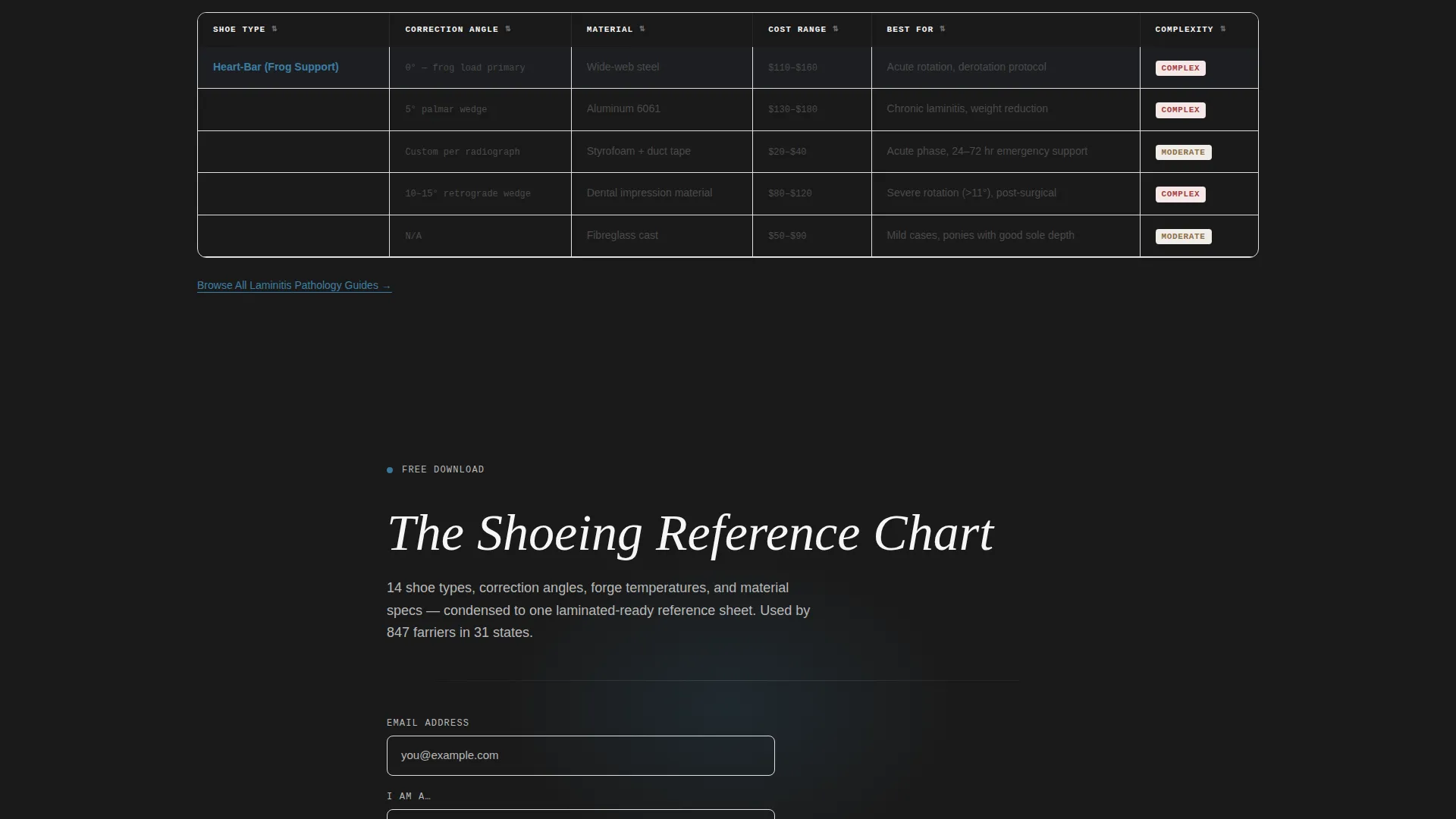
After the second case study, a primary call-to-action prompts visitors to download the Shoeing Reference Chart. The form asks only for an email address and reader type (farrier, apprentice, or horse owner). The ask is intentionally minimal and placed after enough editorial content to establish trust.
Ungated Pathology Guide Links
Beneath each comparison table, a secondary text link reads "Browse All Pathology Guides." This keeps resource-seeking visitors moving through the page without requiring a gate. It creates a secondary circulation path for readers who are not yet ready to convert.
Editorial Magazine Visual System
The layout follows an Editorial Magazine theme with a Monochrome Steel palette. No imagery is used in the header. The data and typography carry all visual weight, giving the page a clean, authoritative feel suited to a professional trade audience.
Page sections overview
| Section | Purpose |
|---|---|
| Stats Dashboard Header | Open with bold key metrics to establish authority instantly |
| Hero Body Line | Anchor the stats with a single editorial positioning statement |
| Case Study One | Cover a navicular Thoroughbred scenario with a shoe comparison table |
| Case Study Two | Present a laminitic pony case with corrective option comparisons |
| Primary call to action Block | Prompt the Shoeing Reference Chart download after trust is built |
| Case Study Three | Address a flat-footed trail horse with maintenance trim comparisons |
| Pathology Guide Links | Provide ungated secondary navigation beneath each comparison table |
| Resource Footer Area | Close the page with additional context and secondary orientation |
Design & branding system
The visual identity is built around an Editorial Magazine theme using a Monochrome Steel color system. Every design decision prioritizes clarity and authority over decoration.
- Core palette: anvil black (#1A1A1A), forge-scale gray (#4A4A4A), cold-rolled silver (#B8B8B8), and horseshoe-bright white (#F5F5F5)
- Single accent color: quench-water blue (#3D7EA6) used exclusively for hyperlinks, the primary call-to-action button, and active comparison table headers
- Typography uses condensed sans-serif at display scale for metric numerals, paired with editorial body text and thin silver rules as structural dividers
Mobile & speed optimization
The template is designed with a content-first layout that stays readable and functional across screen sizes. The no-imagery header approach keeps the initial load visually clean and structurally simple.
- Comparison tables are structured to remain scannable at smaller viewport widths without losing column clarity
- The stats dashboard uses typographic weight and scale rather than heavy image assets, keeping the layout lightweight by design
How this template helps you convert
Forge uses a trust-first editorial approach to move visitors toward two clear actions without pressuring them too early.
- The gated download call to action appears only after two case studies have delivered genuine value, so readers arrive at the form already convinced the reference chart is worth their email address.
- The ungated "Browse All Pathology Guides" links beneath each table keep non-converting visitors engaged and circulating, increasing the chance they return or share the resource.
Other information about this template
This template is well suited to farriery professionals, trade educators, and equine health content publishers who need a credible digital reference destination. The layout structure can also support hoof-care curriculum pages, professional development resources, and certification study aids.
- The template style is a Comparison Table layout paired with a Case Study Narrative creative direction
- The header concept is a Stats and Metrics dashboard with no reliance on photography or illustration
- The page direction is Content and Resource, meaning the primary goal is delivering useful information before converting
- The color system is labeled Monochrome Steel and is designed to feel like a freshly dressed anvil face: no warmth, no ornamentation, just clean purpose
Theme
Editorial Magazine
Creative direction
Case Study Narrative
Color system
Monochrome Steel
Style
Comparison Table
Direction
Content/Resource
Page Sections
Stats and Metrics Dashboard Header
Case Study Narrative Sections
Inline Shoe Comparison Tables
Gated Reference Chart Download
Ungated Pathology Guide Links
Related questions
Who is the Forge template designed for?
What kind of content does this landing page template include?
Do visitors need to fill out a form to access the page content?
Can I adapt the case studies to different horse types or hoof conditions?
What makes the visual design feel authoritative rather than generic?



