SaaS Mastermind Community Landing Page Template
Forge is an editorial landing page template built for SaaS founders running a private mastermind community. It combines an animated member mosaic header, magazine-style member profiles, oversized pull-quote breaks, and a two-path application form. The result is a warm, intimate page that makes visitors feel like they already know people inside the room before they apply.
by Rocket studio
Quick summary
Forge is a single-page landing page template designed for a private SaaS builders mastermind group. It blends editorial magazine design with community social proof to drive founder applications. The layout moves visitors through member stories, raw pull-quotes, and a clear "Apply for a Seat" form, making the room feel real before anyone fills out a field.
Who this template is for
This template is built for operators who run or plan to run a paid or curated mastermind community for SaaS founders. If your community thrives on peer accountability and real numbers, this layout communicates that directly.
- Founders building a private SaaS builders mastermind and needing a lead generation page
- Community operators who want to attract solo founders and small two-person SaaS teams at early monthly recurring revenue stages
- Bootstrapped community builders who want intimacy and trust over polished corporate design
What problem this template solves
Most community landing pages look like event ticketing sites. They list benefits in bullet points and paste in a few star ratings. That approach fails for high-trust, selective groups where applicants need to feel the room before they commit.
- Generic community templates do not communicate intimacy or peer credibility
- Founders evaluating exclusive rooms need social proof through stories, not logos
- A plain sign-up form feels low-stakes and attracts the wrong applicants
What you get with this template
Forge delivers a complete editorial landing page that earns trust through design and storytelling. Every section is intentional and sourced from a real community brief.
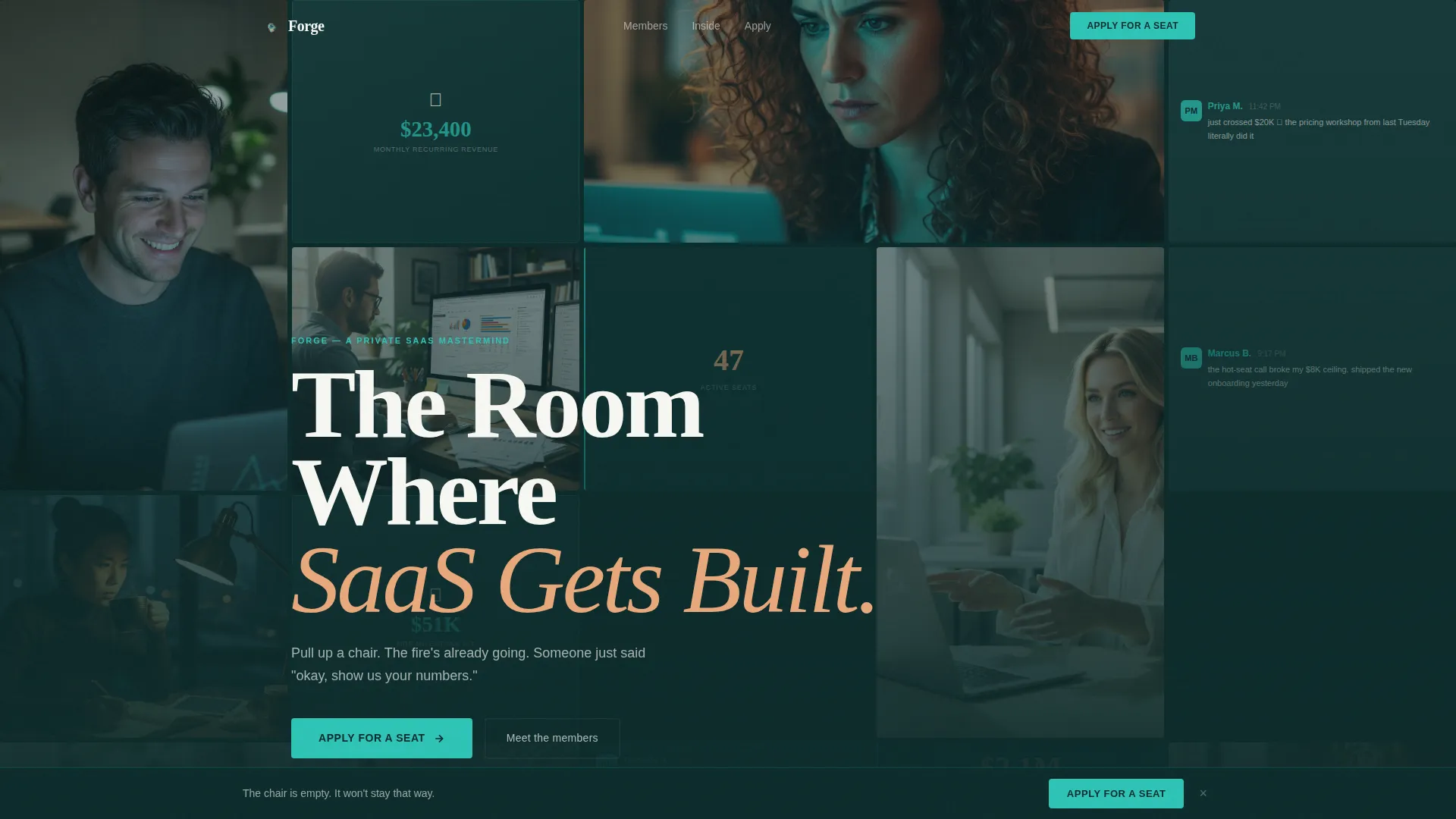
- An animated masonry hero grid that tiles member photos, product screenshots, and Slack milestone snippets across the full viewport
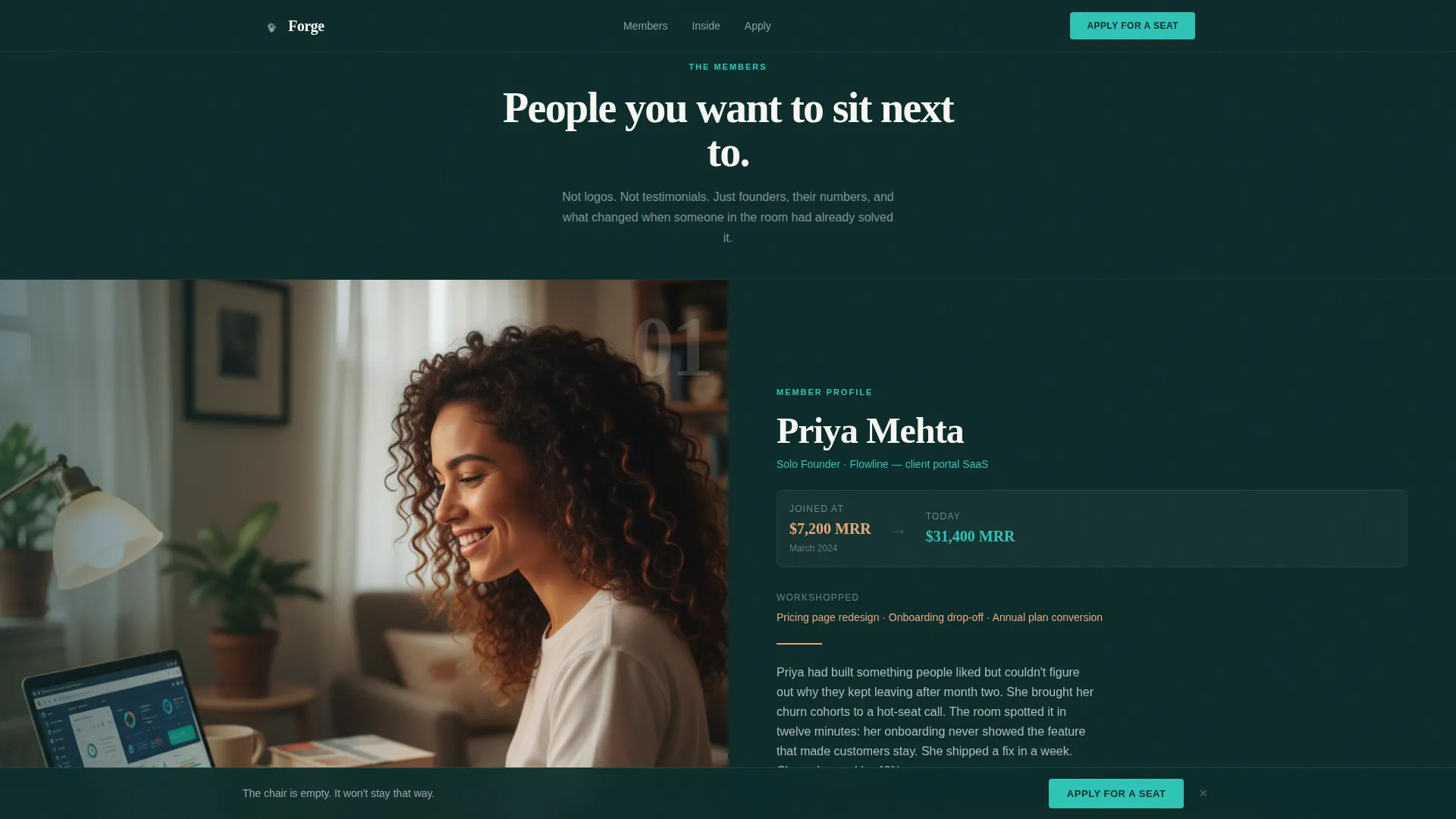
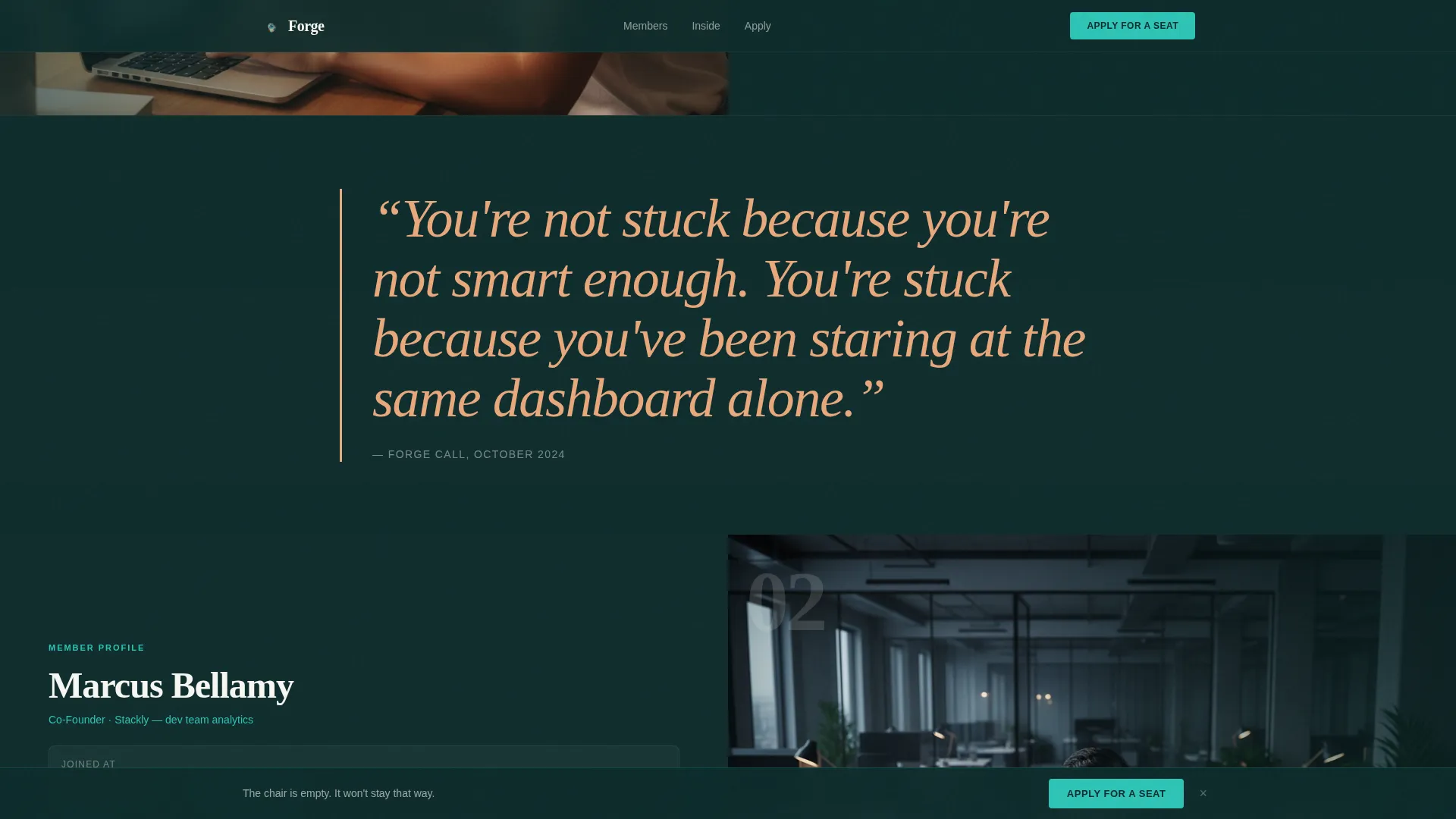
- Three magazine-style member profile spreads with before-and-after story arcs alongside oversized ember pull-quote breaks
- A two-path application section with the primary "Apply for a Seat" form and a secondary "Sit In on a Session" guest pass option
Feature list
This template is built around a specific set of design and interaction capabilities described in the source brief.
Breathing Mosaic Hero Header
The header is a full-viewport masonry grid that tiles real member photos, product dashboards, Slack snippets, and monthly recurring revenue milestone celebrations. Tiles softly fade and swap on a timed cycle, giving the grid a living quality. A large serif editorial headline overlays the mosaic.
Magazine Member Profile Spreads
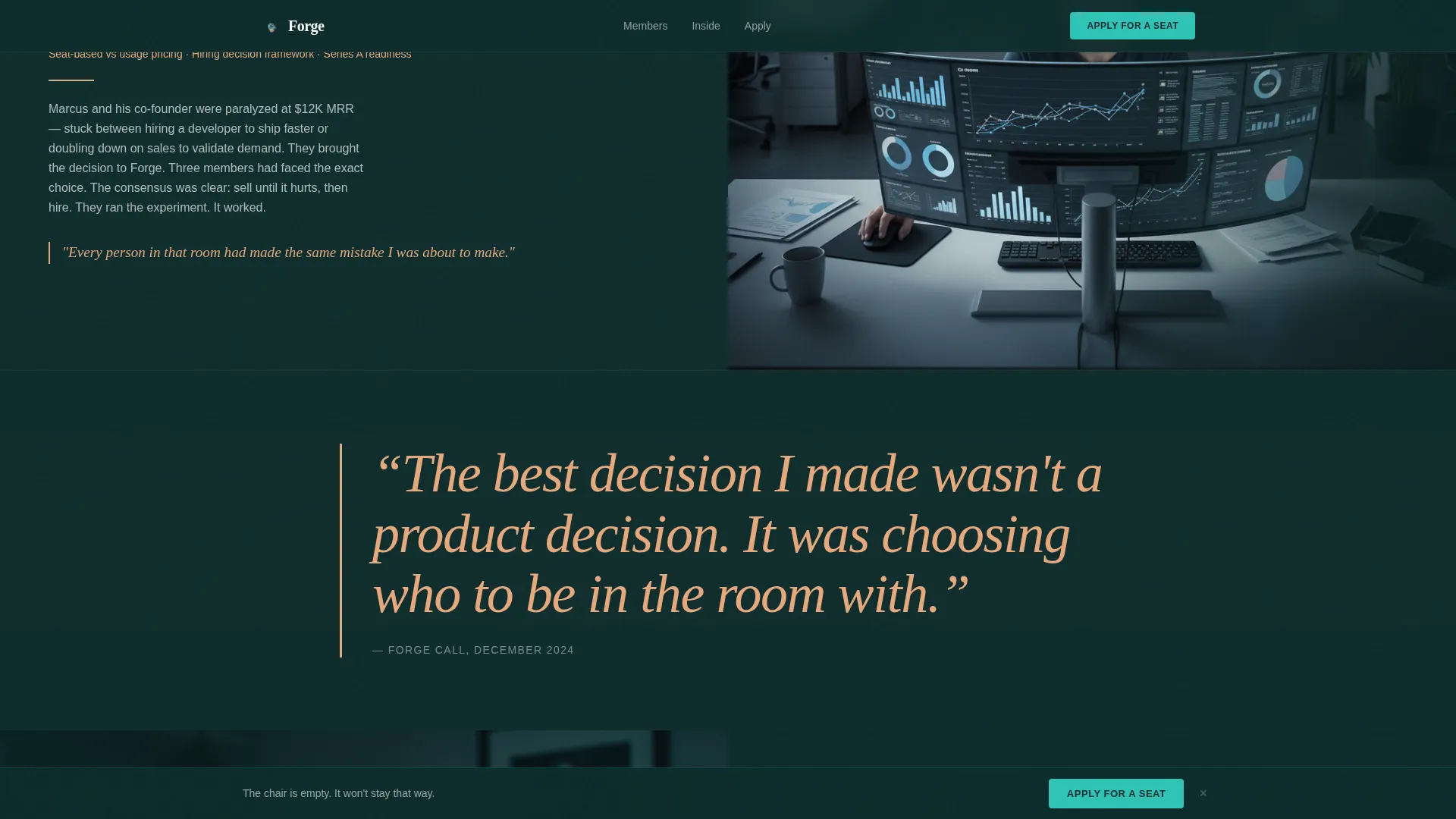
Three member profiles are laid out as editorial magazine spreads. Each spread pairs a founder photo on one side with a written story arc on the other, covering where they were when they joined, what they workshopped inside the community, and where they are now.
Oversized Pull-Quote Breaks
Between each member profile, the layout inserts full-width pull-quote callouts in warm ember color. These quotes are styled in oversized type to break the reading rhythm and deliver raw lines from real community calls.
Two-Path Application Section
The primary call to action is an "Apply for a Seat" form collecting first name, SaaS product URL, current monthly recurring revenue range via dropdown, and an open text field asking what the applicant is stuck on. A secondary path offers a "Sit In on a Session" guest pass to lower commitment while still capturing the lead.
Sticky Apply Button
A catalyst teal "Apply for a Seat" button is pinned to the bottom of the viewport on scroll. It activates after the third member profile, keeping the primary conversion action visible without interrupting the editorial reading experience.
Scroll-Reveal and Parallax Animations
Profile spreads and pull-quotes enter the viewport with scroll-reveal transitions. Pull-quote sections use a subtle parallax effect to reinforce the editorial pace and give the page a premium, high-production feel.
Page sections overview
| Section | Purpose |
|---|---|
| Hero Mosaic Grid | Opens with animated member tiles and editorial headline |
| Who's In The Room | Three magazine profile spreads with founder story arcs |
| Pull-Quote Breaks | Ember-colored oversized quotes between member profiles |
| How It Works | Explains hot-seat calls, MRR teardowns, and pricing workshops |
| Apply for a Seat | Primary application form with dropdown and open field |
| Guest Pass Path | Secondary "Sit In on a Session" low-commitment lead capture |
| Footer | Linear single-row footer pattern |
Design & branding system
The visual identity follows a Community Hearth theme using the Teal Catalyst color system. The palette is designed to feel like a late-night cofounder conversation, dim, warm, and quietly electric.
- Color palette: deep hearthstone (#0D2B2B) for backgrounds, catalyst teal (#2EC4B6) for accents and calls to action, warm ember (#E8A87C) for pull-quote typography, and clean chalk (#F7F7F2) for body text and open space
- Typography pairing: Fraunces serif for editorial headlines and section titles, DM Sans for body copy and interface elements
- Visual style: dark, editorial, and intimate, built to feel like a printed magazine opened late at night rather than a polished SaaS marketing site
Mobile & speed optimization
The template is designed desktop-first, reflecting how founders typically review community pages late at night on a laptop. It is built to be fully responsive for mobile viewing.
- Desktop-first layout prioritizes the wide editorial spread and side-by-side magazine columns
- The mosaic animation and sticky call-to-action button are implemented as client-side components, while static sections use server-side rendering for reliable load performance
- Responsive mobile layout adapts the masonry grid and profile spreads to single-column stacking without losing the editorial tone
How this template helps you convert
Every design decision in Forge is pointed at one outcome: making a founder feel like the empty chair is theirs before they see the form.
- The breathing mosaic header places real member faces and milestone moments at the top of the page, building immediate social proof through intimacy rather than statistics or logo walls
- The magazine profile spreads walk visitors through before-and-after founder stories, creating the feeling of already knowing people inside the room and making the application feel like a natural next step
- The two-path conversion section reduces commitment friction by offering a free guest session pass alongside the full application, capturing leads at two different levels of readiness
Other information about this template
Forge is built specifically for the SaaS builders mastermind niche, but the layout can adapt to any founder community or peer accountability group that relies on story-driven social proof and selective application.
- The template is categorized under Community and Nonprofit with a SaaS Builders Community subcategory
- Animation level is high: the mosaic uses tile fade-and-swap cycling, profile sections use scroll reveals, and pull-quotes use parallax transitions
- The form includes a monthly recurring revenue range dropdown with five tiers: pre-revenue, $0 to $5K, $5K to $15K, $15K to $50K, and $50K and above
- The footer follows a linear single-row pattern consistent with the editorial layout
- The template style is classified as Editorial and Magazine with a Community Hearth theme
Theme
Community Hearth
Creative direction
Community Gallery
Color system
Teal Catalyst
Style
Editorial/Magazine
Direction
Lead Generation
Page Sections
Breathing Mosaic Hero Header
Magazine Member Profile Spreads
Oversized Ember Pull-quote Breaks
Two-path Application Form
Sticky Catalyst Teal Apply Button
Scroll-reveal and Parallax Transitions
Related questions
What type of community is this landing page template designed for?
What sections are included in this landing page template?
Can the application form fields be customized?
Does this template work for communities that are not SaaS focused?
What animation features does this template include?



