Ironworker Business Comparison Website Template
Forge is a single-page quote request landing page built for union ironworkers and structural steel contractors. It combines an authority-first header with carrier badge rows, named underwriter profiles, and side-by-side coverage comparison tables. The page targets liability coverage, builder's risk, and surety bond inquiries with a B2B-focused form and a secondary guide download path.
by Rocket studio
Quick summary
Forge is a quote request landing page designed for ironworkers and structural steel contractors who need verified insurance coverage fast. The layout leads with carrier credential badges, moves through named underwriter panels, and closes every comparison table with a direct quote call to action. It converts high-intent contractors before they fill a single field.
Who this template is for
This template is built for professionals in the structural steel and ironwork trades who need to secure coverage before a job begins. It speaks their language and answers the questions they already have.
- Union ironworkers and shop stewards filing compliance paperwork for prevailing-wage projects
- Independent structural steel contractors pursuing bridge rehabilitation contracts from state departments of transportation
- Safety directors renewing wrap-up policies under tight pre-mobilization deadlines
What problem this template solves
Contractors in the ironwork trades lose bid opportunities when their insurance documentation is incomplete or hard to verify. A generic insurance landing page does not answer trade-specific questions. Forge closes that gap.
- Lack of trust signals delays the decision to request a quote from a specialty insurer
- Contractors cannot easily compare how liability coverage, builder's risk, and surety bonds respond to real jobsite scenarios
- Prospects in early bid-prep need a secondary path to engage before they are ready to commit to a full quote
What you get with this template
Forge delivers a complete single-page layout with every section pre-built for the structural steel insurance niche. You get authority design, structured content zones, and two distinct conversion paths out of the box.
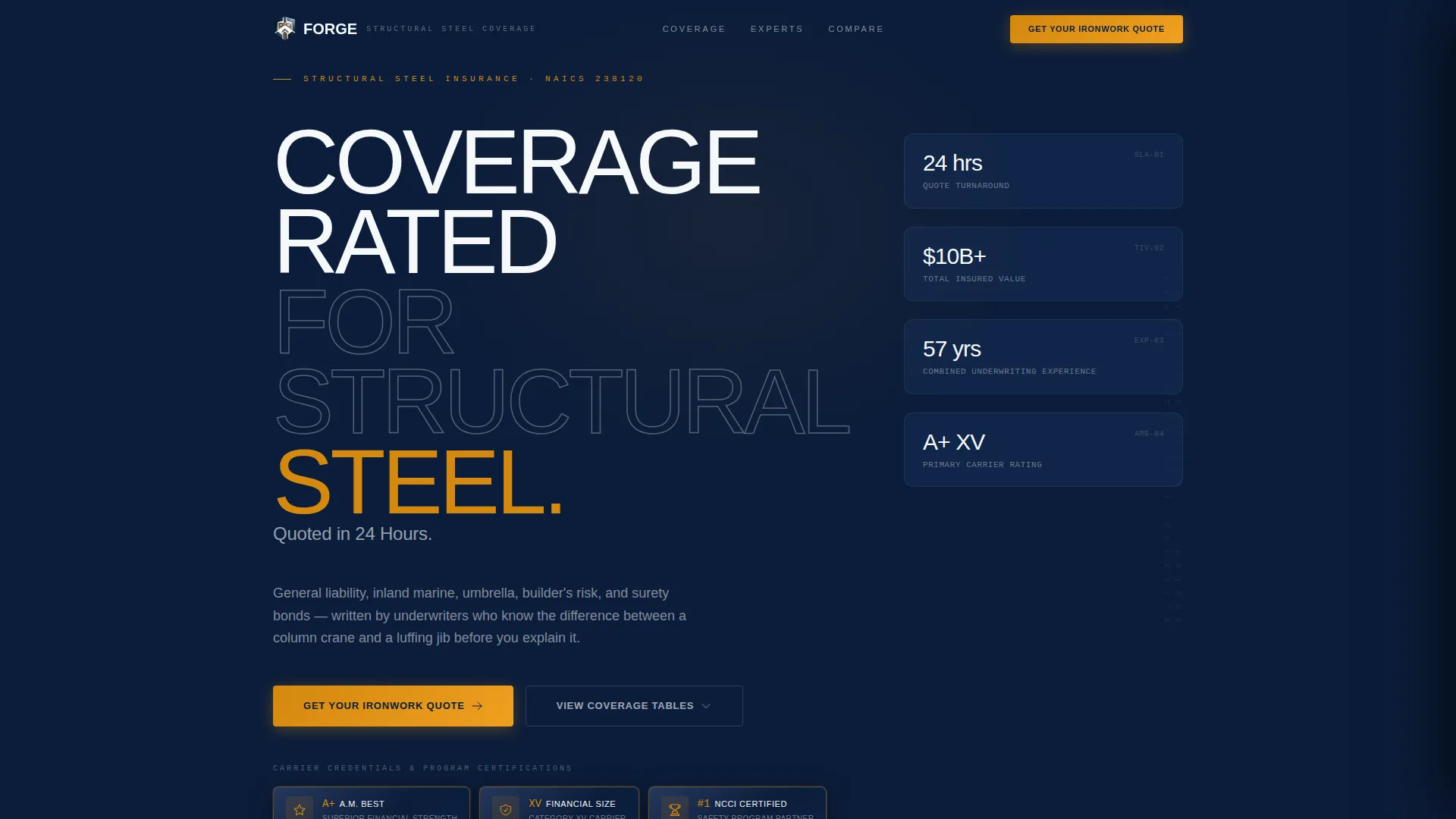
- An embossed badge header row featuring carrier ratings, safety certifications, union trust endorsements, and specialty insurer distinctions
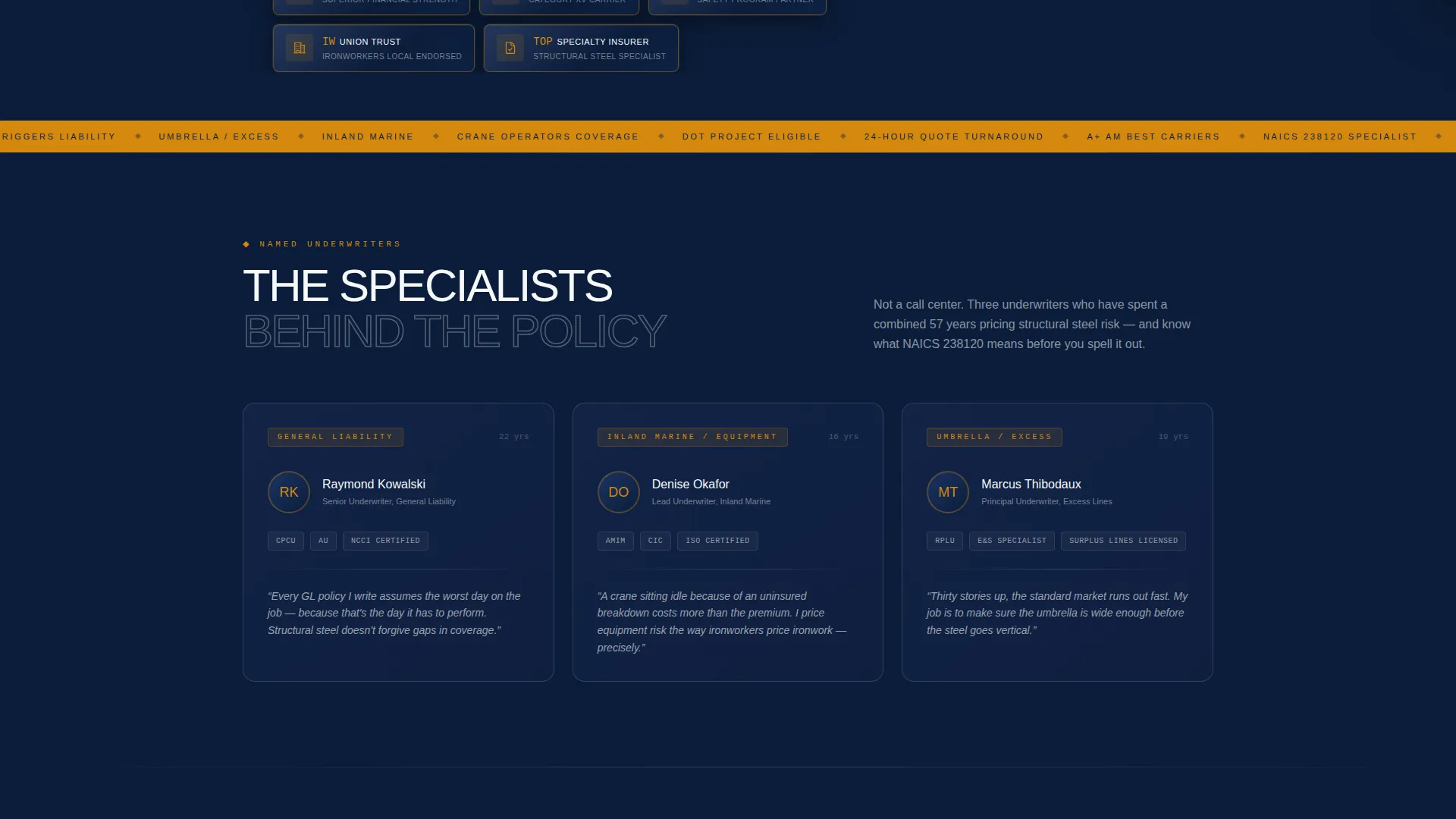
- Three named underwriter profile cards covering general liability, inland marine and equipment, and umbrella and excess coverage classes
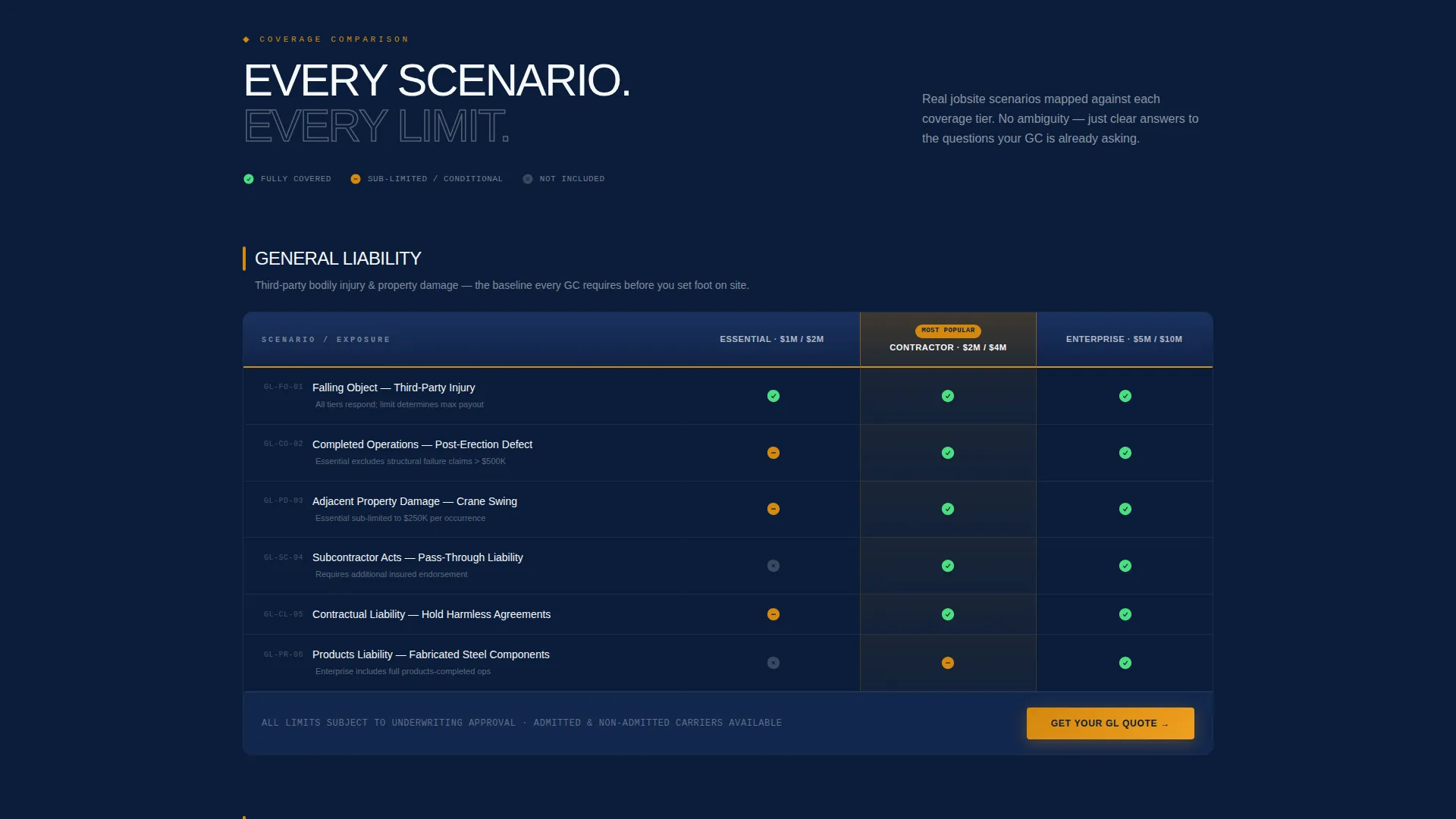
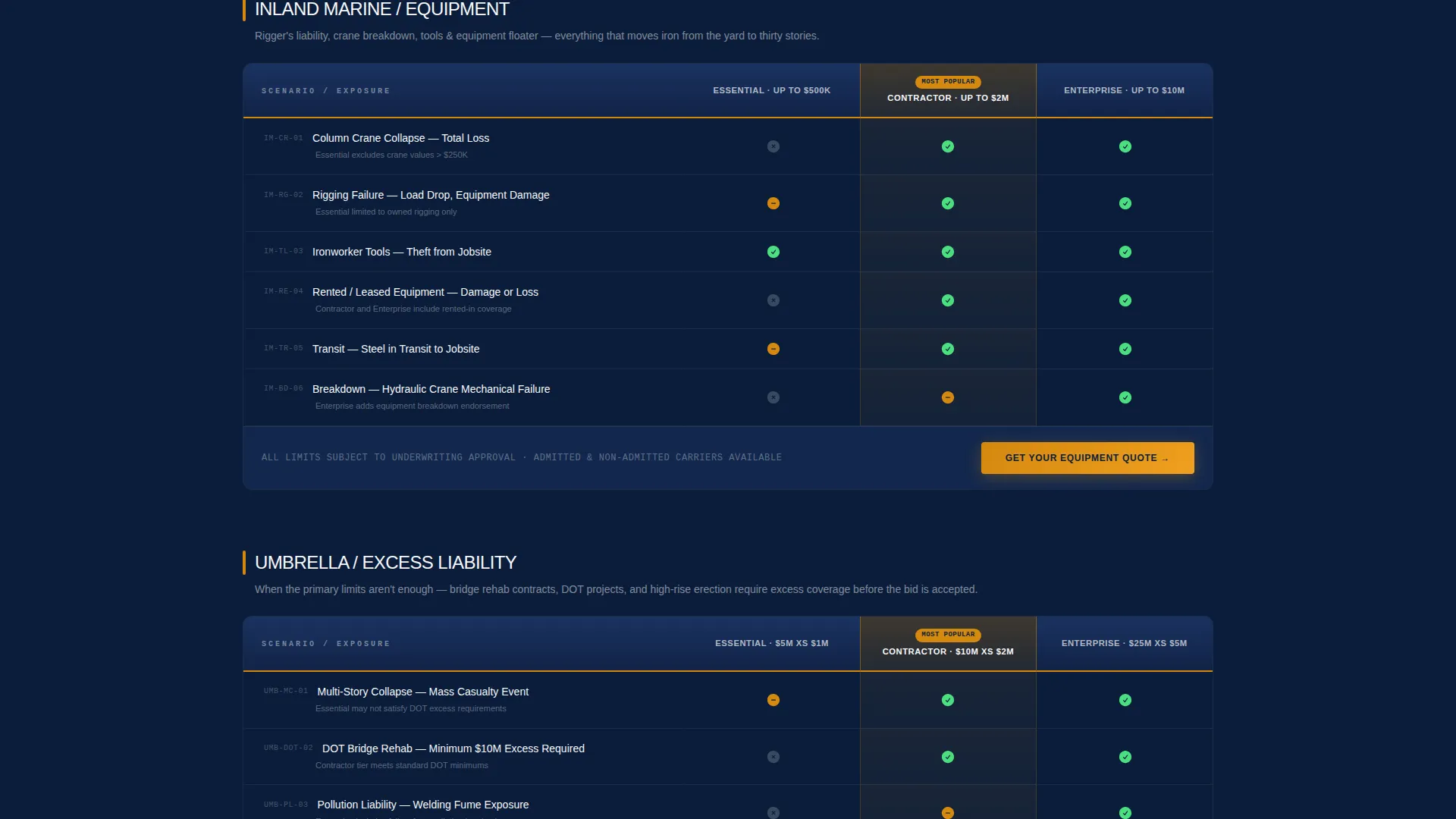
- Side-by-side comparison tables mapping coverage tiers to real jobsite scenarios such as column crane collapse, rigging failure, and falling-object third-party injury
Feature list
The template packages several purpose-built components that work together to earn contractor trust before the quote form opens.
Award Badge Header Row
A horizontal row of embossed metallic shield badges opens the page against the deep navy background. Each badge represents a distinct credential: carrier A.M. Best ratings, National Council on Compensation Insurance safety program certifications, ironworker union trust endorsements, and Top Specialty Contractor Insurer distinctions. The badges replace stock photography and deliver proof immediately.
Named Underwriter Expert Panel
Three underwriter cards appear below the header. Each card shows the underwriter's name, their coverage specialization, years of experience in trade insurance, and a single-sentence philosophy on ironwork risk. This section positions the insurer as a genuine specialist before any comparison data appears.
Scenario-Driven Comparison Tables
The core of the page is a series of side-by-side tables. Coverage tiers are stacked against real jobsite loss scenarios so contractors can see exactly where each policy responds. Every row answers a question the contractor already carries into the conversation.
Slide-Out Quote Request Form
The primary call to action opens a slide-out panel rather than navigating away from the page. The form collects business name, state of operations, annual payroll range across four brackets, current Experience Modification Rate, and number of active jobs.
Secondary Lead Capture Path
A "Download Our Structural Steel Coverage Guide" option appears alongside the primary quote call to action. It captures email addresses from contractors in bid-prep who are not yet ready to request a full quote. Both paths feed into the same trust-first flow.
Locked Bottom call to action Bar
The "Get Your Ironwork Quote" button is locked to the bottom of every comparison table section. Contractors never have to scroll back to find the action step. The amber highlight color keeps it visually distinct without competing with the data-rich table rows.
Page sections overview
| Section | Purpose |
|---|---|
| Badge Header Row | Establish carrier authority and credentials immediately |
| Primary Headline | Anchor the value proposition in one bold statement |
| Expert Underwriter Panel | Build specialist trust through named professionals |
| Liability Coverage Table | Compare general liability tiers against jobsite scenarios |
| Builder's Risk Table | Show policy response to structural and equipment loss scenarios |
| Surety Bond Table | Map bond tiers to bid and contract compliance needs |
| Quote Form Panel | Collect qualified lead data via slide-out form |
| Guide Download Section | Capture early-stage prospects with a content offer |
Design & branding system
The visual identity follows a Legal Shield theme built on a Navy Authority color system. Every palette choice reinforces authority and compliance rather than lifestyle or aspiration.
- Deep dress-blue navy (#0B1D3A) serves as the primary page background, anchoring the layout in institutional credibility
- Brushed gunmetal (#4A5568) defines secondary panels and all table borders, giving the comparison data a structured, document-like appearance
- Bright compliance white (#F7F8FA) is used for content surfaces so text stays crisp and readable against both dark and mid-tone backgrounds
- Molten-iron amber (#D4880F) is reserved exclusively for calls to action, active-state highlights, and badge accents, making every action step immediately visible
Mobile & speed optimization
The layout is structured to remain clear and functional on smaller screens where contractors may be reviewing coverage options from a jobsite or field office.
- Comparison tables are designed to stack or scroll horizontally on narrow viewports so no data row is lost at mobile screen widths
- The slide-out quote form panel adapts to full-screen display on mobile, keeping every field reachable without zooming
- Badge rows reflow into a condensed grid on smaller screens so credential proof remains visible above the fold
How this template helps you convert
Forge is engineered to move high-intent prospects from credential verification to quote submission without friction or distraction.
- The badge header and named expert panel establish specialized trust before any form is shown, reducing the hesitation that kills B2B insurance conversions
- Scenario-specific comparison tables answer the contractor's existing questions in the order they naturally arise, replacing generic policy summaries with jobsite-relevant proof
- Two conversion paths, the direct quote form and the guide download, capture both ready-to-quote contractors and those still in bid preparation, so no qualified prospect leaves empty-handed
Other information about this template
Forge is specifically scoped for the ironworker insurance niche, with structural details that reflect real trade compliance requirements and partnership-oriented B2B sales flows.
- The template references NAICS code 238120, the standard classification for structural steel and precast concrete contractors, signaling domain fluency to contractor prospects
- The Expert Panel creative direction and Award Badges header concept are baked into the template layout and do not require custom design work to activate
- The Comparison Table template style is the primary format, making the page well-suited for insurers who need to differentiate multiple coverage tiers side by side
- The Partnership and B2B landing-page direction means the copy and form logic are written for business owners and safety directors, not individual policyholders
Theme
Legal Shield
Creative direction
Expert Panel
Color system
Navy Authority
Style
Comparison Table
Direction
Partnership/B2B
Page Sections
Award Badge Header Row
Named Underwriter Expert Panel
Scenario-driven Comparison Tables
Slide-out Quote Request Form
Secondary Guide Download Path
Locked Bottom Call to Action Bar
Related questions
What types of coverage does this template address?
Who is the intended audience for this landing page?
Can I use this template to capture leads who are not ready to request a quote?
What information does the quote request form collect?
Does the template use stock photography or lifestyle imagery?



