Complete Agricultural Equipment Manufacturing Professional Website Template
Forge is a single-column flow landing page template built for agricultural equipment prototyping and rapid manufacturing services. It pairs a dark charcoal and amber visual system with spatial, room-by-room scroll architecture to guide engineering teams from intake through validation. The primary call to action gates a practical spec guide, while embedded tools give visitors immediate value before the download ask.
by Rocket studio
Quick summary
Forge is a precision-built landing page template for agricultural equipment prototype and rapid prototyping services. It uses an isometric exploded-view hero, a spatial scroll flow that walks visitors through intake, fabrication, and validation, and a gated spec guide as its primary call to action. The charcoal and amber palette signals technical authority from the first scroll.
Who this template is for
This template serves teams and individuals who need to move a mechanical concept from design file to field-ready prototype quickly. The layout is built around their real workflow, not a generic service pitch.
- Agricultural engineering teams at mid-size original equipment manufacturers racing seasonal deadlines
- Independent inventors developing concepts such as improved grain cart unloading augers or seed metering plates
- University extension laboratories validating tillage and implement concepts ahead of grant reviews
What problem this template solves
Prototyping services often struggle to communicate technical credibility to buyers who already understand engineering. A polished but vague marketing page loses those visitors immediately. Forge solves this by leading with real engineering data and process transparency instead of marketing copy.
- Visitors with deep technical backgrounds need to see process fluency, not generic capability claims
- Service pages that hide lead times, tolerances, and material choices force buyers to call before they trust
- A gated download without demonstrated expertise gets ignored; Forge builds that trust first through embedded tools and visible data
What you get with this template
Forge delivers a fully structured single-column landing page designed specifically for agricultural equipment prototyping services. Every section has a clear job, and the layout earns the conversion before asking for contact details.
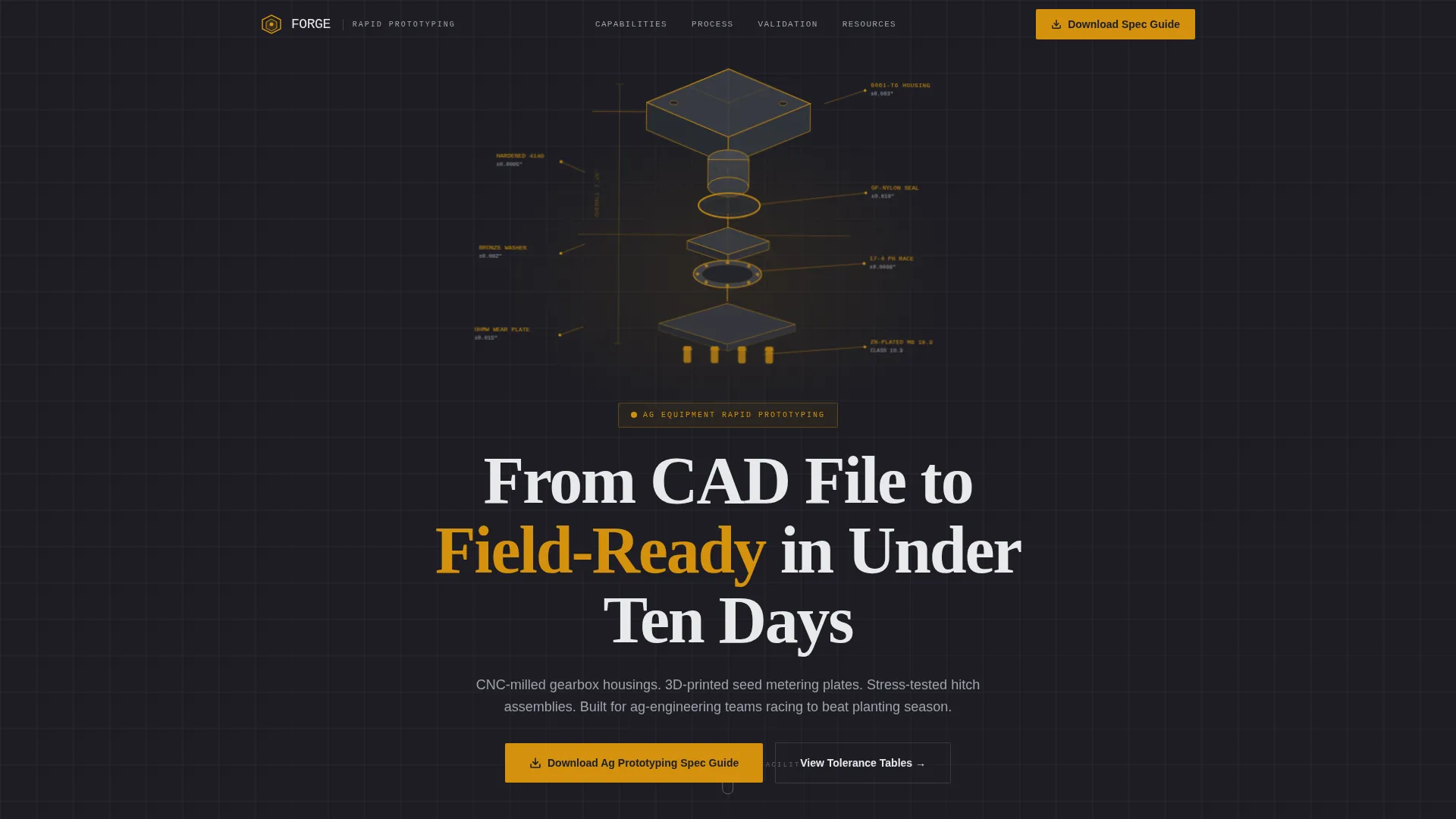
- An isometric exploded-view hero with labeled material callouts and tolerance annotations
- Three full-viewport spatial rooms covering intake, fabrication, and validation, each separated by perspective-shift scroll transitions
- A gated PDF spec guide form alongside ungated embedded tools including a tolerance comparison table and a process selection flowchart
Feature list
This template is built around a specific set of sections and design decisions drawn directly from the brief. Each feature below reflects a named component or defined behavior in the template.
Isometric Exploded-View Hero
The header features a technical illustration of a hydraulic down-pressure actuator broken into seven layered components. Each piece carries material callouts such as 6061-T6 aluminum, glass-filled nylon, and hardened 4140 steel, plus tolerance annotations. The assembly rotates subtly on a charcoal field with amber highlight lines tracing the build path.
Spatial Room-by-Room Scroll Architecture
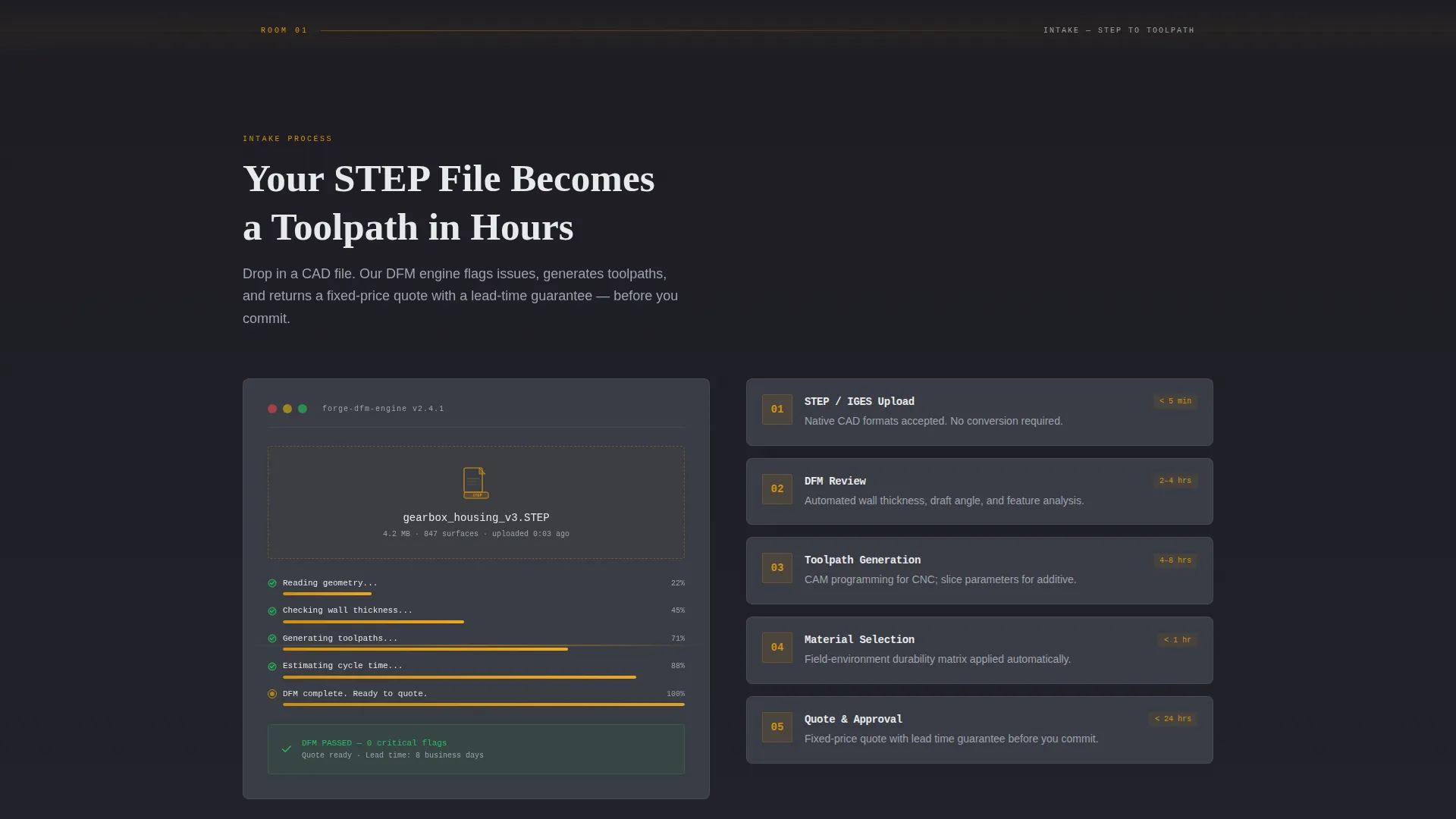
Scrolling moves the visitor through three connected rooms: intake, fabrication, and validation. Each room occupies a full viewport. Perspective-shift transitions tilt the viewing angle between rooms, giving the scroll a physical, architectural momentum that reflects the actual prototyping sequence.
Gated Spec Guide with Qualifying Form
The primary call to action prompts visitors to download an agricultural prototyping spec guide. The form collects name, company, and a qualifying dropdown asking what stage the prototype is at, from concept sketch through pre-production tooling. The gate is placed after the page has already demonstrated technical depth.
Ungated Embedded Reference Tools
Before the download ask, visitors can use an embedded tolerance comparison table and a process selection flowchart directly on the page. These tools provide immediate, practical value and build trust in the service's expertise without requiring any form submission.
Dashboard-Style Validation Readouts
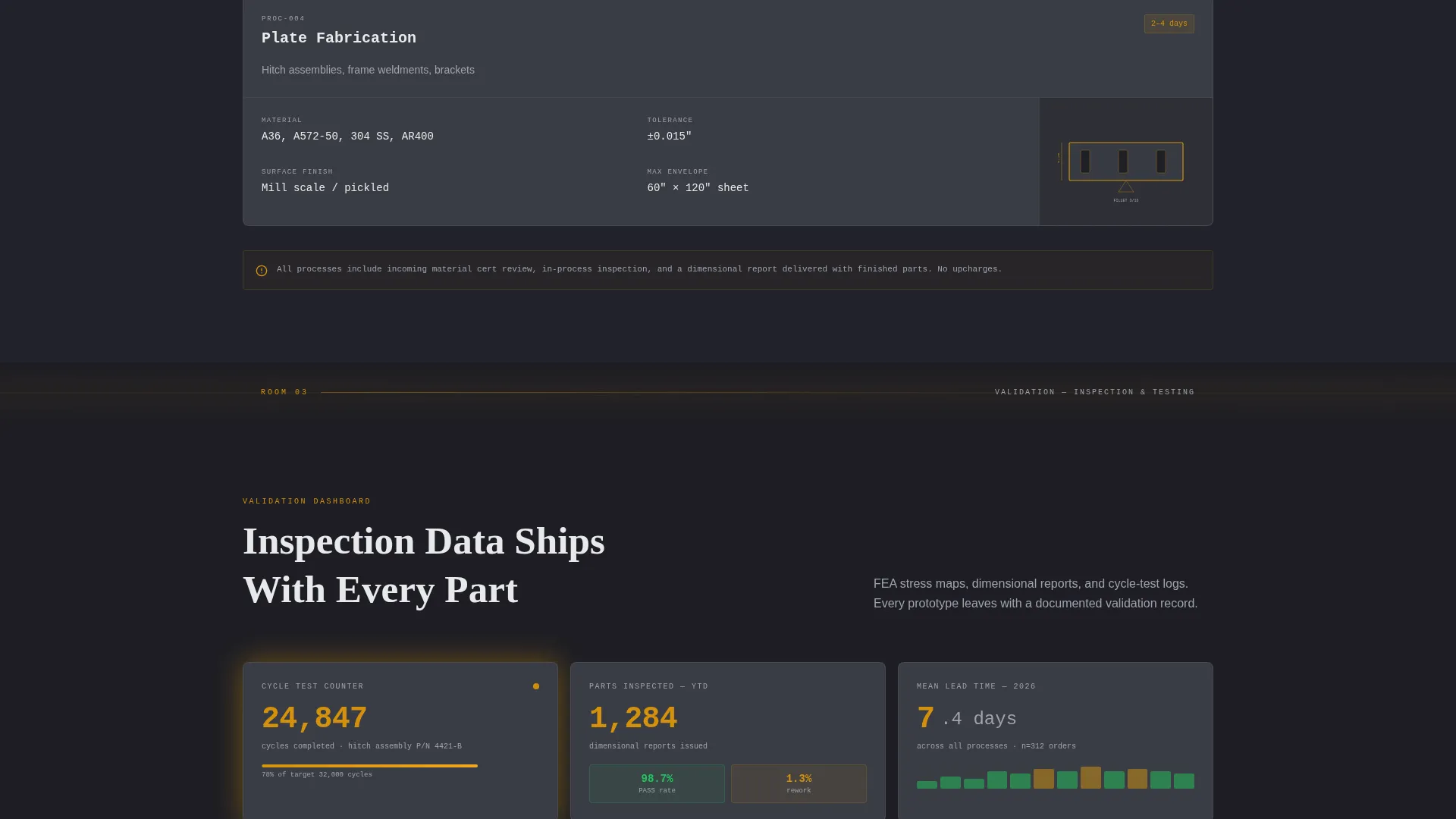
The validation room displays data panels styled like instrument readouts. Finite element analysis stress maps, dimensional inspection reports, and cycle-test counters that climb in real time fill this section with the kind of engineering evidence that resonates with technical buyers.
Fabrication Cross-Section Diagrams
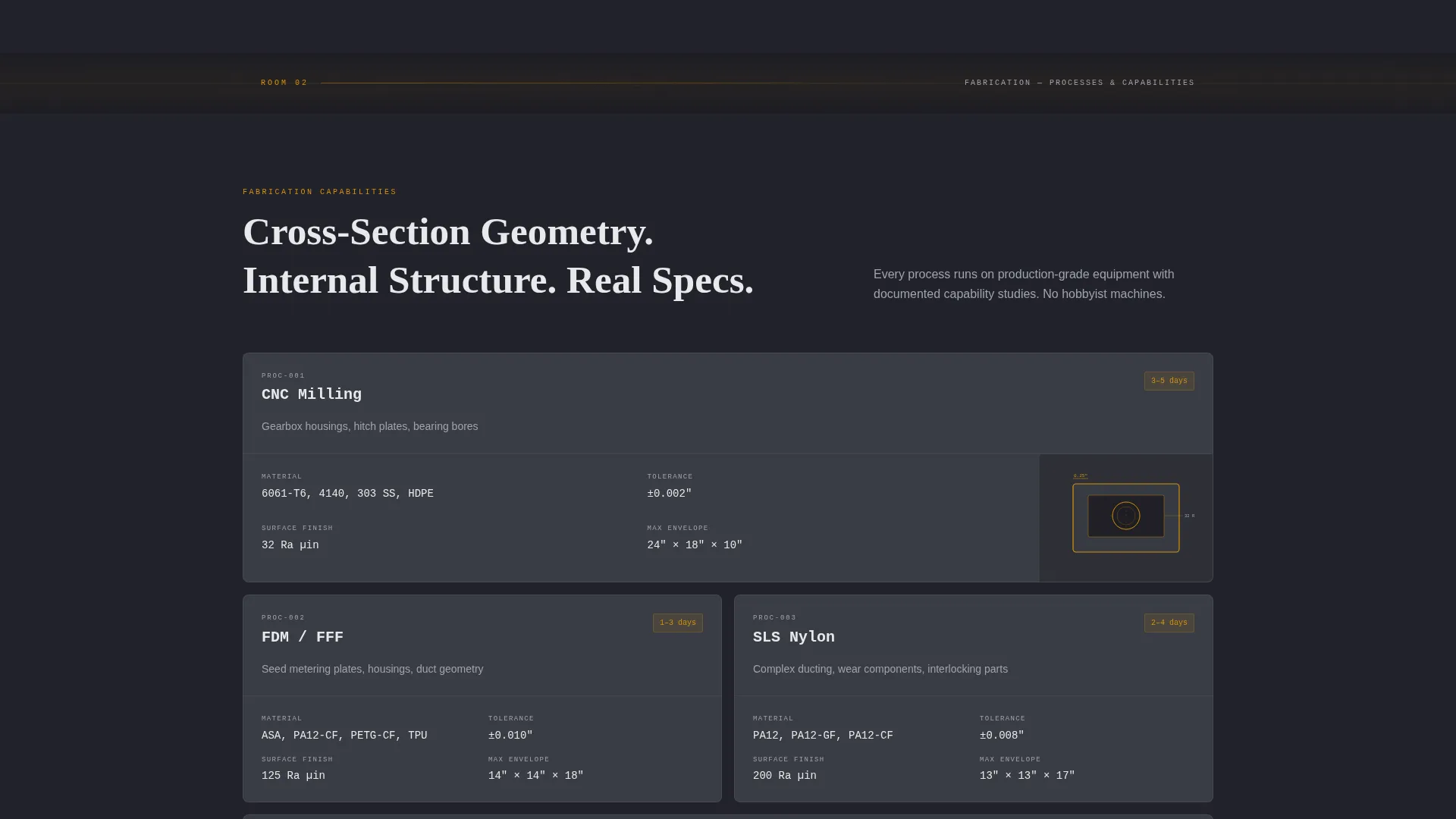
The fabrication room uses cross-section diagrams to reveal internal geometries, wall thicknesses, and infill patterns of prototype components. This communicates process depth visually, making manufacturing capability legible without requiring a sales conversation.
Page sections overview
| Section | Purpose |
|---|---|
| Isometric hero header | Establishes technical credibility with labeled exploded-view illustration |
| Intake room | Shows STEP file to toolpath animation, framing the service entry point |
| Fabrication room | Displays cross-section diagrams of geometries, walls, and infill patterns |
| Validation room | Presents dashboard readouts for stress maps, inspections, and cycle tests |
| Tolerance comparison table | Gives visitors an ungated reference tool to assess process fit |
| Process selection flowchart | Helps visitors self-qualify the right prototyping method before contacting |
| Spec guide download form | Captures qualified leads with a three-field form and stage dropdown |
Design & branding system
The visual identity follows a Dashboard Pro theme built on a charcoal and amber color system. The palette evokes the instrument panel of a late-model combine at dusk: dark readouts lit by precise amber indicators, every element functional.
- Forge-scale charcoal (#1E1E24) anchors all backgrounds; machined-steel mid-gray (#3A3D45) surfaces cards and section dividers
- Harvest amber (#D4910D) accents data points, progress indicators, and hover states throughout the page
- Clean aluminum (#E8E9EB) handles body text and diagram labels, keeping readability high against dark backgrounds
Mobile & speed optimization
The single-column flow layout simplifies the mobile reading experience. Visitors on any screen size move through the same linear sequence without horizontal navigation or complex grid reflows.
- Full-viewport room sections stack cleanly in a single column on smaller screens
- The isometric hero and cross-section diagrams are vector-based illustrations, keeping file weight low without sacrificing visual sharpness
- The embedded tolerance table and flowchart are designed to remain legible and usable at mobile widths
How this template helps you convert
Forge earns the lead form submission before it asks for one. The page architecture is deliberate: demonstrate expertise first, gate the deeper resource second.
- The three-room scroll sequence shows the full prototyping workflow with real engineering data, meaning a visitor reaches the form already convinced the service understands their field
- The ungated embedded tools provide immediate utility, so even visitors who do not download the guide leave with a positive impression and a reason to return
- The qualifying dropdown on the form segments leads by prototype stage, making every submission more useful and the follow-up conversation more efficient
Other information about this template
Forge is a single-column flow template built under the Dashboard Pro theme. It is designed for the agricultural equipment prototype and rapid prototyping niche within the broader manufacturing and industrial category.
- The template follows the Spatial and Architectural creative direction, with perspective-shift transitions between full-viewport sections
- The header concept is isometric, using a technical exploded-view drawing as the hero rather than photography or stock imagery
- The landing page direction is Content and Resource focused, centering the experience on a gated PDF spec guide covering material selection, design-for-manufacturing checklists, and lead-time calculators
- The color system is Charcoal and Amber, with specific hex values defined for backgrounds, surfaces, accents, and text
- Suitable for rapid prototyping services working in agricultural equipment manufacturing and farm machinery development contexts
Theme
Dashboard Pro
Creative direction
Spatial & Architectural
Color system
Charcoal & Amber
Style
Single Column Flow
Direction
Content/Resource
Page Sections
Isometric Exploded-view Hero Illustration
Three-room Spatial Scroll Flow
Gated Spec Guide Download Form
Ungated Embedded Reference Tools
Dashboard-style Validation Data Panels
Fabrication Cross-section Diagrams
Related questions
Can I adapt this template for a non-agricultural prototyping service?
Is the spec guide PDF included with the template?
Can I replace the isometric illustration with my own technical drawings?
How does the qualifying dropdown on the form work?
What makes this template different from a generic service landing page?



