Plastics & Injection Molding Portfolio Website Template
Forge is a dashboard-style landing page template built for 3D printed plastic parts manufacturers targeting procurement engineers and product managers. It leads with a live metrics wall, walks visitors through two data-rich case studies, and closes with a three-step progressive request-for-quote form. Every section is designed to communicate dimensional accuracy, material range, and turnaround speed through verified production data.
by Rocket studio
Quick summary
Forge is a precision-focused landing page template for 3D printed plastic parts manufacturers. It opens with five verified production metrics, walks prospects through two client case studies told entirely in data, and ends with a gated spec sheet and a progressive request-for-quote form. The result is a conversion-ready page that speaks directly to procurement engineers and product managers.
Who this template is for
This template is built for industrial manufacturers who sell bridge production runs and functional plastic parts to engineering buyers. It suits teams that need to prove capability before a prospect ever gets on a call.
- Procurement engineers sourcing bridge runs of 500 units who need traceable dimensional specs before committing to a supplier
- Product managers who require functional housings ahead of hard tooling and need proof of material suitability
- Contract manufacturers backfilling supply chain gaps who need a page that communicates speed, accuracy, and reliability fast
What problem this template solves
Industrial buyers rarely trust a manufacturer they cannot verify. Generic product pages do not answer the specific questions procurement teams ask: What are your actual tolerances? What materials do you run? How fast can you ship? Forge replaces marketing language with production data, letting the numbers do the persuading.
- Buyers leave pages that lack traceable specs, material certifications, or real lead-time figures
- Procurement teams need structured proof, not paragraphs, to move a supplier through internal approval
- A three-step quote form reduces friction by collecting the right information in the right order, rather than asking everything upfront
What you get with this template
Forge delivers a complete single-page layout built around a metrics-first visual structure. Every section prioritizes data legibility over decoration, keeping engineering buyers engaged from first scroll to quote submission.
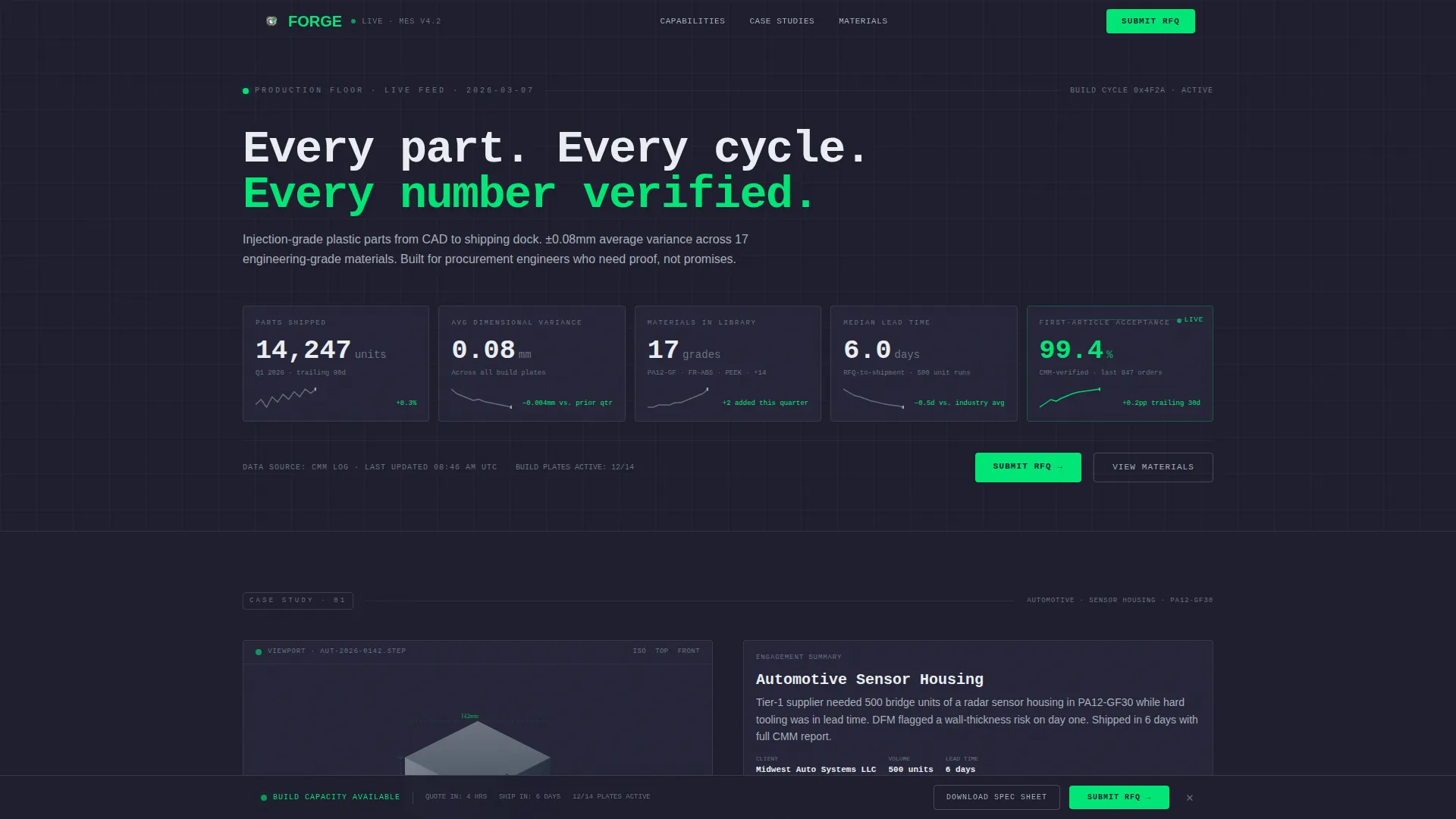
- A live-formatted metrics wall with five key production KPIs, each paired with a trailing 90-day micro-sparkline
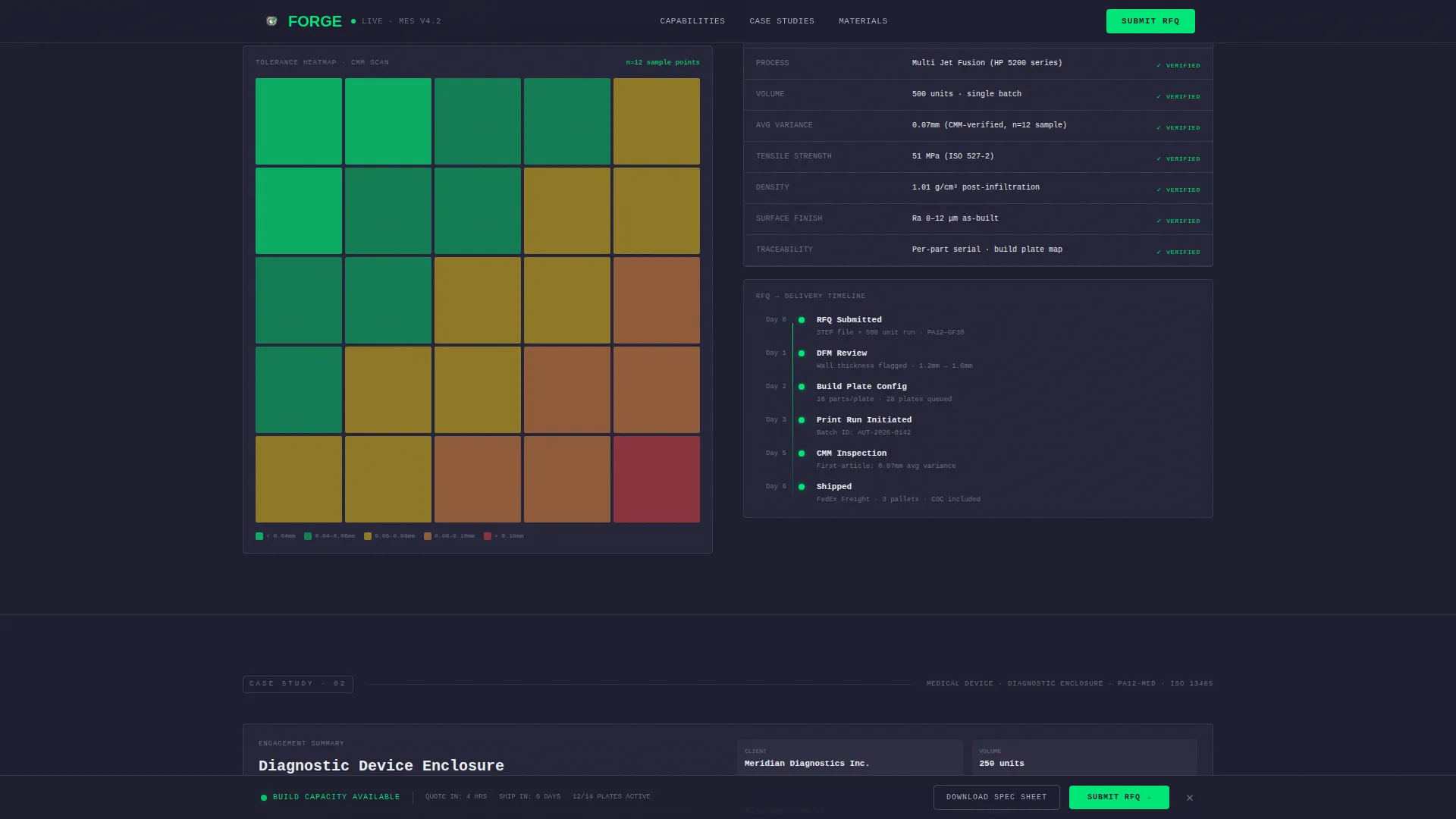
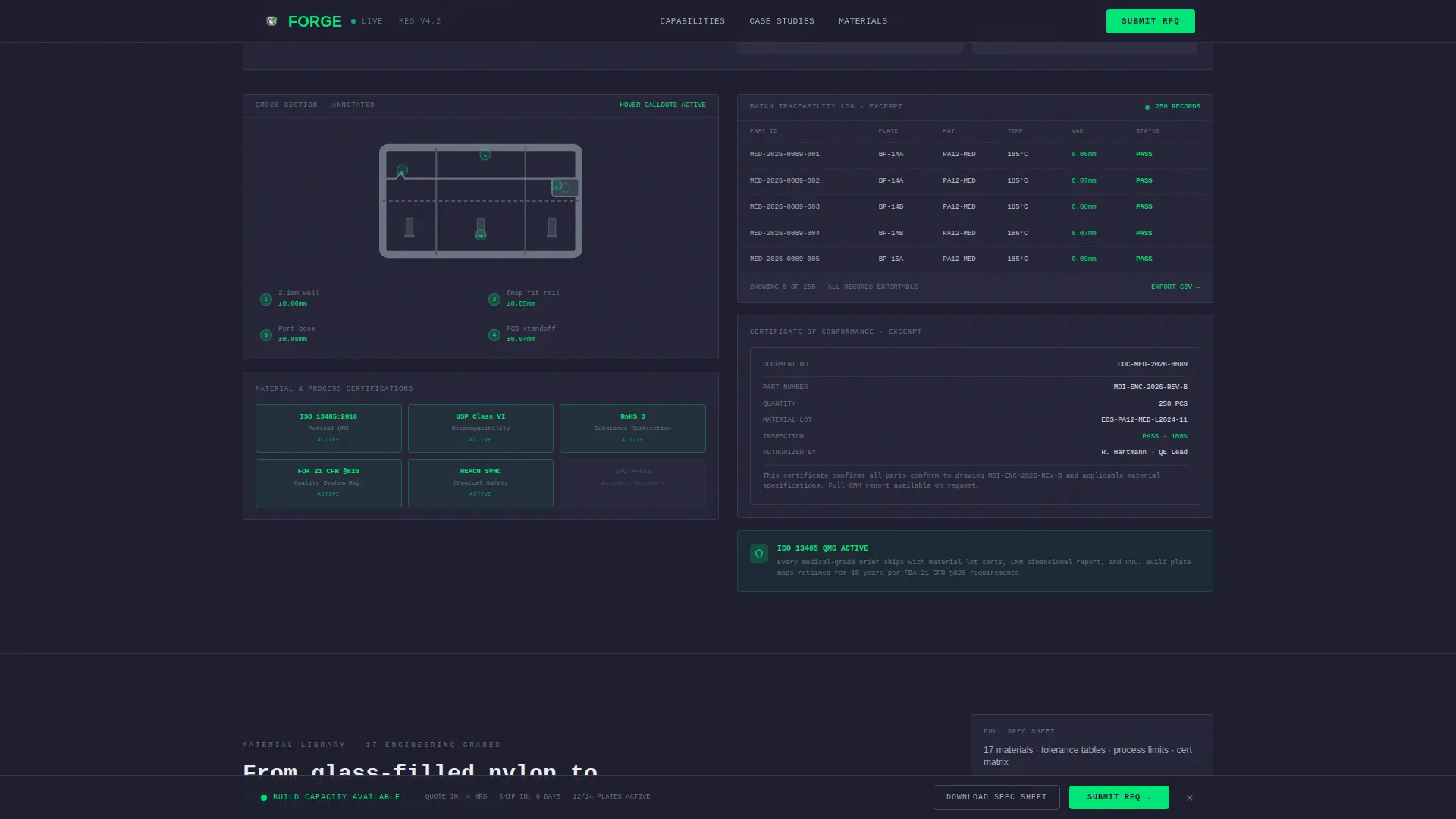
- Two full case study sections presented as data stories, with annotated renders, tolerance heatmaps, and traceability dashboards
- A progressive three-step request-for-quote form with a persistent bottom bar, plus a gated spec sheet download path for buyers earlier in evaluation
Feature list
This section describes the core components built into the Forge template.
Live Production Metrics Wall
The header displays five verified production numbers in large monospaced type: 14,200 or more parts shipped this quarter, 0.08mm average dimensional variance, 17 engineering-grade materials in the library, a 6-day median lead time, and a 99.4% first-article acceptance rate. Each metric sits in its own card with a micro-sparkline showing the trailing 90-day trend. The acceptance-rate indicator pulses in signal green to communicate live production status at a glance.
Case Study Data Narratives
Two scrollable case study sections replace traditional testimonials with structured data stories. The first covers an automotive sensor housing, presenting a three-dimensional viewport render alongside a tolerance heatmap and a full timeline from request-for-quote to delivery. The second features a medical device enclosure, highlighting material certification documents and a batch traceability dashboard. Each story escalates in complexity to match the scrutiny of high-stakes procurement decisions.
Materials and Tolerances Specification Grid
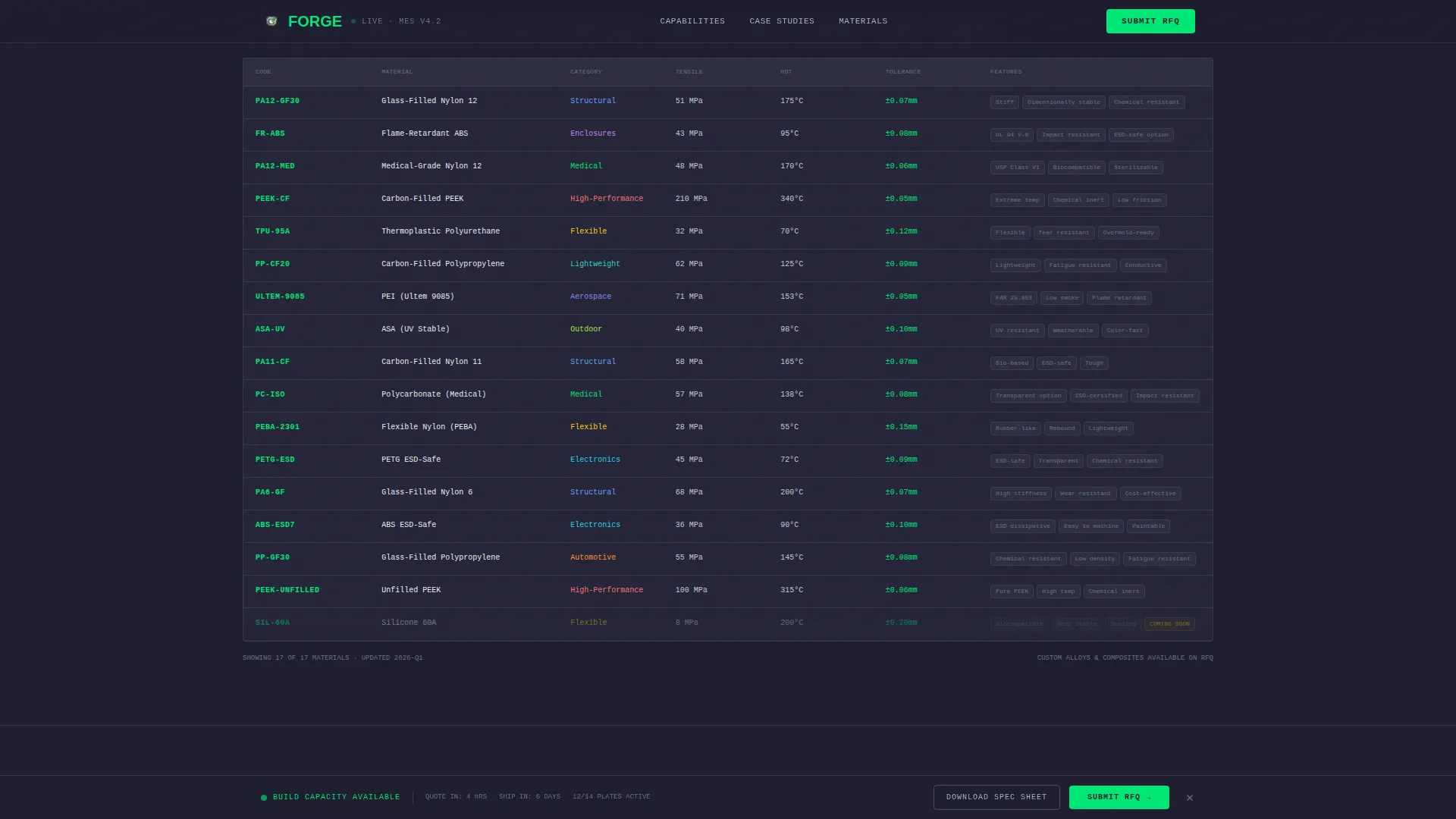
A full 17-material specification table gives buyers the technical detail they need to self-qualify. The grid covers materials from glass-filled nylon to flame-retardant acrylonitrile butadiene styrene, with tolerance ranges, temperature ratings, and compliance notes. A downloadable spec sheet is gated behind a work email field, qualifying leads who are deep in evaluation but not yet ready to submit a formal quote.
Progressive Three-Step RFQ Form
The request-for-quote form is divided into three focused steps to reduce drop-off. Step one collects company name and part volume range. Step two accepts a STEP or STL file upload alongside material preference. Step three asks for target unit cost and delivery window. The form activates in a persistent bottom bar that appears after the visitor passes the first case study, keeping the call to action visible without interrupting the data narrative.
Dashboard Pro Visual System
The entire page is built on a monochrome steel palette with a manufacturing execution system terminal aesthetic. JetBrains Mono handles all data and metric typography for maximum readability of numerical values. Manrope is used for labels and body text. Signal green highlights calls to action and positive-delta indicators, while machined graphite backgrounds and brushed aluminum borders keep visual noise at zero.
Page sections overview
| Section | Purpose |
|---|---|
| Metrics Wall Header | Establishes credibility with five live production KPIs and sparklines |
| Automotive Case Study | Shows tolerance heatmap, 3D render, and RFQ-to-delivery timeline |
| Medical Device Case Study | Demonstrates material certs and batch traceability for high-stakes parts |
| Materials & Tolerances Grid | Delivers 17-material spec table with gated spec sheet download |
| Progressive RFQ Form | Converts qualified visitors through a three-step quote submission flow |
| Linear Footer | Provides compact single-row contact and navigation reference |
Design & branding system
The Forge template uses a monochrome steel color system modeled on the interface of a precision CNC controller. Every design decision removes decoration and keeps engineering data readable at a glance.
- Core palette: machined graphite (#1E1E2E) for primary backgrounds, brushed aluminum (#A8B0BC) for data borders and secondary surfaces, white-light (#EAEDF2) for metric values and key text, and signal green (#00E676) for live-status indicators and calls to action
- Typography pairing: JetBrains Mono for all numerical and metric display, Manrope for labels, form fields, and body copy
- Animation set: counter animations on metrics, sparkline draw-on-scroll, scroll-reveal for case study sections, and pulsing status indicators on the acceptance-rate card
Mobile & speed optimization
The Forge layout is built desktop-first, reflecting the workstation environment where procurement engineers typically evaluate suppliers. Tablet responsiveness is included to support on-floor and mobile-review scenarios.
- Static content sections are structured as server components for fast initial load, while the interactive three-step form is handled as a client component to keep interactivity self-contained
- The dashboard grid, metrics wall, and case study sections reflow cleanly to tablet viewport widths without losing data legibility
How this template helps you convert
Forge is structured to move industrial buyers from first impression to quote submission using a logical, data-led progression. Every section removes a reason to leave rather than adding a reason to stay.
- The metrics wall answers the three questions every procurement engineer asks first: accuracy, materials, and lead time. Answering them in the header eliminates the most common drop-off reason before the buyer even scrolls.
- The case studies build trust by showing real part types, real tolerance data, and real delivery timelines. A buyer who sees their own part category reflected in a case study is far more likely to submit a quote.
- The persistent bottom bar with the "Submit Your RFQ" call to action stays visible after the first case study, so buyers can act the moment they feel confident without hunting for a form.
Other information about this template
Forge is part of the Dashboard Pro theme family and uses the Monochrome Steel color system designed for industrial and manufacturing contexts. A few additional details worth noting for teams evaluating this template:
- The template is built for a United States market context, with dual imperial and metric unit display across spec tables and tolerance figures, and pricing referenced in United States dollars
- The creative direction follows a Case Study Narrative structure, meaning each scroll step functions as a deeper layer of verification rather than a traditional marketing section
- The header concept is a Stats/Metrics wall, making the page immediately machine-readable to engineering buyers who scan for numbers before reading prose
- The landing page direction is Partnership/B2B, and every conversion path, from the gated spec sheet to the three-step form, is calibrated for evaluated, high-intent leads rather than impulse signups
- Interactivity level is high: hover states on the tolerance heatmap, a multi-step form with file upload, and a gated email capture all require thoughtful implementation during customization
Theme
Dashboard Pro
Creative direction
Case Study Narrative
Color system
Monochrome Steel
Style
Dashboard/Data Grid
Direction
Partnership/B2B
Page Sections
Live Production Metrics Wall
Case Study Data Narratives
Material Specification Grid
Progressive Three-step RFQ Form
Dashboard Pro Visual System
Related questions
Who is the Forge template designed for?
Can I update the production metrics to match my own data?
What file formats does the RFQ form support for uploads?
Does the template include the gated spec sheet download?
Is this template suitable for automotive or medical device manufacturers?



