Specialist Tool & Die Making Reviews & Social Proof Website Template
Forge is a dashboard-style landing page template built for precision tool and die shops. It presents completed projects as data-rich grid cards, backed by real inspection metrics, delivery records, and shop photography. The layout is built around a Monochrome Steel color system and a Logo Bar header, designed to earn B2B trust through evidence rather than adjectives.
by Rocket studio
Quick summary
Forge is a single-page, dashboard-style template designed for precision tool and die shops competing for high-stakes manufacturing contracts. It leads with industry logo credibility, converts visitors through data-rich project cards, and closes with a direct print-upload form. Every section is built to show capability through numbers, not claims.
Who this template is for
This template is built for established tool and die shops serving industrial and manufacturing markets. It speaks directly to the buyers those shops need to reach: engineers qualifying second-source vendors, procurement managers running supplier programs, and plant managers dealing with urgent die repair timelines.
- Precision tool and die shops targeting automotive, aerospace, and industrial clients
- Shop owners and sales teams replacing outdated or generic web presence with evidence-first pages
- Operations and marketing leads who want to convert qualified buyers without a sales pitch
What problem this template solves
Most tool and die shops look the same online: stock photography, vague capability claims, and contact forms that go nowhere. Forge solves that by replacing adjectives with data. It gives procurement teams and engineers exactly what they need to qualify a new vendor quickly.
- Engineers and procurement managers cannot verify capability from generic shop websites
- Buyers in urgent situations (re-source or emergency repair) need fast answers, not marketing copy
- Shops with strong track records have no structured way to present that evidence online
What you get with this template
Forge delivers a complete single-page layout built around a case study narrative structure. The template is ready to populate with your own project data, photography, and form configuration. Every section has a defined purpose and a fixed visual hierarchy.
- A Logo Bar header featuring monotone client industry logos and a headline metric strip
- A data grid of expandable project cards, each structured with tool type, material grade, cavity count, cycle time, tonnage, and lead time metrics
- A persistent bottom-rail call to action and a dual-path conversion setup with both a print-upload form and a capability sheet request option
Feature list
A paragraph introducing the feature set: Forge is built around a small number of high-impact components. Each one is designed to do a specific job for a specific type of buyer. Below is a breakdown of what the template includes and how each piece earns its place on the page.
Logo Bar Header with Metric Strip
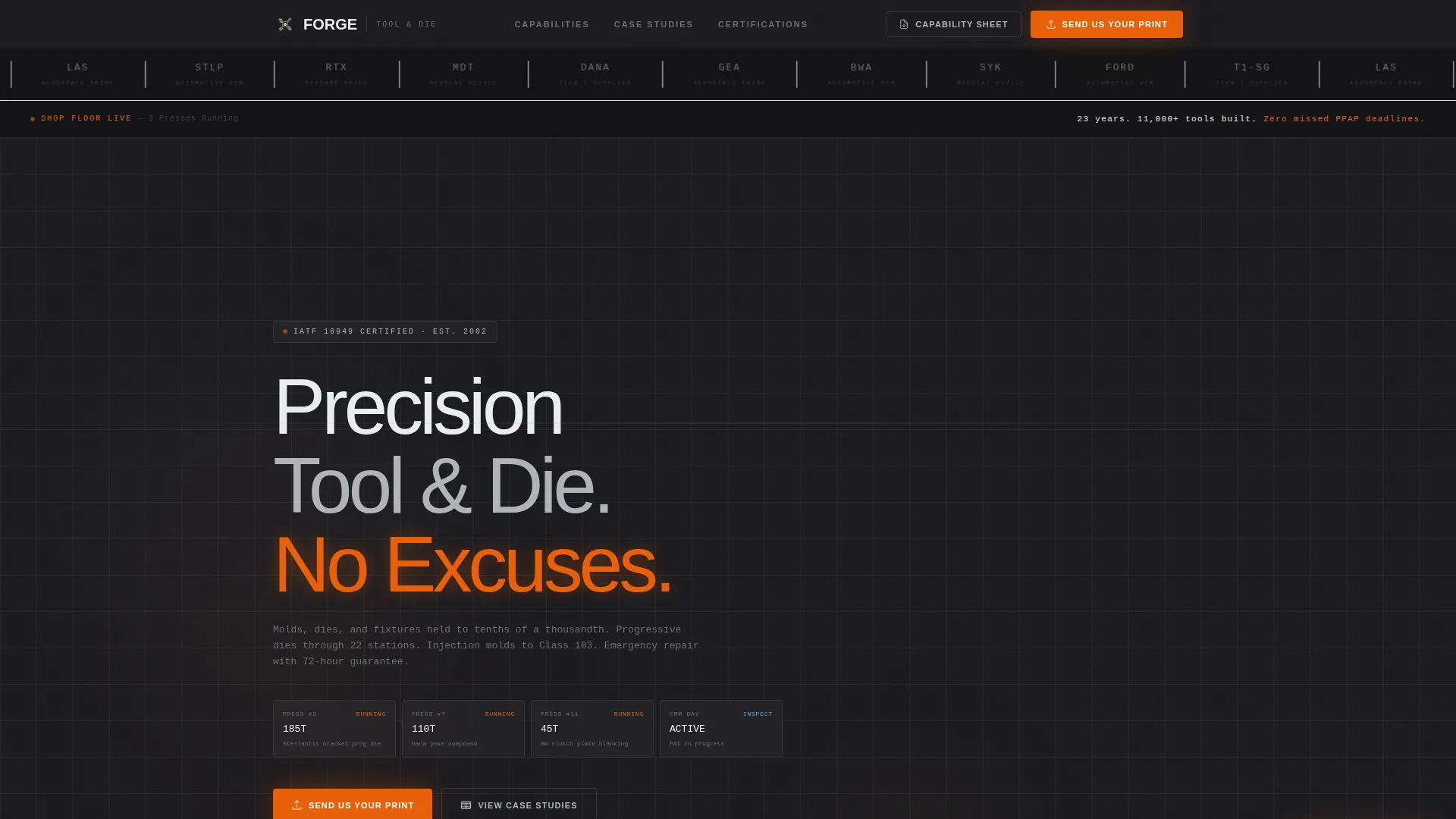
The header opens with a horizontal row of client industry logos rendered in machined silver monotone against a mill-scale black background. Beneath the logos, a single line of inspection-surface white text anchors the page: "23 years. 11,000+ tools built. Zero missed PPAP deadlines." No hero image competes for attention. The logos carry the credibility.
Expandable Project Case Study Grid
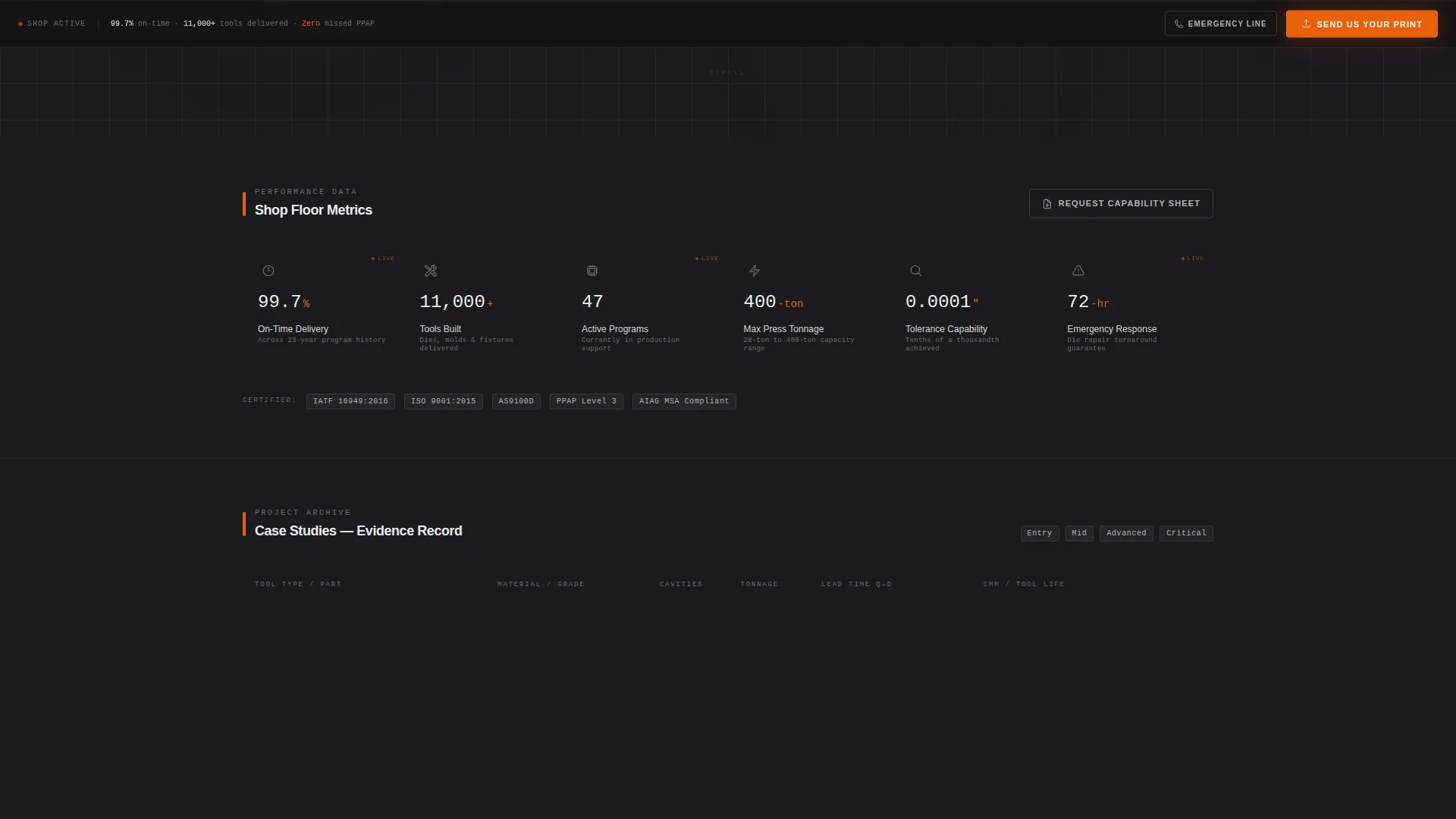
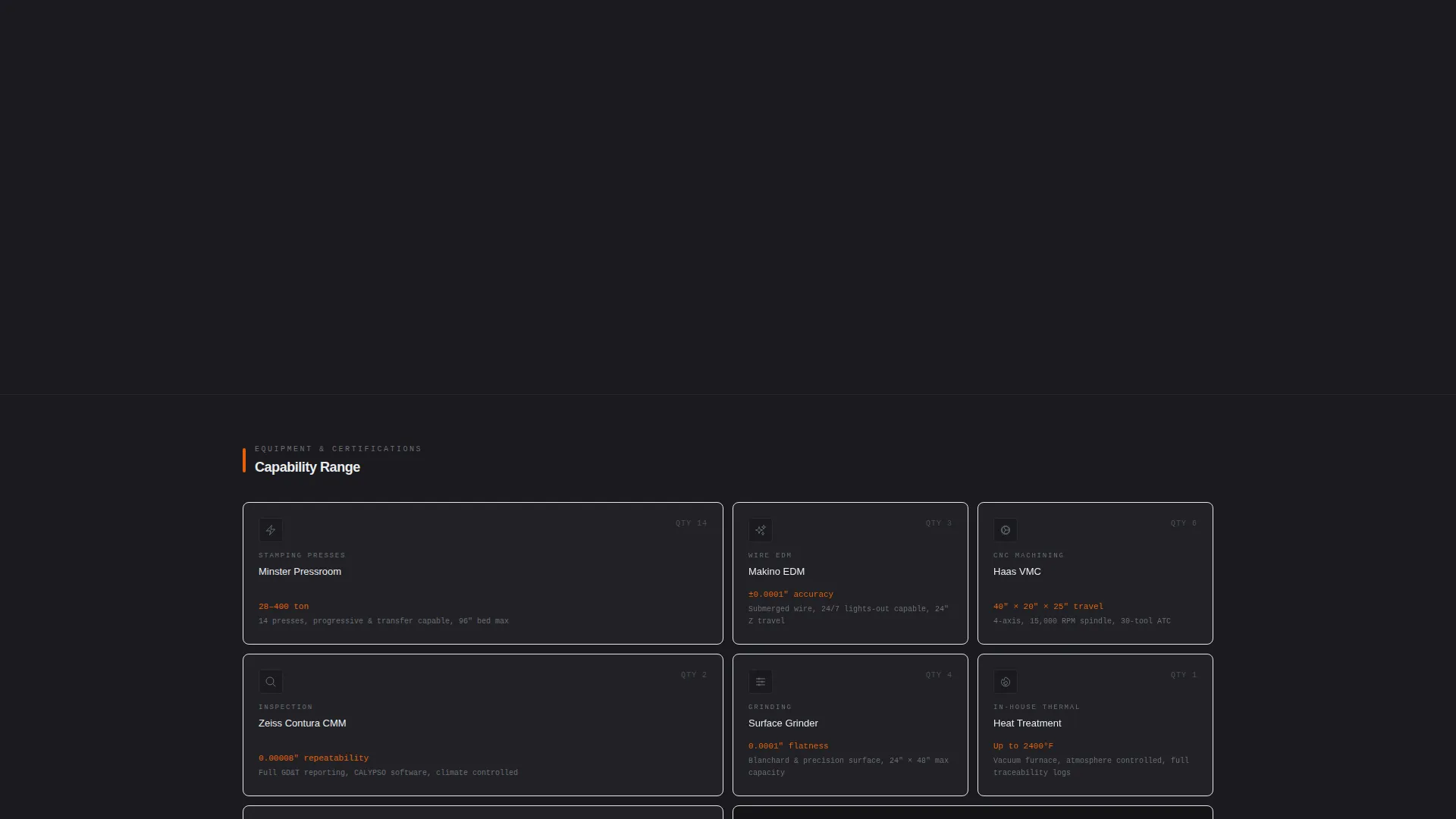
The core of the page is a data grid where each card represents a completed project. Cards display tool type, material grade, cavity count, cycle time, tonnage, and quoted versus delivered lead time. Clicking a card expands into a full case study view that includes CMM (Coordinate Measuring Machine) inspection reports, tool life data, and before-and-after photography of worn dies recut to print.
Dual-Path Conversion System
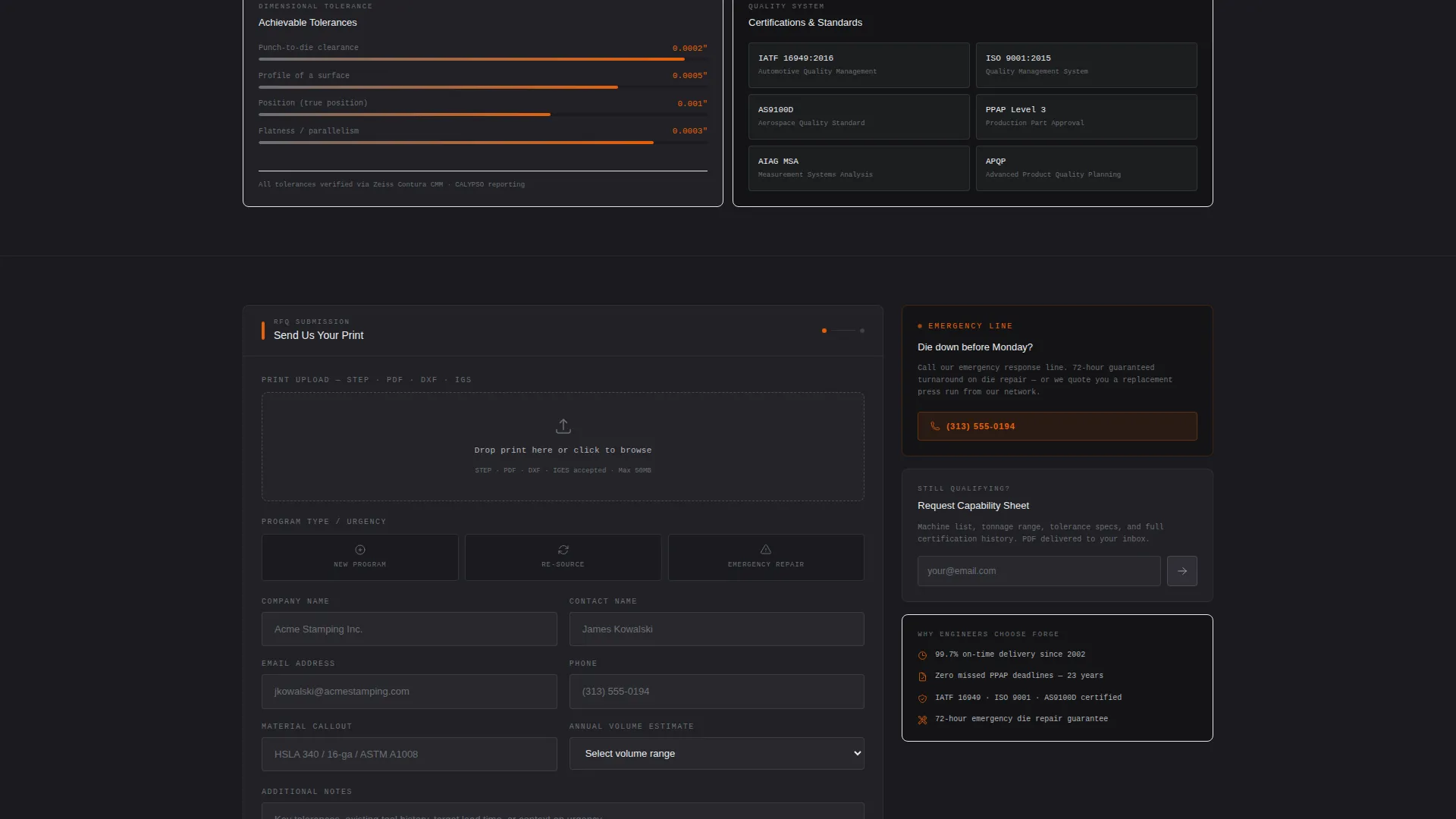
The template offers two conversion paths built for different buyer stages. The primary call to action, "Send Us Your Print," opens a form requesting part print upload in STEP, PDF, or DXF format, annual volume estimate, material callout, and an urgency dropdown covering new program, re-source, and emergency repair. The secondary path, "Request Our Capability Sheet," is a lower-commitment, email-gated PDF request for engineers still in the qualifying phase.
Persistent Bottom-Rail Call to Action
The "Send Us Your Print" call to action appears in the header and again as a fixed bottom rail that stays visible throughout the scroll. This ensures the primary conversion action is always reachable without requiring the visitor to scroll back to the top.
Monochrome Steel Visual System
The entire template uses a four-color palette: mill-scale black, machined surface silver, inspection-surface white, and spark-flash orange. Orange is reserved exclusively for calls to action and live data callouts. The result is a layout that reads like instrumentation, not marketing, which builds trust with technical buyers.
Page sections overview
| Section | Purpose |
|---|---|
| Logo Bar Header | Opens with client industry logos and a headline metric strip to establish credibility immediately |
| Metric Headline Strip | Displays 23-year track record, tool count, and PPAP delivery record in a single line |
| Project Case Study Grid | Presents completed projects as data cards with tool specs, tonnage, and lead time comparisons |
| Expanded Card View | Reveals full case study detail including CMM reports, tool life data, and shop photography |
| Print Upload Form | Captures qualified leads with part print, volume, material, and urgency inputs |
| Capability Sheet call to action | Offers a lower-commitment email-gated PDF for buyers still in the qualifying phase |
| Persistent Bottom Rail | Keeps the primary call to action visible throughout the entire page scroll |
Design & branding system
The visual identity follows a Dashboard Pro theme built on the Monochrome Steel color system. The palette is intentionally minimal, with every color carrying a functional role rather than a decorative one. The result feels closer to a precision measurement instrument than a marketing website.
- Four-color system: mill-scale black (#1A1A1E), machined surface silver (#B0B3B8), inspection-surface white (#EAEDF0), and spark-flash orange (#E8600A)
- Orange is used exclusively for calls to action and live data callouts; no decorative use anywhere on the page
- All client logos in the header are rendered in a single machined silver monotone, keeping the header unified and distraction-free
Mobile & speed optimization
The dashboard grid layout is structured to reflow cleanly across screen sizes. Project cards are designed to stack vertically on smaller screens without losing the data hierarchy that makes them useful to technical buyers reviewing on a phone or tablet.
- Grid cards adapt from a multi-column desktop layout to a single-column mobile stack
- The persistent bottom-rail call to action remains fixed and accessible on all screen sizes
- The print upload form fields are sized and spaced for easy input on touch devices
How this template helps you convert
Forge is built to move technical buyers from skepticism to action. It does this by presenting evidence in a format that engineers and procurement managers already trust: structured data, inspection records, and delivery metrics. The conversion flow respects the buyer's process rather than fighting it.
- The Logo Bar header and metric strip immediately answer the question "Can this shop handle our programs?" before the visitor scrolls a single pixel.
- The expanding project case study grid lets buyers self-qualify by reviewing real tool data, lead time performance, and inspection reports at their own pace, removing the need for a preliminary sales call.
- The dual-path conversion system meets buyers at two different stages of the decision process, capturing both ready-to-quote leads through the print upload form and early-stage researchers through the capability sheet request.
Other information about this template
Forge is built specifically for the tool and die making niche inside the broader manufacturing and industrial category. The template style is Dashboard and Data Grid, and the creative direction is Case Study Narrative. These choices reflect the expectations of the buyers this page targets: people who read inspection reports, not brochures.
- Template theme: Dashboard Pro with a Monochrome Steel color system
- Creative direction: Case Study Narrative, structured to escalate complexity from single-hit blanking dies through 22-station progressive dies to multi-cavity plastic injection molds
- Header concept: Logo Bar with monotone automotive OEM shields, aerospace prime logos, and medical device wordmarks
- Landing page direction: Partnership and B2B engagement, with urgency pathways for emergency repair and re-source situations
- The capability sheet secondary path is designed for engineers still in the supplier qualification phase, reducing friction for buyers not yet ready to submit a print
Theme
Dashboard Pro
Creative direction
Case Study Narrative
Color system
Monochrome Steel
Style
Dashboard/Data Grid
Direction
Partnership/B2B
Page Sections
Logo Bar Header with Metric Strip
Expandable Project Case Study Grid
Dual-path Conversion Setup
Persistent Bottom-rail Call to Action
Monochrome Steel Color System
Related questions
Who is this landing page template designed for?
Can I use this template if my shop does not have 23 years of history?
What file types does the print upload form support?
How does the expandable case study card work?
Is the capability sheet request separate from the main quote form?



