Manufacturing Processes Specialist Professional Website Template
The Form Precision Hydroforming landing page template is built for industrial service providers who need to convert technical buyers fast. It combines a full-width infographic header, an audit-style data grid comparison, and two clear conversion paths into a single-page layout that does the engineering math in public before asking for a click.
by Rocket studio
Quick summary
This single-page template is designed for hydroforming service providers targeting procurement engineers and Tier 1 automotive suppliers. It leads with a technical infographic, walks visitors through a structured process audit, and closes with a part-for-part comparison request form. Every section earns the conversion by presenting hard data before asking for commitment.
Who this template is for
This template is built for industrial manufacturers who need to win technical buyers with evidence, not marketing language. It works best when the sales cycle involves engineers who want to see numbers before they forward anything to a program manager.
- Hydroforming service providers selling to Tier 1 automotive and aerospace procurement teams
- Industrial original equipment manufacturers replacing multi-piece weldments with single-part solutions
- Fabrication shops making a case against stamping, casting, or welded assemblies at scale
What problem this template solves
Technical buyers rarely convert on brand alone. They convert when they can see their current process compared objectively against an alternative. This template removes the gap between first visit and qualified inquiry by doing that comparison work directly on the page.
- Procurement engineers leave pages that describe a service without quantifying the advantage
- Multi-step sales decks get forwarded internally and lose context; a self-contained audit page does not
- Traditional service pages bury the cost and quality data that engineers actually need to build a business case
What you get with this template
You get a structured, data-forward landing page that guides a technical visitor from curiosity to conversion in a single scroll. The layout is organized around evidence, not promotion.
- A full-width infographic header with cross-sectional technical line art and animated water pressure path visualization
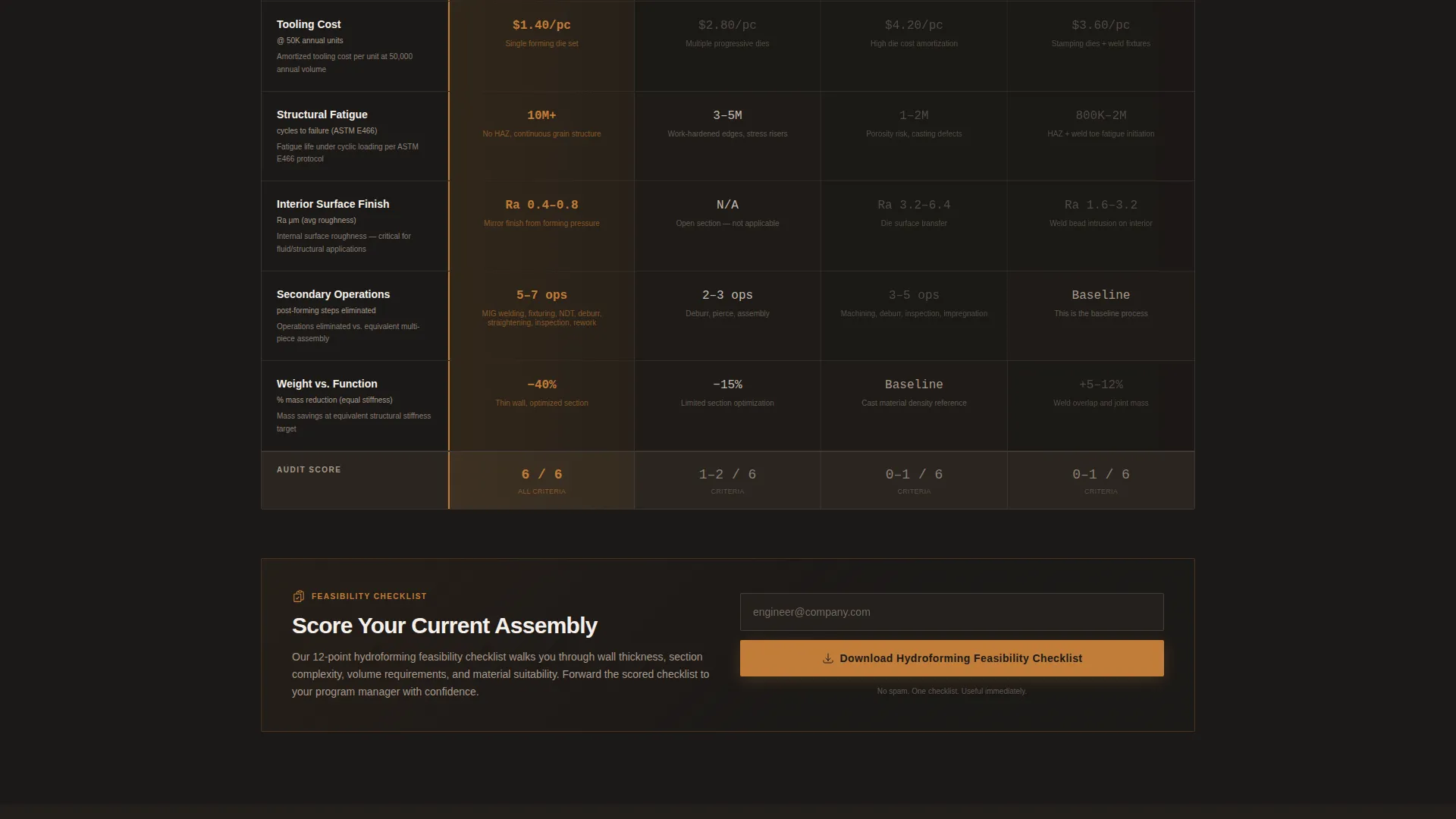
- A multi-row data grid comparing hydroforming against stamping, casting, and welded fabrication across part count, tooling cost, fatigue cycles, surface finish, and secondary operations
- Two conversion paths: a part-for-part comparison request form and a gated feasibility checklist download behind an email gate
Feature list
A paragraph introduces the feature set: every element in this template was chosen to match the decision-making process of an industrial procurement buyer. The features below reflect exactly what the brief specifies.
Cross-Sectional Infographic Header
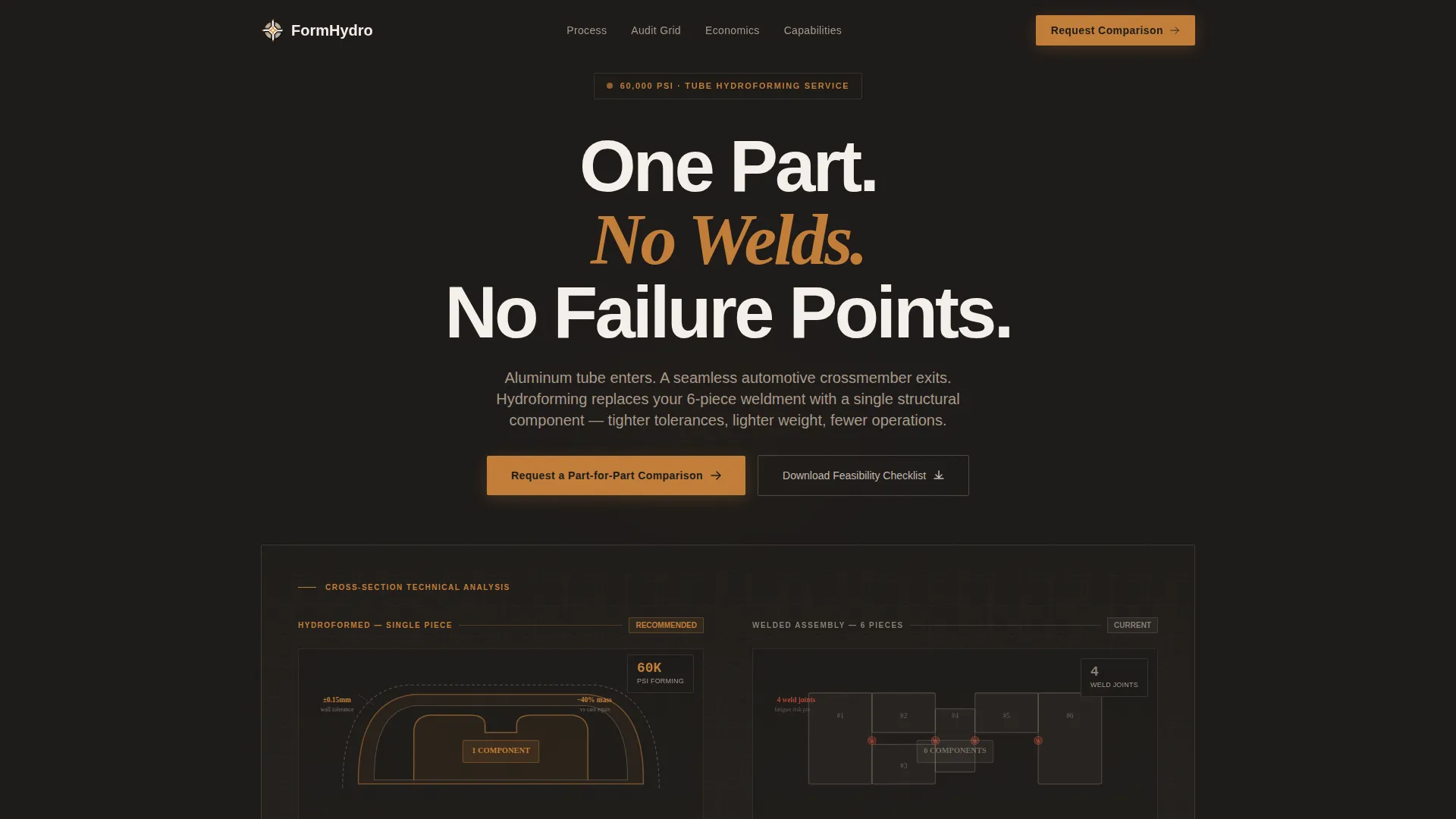
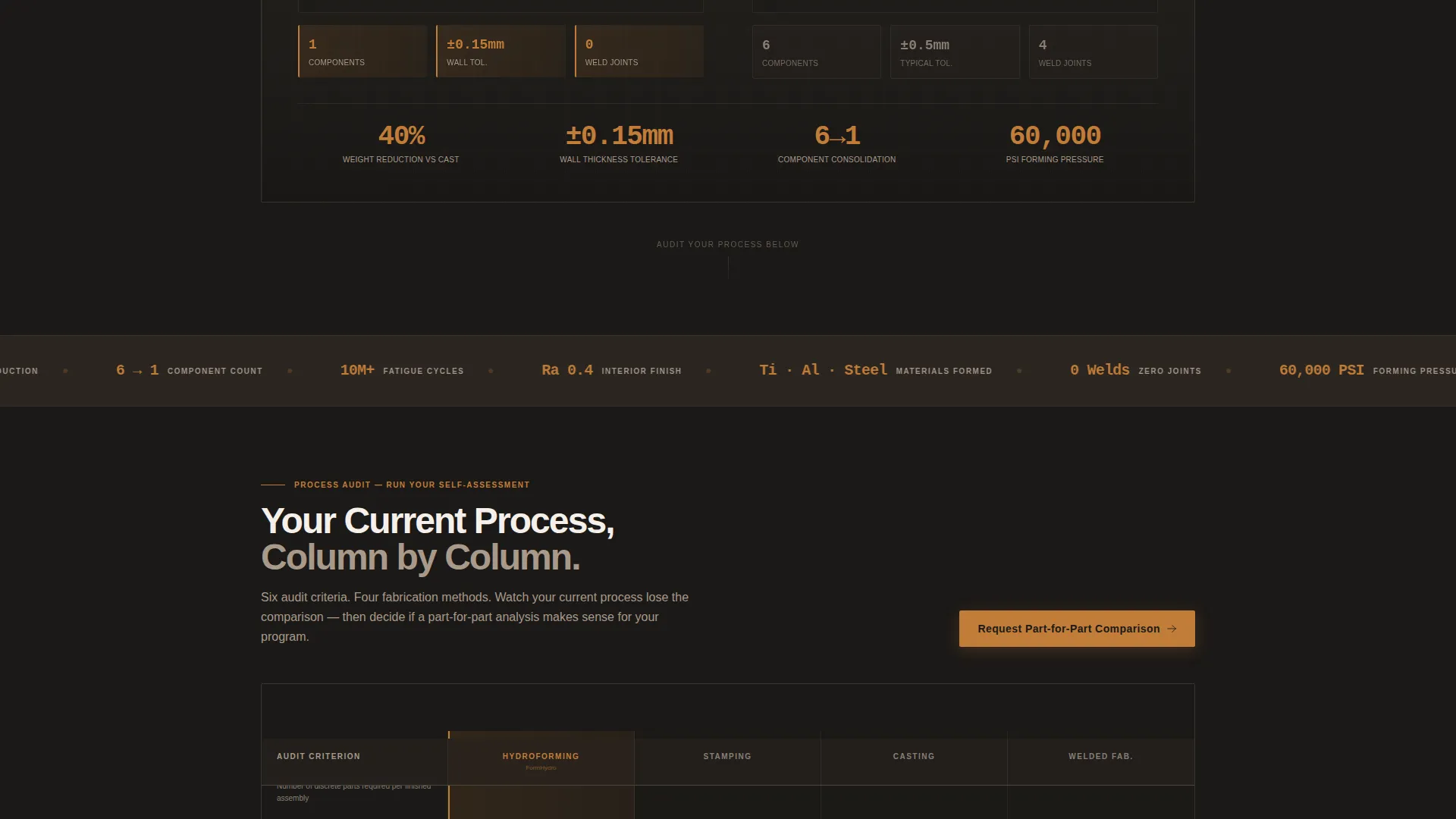
The header renders a side-by-side technical line art diagram of a hydroformed part versus a traditional welded assembly. Callout data points include wall thickness tolerance of plus or minus 0.15 mm, 40 percent weight reduction, and single-piece construction replacing a 6-component weldment. Key figures are oversized and set in hydraulic amber against a concrete background.
Animated Pressure Path Visualization
A subtle animated pulse traces the water pressure path through the tube cross-section, giving the schematic a living quality without distracting from the data. This detail communicates process expertise before a single word is read.
Audit-Style Process Comparison Grid
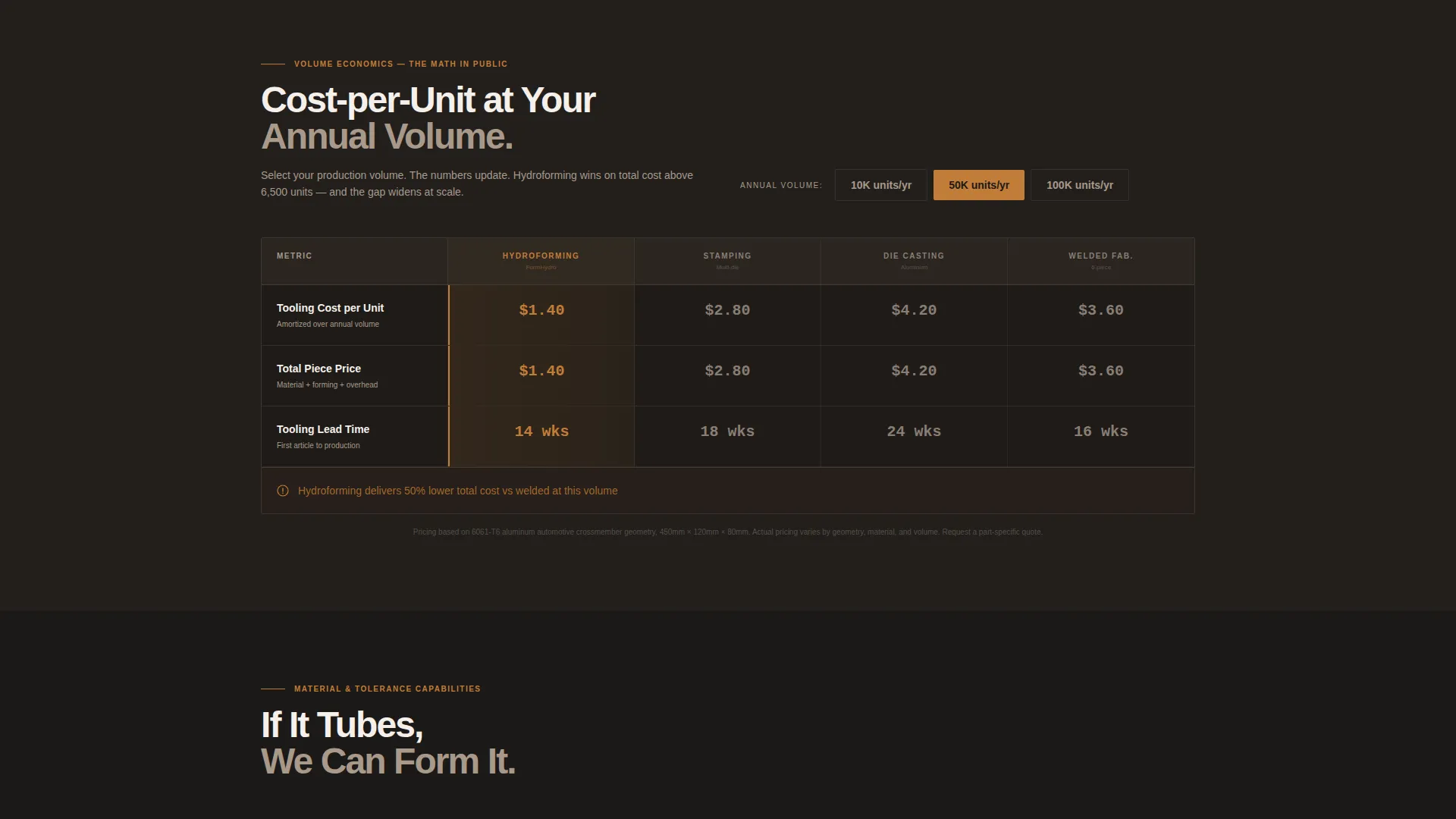
The data grid is the core of the page. Each row is a structured audit criterion comparing hydroforming against competing fabrication methods side by side. Columns cover part count, tooling cost per unit at 10,000, 50,000, and 100,000 annual volumes, structural fatigue cycles, surface finish grade, and secondary operations eliminated.
Gated Feasibility Checklist Download
Midway through the audit grid, a downloadable checklist titled "Score Your Current Assembly" appears as a secondary conversion point. It is gated behind an email capture, creating a lower-commitment engagement path for visitors who are not yet ready to submit a part file.
Part-for-Part Comparison Request Form
The primary conversion form collects current process type via dropdown, annual production volume, material selection including aluminum, steel, titanium, and Inconel, and an optional STEP file upload. The form appears at the top of the data grid and repeats after the final audit row.
Dual Conversion Architecture
The page runs two parallel conversion paths simultaneously. The primary path targets engineers ready to submit a specific part. The secondary path captures earlier-stage buyers with a feasibility checklist. Both paths are present without competing for visual priority.
Page sections overview
| Section | Purpose |
|---|---|
| Infographic Header | Establish technical credibility with cross-sectional part diagram and key data callouts |
| Process Comparison Grid | Audit hydroforming against stamping, casting, and welded fabrication row by row |
| Tooling Cost Columns | Break down cost per unit at 10K, 50K, and 100K annual volumes for direct comparison |
| Fatigue and Finish Rows | Compare structural fatigue cycles and surface finish grade across fabrication methods |
| Secondary Ops Eliminated | Show which downstream operations hydroforming removes versus competing processes |
| Midpage Checklist Gate | Capture early-stage buyers with a gated feasibility download mid-scroll |
| Primary Comparison Form | Collect process type, volume, material, and optional STEP file for qualified inquiry |
| Repeated call to action Row | Reinforce the comparison request after the final audit row with a second form placement |
Design & branding system
The visual identity follows an Industrial Raw theme built on a Warm Stone color palette. Every color choice references real shop-floor materials, creating a tactile, earned aesthetic that resonates with engineers and procurement professionals.
- Forge-scale black (#1C1917) for primary backgrounds, machined-surface taupe (#A8998A) for secondary surfaces, and shop-floor concrete (#D6CFC7) for data grid backgrounds
- Hydraulic-line amber (#C27D38) reserved exclusively for interactive elements, comparison highlights, oversized data callouts, and call-to-action buttons
- Technical line art rendering style for all part diagrams, keeping visuals precise and process-accurate rather than decorative
Mobile & speed optimization
The template is structured for a single-page linear scroll, which keeps layout complexity manageable across screen sizes. The data grid and form components are designed to reflow cleanly at smaller widths.
- Data grid rows collapse into stacked comparison cards on narrow screens, preserving readability without horizontal scrolling
- The infographic header and animated pulse element are contained within a full-width block that scales proportionally across device widths
- Form fields including the STEP file upload are laid out in a single-column stack on mobile to reduce friction at the conversion point
How this template helps you convert
The page is built around a Comparison/Versus conversion model. It earns the click by presenting structured evidence before the form ever appears.
- The infographic header anchors the page with three hard data points, stopping a procurement engineer mid-scroll and establishing process authority in the first viewport.
- The audit grid turns passive reading into active self-assessment, so by the time the visitor reaches the primary form they have already watched their current fabrication method lose column by column.
- The dual conversion paths ensure that visitors at different stages of the buying cycle both have a next step, reducing page exits for buyers who are not yet ready to submit a part file.
Other information about this template
This template is designed specifically for the Manufacturing and Industrial category, with a focus on the hydroforming service provider niche within manufacturing processes. It is a strong fit for any industrial supplier whose sales process depends on technical differentiation rather than price alone.
- The Dashboard/Data Grid template style makes it straightforward to adapt the comparison rows for other precision forming or fabrication services beyond hydroforming
- The Checklist and Audit creative direction means the page functions as a pre-qualification tool, delivering warmer, more technically informed inquiries to the sales team
- The Warm Stone color system and Industrial Raw theme are cohesive enough to extend across printed sales collateral, trade show materials, or follow-up PDF decks without rebuilding the visual identity from scratch
Theme
Industrial Raw
Creative direction
Checklist & Audit
Color system
Warm Stone
Style
Dashboard/Data Grid
Direction
Comparison/Versus
Page Sections
Cross-sectional Infographic Header
Animated Water Pressure Path
Audit-style Fabrication Comparison Grid
Dual Conversion Path Architecture
Gated Feasibility Checklist
Repeated Call to Action Placement
Related questions
Who is the primary audience for this landing page template?
Can the data grid be adapted for different fabrication comparisons?
What does the primary conversion form collect?
What is the secondary conversion path on this page?
Does the template include the animated infographic element?



