Thermoforming Company Landing Page Template
Formline is a hub-and-spoke landing page template built for thermoforming companies. It leads with three oversized production stats, then anchors each figure to a dedicated spoke section covering prototyping, precision, and capacity. The design uses a warm industrial palette and funnels every visitor toward a quote request, making it the right starting point for any custom thermoforming operation ready to convert serious buyers.
by Rocket studio
Quick summary
Formline is a single-page, anchor-navigated landing page template designed for thermoforming manufacturers. It opens with an immersive factory header, punches with three key production stats, and routes visitors through focused spoke sections before directing them to a quote page. The template balances technical credibility with a clean conversion path.
Who this template is for
This template is built for custom thermoforming companies that serve industrial and commercial buyers. It speaks directly to the technical audience those companies need to impress before a request for quotation ever lands in the inbox.
- Thermoforming manufacturers producing trays, housings, enclosures, blisters, and clamshells for multiple industries
- Sales and marketing teams at plastics fabrication companies who need a page that earns engineering trust fast
- Operations or business development leads looking to replace a generic service page with something that proves capability through real production data
What problem this template solves
Most manufacturing service pages bury their capabilities in dense text, losing busy procurement managers and packaging engineers before they find a reason to reach out. This template solves that by putting the numbers first and the detail exactly one scroll away.
- Visitors leave before contacting a supplier because the page offers no quick proof of production capacity or tolerance capability
- Engineers in the research phase have no clear secondary path to stay engaged before they are ready to submit a formal quote request
- Generic industrial pages fail to separate a precision thermoformer from commodity competitors
What you get with this template
You get a fully structured, single-page layout with anchor navigation, three data-led spoke sections, and two conversion paths built in from the start. Every section is pre-planned so you only need to drop in your own figures, images, and copy.
- A fixed anchor navigation bar with a persistent primary call-to-action button that appears throughout the page
- Three content spokes covering prototyping timelines, tolerance specifications, and production capacity, each with its own closing call-to-action
- A secondary lead-capture path using a single-field email gate tied to a materials and tolerance guide download
Feature list
This section covers the core functional and design components the template delivers based on the source brief.
Stats-First Hero Block
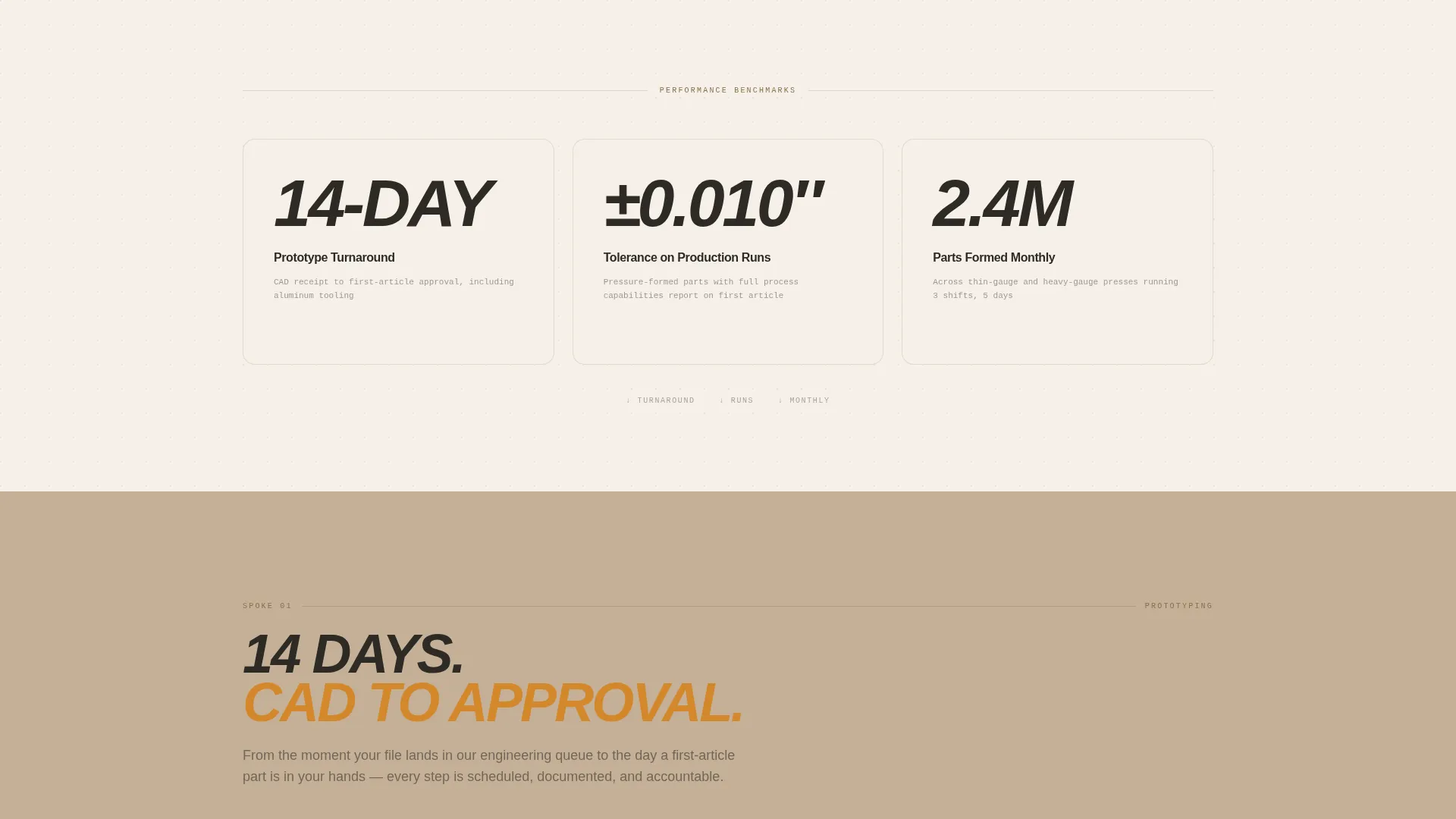
Three oversized production figures sit immediately below the header image, each one linked by smooth-scroll anchor to its corresponding spoke section. The layout rewards fast scanners and technical buyers equally, letting a single number pull someone into a deeper reading path.
Hub-and-Spoke Anchor Navigation
A persistent navigation bar keeps all three spoke labels and the primary quote call-to-action visible as the visitor scrolls. Each anchor label maps directly to a content spoke, so navigation feels purposeful rather than generic.
Prototyping Spoke with Step Timeline
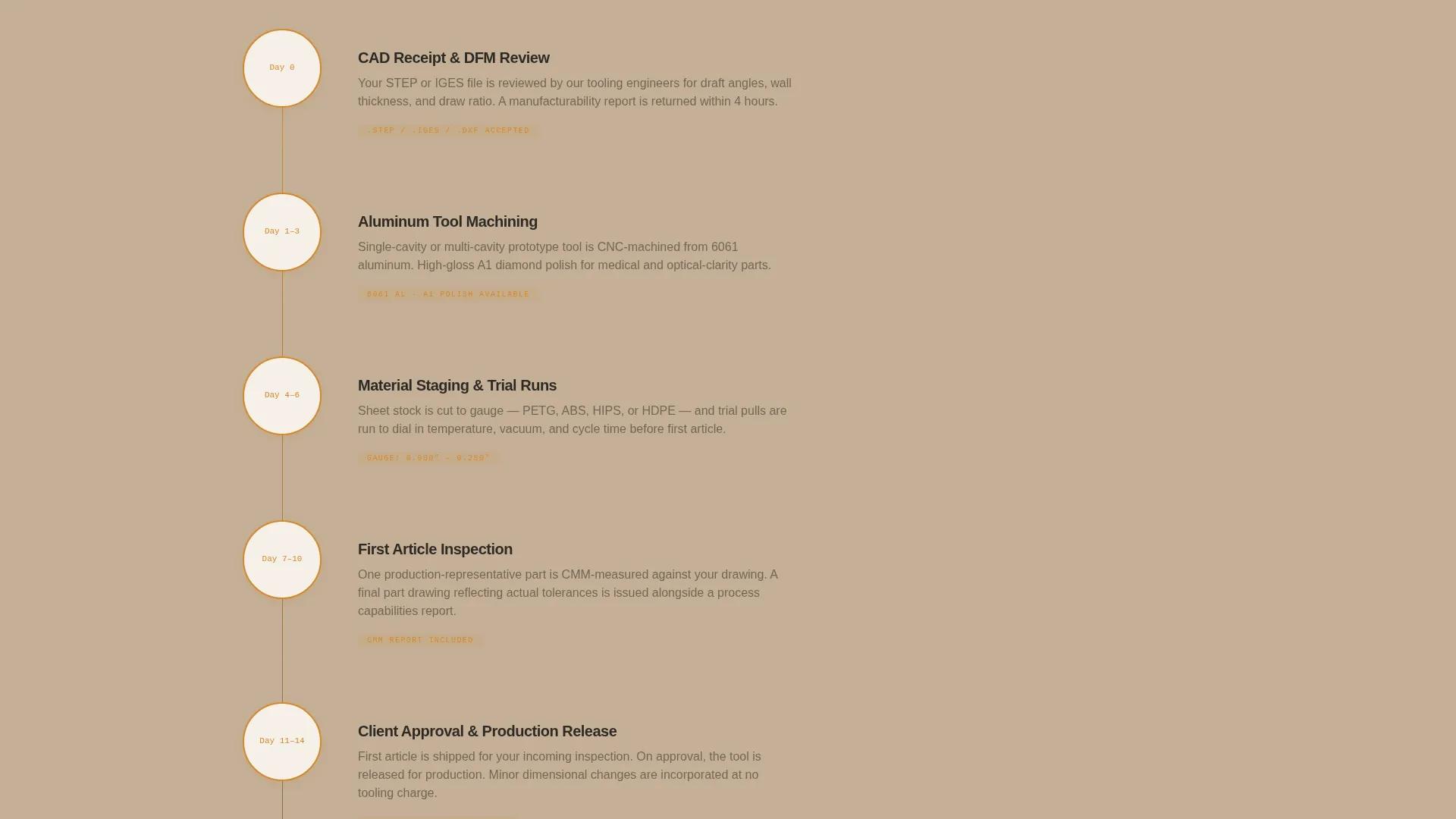
The first spoke section presents a visual step-by-step timeline from computer-aided design (CAD) file receipt through to first-article approval. It gives procurement contacts a clear picture of how fast a prototype can move without requiring a phone call.
Precision Spoke with Tolerance Comparison Table
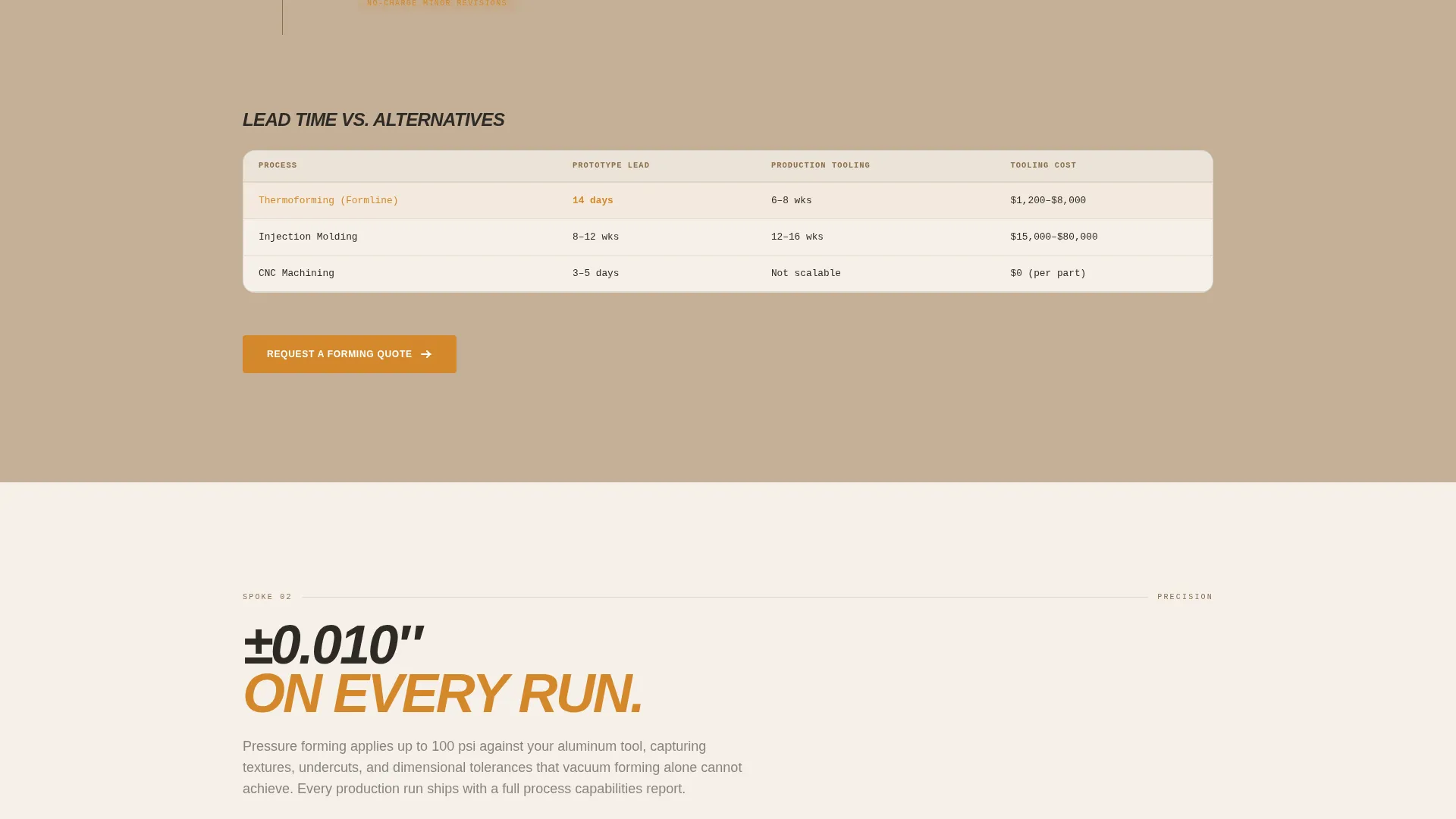
The second spoke includes a structured comparison table showing tolerance ranges against injection molding and computer numerical control (CNC) trimming. It gives engineers a defensible reason to specify thermoforming before the conversation begins.
Capacity Spoke with Production Data
The third spoke breaks down press tonnage, maximum sheet sizes, and simultaneous tooling slots. The section closes with the same primary call-to-action, reinforcing the conversion goal after the heaviest technical content.
Dual Conversion Path Design
The template supports two distinct paths: a primary click-through to a dedicated quote page, and a secondary single-field email gate for a downloadable materials and tolerance guide. Neither path requires a form on the landing page itself.
Page sections overview
| Section | Purpose |
|---|---|
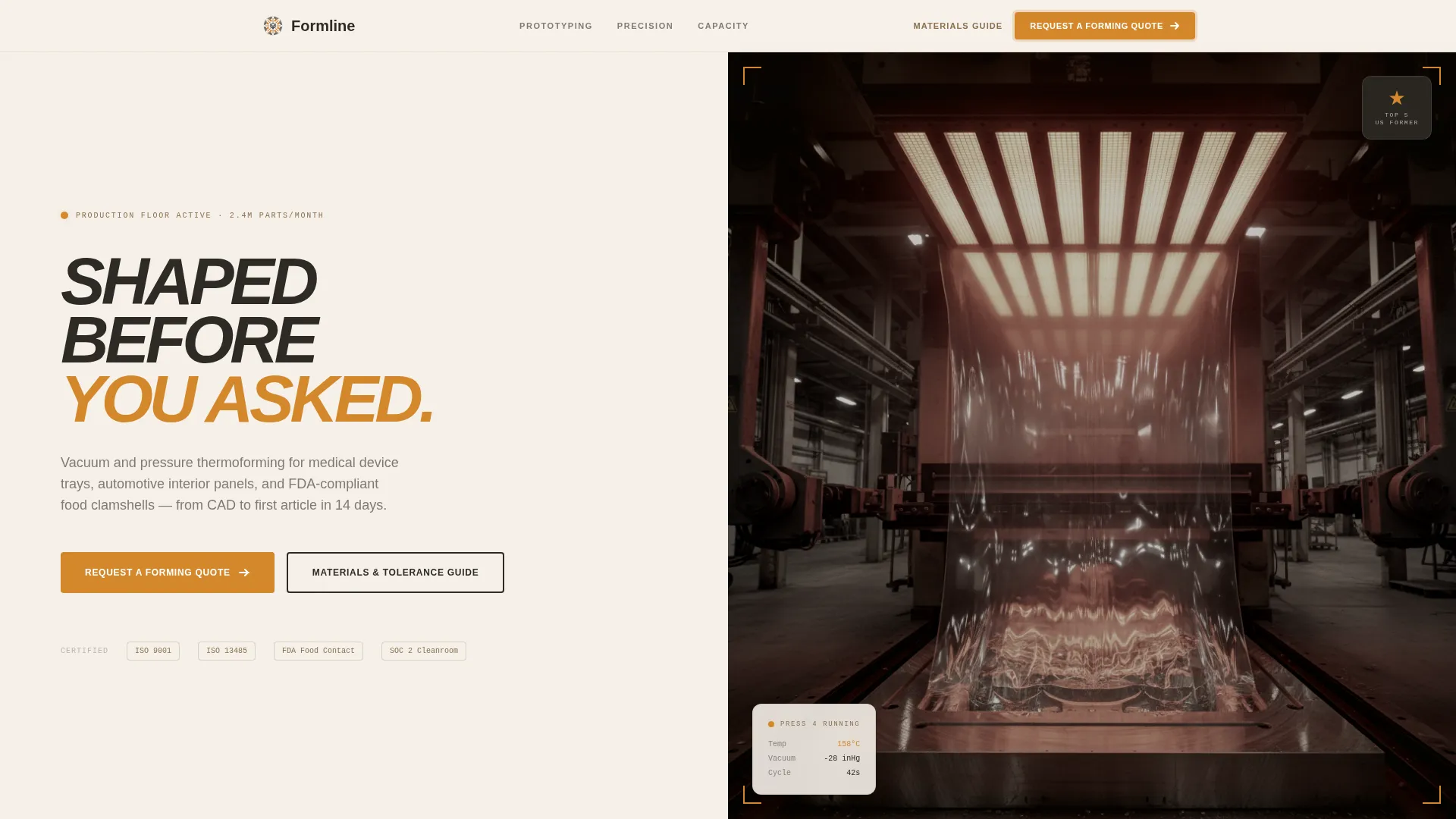
| Factory Header Image | Sets industrial credibility with an immersive behind-the-scenes forming station photograph |
| Stats Impact Bar | Delivers three key production figures that anchor the hub navigation spokes |
| Anchor Navigation Bar | Keeps spoke links and primary call-to-action fixed as the visitor scrolls |
| Prototyping Spoke | Walks through the prototype timeline from CAD receipt to first-article approval |
| Precision Spoke | Shows tolerance comparison data against alternative manufacturing processes |
| Capacity Spoke | Details press tonnage, sheet size limits, and tooling slot availability |
| Materials Guide Gate | Captures research-phase engineers with a single-field email download prompt |
| Quote Page call to action | Repeats the primary call-to-action at the close of every spoke section |
Design & branding system
The visual identity follows a Service Utility theme built around a Warm Stone color palette. Every color choice is tied to a functional role, and nothing decorative appears without earning its place in the layout.
- The four core palette colors are quarry tan (#C4B097), kiln-fired clay (#8B6F4E), heated-sheet white (#F5F0E8), and deep tool steel (#2E2A25) for primary text; backgrounds alternate between heated-sheet white and quarry tan to visually separate each spoke section
- Molten amber (#D4882C) serves as the single accent color, reserved exclusively for call-to-action buttons and key data callouts, keeping urgency focused and never decorative
- Typography anchors in deep tool steel throughout, giving the page the weight and seriousness of a technical specification sheet
Mobile & speed optimization
The template is structured to remain clear and navigable on smaller screens without sacrificing the data-heavy layout that technical buyers need. The anchor navigation and spoke sections translate naturally to a vertical scroll experience.
- Fixed anchor navigation collapses to remain accessible on mobile viewports, keeping the quote call-to-action within reach at all times
- Oversized stat figures and comparison tables are formatted to reflow cleanly at narrower widths so engineers reviewing the page on a tablet or phone can still read the key numbers
How this template helps you convert
The conversion strategy is built on a single principle: build enough technical confidence that clicking through to the quote page feels like the obvious next step, not a leap of faith.
- The stats-first layout puts the most compelling proof points at the very top of the page, so even a visitor spending only a few seconds gets the core message before they leave
- The persistent call-to-action in the anchor navigation bar means the quote request option is never more than one click away, regardless of where in the page the visitor is reading
- The secondary email gate for the materials and tolerance guide keeps research-phase engineers in the pipeline, giving the thermoforming company a second chance to convert them when the formal request for quotation is ready
Other information about this template
This template is categorized under Manufacturing and Industrial, with a specific focus on the Plastics and Injection Molding subcategory and a Thermoforming Company niche. It is a strong fit for any custom thermoforming operation that serves packaging, automotive, food processing, or medical device sectors.
- The template style is Hub and Spoke with Anchor Navigation, making it distinct from a standard scrolling brochure page
- The header concept is Behind-the-Scenes, built around a wide-angle factory shot taken from inside the forming station during an active vacuum-forming pull
- The creative direction is Stats-First Impact, meaning data leads the narrative and prose supports rather than leads
- The landing page direction is Click-Through, meaning no quote form lives on the page itself; every conversion action routes to a dedicated external quote page
Theme
Service Utility
Creative direction
Stats-First Impact
Color system
Warm Stone
Style
Hub & Spoke (Anchor Nav)
Direction
Click-Through
Page Sections
Stats-first Hero Block
Hub-and-spoke Anchor Navigation
Prototyping Spoke with Step Timeline
Precision Spoke with Tolerance Table
Capacity Spoke with Production Data
Dual Conversion Path Design
Related questions
Does this template include a quote form on the page?
What are the two conversion paths this template supports?
Can this template work for a thermoforming company serving multiple industries?
What production data does the template expect me to supply?
Is the header image a stock photo?



