Food & Beverage Manufacturing Professional Website Template
Formulate is a dark, dashboard-style landing page template built for food and beverage contract manufacturers and original equipment manufacturer (OEM) co-packers. It guides procurement-focused visitors through a five-stage production pipeline using data-grid cards, live spec comparisons, and an interactive co-packer comparison form, converting serious buyers into qualified leads.
by Rocket studio
Quick summary
Formulate is a single-page, data-grid landing page template designed for food and beverage OEM suppliers and contract manufacturers. It walks buyers through the full production pipeline, from raw formulation to finished-goods fulfillment, using industrial dashboard aesthetics, real operational metrics, and a side-by-side co-packer comparison tool that converts hesitation into action.
Who this template is for
This template is built for B2B suppliers who need to earn trust fast with buyers that already know what they want. It speaks the language of specification sheets, lead times, and compliance certifications rather than lifestyle imagery.
- Supplement startup founders and direct-to-consumer (DTC) beverage brands evaluating co-packers for the first time or scaling from small pilot runs to high-volume production
- Procurement managers at regional grocery chains sourcing white-label functional beverages, kombuchas, or nutritional shots and comparing suppliers on compliance coverage and per-unit cost
- Contract manufacturers and OEM facility operators who need a professional, conversion-focused web presence that reflects operational credibility
What problem this template solves
Procurement buyers spend hours cross-referencing supplier spec sheets, chasing certifications, and trying to compare co-packer lead times in spreadsheets. A generic website with stock photography and vague capability claims loses these buyers immediately.
- Serious B2B buyers cannot quickly compare a supplier's specs against industry averages on a typical marketing site
- Operational proof points like defect rates, minimum order quantities (MOQs), turnaround days, and certification coverage are buried or absent on most co-packer websites
- There is no clear, low-friction path for a buyer to compare their current supplier against a new one without picking up the phone
What you get with this template
This template delivers a fully structured, one-page dashboard experience purpose-built for an industrial food and beverage OEM audience. Every section answers a buyer objection before they need to ask it.
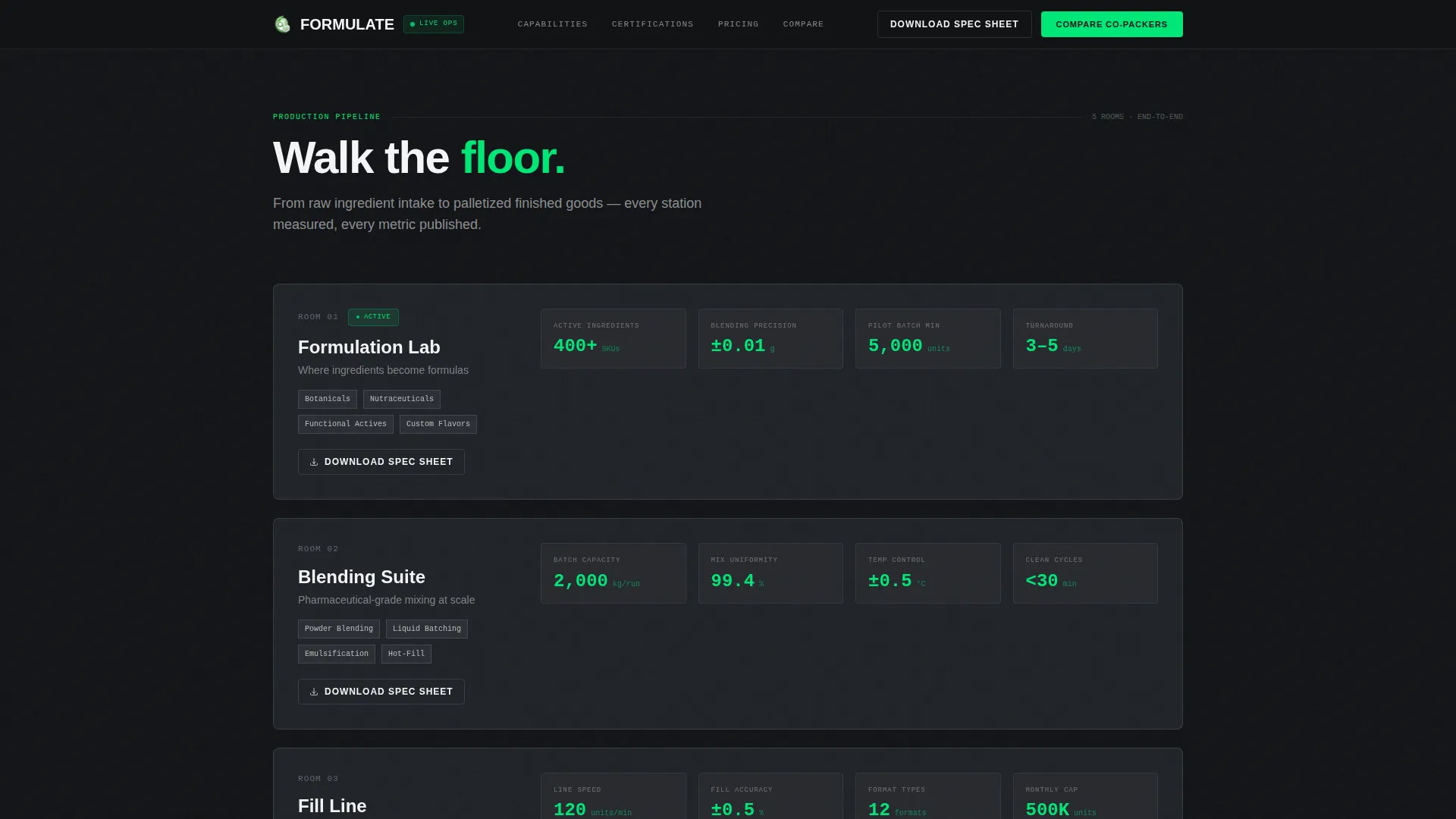
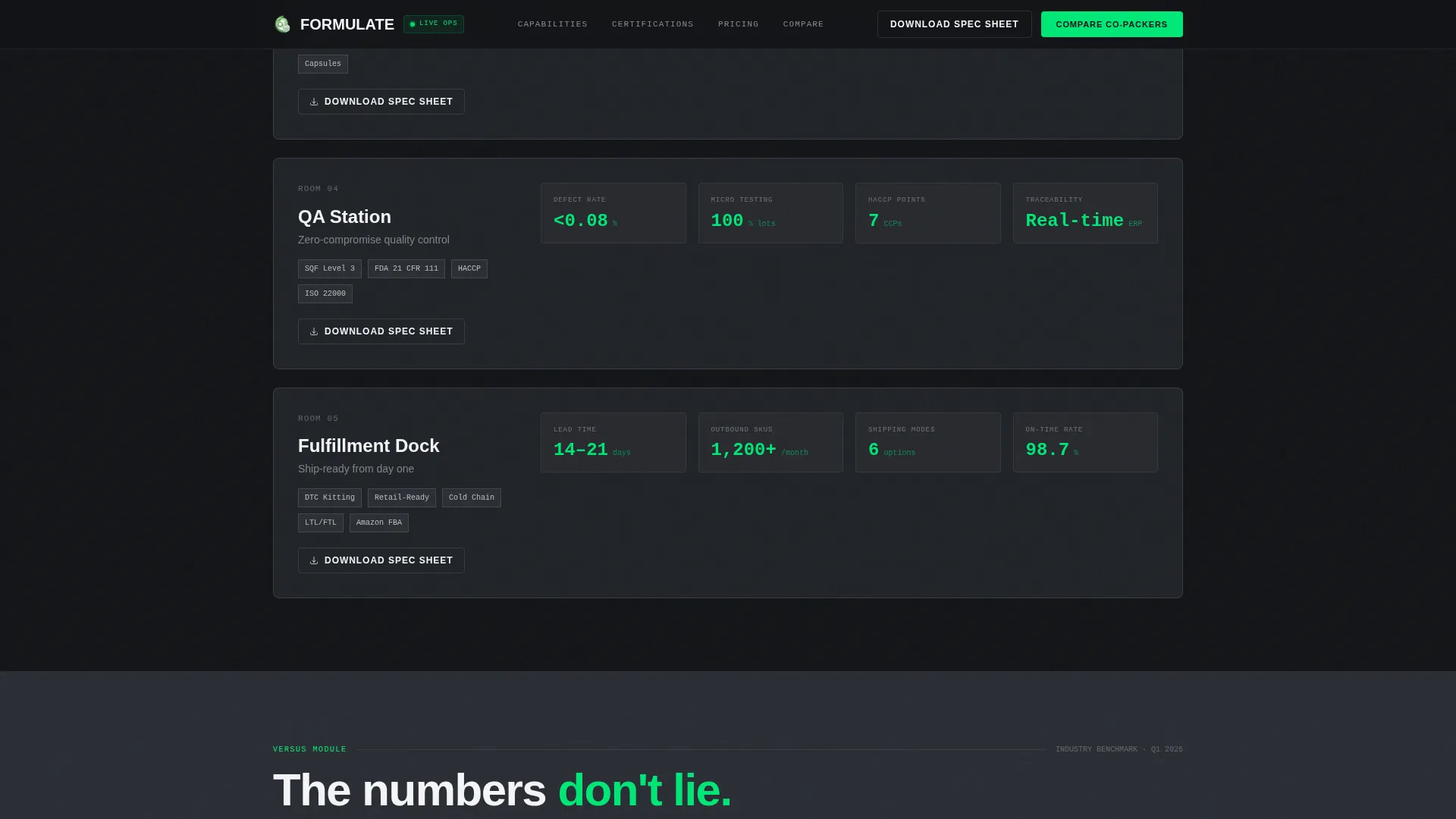
- A five-section production pipeline layout with data-grid cards covering the Formulation Lab, Blending Suite, Fill Line, QA Station, and Fulfillment Dock, each card designed to surface real operational metrics
- An interactive two-column co-packer comparison form where visitors input their current supplier's specs and the right column auto-populates with this supplier's matching figures in signal-green
- A sticky bottom call-to-action (call to action) bar with "Compare Your Current Co-Packer" that appears after the first versus module, plus a floating "Download Spec Sheet" link on every facility-room card
Feature list
This template ships with a focused set of purpose-built components. Each one is designed to serve a data-literate, procurement-minded buyer.
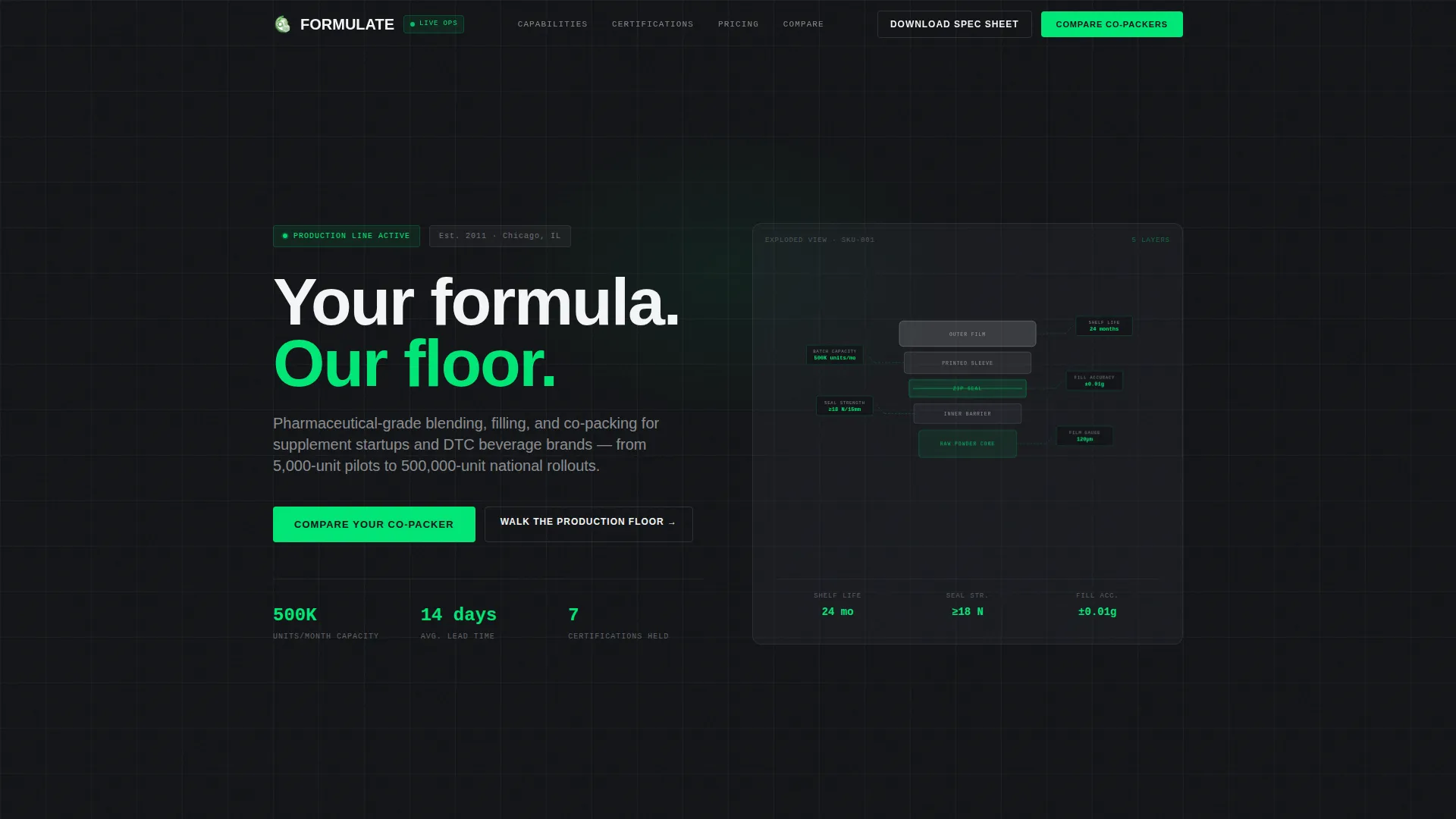
Exploded View Hero Illustration
The header features an isometric or three-quarter technical illustration of a supplement pouch or bottled shot deconstructed into its physical layers: outer film, printed sleeve, zip seal, inner barrier, and raw powder or liquid core. Thin leader lines connect each layer to specification callouts covering film gauge, seal strength, shelf-life rating, and batch capacity. The illustration renders in monochrome with signal-green highlights on data points against a carbon black background.
Five-Room Production Pipeline
The main body structures the scroll as a walk through five discrete facility rooms. Each room, Formulation Lab, Blending Suite, Fill Line, QA Station, and Fulfillment Dock, is presented as a data-grid card showing real metrics such as turnaround days, MOQ ranges, certifications held, and defect rates. GSAP-powered scroll reveals and staggered card entries animate each room into view.
Comparison and Versus Modules
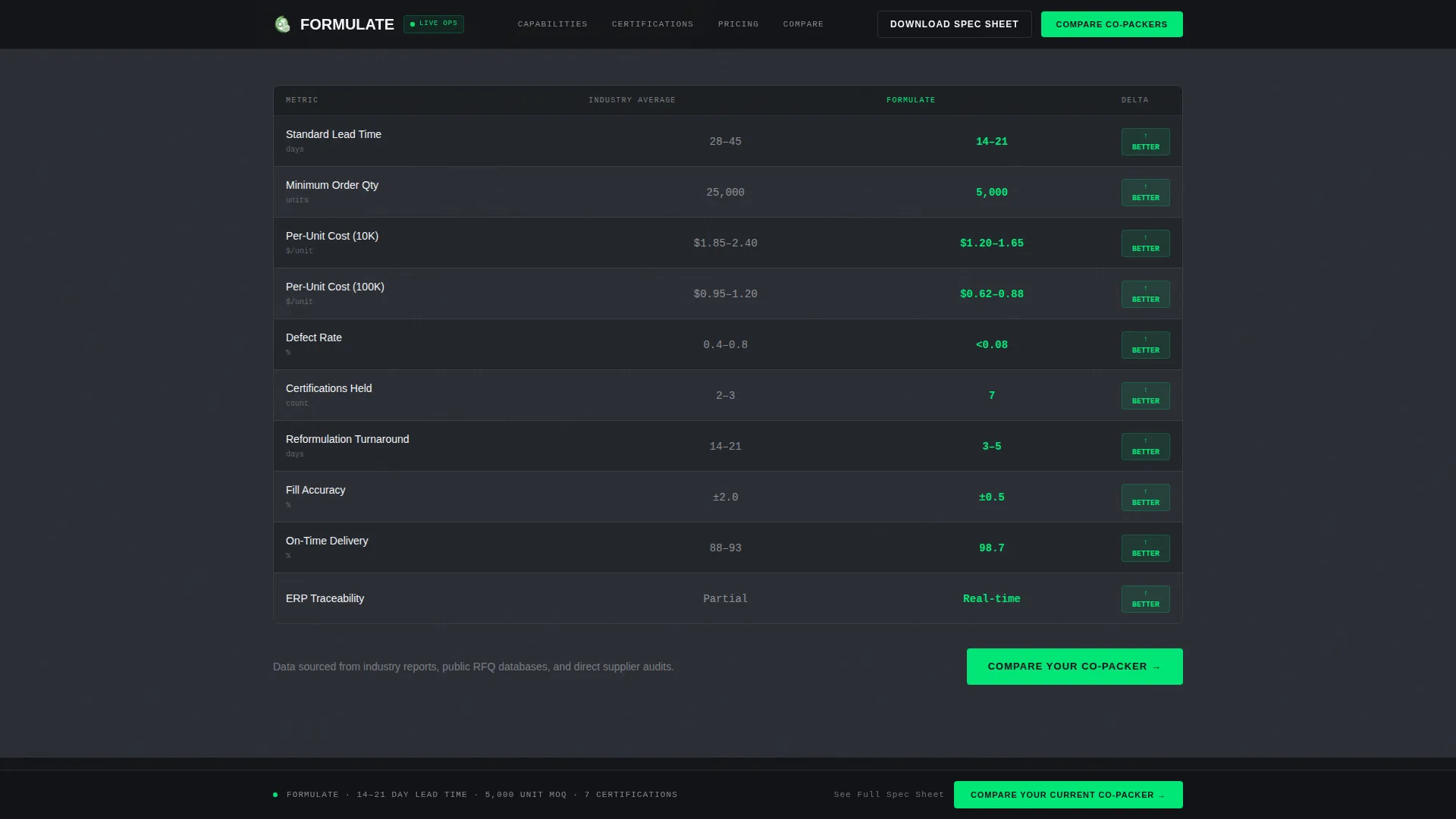
Between facility rooms, the template inserts side-by-side spec comparison tables. These pit the supplier's figures against industry averages on lead time, per-unit cost at volume tiers, and compliance coverage including Food and Drug Administration (FDA), Safe Quality Food (SQF), organic, and kosher standards. The architecture escalates from ingredient sourcing to fulfillment logistics.
Interactive Co-Packer Comparison Form
The primary conversion component is a two-column form. The left column collects the visitor's current supplier's lead time, MOQ, and certifications via dropdowns rather than free-text fields. The right column auto-populates with the supplier's matching specs in signal-green. A single work email field and a "Get Your Custom Comparison Report" button complete the flow.
Sticky call to action Bar and Floating Spec Sheet Links
A persistent bottom bar appears after the first versus module and anchors the primary conversion path throughout the rest of the page. Every facility-room card also carries a floating "Download Spec Sheet" link gated behind email only, creating a low-friction, high-intent secondary lead capture path.
QA and Certifications Compliance Grid
A dedicated section displays the supplier's compliance credentials as a visual grid with certification badges, defect rate figures, and traceability metrics. This section directly addresses the compliance verification step that procurement managers perform before shortlisting a co-packer.
Page sections overview
| Section | Purpose |
|---|---|
| Hero Exploded View | Introduce product layers and key spec callouts with technical illustration and glassmorphic data cards |
| Formulation Lab Card | Show ingredient sourcing and blending capabilities with real turnaround and MOQ metrics |
| Blending Suite Card | Detail pharmaceutical-grade blending conditions and batch capacity figures |
| Fill Line Card | Display fill speed, unit output range, and packaging format support |
| QA Station Card | Surface defect rates, inspection protocols, and traceability data |
| Fulfillment Dock Card | Cover finished-goods logistics, lead times, and shipping volume tiers |
| Versus Modules | Compare supplier specs against industry averages on lead time, cost, and compliance side by side |
| QA Certifications Grid | Present FDA, SQF, organic, and kosher credentials with badge visuals and metric callouts |
| Comparison Form Section | Collect current co-packer details and auto-populate matching specs for a custom comparison report |
| Sticky call to action Bar | Anchor "Compare Your Current Co-Packer" persistently after the first versus module |
| Footer Row | Single-row linear footer with essential links and contact reference |
Design & branding system
The visual language is built around an industrial control-panel aesthetic. The palette and typography choices reinforce the precision and authority expected from a pharmaceutical-grade manufacturing supplier.
- Carbon Fiber color system using deep carbon black (#121417) as the primary background, machined graphite (#2A2D34) as the alternating surface color, cleanroom white (#F4F5F7) for body text, and signal-green (#00E676) exclusively for live data points, toggle states, active form fields, and call to action surfaces
- DM Sans for all prose and label typography, paired with JetBrains Mono for all data values, metric readouts, and monospace callouts to visually separate editorial copy from operational figures
- Hairline dividers at 12% opacity between sections, with backgrounds alternating between carbon black and graphite to create spatial depth without decorative elements
Mobile & speed optimization
The template is architected desktop-first, reflecting how procurement managers and supplement founders research suppliers, on wide screens where data grids and comparison tables have enough room to breathe.
- Server Components handle all static sections including the hero illustration, facility-room cards, and certifications grid, keeping initial page load lean
- Client Components are scoped to interactive elements only: the co-packer comparison form with auto-populate behavior, the sticky call to action bar, and GSAP-driven scroll animations including number count-up and staggered card reveals
- The responsive layout preserves data-grid readability on tablet viewports while stacking cards vertically on smaller screens
How this template helps you convert
The entire page architecture is built around one buying decision: choosing a co-packer. Every section removes a barrier that typically stalls that decision.
- The versus modules and compliance grid answer the two most common objections, "can you match my current supplier's specs?" and "are you certified?", before a buyer has to ask, reducing the need for a discovery call
- The interactive comparison form transforms a passive page visit into an active evaluation session, giving buyers a concrete deliverable (a custom comparison report) in exchange for their work email, creating a qualified lead with documented buying intent
Other information about this template
Formulate is well-suited for any food and beverage contract manufacturing supplier looking to upgrade from a generic service page to a conversion-optimized, data-driven web presence. The template's modular section structure means individual facility-room cards and versus tables can be updated to reflect current operational metrics without redesigning the layout.
- The template is built on a Dashboard Pro theme with a Carbon Fiber color system, making it visually distinct from standard food industry websites that rely on natural photography and soft palettes
- The Spatial and Architectural creative direction means the scroll path mirrors the physical production sequence, which reinforces supplier credibility by demonstrating operational transparency
- The Exploded View header concept is intentionally engineering-forward with no lifestyle photography, which aligns with how procurement buyers and founders evaluate industrial partners rather than consumer brands
Theme
Dashboard Pro
Creative direction
Spatial & Architectural
Color system
Carbon Fiber
Style
Dashboard/Data Grid
Direction
Comparison/Versus
Page Sections
Exploded View Technical Hero
Five-room Production Pipeline Cards
Side-by-side Versus Comparison Modules
Interactive Co-packer Comparison Form
Sticky Call to Action Bar and Spec Sheet Downloads
QA and Certifications Compliance Grid
Related questions
Who is this landing page template designed for?
What sections are included in this template?
Can I customize the metrics and spec callouts in the data-grid cards?
What is the primary conversion goal of this template?
Is this template suited for a desktop-first audience?



