Food & Beverage Prototyping Lab Landing Page Template
Formulate is a split-screen landing page template built for food and beverage prototyping labs. It pairs a stats-driven hero with a scrolling timeline that walks visitors through a real development cycle, from Day 1 briefing to retail-ready sample. A gated playbook and ungated deliverable downloads work together to earn trust before asking for a lead.
by Rocket studio
Quick summary
Formulate is a precision-built landing page template for food and beverage prototype and rapid prototyping labs. It opens with four animated performance counters, then guides visitors through a milestone-by-milestone product development timeline. A gated 22-page playbook and freely downloadable phase deliverables create a dual-path conversion flow designed for technically minded buyers.
Who this template is for
This template speaks directly to businesses and professionals who work at the intersection of science, speed, and commercial food production. It is built for organizations that need to earn credibility with technically literate visitors before asking them to share their contact details.
- Consumer packaged goods brand managers racing toward a retail launch window
- Startup founders who need to scale a kitchen recipe past small-batch limits
- Research and development directors at mid-market beverage companies dealing with reformulation delays
What problem this template solves
Food and beverage prototyping services often struggle to communicate rigor and speed at the same time. Generic agency pages feel either too clinical or too casual, and neither builds the trust a brand manager or R&D director needs before sharing their work email. This template solves that gap.
- It proves capability upfront with hard performance numbers rather than vague claims
- It shows the full development cycle in sequence, so visitors understand the process before committing
- It removes friction by letting visitors download sample deliverables before they ever hit a form
What you get with this template
You get a fully structured single-page layout that moves visitors from proof to process to commitment in one continuous scroll. Every section is purposeful, and no visual element competes with the core message.
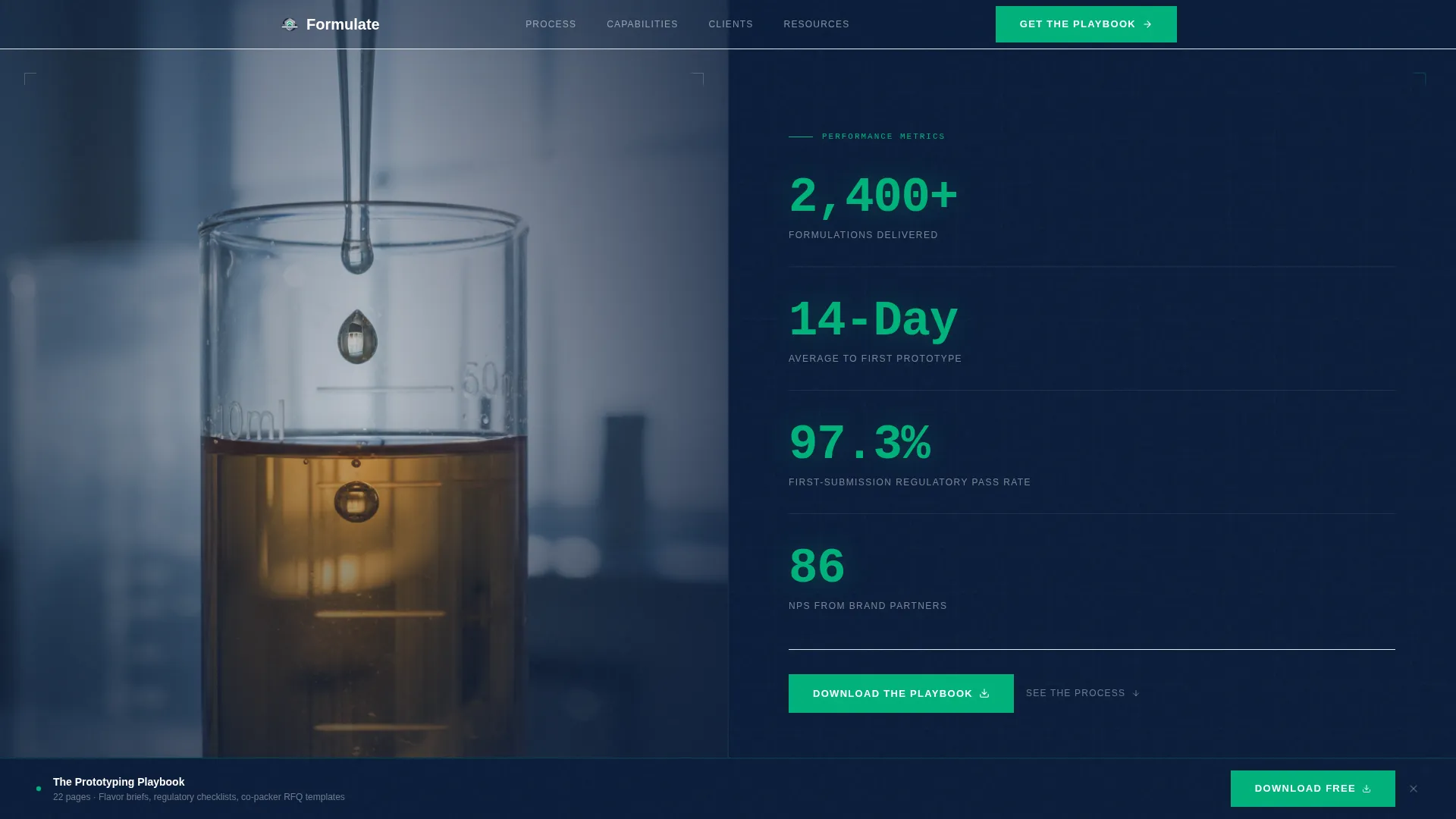
- A 50/50 split-screen hero section featuring four animated metric counters in a monospaced typeface
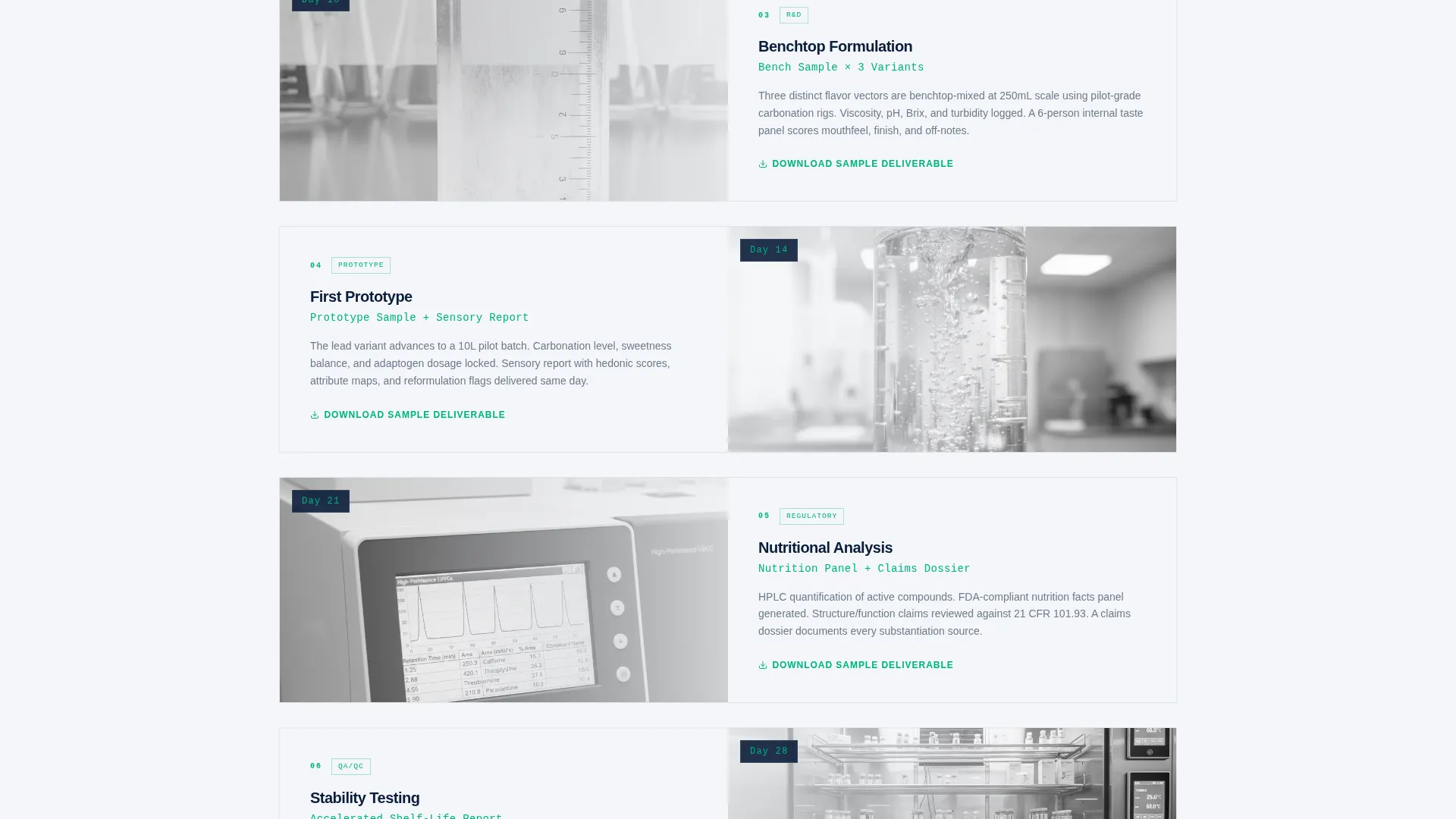
- A horizontal, scroll-driven timeline covering a full product development arc from briefing to retail sample
- A dual conversion path: a gated 22-page PDF playbook and ungated individual phase deliverable downloads
Feature list
This template includes structured components drawn directly from the source brief. Each one serves a specific role in moving a technically minded visitor toward action.
Animated Stats Hero Wall
The header splits the screen 50/50. The left panel holds an ambient, tightly cropped product photograph. The right panel runs four large animated counters on a deep navy background, each ticking upward in a monospaced typeface highlighted in regulatory-green. The numbers function as the headline, eliminating the need for a competing tagline.
Scroll-Driven Development Timeline
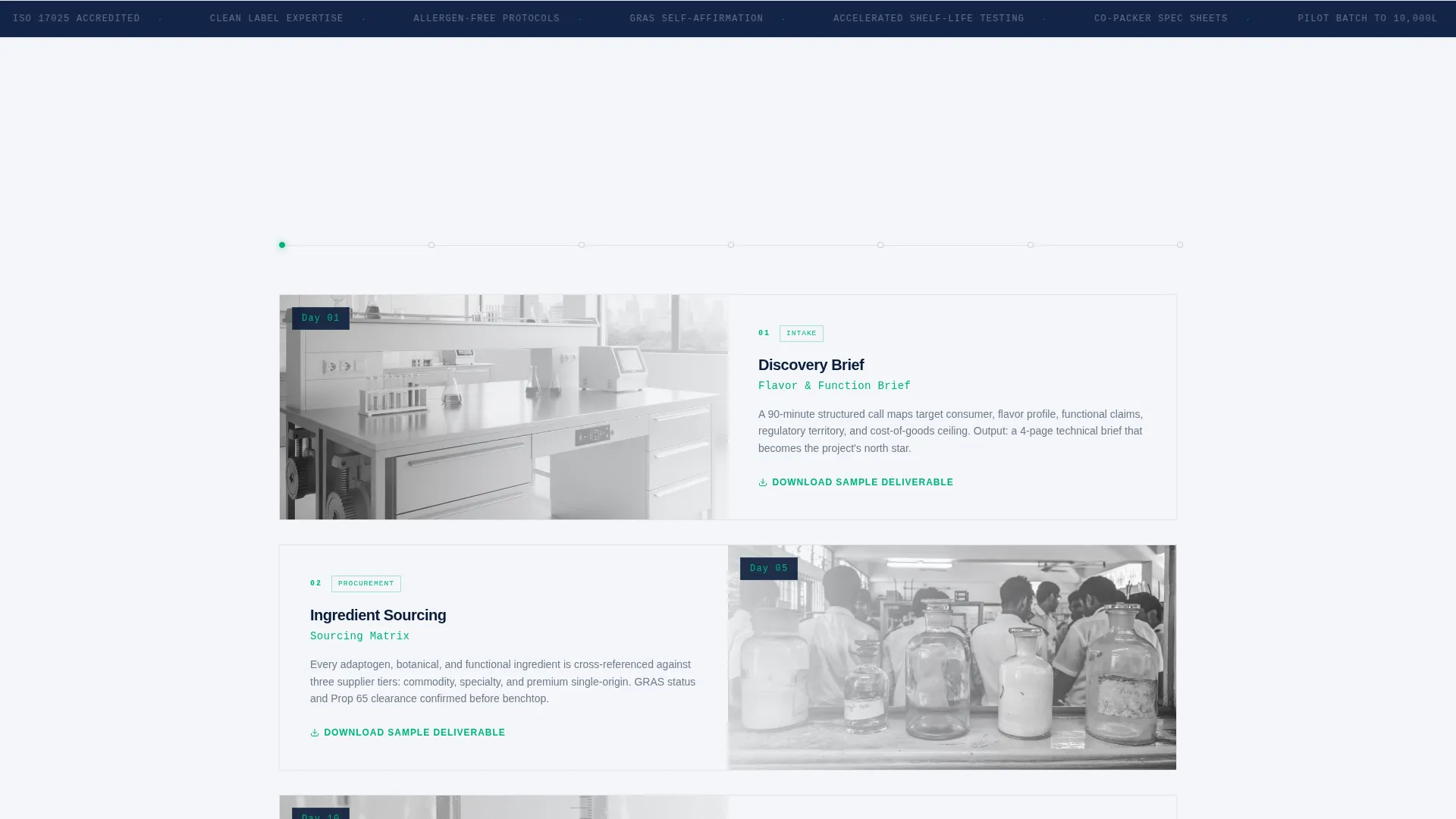
A horizontal timeline tracks a single hypothetical product through its full development arc. Each milestone splits the screen: the left side shows the actual deliverable artifact, and the right side provides two sentences of context. Visitors see ingredient sourcing, pilot batch production, accelerated shelf-life testing, and co-packer specification sheets in sequence.
Dual-Path Conversion Flow
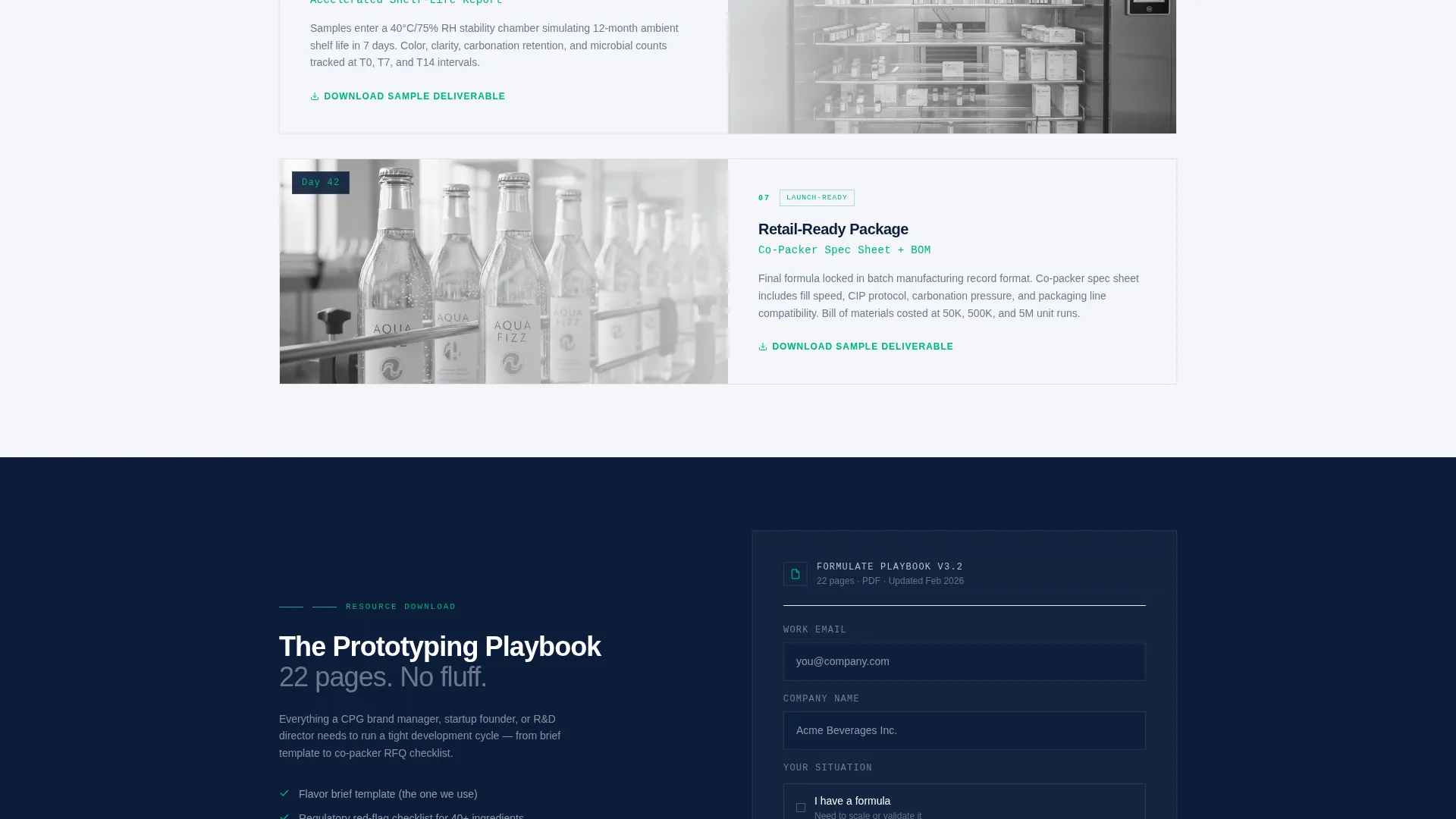
The primary path gates a 22-page prototyping playbook behind a three-field form collecting work email, company name, and a single radio selection. The secondary path lets visitors download individual phase deliverable samples from the timeline without any form, building confidence before the full ask.
Regulatory-Green Progress Bar
As visitors scroll through the timeline, a progress bar fills continuously with the template's regulatory-green accent color. The kinetic visual reinforces forward momentum and makes each completed phase feel like a real milestone rather than a static graphic.
Sticky Playbook Call-to-Action Bar
The playbook call-to-action appears first at the timeline's midpoint. It reappears as a sticky bar once a visitor passes 60 percent scroll depth. By that point, the visitor has already seen real deliverable artifacts, making the ask feel earned rather than premature.
Corporate Precision Color System
Every color in the palette carries a functional role. Deep command navy anchors headers and hero backgrounds. Pressed-shirt white fills content panels. Brushed-steel gray handles body text and dividers. Regulatory-green is reserved exclusively for calls-to-action, progress indicators, and data highlights.
Page sections overview
| Section | Purpose |
|---|---|
| Split-Screen Hero | Display four animated performance counters alongside an ambient product photograph |
| Timeline Phase 1 | Show Day 1 briefing call deliverable with downloadable flavor brief sample |
| Timeline Phase 2 | Present bench sample artifact with ingredient sourcing context |
| Timeline Phase 3 | Introduce pilot batch milestone with accelerated shelf-life testing detail |
| Timeline Phase 4 | Display co-packer spec sheet and retail-ready sample outcome |
| Mid-Timeline call to action | Surface the gated playbook download at the timeline's midpoint |
| Sticky call to action Bar | Reintroduce the playbook offer after 60 percent scroll depth |
| Gated Form Panel | Collect work email, company name, and formula-status radio selection |
Design & branding system
The visual identity follows a Corporate Precision theme. The palette is authoritative enough for procurement teams and clinical enough for food scientists, sitting somewhere between a Fortune 500 annual report and a stainless-steel pilot plant.
- Navy Authority palette: deep command navy (#0B1D3A), pressed-shirt white (#F4F6F9), brushed-steel gray (#6B7A8D), and regulatory-green (#00B27A) each assigned a strict functional role
- Monospaced typeface for all counter numerals, reinforcing calibration and data precision
- Regulatory-green used exclusively for calls-to-action, progress indicators, and data highlights, never as decoration
Mobile & speed optimization
The template is structured to translate its 50/50 desktop layout cleanly to narrower viewports. Each split-screen section is designed with stacking behavior in mind so content reads in logical order on mobile.
- Split-screen panels stack vertically on smaller screens, keeping deliverable artifacts above their context copy
- The sticky call-to-action bar maintains its position and visibility across screen sizes
- Animated counters and the scroll-driven progress bar are scoped to perform without disrupting layout reflow
How this template helps you convert
The conversion strategy in this template is sequential. Trust is built visibly before any form is introduced, and the call-to-action is reinforced at two well-timed moments rather than pushed early.
- The animated metrics wall immediately establishes credibility with hard numbers, giving technically minded visitors a reason to keep reading before any pitch is made.
- Ungated deliverable downloads across the timeline let visitors collect real value before encountering a form, reducing resistance when the gated playbook ask finally appears.
- The sticky bar at 60 percent scroll depth re-presents the primary call-to-action at the exact moment a visitor has consumed enough content to feel informed and ready.
Other information about this template
This template is categorized under Manufacturing and Industrial, specifically within the Food and Beverage Manufacturing niche. It is built for the food and beverage prototype and rapid prototyping space, where the sales cycle depends on demonstrating process expertise before discussing pricing or scope.
- The three-field gated form uses a radio selection ("I have a formula / I need a formula") to segment leads at the point of capture without adding form friction
- The hypothetical product used throughout the timeline is a sparkling adaptogen water, giving the development arc a believable and specific narrative thread
- The template style is a 50/50 split screen, meaning every major content section presents a visual artifact alongside its written context simultaneously
- The header concept is a Stats and Metrics wall, intentionally replacing a traditional headline with performance data to lead with proof
Theme
Corporate Precision
Creative direction
Timeline Progression
Color system
Navy Authority
Style
Split Screen (50/50)
Direction
Content/Resource
Page Sections
Animated Metrics Counter Hero
Scroll-driven Product Timeline
Gated Playbook Download Form
Ungated Deliverable Downloads
Sticky Call-to-action Bar
Corporate Precision Color System
Related questions
Who is this landing page template designed for?
What does the timeline section show?
How does the dual-path conversion flow work?
Can I customize the stats in the animated counter section?
What is the purpose of the sticky call-to-action bar?



